Key Takeaway
- Unreal Engine can deliver high-fidelity mobile games, but PC and console settings must be optimized for mobile hardware constraints.
- Define device tiers and performance targets early to create scalable experiences across flagship, mid-range, and budget smartphones.
- Target stable frame rates over peak FPS, with 30 FPS for slower-paced games and 60 FPS for action, racing, and multiplayer titles.
- Reduce GPU and CPU load by using LODs, instancing, texture streaming, optimized lighting, simpler shaders, and occlusion culling.
- Use Nanite, Lumen, Mobile HDR, and dynamic resolution selectively, validating their performance on real target devices rather than relying on desktop previews.
- Profile performance throughout development with tools such as Unreal Insights and maintain clear CPU/GPU frame budgets to catch bottlenecks early.
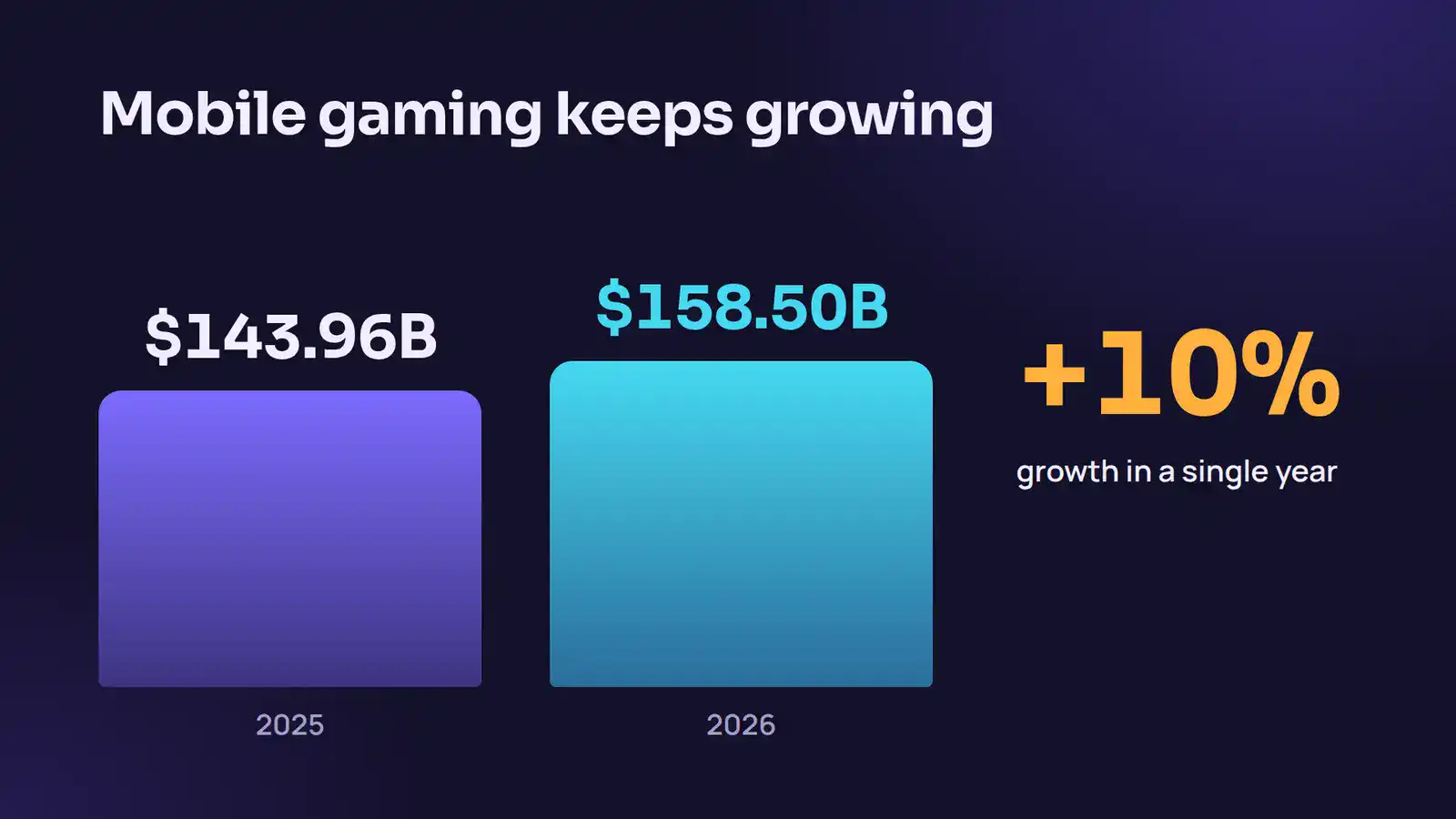
Mobile players expect more than they did two years ago. The global mobile gaming market reached USD 143.96 billion in 2025 and is projected to grow to USD 158.50 billion in 2026. Players spend serious money on mobile titles and expect premium experiences. If your game stutters, they uninstall it.
Unreal Engine gives you the tools to build console-class visuals on a phone. But the engine ships with settings tuned for PCs and consoles. You take those defaults to mobile, and you get a frame rate disaster.
This guide covers what you actually need to change, in order of impact. With a systematic Unreal Engine mobile optimization strategy, you can achieve stable 60 FPS while maintaining high-fidelity visuals on modern flagship devices. You just need to make deliberate choices at every level of your pipeline.
Why Is Unreal Engine Worth the Effort on Mobile Games?
Most studios building mobile games reach for Unity first. It is easier to get started, and it covers mid-range hardware well. But when your project demands console-class visuals on a flagship phone, Unreal Engine is the better tool.
Unreal’s rendering stack runs on Vulkan on Android and Metal on iOS. These low-level APIs reduce driver overhead and give you more direct control over the GPU. Epic built its mobile tooling based on real shipping requirements from Fortnite on phones and tablets. That is not marketing; it means the tools are tested against actual hardware constraints.
The challenge is that Unreal’s feature depth is also its biggest trap on mobile. Leave too many systems on, and your frame time blows up. The work is not about turning things off. It is about knowing which features earn their performance cost and which ones burn your budget invisibly.
More than 58% of top-tier mobile game developers now optimize titles specifically for low-latency 5G experiences. The audience for high-fidelity mobile games is real and growing. Worth building for.
“High-fidelity mobile games are no longer limited by hardware. They are limited by how intelligently developers optimize for performance, scalability, and player experience.” – Salman Lakhani, Founder & CEO, Cubix
Partnering with an experienced production studio helps you bypass these optimization traps entirely. You can utilize dedicated Unreal game development services from Cubix to build, test, and scale your project across diverse mobile hardware tiers. Their engineering teams handle the heavy lifting of shader compression, asset streaming, and device profiling so you can launch your high-fidelity game on schedule.
Establish a Strong Performance Foundation for Mobile Games
High-fidelity mobile games do not become optimized at the end of development. Teams build them with performance in mind from the start. Unreal Engine offers real-time rendering capabilities, but mobile devices still operate under strict limits for memory, battery life, and thermal performance. If you establish a strong performance foundation early, you avoid expensive rework later and deliver smoother experiences across devices.
1. Define Device Tiers Early
Not every mobile device delivers the same level of performance. Flagship smartphones can handle advanced graphics features, while mid-range and budget devices require lighter workloads. Before development begins, divide your target hardware into clear device tiers.
A common approach includes three categories:
- High-tier devices: Latest flagship smartphones with advanced GPUs.
- Mid-tier devices: Smartphones released within the last two to three years.
- Low-tier devices: Budget devices with limited processing power.
This strategy helps you create scalable experiences for different hardware levels. Unreal Engine’s Device Profile system allows you to assign graphics settings based on device capabilities. By defining tiers early, you ensure that your game performs consistently across a wider range of smartphones.
2. Set Realistic Frame Rate Targets
Frame rate directly affects player experience. Mobile users expect smooth gameplay, especially in competitive and action-heavy games. However, higher frame rates require more GPU and CPU resources.
Set performance targets based on your game’s genre:
- 30 FPS for strategy, simulation, or narrative-driven experiences.
- 60 FPS for action, racing, and multiplayer games.
- 90 FPS or higher for premium devices that support high refresh rates.
A stable frame rate matters more than a higher but inconsistent one. Players notice frame drops immediately, and performance issues often lead to lower retention rates. With the right optimization strategy, you can achieve stable 60 FPS while maintaining high-fidelity visuals on modern flagship devices.
3. Configure Device Profiles
Unreal Engine’s Device Profiles let you customize settings for different hardware classes without maintaining separate game builds. This feature allows your game to scale visual quality automatically based on device capabilities.
You can configure settings such as the following:
- Texture quality
- Shadow resolution
- Anti-aliasing methods
- Post-processing effects
- Screen resolution
For example, high-end devices can enable advanced shadows and higher texture resolutions, while mid-range devices prioritize frame rate. This approach ensures players receive the best possible experience on their hardware without unnecessary performance costs.
4. Create CPU and GPU Budgets
Performance optimization starts with clear budgets. Every frame consumes CPU and GPU time, and exceeding those limits leads to stutters and unstable gameplay.
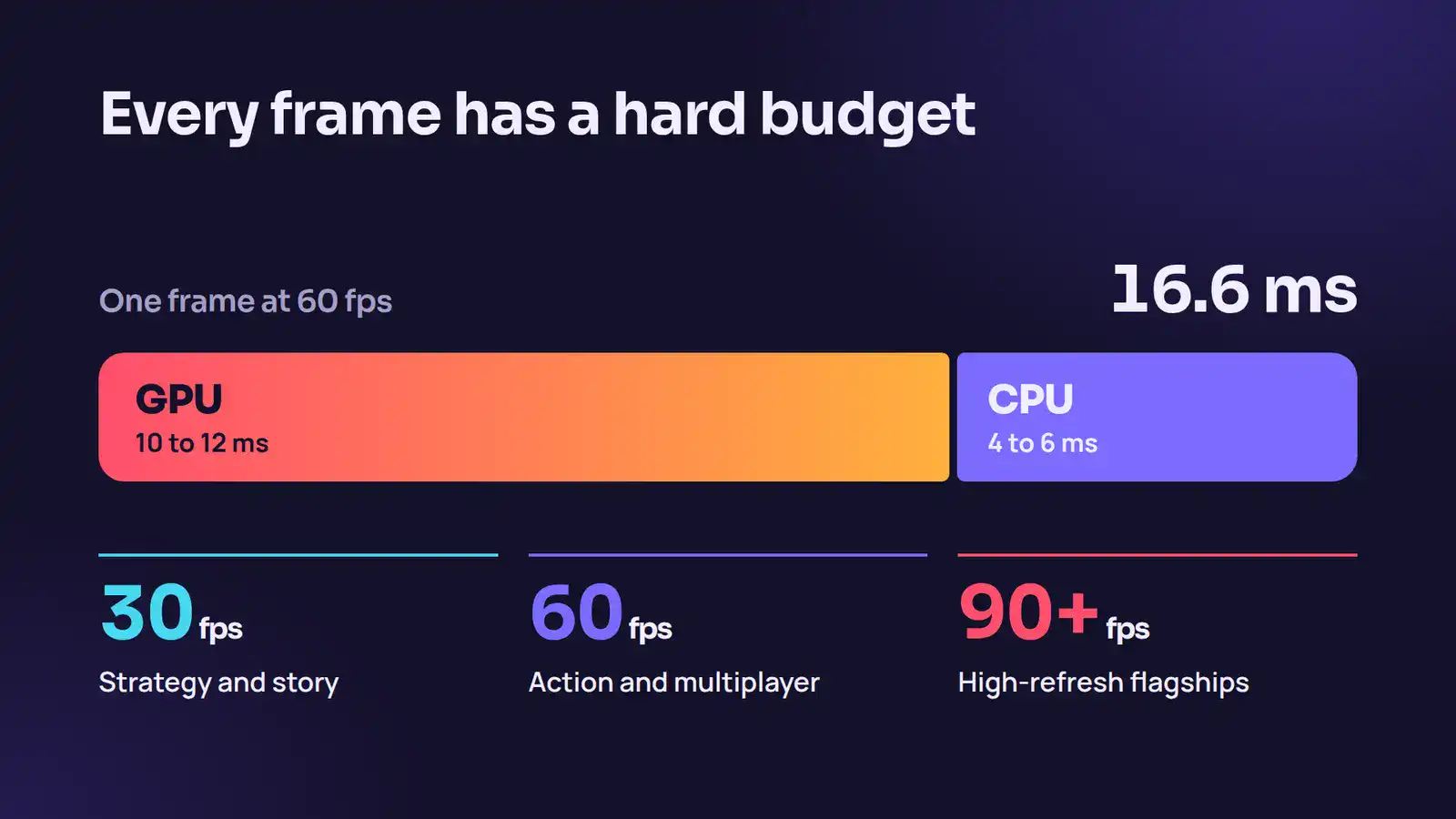
For a 60 FPS target, each frame has a budget of approximately 16.6 milliseconds. Allocate resources carefully:
- GPU budget: Around 10-12 ms
- CPU budget: Around 4-6 ms
Treat these budgets as hard limits throughout development. Every new shader, animation, and visual effect consumes part of the available frame time. Teams that monitor budgets early avoid performance bottlenecks later in production.
5. Plan for Thermal Constraints
Thermal throttling remains one of the biggest challenges in mobile game development. Smartphones reduce processing power when temperatures rise, causing frame rates to drop during long play sessions.
A game that runs smoothly for five minutes can struggle after twenty minutes of continuous gameplay.
To reduce thermal issues:
- Limit sustained GPU usage.
- Reduce expensive post-processing effects.
- Test games under real-world conditions.
- Conduct extended play sessions on target devices.
Long-term stability matters as much as peak performance. Players expect your game to maintain smooth performance during extended sessions.
6. Optimize Battery Consumption
Battery drain directly impacts user satisfaction. Graphics-heavy games naturally consume more power, but inefficient systems increase energy usage unnecessarily.
You can improve battery efficiency by:
- Reducing background processing.
- Limiting unnecessary physics calculations.
- Lowering GPU-intensive visual effects.
- Optimizing network requests.
Efficient games allow players to enjoy longer sessions without rapid battery loss. As mobile gaming continues to grow, energy-efficient design becomes an important part of delivering premium experiences.
Performance is not a final step in mobile game development. It is the foundation. By defining device tiers, managing frame budgets, and planning for thermal and battery limitations, you create high-fidelity Unreal Engine games that look impressive and run smoothly across modern devices.
Want to build a high-fidelity mobile game? Connect with Cubix today
Contact UsOptimize Rendering and Assets for High-Fidelity Mobile Games
Effective optimization techniques are essential for achieving smooth performance in mobile games without sacrificing visual quality. In high-fidelity projects built with Unreal Engine, rendering and asset management play a major role in maintaining stable frame rates. By carefully optimizing geometry, textures, lighting, and materials, developers can significantly reduce GPU and CPU load while preserving visual impact across different mobile devices.
1. Implement Effective LOD Systems
Level of Detail systems reduce the complexity of 3D assets as they move farther from the camera. Mobile screens are smaller than monitors, so players rarely notice lower detail models at a distance. Configure aggressive LOD transitions to reduce GPU workload without affecting visual quality. Unreal Engine’s automatic LOD tools help, but manual adjustments often produce better results for hero assets.
2. Reduce Draw Calls Through Instancing
Draw calls increase CPU overhead and quickly become a bottleneck on mobile devices. Use Instanced Static Meshes and Hierarchical Instanced Static Meshes for repeated assets such as trees, rocks, and props. This approach allows Unreal Engine to render many objects with a single draw call, improving performance significantly.
3. Compress and Stream Textures Efficiently
High-resolution textures consume memory quickly. Use texture streaming to load only the required texture data during gameplay. Reserve 4K textures for hero assets and use 2K textures for most environments. Configure texture streaming pools based on device tiers to prevent texture pop-in and memory issues.
4. Optimize Lighting and Shadows
Dynamic lighting creates realistic environments, but it also consumes GPU resources. Use baked lighting for static environments whenever possible. Limit dynamic shadows to important gameplay areas. Smaller shadow maps reduce GPU load while maintaining visual quality.
5. Simplify Materials and Shaders
Complex shaders increase rendering costs. Use material instances instead of unique materials to reduce shader compilation overhead. Monitor shader complexity inside Unreal Engine and simplify any material that appears red in the complexity view.
6. Use Occlusion Culling and HLOD
Occlusion culling prevents the Unreal Engine from rendering objects hidden from the player’s view. Hierarchical Level of Detail systems combine distant objects into simplified meshes. Together, these systems reduce draw calls and improve frame rates in large environments.
Leverage Unreal Engine 5 Features and Testing Tools
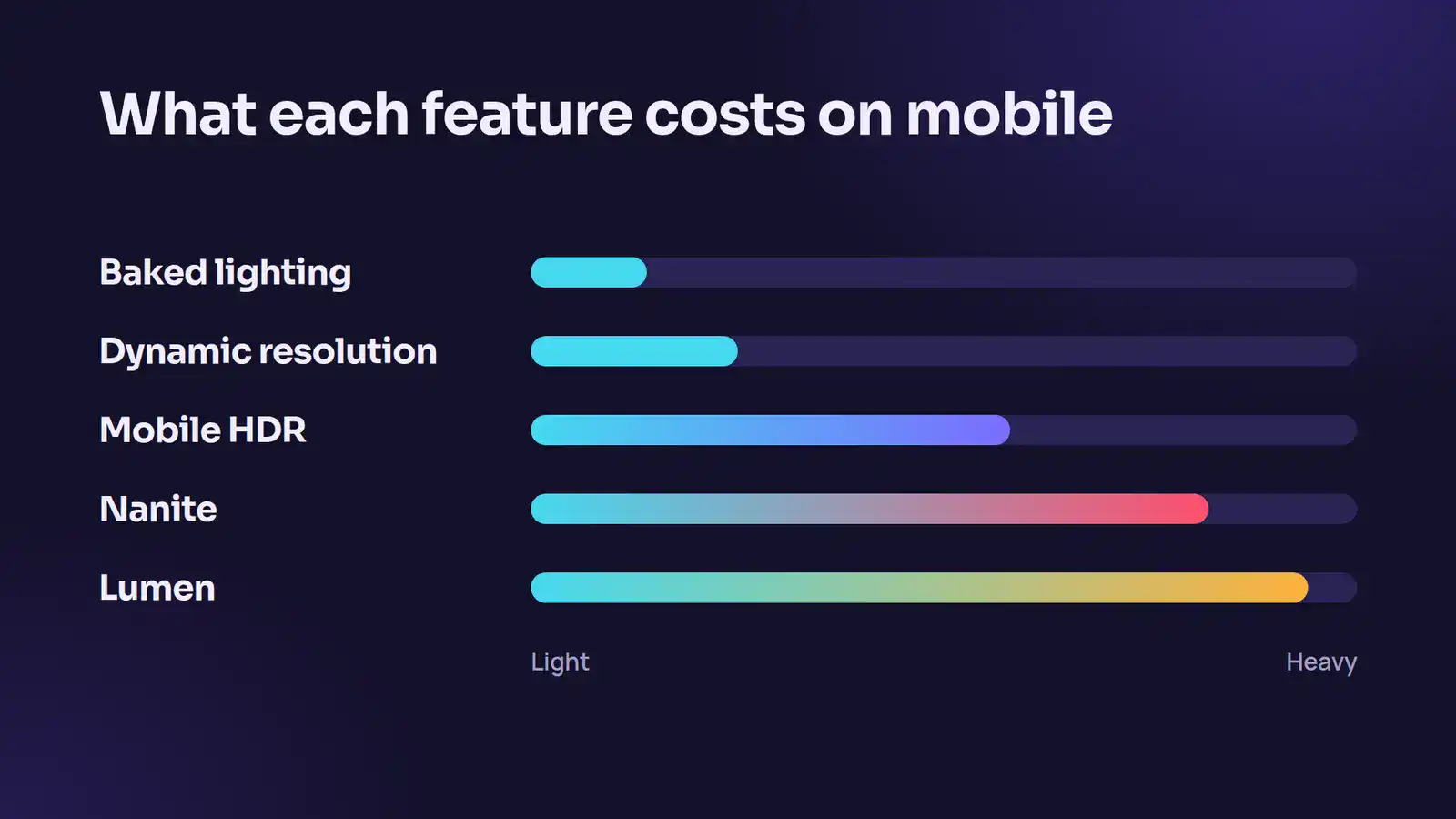
Unreal Engine 5 introduces powerful systems that can transform your mobile pipeline, but you must validate these features through rigorous benchmarking. Tracking your Unreal Engine mobile performance throughout production prevents late-stage development bottlenecks and ensures your game fits within strict mobile hardware boundaries. By combining modern rendering features with the correct diagnostic applications, you can maintain high frame rates without sacrificing your artistic vision.
Use Nanite Strategically on Mobile
Nanite automatically adjusts geometric detail based on what players see on screen. While modern flagship devices support Nanite, developers still need fallback assets for older hardware. Test Nanite carefully on target devices to ensure stable performance.
Apply Lumen Selectively
Lumen delivers dynamic global illumination, but it comes with a performance cost. Use it only in scenes where lighting changes significantly. For most mobile environments, baked lighting remains the more efficient option.
Configure Mobile HDR and Dynamic Resolution
Mobile HDR improves visual quality but increases GPU workload. Dynamic resolution scaling helps maintain stable frame rates by lowering resolution during demanding scenes. Together, these settings balance visual fidelity and performance.
Profile Performance with Unreal Insights
Optimization begins with measurement. Unreal Insights provides detailed data on CPU usage, GPU time, and memory consumption. Profile gameplay regularly to identify bottlenecks before they affect players.
Test on Real Devices
Desktop previews cannot fully replicate mobile hardware behavior. Test your game across multiple Android and iOS devices throughout development. Real-world testing reveals thermal issues, memory limitations, and rendering differences.
Monitor Thermal Performance
Mobile devices reduce performance when they overheat. Conduct long gameplay sessions to identify thermal throttling issues. Leave performance headroom so your game maintains stable frame rates even during extended play sessions.
“Ideally, optimization should begin early, before full content build-out. We’re doing two things: strengthening engine support with more automated optimization across devices and expanding developer education so ‘optimize early’ becomes standard practice. If needed, our engineers can step in.”
Tim Sweeney said in a media interview after his Unreal Fest keynote in South Korea.
The Cost to Develop a Game in Unreal Engine
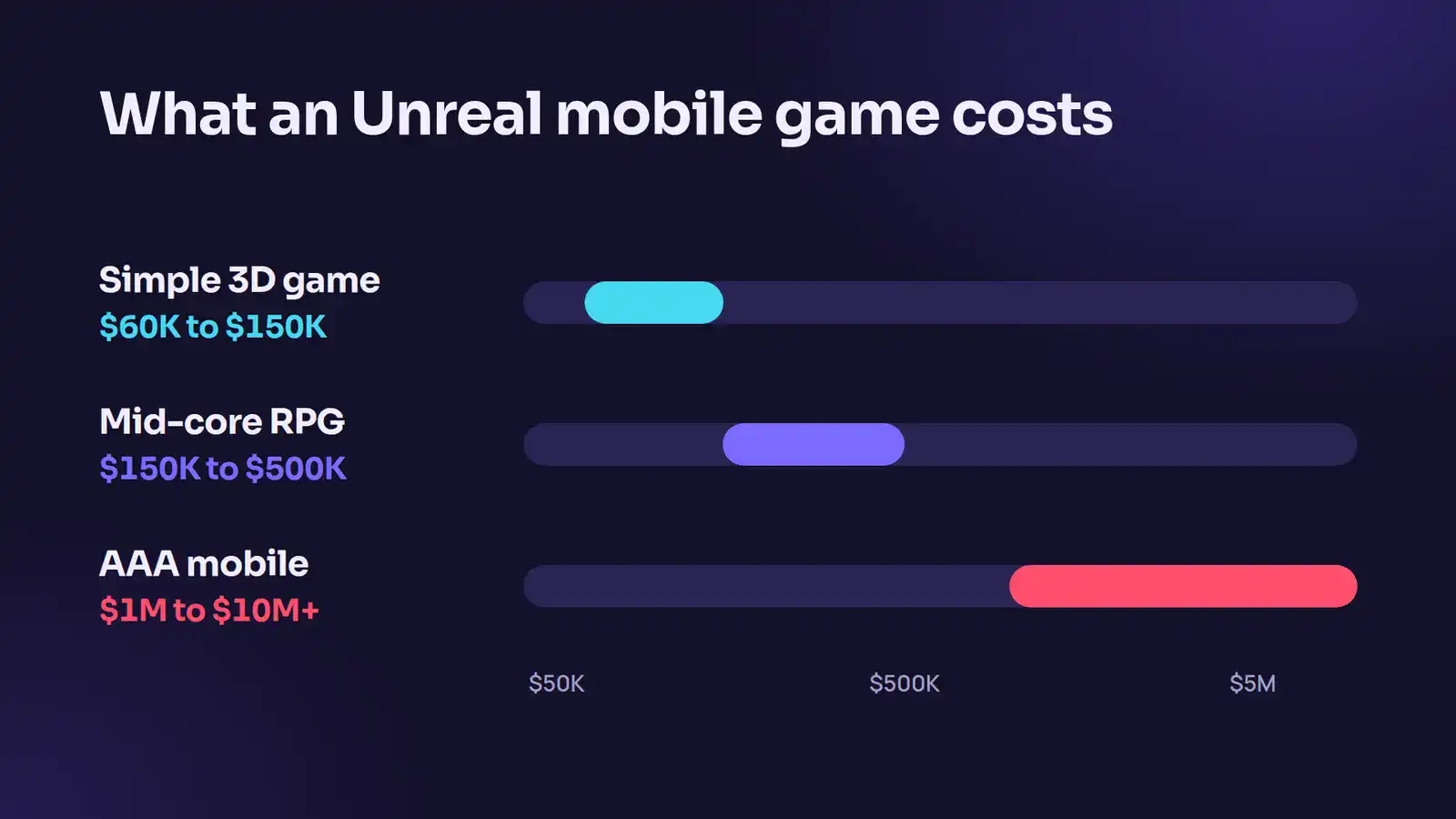
High-fidelity visuals require financial planning alongside technical planning. The cost to develop a game in Unreal Engine varies heavily based on your scope, asset complexity, and team location. While the engine provides premium tools, managing your budget determines whether your project crosses the finish line.
Budget Breakdowns by Project Scale
Data from 2026 shows that mobile game development costs sit within clear ranges depending on complexity:
- Simple 3D Games: $60,000 to $150,000 for titles with basic mechanics and limited custom art.
- Mid-Core RPGs and Strategy Games: $150,000 to $500,000 for multi-layered systems, custom animations, and basic network infrastructure.
- AAA Mobile Productions: $1,000,000 to $10,000,000+ for massive multiplayer titles, persistent online worlds, and photorealistic environments.
The development phase takes up the largest portion of your resources. Coding and engineering consume 35 to 45 percent of your total budget, while art and design require 20 to 30 percent. Testing, quality assurance, and launch operations make up the remaining balance.
Understand the Unreal Engine Licensing Fees
You can download and use Unreal Engine for free during your initial production phase. This royalty-free model minimizes your early financial risk. Epic Games changes this structure once your game achieves market success.
The engine charges a 5 percent royalty fee only after your project exceeds 1 million US dollars in gross revenue. If your title never reaches this milestone, you owe nothing for using the software. This commercial model allows indie studios to build high-fidelity games without paying massive upfront software fees.
Production Costs Across Global Hubs
Your team location impacts your total expenditure more than your choice of tools. Developers in the United States and Canada command hourly rates between $55 and $120. Western European professionals cost between $50 and $100 per hour.
You can reduce development costs by 60 to 80 percent by partnering with regional development hubs in South Asia or Eastern Europe, where hourly rates fall between $20 and $60. Choosing a hybrid or outsourced development model allows you to redirect budget toward user acquisition and post-launch live operations.
Achieve High-Fidelity Mobile Games’ Success with Cubix Expertise
Optimizing a high-fidelity mobile game requires immense technical skill and structured workflows. Many studios choose to partner with specialized external development teams to handle these heavy optimization burdens. Cubix stands out as a global leader among mobile game development companies by building performance-optimized mobile games across diverse genres.
The studio maintains an elite team of over 350 game designers, artists, and developers who understand the limits of modern mobile hardware. They use advanced engines like Unreal Engine and Unity to deliver visually striking games without sacrificing frame rates.
A Full-Cycle Production Process
You get access to a structured, six-step development loop when you outsource your optimization or core development tasks to a studio like Cubix:
- Consulting and Ideation: Aligning your creative vision with technical mobile limitations.
- Design and Architecture: Crafting user interfaces and technical blueprints built for speed.
- Prototyping: Testing core gameplay loops early to check hardware frame times.
- Development and Integration: Writing clean code and setting up advanced rendering pipelines.
- Rigorous Testing and QA: Benchmarking performance on dozens of physical test devices.
- Launch and Post-Launch Support: Managing live operations, performance patches, and community updates.
Partnering with an experienced team allows you to focus on your core business goals while expert engineers optimize your game files. This approach reduces your time-to-market and keeps your players engaged.
The Bottom Line
Optimizing Unreal Engine mobile gaming for high-fidelity experiences is not about disabling features. It’s about knowing which features deliver visual value at an acceptable performance cost and which ones consume resources without players noticing.
Start with LODs and draw call reduction. Those two areas return the most performance for the least visual trade-off. Build your profiling pipeline early so you catch problems before they compound. Test on real hardware constantly.
The studios shipping console-quality mobile games in 2026 aren’t doing anything magical. They profile obsessively, make data-driven decisions, and resist the temptation to leave expensive features on because they look good in the editor.
Turn your game vision into reality with Cubix game development services
Contact UsFrequently Asked Questions
1. Is Unreal Engine suitable for mobile game development?
Yes. Unreal Engine supports both Android and iOS development and offers advanced rendering features such as Vulkan, Metal, Nanite, and Lumen. Developers use it to create high-fidelity mobile games with console-quality visuals. However, achieving smooth performance requires careful optimization for mobile hardware.
2. How do you optimize Unreal Engine games for mobile graphics performance?
You can optimize Unreal Engine mobile games by defining device tiers, reducing draw calls, implementing LOD systems, compressing textures, and configuring device profiles. Profiling tools such as Unreal Insights also help identify performance bottlenecks before they impact gameplay.
3. Does Unreal Engine 5 support Nanite and Lumen on mobile?
Yes, Unreal Engine 5 supports Nanite and Lumen on compatible high-end mobile devices. However, these features consume significant resources. Developers often use Nanite selectively and rely on baked lighting or limited Lumen usage to maintain stable frame rates.
4. What is the ideal frame rate for high-fidelity mobile games?
The ideal frame rate depends on the game genre and target hardware. Most action and multiplayer games aim for 60 FPS, while narrative or strategy games often target 30 FPS. Premium devices with high refresh rate displays can support 90 FPS or higher.
5. What are the best practices for optimizing Unreal Engine projects for high-fidelity mobile games?
Best practices for optimizing an Unreal Engine mobile game include using LODs, reducing draw calls with instancing, compressing textures, simplifying materials, and relying on baked lighting. Always profile on real devices, use device tiers, and keep CPU/GPU frame budgets to maintain stable performance.