Key Takeaways
- Spec-driven development means writing a clear plan before AI writes code.
- Vague prompts push AI to guess, and guesses cause bugs.
- A good spec covers the goal, context, limits, and tests.
- AI code still needs tests, human review, and security checks.
- A spec-first team can ship AI-built software safely.
Google says 75% of its new code is now AI-generated. Engineers review it before it ships. In late 2024, that figure was just 25%. AI-assisted software development is no longer a side project.
AI code generation is fast. It is not always careful. Many teams give an agent a vague prompt and hope for the best. Then they lose days fixing what comes back. Fast code is not the same as safe code.
There is a better way. It is called spec-driven development. This guide shows what it is and how to use it. You will learn to write specs, set goals, and test results.
Build production-ready AI software with Cubix. Start today
Contact UsWhat Is Spec-Driven Development?
Spec-driven development is a simple idea. You write down what you want before the AI writes any code. That written plan is the spec. The AI agent then builds from it.
Think of a builder and a blueprint. No builder starts a house without one. AI agents work the same way.
The need is real. Stack Overflow’s 2025 survey of 49,000 developers found that 84% use or plan to use AI tools. That is a lot of work handed to machines. A clear brief makes that work safer.
Spec vs. Prompt
A prompt is a quick request. A spec is a full brief.
- Prompt: “Build me a login page.”
- Spec: Who logs in, how they log in, which rules apply, and what “done” means.
The prompt leaves gaps. The AI fills them with guesses. The spec closes those gaps before any code exists.
Why It Matters Now
AI agents no longer write tiny snippets. They build whole features. They touch many files in one run. One small gap in your brief can spread fast.
Three things have changed:
- Agents now work for longer without help.
- They change more files per task.
- Teams ship their output sooner.
Learning how to brief AI coding agents is now a core skill. It is a core part of spec driven development with AI agents.
Here is how the two styles compare.
Vibe Coding vs. Spec-Driven Development
| Factor | Vibe Coding | Spec-Driven Development |
|---|---|---|
| Planning | Little or none | Written before coding |
| Starting speed | Very fast | Slower at first |
| Code quality | Varies a lot | More consistent |
| Rework | High | Lower |
| Risk | Hidden bugs and gaps | Caught early in review |
| Best for | Demos and throwaway tests | Real products |
Why AI Code Breaks Without a Spec
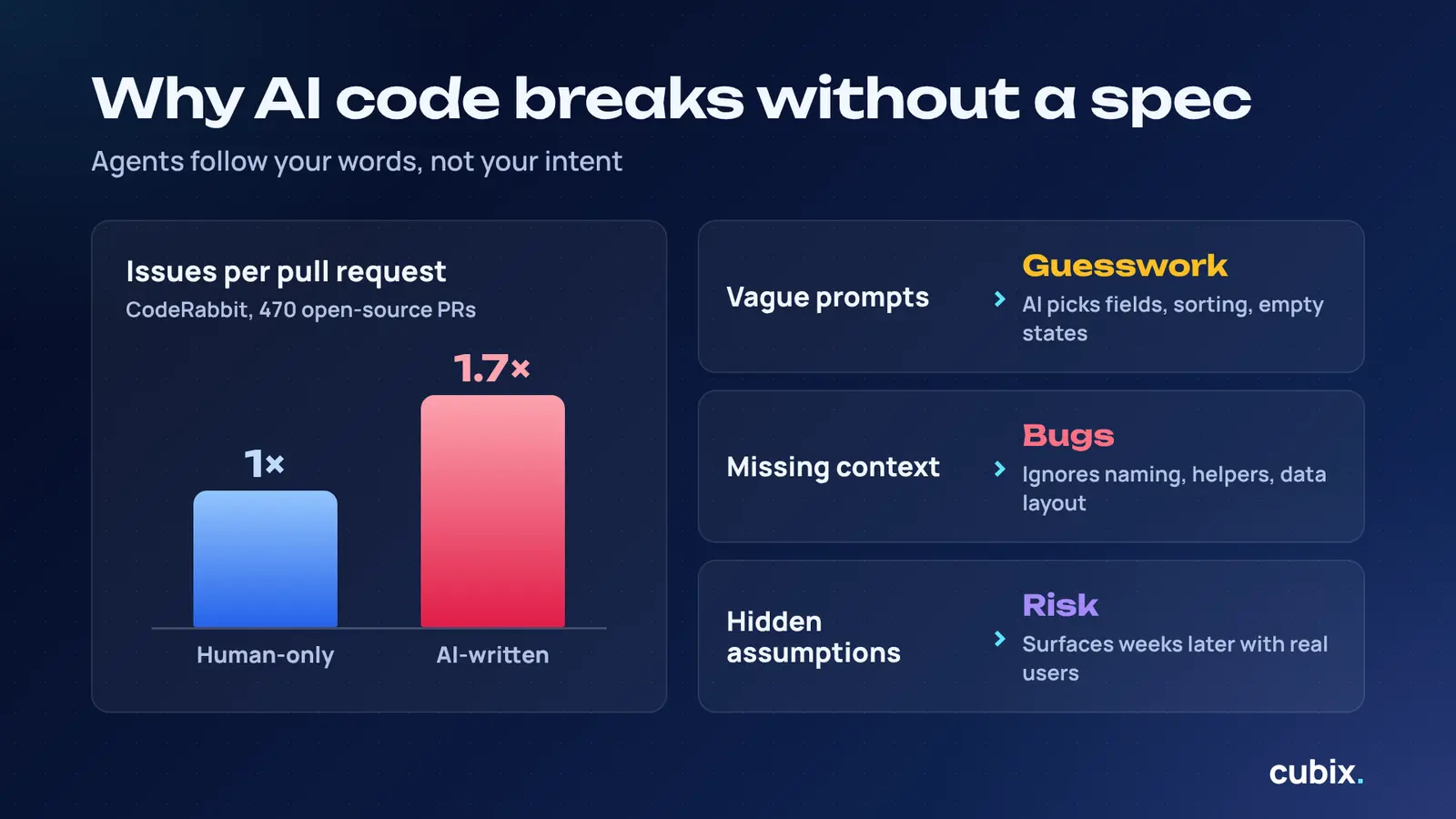
AI agents are fast. They are also literal. They follow your words, not your intent.
The numbers back this up. CodeRabbit studied 470 open-source pull requests. AI-written changes had about 1.7 times more issues than human-only ones. That is a clear drop in AI generated code quality.
Vague Prompts Create Guesswork
Say “add a search bar.” The AI picks everything else. It chooses the data source, the rules, and the look. You may not like its picks.
Common guesses include:
- Which fields people can search
- How results are sorted
- What happens when nothing matches
Missing Context Creates Bugs
The agent cannot see your team’s habits. You have to tell it.
Without context, AI often misses:
- Your naming rules
- Helper functions that already exist
- Your database layout
- How your team handles errors
The result looks neat. It just does not fit your codebase.
Hidden Assumptions Create Risk
Some guesses look fine until real users arrive. The AI may assume every user is logged in. It may assume your data stays small. These bugs hide for weeks.
A spec forces those assumptions into the open. You can spot them before they ship.
Can AI Agents Write Production-Ready Code?
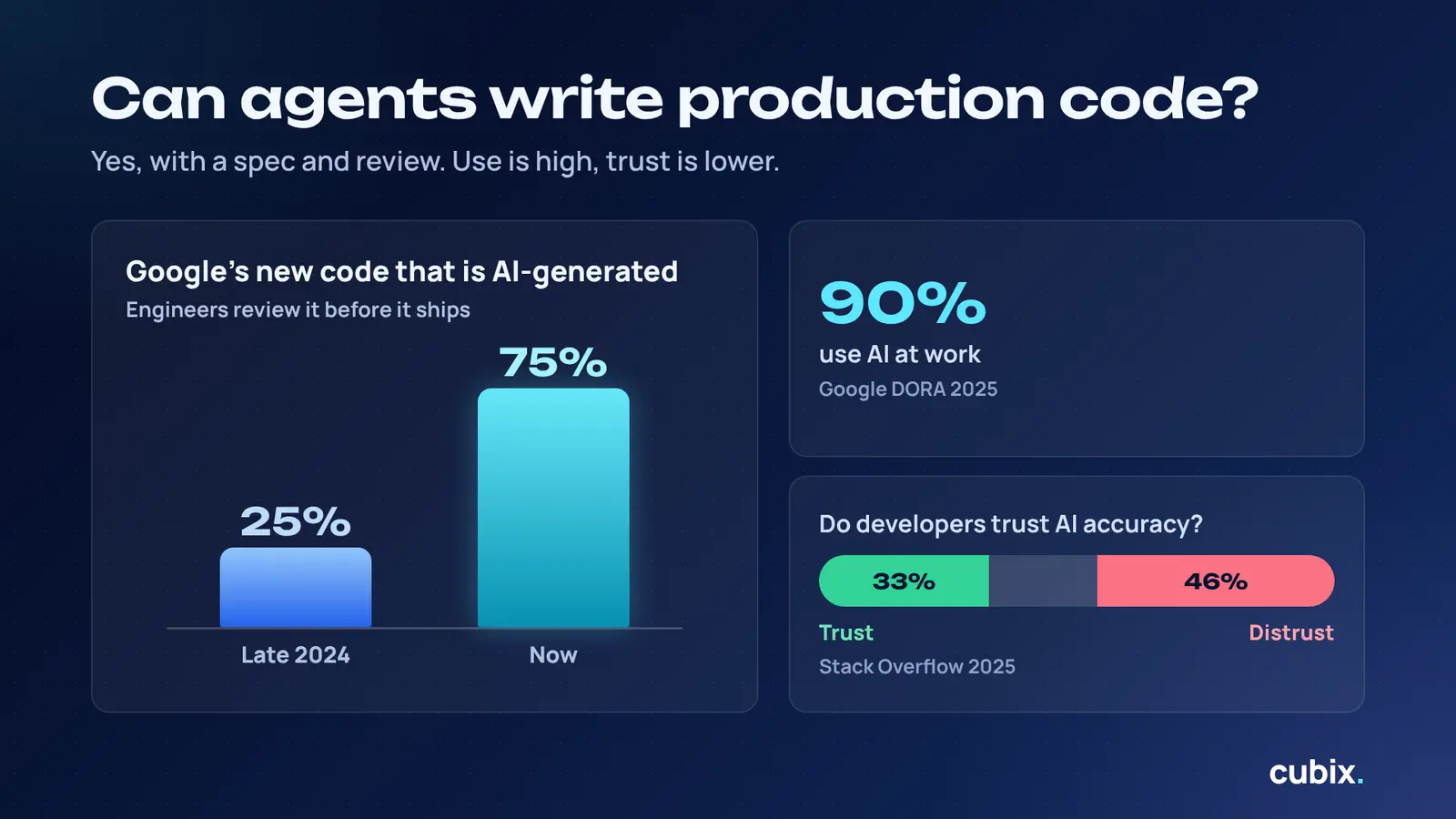
Short answer: Yes, but not on their own. AI agents can write production-ready code when you give them a clear spec and check their work.
Adoption is huge. Google’s 2025 DORA report found that 90% of respondents use AI at work. Trust is lower. In Stack Overflow’s survey, 46% of developers distrust AI accuracy, while 33% trust it.
That gap is the whole story. People use the tools but still verify the output.
Even at Google, humans approve the code. AI writes it. Engineers sign off.
What Agents Do Well
- Draft boilerplate and repeat patterns
- Write first versions of tests
- Refactor code that already has tests
- Explain unfamiliar code
- Work through long task lists without tiring
Where They Still Need Humans
- Judging if a feature solves the real problem
- Spotting security gaps
- Choosing between two good designs
- Understanding unwritten business rules
- Deciding when to stop
At Cubix, our team reviews every agent output before it reaches a client. No agent code goes live untouched. That habit is the heart of any solid AI coding workflow.
So can AI agents write production-ready code? Yes. Production ready AI generated code comes from a good brief and a strong review.
What Goes Into a Good Spec
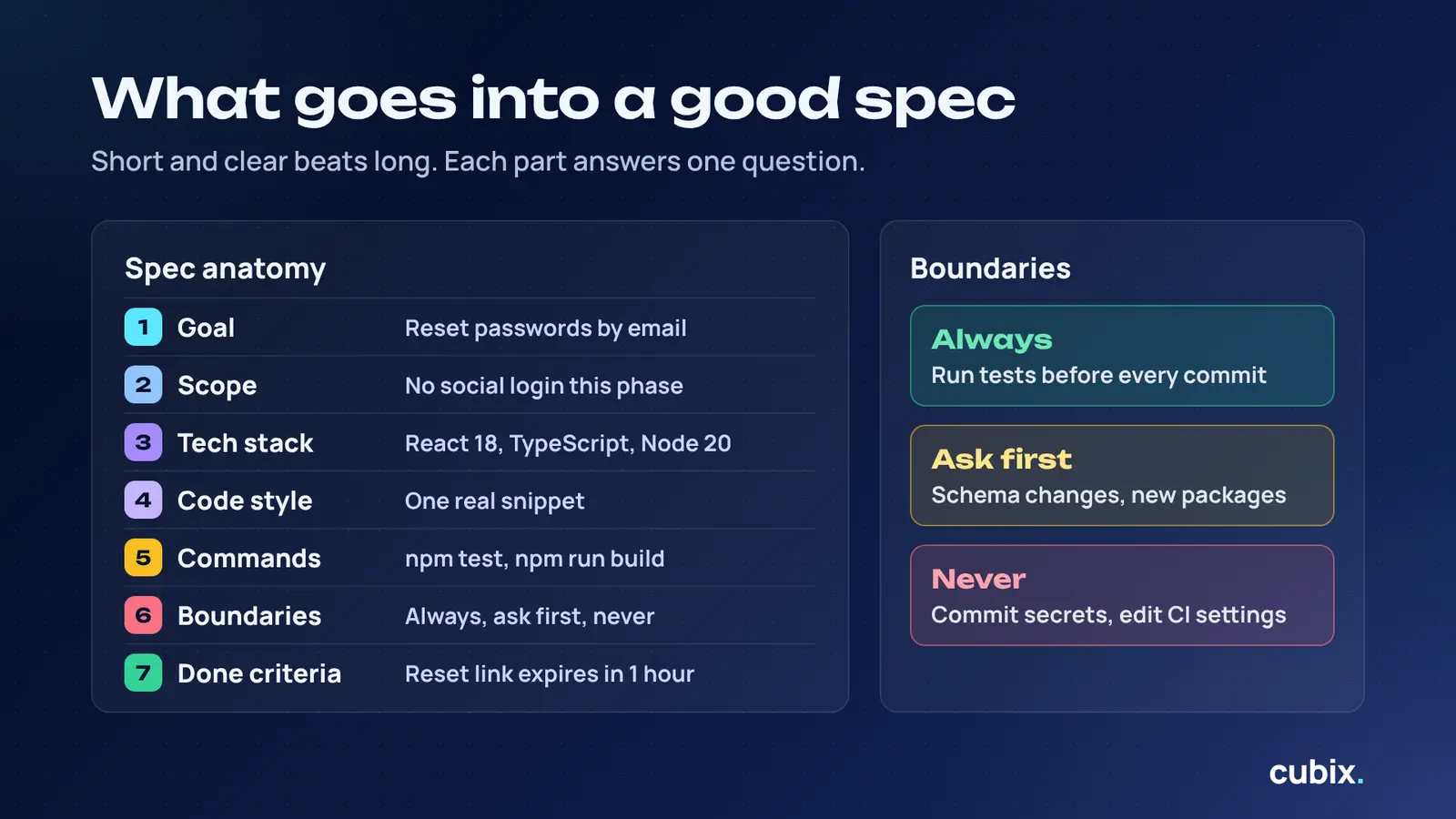
A good spec is not long for the sake of it. It is clear. GitHub studied more than 2,500 agent configuration files. Its main finding was that most fail because they are too vague.
Think of a spec as six short parts. Each part answers one question for the agent.
Goal and Scope
Say what you are building and why. Then say what is out of scope.
- One short goal statement
- A list of what is included
- A list of what is not included
Context and Constraints
Tell the agent about your world.
- Name your tech stack and versions. “React 18 with TypeScript” beats “a React app.”
- Show one real code sample in your style.
- List the rules the code must follow.
Boundaries: Always, Ask First, Never
Boundaries work best in three tiers.
- Always: Run tests before every commit.
- Ask first: Change the database schema or add a new package.
- Never: Commit secrets or edit the CI settings.
In GitHub’s study, “never commit secrets” was the most common helpful rule.
Commands and Tests
Give the agent exact commands. Do not just name the tool.
- Build: npm run build
- Test: npm test
- Lint: npm run lint –fix
Also say where tests live and what coverage you expect.
The Parts of a Good Spec
| Spec Part | What to Write | Quick Example |
|---|---|---|
| Goal | What you build and why | Let users reset passwords by email |
| Scope | What is in and out | No social login in this phase |
| Tech stack | Tools and versions | React 18, TypeScript, Node 20 |
| Code style | One real snippet | A sample function in your naming style |
| Boundaries | Always, ask first, never | Never edit CI settings |
| Commands | Exact build and test commands | npm test |
| Done criteria | How you check success | Reset link expires in one hour |
Need a deeper template? Our guide to the software specification document shows how discovery shapes a strong brief. These parts also cover the software requirements for AI agents. If you wonder how to write technical specifications for AI, start with this table.
How to Write Specs for AI Agents
The stakes are clear. In Stack Overflow’s survey, 66% of developers said AI answers are “almost right, but not quite.” A good spec closes that gap.
Here are five steps for writing specs for AI agents.
Step 1: Start With the Goal
Write one or two plain sentences. State what you want and why.
- Keep it short.
- Skip the tech details for now.
- Ask the AI to draft the longer spec from your goal.
Step 2: List Users and Use Cases
Say who uses the feature. Say what they want to do.
- Name each type of user.
- Write two or three real scenarios.
- Add the sad paths too, like a failed payment.
Step 3: Add Tech Stack and Rules
Now get specific. This is where the agent learns your world.
- List languages, frameworks, and versions.
- Add your style rules with one code sample.
- Add the boundaries from the last section.
Step 4: Break Work Into Small Tasks
Big prompts confuse agents. Too many rules at once means the AI follows only a few.
- Aim for tasks you can test alone.
- Swap “build login” for “create a sign-up endpoint that checks email format.”
- Feed the agent one task at a time.
Step 5: Review Before Coding
Read the spec before any code exists. Many tools have a read-only planning mode for this.
- Ask the agent to question your plan.
- Fix gaps and wrong guesses.
- Approve the spec, then start building.
This review step is the backbone of a healthy AI agent development workflow.
How to Set Acceptance Criteria
Acceptance criteria tell the agent when the job is done. Without them, the AI decides alone. Stack Overflow found that 45% of developers say debugging AI code takes more time. Clear criteria cut that pain.
They also help with acceptance criteria for AI coding agents in your own team. Every task gets a clear finish line.
Write Criteria in Plain Language
Use words your whole team understands.
- Write one rule per line.
- Use “when” and “then” to show cause and effect.
- Skip jargon.
A simple pattern works well: “When the user does X, then the system does Y.”
Make Every Criterion Testable
If you cannot test it, do not write it. A test gives a clear yes or no.
- Add numbers where you can.
- Name the exact message or result.
- Link each rule to a test.
This matters most in AI agent software development, where the agent cannot read your mind.
Good vs. Bad Examples
- Weak: “The page should load fast.”
- Strong: “The page loads in under two seconds on a 4G connection.”
- Weak: “Handle errors well.”
- Strong: “If payment fails, show a clear message and keep the cart.”
- Weak: “Make it secure.”
- Strong: “Hash passwords with bcrypt. Never log raw passwords.”
Trust is falling as use grows. Clear criteria give your team proof, not hope.
Our Spec-to-Code Workflow
A workflow keeps the spec alive. It turns one document into a repeatable process. It matters because speed can hurt stability. DORA’s 2024 survey linked every 25% rise in AI adoption to a 7.2% drop in delivery stability.
Here is how our team at Cubix runs it. The flow has four phases. Each phase ends with a human check.
Specify
We start with the user and the goal. The AI drafts a detailed spec from our short brief. Then a person edits it until it is right.
Plan
Next we add the tech choices and limits. The agent drafts a technical plan. We check it against our standards and the client’s rules.
Tasks
The plan becomes small tasks. Each task is easy to test alone. We review the order and size before any code is written.
Implement
The agent builds one task at a time. It runs tests as it goes. A person reviews each change before it merges.
This four-phase pattern is the same one many spec tools use. It fits any automated software development workflow.
Who Does What in Each Phase
| Phase | Human Role | AI Role | Output |
|---|---|---|---|
| Specify | Set goals and success checks | Draft the detailed spec | Approved spec |
| Plan | Choose stack and limits | Draft the technical plan | Technical plan |
| Tasks | Check size and order | Split work into tasks | Task list |
| Implement | Review each change | Write code and run tests | Reviewed code |
The same flow guides our generative AI development projects. The AI moves fast. People keep control.
How to Test and Validate AI Code
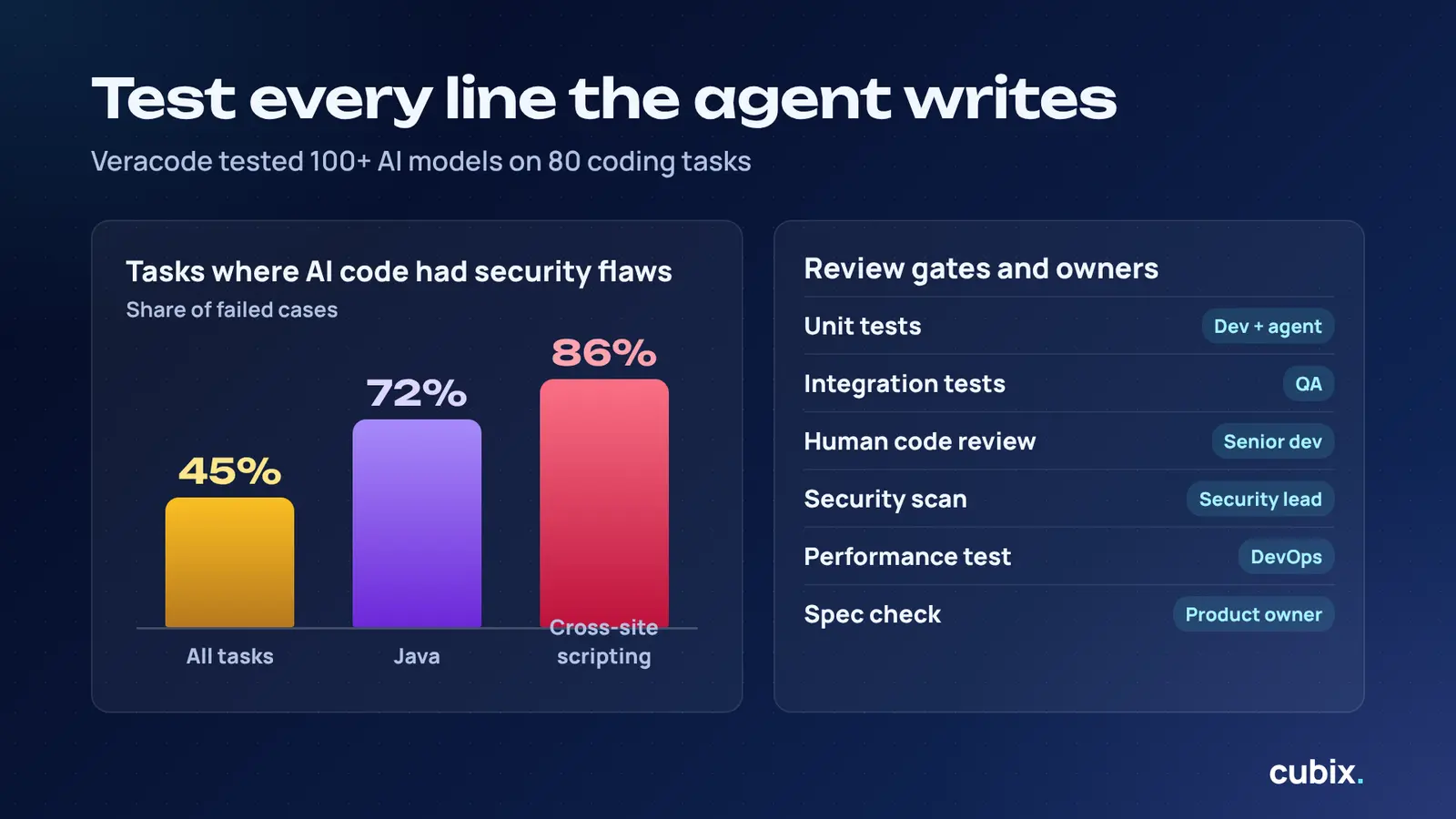
Testing is where specs pay off. Veracode tested more than 100 AI models on 80 coding tasks. AI code introduced security flaws in 45% of cases. For cross-site scripting, the failure rate hit 86%. Java did worst overall, at 72%.
Your tests should match your spec. Each criterion needs a check.
Unit and Integration Tests
- Unit tests check small pieces on their own.
- Integration tests check that pieces work together.
- Ask the agent to write tests first, then code.
- Never let an agent delete a failing test without approval.
Human Code Review
A person must read the code. Passing tests do not prove it is right.
- Check the code against the spec.
- Ask if you can explain every change.
- Look hardest at login, payments, and data access.
Security and Performance Checks
- Run security scanners on every pull request.
- Check how the code handles bad input.
- Test with realistic data sizes.
- Watch for slow queries and extra network calls.
AI Code Checks at a Glance
| Check Type | What It Catches | Who Owns It |
|---|---|---|
| Unit tests | Broken logic in small parts | Developer and AI agent |
| Integration tests | Parts that fail together | QA engineer |
| Linters and formatters | Style and naming drift | Automated pipeline |
| Human code review | Wrong approach, hidden gaps | Senior developer |
| Security scan | Known flaws like injection | Security lead |
| Performance test | Slow queries, heavy loads | DevOps engineer |
| Spec check | Missing requirements | Product owner |
At Cubix, every build passes these review gates before release. Tests, scans, and people all sign off. This is how we handle AI code testing and validation. You can read more in our guide to AI code testing and validation.
Follow this layered approach and you will know how to make AI generated code production ready.
Best AI Tools for Spec-Driven Work
The tool market moves fast. GitHub’s Spec Kit passed 115,000 stars by June 2026, less than a year after launch. Spec-driven work has gone mainstream.
Here are tools worth a look. Always check current features and pricing, since they change often.
Coding Agents
- Claude Code: Has a read-only plan mode. Good for planning before building.
- GitHub Copilot: Works inside popular editors. Good for teams already on GitHub.
- Cursor: Strong for quick edits and refactoring.
Spec and Planning Tools
- GitHub Spec Kit: An open-source toolkit with a four-phase flow. Works with many agents.
- Kiro: An AWS editor built around requirements, design, and tasks.
- OpenSpec: A light, open-source option for tracking spec changes.
These are the main AI software engineering tools for spec work. Pick AI coding tools for developers that fit your team’s habits. Do not pick on hype.
Building something with custom models? Our machine learning development services can help.
Common Mistakes and FAQs
Even good teams trip up. Stack Overflow found that 81% of AI agent users worry about security and data privacy. Most of these worries trace back to a few repeat mistakes.
Five Mistakes to Avoid
- Vague prompts. “Make it better” gives the agent nothing to hold.
- Giant specs. Too much context makes the agent lose focus.
- Skipping review. Passing tests do not prove the code is safe.
- Mixing vibe coding with production. Quick demos are fine. Real products need discipline.
- Never updating the spec. An old spec misleads the agent.
How Cubix Builds Software with AI Agents
Cubix is an AI software company. We use agents to move faster. We use specs and people to keep quality high.
Our process in plain words:
- Discovery: We learn your goals, users, and data.
- Spec and plan: We write the brief the agent will follow.
- Build and optimize: Agents write code in small, reviewed steps.
- Testing and validation: Tests and scans check every change.
- Deployment and support: We launch, monitor, and keep improving.
Specs guide the agent. Tests prove the work. People make the final call. That mix is what makes our AI software development services reliable for real products. Learn more about AI software development services at Cubix.
Work with Cubix on Your Next Build
Whether you run a startup or a large team, Cubix can help. We work with companies that want AI speed without AI risk.
Who we help:
- Startups building a first product
- Teams adding AI features to an existing app
- Businesses that want a safer AI coding process
What you get:
- A clear written spec before coding starts
- Small, reviewed builds you can follow
- Tests and security checks on every release
- Honest updates from a team that explains its work
Ready to build smarter? Partner with Cubix for success
Contact UsFrequently Asked Questions
1. Can AI agents write production-ready code?
Yes, with a clear spec, strong tests, and human review. Without those, expect bugs and gaps.
2. How do I make AI-generated code production ready?
Write a spec. Set testable criteria. Run tests and security scans. Have a person review every change.
3. How do top tech companies use spec-driven development?
GitHub built Spec Kit around a four-phase flow. AWS built Kiro around requirements, design, and tasks. Google has engineers approve AI code before it ships.
4. How should I structure requirements for AI?
Start with the goal. Add users, tech stack, rules, boundaries, and done criteria. Split the work into small tasks.