Key Takeaways
- Game show apps turn passive viewers into active participants.
- Live trivia, voting, and TV companion games serve different audiences.
- Real-time messaging helps synchronize questions, answers, and results.
- Server-side scoring helps maintain fair competition.
- Development costs depend on features, platforms, and audience size.
The global games market reached $201.6 billion in 2025. Newzoo reported growth of 9.1% that year.
Interactive entertainment continues to create new opportunities. Game show apps bring this entertainment directly to mobile devices.
A game show app turns players into active participants. Users answer questions, join competitions, and follow live results. Some apps feature live hosts and timed challenges. Others connect viewers with television broadcasts and events. These experiences make ordinary quizzes feel more social.
So, what makes these apps work? This guide explains their features, formats, and technology. You’ll also learn about development costs and monetization. Let’s explore what goes into building one.
Want to discuss your project? Our experts are just a click away.
Contact UsWhat Is a Game Show App?
A game show app lets users participate in organized games. These games often feature questions, timers, points, and winners. Some experiences happen live with a shared audience. Others let players compete whenever they want.
Unlike basic quizzes, game shows often include multiple participants. They may feature hosts, rounds, prizes, and leaderboards. Some also connect with television programs or live events.
How Is It Different From a Quiz App?
Both apps use questions to engage players. However, their gameplay experiences can differ considerably.
| Feature | Basic Quiz App | Game Show App |
| Gameplay | Individual questions | Hosted or shared sessions |
| Timing | Often flexible | Often synchronized |
| Competition | Personal scores | Live rankings or teams |
| Host | Usually unnecessary | Optional live host |
| Events | Usually self-paced | Scheduled or live |
| Audience participation | Limited | Voting, polls, and shared events |
For example, a quiz app might test general knowledge. Players answer questions and review their scores afterward.
A TV game show app can create a shared experience. Everyone receives questions during the same scheduled event. Players compete while watching a host or broadcast.
Where Are Game Show Apps Used?
Businesses and organizations can use these apps differently.
- Live entertainment: Hosts run trivia nights and competitions.
- Television: Viewers answer questions during broadcasts.
- Marketing: Brands create interactive promotional campaigns.
- Education: Teachers organize classroom competitions and knowledge checks.
- Corporate training: Teams participate in learning challenges.
- Events: Organizers engage audiences through polls and predictions.
The format depends on the audience and purpose. Some experiences prioritize competition, while others encourage participation.
How Does a Game Show App Work?
A game show app follows a simple gameplay cycle. Players join, answer questions, and receive results. The system manages each step behind the scenes.
From Joining to Receiving Questions
The experience usually begins with a session. Players open the app and join an available game.
They might enter a code or select an event. The app then displays the current question and timer. In live games, participants receive coordinated updates.
How Answers and Scores Are Processed
Players select answers and submit them through the app. The backend checks submissions against the game’s rules. It then calculates scores and updates player standings.
For competitive games, scoring should happen server-side. This helps prevent inconsistent results across different devices.
How Results and Winners Are Displayed
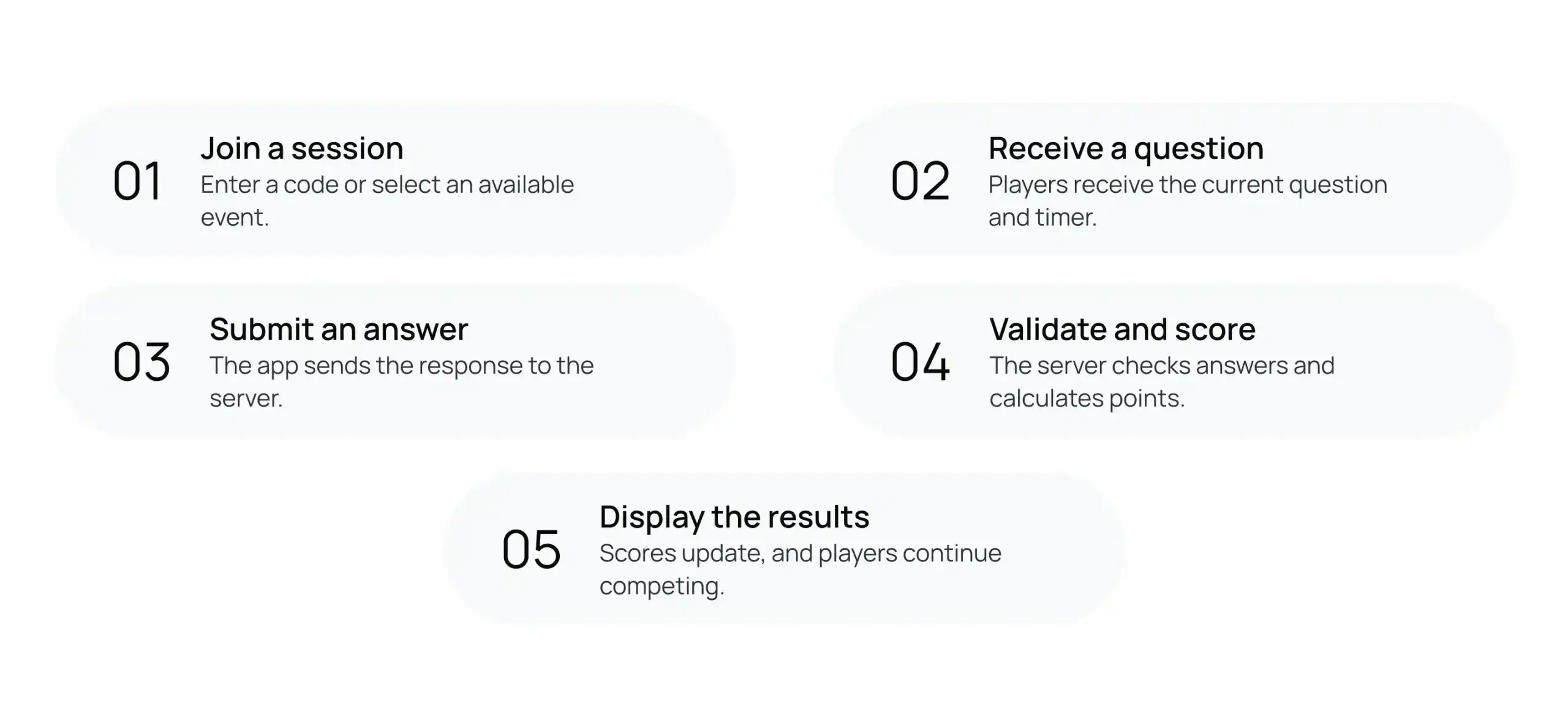
After each round, players can view their scores. Some apps display rankings after every question. Others wait until the final round ends.
Tie-breaking rules should be defined before gameplay begins. This keeps results consistent and easier to explain.
What Types of Game Show Apps Can You Build?
Game show apps can support several different formats. Each format serves a different audience and purpose.
Live Trivia and Quiz Shows
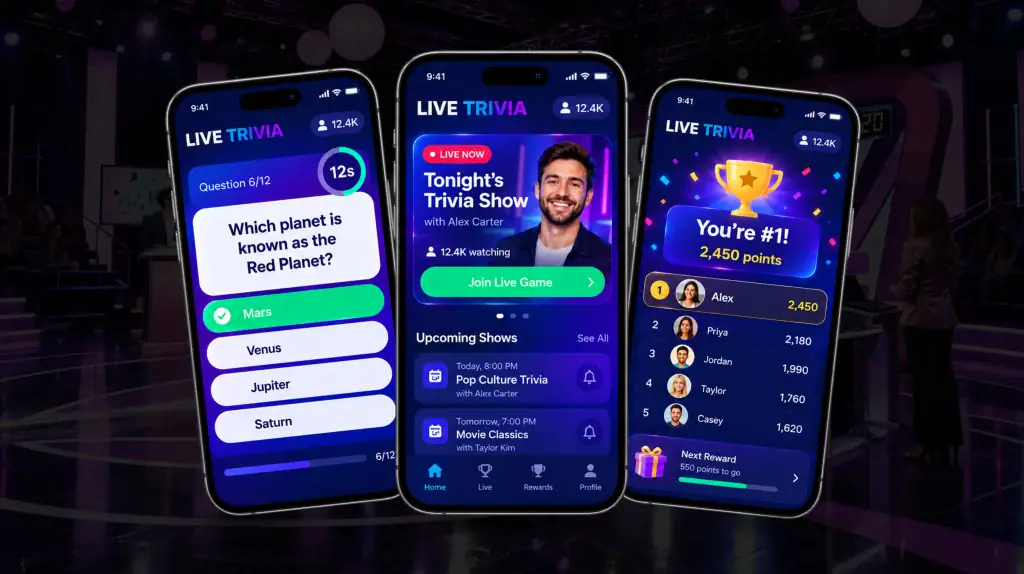
Live trivia apps bring players together for timed competitions. A host can introduce questions and manage rounds. Players answer questions and compete for the highest scores.
These apps often include:
- Timed questions and answer options
- Live hosts and scheduled sessions
- Individual or team-based scoring
- Leaderboards and winner announcements
Prediction and Voting Games
These apps focus on opinions, predictions, and audience choices. Participants might vote during events or predict outcomes. The system collects responses and displays aggregated results.
Unlike trivia, these games need not have correct answers. Their scoring depends on the chosen game rules.
Branded and Sponsored Game Shows
Brands can use interactive games for customer engagement. They might create themed questions or sponsor specific rounds. Some campaigns also include rewards and promotional offers.
The experience should match the brand’s audience. Clear rules help participants understand the competition.
Classroom and Corporate Games
Educational game shows turn lessons into interactive challenges. Teachers can test knowledge through questions and team competitions.
Companies can use similar formats for employee training. Private sessions help teams participate without public leaderboards.
Second-Screen TV Experiences
A TV game show app connects viewers with broadcasts. Players answer questions while watching their favorite programs. Some experiences also offer polls and live predictions.
Timing matters when gameplay follows a television broadcast. The app must account for broadcast delays and connections.
| Game format | Main purpose | Common features | Typical users |
| Live trivia | Competition | Timers, scores, leaderboards | General audiences |
| TV companion | Audience engagement | Broadcast-linked questions, polls | TV viewers |
| Prediction game | Participation | Predictions, voting, results | Event audiences |
| Branded game show | Marketing | Sponsored rounds, rewards | Customers |
| Classroom quiz | Learning | Question banks, team scores | Students |
| Corporate game | Training | Private sessions, reports | Employees |
The format should guide early development decisions. It influences features, infrastructure, and testing needs.
What Features Does a Game Show App Need?
The right features make gameplay clear and enjoyable. They also help organizers manage sessions without confusion.
Features for Players
Players need simple tools to participate comfortably.
- Profiles: Let users manage accounts and preferences.
- Session joining: Allow access through codes or invitations.
- Live questions: Display questions, answers, and timers.
- Answer submission: Make responses quick and straightforward.
- Leaderboards: Show rankings and current scores.
- Notifications: Remind users about upcoming events.
Avoid adding unnecessary steps before gameplay starts. A simple joining process helps reduce confusion and that is definitely possible through amazing mobile game development.
Features for Hosts and Administrators
Hosts need control over questions, rounds, and participants. An administration panel makes these tasks easier.
- Live session controls: Start, pause, and end games.
- Question management: Create, edit, and organize questions.
- Scoring settings: Configure points and tie-breaking rules.
- Player moderation: Manage reports and disruptive behavior.
- Analytics: Review participation and completion.
- Event scheduling: Organize future games and sessions.
Features That Improve Fairness
Competitive games need consistent rules for everyone. Server-side validation helps maintain reliable scoring.
- Validate answers against the active question.
- Reject duplicate submissions where appropriate.
- Apply consistent answer deadlines.
- Record score changes for later review.
- Define clear rules for ties and disputes.
| Feature | Purpose | Priority |
| Session management | Organizes players and rounds | Essential for live games |
| Question management | Creates and schedules questions | Essential |
| Real-time messaging | Delivers questions and updates | Essential for live games |
| Scoring system | Calculates points consistently | Essential |
| Leaderboards | Displays player rankings | Format dependent |
| Moderation tools | Manages disruptive activity | Important for public events |
| Analytics | Measures participation and results | Useful for ongoing events |
| Push notifications | Reminds players about sessions | Format dependent |
Feature priorities depend on the intended experience. An asynchronous quiz may need fewer live controls. A hosted competition requires more session management.
How Does the Technology Work?
A game show app combines several connected systems. Each component handles a different part of gameplay.
1. Mobile or web app
This is where players interact with the game. It displays questions, timers, answers, and results.
2. Real-time communication
This system sends updates between the server and players. WebSockets are one option for two-way communication.
3. Backend server
The backend manages sessions, game rules, and submissions. It also validates answers and calculates scores.
4. Database and cache
The database stores accounts, questions, and historical results. A cache can hold frequently accessed or temporary data.
5. Content management system
Administrators use this system to manage questions. They can organize categories, rounds, and scheduled events.
6. Analytics and monitoring
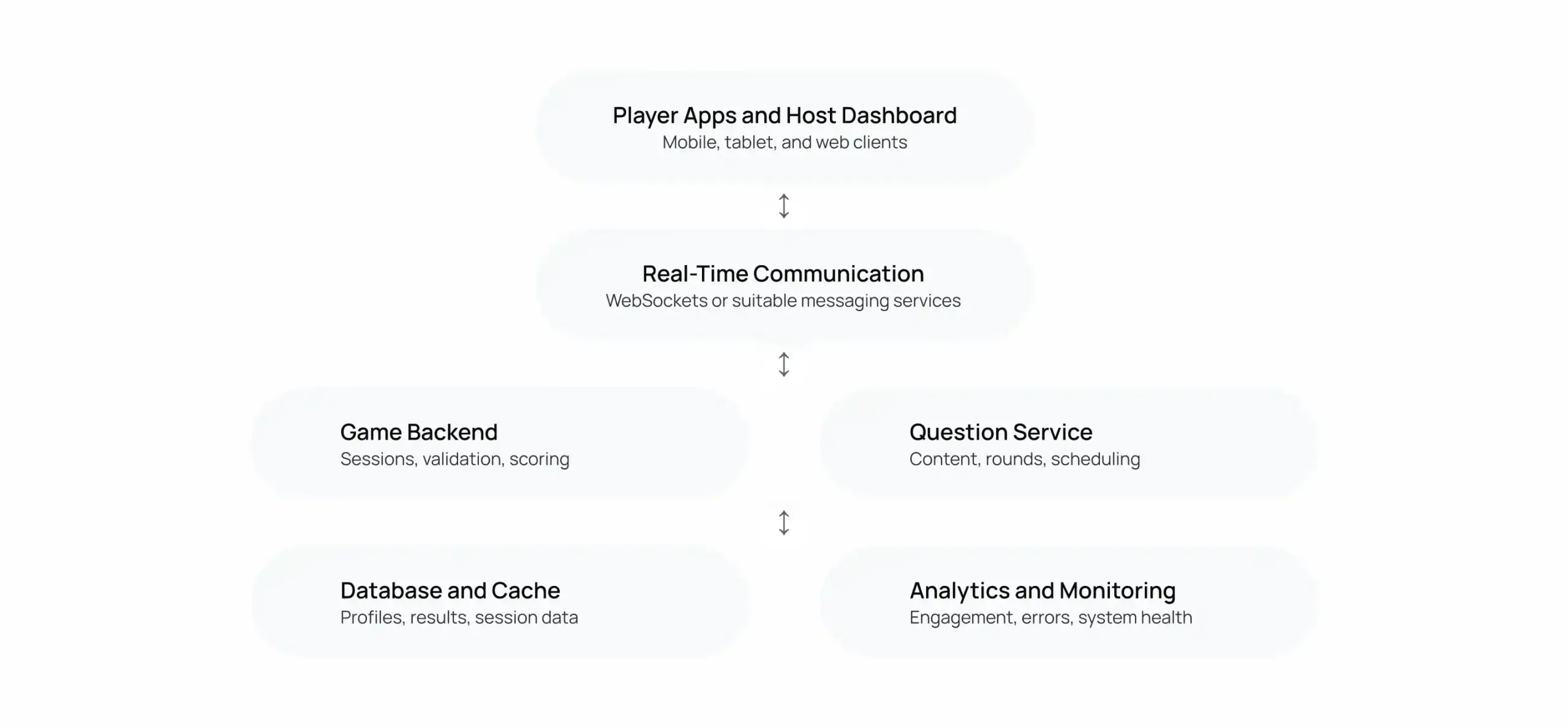
These tools track participation and system performance. They also help teams identify errors during live events.
Conceptual architecture. Individual projects may use different components.
How Players Stay in Sync
Live games need consistent questions and deadlines. The server can control the official session clock. Clients display the remaining time to players.
However, network delays can affect message delivery. The system should handle late answers and reconnections. Testing helps teams identify these issues before launch.
Why Matchmaking and Scoring Are Separate
Matchmaking places players into suitable sessions. It may consider invitations, teams, or session capacity.
Scoring follows the rules of the current game. It validates answers and calculates points independently. Keeping these responsibilities separate simplifies maintenance.
What Happens When Many Players Join?
Large events can create sudden traffic spikes. Cloud infrastructure can help manage changing demand.
Developers should estimate attendance and peak concurrency first. Load testing then checks whether the system handles that demand. Monitoring helps identify slow responses and unexpected failures.
Why Internet Access Matters
ITU estimated six billion internet users worldwide in 2025. That represented 74% of the global population.
However, internet access does not guarantee reliable connectivity. Apps should handle weak signals and interrupted sessions gracefully.
How Much Does It Cost to Build a Game Show App?
Game show app development costs vary by project. Features, platforms, and technical requirements influence the budget. Live multiplayer experiences generally require more backend planning.
What Affects Development Costs?
Several decisions influence the final estimate.
- Platforms: Supporting more platforms increases development and testing.
- Gameplay: Live sessions need additional synchronization and controls.
- Design: Custom animations and interfaces require extra work.
- Backend: Complex scoring and session management add effort.
- Administration: Host dashboards and content tools need development.
- Testing: Large events require broader performance testing.
- Maintenance: Hosting, updates, and support continue after launch.
How Different App Types Affect Costs
Start by identifying the intended experience. Then estimate the features that experience requires.
| App type | Main development needs | Main cost drivers |
| Basic quiz app | Questions, answers, profiles | Interface and basic backend |
| Multiplayer quiz app | Shared sessions, scoring | Synchronization and session handling |
| Hosted game show | Host controls, live rounds | Real-time systems and administration |
| TV companion app | Broadcast-linked participation | Timing and external integrations |
| Branded platform | Campaigns, analytics, rewards | Custom workflows and integrations |
These categories describe different levels of complexity. They do not represent fixed prices or guaranteed timelines.
How to Plan a Realistic Budget
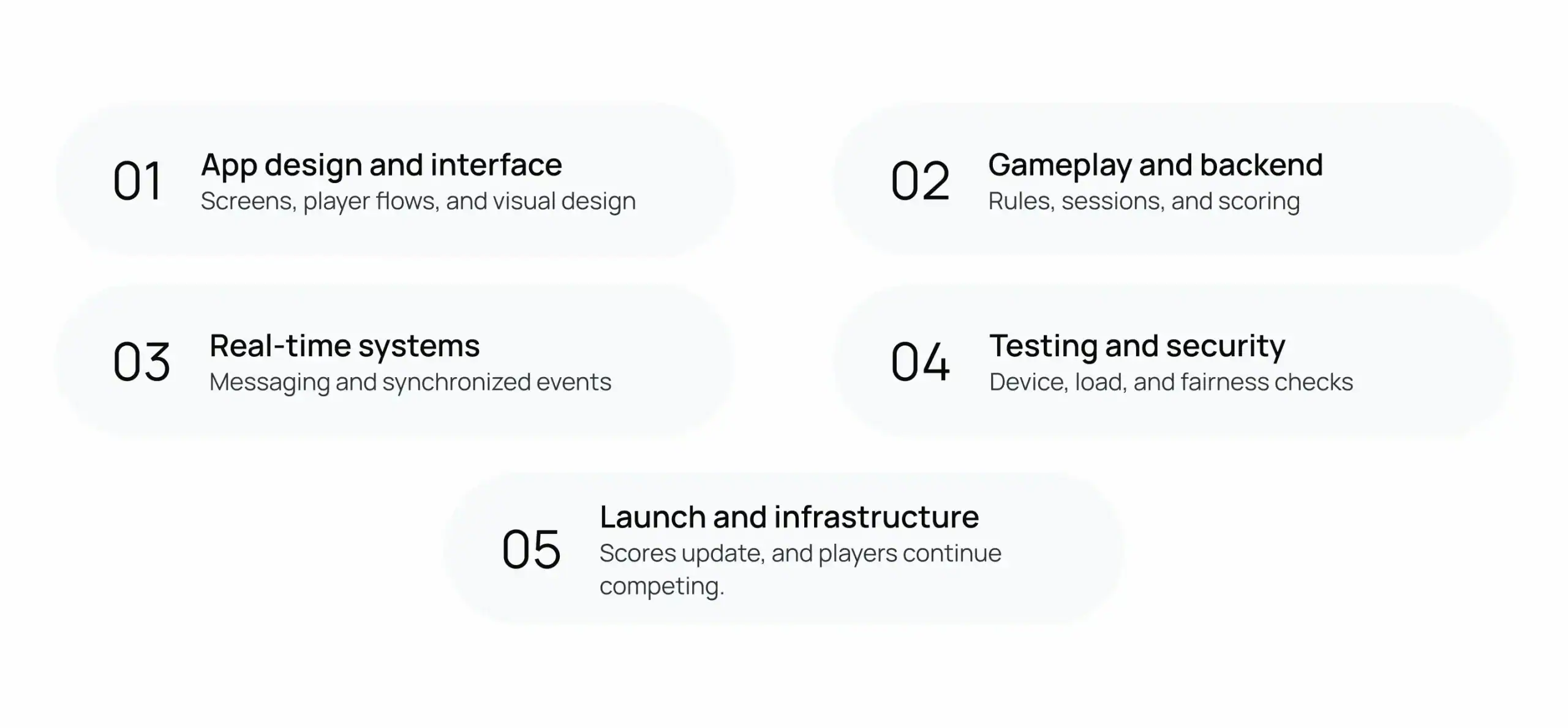
Begin with a clear list of essential features. Avoid building every possible feature immediately.
- Choose one primary game format.
- Define the first release’s essential features.
- Estimate expected players and peak traffic.
- Include testing, hosting, and maintenance.
- Add advanced features after validating demand.
What Should You Include in the Initial Budget?
Your initial estimate should cover development and launch preparation. It should also account for operating expenses.
| Budget category | Questions to consider |
| Product design | How many screens and player journeys are needed? |
| Development | Which platforms and features are required? |
| Infrastructure | How many simultaneous players are expected? |
| Testing | Which devices and network conditions need testing? |
| Content | Who creates and reviews questions? |
| Maintenance | Who handles updates, incidents, and support? |
A realistic estimate starts with documented requirements. A development team can then assess the effort involved.
How Can a Game Show App Make Money?
A game show app can use several revenue models. The right choice depends on its audience and purpose.
Newzoo forecast the global games market would reach $213.9 billion in 2026. Its forecast represented 6.1% year-over-year growth.
This broader market figure provides context, not guaranteed demand for game show apps.
Advertising and Sponsorships
Free apps can earn revenue through advertising. Sponsored rounds offer another option for interactive experiences.
For example, a brand might sponsor a trivia event. Its name could appear alongside selected questions. Ads should not interrupt important moments during live gameplay.
Subscriptions and In-App Purchases
Subscriptions can unlock premium access or additional content. In-app purchases can offer optional digital items.
Possible options include:
- Premium trivia categories
- Private game sessions
- Additional customization options
- Exclusive competitions or events
The app should clearly explain paid features. Developers must also consider applicable app store payment rules.
Branded Experiences and Licensing
Businesses can commission customized game show experiences. Event organizers may also pay for private competitions.
Licensing can support reusable formats across different clients. Each arrangement needs clear terms and content permissions.
| Revenue model | How it works | Suitable formats |
| Advertising | Ads appear around gameplay | Free trivia apps |
| Sponsorships | Brands support rounds or events | Live competitions |
| Subscriptions | Users pay for ongoing access | Premium communities |
| In-app purchases | Users buy optional digital items | Casual game shows |
| Licensing | Organizations pay to use a format | Branded experiences |
| Event fees | Clients pay for private experiences | Corporate games |
Choose a model that fits the experience. Too many payment prompts can disrupt participation.
What Challenges Should Developers Plan For?
Game show apps face challenges beyond ordinary quiz gameplay. Live sessions introduce timing, fairness, and reliability concerns.
Network Delays and Synchronization
Players may have different internet speeds. Some answers may reach the server later than others.
The system needs clear deadlines and consistent rules. Reconnection handling also matters when connections drop.
Fair Scoring and Cheating Prevention
Players should compete under the same rules. Server-side scoring helps maintain consistent results.
Developers can also implement duplicate submission checks. Audit logs help investigate disputed results later.
Managing Large Live Events
Popular events can attract many simultaneous players. Traffic may increase sharply when a show begins.
Developers should plan for expected peak attendance. Load testing helps reveal bottlenecks before launch. Monitoring also helps teams respond during live events.
Content Quality and Moderation
Incorrect questions can damage player trust. Unclear wording can also create scoring disputes.
Content teams should review questions before publication. Moderation tools help manage inappropriate submissions and behavior.
Testing Across Devices
Players may use different phones and operating systems. Screen sizes and connection quality can also vary.
Test the experience under realistic conditions. Include interrupted sessions, late answers, and reconnect attempts.
Why Device and Network Access Matter
ITU reported that 74% of the global population used the internet in 2025. However, 2.2 billion people remained offline.
Target markets can have very different connectivity conditions. Lightweight interfaces and recovery options help improve accessibility.
How Do You Build an Interactive Game Show App?
Building a game show app starts with a clear plan. Each stage helps turn the idea into working software.
Define the Game Format
First, decide what players will experience. Will they join live trivia competitions? Will they answer questions during television broadcasts?
Define the audience, session length, and scoring rules. These choices help establish the project’s technical requirements.
Design the Player Experience
Map the main steps from joining through results. Keep the interface simple and easy to understand.
Players should quickly find questions and submit answers. Hosts should manage sessions without navigating confusing menus.
Build the Backend and Gameplay
Develop the systems that support the chosen format. These may include question delivery, scoring, and session controls.
Live games need additional real-time communication. Asynchronous quizzes may use a simpler architecture.
Test Before Launch
Test the app across supported devices and networks. Check scoring, session recovery, and administrative controls.
Run load tests based on expected attendance. Review security and performance before releasing the app.
Launch and Improve the App
Monitor performance after the initial release. Collect feedback from players and event organizers.
Review participation and completion patterns. Use those findings to guide future improvements.
| Development stage | Main activities | Expected output |
| Discovery | Audience, format, and requirements | Project scope |
| Design | User journeys and interface design | Interactive prototype |
| Development | App, backend, and gameplay | Working application |
| Testing | Functional, security, and load tests | Release candidate |
| Launch | Deployment and monitoring | Live application |
| Improvement | Analytics and feedback | Planned updates |
How Long Should Development Take?
The timeline depends on the project’s scope. A simple quiz differs from a live multiplayer platform.
Custom dashboards and integrations can require additional work. Testing also depends on concurrency and gameplay complexity.
Ask your development team for a milestone-based estimate. The estimate should explain dependencies and testing requirements.
Why Choose Cubix for Game Show App Development?
Building an interactive game show requires several connected skills. These include gameplay design, application development, and backend engineering.
Cubix works across software, mobile applications, and games. Its game development services can support projects with different requirements.
Plan the Gameplay Around Your Audience
Start by defining the audience and gameplay format. Then identify the features that support that experience.
A live trivia app needs reliable session controls. A TV companion may need broadcast synchronization. A branded experience may require campaign management tools.
A custom game development company can help translate these requirements into a practical plan. The goal is to match technology with the intended experience.
Explore Cubix’s game development service to learn more about its capabilities.
Build the Technology Around Your Requirements
Different game show apps need different technical solutions. The development team should assess the requirements before selecting technologies.
Depending on the project, development may include:
- Mobile and web game interfaces
- Real-time multiplayer functionality
- Backend systems and scoring logic
- Question management and host dashboards
- Testing, deployment, and ongoing support
Cubix can help businesses plan their game development projects. The appropriate approach depends on scope, audience, and goals.
Start Building Your Game Show App With Cubix
Every successful game show app starts with a clear concept. The next step is choosing features that support it.
Define your audience, gameplay, and essential requirements. Then plan the architecture around those decisions. This approach helps keep development focused and manageable.
Cubix can help scope the project and plan development. Its team can also support implementation and testing. The right approach depends on your project’s needs.
Ready to Discuss Your Idea?
Whether you’re planning live trivia or television integration, start with your core concept. Identify the features players need most.
Explore mobile game development services to understand the development options. You can also hire mobile game developers through Cubix for project-specific requirements.
Have a game show idea? Let’s build it. Discuss your concept, gameplay format, and development requirements with Cubix.
Want to discuss your project? Our experts are just a click away.
Contact UsFrequently Asked Questions
1. What is a game show app?
A game show app lets users participate in interactive competitions. It may include live questions, timers, scores, and leaderboards. Some apps also connect viewers with television broadcasts.
2. How does a live trivia app work?
Players join a scheduled session and receive questions. They submit answers before the deadline. The server validates responses and calculates scores. Players then see updated rankings or final results.
3. What features does a game show app need?
Most live formats need session management and question delivery. Scoring, timers, and leaderboards support competitive gameplay. Host controls and moderation tools help manage events.
4. How do game show apps synchronize players in real time?
The server coordinates questions, deadlines, and gameplay events. Real-time messaging delivers updates to connected devices. The system must also handle network delays and reconnections.
5. How much does it cost to build a game show app?
Costs depend on features, platforms, and technical complexity. Live multiplayer experiences often require additional backend work. A project estimate should include development, testing, infrastructure, and maintenance.
6. What backend is needed for a live quiz app?
A live quiz app needs a backend for sessions and scoring. It also needs question management and data storage. Real-time messaging supports synchronized gameplay and score updates.