
A vulnerability found after deployment is one problem. Finding it while the code is still being written is another. That difference is at the heart of shift-left security.
As software moves faster, security needs to move closer to code, pull requests, dependencies, and CI/CD pipelines. The need is clear: Verizon’s latest Data Breach Investigations Report found that exploitation of vulnerabilities accounted for 20% of confirmed breaches, after increasing by 34% year over year in its analyzed data set.
AI-powered security testing can strengthen this approach by helping teams analyze findings, prioritize risks, generate security tests, identify suspicious code patterns, and suggest remediation. Rather than replacing SAST, DAST, SCA, IAST, penetration testing, or security expertise, AI adds context and automation across the DevSecOps pipeline. This guide explores where AI fits into the SDLC, how to integrate it into CI/CD, and where human validation remains essential.
Key Takeaways
- AI-powered security testing brings AI into SAST, DAST, SCA, IAST, threat modeling, vulnerability management, and remediation workflows.
- Shifting security left helps teams identify and address vulnerabilities earlier in the software development lifecycle.
- AI can analyze security findings, add application context, prioritize risks, generate test scenarios, and suggest remediation.
- AI works best alongside established security controls rather than replacing deterministic scanners, penetration testing, or security expertise.
- AI-generated security fixes still require developer review, testing, re-scanning, and validation before deployment.
- Human oversight remains essential for threat modeling, high-impact remediation, sensitive source-code handling, and autonomous security testing.
- Effective AI security implementations focus on reducing alert noise and improving the quality of security feedback, not simply increasing automation.
Want to discuss your project? Our experts are just a click away.
Contact UsWhat Is AI-Powered Security Testing?
AI-powered security testing uses artificial intelligence and machine learning to enhance application security activities across the software development lifecycle.
Traditional security tools generally rely on predefined rules, signatures, queries, heuristics, or deterministic analysis. AI can complement these mechanisms by interpreting larger amounts of contextual information and helping security teams determine which findings deserve attention first.
Depending on the implementation, AI can support:
- Vulnerability detection and classification
- Static code analysis
- Dynamic security testing
- Security-focused code review
- Dependency and software supply chain analysis
- Threat modeling
- Test-case and attack-scenario generation
- Vulnerability prioritization
- Security finding correlation
- Remediation recommendations
- Regression validation
- Security documentation and explanations
The distinction matters. AI should generally sit around established security controls rather than replace them.
For example, an AI model might analyze a SAST finding and determine whether the vulnerable function is reachable from an external request, whether sensitive data is involved, and whether the issue appears exploitable in the application’s context. The underlying static analyzer still provides the security finding.
That combination creates a more useful workflow:
Detect → understand → prioritize → remediate → validate
It is this workflow, rather than AI alone, that makes AI-powered security testing valuable in DevSecOps.
Why Security Needs to Shift Left in the SDLC
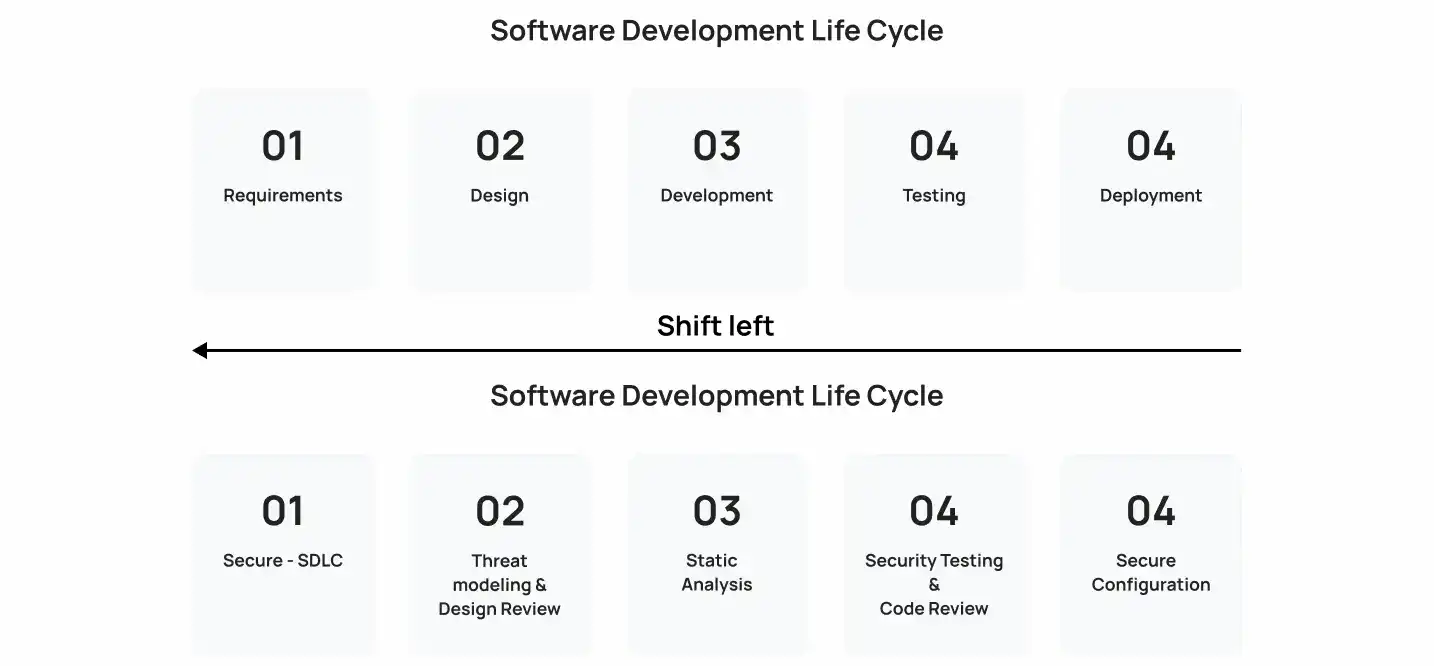
Security becomes harder to fix when it is postponed.
If an architectural weakness is discovered during design, the team can change the design. If the same weakness appears after production deployment, fixing it may involve application changes, infrastructure changes, database migrations, regression testing, release coordination, and incident response.
NIST’s Secure Software Development Framework recommends integrating secure development practices into each SDLC rather than treating software security as a separate activity.
Shift-left security applies that principle operationally by moving security feedback toward planning, design, coding, and build stages.
What Late Security Testing Can Miss
A late-stage security process can create several problems:
- Vulnerabilities remain undiscovered until release candidates are available.
- Developers may need to revisit code they wrote weeks earlier.
- Security teams receive large volumes of findings at once.
- Third-party dependency vulnerabilities can remain buried in transitive packages.
- Misconfigured cloud resources may reach deployment before validation.
- Architecture-level weaknesses can become expensive to redesign.
- Security remediation competes directly with release deadlines.
Shift-left security does not mean moving every security test to the first stage of development.
A DAST scan still needs a running application. A penetration test still needs a meaningful attack surface. Runtime testing still requires execution context.
The goal is to move the right security feedback to the earliest stage where it can be useful.
AI in DevSecOps: Where It Fits Across the Security Lifecycle
AI can support multiple stages of a DevSecOps pipeline, but its role changes depending on the type of security problem.
| SDLC stage | Security activity | How AI can help |
| Planning | Threat modeling | Identify potential attack paths and security assumptions |
| Design | Architecture review | Analyze trust boundaries, data flows, and exposed components |
| Coding | Secure code review | Detect suspicious patterns and explain security implications |
| Build | SAST and SCA | Classify findings and prioritize relevant vulnerabilities |
| Testing | DAST and IAST | Generate scenarios, correlate findings, and investigate behavior |
| CI/CD | Security gates | Apply risk-based policies to builds and pull requests |
| Remediation | Vulnerability management | Generate fix suggestions and remediation guidance |
| Validation | Regression testing | Re-scan modified code and verify that fixes did not create new findings |
| Operations | Security monitoring | Correlate signals and investigate unusual behavior |
This fits naturally within DevSecOps because the pipeline already produces large amounts of security and engineering data.
The AI layer can help turn that data into context.
How AI Enhances Application Security Testing
AI does not make every security test better simply by being added to it. Its strongest applications are generally those where context, prioritization, pattern recognition, or repetitive analysis creates a bottleneck.
1. AI-Powered SAST for Static Code Analysis
Static Application Security Testing examines source code, bytecode, or compiled artifacts without executing the application.
Traditional SAST tools can identify patterns associated with issues such as injection vulnerabilities, insecure cryptography, improper input handling, and unsafe data flows.
AI can add contextual analysis to those findings.
For example, an AI-assisted SAST workflow can help determine:
- Where potentially unsafe input originates
- How that input moves through the application
- Whether it reaches a sensitive operation
- Whether authentication or authorization controls intervene
- Whether a reported finding appears reachable
- Why the issue matters
- What remediation options developers should investigate
This is where AI code review security becomes useful. Rather than giving developers another raw vulnerability alert, the system can provide an explanation connected to the actual code.
However, AI analysis should not be treated as inherently more accurate than deterministic static analysis. The two approaches can complement one another.
2. AI-Powered DAST for Running Applications
Dynamic Application Security Testing evaluates an application while it is running.
DAST can identify runtime issues involving areas such as:
- Authentication
- Session management
- Input validation
- Injection
- Access control
- HTTP behavior
- API security
- Configuration weaknesses
AI can assist by generating test inputs, selecting promising attack paths, correlating responses, and interpreting large sets of scan results.
This is particularly useful for applications with extensive APIs or complicated workflows where manually determining which endpoints and parameters deserve deeper testing can consume significant time.
AI-powered DAST should still operate within defined testing environments, authorization boundaries, and rate limits. Autonomous behavior without proper scope controls can create operational and security problems of its own.
3. IAST for Runtime Application Context
Interactive Application Security Testing combines aspects of static and dynamic analysis by observing application behavior during execution.
IAST typically uses instrumentation to obtain information about application code, data flows, and runtime behavior.
AI can help correlate this runtime information with other security findings.
For example, a security platform might connect:
HTTP request → controller → application logic → database query → returned response
with a related static finding or dependency issue.
That additional context can help security teams distinguish a theoretical finding from a path that is actually exercised by the application.
4. AI and Software Composition Analysis
Modern applications rarely consist entirely of proprietary code.
They depend on open-source packages, frameworks, container images, SDKs, libraries, and transitive dependencies. That creates a software supply chain that must be monitored throughout development and deployment.
Software Composition Analysis (SCA) helps identify vulnerable or outdated dependencies and can contribute to software inventory and SBOM processes.
AI can assist by:
- Correlating dependency findings
- Prioritizing exposed packages
- Explaining why a vulnerable dependency matters
- Connecting vulnerable versions to application usage
- Grouping related findings
- Supporting remediation decisions
- Identifying unusual dependency patterns
For organizations using large dependency graphs, this contextual layer can help reduce the amount of manual triage required.
AI Code Review Security: From Detection to Remediation
Finding a vulnerability is only the first half of the problem.
Developers still need to understand what went wrong, determine the appropriate fix, implement it, and verify that the change did not break application behavior.
Generative AI for application security can help shorten this process.
A practical AI-assisted workflow looks like this:
Security finding → Contextual explanation → Suggested remediation → Developer review → Re-scan → Validation
Modern developer security platforms already demonstrate this model. For example, GitHub documents AI-assisted capabilities that generate fix suggestions from code-scanning alerts while requiring developers to review proposed changes before accepting them.
That human review is important.
An AI-generated security fix may address the reported vulnerability while introducing a functional regression, changing application behavior, weakening another control, or failing to address the root cause.
AI-driven code remediation should therefore be treated as assisted remediation, not unconditional autonomous fixing.
The safest workflow is:
- Generate a candidate fix.
- Review the code change.
- Run unit and integration tests.
- Re-run security analysis.
- Validate the application’s intended behavior.
- Approve the change through the normal development workflow.
Predictive Risk Analysis in Software Development
Not every security finding deserves the same response.
A critical-severity vulnerability in an isolated internal component may represent less immediate exposure than a moderate-severity issue affecting an internet-facing authentication service.
This is where predictive risk analysis in software development can help.
AI-based risk analysis can combine signals such as:
- Vulnerability severity
- Exploitability
- Application exposure
- Code reachability
- Data sensitivity
- Authentication requirements
- Dependency usage
- Business criticality
- Historical security findings
- Runtime behavior
- Existing compensating controls
The objective is not to replace CVSS, security policies, or expert judgment. It is to provide more context around them.
A useful prioritization model can therefore move beyond:
“This vulnerability is high severity.”
toward:
“This vulnerability is high severity, affects an internet-facing service, involves sensitive data, is reachable from user-controlled input, and has no compensating control.”
That distinction can improve vulnerability management workflows.
The same contextual risk-analysis principles can also apply outside application scanning. For example, Fraud Detection Solutions use machine learning to analyze behavioral patterns and identify potentially suspicious activity, showing how AI-based risk analysis can extend into other security-sensitive workflows.
How to Integrate AI Into DevSecOps Pipelines
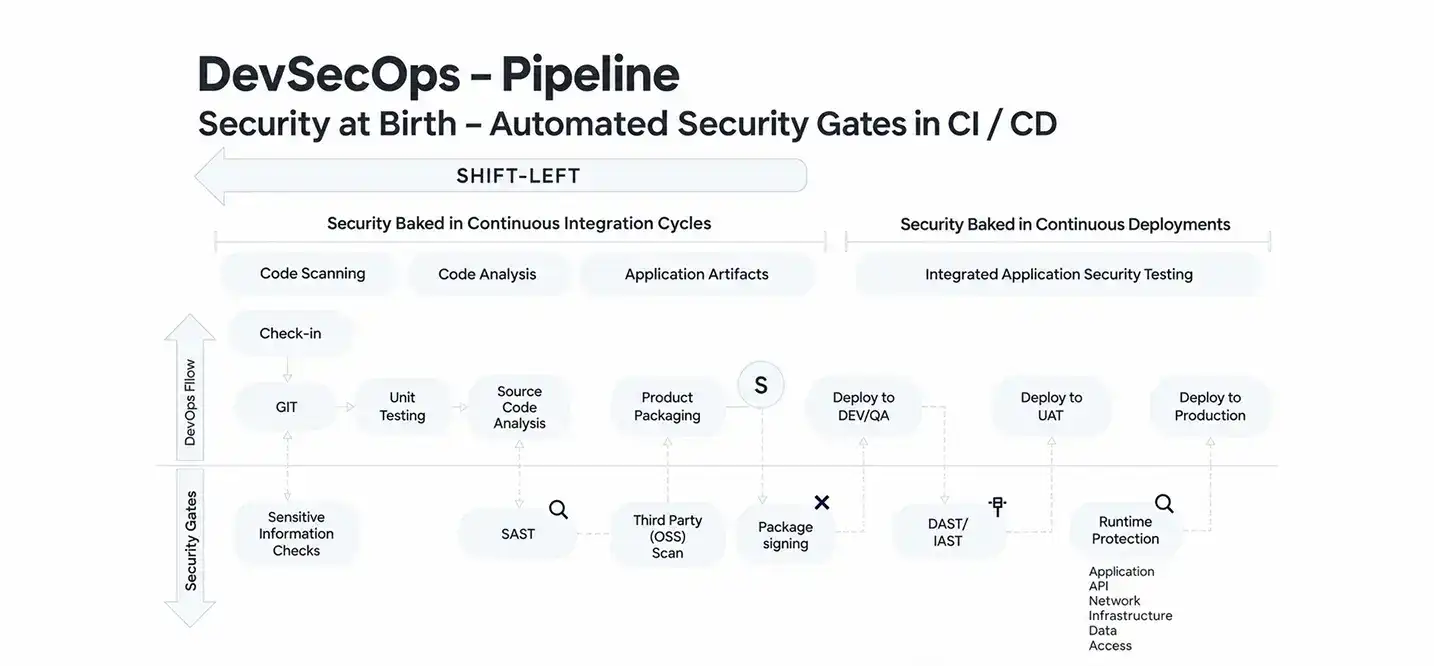
AI security tooling should not be added to a CI/CD pipeline simply because the technology is available.
The first question should be: Where is the existing security process losing time, context, or accuracy?
1. Map the Existing SDLC and CI/CD Pipeline
Document where security checks currently occur.
Look at:
- Pull requests
- Build pipelines
- Dependency installation
- Container creation
- Staging environments
- API testing
- Production monitoring
- Vulnerability management
- Developer IDE workflows
This provides a baseline before introducing AI.
2. Identify Where Security Feedback Arrives Too Late
Next, find the bottlenecks.
Perhaps SAST generates too many findings. Maybe developers receive security feedback only after a build. Perhaps dependency alerts lack application context. Or security engineers spend hours manually correlating findings from multiple tools.
Those are better AI use cases than simply adding another scanner.
3. Add AI Where Context or Triage Is the Bottleneck
AI is particularly useful when teams already have reliable security data but struggle to interpret it efficiently.
Examples include:
- Finding classification
- False-positive investigation
- Vulnerability explanation
- Risk prioritization
- Code remediation suggestions
- Test generation
- Finding correlation
4. Connect Security Controls to CI/CD
A mature pipeline can combine deterministic security controls with AI-assisted analysis.
A representative workflow is:
Commit → SAST/SCA → Build → DAST/IAST → AI risk analysis → Security gate → Remediation → Re-test → Deploy
OWASP’s DevSecOps guidance includes SAST, DAST, IAST, SCA, infrastructure vulnerability scanning, and container vulnerability scanning among the security activities that can be incorporated into CI/CD pipelines. OWASP DevSecOps Guideline
AI can sit across these controls to correlate findings and improve decision-making.
5. Establish Human Approval Points
Not every action should be autonomous.
Human approval should generally remain part of workflows involving:
- Production security changes
- High-impact remediation
- Access-control modifications
- Authentication logic
- Cryptographic changes
- Compliance decisions
- Penetration-testing scope
- Sensitive source-code processing
This creates a practical human-in-the-loop security model rather than treating AI output as an unquestionable decision.
Benefits of Shift-Left Security With Automation
When AI is integrated into an established DevSecOps process, the main benefit is not simply “more automation.”
The bigger opportunity is better security feedback at the point where developers can still act on it efficiently.
| Benefit | What changes |
| Earlier detection | Security issues can surface closer to code creation |
| Faster triage | AI can summarize and contextualize large finding sets |
| Better prioritization | Findings can be evaluated using multiple risk signals |
| Faster remediation | Developers can receive actionable fix suggestions |
| Lower security friction | Feedback can appear inside existing development workflows |
| Continuous validation | Security checks can run throughout CI/CD |
| Better developer visibility | Findings are connected to specific code and behavior |
The result depends heavily on implementation quality. Poorly configured automation can create alert fatigue just as easily as manual security processes.
What AI-Powered Security Testing Cannot Do Alone?
AI can improve application security workflows, but it introduces its own limitations.
1. AI Can Produce False Positives and False Negatives
AI systems can misinterpret code, runtime behavior, configuration, or vulnerability context.
A finding may be incorrectly classified as dangerous, or a genuine issue may be missed.
That is why deterministic analysis, multiple security controls, testing, and expert review remain important.
AI should improve triage rather than become the only source of truth.
2. AI-Generated Fixes Can Introduce New Risks
A generated code change is still a code change.
It needs the same validation as manually written security remediation.
GitHub’s documentation, for example, describes human review and automated testing as part of its AI-assisted security-fix workflow.
The principle is straightforward: never assume that fixing one security alert makes the resulting code secure.
3. AI Does Not Replace Threat Modeling or Expert Review
Threat modeling addresses questions that automated code analysis cannot fully answer:
- What assets matter?
- Who can access them?
- What trust boundaries exist?
- What abuse cases are realistic?
- What security properties does the architecture require?
AI can help analyze these questions, but security architects and engineers still need to establish the application’s threat model and acceptable risk.
4. Sensitive Source Code Creates Data Governance Concerns
AI security tools may process source code, vulnerability details, file names, dependencies, logs, or other sensitive engineering information.
Organizations should therefore evaluate:
- Where data is processed
- Whether data leaves controlled environments
- Retention policies
- Model-training policies
- Access controls
- Encryption
- Regulatory requirements
- Vendor security controls
NIST’s Generative AI Profile provides a useful framework for considering risks associated with generative AI across its lifecycle.
5. Autonomous Penetration Testing Requires Guardrails
AI agents can potentially generate and execute security tests, but penetration testing is not something that should be allowed to run against arbitrary systems without strict authorization.
Production systems can contain destructive endpoints, rate limits, sensitive records, or third-party integrations.
Autonomous security testing therefore needs:
- Explicit authorization
- Defined targets
- Testing windows
- Rate limits
- Safe execution environments
- Stop conditions
- Logging
- Human oversight
Automation should expand testing capacity without turning security validation into an uncontrolled attack.
AI-Powered Security Testing vs. Traditional Security Testing
The two approaches are better understood as complementary rather than competing models.
| Area | Traditional security testing | AI-enhanced security testing |
| Detection | Rules, signatures, queries, heuristics | Traditional detection plus contextual AI analysis |
| Triage | Manual investigation | AI-assisted classification and prioritization |
| Code review | Human and static analysis | Human review plus AI-assisted analysis |
| Remediation | Developer researches and implements fix | AI can suggest candidate fixes |
| Test generation | Predefined or manually created scenarios | AI can generate additional scenarios |
| CI/CD | Automated security checks | Automated checks plus AI-assisted interpretation |
| Final decision | Security/development teams | Security/development teams |
The important distinction is that AI adds an intelligence and automation layer. It does not eliminate the need for established security controls.
How Much Does AI-Powered Security Testing Cost?
There is no single price for AI-powered security testing because implementation varies significantly between organizations.
The cost depends less on the AI model alone and more on the surrounding engineering environment.
| Cost driver | Why it matters |
| Application complexity | More services, APIs, repositories, and dependencies increase testing scope |
| Number of repositories | Larger codebases require broader scanning and governance |
| Existing security stack | Existing SAST, DAST, SCA, and CI/CD tools can reduce implementation work |
| AI model usage | API-based inference creates ongoing usage costs |
| Custom models | Specialized models require data, infrastructure, evaluation, and maintenance |
| CI/CD integration | Security gates and workflow orchestration require engineering effort |
| IDE integration | Real-time developer feedback adds plugin and platform requirements |
| AI agents | Autonomous workflows require additional orchestration and guardrails |
| Policy as Code | Security policies need to be defined, tested, and maintained |
| Compliance | Audit evidence, governance, and data controls can increase implementation effort |
| Monitoring | AI systems need ongoing evaluation and tuning |
For some organizations, integrating AI with an existing AppSec stack may be relatively straightforward. Others may need a custom security intelligence platform connecting repositories, scanners, CI/CD systems, cloud environments, and internal risk data.
A custom machine learning layer can also make sense when an organization needs domain-specific risk models or proprietary security workflows. Teams exploring that route can evaluate custom machine learning development services as part of a broader AI security architecture.
The important point is to price the entire operating model, not just the AI component.
How to Implement AI Security Testing Without Creating More Noise
More security alerts do not automatically mean better security.
A successful implementation should make security feedback more useful to developers.
Start with a small number of high-value workflows:
- Choose a defined security problem.
Start with vulnerability triage, remediation, dependency risk, or another measurable bottleneck. - Keep deterministic controls in place.
Use SAST, DAST, SCA, secret scanning, infrastructure scanning, and other controls appropriate to the application. - Use AI for context.
Let AI explain findings, correlate signals, and help prioritize remediation. - Set risk thresholds.
Not every informational finding should block a deployment. - Keep remediation reviewable.
Generated fixes should go through pull requests, testing, and security validation. - Measure false positives and false negatives.
Monitor whether AI actually improves triage instead of assuming it does. - Protect engineering data.
Establish clear policies for source-code handling, model providers, retention, and access. - Re-test every security fix.
A vulnerability is not resolved simply because an AI agent produced a patch.
The best AI security workflows reduce noise by improving context, not by hiding findings.
The Role of AI in a Secure Software Development Lifecycle
AI-powered security testing works best when it becomes part of a broader secure software development lifecycle.
A practical security lifecycle can look like:
Threat Modeling → Secure Coding → AI-Assisted Code Review → SAST → SCA → DAST/IAST → Risk Prioritization → Remediation → Validation → Deployment → Continuous Monitoring
Each layer addresses a different security concern.
Threat modeling examines the architecture. Secure coding reduces common implementation weaknesses. SAST analyzes source code. SCA examines dependencies. DAST evaluates the running application. IAST adds runtime context. Risk analysis helps prioritize findings. Remediation addresses vulnerabilities. Validation confirms that changes work as intended.
AI can connect these stages by helping teams interpret and correlate the information they produce.
That makes AI most useful as a coordination and reasoning layer inside AppSec, rather than as a standalone security product.
Organizations building AI-enabled security capabilities can also apply the same principles to specialized use cases such as anomaly detection and fraud analysis. For example, Fraud Detection Solutions can use machine learning to analyze behavioral patterns and identify potentially suspicious activity, demonstrating how AI-based risk analysis extends beyond traditional application scanning.
For teams building more specialized AI capabilities, model selection, data pipelines, evaluation, integration, and security governance all become part of the engineering problem.
Final Thoughts on AI-Powered Security Testing
AI-powered security testing gives DevSecOps teams a practical way to bring more context and automation into application security without replacing established security controls. AI can help identify suspicious code, prioritize vulnerabilities, generate security tests, explain findings, and support remediation across the SDLC.
The strongest approach is not to let AI operate in isolation. SAST, DAST, SCA, IAST, threat modeling, secure coding practices, and penetration testing still serve distinct purposes, while AI helps connect their findings and make security feedback more actionable. Human review also remains essential for validating high-impact findings and AI-generated fixes.
For organizations exploring AI-driven security workflows, the priority should be finding the right points for automation, establishing clear guardrails, and measuring whether the implementation actually improves detection, triage, and remediation. Cubix can help organizations build and integrate AI capabilities into modern software and security workflows.
Want to discuss your project? Our experts are just a click away.
Contact UsFrequently Asked Questions
1. What does “shifting left” mean in AI-powered DevSecOps?
Shifting left means moving security testing earlier in the SDLC so vulnerabilities can be identified and addressed closer to where they are introduced.
2. How does AI improve security testing in DevSecOps?
AI can help analyze findings, prioritize risks, generate security tests, explain vulnerabilities, and suggest remediation.
3. How can AI be integrated into a DevSecOps pipeline?
AI can connect with SAST, SCA, DAST, CI/CD, vulnerability management, and monitoring tools to improve analysis, prioritization, and remediation.
4. Can AI reduce false positives in SAST and DAST?
AI can help contextualize and prioritize findings, but it cannot guarantee the elimination of false positives or false negatives.
5. Can AI automatically fix security vulnerabilities?
AI can suggest or generate fixes, but developers should review, test, and re-scan those changes before deployment.
6. What is the difference between AI-powered SAST and traditional SAST?
AI-powered SAST adds contextual analysis, prioritization, explanation, or remediation assistance to traditional static code analysis.
7. How much does AI-powered security testing cost?
Costs vary based on application complexity, existing security tools, AI usage, integrations, custom development, and ongoing maintenance.
8. Does AI-powered security testing replace penetration testing?
No. AI can assist penetration testing, but human-led testing remains important for evaluating complex attack paths and application-specific risks.