Key Takeaways
- A game engine is the software foundation that handles rendering, physics, audio, input, and logic so developers do not have to build every system from scratch.
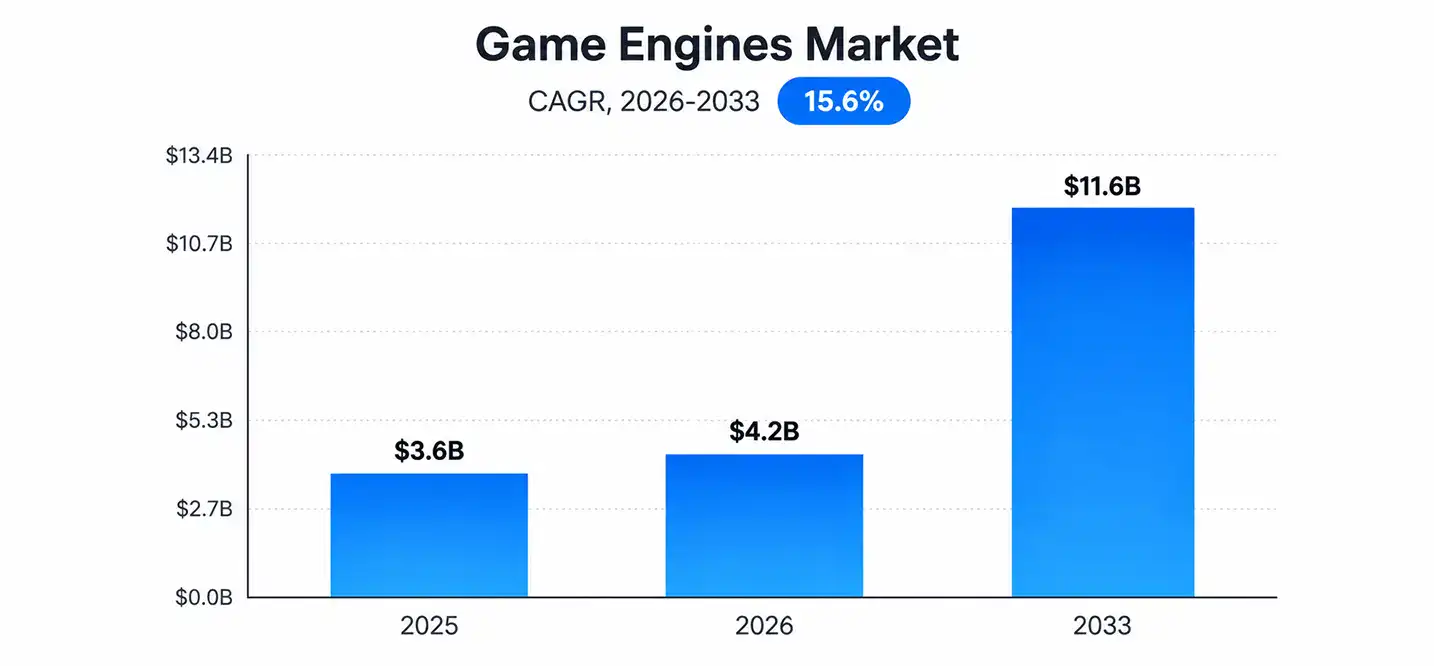
- The global game engine market was valued at roughly $3.6 billion in 2025 and is projected to reach $11.6 billion by 2033, growing at a 15.6% CAGR.
- Unity, Unreal Engine, and Godot dominate the market today, but each serves a different type of project and team.
- Custom, in-house engines have fallen out of favor. They powered roughly 70% of Steam releases in 2012 but only about 13% in 2024.
- Choosing the right engine depends on your game type, target platform, team skills, and budget, not just popularity.
If you are wondering what is a game engine, it is the software foundation that turns code, assets, and design ideas into a playable game. Every character movement, visual effect, physics interaction, and sound runs through systems managed by the engine.
The gaming industry continues to expand alongside the technologies used to create games. The global games market is projected to reach $213.9 billion in 2026, representing a 6.1% year-over-year increase, according to Newzoo’s latest forecast.
This guide explains how a game engine works, its key components, different types of engines, and how to choose the right one for your project. It also compares a game engine with a game framework, since the two are often confused
What Is a Game Engine?
A game engine is a software framework that provides the core tools developers need to build a video game. Instead of writing rendering code, physics calculations, and input handling from zero, developers plug their assets and logic into an engine that already handles those systems.
Grand View Research projects the market for game engines will grow from $4.2 billion in 2026 to $11.6 billion by 2033, driven partly by demand outside traditional gaming, including simulation, training, and virtual production.
Think of it as the operating system for a game. It manages memory, draws graphics on screen, calculates collisions, plays audio, and responds to player input, all in real time and often 60 times per second or more.
Modern engines go further than raw code libraries. As a result, they include:
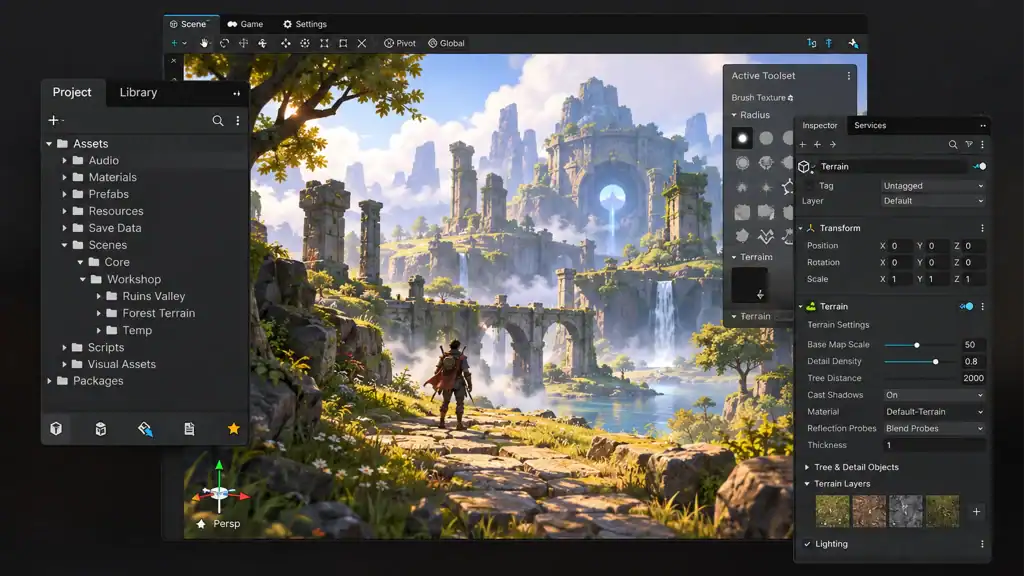
- Visual editors for building levels and scenes
- Asset pipelines for importing 3D models, textures, and audio
- Debugging and profiling tools
- Built-in support for multiple platforms, from PC to mobile to consoles
So, what is a game engine in practical terms? It is the single environment where art, code, sound, and logic come together into a finished, playable experience. Without one, every studio would need to reinvent rendering and physics systems for every single project, which would slow development to a crawl. Studios that outsource this work, such as our game development team, rely on this exact foundation to move from concept to a shippable build faster.
Want to discuss your project? Our experts are just a click away.
Contact UsWhat Are the Key Components of a Game Engine?
A game engine is not one tool. It is a collection of specialized systems, or game engine components, that work together. Each component handles one part of the experience, and together they form the engine’s overall game engine architecture.
Here is a breakdown of the systems you will find in nearly every modern engine.
1. Graphics Engine
The graphics engine manages how visual data gets processed and prepared for display. It handles textures, shaders, lighting models, and visual effects such as particles or post-processing filters. This system decides how a scene should look before it gets drawn to the screen.
2. Rendering Engine
The rendering engine takes that visual data and converts it into pixels on screen. This is where game engine rendering happens frame by frame. Modern engines rely on a real-time rendering engine to draw complex 3D scenes at 30 to 120 frames per second, depending on the target hardware.
Rendering pipelines typically use APIs like DirectX, Vulkan, or Metal to talk directly to the graphics card. Because rendering is the most performance-intensive task in most games, engines spend a huge amount of engineering effort optimizing this single system.
3. Physics Engine
A game physics engine simulates how objects move, collide, and react to forces like gravity or friction. Without it, a ball would not bounce, a character would not fall, and two objects could pass straight through each other.
Popular physics engines include Nvidia PhysX and Box2D, both of which are integrated into major commercial engines. Physics accuracy matters most in simulation, racing, and physics-puzzle games, where realistic object behavior is central to gameplay.
4. Audio Engine
The audio engine handles sound effects, background music, and voice lines. It manages 3D positional audio so a sound gets louder or quieter depending on distance, and it mixes multiple audio sources without distortion or clipping.
5. Input System
The input system reads signals from a keyboard, mouse, controller, or touchscreen and translates them into in-game actions. A well-built input system supports multiple device types and lets developers remap controls without rewriting core logic.
6. Artificial Intelligence (AI)
The AI system controls how non-player characters (NPCs) behave. This ranges from simple pathfinding, so a character can walk around obstacles, to complex decision trees that drive enemy behavior in combat.
7. Animation Tools
Animation tools blend and sequence character movements, from walking and jumping to combat and facial expressions. Most engines support skeletal animation, where a digital skeleton drives the movement of a 3D model’s mesh.
8. Networking
Networking systems handle multiplayer communication between the game client and a server, or between multiple players directly. This includes syncing player positions, handling latency, and preventing cheating through server-side validation.
9. Asset/Resource Manager
The asset manager loads, stores, and unloads resources such as textures, models, and audio files. Because games can contain gigabytes of assets, efficient resource management directly affects loading times and memory usage.
How Does a Game Engine Work?
Understanding how does a game engine work means looking at what happens between the moment a developer builds a scene and the moment a player sees it move on screen. The process breaks down into five stages.
1. Integrated Toolchain
A game engine combines graphics, physics, AI, audio, and animation systems through a unified set of development tools and APIs. Instead of juggling separate libraries that do not talk to each other, developers work inside one connected environment, which speeds up iteration significantly.
2. Asset and Scene Authoring
Visual editors let developers build game worlds without writing every line of placement code. Teams drag and drop assets into a scene, configure object behaviors, and preview gameplay instantly. This visual workflow is a major reason engines replaced custom, code-only pipelines.
3. Runtime Execution
Once a game launches, the engine loads resources, reads player input, runs game logic and physics calculations, and renders each frame in real time. This entire sequence has to complete fast enough to hit the target frame rate, usually 30 or 60 frames per second.
4. Platform Abstraction
Game engines absorb most of the differences between hardware and operating systems. As a result, a team can build one game and deploy it across PC, consoles, and mobile devices with only minor code changes, instead of rewriting the game for each platform.
5. Game Loop and Real-Time Processing
At the center of every engine sits the game loop, a continuous cycle that updates input, gameplay logic, physics, animation, and rendering. This loop repeats dozens of times per second to keep gameplay smooth and responsive.
A simplified game loop looks like this:
- Read player input
- Update game logic and AI
- Calculate physics and collisions
- Update animations
- Render the frame
- Repeat
This cycle, combined with the engine’s game engine programming interfaces, is what makes real-time interactivity possible. It is also why performance optimization is such a core skill for engine developers.
What Are the Different Types of Game Engines?
Not every project needs the same engine. Engines differ by dimensionality, licensing model, platform support, and specialization.
2D Game Engines
A 2D game engine focuses on flat, sprite-based visuals and simplified physics. Examples include GameMaker Studio and Godot’s 2D workflow. These engines suit platformers, puzzle games, and mobile titles where 3D rendering would add unnecessary complexity. For a deeper breakdown of the top options, see our complete comparison guide to 2D game engines.
3D Game Engines
A 3D game engine handles depth, lighting, and complex meshes for fully three-dimensional worlds. Unreal Engine and Unity both lead this category. According to Global Market Insights, 3D engines accounted for close to 78.9% of total game engine market revenue in 2025, which shows how dominant 3D development has become.
Open-Source Game Engines
Open-source engines like Godot give developers full access to the source code, with no licensing fees. Because the community can inspect and modify the codebase directly, these engines often gain features and bug fixes quickly. This model appeals to small teams in particular, since it removes licensing costs from the budget entirely while still delivering professional-grade rendering and physics.
Cross-Platform Game Engines
Cross-platform engines let a single codebase target multiple platforms, including PC, mobile, console, and web, with minimal rewriting. This capability has become close to a baseline requirement, since most commercial games now launch on more than one platform. Browser-based projects lean on a different subset of tools entirely, which Cubix covers in its comparison of top HTML5 game engines.
Specialized Game Engines
Some engines target a narrow use case instead of general development. Examples include RPG Maker for role-playing games and Construct for browser-based, no-code projects. These specialized tools trade flexibility for speed, since they come preloaded with genre-specific systems. Training simulators and enterprise visualization projects fall into this category too, and they typically need an engine tuned for accuracy over flashy visuals.
What Are the Benefits of Using a Game Engine?
Building a game without an engine means writing rendering, physics, and audio systems from scratch. That is why almost every modern studio, from solo developers to AAA teams, builds on top of an existing engine.
1. Faster Game Development
Prebuilt systems for rendering, physics, and input let teams focus on gameplay and content instead of infrastructure. This alone can cut development time by months on a mid-sized project.
2. Reusable Development Tools and Assets
Engines support asset stores and plugin marketplaces, so teams can buy or reuse existing models, sound packs, and code modules instead of building everything internally. This is especially valuable for small teams working with limited budgets, which is why a roundup of the best game engines for indie developers puts asset store depth near the top of its criteria.
3. Cross-Platform Game Development
Because engines abstract away hardware differences, a single project can deploy to PC, console, and mobile with far fewer platform-specific bugs.
4. Real-Time Rendering and Testing
Developers can preview changes instantly inside the editor, rather than waiting for a full build. This tight feedback loop speeds up iteration on level design, lighting, and gameplay balance.
5. Built-In Physics, Audio, and Animation
Instead of licensing separate middleware for each system, most engines bundle physics, audio, and animation tools together, which reduces integration headaches and licensing costs.
5. Scalable Development Workflows
As a team grows, engines support version control integration, collaborative editing, and modular project structures, so a two-person indie team and a 200-person studio can both work inside the same tool.
Best Game Engines in 2026: Comparison Table
The Unity game engine, Unreal Engine, and Godot game engine cover most development needs today, though each fits a different type of project and team.
| Game Engine | Best For | 2D/3D | Platforms | Key Strength |
|---|---|---|---|---|
| Unreal Engine | High-fidelity AAA and cinematic games | 3D (2D support available) | PC, console, mobile, VR | Photorealistic rendering and Blueprint visual scripting |
| Unity | Mobile, indie, and cross-platform projects | 2D and 3D | PC, console, mobile, web, VR/AR | Largest asset store and broad platform reach |
| Godot | Indie and open-source projects | 2D and 3D | PC, console, mobile, web | Free, open-source, and lightweight |
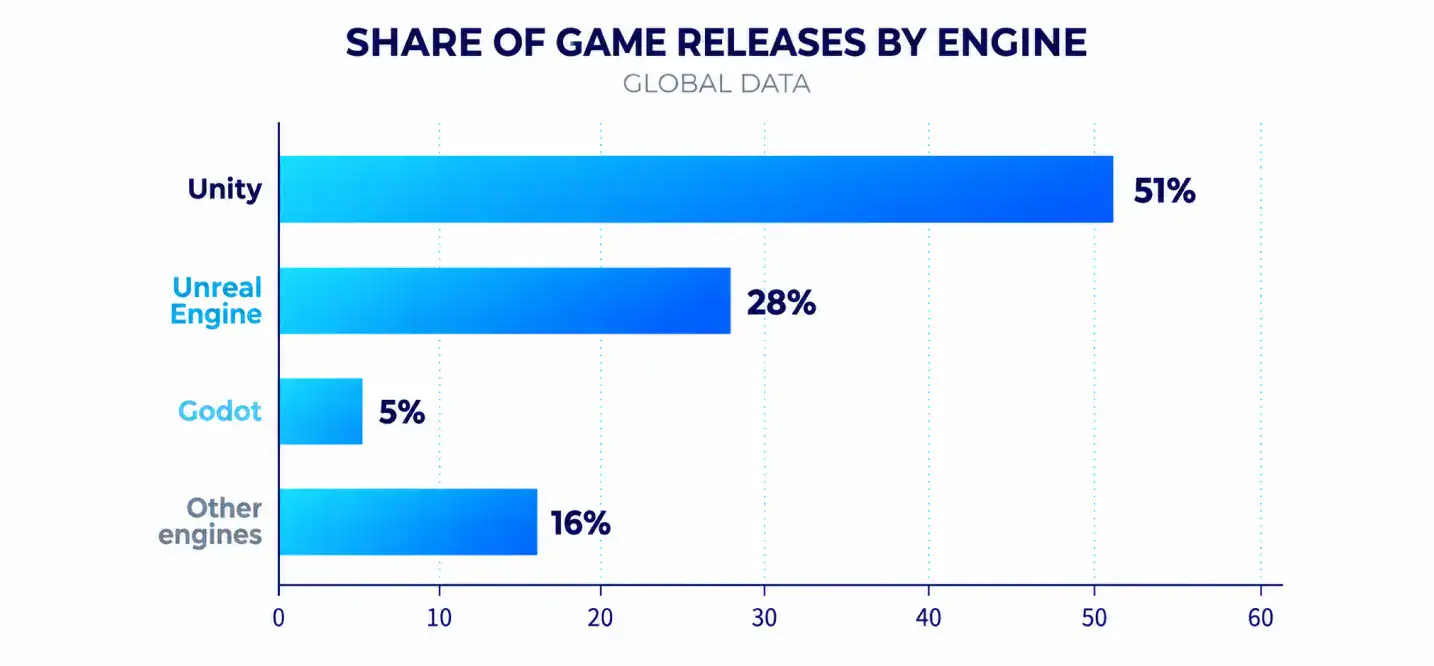
Unity still ships the highest number of games overall, powering an estimated 51% of Steam releases in 2024. However, Unreal Engine has grown its share of Steam game revenue to about 31%, up from 19% in 2023, according to Levvvel’s market share data. That gap between release volume and revenue matters: Unity wins on indie and mobile volume, while Unreal wins on premium, high-budget titles.
Godot, meanwhile, has grown game unit production by 144% since 2020, based on the same report, making it the fastest-growing engine among smaller players. If Unity looks like the right fit for your project, our guide to Unity game development walks through the workflow, tooling, and typical project timelines in more depth.
How to Choose the Right Game Engine
Picking an engine is not about chasing the most popular name. It comes down to matching the tool to your project’s actual needs. For a full walkthrough of this decision process, our guide on how to choose your first game engine breaks down each factor in more depth.
Define Your Game Type and Scope
A small 2D puzzle game and a large open-world RPG need very different tools. Start by defining genre, scope, and visual complexity before comparing engines.
Target Platforms and Deployment Needs
Confirm which platforms you need to launch on, since not every engine supports every console equally well. Unreal and Unity both offer broad platform coverage, but licensing terms and certification support vary by platform.
Team Skills: Coding vs Visual Scripting
Some teams lean heavily on programmers comfortable with C++ or C#. Others rely on designers who prefer visual scripting tools like Unreal’s Blueprints. Match the engine’s game engine programming model to your team’s actual skill set, not the one you wish you had.
Budget, Licensing, and Revenue Share Models
Licensing terms differ significantly across engines:
- Unity charges based on subscription tiers and, in some cases, runtime fees tied to installs or revenue.
- Unreal Engine is free to use, but Epic Games takes a royalty on revenue above a set threshold.
- Godot is completely free and open-source, with no royalty obligations.
Asset Store, Plugins, and Community Support
A large asset store and active community save time. Before committing, check whether the engine has plugins for the specific systems your game needs, such as advanced networking or specific genre tools.
Long-Term Maintenance and Scalability
Consider how well the engine will support your project years down the line. Engine updates, backward compatibility, and long-term vendor stability all affect whether a project can scale smoothly or hits a wall later. This matters even more for non-gaming applications like training and simulation, where Cubix’s breakdown of game engines for simulation projects explains why accuracy and long-term support often outweigh visual polish.
Game Engine vs. Game Framework: What’s the Difference?
A game engine is an all-in-one software environment with built-in visual editors, while a game framework is a collection of code libraries that lets you build everything through programming.
This game engine vs game framework distinction matters because frameworks trade convenience for control. A framework like LibGDX or MonoGame gives programmers direct access to low-level systems, without the overhead of a full editor.
| Feature | Game Engine | Game Framework |
|---|---|---|
| Definition | Complete software environment for building games | Code library set for building games programmatically |
| Visual Editors | Yes, built-in scene and asset editors | No, code-only workflow |
| Control & Flexibility | Moderate to high, within engine constraints | Very high, since developers control every system |
| Development Speed | Faster for most standard game types | Slower, but more customizable |
| Target Audience | Studios, indie teams, designers, and programmers | Experienced programmers who want full control |
| Examples | Unity, Unreal Engine, Godot | LibGDX, MonoGame, Phaser |
Choose an engine when speed and visual tools matter most. Choose a framework when you need precise control over performance or you are building something highly unconventional that does not fit a standard engine’s assumptions.
Custom Game Development with Modern Game Engines
Modern game development uses established engines as a foundation, allowing developers to customize gameplay, graphics, physics, animation, and other systems without building everything from scratch. Cubix provides game development services that combine proven game engines with custom development for unique gaming experiences.
Using engines such as Unity and Unreal Engine helps teams streamline development while supporting multiple platforms, including mobile, PC, consoles, and AR/VR. Developers can also extend these engines with custom tools, mechanics, shaders, and backend systems.
What Do Game Development Services Offer?
- 2D and 3D Game Development: Build engaging games for mobile, PC, consoles, and other platforms.
- Unity and Unreal Development: Leverage powerful engines to create immersive and scalable gaming experiences.
- AR/VR Game Development: Develop interactive games for augmented and virtual reality platforms.
- Multiplayer Game Development: Build real-time multiplayer experiences with reliable networking and backend systems.
- Game Design and Prototyping: Turn concepts into playable prototypes and refine core gameplay mechanics.
- Game Testing and Optimization: Improve performance, stability, compatibility, and overall player experience.
Want to discuss your project? Our experts are just a click away.
Contact UsFrequently Asked Questions
1. What does a game engine actually do?
A game engine manages the core systems behind a video game, including rendering, physics, audio, input, and AI. It lets developers focus on gameplay and content instead of writing low-level systems from scratch.
2. What are the main components of a game engine?
The main game engine components include a graphics engine, rendering engine, physics engine, audio engine, input system, AI system, animation tools, networking, and an asset manager. Each handles a specific part of the player experience.
3. How does a game engine render graphics in real time?
Real-time rendering works through a rendering pipeline that converts 3D or 2D scene data into pixels, typically 30 to 120 times per second. The engine calculates lighting, shading, and effects, then sends the finished frame to the display through APIs like DirectX or Vulkan. This is how game engines work behind the visuals players see on screen.
4. Do all games need a game engine?
No. Small or highly experimental games can be built with a game framework or custom code instead. However, most commercial games, from mobile titles to AAA releases, rely on an engine because it saves significant development time.
5. What is the difference between a game engine and a game framework?
A game engine provides a complete environment with visual editors and built-in systems, while a framework offers code libraries that require more manual setup. Engines favor speed, frameworks favor control.
6. Which game engine is best for 2D and 3D games?
Godot and Unity both handle 2D and 3D game engine projects well, while Unreal Engine focuses primarily on high-fidelity 3D development. The right choice depends on your budget, team skills, and target platforms.