Key Takeaways
- Offline-first mobile apps store data locally first and sync with the server when a connection becomes available, rather than depending on constant connectivity.
- Local databases like SQLite, Realm, and Watermelon DB form the foundation of any offline-first mobile app architecture.
- Synchronization strategies such as Delta Synchronization and Eventual Consistency reduce data transfer and keep apps responsive on weak networks.
- Conflict Resolution and the Outbox Pattern prevent data loss when multiple devices edit the same record while offline.
- Testing across varied network conditions, not just “online” and “offline,” catches failures before users do.
Mobile users expect apps to work everywhere, whether they’re on a subway, in a rural clinic, or on a flight. However, network conditions rarely cooperate. Offline-first mobile apps solve this problem by treating local storage as the primary data source and the network as an enhancement, not a requirement.
The global mobile application market is projected to reach $626.39 billion by 2030, growing at a 14.3% CAGR from 2024, according to Grand View Research. As app portfolios scale across regions with inconsistent connectivity, offline-first design has moved from a nice-to-have feature to a baseline requirement in modern mobile app development.
This guide covers the architecture, tools, and best practices behind reliable offline-first mobile apps. You’ll find practical guidance on local storage, synchronization, conflict handling, and testing, along with the trade-offs each approach involves.
Want to discuss your project? Our experts are just a click away.
Contact UsWhat Are Offline-First Mobile Apps?
Offline-first mobile apps are applications designed to function fully without an active internet connection. Instead of fetching data from a server on every request, the app reads and writes to a local database first. It then syncs changes to the server whenever a connection appears.
This approach differs from adding “offline support” as an afterthought. Traditional apps often show an error screen when the network drops. Offline-first apps, by contrast, treat the local device as the source of truth and the network as a background process.
Offline-First vs. Traditional Online-Only Apps
The difference becomes clear when you compare how each approach handles a dropped connection.
| Aspect | Traditional Online-Only App | Offline-First Application |
| Data source | Remote server, fetched live | Local database, synced in background |
| Behavior on connection loss | Errors, blank screens, or frozen UI | Full functionality continues. |
| User actions offline | Blocked or queued with warnings | Saved locally, synced automatically later |
| Perceived speed | Depends on network latency | Instant, since reads come from disk |
| Development complexity | Lower initially | Higher upfront, lower long-term support cost |
Some teams consider a lighter-weight alternative in progressive web apps, which borrow offline caching techniques from native apps without requiring an app store install. However, native offline-first apps still offer deeper control over local storage, background sync, and hardware access.
Why Unreliable Connectivity Matters for Mobile Apps
Connectivity gaps can happen anywhere, from elevators and basements to rural areas and moving vehicles. Even brief interruptions can affect how users access and interact with an app.
Unreliable connectivity can lead to:
- Interrupted tasks: Users may lose progress when a connection drops mid-action.
- Slow app performance: Delayed requests can make apps feel unresponsive.
- Failed transactions: Payments, orders, and form submissions may not go through.
- Limited data access: Users may be unable to view important information when offline.
- Poor user experience: Repeated connection errors can frustrate users and reduce engagement.
Offline-first design addresses these issues by keeping essential features and data available without a constant internet connection.
Key Principles of Offline-First Mobile App Design
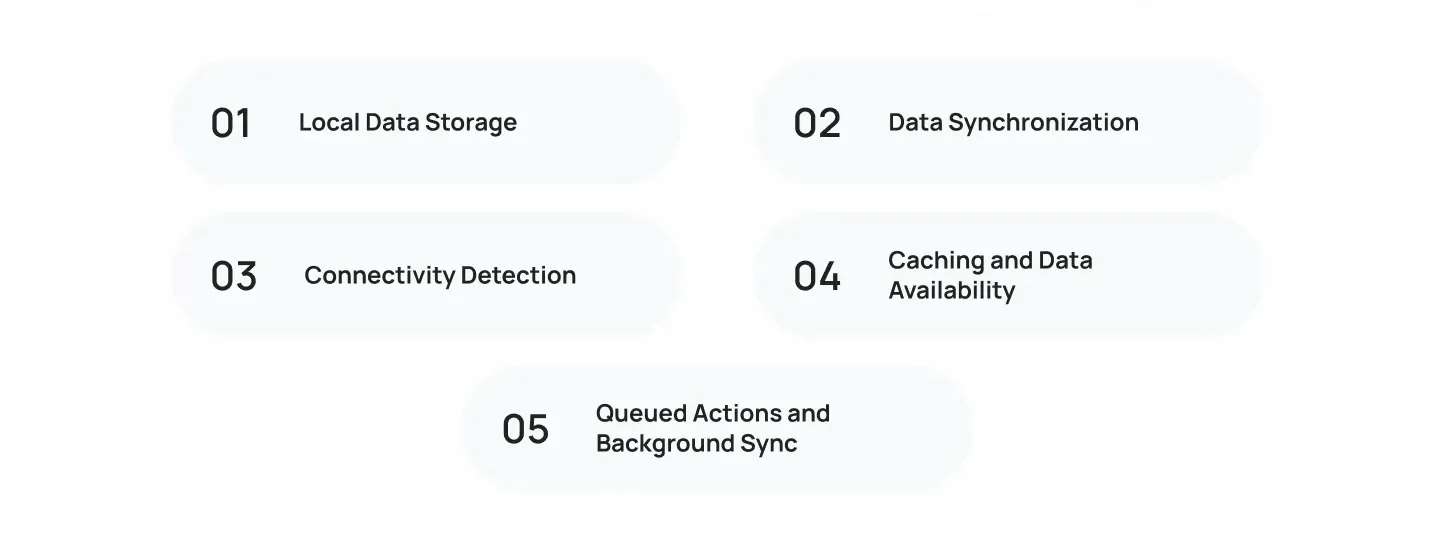
Building offline-first mobile apps requires rethinking how data flows through the application. Five principles form the foundation of this approach.
1. Local Data Storage
Every offline-first app needs a local database that mirrors the structure of server data. Mobile teams commonly use SQLite, Realm, or WatermelonDB for this layer.
The Repository Pattern helps here. It separates data access logic from the rest of the app, so the UI doesn’t need to know whether data came from local storage or a remote API. As a result, you can swap or upgrade your storage layer without rewriting business logic.
2. Data Synchronization
Synchronization keeps local and remote data aligned once a connection returns. Delta synchronization sends only changed records instead of full datasets, which reduces bandwidth use and speeds up sync on slow connections.
Because two devices can edit the same record while both are offline, most systems accept eventual consistency: local and remote data will match eventually, but not necessarily at the same instant. This trade-off is deliberate. It favors availability and responsiveness over strict, real-time accuracy.
3. Connectivity Detection
An offline-first app needs to know its current network state to decide when to sync. Connectivity Monitoring listens for network changes and triggers sync jobs automatically when a connection becomes available.
Simple “online or offline” checks aren’t enough, however. A device can show a Wi-Fi icon while sitting behind a captive portal with no real internet access. Reliable connectivity detection tests actual reachability, not just interface status.
4. Caching and Data Availability
Caching determines what data stays available offline and for how long. Well-designed offline mobile applications cache the data users need most, such as recent orders, saved content, or profile details, while deferring less critical data until a connection returns.
Cache invalidation adds complexity. Teams need clear rules for when cached data expires and gets refreshed, so users don’t act on stale information without knowing it.
5. Queued Actions and Background Sync
When a user submits an action offline, such as sending a message or placing an order, the app needs to queue it. The Outbox Pattern stores these pending actions in a local queue and processes them in order once connectivity returns.
Failed sync attempts shouldn’t retry immediately and repeatedly, since that drains battery and can overwhelm a recovering network. Exponential Backoff spaces out retry attempts with increasing delays, which gives the network time to stabilize before the next attempt.
Use Cases for Offline-First Mobile Apps
Offline mobile app development applies across almost every industry where users move between connectivity zones. Common use cases include:
- Field service and logistics apps that let technicians log job details, capture signatures, and update inventory without signal.
- Healthcare apps used in clinics or ambulances where patient data must be recorded regardless of network availability.
- Travel and navigation apps that need maps, itineraries, and directions to work mid-flight or in remote areas.
- Retail and point-of-sale apps that must keep processing transactions during outages instead of stopping checkout entirely.
- Note-taking and productivity apps where users expect instant response times regardless of connection quality.
- Educational apps serving regions with limited or expensive mobile data.
Across all these cases, the common thread is the same. Users need the core task to complete now, with sync happening quietly afterward. As mobile web technology matures, more teams are blending native and web approaches, too. For a broader look at where this is headed, see our analysis of the future of progressive mobile web apps.
Essential Tools and Technologies for Offline-First Design
Offline-first mobile app development relies on a defined stack of local databases, sync frameworks, and monitoring tools. Enterprise investment in this tooling continues to grow. Gartner forecasts worldwide IT spending will reach $6.37 trillion in 2026, with software spending alone climbing to $1.47 trillion, up 15.5% year over year, much of it directed at application platforms and mobile infrastructure.
Local Databases and Storage
| Tool | Platform | Best For |
| SQLite | iOS, Android, cross-platform | Structured relational data, mature tooling |
| Realm | iOS, Android, React Native, Flutter | Object-oriented models, fast reads |
| WatermelonDB | React Native | Large datasets with lazy loading |
| ObjectBox | iOS, Android, Flutter | High-performance local queries |
| Hive | Flutter | Lightweight key-value storage |
APIs and Synchronization Frameworks
Sync frameworks manage the exchange of data between local storage and the server. Firebase Firestore, WatermelonDB’s sync protocol, and custom REST or GraphQL layers built around Delta Synchronization all handle this differently, but the goal stays constant: move only what changed, confirm receipt, and resolve conflicts predictably.
Network Monitoring Tools
Connectivity Monitoring libraries, such as NetInfo for React Native or Android’s ConnectivityManager, detect network type, strength, and reachability. Pairing these with a retry strategy ensures the app reacts to real connection changes instead of guessing.
Offline Data Management Libraries
Libraries like Redux Offline, RxDB, and PouchDB handle queuing, caching, and sync orchestration as a package, reducing the amount of custom infrastructure a team needs to build and maintain. Teams building for the browser instead of native platforms follow a similar playbook. If you’re new to the concept, this guide on how to build web apps with offline support covers service workers and cache APIs in more depth.
Challenges of Building Offline-First Mobile Apps
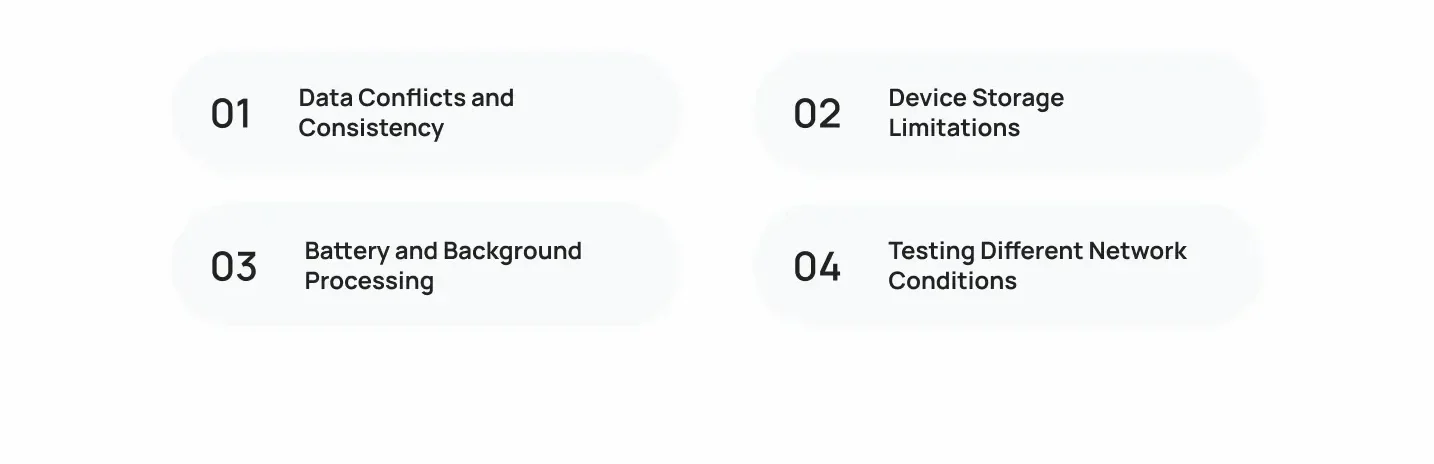
Offline-first architecture solves connectivity problems, but it introduces its own set of engineering challenges.
Data Conflicts and Consistency
When two devices edit the same record offline, the app needs a conflict resolution strategy. Common approaches include last-write-wins, field-level merging, or prompting the user to choose a version. Without a clear strategy, teams risk silent data loss, which is often worse than a visible error.
Device Storage Limitations
Older or budget devices have limited storage, which restricts how much data offline mobile applications can cache locally. Teams need to prioritize which data justifies the storage cost and set clear limits on cache size.
Battery and Background Processing
Background sync, retry loops, and connectivity checks all consume battery. Exponential Backoff helps here too, since it reduces the frequency of failed attempts. Still, background processing needs careful tuning so the app doesn’t become known as a battery drain.
Testing Different Network Conditions
Real-world networks rarely fail cleanly. They degrade gradually, drop intermittently, or throttle bandwidth without disconnecting entirely. Testing only for “online” and “offline” states misses most of these scenarios.
Best Practices for Designing Offline-First Mobile Apps

Following a structured process reduces rework later in development.
Decide Which Features Must Work Offline
Not every feature needs full offline support. Start by identifying which actions are critical to the core user journey. An offline-first application for field service, for example, must let technicians log work orders offline, but analytics dashboards can reasonably wait for a connection.
Prioritize Critical Data
Once you know which features need offline support, define what data those features require. Cache that data aggressively, and defer everything else until the app reconnects.
Plan for Synchronization Failures
Sync will fail sometimes, whether from server errors, timeouts, or conflicting edits. Build Conflict Resolution and Exponential Backoff into the sync layer from the start, rather than patching them in after users report data loss.
Test Across Different Connectivity Scenarios
Use a checklist to verify behavior under realistic conditions:
- App launches and functions with no connection at all
- App recovers gracefully when connection returns mid-session
- Queued actions sync correctly after intermittent drops
- Conflicting edits resolve without silent data loss
- Sync retries back off correctly instead of hammering the server
- Battery usage stays reasonable during extended offline periods
Build Reliable Offline-First Mobile Apps With Cubix
Cubix designs and builds offline-first mobile apps for teams that can’t afford downtime when connectivity drops. As a leading custom mobile app development company, our engineers architect the local storage, sync, and conflict-handling layers your app needs from day one, rather than retrofitting them after launch. This matters whether you’re building a native app, a hybrid app, or a connected web experience.
If your roadmap also includes a lightweight, installable web experience, our PWA Development Company team applies many of the same offline caching and background sync principles covered in this guide, adapted for the browser instead of the OS. Progressive web apps won’t replace a fully native offline-first app for every use case, but they can extend reach to users who prefer not to install from an app store.
Whether you need a field service platform, a healthcare app, or a consumer product built for unreliable networks, our team handles the full stack, from Repository Pattern data layers to Delta Synchronization pipelines.
Want to discuss your project? Our experts are just a click away.
Contact UsFrequently Asked Questions
1. What is an offline-first mobile app?
An offline-first mobile app stores and processes data locally on the device first, then syncs with a server when a connection is available. This means the app remains fully usable without internet access, unlike traditional apps that depend on a live connection for most actions.
2. How does an offline-first app work?
The app reads and writes to a local database as the primary data source. A background process monitors connectivity and syncs changes to the server whenever a connection appears, using strategies like Delta Synchronization to keep transfers efficient.
3. What is offline-first architecture?
Offline-first architecture is a system design approach where local storage acts as the source of truth, and the network layer becomes optional rather than required. It includes local databases, sync engines, conflict handling, and connectivity detection working together.
4. How do offline-first apps synchronize data?
Most apps use Delta Synchronization to send only changed records, reducing bandwidth use. Sync typically runs in the background, triggered by Connectivity Monitoring, and follows a queue so actions process in the correct order.
5. How do offline apps handle data conflicts?
Apps use Conflict Resolution strategies such as last-write-wins, timestamp comparison, or field-level merging. Some apps prompt users to choose between conflicting versions when automatic resolution isn’t safe.
6. What database is best for offline-first mobile apps?
SQLite works well for structured relational data, while Realm and ObjectBox suit object-oriented models with frequent local queries. WatermelonDB and Hive fit React Native and Flutter apps handling large datasets efficiently. The right choice depends on your data structure and platform.
7. What is the difference between offline-first and online-first apps?
Offline-first apps treat local storage as the primary data source and sync opportunistically. Online-first apps fetch data live from a server on each request and typically fail or degrade when the connection drops.
8. What is the difference between offline-first and local-first?
Offline-first focuses on maintaining functionality during connectivity gaps, with the expectation that data eventually syncs to a central server. Local-first extends this idea further, prioritizing user ownership of data and often supporting peer-to-peer sync without requiring a central server at all.
9. Can Flutter build offline-first mobile apps?
Yes. Flutter supports offline-first development through libraries like Hive, ObjectBox, and Drift for local storage, paired with custom sync logic or packages like RxDB for conflict handling and background sync.
10. Can React Native build offline-first apps?
Yes. React Native commonly uses WatermelonDB or Realm for local storage, combined with Redux Offline or RxDB for sync orchestration, and NetInfo for Connectivity Monitoring.
11. How much does it cost to build an offline-first mobile app?
Costs vary based on app complexity, the number of platforms, and how much offline functionality the app requires. Offline-first architecture typically adds development time upfront for local storage and sync logic, but it reduces long-term support costs tied to network failure bugs.
12. What industries benefit most from offline-first apps?
Field service, logistics, healthcare, retail, travel, and education see the clearest benefits, since users in these industries regularly operate in areas with inconsistent connectivity. Any app where task completion can’t wait for a network connection is a strong candidate for offline-first design.