Key Takeaways
- AR adds digital elements to the real world, while VR creates fully virtual environments.
- AR targets mobile users, while VR focuses on headset users seeking immersive experiences.
- AR development focuses on tracking and compatibility, while VR requires high performance and comfort testing.
- VR games generally cost around 30% more than AR games of similar scope.
- The right choice depends on your game concept, target audience, budget, and development goals.
AR vs VR game development begins with one choice. Do you want players to see the real world, or leave it behind? Augmented reality (AR) adds digital objects to a live camera view. Virtual reality (VR) replaces the player’s surroundings with a fully rendered 3D world.
That choice shapes your engine setup, hardware targets, art pipeline, and budget. It also changes how you test. An AR game must work in a messy living room. A VR game must keep players comfortable inside a headset.
This guide compares both paths side by side, so you can plan with clear facts. If you want to hire a game development company, the sections below also show what to ask for. Studios now build for AR and VR gaming at the same time, and the hardware market keeps shifting.
What Is the Difference Between AR and VR Game Development?
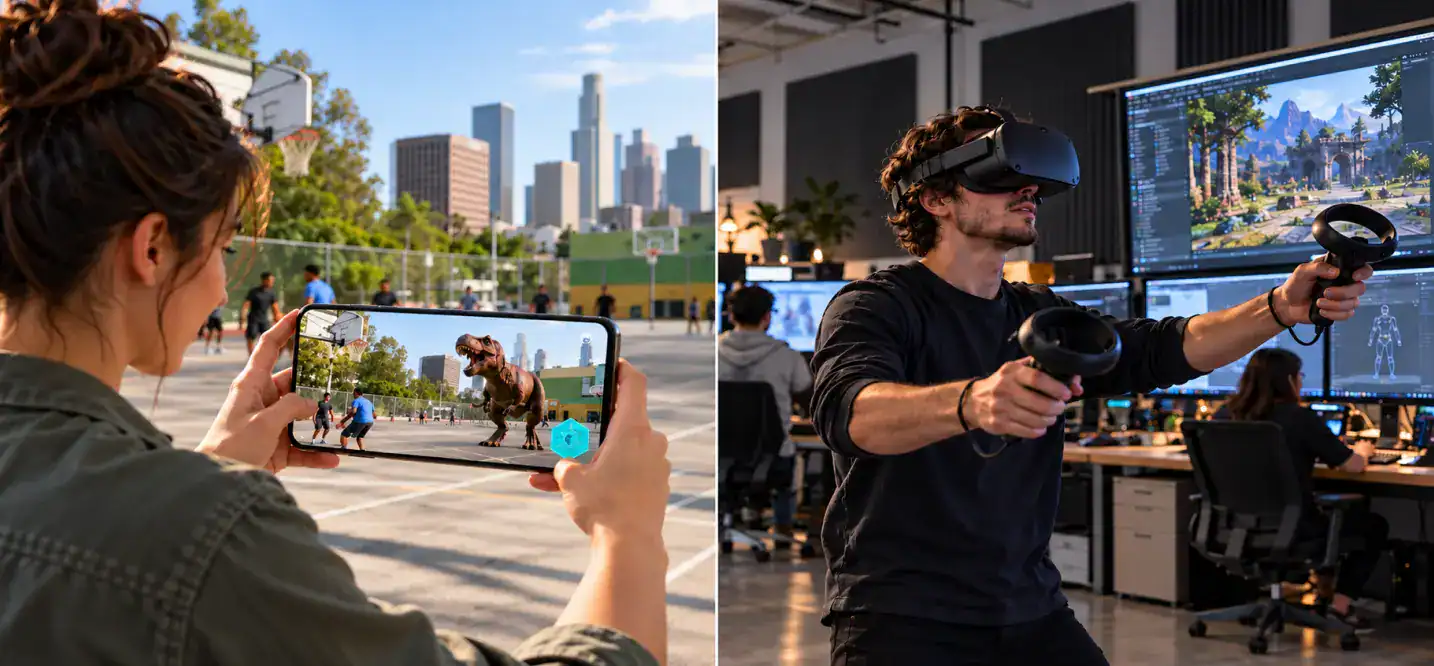
The main difference in AR vs VR game development is simple. AR adds to the player’s world, while VR builds a new one. Because of this, every technical choice changes, from tracking to level design to testing.
What Is AR Game Development?
Augmented reality game development creates games that place digital content in the player’s real surroundings. Players see that content through a phone, tablet, or smart glasses.
Key traits of AR games:
- Use the camera and motion sensors to read the room
- Detect surfaces, images, faces, or GPS locations
- Run mostly on mobile devices
- Favor short sessions and outdoor play
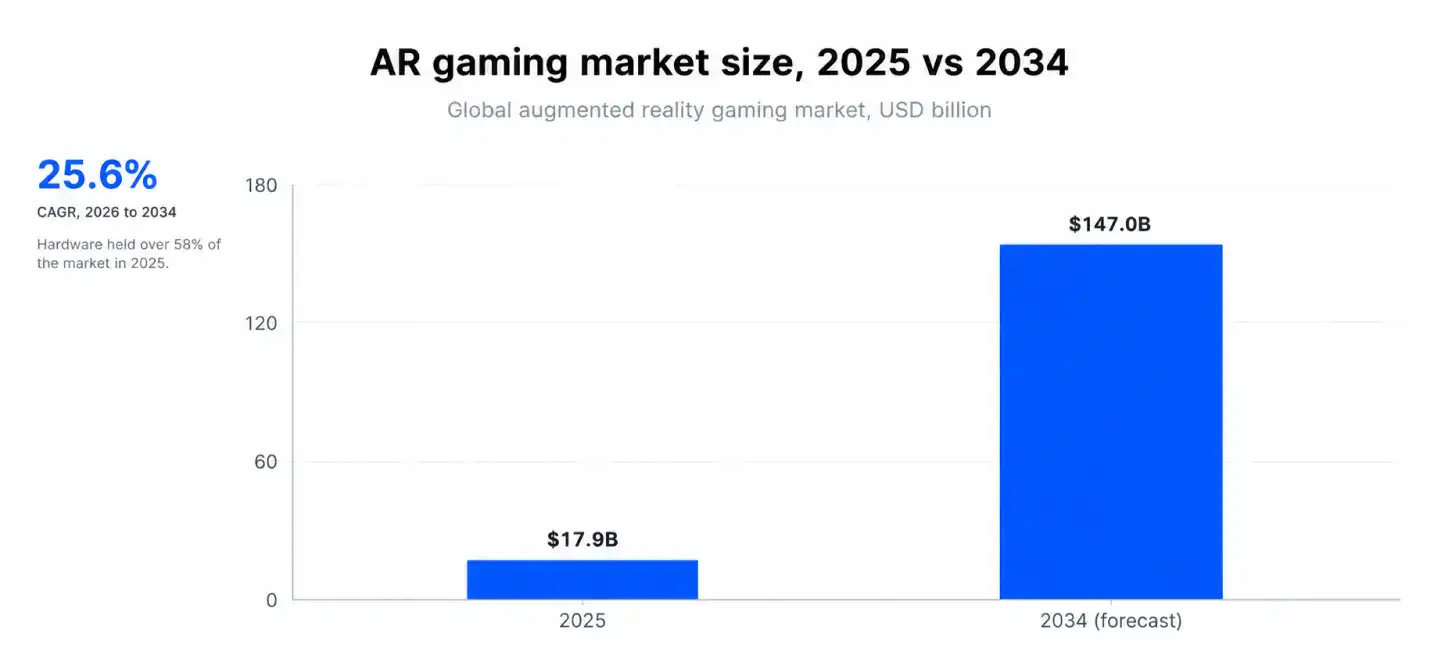
AR is also a fast-growing market. The global AR gaming market was valued at USD 17.9 billion in 2025, and IMARC Group expects it to reach USD 147.0 billion by 2034, a 25.6% CAGR from 2026 to 2034.
What Is VR Game Development?
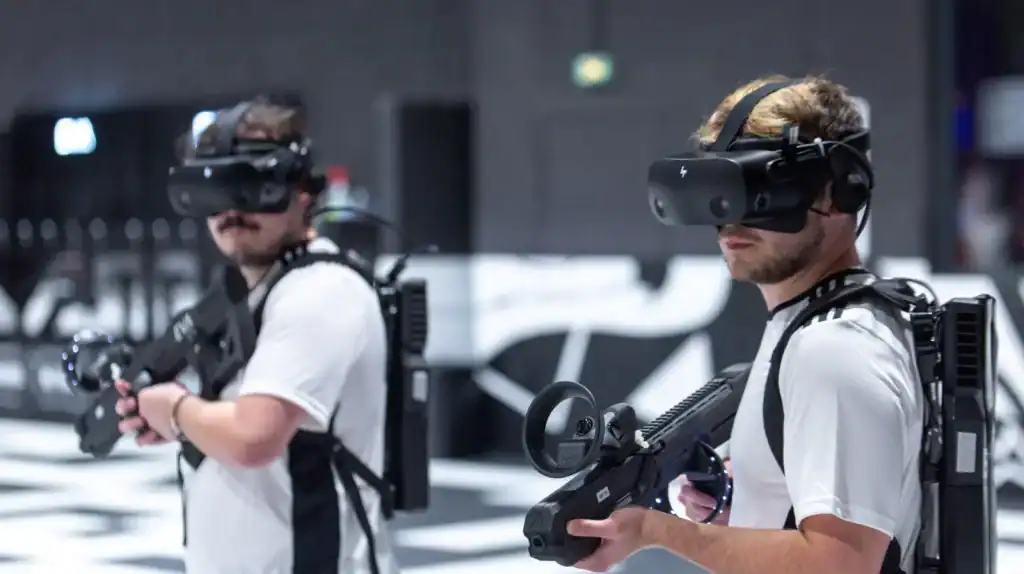
Virtual reality game development builds fully enclosed 3D worlds that players enter with a headset. The game controls everything the player sees and hears.
Key traits of VR games:
- Track head and hands in six degrees of freedom (6DoF)
- Need stable frame rates, often 72 to 120 FPS
- Support room scale or seated play
- Fit deep, focused sessions
Because the player cannot see the real room, you must manage comfort, safety, and scale with care.
AR vs VR Game Examples
- AR: Pokémon GO (location-based play), Monster Hunter Now, and Peridot (virtual pet care)
- VR: Beat Saber (rhythm), Half-Life: Alyx (PC VR), and Gorilla Tag (social play on Quest)
- Mixed reality: Demeo (tabletop strategy on Meta Quest)
These titles show augmented reality vs virtual reality in gaming in practice. AR games reward movement through real places. VR games reward presence inside a built world.
AR vs VR Game Development: Key Differences
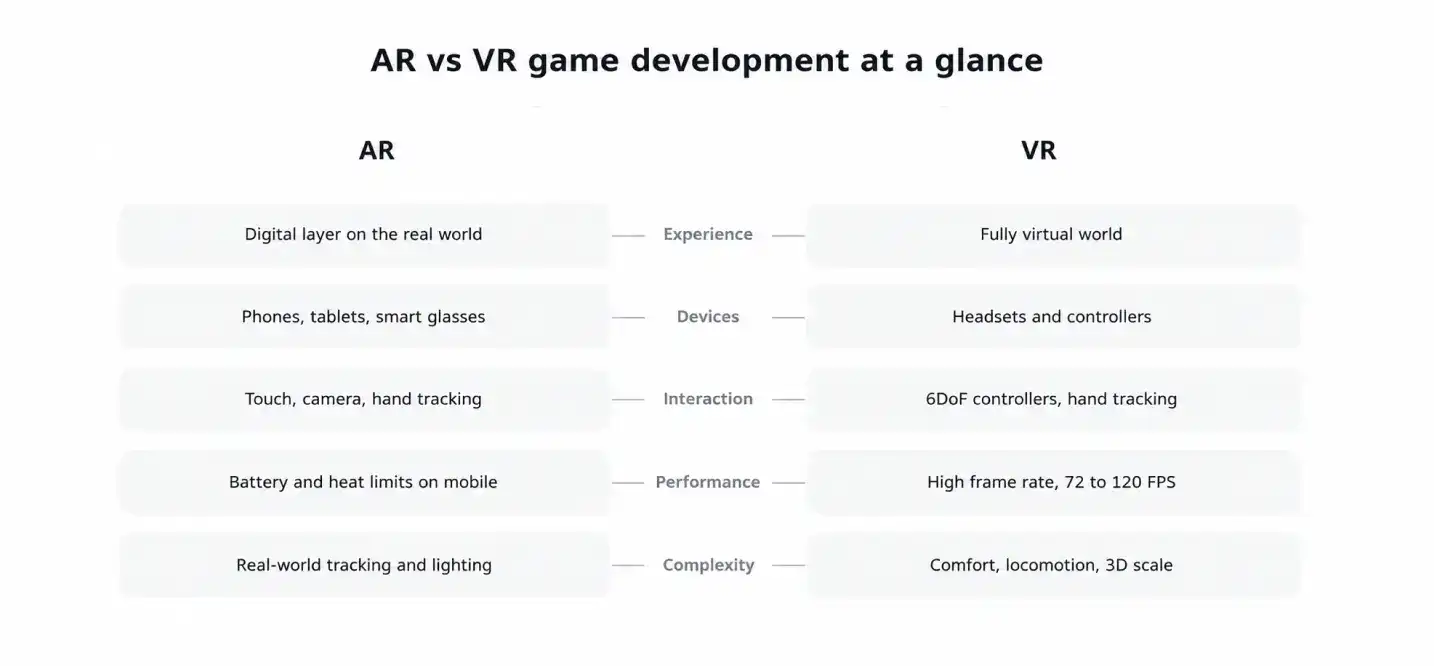
Use this table to see the main AR vs VR differences at a glance.
| Factor | AR Games | VR Games |
|---|---|---|
| Environment | Real world with digital overlay | Fully virtual world |
| Main devices | Smartphones, tablets, smart glasses | Headsets (Meta Quest, PS VR2, PICO, PC VR) |
| Input | Touch, camera, gestures, GPS | 6DoF controllers, hand tracking, eye tracking |
| Target frame rate | 30 to 60 FPS on mobile | 72 to 120 FPS |
| Session length | Short and casual | Medium to long and intense |
| Art scope | Small assets that blend into real rooms | Full environments and detailed worlds |
| Biggest risk | Tracking in poor light and clutter | Motion sickness and comfort |
| Typical audience | Mass market mobile players | Core and enthusiast players |
1. Gameplay and Player Experience
AR gameplay connects to the player’s real space. Players walk, point, and scan. As a result, designs focus on quick, repeatable actions. VR gameplay centers on presence. Players reach, dodge, and look around inside a world you control. Therefore, sessions run deeper but need comfort breaks.
2. Hardware and Devices
AR reaches billions of phones that already support ARKit or ARCore. You do not need new hardware to find players. VR requires a headset purchase. Your audience is smaller, yet it is more engaged and spends more per user.
3. Interaction and Controls
AR uses touch, camera input, and simple gestures. VR uses tracked controllers and hand tracking, so players grab, throw, and push objects directly. Because VR input feels physical, you must tune collisions, haptics, and object weight.
4. Graphics and Performance
In AR vs VR gaming technology, rendering needs differ most. A VR headset draws two views at once, which raises the load. A dropped frame there causes discomfort, not just a visual glitch. AR games share a phone’s battery and heat budget with the camera. Therefore, you keep models light and effects simple.
5. Development Complexity
AR complexity comes from the real world. Lighting, surfaces, and room clutter vary every session. VR complexity comes from the virtual world. You build full environments, systems for movement, and a comfort model. In short, AR tests your tracking, while VR tests your content and optimization.
How AR and VR Differ in Game Design
The design work in AR vs VR game development shifts from building spaces to adapting to them. In AR, the room is your level. In VR, you build the room and control every inch of it.
1. Level Design and Environments
AR levels must flex. You cannot know if the player sits in a kitchen or a park. Therefore, designers use anchors, flexible spawn rules, and scalable objects.
VR levels are fixed and detailed. You control lighting, scale, and sightlines. However, players notice poor scale instantly, so you must test proportions in a headset.
2. Player Movement and Interaction
AR relies on real movement. Players walk to explore, so you must plan for safe, small, or outdoor spaces.
VR needs locomotion choices:
- Teleport for comfort
- Smooth movement for experienced players
- Snap turning to reduce nausea
- Room scale for natural walking in small areas
3. Spatial Audio and Immersion
Spatial audio places sound in 3D space. In VR, it builds presence because players locate threats and objects by ear.
In AR, sound must blend with real noise. Designers keep audio cues clear but not overpowering, since players still hear their surroundings.
4. Comfort and Accessibility
Comfort affects retention. VR players who feel sick leave and rarely return.
Build these options early:
- Seated mode and adjustable height
- Vignette during movement
- Subtitles and one handed controls
- Safe play area warnings for AR and VR
AR vs VR Game Development Process
Both paths follow the standard game pipeline, but the early and late stages differ. For a deeper look at how studios work through each stage, read the AR and VR game development process guide.
AR Game Development Process
The AR game development process follows these steps:
- Define the play space: indoor, outdoor, or tabletop
- Choose a tracking method: plane detection, image markers, depth, or GPS
- Prototype on real phones in real rooms
- Build lightweight, optimized 3D assets
- Connect backend services for location, multiplayer, or live events
- Test across devices and lighting, then publish on the App Store and Google Play
VR Game Development Process
The VR game development process follows these steps:
- Set the comfort model and locomotion style
- Greybox levels and test them in a headset early
- Build full environments and interactions
- Optimize for the target frame rate
- Add spatial audio and haptics
- Playtest for comfort, then submit to stores such as Meta Horizon Store, Steam, or PlayStation Store
Testing and Quality Assurance
Testing differs for each type. Plan for these checks:
- AR: Different lighting, surfaces, phone models, and outdoor conditions
- VR: Frame rate stability, motion comfort, controller tracking, and play area limits
- Both: Battery drain, thermal limits, crashes, and input latency
Launch and Post-Launch Support
Launch is the start of a longer cycle. Store reviews, OS updates, and new devices keep changing your target.
- Patch bugs found by real players
- Update the game for new iOS, Android, and headset firmware versions
- Add events and content to keep players active
- Track retention, crash rates, and session length
Game Engines, Tools, and Platform Requirements
Tools drive timelines and budgets in AR vs VR game development. The A Comprehensive Guide to Game Development in 2026 covers general pipelines if you want broader context on engines and teams.
Unity vs Unreal Engine
The best game engine for AR and VR games depends on your platform and visual goal.
| Unity | Unreal Engine | |
|---|---|---|
| Language | C# | C++ and Blueprints |
| AR support | Strong, through AR Foundation | Available, with fewer mobile tools |
| VR support | Strong, especially for standalone headsets | Strong for high end PC and console VR |
| Best for | Mobile AR, Quest titles, fast prototypes | Visually rich VR and PC experiences |
In short, pick Unity for most AR games and standalone VR. Pick Unreal when visual quality is your top priority.
AR and VR Development SDKs
The right AR and VR game development tools save weeks of work:
- AR: ARKit (iOS), ARCore (Android), AR Foundation, and Vuforia
- VR: OpenXR, Meta XR SDK, SteamVR, and PICO SDK
- Audio and input: Steam Audio, Meta XR Audio SDK, and XR Interaction Toolkit
OpenXR matters most for VR. It lets one codebase target several headsets.
Supported Gaming Platforms
The AR VR gaming platforms you choose set your audience size.
- AR: iOS, Android, and smart glasses
- VR: Meta Quest, PlayStation VR2, SteamVR PCs, and PICO
- Mixed reality: Meta Quest 3 and similar headsets with color passthrough
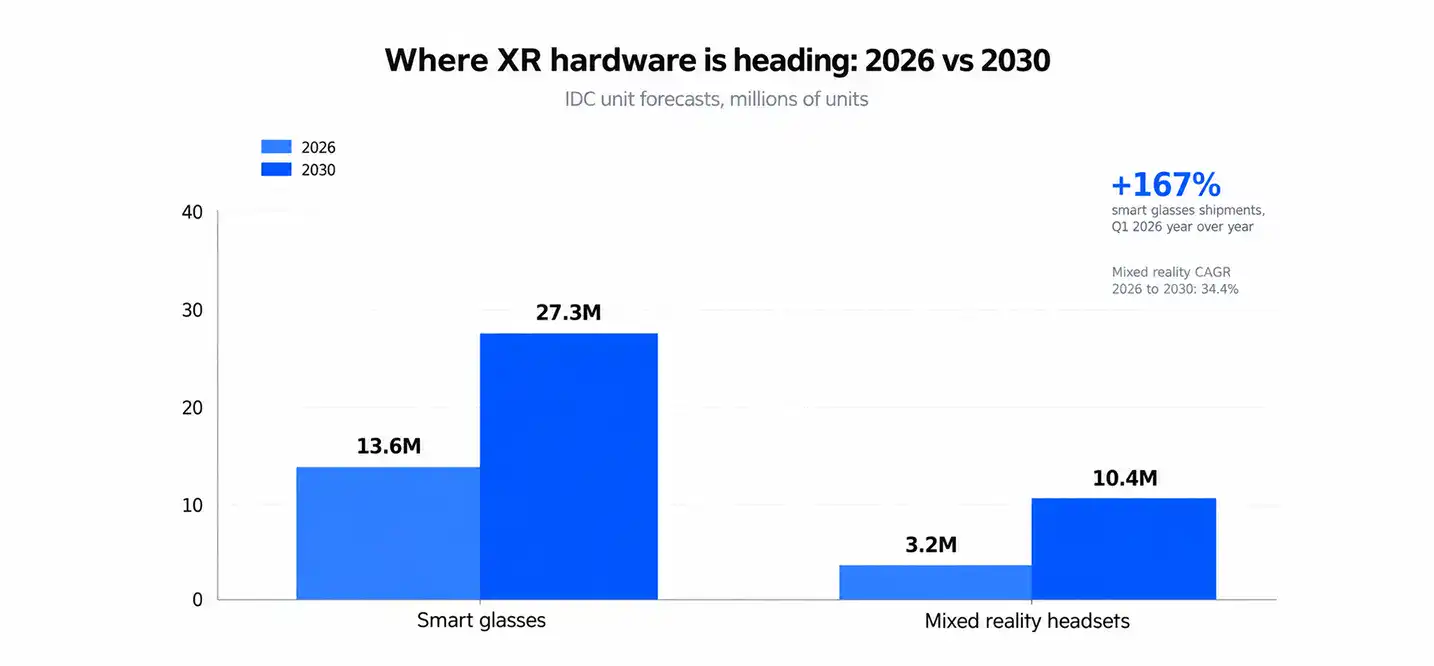
Hardware trends also matter. IDC reports smart glasses shipments grew 167% year over year in Q1 2026, and it expects mixed reality headsets to grow from 3.2 million units in 2026 to 10.4 million by 2030.
Hardware Requirements
Plan your hardware requirements for AR and VR games before production starts.
- Development PC: Strong GPU, 32 GB RAM, and a fast SSD
- AR test devices: Several iPhones and Android phones, plus one tablet
- VR test devices: At least two headsets, such as Quest 3 and Quest 3S
- Extras: Controllers, a Mac for iOS builds, and a clear play space
Technical Challenges Studios Should Plan For
Every project in AR vs VR game development hits a few predictable problems. Plan for them in your schedule, not after launch.
1. Tracking and Spatial Accuracy
AR tracking drifts in low light, on shiny surfaces, and in empty rooms. Objects then float or slide. VR tracking fails when controllers leave the sensor view or the room is too bright. In both cases, test in poor conditions, not only in your office.
2. Performance and Rendering
Performance limits are strict. Phones overheat, and headsets render two eyes at once.
- Reduce draw calls and polygon counts
- Use foveated rendering on supported headsets
- Bake lighting where possible
- Profile on target devices every week
3. Comfort and Player Safety
Motion sickness is the top VR risk. AR adds a different risk, since players look at screens while they walk. Add boundary warnings, session reminders, and safe play prompts. Moreover, avoid forcing camera motion that players do not control.
4. Device Compatibility
Devices differ widely. Android phones vary in sensors and chips. Headsets vary in resolution, controllers, and tracking. Therefore, set a device support list early, and build on OpenXR or AR Foundation to limit rework.
AR vs VR Game Development Cost Comparison
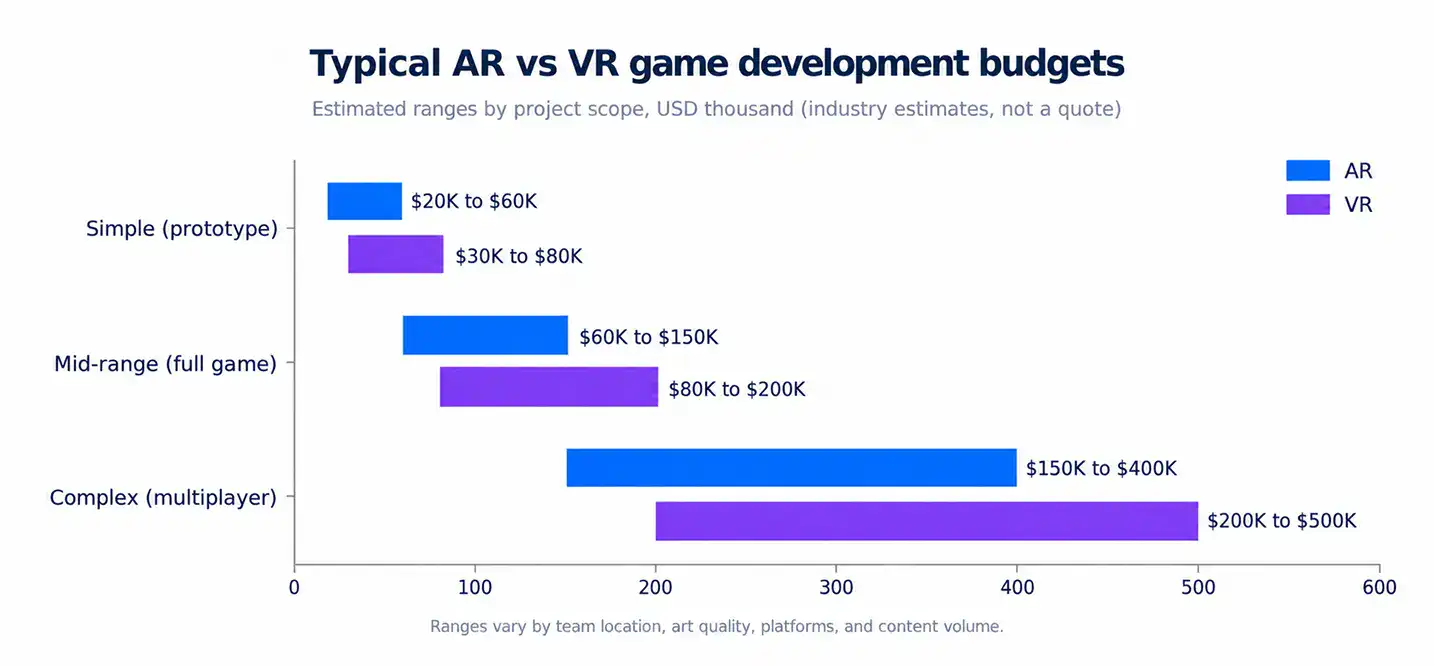
AR/VR game development cost depends mostly on scope, not on the technology label. VR usually costs about a third more than AR at the same scope because it needs full environments, deeper optimization, and comfort testing.
| Project Size | AR Cost Estimate | VR Cost Estimate | Typical Timeline |
|---|---|---|---|
| Prototype or simple game | $20,000 to $60,000 | $30,000 to $80,000 | 1 to 3 months |
| Mid range game | $60,000 to $150,000 | $80,000 to $200,000 | 4 to 8 months |
| Complex game (multiplayer, custom tech) | $150,000 to $400,000 | $200,000 to $500,000 | 9 to 18 months |
These ranges are planning estimates, not quotes. Prices change with team location and content volume.
Factors That Affect Development Costs
- Scope: Number of levels, mechanics, and play hours
- Art quality: Stylized assets cost less than realistic ones
- Platforms: Each extra device adds testing and optimization
- Multiplayer: Servers and sync raise cost and timeline
- Custom tech: Special tracking or hand input adds research time
For a real timeline example, read How We Built a Multiplayer Game in 16 Weeks.
Maintenance and Updates
Budget for life after launch. A common rule is 15% to 20% of the original cost each year. That money covers OS updates, device support, bug fixes, server costs, and new content. Skipping maintenance hurts ratings fast, especially on mobile.
Is AR or VR Better for Game Development?
Neither wins in AR vs VR game development. The better choice depends on your concept, audience, and budget. Match the technology to the experience you want, not to the trend.
When to Choose AR
- You want a large, mass-market audience
- Your game uses real places, such as walking or city exploration
- You have a smaller budget and need a faster launch
- Your players already own the device: a phone
When to Choose VR
- Your game needs deep immersion, such as horror, simulation, or fitness
- You target core players who own headsets
- You want physical interaction with objects and spaces
- You can fund longer production and comfort testing
Can a Game Combine AR and VR?
Yes. Mixed reality headsets show the real room through color passthrough. A game then places virtual objects on your table or walls. Studios build these games in Unity or Unreal with OpenXR. In addition, many players can switch between full VR and mixed reality in the same title, as in Demeo.
How to Choose an AR/VR Game Development Company
Picking the right AR/VR game development company reduces rework and missed deadlines. Judge candidates on proven experience, clear planning, and post-launch support.
1. Technical Expertise and Portfolio
Ask for live builds, not slide decks. Check that the team has shipped games for your target devices and engine.
Cubix has experience in immersive game development and offers dedicated augmented reality game development services for businesses looking to build interactive AR gaming experiences.
2. Development Budget and Timeline
Request a scoped estimate with milestones. A clear plan lists deliverables, test builds, and approval points.
Compare AR game development companies based on what each price includes. Check art, QA, store submission, and server costs. Cheap quotes often leave these out, raising the final bill. Also, confirm who owns the source code and assets.
3. Post-Launch Support
Ask how the studio handles updates after release. Devices, SDKs, and store rules change over time.
Cubix also provides virtual reality game development services for businesses building immersive gaming experiences. Before choosing a company, confirm response times for bugs and plans for supporting new headsets and operating system versions.
Ready to Build Your AR or VR Game? Contact Cubix Today
Contact UsFrequently Asked Questions
1. What’s the difference between VR and augmented reality?
VR replaces your surroundings with a fully virtual world through a headset. AR keeps the real world visible and adds digital objects through a phone, tablet, or glasses.
2. What are the differences between augmented reality, virtual reality, and mixed reality?
AR overlays digital content on the real world. VR fully replaces it. Mixed reality anchors digital objects to real surfaces so they react to your room, usually through headset passthrough.
3. What is better, AR or VR?
Neither is better overall. AR suits mass market mobile and location games. VR suits immersive games for a dedicated audience. Choose based on concept, audience, and budget.
4. What are the similarities between virtual reality and augmented reality?
Both use 3D engines like Unity and Unreal, track real movement, rely on spatial design and 3D audio, and need low latency. Both also require testing on real devices.
5. How is AI used in AR and VR?
AI creates and animates assets, powers smart NPCs and voice features, and improves scene understanding such as depth and occlusion. It also speeds up playtesting and bug detection.
6. Is VR growing or dying?
VR is shifting, not dying. IDC says smart glasses are displacing traditional VR and MR headsets as the main growth driver, yet it forecasts mixed reality growing from 3.2 million units in 2026 to 10.4 million by 2030.
7. How do development costs typically differ between AR and VR games?
VR usually costs about a third more than AR at the same scope. Full 3D environments, heavier optimization, and comfort testing drive the gap.
8. What are the primary programming languages and frameworks used in AR game studios?
Studios use C# with Unity (AR Foundation, ARKit, ARCore), C++ and Blueprints with Unreal, Swift for native iOS, Kotlin for native Android, and JavaScript with WebXR.