- Game sound design is the craft of planning, making and placing every sound in a game.
- Audio gives feedback, builds mood and helps players read the action.
- Games use five audio types: effects, music, voice, ambience and UI sounds.
- Adaptive audio changes with gameplay, so the game feels alive.
- Good audio needs testing on real phones, speakers and headphones.
- Start small with a plan, a budget and a simple checklist.
Only 8% of surveyed mobile players play with sound on. TapResearch asked 2,400 players about it in 2022. Most people play on mute. So why care about audio at all?
Think about a coin pickup chime. Or a footstep right behind you. You react before you think. Sound works that fast. That same survey also found that frequent players use sound more. Great audio gives them a reason to stay.
This guide explains game sound design in plain English. You will learn the sound types, the pipeline, testing, licensing and costs. You will also get a checklist you can use today.
What Is Game Sound Design?
Game sound design is the craft of making every sound in a game. It covers effects, music, voice and ambience. The goal is simple. Help players feel, understand and enjoy the game.
Think of it as the hidden half of the screen. You may not notice good audio. You will notice bad audio fast.
It is also real, paid work. GameSoundCon ran a survey of 645 people in 2023. In North America, salaried composers and sound designers average $128,511.
What Game Sound Design Covers
- Sound effects (SFX): footsteps, hits, jumps and pickups.
- Music: themes, battle tracks and menu loops.
- Voice: dialogue, narration and character reactions.
- Ambience: wind, crowds, rooms and city noise.
- UI sounds: button taps, menu clicks and alerts.
What a Game Sound Designer Does
A sound designer plans, builds and places the sounds players hear. The job goes beyond making cool noises.
- Records or designs sound effects.
- Edits and cleans audio files.
- Sets up sounds in tools like Wwise or FMOD.
- Works with programmers to trigger sounds in the game.
- Mixes levels so nothing hides important cues.
- Fixes audio bugs during testing.
On small teams, one person often does all of it.
Bring Your Game to Life With Better Sound Design
Contact UsHow Sound Affects Gameplay
Sound changes how a game plays, not just how it feels. It does four jobs at once.
Feedback
Good audio tells players what just happened. A bright chime says you won. A dull thud says you missed. Players learn this without reading a single word.
Immersion
Sound builds mood. Rain, echoes and a low hum make a room feel real. Music sets the emotion. Silence can do the same job.
Gameplay Readability
Players often hear danger before they see it. A growl from the left says turn left. If sounds clash, players miss that cue. Clear mixing keeps the game fair.
Accessibility
Not every player hears well. Some play in loud places. Others play with the sound off. Good design plans for all of them.
- Add subtitles with clear, large text.
- Show visual cues for key sounds.
- Offer separate volume sliders.
- Include a mono audio option.
- Use vibration for important alerts.
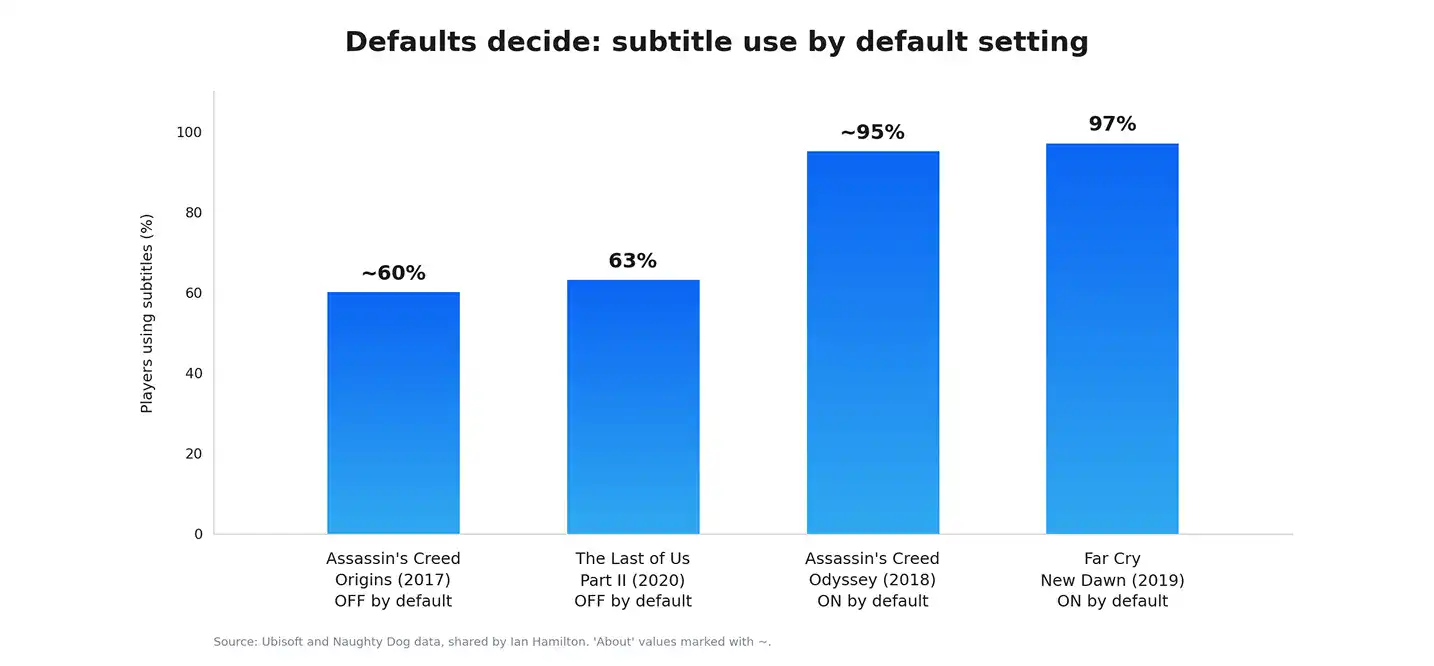
Ubisoft shared a telling gap. Around 60% of Assassin’s Creed Origins players switched subtitles on. In Odyssey, subtitles started on. Around 95% kept them. Defaults matter more than most teams expect.
The reach is huge too. Microsoft estimates over 400 million gamers have a disability. Audio UX works best when planned with your Game UI/UX Design.
Types of Game Audio
Every game uses a mix of five audio types. Each one has a different job.
| Audio type | What it does | Example | Common mistake |
|---|---|---|---|
| Sound effects | Gives feedback on actions | Sword hit, jump, pickup | Same sound repeats too often |
| Music | Sets mood and pace | Boss theme, menu loop | Loops feel obvious or tiring |
| Voice | Tells story and guides players | Tutorial narrator | Lines are cut off or too quiet |
| Ambience | Makes the world feel real | Wind, crowd, forest | Too loud, hides key sounds |
| UI sounds | Confirms taps and choices | Button click, reward chime | Too harsh or too frequent |
Roles blur on small teams. GameSoundCon surveyed the industry in 2023. Over 60% of indie sound designers also composed music. In AAA studios, fewer than 15% did.
Each type needs a clear job. If everything is loud, nothing stands out.
What Is Adaptive Game Audio?
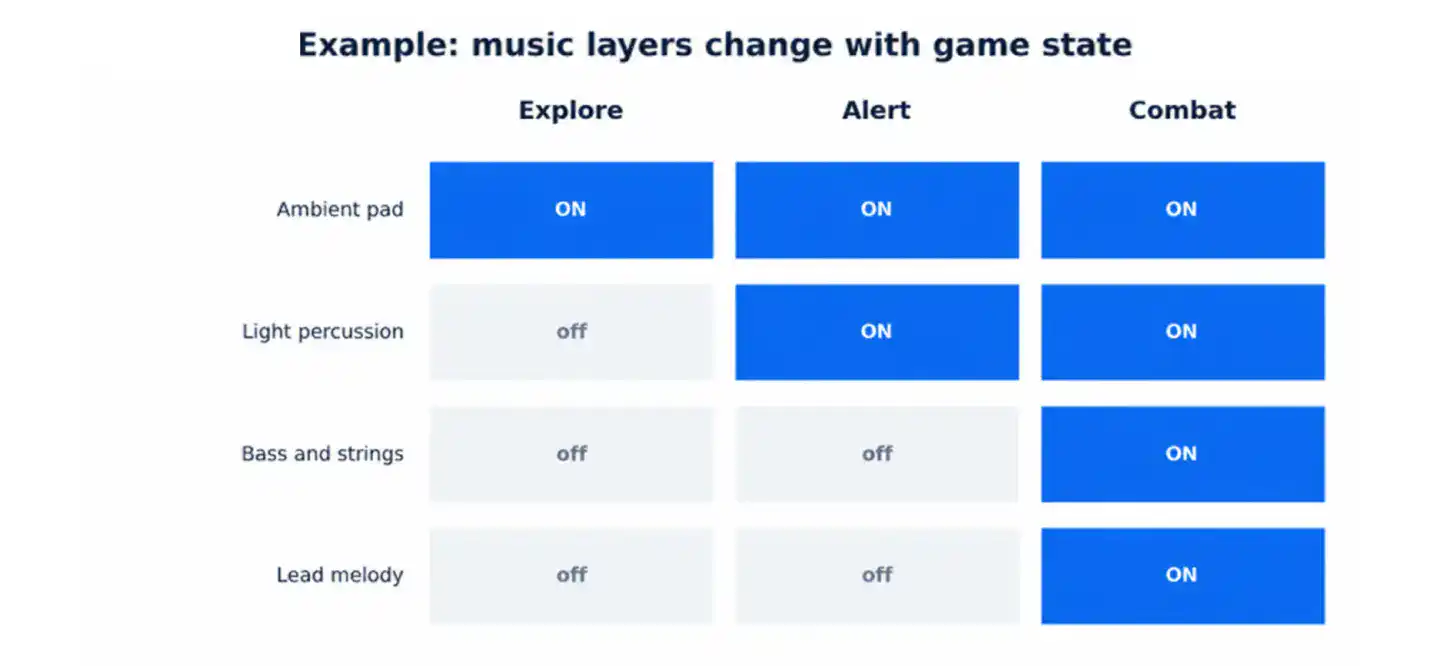
Adaptive game audio changes with what the player does. Music, effects and mix shift as the game state changes. A calm scene turns tense when an enemy appears.
Adaptive Music vs Linear Music
- Linear music: plays start to finish, like a movie score.
- Adaptive music: layers and sections change with gameplay.
- Linear is simpler: it costs less and tests faster.
- Adaptive feels alive: it needs more planning and more testing.
Look at the diagram below. A single track can grow from calm to intense. Layers fade in as danger rises.
Interactive Mixing
Interactive mixing balances sounds in real time. Three ideas matter most.
- Ducking: lowers music when a voice line plays.
- Priority: important sounds win when voices are limited.
- Dynamic range: loud moments feel loud because quiet ones exist.
Spatial Audio
Spatial audio places sounds around the player in 3D. On headphones, you can tell if a sound is left, right or behind.
- Helps players find enemies and objects.
- Adds depth to environments.
- Needs testing on speakers too, since phone speakers play it flat.
Players want it. A 2022 Agora survey asked Gen Z where spatial audio matters most. Gaming came first at 24%.
The Game Audio Pipeline
A pipeline is the path a sound takes from idea to player. Skipping steps costs time later.
Stages
- Concept: set the sound style, rules and budget.
- Creation: record, design and compose the assets.
- Implementation: connect sounds to game events.
- Mixing: balance levels across every scene.
- QA: test on real devices.
- Release and updates: watch for bugs and patch audio.
Studios often pair this with full Online Game Development Services support.
Roles
- Sound designer: builds effects and ambience.
- Composer: writes the music.
- Audio programmer: builds tools and triggers.
- QA tester: hunts audio bugs.
- Audio lead or producer: keeps schedule and budget on track.
GameSoundCon’s 2023 survey shows how teams are built. About 64% of game audio pros are salaried employees. Only 30% are pure freelancers.
Audio Middleware Options
Middleware sits between your sounds and your game engine. It gives designers control without heavy coding.
| Tool | Best for | Learning curve | Cost model |
|---|---|---|---|
| Wwise | Large, complex projects and Unreal teams | Steeper | Free tier plus license tied to project size. Check current terms |
| FMOD Studio | Indie and mid-size teams, especially Unity | Medium | Free for non-commercial use. Tiered license by budget. Check current terms |
| Engine-native audio | Simple games and quick prototypes | Lower | Included with the engine |
The same survey found FMOD popular with Unity teams. Wwise led with Unreal.
A development partner like Cubix can help connect audio tools to your engine. That saves your team setup time.
How Game Audio Is Tested
Audio QA checks that every sound plays at the right time, level and place. Players use many devices. A Consumer Technology Association survey found 61% of US gamers play across multiple devices. Your audio must work on all of them.
Audio QA Basics
Hunt for these bugs first.
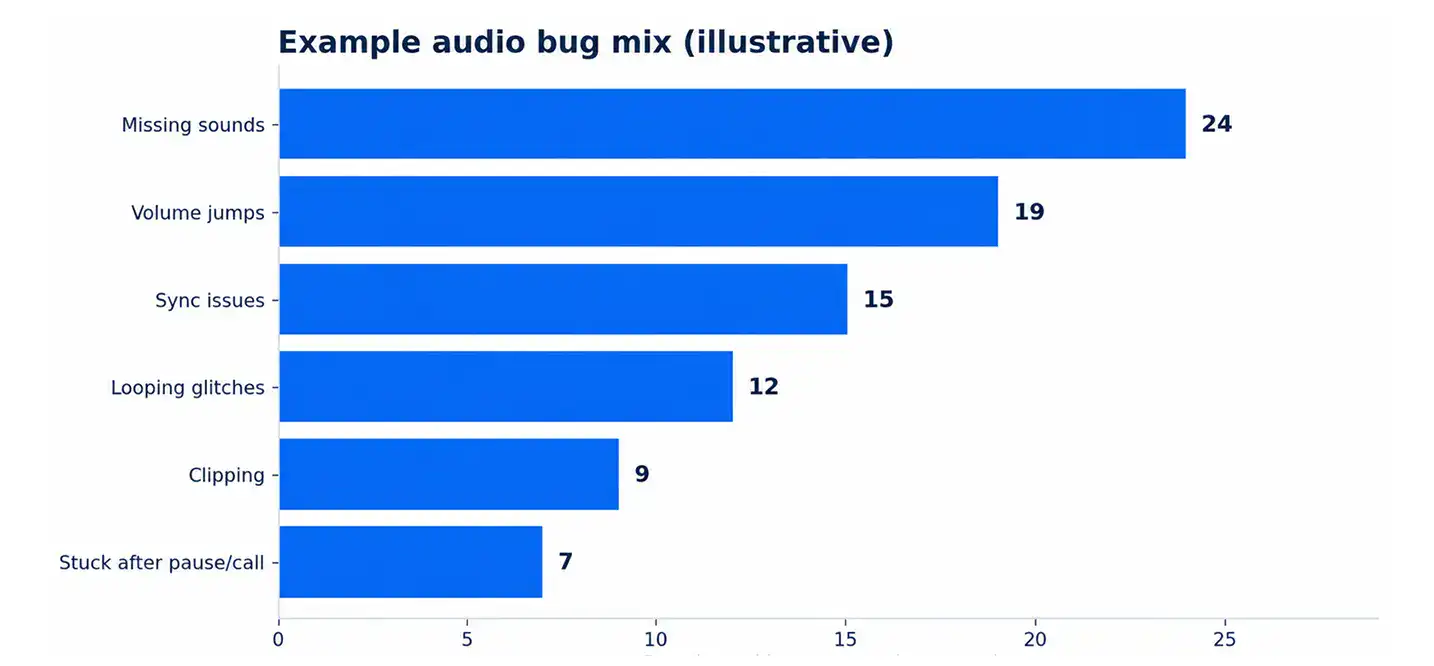
- Missing or wrong sounds.
- Looping glitches and sounds that never stop.
- Clipping and distortion.
- Audio out of sync with visuals.
- Big volume jumps between scenes.
- Sound that breaks after a call, alarm or pause.
- Memory spikes during busy scenes.
Test on low, mid and high-end phones. Test with speakers and headphones. Test with calls and notifications.
KPIs and Failure Signals
| Metric | Example target | How to test | Warning sign |
|---|---|---|---|
| Loudness consistency | Similar level across scenes | Play every level back to back | Players reach for the volume |
| Voice count | Stays under your set limit | Run the busiest scene | Sounds drop or cut out |
| Audio memory | Inside the assigned budget | Check profiler reports | Crashes on low-end phones |
| Sync accuracy | Sound lands with the action | Frame-by-frame review | Hits feel late or loose |
| Long-session stability | No dropouts in a 30 minute run | Soak test on real devices | Glitches grow over time |
| Missing sounds | Zero on core actions | Event checklist pass | Silent buttons or hits |
Licensing and Performance
Money is moving to mobile. Newzoo says mobile earned $113.3 billion in 2025. That was 56% of the $201.6 billion games market. Big revenue makes rights and file limits matter more.
Licensing Basics
- Royalty-free: pay once, use many times. Check the limits.
- Custom music and SFX: made for you. Confirm who owns what.
- Licensed music: popular tracks, often costly, with limits on region, time and platform.
Check every contract for these points.
- Ownership: work for hire or license.
- Territories and term.
- Platforms covered.
- Rights for updates and sequels.
- Credit lines.
Keep every contract and receipt in one folder.
Performance on Mobile
Phones have limits. Audio must fit inside them.
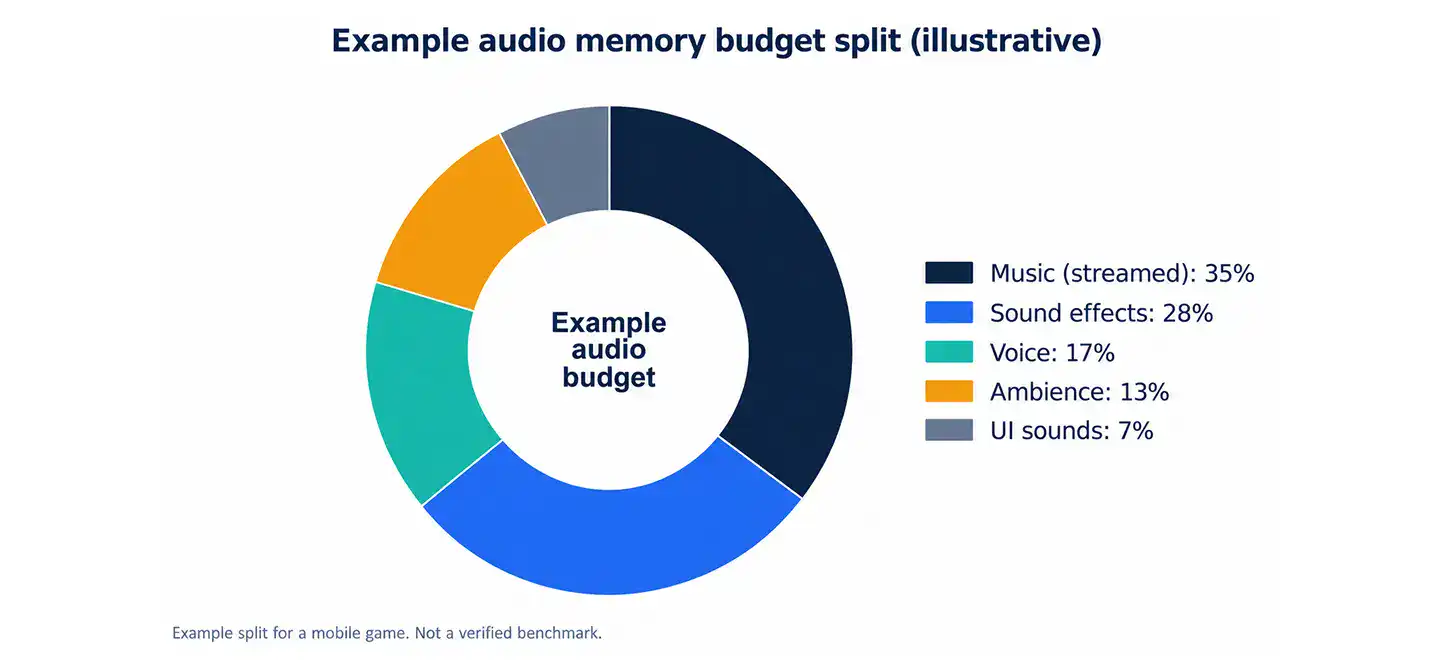
- Memory: stream long music. Load short effects.
- File size: compress audio and test the result.
- Voice limits: cap how many sounds play at once.
- CPU: skip heavy live effects on low-end phones.
- Loading: load audio per level, not all at once.
Size matters for installs. Google Play warns users on mobile data when an app passes 200 MB. Audio can take a big slice of that.
Planning early is easier with strong Mobile Game Development basics. At Cubix, mobile builds shape audio choices from the start. Memory and size limits guide each format decision.
Cost and Implementation Example
This example is an illustration. It is not a verified benchmark. Your costs will differ.
Example Setup
Assumptions for a small studio:
- A 2D mobile puzzle-adventure game for iOS and Android.
- Eight levels and about six months of production.
- 10 minutes of looping music.
- About 120 custom effects, plus some library sounds.
- 60 short voice lines.
- Audio built in FMOD with a Unity game.
- Hourly rates between $40 and $80.
Sample Budget
| Item | Scope | Estimated range | Notes |
|---|---|---|---|
| Music | 10 minutes at $100 to $500 per minute | $1,000 to $5,000 | Indie rates sit at the low end |
| Custom SFX | 120 sounds at $15 to $40 each | $1,800 to $4,800 | Mix with library sounds |
| Library packs | 2 to 4 packs | $300 to $1,500 | Check the license first |
| Voice | 60 lines at $10 to $30 each | $600 to $1,800 | Add retake time |
| Implementation | 60 to 120 hours | $2,400 to $9,600 | Events, mixer and triggers |
| Mix and QA | 30 to 60 hours | $1,200 to $4,800 | Test on several devices |
| Total | $7,300 to $27,500 | Example only |
For context, GameSoundCon found common AAA freelance music rates of $1,000 to $2,000 per finished minute. Rates of $100 per minute were common for indie games. Your scope sets your real price.
Ways to Control Cost
- Lock the sound style before production starts.
- Reuse sounds with pitch and layer changes.
- Use one adaptive track instead of many linear ones.
- Batch your voice recording sessions.
- Test early so you avoid costly rework.
Common Mistakes
Most audio problems start early. Here are six to avoid.
- Mixing too late. Fix: mix at every milestone, not only at the end.
- Loud music over key sounds. Fix: use ducking and priority rules.
- No volume settings. Fix: add separate sliders for music, effects and voice.
- Poor file compression. Fix: test formats and sizes on low-end phones.
- Skipping device testing. Fix: test speakers, wired and Bluetooth headphones.
- Weak licensing records. Fix: store a contract and receipt for every asset.
Do not forget the sound-off crowd. TapResearch found 58% of players who rarely use sound have never bought in-game items. Design for sound off first. Then reward players who turn it on.
At Cubix, audio checks start at the prototype stage. Catching issues early costs far less than fixing them after launch.
Game Sound Design Checklist
Plan
- ☐ Define your audio style with two or three references.
- ☐ Set memory and file size budgets.
- ☐ Pick your tools: engine audio, FMOD or Wwise.
Build
- ☐ List every sound event in a spreadsheet.
- ☐ Add volume sliders, subtitles and visual cues.
Test
- ☐ Test on low, mid and high-end phones.
- ☐ Test speakers, wired and Bluetooth headphones.
- ☐ Run a long session test for crashes and leaks.
Launch
- ☐ Verify the license for every asset.
- ☐ Watch reviews and crash reports for audio issues.
Why Cubix for Game Audio and Development
Great audio needs more than great sounds. It needs a team that builds the whole game with sound in mind. Cubix offers game development, mobile game development and game UI/UX design in one place.
- Team skills: designers, developers and QA work side by side.
- Audio in the full process: sound is planned with gameplay, UI and performance.
- Quality checks: audio is tested on real devices before launch.
That joined-up approach keeps audio from becoming a last-minute patch.
Talk to Cubix About Your Game
Ready to plan your game’s audio? Bring a few notes to your first call with Cubix.
- Your game idea, genre and target platforms.
- Your target devices and app size limit.
- Your budget range and timeline.
- Two or three games with the audio feel you want.
- Any audio assets or licenses you already own.
Cubix can turn that list into a clear audio plan. No pressure. Just a good first step.
Planning a Game That Sounds as Good as It Plays?
Contact UsFrequently Asked Questions
1. How does sound affect gameplay?
Sound tells players what just happened. It also warns them of danger and sets the mood. Good audio makes a game easier to read and more fun to play.
2. What is adaptive game audio?
Adaptive audio changes with the player’s actions. Music layers, effects and mixing shift as the game state changes. A calm scene can turn tense when an enemy appears.
3. What does a game sound designer do?
A sound designer creates, edits and places the sounds in a game. They set up audio in tools like Wwise or FMOD. They also mix levels and fix audio bugs during testing.
4. How is game audio tested?
Testers check that every sound plays at the right time and level. They hunt for missing sounds, loops, clipping and sync issues. They test on low, mid and high-end phones, with speakers and headphones.
5. How much does game sound design cost?
It depends on scope, team size and music needs. Our example mobile game landed between $7,300 and $27,500. Treat that as an illustration, not a benchmark.
6. Should I use middleware or my engine’s built-in audio?
Built-in audio works well for simple games and quick prototypes. Middleware like FMOD or Wwise gives designers more control. Pick based on your team size and how complex your audio is.
7. Do I need to design for players who mute the game?
Yes. A 2022 TapResearch survey found most mobile players play with sound off. Add subtitles and visual cues for key moments. Then reward players who do turn sound on.