Key Takeaways
- No-code tools let anyone build a basic game without writing a single line of code
- Popular platforms include Construct 3, GDevelop, Buildbox, and visual scripting inside Unity and Unreal
- No-code is great for prototypes and simple mobile games, but it runs into walls fast once a game gets complex
- Monetization and app store publishing both work fine with no-code tools, up to a point
- Most successful studios eventually blend no-code speed with real code for scale
- Hiring a professional game developer is worth it the moment you outgrow no-code limits
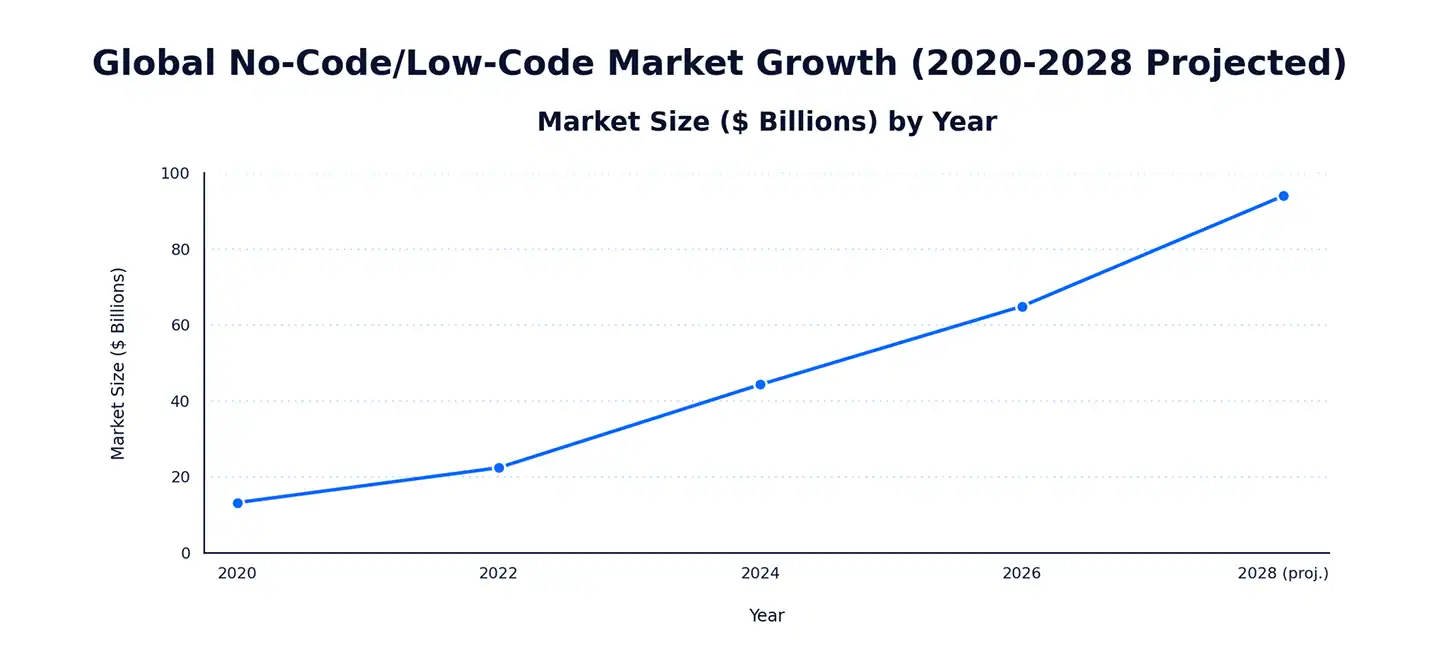
The no-code development market hit $65 billion in 2026. That’s not a typo. Five years ago, most people assumed you needed a computer science degree to build anything. Not anymore.
Game development used to mean months of learning C# or C++ before you could even move a character across a screen. Today you can drag a block, drop it next to another block, and watch a working game come to life in an afternoon. That shift is real, and it’s changing who gets to call themselves a game developer.
This guide walks you through exactly how to make a game without coding in 2026. We’ll cover the best tools, what they can and can’t do, how much they cost compared to hiring a real dev team, and when it’s time to bring in professionals like Cubix to take your prototype the rest of the way.
Ready to Take Your Game Beyond No-Code? Let’s Build It Together
Contact UsWhat Does “No-Code Game Development” Actually Mean?
No-code game development means building a playable game using visual tools instead of typing programming languages. You drag objects onto a screen. You connect events with logic blocks. You pick behaviors from a menu instead of writing them from scratch.
It sounds too simple to work. But it works.
How No-Code Tools Work Under the Hood
Every no-code engine is really just hiding code behind a friendly interface. When you drag a “jump” behavior onto your character, the engine writes the actual code for you in the background. You never see it. You never touch it.
Gartner predicts that by 2026, roughly 70% of new apps built worldwide will use low-code or no-code platforms. Games are a growing slice of that number.
Here’s what’s happening behind the scenes when you build without code:
- You place objects (sprites, backgrounds, buttons) visually
- You attach pre-built behaviors (movement, gravity, collision)
- You connect “if this happens, do that” event chains
- The engine compiles all of it into real, working game code
Who No-Code Game Making Is Really For
No-code isn’t just a beginner toy. Different people use it for very different reasons.
- Hobbyists who want to build something fun without a learning curve
- Students learning game design logic before diving into real programming
- Indie developers testing an idea fast before investing real money
- Small studios prototyping a concept to pitch to investors or publishers
- Marketing teams building simple branded games or interactive campaigns
If your goal is a quick, playable idea, no-code delivers. If your goal is the next big mobile hit with millions of downloads, you’ll likely need more.
The Best No-Code Game Engines in 2026
There’s no single “best” tool. It depends on what you’re building and how far you want to take it.
| Tool | Best For | Platform Export | Price | Coding Required |
| Construct 3 | 2D games, quick prototypes | Web, iOS, Android, Steam | Free tier, paid plans from ~$99/yr | None |
| GDevelop | Beginners, open-source fans | Web, iOS, Android, Windows | Free (open-source) | None |
| Buildbox | Mobile hypercasual games | iOS, Android | Plans from ~$14/mo | None |
| Unreal Engine (Blueprints) | 3D games, high visual quality | PC, console, mobile, VR | Free (royalty on revenue) | Visual scripting only |
| Unity (Bolt/Visual Scripting) | Cross-platform 2D/3D | Nearly all platforms | Free tier, paid plans from ~$24/mo | Visual scripting only |
Construct 3
Construct 3 is a browser-based engine built for 2D games. It’s event-driven, meaning you set up rules like “when the player touches the coin, add 1 to the score.” No typing required. It’s a favorite for puzzle games, platformers, and simple arcade titles.
- Runs entirely in your browser, no installation needed
- Strong community with thousands of free tutorials
- Exports to web, mobile, and even Steam
GDevelop
GDevelop is free and open-source, which makes it a popular starting point. It uses the same event-sheet logic as Construct 3 but gives you more flexibility since the source code is public.
- Completely free, no paywalls on core features
- Good physics engine built in
- Active community forums for troubleshooting
Buildbox
Buildbox is built specifically for mobile games, especially the hypercasual style that dominates app store charts. It’s drag-and-drop with a heavy focus on speed.
- Fastest way to prototype a mobile game idea
- Built-in monetization and ad network integrations
- Less flexible for complex, story-driven games
Unreal Engine Blueprints
Unreal’s Blueprint system is visual scripting, not true no-code, but it lets you build entire 3D games without writing a line of C++. It’s more powerful than the tools above, and also harder to learn.
- Industry-grade visuals and physics
- Steeper learning curve than Construct or GDevelop
- Used by real studios for actual commercial releases
Unity Visual Scripting (Bolt)
Unity’s visual scripting tool, formerly called Bolt, is a solid middle ground. It connects nodes instead of writing C#, while still giving you access to Unity’s massive asset store and cross-platform export options.
- Huge asset library to speed up development
- Exports to almost every platform that exists
- Easier to transition into real code later, since it sits inside Unity
Want something built beyond a prototype? Cubix’s custom game development team picks up exactly where these tools leave off.
How to Make a Game Without Coding (Step-by-Step)
Here’s the actual process, broken down simply.
- Pick your engine. Match the tool to your game type (2D vs 3D, mobile vs PC)
- Choose a template or start blank. Templates save huge amounts of time for beginners
- Design your characters and levels. Use built-in asset libraries or import your own art
- Add game logic with visual scripting. Set rules for movement, scoring, and win/lose conditions
- Test on a real device. Bugs show up differently on phones than in the editor
- Export and publish. Push to the App Store, Google Play, or Steam directly from most tools
Using Drag-and-Drop Game Logic
Most no-code engines use what’s called an event-driven system. You set a trigger (“when player presses jump”) and an action (“character moves up”). String enough of these together and you have a functioning game.
- Simple enough for a 10-year-old to learn in an afternoon
- Powerful enough to build full platformers and puzzle games
- Gets messy fast once you have hundreds of event chains
Using Pre-Built Physics and Asset Libraries
You don’t need to build gravity, collision detection, or particle effects from scratch. Every major no-code tool ships with these already built in.
Low-code and no-code development can cut build time by up to 90% compared to traditional coding, according to Red Hat research. That’s the entire pitch of no-code in one number.
- Physics engines handle gravity, bouncing, and momentum automatically
- Asset stores offer thousands of free and paid characters, backgrounds, and sound effects
- Animation tools let you rig movement without touching a timeline of code
How to Make a Game Without Coding for Free
You don’t need to spend a dollar to get started. Several tools offer full, real features at no cost.
- GDevelop — completely free, open-source, no watermarks
- Construct 3 — free tier lets you build and test, paid plan needed to export
- Unity (Personal plan) — free for small teams and low-revenue projects, visual scripting included
- Unreal Engine — free to use, Epic takes a royalty only after you earn real revenue
What You Give Up With Free Tools
Free doesn’t mean unlimited. There are real trade-offs.
- Export limits (some free tiers cap how many projects you can publish)
- Watermarks or branding on your published game
- Smaller asset libraries compared to paid tiers
- Limited or no customer support
Over 60% of the no-code market share currently comes from small and medium-sized businesses and individual builders, not enterprise teams. Free tools are a big reason why.
How to Make a Game Without Coding on Mobile
Plenty of people want to build a game right from their phone, no laptop needed. It’s possible, just more limited.
- GDevelop mobile companion apps for quick edits on the go
- Buildbox’s mobile-friendly dashboard for hypercasual game builders
- Flowlab and Hyperpad for lightweight, phone-first game creation
Limitations of Mobile-Only Game Builders
Building entirely on a phone works for simple ideas. It gets frustrating fast for anything bigger.
- Smaller screen makes detailed level design tedious
- Fewer advanced features than desktop versions of the same tool
- Performance testing on the same device you’re building on isn’t reliable
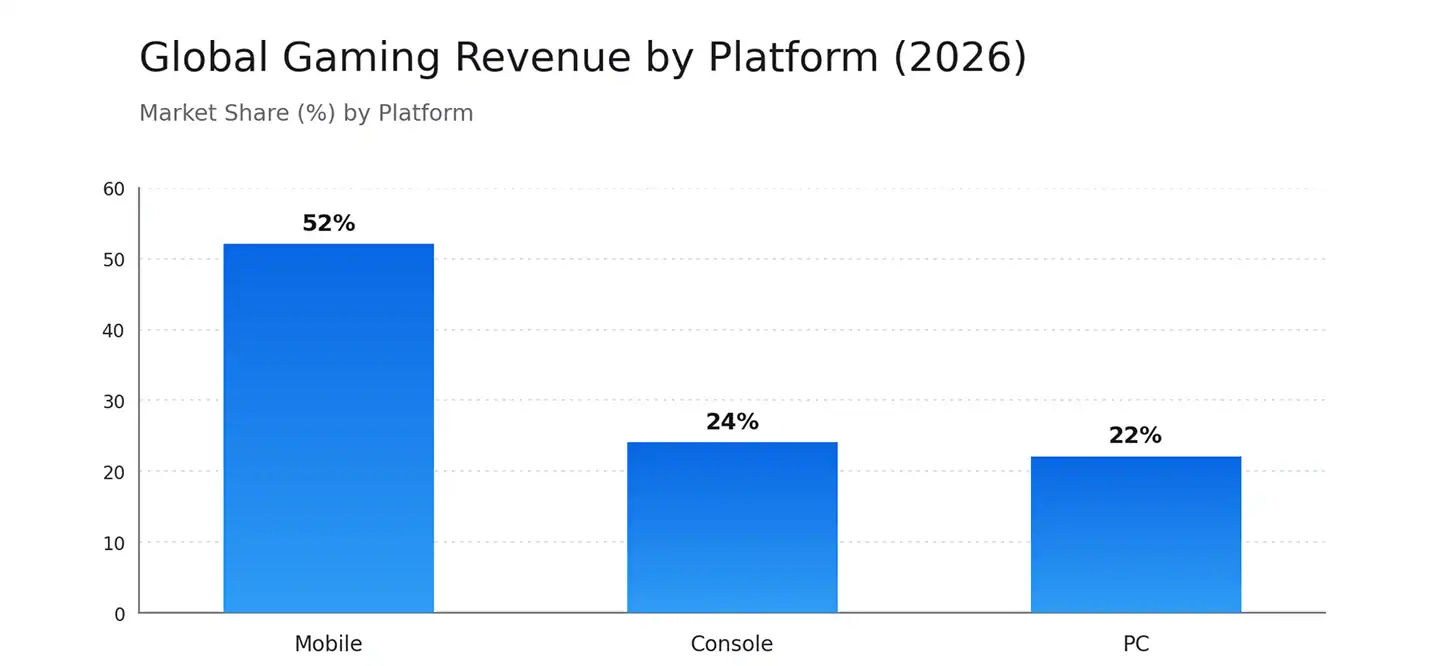
Mobile gaming already makes up 52% of all global gaming revenue, pulling in $107 billion in 2026. That’s exactly why so many no-code tools are racing to add better mobile-first building experiences.
Can You Actually Publish and Monetize a No-Code Game?
Short answer: yes. Every major no-code engine supports exporting straight to the App Store, Google Play, and even Steam.
In-App Purchases and Ad Monetization
Most no-code tools come with built-in ad network plugins (AdMob, AppLovin, Unity Ads) and simple IAP setup wizards. You don’t need a developer to wire these up.
Global mobile game IAP revenue hit $40 billion in the first half of 2026 alone, even after a slight 2% year-over-year dip. Meanwhile, gaming ad spend jumped 8% to $7 billion in that same period, showing publishers are leaning harder into ads to make up the difference.
Publishing to iOS, Google Play, and Steam
Publishing itself is usually painless. The tricky part is passing store review, especially on iOS, where Apple scrutinizes low-effort or template-looking games more closely than it used to.
| Monetization Type | No-Code Support Level | Best Use Case |
| Rewarded Ads | Excellent, built-in plugins | Free-to-play casual games |
| Interstitial Ads | Excellent, built-in plugins | Hypercasual, quick-session games |
| In-App Purchases | Good, wizard-based setup | Power-ups, cosmetics, extra lives |
| Subscriptions | Limited, often needs custom code | Long-term games with ongoing content |
| Paid Download | Excellent, no setup needed | Premium single-purchase games |
Interestingly, where a game earns its money depends heavily on the region. In India, ads account for 70.3% of mobile game revenue. In the US, that number drops to just 22.1%, with players there spending more directly through IAP. If you’re building for global audiences, that gap matters a lot for how you set up monetization.
Where No-Code Game Engines Hit Their Limits
No-code is fantastic for getting started. It’s not built to carry a game all the way to a polished, high-performing commercial release.
Performance Bottlenecks and Optimization Issues
Visual scripting adds overhead. Every drag-and-drop block is translated into generic code behind the scenes, and generic code is rarely as efficient as code written specifically for your game.
- Frame rate drops as event chains get longer and more complex
- Memory leaks are harder to catch without access to the underlying code
- Load times increase once you add more than a handful of levels or assets
Scaling Problems With Complex Games
No-code tools start to strain the moment you ask for anything beyond basic single-player mechanics.
- Real-time multiplayer networking is extremely limited or unsupported
- Large open-world maps slow the editor down and hurt in-game performance
- Save systems and cloud syncing often need custom backend work anyway
Procedural Logic and AI Behaviors No-Code Can’t Handle Well
Smart enemy AI, procedurally generated levels, and dynamic difficulty adjustment all rely on complex logic that visual scripting struggles to express cleanly.
| Feature | No-Code Engine | Custom C#/C++ Code |
| Basic 2D platformer mechanics | Handles well | Overkill for simple needs |
| Simple mobile puzzle logic | Handles well | Not necessary |
| Real-time multiplayer | Very limited | Fully supported |
| Advanced AI enemy behavior | Weak, generic patterns | Fully customizable |
| Large open-world performance | Struggles, lag-prone | Optimized, scalable |
| Procedural level generation | Basic templates only | Fully flexible |
This is usually the point where teams reach out to a professional studio. Cubix’s page on how to hire an Android game developer is a good next step once your no-code prototype proves the concept works and you’re ready to scale it properly.
Mobile alone earns more than console and PC combined. That’s a big reason so many no-code tools focus almost entirely on mobile export.
No-Code vs. Hiring a Custom Game Development Team
Both paths work. They just work for different goals and different budgets.
| Factor | No-Code Tools | Custom Development Team |
| Upfront cost | Free to a few hundred dollars/year | Tens of thousands and up |
| Time to first prototype | Days to weeks | Weeks to months |
| Ceiling on complexity | Low to moderate | Virtually unlimited |
| Performance optimization | Limited control | Full control |
| Multiplayer support | Rare or basic | Fully custom-built |
| Long-term maintenance | You’re on your own | Ongoing support available |
When Migration From No-Code to Custom Code Makes Sense
Moving from a no-code prototype to real code isn’t cheap, but it’s often necessary once a game starts gaining traction. Rebuilding visual logic into proper C# or C++ typically costs a meaningful chunk of a studio’s early budget, largely because every event chain has to be manually translated and then optimized, not just copied over.
The indie game market itself is valued at $5.54 billion in 2026 and is expected to nearly double to $10.83 billion by 2031. A lot of that growth comes from small teams who started with a no-code prototype and then brought in developers once the idea proved itself.
Signs it’s time to move to custom development:
- Your game is getting real downloads and needs to scale
- Players are reporting lag, crashes, or long load times
- You want multiplayer, live events, or ongoing content updates
- Investors or publishers are asking for a technical roadmap
Why Studios Work With Cubix for Game Development
No-code tools are a great starting point. They’re not built to carry a game through a full commercial launch with polish, performance, and long-term support.
Cubix has spent years helping studios and indie developers take exactly that next step, turning a working prototype into a game that actually performs at scale. The team handles everything a no-code engine can’t:
- Custom C# and C++ development for performance-critical features
- Real-time multiplayer networking and backend infrastructure
- Advanced AI behaviors and procedural systems
- Cross-platform optimization for iOS, Android, console, and PC
Explore Cubix’s full range of custom game development service to see what’s possible once you’re ready to move past visual scripting.
Ready to Build Beyond No-Code? Work With Cubix
Building a prototype without code is the easy part. Making it fast, stable, and genuinely fun to play at scale is where experience matters.
If your no-code idea is gaining traction and you’re hitting the limits we covered above, it’s time to bring in developers who can take it the rest of the way.
- Skip months of trial-and-error rebuilding your prototype yourself
- Get real performance optimization instead of generic visual-scripting output
- Work with a team that’s shipped games across mobile, console, and PC
Ready to talk specifics? Hire an Android game developer through Cubix and turn your no-code prototype into a real, published game.
Outgrown Your Game Prototype? Let’s Turn It Into a Scalable Game
Contact UsFrequently Asked Questions
1. Can you really build a full commercial game without writing any code?
Yes, for simpler games. Plenty of hypercasual mobile hits have been built entirely with drag-and-drop tools. For anything with deep systems, multiplayer, or high performance demands, you’ll eventually need real code.
2. What are the top no-code game development platforms and visual scripting tools available in 2026?
Construct 3, GDevelop, and Buildbox lead the true no-code space. Unreal Engine Blueprints and Unity’s visual scripting are strong options if you want more power and don’t mind a steeper learning curve.
3. How does the cost of building a game with no-code tools compare to hiring a custom game development team?
No-code tools cost next to nothing upfront, often free to a few hundred dollars a year. A custom development team costs significantly more but removes the performance and scaling limits that come with visual scripting.
4. What are the major performance and scalability limitations of no-code game engines?
Frame rate drops, memory leaks, and slow load times are common once a game grows past a basic prototype. Multiplayer and large open-world games are especially hard to support without custom code.
5. When should a studio transition from a no-code prototype to custom C# or C++ engine code?
Once the game shows real player interest, or once you need features like multiplayer, live events, or advanced AI, it’s usually time to bring in a development team.
6. Can you monetize and publish no-code games to iOS App Store, Google Play, and Steam?
Yes. Most no-code engines export directly to all three, and built-in plugins make setting up ads and in-app purchases fairly simple.