Key Takeaways
- Real-time voting lets viewers participate during live shows.
- Second-screen apps connect television viewing with mobile interaction.
- Voting systems validate responses before counting them.
- Synchronization helps keep viewers aligned with show events.
- Native apps and browsers offer different user experiences.
A 2024 study examined second-screen habits among 1,702 US television viewers. Researchers analyzed viewing diaries covering 2,755 prime-time shows. They found that 65.22% used another screen during the study.
This behavior creates opportunities for more interactive television experiences. Viewers can answer questions, predict outcomes, and compete. They can also follow scores while watching their favorite shows. Their phones become part of the entertainment experience.
A real-time voting game show turns viewers into active participants. However, making this work requires more than voting buttons. Apps must manage timing, responses, fairness, and live updates. This guide explains how these systems work. It also covers development choices and essential technologies.
Build your real-time voting game show app with Cubix today
Contact UsWhat Is Real-Time Voting in a Game Show?
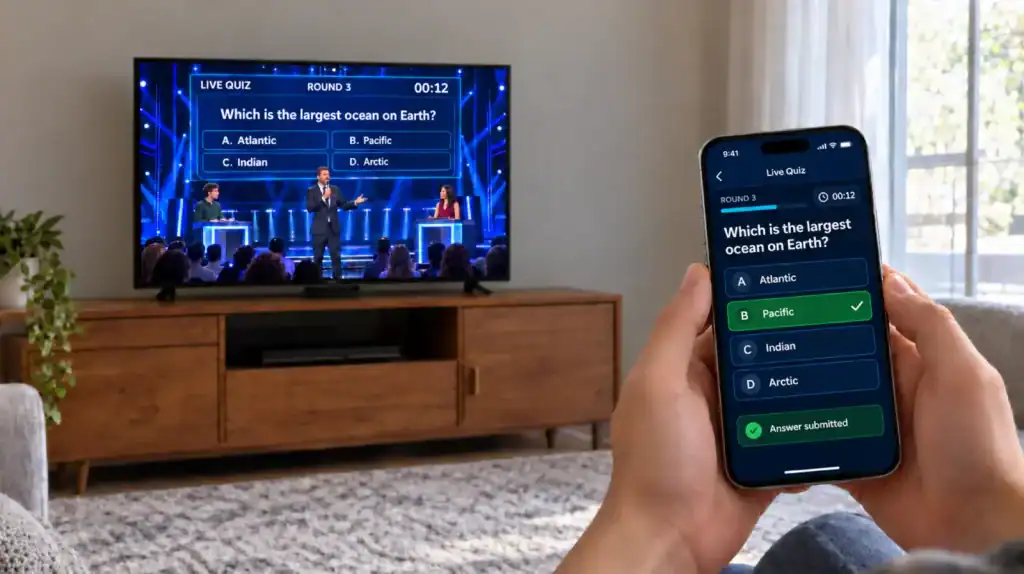
Real-time voting lets viewers submit answers during a show. The system receives responses within a defined voting window. It then validates and counts accepted votes. Results may appear on phones or television screens.
For example, imagine a talent competition asking viewers to choose winners. Each viewer opens the companion app and selects an act. The system collects votes before the deadline. Producers can then display the approved results.
What Is Real-Time Voting?
A real-time voting system collects responses while an event unfolds. It processes submissions according to predefined rules. Results can update as responses arrive or voting closes.
Common examples include:
- Talent show voting.
- Live audience predictions.
- Quiz questions during broadcasts.
- Viewer-selected challenges.
- Interactive awards and entertainment events.
Not every system needs instant public results. Some shows reveal totals only after voting closes. Others update leaderboards throughout the experience.
What Is a Second-Screen Experience?
A second-screen experience adds digital interaction to television viewing. Viewers usually participate through phones, tablets, or browsers. The main broadcast remains on the television screen.
A companion app might display questions during specific scenes. It could also provide contestant profiles or bonus challenges. Some experiences let viewers earn points for correct answers.
Research published in 2024 examined second-screen viewing behavior. The study covered 59,911 individual viewing reports. Second-screen activity appeared in 16.09% of those reports.
This figure includes second-screen behavior beyond voting. It should not be interpreted as voting app adoption.
How Is It Different From an Ordinary Poll?
Both systems collect audience responses. However, game-show voting often involves stricter timing and scoring.
| Feature | Ordinary Poll | Game Show Voting |
|---|---|---|
| Main purpose | Collect opinions | Support live gameplay |
| Timing | Often flexible | Linked to show events |
| Identity | May be anonymous | Depends on participation rules |
| Scoring | Usually simple totals | May affect points or rankings |
| Results | Can appear later | Often linked to live events |
| Host control | May be limited | Can include controlled voting windows |
An ordinary poll might remain open for several days. Game-show voting usually follows a specific event. That difference changes how developers design the system.
How Does Real-Time Voting Work?
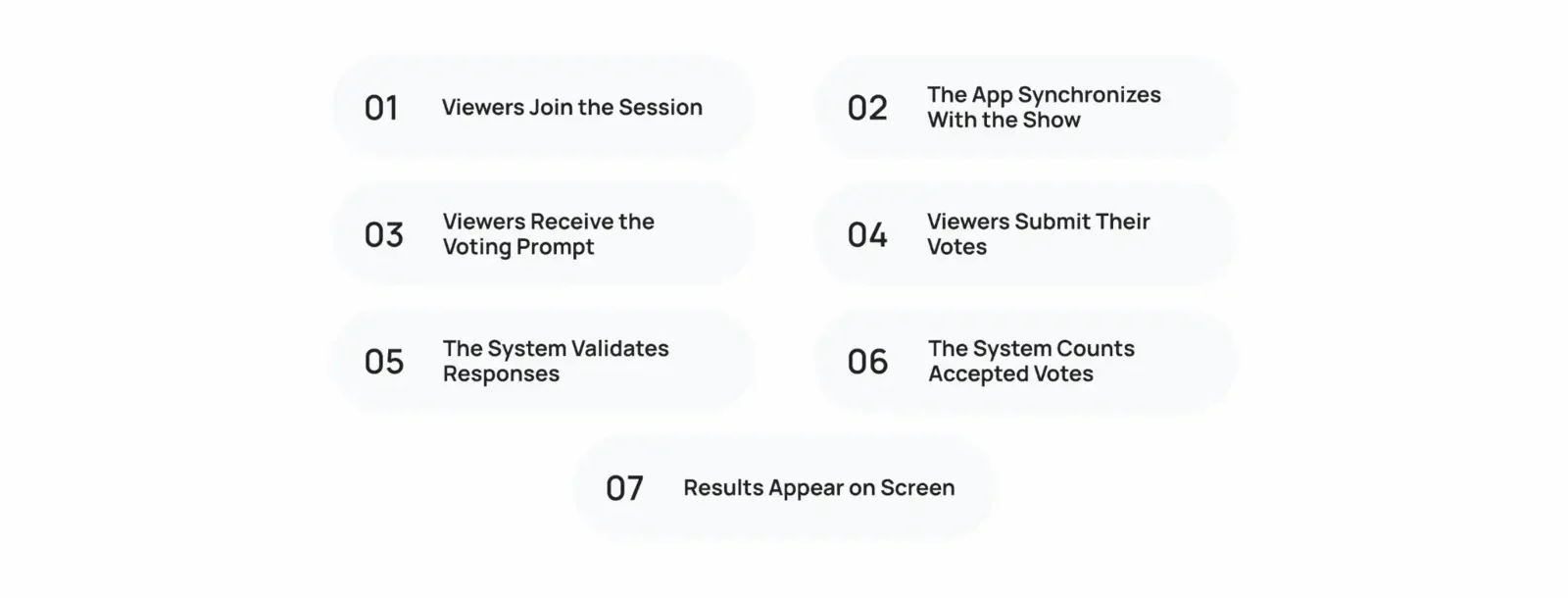
A real-time voting app follows a defined process. Each step prepares the system for the next action. The following example shows a typical voting journey.
Step 1: Viewers Join the Session
Viewers scan a QR code or open an app. The app connects them to the correct show session. Some experiences allow anonymous participation. Others require accounts or eligibility checks.
Step 2: The App Synchronizes With the Show
The system identifies the current event or voting window. It may receive an event trigger from the production system. The app then displays the correct question.
Step 3: Viewers Receive the Voting Prompt
The app displays available answers and voting instructions. A countdown may show the remaining time. Clear instructions help viewers respond without confusion.
Step 4: Viewers Submit Their Votes
Viewers select an answer and submit their responses. The app sends each submission to the backend. A confirmation message tells viewers whether it succeeded.
Step 5: The System Validates Responses
The backend checks the submission against voting rules. It verifies the session, deadline, and participation limits. Invalid or late submissions are handled according to policy.
Step 6: The System Counts Accepted Votes
The backend records valid submissions and updates totals. Depending on the design, a cache may support fast reads. The system can also calculate scores and leaderboard positions.
Step 7: Results Appear on Screen
The app displays approved totals or updated rankings. Producers may show the same results during the broadcast. The timing depends on the show’s rules and synchronization plan.
The process needs clear rules for every stage. Developers must also test what happens when connections fail. A useful voting experience provides clear feedback throughout.
For example, a viewer should know when voting closes. They should also know whether their response was accepted. Unclear confirmations can cause repeated submissions and frustration.
If the experience includes points or rewards, gamification becomes another consideration. Cubix’s gamification services cover interactive mechanics that can support these experiences.
What Technology Powers a Second-Screen App?
A second-screen app connects several technical components. Each component handles a different part of the experience. Together, they manage participation, timing, voting, and results.
What Are the Main Parts of the App?
| Component | Main Responsibility | Simple Example |
|---|---|---|
| Participant client | Displays prompts and accepts answers | Mobile voting screen |
| Real-time messaging layer | Sends timely updates | Voting opens notification |
| Backend and session service | Enforces session rules | Checks the voting deadline |
| Database or cache | Stores votes and supports reads | Accepted response totals |
| Moderation console | Manages content and access | Removes inappropriate submissions |
| Analytics system | Measures activity and performance | Tracks voting completion |
The participant client is the part viewers see. The backend handles rules that viewers cannot control. Data storage preserves accepted votes and relevant records.
The real-time layer distributes updates between connected components. Analytics help teams identify errors and performance problems. Moderation tools support experiences with user-generated content.
How Do WebSockets Support Live Voting?
WebSockets allow two-way communication over a persistent connection. A server can send updates without waiting for repeated requests. This can help when many events happen during a show.
For example, the server can announce a new question. Connected apps can then display the prompt. The same connection may carry status updates or score changes.
However, WebSockets are not mandatory for every project. Short polls may work with ordinary HTTP requests. Server-sent events can suit some one-way updates. The architecture should match the product’s actual needs.
The choice depends on several factors:
- How quickly updates need to arrive.
- How many viewers may connect simultaneously.
- Whether communication must work in both directions.
- How devices reconnect after interruptions.
- What the existing infrastructure already supports.
How Does the Backend Manage Sessions?
The backend acts as the main authority for voting rules. It determines whether sessions remain open. It also checks whether responses meet the requirements.
A typical session includes a unique identifier and voting window. It may also contain questions, answer options, and scoring rules. Server timestamps help establish when submissions arrive.
This matters because device clocks can differ. A phone’s local time should not decide vote eligibility. The server should enforce the official deadline.
A development team must also plan for expected traffic. Capacity testing can reveal bottlenecks before launch. Actual performance depends on infrastructure and usage patterns.
Cubix can help plan game interfaces, backend services, and infrastructure. These components need to work together under realistic conditions. Explore Cubix game development services .
Live Polling vs. Game Voting
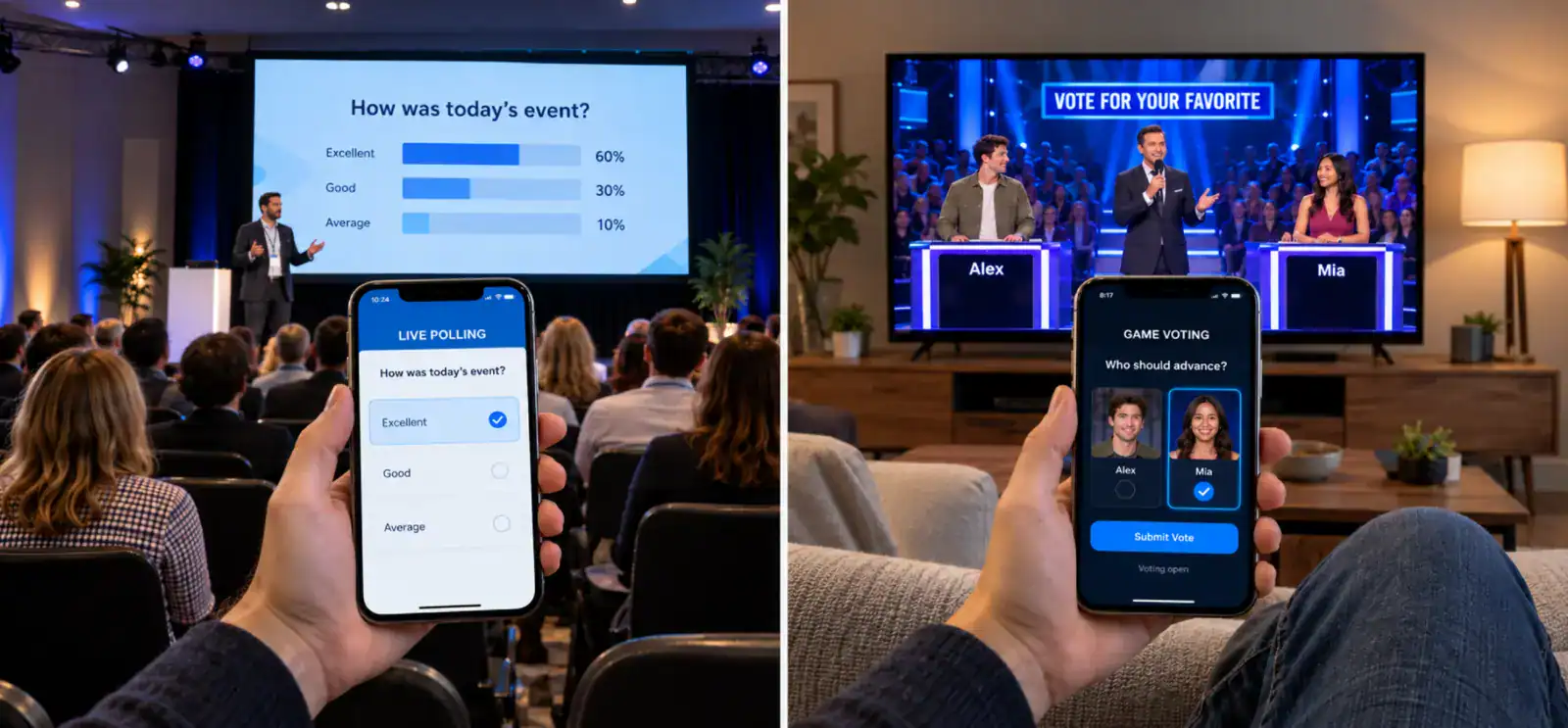
Live polling and game voting share similar features. Both collect answers from multiple participants. However, their rules and outcomes can differ significantly.
Live polls usually measure opinions or preferences. Game voting can influence scores, rankings, or competition outcomes. That difference affects validation and result handling.
Live Polling vs. Game Voting
| Factor | Live Polling | Game Voting |
|---|---|---|
| Goal | Understand audience opinions | Support a game or competition |
| Scoring | Usually unnecessary | May calculate points |
| Identity | Can remain anonymous | Depends on show rules |
| Timing | Flexible or event-based | Often tied to specific events |
| Fairness | Depends on the poll | May require stronger controls |
| Results | Percentages or totals | Totals, rankings, or scores |
Consider a talk show asking about favorite movies. The results may simply show audience preferences. Now consider a talent competition determining its winner. Every accepted vote may affect the final result.
The second example needs stricter voting rules. Developers must define eligibility and submission limits. They must also establish how ties and invalid votes work.
Second-screen activities can also encourage viewers to discuss shows. One study found that 39.07% of participants communicated about watched shows. This happened at least once during the diary period.
That finding concerns show-related communication, not voting participation. Still, it illustrates how viewing can extend beyond television.
For broader interactive experiences, Cubix Games offers a starting point for exploring game development capabilities.
How Do Second-Screen Apps Stay in Sync?
Synchronization helps apps respond at the correct show moment. However, television feeds and mobile connections behave differently. Developers need to account for both.
Broadcast Delay vs. Network Delay
Broadcast delay occurs before the television feed reaches viewers. Streaming services may buffer video to maintain playback. Different viewers can therefore see the same event later.
Network delay affects communication between the app and server. It includes message travel and processing time. These delays are related, but they are not identical.
Consider a live question appearing on television. One viewer may see it before another viewer. Both phones might communicate with the same server. Yet the viewers may receive the prompt at different moments.
A synchronization system needs a clear timing strategy. It might use producer-controlled events or scheduled prompts. The right method depends on the broadcast workflow.
How Do Apps Handle Different Devices?
Viewers use different phones, browsers, and network connections. Some devices may temporarily lose connectivity. Others may pause background activity or delay notifications.
A reliable system should handle these differences gracefully. Useful design choices include:
- Showing clear connection status.
- Reconnecting after temporary interruptions.
- Checking whether a voting window remains open.
- Preventing expired prompts from accepting responses.
- Restoring session details where appropriate.
- Confirming successful submissions.
The app should not assume every viewer stays connected. Reconnection behavior needs testing before the live event.
How Does Host-Controlled Timing Work?
A host or producer may control voting windows. The production system signals when a question opens. The backend then accepts eligible responses.
When voting closes, the backend rejects late submissions. It can finalize totals before releasing approved results. This reduces dependence on individual device clocks.
Some shows need additional timing safeguards. Producers might delay results until a broadcast cue. Others may use a fixed schedule or event timeline.
How Much Latency Is Acceptable?
There is no universal latency target for every show. A casual poll can tolerate some delay. A timed quiz may need tighter controls.
Define the experience before setting performance targets. Then measure the system under realistic conditions.
Track these factors during testing:
- Time from prompt release to app display.
- Time from submission to confirmation.
- Time needed to update results.
- Differences between broadcast and app timing.
- Recovery time after temporary disconnections.
Measure each stage separately. This helps identify where delays actually occur. Never promise zero latency without supporting test evidence.
How Do Apps Keep Voting Fair?
A voting system needs clear rules and reliable enforcement. It should validate submissions before counting them. Security controls should support fairness without confusing legitimate viewers.
Essential Voting Controls
- Identity checks: Apply the show’s chosen participation rules.
- Duplicate-vote controls: Enforce limits on accepted responses.
- Rate limits: Restrict excessive requests from participants.
- Server-side validation: Check eligibility and voting deadlines.
- Audit trails: Record important voting events.
- Access controls: Restrict administrative actions to authorized staff.
- Result verification: Confirm totals before publishing them.
The backend should remain the authority for accepted votes. Client-side checks alone cannot enforce voting rules reliably. Server-side controls should determine which submissions count.
Security also matters because automated traffic can burden applications. Imperva’s 2025 Bad Bot Report examined global traffic during 2024. It found that bad bots represented 37% of internet traffic. Automated traffic overall reached 51%.
These figures cover internet traffic generally, not game-show voting. They show why applications need suitable abuse controls.
The percentages above are visual placeholders, not measured results. A real chart should use verified system logs. Those logs can show how many submissions passed each check.
Privacy deserves equal attention during development. Collect only information needed for the experience. Set appropriate access, retention, and deletion rules. Review applicable privacy laws with qualified legal counsel.
What Happens When Voting Apps Fail?
Live experiences can fail for several reasons. Connections may drop, servers may slow down, or prompts may appear late. Planning for these situations helps protect the viewing experience.
Common Problems and Solutions
| Problem | What Viewers Experience | Possible Solution |
|---|---|---|
| Traffic spikes | Slow responses | Test capacity and scale infrastructure |
| Lost connection | Voting screen stops updating | Add reconnection handling |
| Expired prompt | Old question remains visible | Check session status before accepting votes |
| Delayed results | Scores appear late | Monitor processing and result delivery |
| Moderation issue | Inappropriate content appears | Provide moderation tools and reporting |
| Data loss risk | Votes may be missing | Use reliable storage and recovery procedures |
How Should an App Handle Recovery?
The app should communicate clearly when something goes wrong. Viewers should know whether voting remains open. They should also understand whether their responses were accepted.
For example, imagine someone loses connectivity during voting. The app reconnects after the viewer restores their connection. The backend checks whether the voting window remains open. The viewer can then continue if the rules permit.
Recovery rules should match the show’s format. Automatically reopening voting may create unfair advantages. A closed voting window should remain closed unless authorized staff intervene.
Privacy and moderation also need advance planning. The system should limit unnecessary personal data collection. Jurisdiction-specific privacy requirements need legal review.
A 2024 study found that 16.92% of respondents searched for show information. This occurred at least once during its diary period.
That finding describes viewing behavior, not app failures. Still, it highlights the variety of activities happening alongside television.
Should You Build a Native App or Browser-Based Experience?
Both approaches can support live audience participation. The right choice depends on the audience and features. Consider how viewers will discover and join the experience.
Native Mobile App
A native app is installed on a phone. It can provide a dedicated interface and device integration. Push notifications may also support reminders and updates.
Native apps can suit recurring shows and loyal audiences. They may also support richer profiles and game features. However, viewers must install the app first.
Development teams also need to plan platform updates. Supporting multiple operating systems can increase project complexity. The final cost depends on features and technical requirements.
Browser and QR-Based Access
A browser-based experience opens through a link or QR code. Viewers can join without installing another application. This reduces friction during live broadcasts.
A QR code can appear on the television screen. Viewers scan it and open the voting page. The page then connects them to the correct session.
Browser-based experiences still need thoughtful design. Pages must work across different screen sizes. Teams should also test browser compatibility and reconnection behavior.
Native App vs. Browser-Based Voting
| Factor | Native App | Browser Experience |
|---|---|---|
| Initial access | Requires installation | Opens through a link or QR code |
| User experience | Dedicated app interface | Responsive web interface |
| Notifications | Native notification support | Browser-dependent capabilities |
| Device integration | Broader platform access | Depends on browser support |
| Maintenance | App releases and updates | Web deployments |
| Audience reach | Requires app adoption | Easier first-time access |
| Cost | Depends on platforms and features | Depends on complexity and backend |
Which Option Should You Choose?
Choose a browser experience when quick access matters most. It can help occasional viewers join without installation.
Consider a native app for recurring audiences. It may suit richer features and longer-term engagement.
Some projects can support both options. A shared backend can enforce identical voting rules. The interface can then adapt to each platform.
Cubix can help plan mobile experiences and interactive interfaces. Explore Mobile Game Development and Game UI/UX Design for related capabilities.
How Cubix Builds Real-Time Game Experiences
A second-screen product needs more than an attractive interface. It must connect viewers, show events, and voting rules. The backend must also handle responses and results reliably.
Cubix works across game development and related digital experiences. Project requirements determine the architecture and development approach. The team can plan features around the intended audience.
A real-time voting project may include:
- Voting interfaces: Clear prompts and response confirmations.
- Interactive mechanics: Questions, challenges, points, and leaderboards.
- Backend development: Session management and vote validation.
- Real-time infrastructure: Messaging and event synchronization.
- Quality assurance: Testing under realistic network conditions.
- Analytics: Monitoring engagement and system performance.
Each project needs a defined scope before development begins. Audience size, platforms, and voting rules affect complexity. Testing also helps identify performance limits before launch.
Explore Cubix’s game development services to learn more about its capabilities.
Build a Second-Screen Voting App With Cubix
Planning an interactive game show starts with clear requirements. Decide how viewers will join and submit responses. Then define the rules for timing, scoring, and results.
What Should Your App Include?
The required features depend on the show format. A simple audience poll needs fewer mechanics than competition voting.
Your initial scope may include:
- QR code onboarding and session joining.
- Live questions and voting controls.
- Voting deadlines and response confirmations.
- Backend validation and duplicate-vote controls.
- Results screens and leaderboards.
- Moderation tools and analytics.
- Performance testing and recovery handling.
The development plan should reflect your actual needs. Avoid adding complex features without a clear purpose. Focus first on the core viewing experience.
How Do You Get Started?
Start by outlining the show’s format and audience. Identify the features viewers need during each broadcast. Then discuss platform choices, technical requirements, and testing.
A development team can help turn these requirements into plans. That includes defining the architecture and estimating the work. It also involves identifying risks before development begins.
Cubix can help explore your concept and technical requirements. Whether you need a browser experience or mobile app, start with the intended audience and interaction model.
Have a game show app idea? Let’s discuss it.
Bring your second-screen game show idea to life with Cubix
Contact UsFrequently Asked Questions
1. What Is a Second-Screen Experience?
A second-screen experience adds digital interaction to television viewing. Viewers use phones, tablets, or browsers alongside the show. They can vote, answer questions, or follow scores.
2. How Does Real-Time Voting Work in Game Shows?
Viewers join a session and receive a voting prompt. The backend checks responses against the show’s rules. It counts accepted votes and displays approved results.
3. How Do Live Voting Apps Prevent Duplicate Votes?
Apps use participation rules and server-side validation. They may also apply rate limits and duplicate-submission checks. The appropriate controls depend on the voting format.
4. How Are Second-Screen Apps Synchronized With a TV Show?
The system uses event triggers or scheduled voting windows. Server timestamps help enforce opening and closing times. Broadcast delays still need separate consideration.
5. What Technology Is Used for Real-Time Audience Voting?
These apps can use mobile or browser interfaces, backend services, and databases. Real-time messaging may deliver prompts and result updates. The exact architecture depends on project requirements.
6. How Much Latency Is Acceptable for Live Audience Interaction?
Acceptable latency depends on the interaction and show format. A casual poll may tolerate some delay. Timed competitions need tighter control over submission deadlines.
7. Can Second-Screen Experiences Work in a Web Browser?
Yes, browsers can support voting screens and live updates. Viewers can join through links or QR codes. Browser support and network conditions still affect performance.