Key Takeaways
- GDPR Compliance for Mobile Apps applies to any app with EU users, wherever your company sits.
- Pick a lawful basis for every purpose. Consent is only one option, and it is often the wrong one for core features.
- Start analytics, ad, and tracking SDKs only after the user chooses, and make withdrawal as easy as giving consent.
- A system permission prompt is not GDPR consent, so show an in-app explanation and record the choice.
- Support all eight user rights in the app, and answer every request within one month.
- Sign a written contract with every processor, and check each SDK after every update.
- Notify the supervisory authority within 72 hours of a breach when required, and keep records to prove compliance.
GDPR Compliance for Mobile Apps is a legal duty for any app that handles personal data of people in the EU. Because the rule follows the user, a team in Austin or Dubai faces the same duties as a team in Berlin. Your company’s location does not change that.
Enforcement is active. According to DLA Piper’s 2026 GDPR Fines and Data Breach Survey, European supervisory authorities issued approximately €1.2 billion in GDPR fines during 2025. As a result, weak consent flows, loose SDK settings, and missing records now carry real financial risk.
At Cubix, a custom mobile app development company, we wrote this guide for developers, product owners, and CTOs. It covers principles, build steps, user rights, security, SDKs, and privacy notices. Then it closes with an audit you can run in six steps.
Need a compliant app? Talk to Cubix about your project
Contact UsUnderstanding GDPR Compliance for Mobile Apps
GDPR is the EU’s General Data Protection Regulation. It covers any company that processes personal data of people in the EU, including non-EU companies that target EU users. Fines reach up to €20 million or 4% of global annual turnover, whichever is higher.
Understanding the GDPR requirements starts with a data list, because each item needs a purpose, a lawful basis, and a retention limit. In apps, personal data includes:
- Name, email address, and phone number
- Advertising IDs, IP address, and device identifiers
- Location, photos, contacts, and health data
- Analytics events and crash logs tied to a device
GDPR also works beside other privacy regulations, such as the ePrivacy Directive, which governs access to device identifiers. Strong GDPR Compliance for Mobile Apps therefore protects revenue, store approval, and user trust.
GDPR Responsibilities for App Owners and Developers
GDPR assigns duties by role. The app owner usually acts as the controller and decides why and how data is used. A developer or agency usually acts as a processor and follows the owner’s instructions. Because enterprise mobile apps often involve several vendors and group companies, confirm each role in writing.
Core GDPR Principles for Mobile Apps
Article 5 sets seven principles, and every other GDPR rule builds on them. Therefore, use them as a design checklist for each feature.
1. Lawfulness, Fairness, and Transparency
Every use of data needs a lawful basis. Users must also see, in plain language, what happens to their data. Therefore, avoid dark patterns and disclose every SDK that collects data.
2. Purpose Limitation
Collect data for stated purposes and use it only for them. For example, delivery location cannot feed an ad profile without a new lawful basis.
3. Data Minimization
Collect only what the feature needs. A weather app works with coarse location, so skip precise GPS.
4. Accuracy of Personal Data
Personal data must stay correct. Therefore, let users edit their profiles and fix errors without contacting support.
5. Storage Limitation
Keep data only as long as the purpose requires. Data retention schedules turn this principle into practice. Because uninstalling an app does not delete server records, your backend must enforce the limit.
6. Integrity and Confidentiality
Protect data against loss, theft, and unapproved use. Encryption and role-based access control, for example, limit exposure when an incident occurs.
7. Accountability
You must show that you comply. Therefore, keep processing records, consent logs, impact assessments, and processor contracts ready for any regulator.
How to Make a Mobile App GDPR Compliant
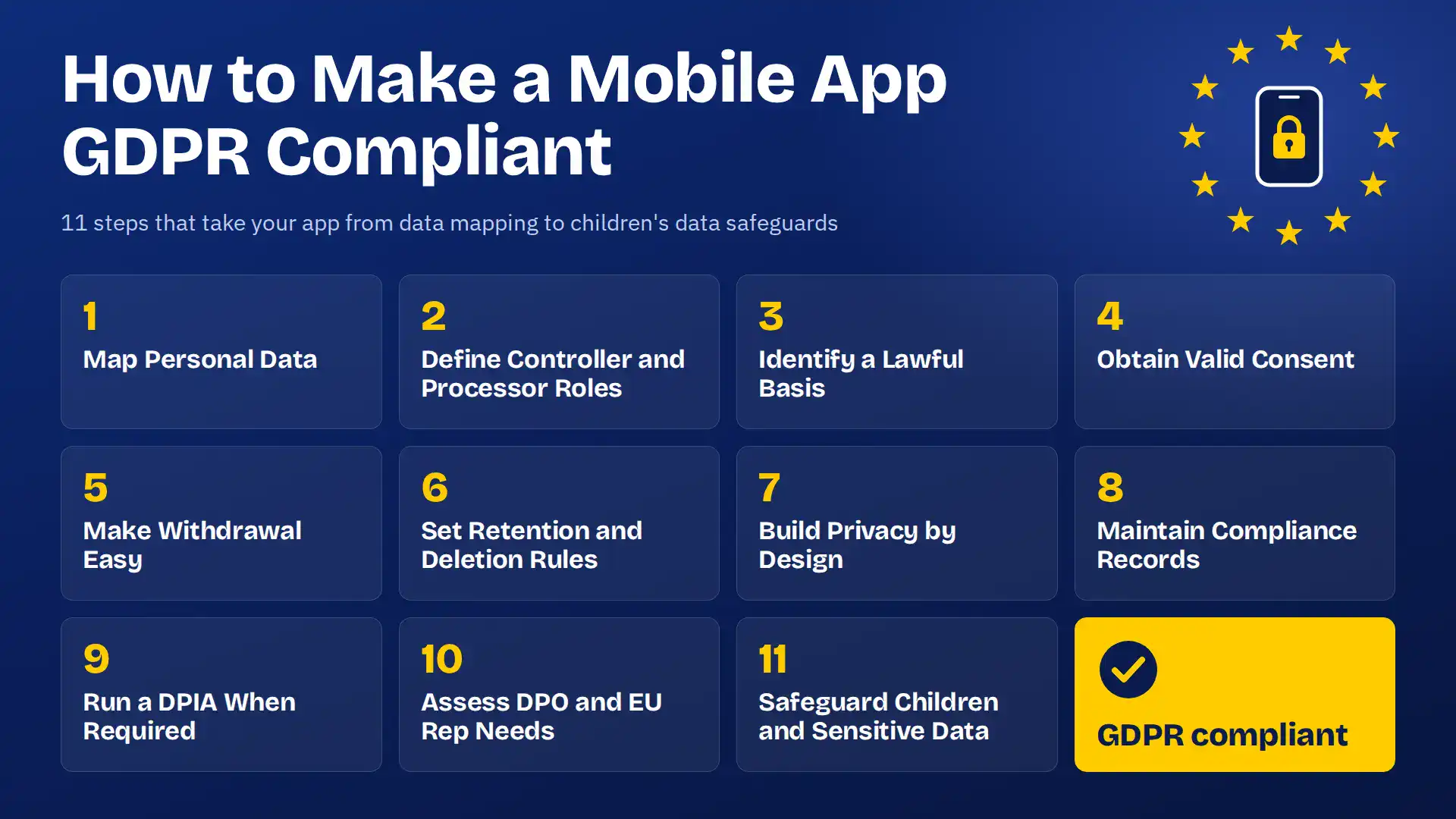
GDPR Compliance for Mobile Apps follows a repeatable sequence. Work through the eleven steps below in order, because each step feeds the next.
1. Map Personal Data and Data Flows
Start with a data inventory, because you cannot protect data you have not found. Record each data element, its purpose, its storage location, and its recipients. Then trace every flow from device to backend to vendors, and confirm the map with a network proxy.
2. Define Controller and Processor Responsibilities
Decide who controls and who processes for each activity. The party that sets purposes and means is the controller. A party that follows documented instructions is a processor. Some SDK vendors act as independent controllers, so read each contract.
3. Identify a Lawful Basis for Each Processing Purpose
Article 6 lists six lawful bases, so pick one for each purpose and write down your choice. Consent is often the wrong choice for core features.
| Lawful basis | Mobile app example |
|---|---|
| Consent | Advertising ID for attribution |
| Contract | Delivery address for an order |
| Legal obligation | Tax records for purchases |
| Vital interests | Emergency medical data sharing |
| Public task | Government service apps |
| Legitimate interests | Fraud prevention logs |
4. Obtain and Record Valid Consent Where Required
Valid consent is freely given, specific, informed, and unambiguous. It needs a clear action, so pre-ticked boxes do not count.
- Start analytics and ad SDKs only after consent
- Use one toggle per purpose
- Give Accept and Reject equal weight
- Log the user ID, timestamp, text version, and choice
Data privacy trends show regulators targeting consent. According to CNIL’s enforcement report published in February 2026, 21 organizations were sanctioned in 2025 for cookie and tracker violations, including consent and transparency failures.
5. Make Consent Withdrawal Easy
Users must withdraw consent as easily as they gave it. Add a Privacy Choices screen in Settings, stop the related SDKs at once, and log every withdrawal.
6. Set Data Retention and Deletion Rules
Set a retention period for each data category and enforce it in code. For example, delete account data within 30 days of closure. Next, automate data deletion with scheduled jobs, and apply the same schedule to backups and processor copies.
7. Build Privacy by Design and by Default
Article 25 requires privacy controls inside the product. Default settings must share the minimum data, so turn off optional tracking until users opt in. Then add a privacy review to every feature ticket across your mobile app development lifecycle.
8. Maintain Compliance Documentation
Regulators judge privacy compliance by your records. Keep your processing records, consent logs, impact assessments, processor contracts, retention schedule, and breach register current. Give each one an owner and a review date.
9. Conduct a Data Protection Impact Assessment When Required
A DPIA is a documented risk assessment that Article 35 requires before high-risk processing. Triggers include large-scale profiling, large-scale health or biometric data, and constant location tracking. If high risk remains, consult the supervisory authority before launch.
10. Assess Whether You Need a DPO or EU Representative
A DPO is an independent expert who monitors GDPR adherence. You need one for large-scale systematic monitoring or large-scale special category data. In addition, non-EU companies that target EU users must appoint an EU representative, unless the processing is occasional and low risk.
11. Apply Additional Safeguards for Children’s and Sensitive Data
Article 8 sets the age of digital consent between 13 and 16, depending on the member state. Below that age, a parent must authorize consent. Other privacy regulations, such as COPPA in the US, add duties for children’s apps. Health and biometric data need explicit consent, and health apps often face sector rules too. Read how custom software security works under HIPAA.
GDPR User Rights Mobile Apps Must Support

Users hold eight rights under Articles 12 to 22, so supporting them is a core part of GDPR Compliance for Mobile Apps. Build an in-app path for each one.
1. Right to Be Informed
Tell users who collects their data and why. Give a short notice at sign-up, show just-in-time notices before permission prompts, and link the full notice in Settings.
2. Right to Access Personal Data
Users can request a copy of their data. Offer a Download My Data option, verify identity first, and remember that the first copy is free.
3. Right to Rectification
Users can correct wrong or incomplete data. Let them edit profile fields directly, then pass each correction to processors.
4. Right to Erasure
Users can ask you to delete their data when you no longer need it or when they withdraw consent. Apple and Google both require in-app account deletion. Complete data deletion covers databases, analytics, logs, and processor copies. However, legal records, such as tax data, stay.
5. Right to Restrict Processing
Restriction pauses the use of data without deleting it. Add a restriction flag to the user record, so every job and SDK respects it.
6. Right to Data Portability
Users can receive the data they provided in a structured, machine-readable format, such as JSON or CSV. This applies to processing based on consent or contract.
7. Right to Object
Users can object to processing based on legitimate interests. Objection to direct marketing is absolute, so stop at once. Add an in-app switch for marketing and profiling.
8. Rights Related to Automated Decision-Making
Article 22 protects users from solely automated decisions with legal or similarly significant effects, such as automated loan approvals. Offer human review and a way to contest the decision.
9. Handle User Requests Within GDPR Deadlines
You must respond within one month, and complex requests allow two more months with notice. A tracked workflow helps you prevent GDPR violations caused by missed deadlines. Log each request, verify identity, search every system, and record the outcome.
Mobile App Data Security and GDPR

Article 32 turns security into a legal duty, so GDPR compliance for mobile apps depends on solid engineering. Security controls protect user data on the device, in transit, and on your servers. Apps also face constant cybersecurity threats, such as stolen logins and weak APIs.
Encrypt Data in Transit and at Rest
Use TLS 1.2 or higher for all traffic, and encrypt databases and files at rest with AES-256. Store keys in the iOS Keychain or Android Keystore, never in source code.
Protect Personal Data Stored on Devices
Phones get lost and backed up to the cloud. Therefore, keep tokens in secure storage, avoid personal data in logs and the clipboard, and clear local data on logout.
Apply Access Controls and Secure Authentication
Offer multi-factor sign-in and use short-lived tokens. Grant staff least-privilege roles, and log every administrator view of personal data.
Use Pseudonymization Where Appropriate
Replace direct identifiers with tokens, and keep the mapping table in a separate system. Pseudonymized data is still personal data, so GDPR still applies to it.
Secure APIs and Backend Systems
Authorize every request, rate limit endpoints, and keep personal data out of URLs and logs. Use private storage buckets and least-privilege roles.
Monitor and Test Security Controls
Because controls decay without testing, Article 32 requires regular testing. Test against OWASP MASVS before each major release. Run dependency scans in CI, commission a penetration test every year, and patch critical flaws on a fixed schedule.
Prepare a Data Breach Response and Notification Plan
DLA Piper’s 2026 survey recorded an average of 443 personal data breach notifications per day across surveyed European jurisdictions. That is a 22% increase over the previous reporting period. Therefore, plan ahead. Contain the incident, notify the supervisory authority within 72 hours when required, and tell affected users without undue delay when the risk is high. Cloud misconfigurations cause many breaches, so follow proven cloud security practices.
Managing Third-Party SDKs and APIs Under GDPR
Third-party code runs inside your app, so its behavior is your responsibility. Even when you protect user data in your own code, an SDK can send identifiers to its own servers.
Audit SDK Data Collection and Sharing
List every SDK, its version, and what it collects. Then verify each vendor claim with network traffic captures, and remove SDKs with no active purpose.
Review Analytics, Advertising, and Tracking SDKs
These SDKs read device identifiers and build behavioral profiles, so they create the most consent issues. Advertising and attribution SDKs need consent. Analytics SDKs usually need it too. Disable automatic collection in your settings files until the user chooses.
Distinguish Device Permissions From Legal Consent
A system permission prompt is not GDPR consent. It grants technical access, but it does not explain purposes or record a choice. Show an in-app explanation first, and pick the lawful basis separately.
Establish Data Processing Agreements With Processors
Article 28 requires a written contract with every processor. Teams call it a DPA. It must cover your instructions, security measures, sub-processors, breach notice, and the return of data at the end. Sign it before the SDK goes live.
Apply Safeguards for International Data Transfers
Sending personal data outside the EU needs a transfer mechanism under Chapter V, such as an adequacy decision or Standard Contractual Clauses. Check vendor server locations first, then list each transfer in your records.
Monitor Vendor and SDK Changes After Updates
An SDK update can add new data collection without warning. Therefore, pin versions, read release notes, and re-run traffic tests on every release candidate. If you call a generative AI API, also review its data terms and generative AI cybersecurity risks, because prompts often contain personal data.
GDPR Privacy Policy Requirements for Mobile Apps
Articles 12 to 14 decide what users must read before you collect their data. Therefore, the notice must be concise, transparent, and written in plain language.
Explain Data Collection, Purposes, and Lawful Bases
List each data type, why you collect it, and its lawful basis. For example, email supports login under contract, while an advertising ID supports ad measurement under consent.
Disclose Data Recipients and International Transfers
Name the recipients or categories, such as cloud hosts and analytics providers. Identify each non-EU country that receives data and the safeguard in use.
Explain Retention Periods and Deletion Criteria
State how long you keep each data category, or explain the criteria. Then say whether you delete or anonymize the data.
Describe User Rights and How to Exercise Them
List all eight rights and the right to withdraw consent. Then give a direct route, such as an in-app privacy screen and an email address, with a one-month response time.
Provide Contact Details and Complaint Information
Include the controller’s legal name and address, plus the DPO and EU representative contacts. Also state that users can complain to their supervisory authority.
Keep Privacy Notices Clear and Accessible
Use short sentences and a layered summary. Link your privacy policy from the store listing, onboarding, and Settings, because Apple and Google both require a policy URL. Finally, update the notice whenever data use changes.
How to Audit Your Mobile App for GDPR Compliance
An audit proves your controls work in the released build, not only on paper. Run one before launch, after major releases, and at least once a year.
Step 1: Define Audit Scope and Verify Data Flows
List the versions, backends, and vendors in scope. Then rebuild the data map from live traffic on a clean install, and flag any data sent before the user chooses.
Step 2: Audit Third-Party SDKs and Vendor Agreements
Match every SDK to a signed agreement and a documented purpose. Confirm transfer safeguards, then remove any SDK that has no owner.
Step 3: Test Consent and Withdrawal Mechanisms
Reject all and confirm that no analytics or ad traffic leaves the device. Then withdraw consent and confirm that SDKs stop at once.
Step 4: Review Privacy Notices and User-Rights Workflows
Compare the notice with real app behavior, line by line. Next, submit a test request for each right and time the response.
Step 5: Verify Security Controls and Compliance Records
Check encryption, storage, sign-in, and logging against these app security best practices. Missing records are the quickest way to fail a privacy compliance review, so confirm that your processing records, impact assessments, and breach register are current.
Step 6: Prioritize Fixes and Retest Compliance
Rank each finding by user risk and legal exposure. Fix collection before consent first. Then assign owners, retest every fix, and store the report as evidence.
Common GDPR Compliance Mistakes in Mobile Apps
Most mobile app GDPR failures come from a short list of repeat errors. Fixing them helps you prevent GDPR violations before a regulator finds them.
- Collecting data before consent: analytics and ad SDKs read ad IDs or IP addresses at launch. Fix it by starting SDKs after consent.
- Using non-compliant consent mechanisms: pre-ticked boxes, forced opt-ins, bundled terms, and hidden reject buttons. Fix it with separate, equal choices.
- Ignoring third-party vendor risks: unvetted SDKs share data without transparency. Fix it with audits and signed agreements.
- Making opt-out difficult: extra steps to withdraw, or collection that continues afterward. Fix it with one-tap withdrawal.
- Keeping outdated or opaque privacy notices: vague notices skip which sensors and identifiers you collect. Fix it by updating the notice with every release.
- Delaying responses to user requests: access and deletion requests need an answer within one month. Fix it with a tracked workflow.
How Cubix Approaches GDPR Compliance for Mobile Apps
Cubix treats privacy as a product requirement. Our team applies privacy by design from the first workshop, so consent, deletion, and logging features ship in the first release. Large companies that need enterprise mobile app developers often add multi-region rollouts and strict vendor reviews. We cover both with one process.
- A data map and lawful basis list during discovery
- Consent and deletion features designed into the first release
- SDK reviews with traffic checks before each release
- Security testing aligned with OWASP MASVS
- A handoff with the data map, retention schedule, and vendor list
- A named owner for each privacy task
Support After Launch
Each release includes a privacy check, a vendor change review, and updated records. We also monitor SDK updates and retest consent flows. As a custom mobile app development company, we keep your app aligned with your privacy notice.
Book a consultation with Cubix and get your app audited
Contact UsFrequently Asked Questions
1. What is GDPR and why does it affect mobile app developers?
GDPR is the EU’s privacy law, in force since May 2018. It applies to any app that handles personal data of people in the EU. Developers therefore build the consent, security, and user-rights features it requires.
2.What are the main GDPR requirements for mobile apps?
Apps need a lawful basis for each purpose, valid consent where required, and a clear privacy notice. They must minimize data, secure it, limit retention, support user rights, and report breaches within 72 hours when required.
3. How do I implement consent management in my app?
Block analytics and ad SDKs until the user chooses. Show one toggle per purpose with equal Accept and Reject buttons, log every choice, and add a settings screen for withdrawal.
4. What happens if my app violates GDPR?
Authorities can issue warnings, order you to stop processing, and impose fines in two tiers based on severity. Users can also claim compensation.
5. How do I handle the right to erasure (right to be forgotten)?
Offer an in-app delete account option, verify identity, and delete data from your database, analytics, logs, and processor systems. Keep only legally required records, and respond within one month.
6. What data do I need explicit consent for?
Explicit consent applies to special category data such as health, biometric, and genetic data. It also applies to solely automated decisions with significant effects based on consent, and to exceptional international transfers.
7. How should I handle data breaches under GDPR?
Contain the incident, assess the risk, and notify the supervisory authority within 72 hours unless the risk is unlikely. Notify affected users without undue delay when the risk is high, and log every breach.
8. Do I need a Data Processing Agreement (DPA)?
Yes. Article 28 requires a written contract with every processor, such as cloud hosts, analytics tools, and agencies. It must cover instructions, security, sub-processors, breach notice, and the return of data.
9. What is a DPIA (privacy impact assessment) and do I need one?
A DPIA is a documented risk assessment for processing likely to create high risk. You need one for large-scale profiling, large-scale special category data, or constant location tracking. Complete it before launch.
10. How do I audit my mobile app for GDPR readiness?
Define the scope, rebuild the data map from live traffic, review SDKs and contracts, and test consent. Then check the notice and user-rights workflows, verify security and records, and prioritize and retest fixes.