What Is Gemini 4 Argon?
AI coding tools can already generate functions, explain unfamiliar code, and suggest fixes. The harder challenge is getting an AI model to work through a complex engineering problem, keep track of decisions across a large codebase, test its changes, and deliver a result that developers can actually use.
That is the problem Google is targeting with Gemini 4 Argon, its flagship reasoning model for complex software engineering, scientific research, and multi-step knowledge work.
Interest in AI-assisted development is growing. According to Stack Overflow’s developer survey, 84% of respondents were using or planning to use AI tools in their development process. Yet adoption does not automatically translate into trust: developers still need reliable code, verifiable results, and control over what AI systems can do.
Gemini 4 Argon aims to address more demanding tasks through extended reasoning, multimodal input, tool use, and support for long-running workflows. Google has announced its availability through the Gemini API, Google AI Studio, enterprise tools, and selected consumer subscriptions.
So, what makes Gemini 4 Argon different, what can developers build with it, and how much does it cost? Here is what the official documentation and published evaluations tell us.
Key Takeaways
- Gemini 4 Argon is designed for complex reasoning, software engineering, scientific problem-solving, and multi-step AI workflows.
- Its key capabilities include multimodal input, a 1-million-token context window, adjustable reasoning depth, and tool use.
- Developers can use it for code generation, debugging, repository analysis, and AI agents that execute multi-step tasks.
- Benchmark results offer useful comparisons but don’t guarantee performance on real-world workloads.
- API access, token pricing, latency, and output limits should factor into deployment decisions.
- Human review, automated testing, and controlled tool permissions remain essential for reliable and secure applications.
What Is Gemini 4 Argon Designed to Do?
Gemini 4 Argon is a reasoning-focused AI model built to handle problems that require more than a single response. Instead of concentrating only on generating an answer quickly, it is designed to work through connected steps, use tools, and maintain context throughout a longer task.
Google positions the model for several demanding use cases.
1. Complex Software Engineering
Argon can help developers navigate large codebases, identify bugs, refactor legacy systems, optimize performance, and generate code across multiple files. These tasks often require understanding how one change affects other components, tests, dependencies, and system behavior.
For example, a team could ask an AI agent to investigate a performance bottleneck, identify the relevant code paths, propose a fix, and run tests. Developers would still need to review the implementation, but the model could help reduce the time spent on repetitive investigation.
2. Multi-Step Reasoning and AI Agents
An AI agent does more than answer a prompt. It can break a goal into steps, call tools, inspect results, and adjust its approach as it works.
Argon’s reasoning and tool-use capabilities make it suitable for workflows such as researching an issue, analyzing project files, running code, and preparing a structured report. The surrounding application must still provide the tools, permissions, state management, and safeguards needed for the agent to operate reliably.
3. Scientific and Mathematical Problem-Solving
Scientific research frequently involves interpreting papers, analyzing data, writing scripts, and checking calculations. Argon is designed to support these connected activities, including advanced mathematics and scientific reasoning.
It can help researchers explore hypotheses, compare evidence, and develop computational approaches. However, generated proofs, calculations, and research conclusions still require independent verification.
4. Enterprise Knowledge Work
Argon also targets work involving long documents, financial analysis, legal research, and complex business information. It can process mixed document inputs and synthesize information into structured outputs.
This is useful when teams need to connect details across contracts, reports, spreadsheets, and technical documentation. For regulated or high-stakes decisions, human review and source verification remain essential.
Gemini 4 Argon: Key Features and Capabilities
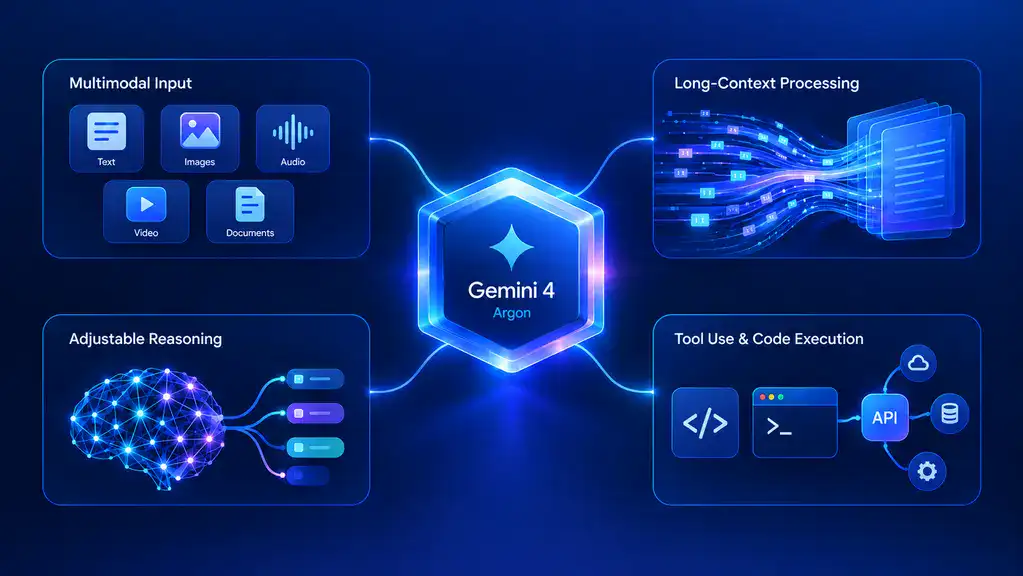
Argon’s main technical distinction is its combination of long-context processing, adjustable reasoning, multimodal inputs, and tools for executing tasks.
1. Multimodal Input
The model accepts several input formats:
- Text: Instructions, source code, technical documentation, and conversational prompts.
- Images: Screenshots, diagrams, charts, and visual references.
- Video: Visual sequences that can provide context for analysis.
- Audio: Audio content supplied for supported analysis workflows.
- PDFs: Reports, specifications, research papers, and other documents.
This makes Argon useful for applications that need to combine information from different sources. A development assistant, for instance, could analyze an error screenshot alongside a code excerpt and a technical specification.
One important distinction: Argon’s documented output is text. Its ability to interpret images, audio, or video does not mean the model itself directly generates every media type.
2. Long-Context Processing and Extended Output
Argon supports a unified context window of up to 1,048,576 tokens. That budget covers input and output together, including the model’s reasoning tokens where applicable. It should not be interpreted as one million input tokens plus a separate million-token output allowance.
The default synchronous output limit is 65,536 tokens. Long-decode workflows can support output of up to one million tokens, subject to the shared context budget and the applicable API configuration.
For developers, this can help with tasks involving large repositories, extensive documentation, long research records, or lengthy generated reports. However, a large context window does not guarantee that every detail will be interpreted correctly. Relevant context, clear instructions, and evaluation still matter.
3. Adjustable Reasoning Depth
Argon supports three thinking levels: low, medium, and high. The default is medium.
These settings let developers test how much reasoning a task needs. A straightforward transformation may not benefit from the highest setting, while a difficult debugging problem or complex mathematical task may justify more reasoning.
More reasoning can increase latency and token consumption. Teams should evaluate each setting against task accuracy, response time, and cost rather than automatically choosing the highest level.
4. Tool Use and Code Execution
Argon supports function calling, code execution, search grounding, structured outputs, file search, URL context, and other documented capabilities. Computer use is listed as a preview feature.
These tools extend the model beyond text generation. An application can let it call approved functions, execute code in a controlled environment, retrieve information, or return data in a defined format.
The model’s capabilities do not automatically provide access to a company’s systems. Developers must implement the integrations, authentication, authorization, and execution environment. Tool permissions should be limited to the actions an agent genuinely needs.
For the full specifications, consult the official Gemini 4 Argon model documentation.
How Does Gemini 4 Argon Perform on Benchmarks?
Benchmarks help compare AI models on defined tasks, but no single score establishes which model is best for every workload. Results depend on the evaluation method, task selection, model configuration, and whether the tests reflect real production conditions.
Google has published results across professional work, coding, cybersecurity, scientific reasoning, and other technical areas.
| Evaluation area | What the results indicate | What developers should consider |
|---|---|---|
| Vals Index | Google reports that Argon ranks first on this index of work across areas such as finance, coding, legal, and tax tasks. | A broad professional-work ranking does not guarantee the best results for a particular application. |
| Software engineering | Google describes internal projects involving large codebase refactoring and performance optimization. | Internal engineering examples are useful evidence of potential, but teams should test their own repositories and workflows. |
| Cybersecurity | Google reports a leading result on an indirect prompt-injection evaluation, with attack success reduced to 0.7% across 15 adaptive attempts. | This is a specific security evaluation, not proof that an AI agent is immune to prompt injection. |
| Scientific and mathematical work | Google describes applications involving research, mathematical reasoning, and scientific optimization. | Research claims should be checked against reproducible methods, independent calculations, and domain expertise. |
The Vals Index provides additional context for the professional-work benchmark Google highlights. Google’s published results should be read alongside the evaluation’s scope and methodology, not as a universal ranking of model quality.
What Benchmark Results do and do Not Prove
A strong benchmark score can indicate that a model performs well on the tasks represented in that evaluation. It does not prove that the model will consistently produce secure code, eliminate bugs, or outperform every competing model in a real application.
When evaluating Argon, development teams should test it against representative tasks from their own environment. Useful measures include:
- Task completion and code correctness.
- Unit and integration test pass rates.
- Number and severity of introduced defects.
- Tool-call accuracy and recovery from errors.
- Response latency and total token cost.
- Security issues and the amount of human correction required.
This provides a more useful basis for deciding whether the model improves an engineering workflow than a leaderboard position alone.
What Can Developers Build With Gemini 4 Argon?
Argon’s capabilities can support different types of AI-powered applications. The value depends on how well the model is integrated with the software, data, and controls around it.
1. Code Generation, Debugging, and Refactoring Tools
Developers can use Argon to generate functions, explain unfamiliar code, write test cases, investigate errors, and propose changes across multiple files.
A more advanced coding assistant could inspect a failing test, trace the related logic, suggest a patch, and run an approved test suite. The developer remains responsible for reviewing the diff, validating edge cases, and approving changes before deployment.
For existing applications, this can also support legacy-code analysis and documentation. The model should not be allowed to rewrite critical components without appropriate testing and rollback procedures.
2. AI Agents That Handle Multi-Step Tasks
Argon can serve as the reasoning component in agents that combine planning, tool calls, and iterative feedback.
Potential applications include:
- Software support agents that investigate reported bugs.
- Internal assistants that search technical documentation and prepare answers.
- Data-analysis agents that execute approved queries and summarize results.
- Workflow agents that gather information and prepare reports for review.
Building a dependable agent requires more than connecting a model to tools. The application needs clear task boundaries, state management, permission checks, error handling, monitoring, and a way to request human approval for consequential actions.
3. Applications That Work With Large Documents and Multimodal Inputs
The large context window and multimodal input support can help applications process technical manuals, long contracts, research papers, screenshots, and other mixed-format material.
For example, an enterprise knowledge assistant could retrieve relevant documents, compare their contents, and generate an answer with source references. A technical-support application could combine a screenshot with troubleshooting documentation to suggest next steps.
For business use, developers should also consider data access controls, document permissions, retrieval quality, and the risk of exposing confidential information to unauthorized users.
Teams exploring these applications can also review Cubix’s guide to AI-powered development across the software lifecycle.
Gemini 4 Argon Availability and Pricing
Gemini 4 Argon is available through several Google products, but access depends on the product, subscription, and use case.
Where Can Developers Access Gemini 4 Argon?
| Access route | Intended use |
|---|---|
| Gemini API and Google AI Studio | Building and testing applications that call the model. |
| Google Cloud and Gemini for business | Enterprise development and business workflows. |
| Google Antigravity | Agentic software development for eligible users. |
| Gemini app and AI Mode in Search | Consumer access for eligible Google AI subscribers. |
For API development, the model ID is gemini-4-argon. Access to the API is through the paid tier, and the model is not available on the Free tier or Google AI Pro plan through the Gemini API. Consumer access and developer access have different eligibility requirements.
How Much Does Gemini 4 Argon Cost?
Google lists the following standard API token rates in U.S. dollars:
| API usage | Introductory rate | Rate after introductory pricing |
|---|---|---|
| Input tokens | $2 per million | $4 per million |
| Output tokens, including thinking tokens | $10 per million | $20 per million |
| Cached input tokens | $0.10 per million | $0.20 per million |
Introductory pricing runs through November 30, with the standard rates taking effect December 1. These figures refer to token usage for the model, not a fixed monthly subscription price.
Actual costs depend on input length, output length, reasoning consumption, caching, and how frequently the application calls the model. Additional tools may have their own charges.
Before integrating Argon into a production service, estimate usage with representative prompts and test how different thinking levels affect both cost and quality. Check Google’s current Gemini API pricing information before committing to a budget, as rates and product terms can change.
What Are Gemini 4 Argon’s Limitations?

Argon’s advanced capabilities do not remove the usual challenges associated with AI systems. Teams should consider the following limitations before relying on it for production work.
1. Benchmark Results May Not Reflect Your Workload
An impressive result on a public or company-reported evaluation does not guarantee success on a proprietary codebase, an unusual business process, or a domain-specific problem. Benchmark methodology and task selection also affect comparisons.
Run a proof of concept using your own test cases before choosing the model for a critical workflow.
2. Complex Tasks Can Take Time and Consume More Tokens
Deep reasoning, long context, and extended outputs can increase latency and cost. Some tasks may require several tool calls, repeated execution, or lengthy outputs before they are complete.
Developers should set practical timeouts, output limits, and budgets. For lengthy operations, background execution and progress tracking may be more appropriate than a single synchronous request.
3. AI-generated Output Still Needs Review
Argon can produce incorrect answers, flawed code, incomplete analysis, or conclusions based on misunderstood context. Tool access introduces additional risks if an agent has excessive permissions or processes untrusted instructions from documents and webpages.
Use automated tests, code review, access controls, monitoring, and human approval for consequential actions. Treat model output as a proposed result that must meet the same quality standards as other software changes.
Google also publishes safety evaluations and known limitations in its Gemini 4 Argon model card. Reviewing that information is useful when assessing a deployment involving sensitive data or autonomous tool use.
What Does Gemini 4 Argon Mean for Software Development?
Gemini 4 Argon points toward a development workflow in which AI can contribute to more than isolated coding tasks. A model that reasons through multi-step work, uses tools, and handles large amounts of context can assist across requirements analysis, implementation, debugging, testing, and technical documentation.
That does not mean teams can hand over an entire software project and expect a production-ready result without oversight. Architecture decisions, product requirements, security, system integration, and accountability still require experienced people and sound engineering practices.
For businesses, the practical question is where Argon can improve a measurable part of the workflow. A team might start with code review assistance, test generation, document analysis, or an internal knowledge assistant, then evaluate accuracy, time saved, operational cost, and risk before expanding its use.
Building a reliable solution also requires the right application architecture, data integrations, evaluation strategy, and deployment controls. Cubix’s generative AI development services provide a relevant starting point for businesses exploring custom AI-powered applications and workflow automation.
Conclusion
Gemini 4 Argon is designed for complex reasoning, software engineering, scientific problem-solving, and multi-step AI workflows. Its unified context window, adjustable thinking levels, multimodal inputs, and tool-use capabilities make it worth evaluating for applications that need more than basic text generation.
The key is to assess the model against real requirements rather than rely on benchmark rankings alone. Test it with representative data, measure quality and cost, and keep security controls and human review in the workflow.
If your business is exploring an AI-powered product or looking to integrate advanced AI into existing software, Cubix can help turn the idea into a practical development plan.
Frequently Asked Questions
1. What is Gemini 4 Argon?
Gemini 4 Argon is Google’s reasoning-focused AI model for complex software engineering, multi-step agent workflows, scientific problem-solving, and enterprise knowledge work. It supports text, image, video, audio, and PDF inputs.
2. Is Gemini 4 Argon available to developers?
Yes. Developers can access it through the Gemini API and Google AI Studio, with enterprise access available through Google Cloud and related products. API access requires the paid tier, and eligibility varies across Google’s consumer and developer products.
3. What is Gemini 4 Argon best at?
Google positions Argon for demanding tasks such as codebase analysis, software refactoring, multi-step agents, mathematical and scientific reasoning, and long-document analysis. Its suitability for a particular project should be confirmed through testing.
4. How much does Gemini 4 Argon cost?
The listed introductory API rate is $2 per million input tokens and $10 per million output tokens, including thinking tokens in the output charge. The rates increase to $4 and $20 per million, respectively, after the introductory period. Cached input tokens are billed separately at discounted rates.
5. Can Gemini 4 Argon write and debug code?
Yes. Argon can generate code, explain errors, suggest fixes, assist with refactoring, and use code execution tools where enabled. Developers should still run tests, inspect code changes, and verify security and performance before deploying generated code.
6. How does Gemini 4 Argon compare with other AI models?
Google reports strong results for Argon across several professional and technical benchmarks. However, there is no single model that is best for every task. Compare models using your own workload, evaluation criteria, latency requirements, security needs, and total cost.