Key Takeaways
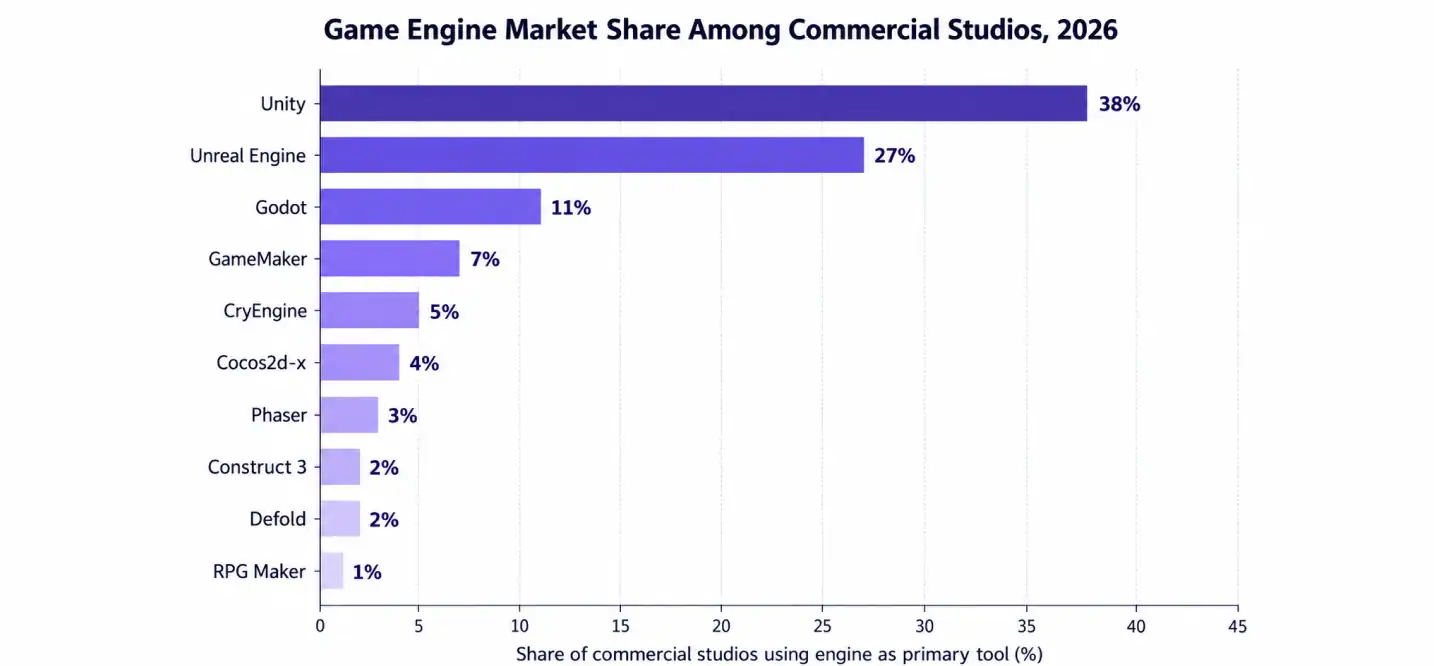
- Unity, Unreal Engine, and Godot remain the three most-used game development engines for commercial projects.
- Your choice depends on platform, budget, and team size, not just graphics quality.
- Free and open-source engines like Godot and Defold now compete seriously with paid options.
- 2D-focused engines like GameMaker, Construct 3, and RPG Maker win on speed, not raw power.
- Licensing models vary a lot. Some charge upfront. Others take a royalty cut later.
- Mobile, PC, console, and VR each favor different engines. There’s no single winner for everything.
- Partnering with an experienced company often matters more than the engine you pick.
Over 70% of top-grossing mobile games run on just two engines. That’s how concentrated this market really is. Picking the wrong one early can cost months later.
Choosing among the best game engines isn’t just a technical decision. It affects your budget, your timeline, and your team’s sanity. Some engines are built for speed. Others are built for scale. A few try to do both and mostly succeed.
This guide breaks down the 10 best game engines for 2026. We’ll cover pricing, platforms, strengths, and weaknesses. By the end, you’ll know exactly which engine fits your project.
Got game idea worth building? Let’s make it happen
Contact UsWhat Is a Game Engine, Really?
A game engine is the software foundation behind every game you’ve ever played. It handles rendering, physics, sound, and input. Without one, developers would rebuild these systems from scratch every time.
Game development engines exist to save time. They give teams pre-built tools for animation, lighting, and networking. That means more energy goes into gameplay, not plumbing.
Most studios don’t build engines in-house anymore. It’s expensive and slow. Working with an established game development company means you get engine expertise without the learning curve. That matters more than people expect. Engine-related rework accounts for nearly 30% of delayed game launches. Picking right the first time saves real money.
How We Ranked These 10 Engines
We looked at five factors for every engine on this list.
- Platform support — mobile, PC, console, VR, and web reach
- Cost and licensing — upfront fees versus royalty models
- Learning curve — how fast a new developer gets productive
- Community and documentation — tutorials, forums, and long-term support
- Performance — how well it handles 2D and 3D workloads at scale
This isn’t a popularity contest. It’s a practical comparison for real production decisions.
Quick Comparison Table: All 10 Engines at a Glance
| Engine | Best For | License | Key Platforms |
| Unity | Mobile, cross-platform, indie | Free tier / Paid plans | iOS, Android, PC, Console, VR |
| Unreal Engine | AAA, high-fidelity 3D | Free (5% royalty after $1M) | PC, Console, Mobile, VR |
| Godot | Open-source, 2D/3D | Free (MIT license) | PC, Mobile, Web, Console |
| GameMaker | 2D, beginners | Paid subscription | PC, Console, Mobile |
| Construct 3 | No-code 2D games | Subscription-based | Web, Mobile, PC |
| Phaser | Browser-based games | Free (MIT license) | Web, Mobile browsers |
| Defold | Lightweight mobile/cross-platform | Free | Mobile, PC, Web, Console |
| CryEngine | Large open-world environments | Free (royalty-based) | PC, Console |
| Cocos2d-x | Lightweight mobile 2D | Free (open-source) | Mobile, Web, PC |
| RPG Maker | Story-driven 2D RPGs | Paid, one-time | PC, Mobile |
The 10 Best Game Engines in 2026
1. Unity Game Engine
The Unity game engine is the default choice for most mobile studios. It handles 2D and 3D equally well. Its asset store saves teams weeks of production time.
Unity’s biggest strength is reach. One codebase can deploy to iOS, Android, PC, and consoles. That’s rare among top game engines.
Pros: Huge asset library, strong mobile pipeline, active community. Cons: Licensing costs rise fast at scale. Frequent UI changes frustrate veterans.
2. Unreal Engine
Unreal Engine sets the bar for visual quality. Nanite and Lumen let small teams build worlds that once needed huge budgets. It’s the go-to for cinematic, high-fidelity titles.
The tradeoff is hardware demand. Unreal needs powerful machines to run smoothly during development. Curious about real costs? Check this Unreal Engine development cost breakdown before committing.
Pros: Industry-leading graphics, strong VR support, visual scripting via Blueprints. Cons: Steep learning curve, heavy hardware requirements.
3. Godot Game Engine
The Godot game engine has become a serious contender, not just a free alternative. Version 4.x brought a rewritten renderer and better 3D performance. Studios like its zero-royalty MIT license.
Godot uses GDScript, which is approachable for beginners. It also supports C# and C++ for advanced teams.
Pros: Completely free, lightweight, growing fast. Cons: Smaller asset marketplace, fewer console porting options.
4. GameMaker
GameMaker remains one of the fastest ways to build a 2D game. Its drag-and-drop system needs no coding at all. Beginners can ship a playable prototype in days.
For teams that want to go deeper, GML gives more control. It’s been used for hits like Undertale and Hyper Light Drifter.
Pros: Beginner-friendly, fast prototyping, solid 2D toolset. Cons: Weak 3D support, subscription can add up over time.
5. Construct 3
Construct 3 takes the no-code idea even further than GameMaker. It runs entirely in a browser. You build logic with visual event sheets, not scripts.
This makes it popular in schools and among hobbyists. Small studios also use it for quick browser game prototypes.
Pros: No installation needed, very beginner-friendly, fast iteration. Cons: Limited for complex 3D or large-scale commercial titles.
6. Phaser Game Engine
The Phaser game engine owns the browser-based game space. It’s built entirely in JavaScript, so web developers pick it up quickly. Phaser powers thousands of small mobile web games.
It’s lightweight and loads fast, which matters a lot for browser performance.
Pros: Free, huge JavaScript community, quick to deploy. Cons: 2D only, not suited for large commercial 3D projects.
7. Defold Game Engine
The Defold game engine doesn’t get as much attention, but it should. It’s fast, lightweight, and completely free. King (the makers of Candy Crush) originally built it in-house.
Defold shines for mobile and cross-platform 2D games where performance matters.
Pros: Very fast runtime, small build sizes, free forever. Cons: Smaller community, fewer tutorials than Unity or Godot.
8. CryEngine
CryEngine specializes in massive, detailed environments. Real-time lighting and particle effects look stunning out of the box. Studios building open-world PC and console titles often turn here.
It carries a 5% royalty model once a game turns profitable.
Pros: Exceptional graphics quality, strong environment tools. Cons: Steep learning curve, thinner documentation than competitors.
9. Cocos2d-x
Cocos2d-x is a lightweight, open-source engine popular across Asian mobile markets. It’s fast, free, and well-suited for casual 2D mobile games. Many hyper-casual hits run on it quietly.
It’s less known in Western markets but still widely used commercially.
Pros: Extremely lightweight, free, strong mobile performance. Cons: Smaller English-language community and documentation.
10. RPG Maker
RPG Maker fills a specific niche: story-driven, tile-based RPGs. It’s a paid, one-time purchase with a huge library of pre-made assets. Indie RPG developers love how fast it moves ideas to playable builds.
It’s not built for action games or 3D work of any kind.
Pros: Extremely fast RPG prototyping, large asset library. Cons: Narrow use case, dated visual style by default.
Want a deeper dive into engines built specifically for solo and small teams? This guide to the top 10 game engines for indie developers covers that ground well.
Feature-by-Feature Game Engine Comparison
| Feature | Unity | Unreal Engine | Godot | CryEngine |
| 2D support | Excellent | Limited | Excellent | Limited |
| 3D quality | Very good | Industry-leading | Good | Excellent |
| Mobile support | Best in class | Limited | Good | Poor |
| Beginner-friendly | Yes | Moderate | Yes | No |
| Scripting language | C# | C++ / Blueprints | GDScript / C# | C++ / Lua |
| VR support | Excellent | Excellent | Basic | Limited |
This kind of game engine comparison matters most once you know your platform target. Reach for our 2D game engine comparison guide if flat-screen titles are your focus.
Best Game Engine By Use Case
Different projects need different engines. Here’s a fast lookup.
- Best game engine for commercial games: Unity or Unreal Engine, depending on platform and budget.
- Best 2D game engine: Godot or GameMaker for flexibility and speed.
- Best 3D game engine: Unreal Engine for fidelity, Unity for balance.
- Best mobile game engine: Unity, followed closely by Defold and Cocos2d-x.
- Best cross-platform game engine: Unity, thanks to its single-codebase deployment.
- Best AAA game engine: Unreal Engine, without much debate.
- Best multiplayer game engine: Unity Gaming Services or Unreal’s built-in networking stack.
About 55% of indie studios say platform reach drives their engine choice more than graphics. That single stat explains why Unity still leads mobile by a wide margin.
Game Engine Pricing and Licensing Compared
| Engine | Pricing Model | Free Tier Available |
| Unity | Subscription tiers | Yes, under revenue threshold |
| Unreal Engine | 5% royalty after $1M revenue | Yes, fully free until threshold |
| Godot | Free forever, no royalties | Yes |
| GameMaker | Paid subscription | Limited trial only |
| CryEngine | 5% royalty model | Yes, free to start |
Game engine licensing decisions affect your budget more than most teams plan for. A game that clears $1M in revenue on Unreal starts paying royalties immediately after. Wondering what full production actually costs? This breakdown on what it costs to make a video game fills in the gaps.
Game engine pricing isn’t just the license fee either. Add hosting, plugins, and platform certification costs. Studios that skip this math often blow past their original budget by 20% or more.
Game Engine Performance: 2D vs 3D, Mobile vs PC
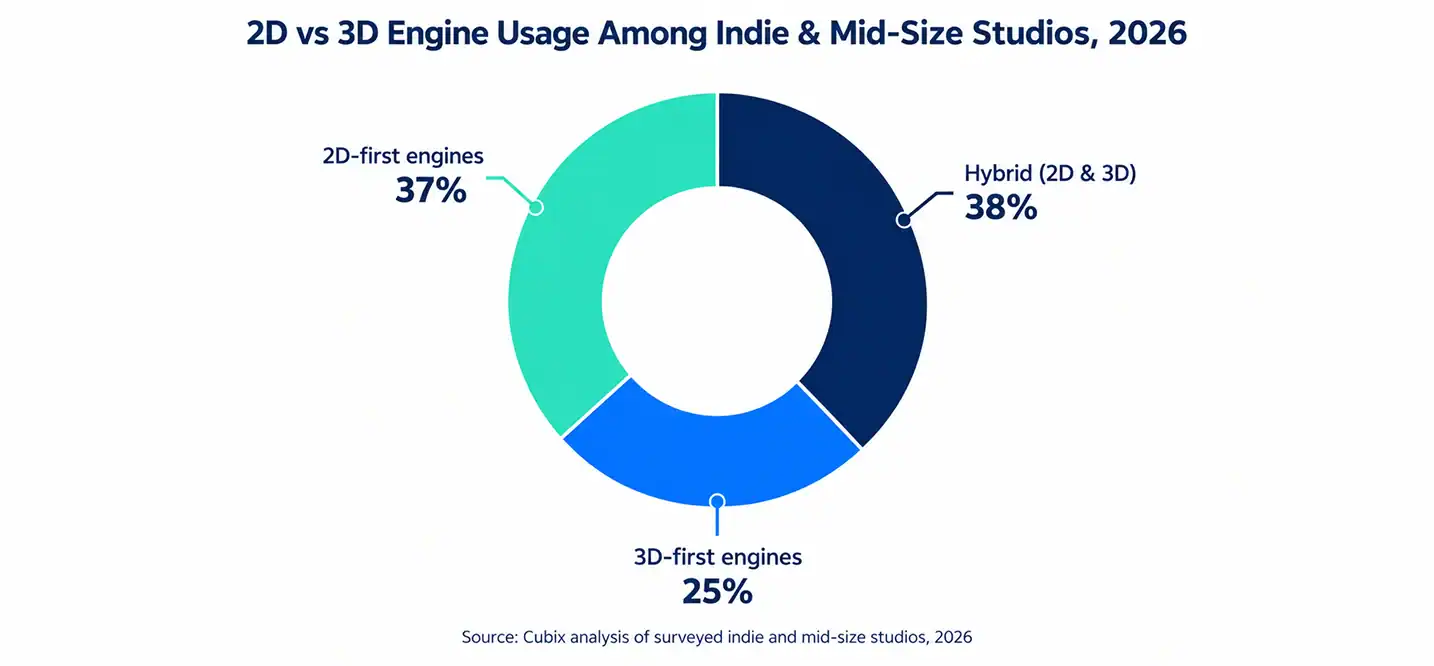
Game engine performance varies a lot by workload type. 2D-focused engines like Defold and Cocos2d-x load faster and run leaner. 3D engines like Unreal demand far more processing power.
A game engine for PC games usually needs more headroom than one built for mobile. Console targets add another layer of certification and performance testing entirely.
Roughly 62% of indie titles released in 2025 were built in 2D-first engines. That’s a meaningful shift from five years ago, when 3D dominated indie output.
A solid game engine for console games needs certification support baked in, not bolted on later. Unity and Unreal both handle this natively. Smaller engines often lean on third-party porting partners instead.
VR remains a smaller but growing category. A game engine for VR games needs strong SDK support, and right now Unity and Unreal both lead that race comfortably.
Custom Game Engine vs Commercial Engine
Some studios still ask about building their own engine from scratch. It’s rarely worth it anymore.
A custom game engine gives full control over performance and architecture. But it also means building physics, rendering, and tooling from zero. Most teams don’t have the time or budget for that path.
A commercial game engine gets you to market faster. Unity, Unreal, and Godot already solved the hard problems years ago. Unless you’re a massive studio with very specific technical needs, commercial makes more sense.
Curious how 3D pipelines actually come together from scratch? This beginner’s guide to 3D game development walks through the fundamentals well.
Why Work With a Game Development Studio Instead of Going Solo
Picking the right engine is only half the battle. Execution is where most projects actually stall.
A skilled Game Development Studio brings engine-specific expertise you can’t build overnight. Cubix has shipped titles across Unity, Unreal, and Godot for clients worldwide. That range matters when your platform requirements shift mid-project.
Studios like Cubix also carry production discipline. Sprint planning, QA cycles, and live-ops support come standard. That structure is hard to replicate as a solo developer or a two-person team.
If you’re weighing full video game development services against building in-house, the math usually favors partnering, especially for first-time commercial releases.
How Cubix Helps You Choose and Build on the Right Engine
Cubix doesn’t push one engine for every project. The team evaluates platform targets, budget, and timeline first. Then they recommend the engine that actually fits.
For flat, stylized, or mobile-first titles, Cubix’s 2D game development services cover everything from prototyping to launch. For immersive, high-fidelity projects, their 3D game development services handle everything from environment art to performance optimization.
Racing games have their own engine quirks too. This breakdown of the best racing game development engines is worth a look if that’s your genre.
Whether you’re building a mobile puzzle game or a AAA console title, working with a team that’s shipped across multiple engines removes a lot of guesswork. That’s the real value a game development partner brings to the table.
Need game engines compared? Let’s build the next hit
Contact UsFrequently Asked Questions
1. Which game engine is the best overall choice for a commercial game?
Unity and Unreal Engine lead for most commercial releases. Unity wins on mobile and cross-platform reach. Unreal wins when visual fidelity is the priority.
2. How do game engine licensing fees affect a game’s total development budget?
Royalty models like Unreal’s 5% cut only apply after $1M in revenue, so early costs stay low. Subscription-based engines like GameMaker add predictable monthly costs regardless of revenue.
3. Which game engine is strongest for high-end 3D and AAA-style projects?
Unreal Engine remains the clear leader here. Nanite and Lumen give small teams AAA-level visual output without massive art teams.
4. Which engines provide the best support for mobile, PC, and console releases?
Unity offers the broadest single-codebase reach across all three. Unreal Engine is strong for PC and console but less mobile-optimized.
5. When should a studio choose a custom engine instead of an off-the-shelf engine?
Only when you have very specific technical needs and a large enough budget to build core systems from scratch. For most studios, commercial engines are faster and cheaper.
6. Which game engine is best suited to a scalable multiplayer project?
Unity Gaming Services and Unreal Engine’s native networking stack both handle multiplayer at scale well. The right choice depends on your existing tech stack and platform targets.