Key Takeaways
- 3D game development is more accessible than ever. Free engines (Unity, Unreal, Godot) and free asset libraries mean you don’t need a studio budget to start — just a clear idea and some patience.
- Every 3D game follows the same core pipeline: concept, modeling, texturing, rigging/animation, programming, testing, deployment. Modeling and testing alone can eat over half your timeline, so plan for both.
- Scope small for your first project. Most abandoned beginner projects fail from starting too ambitious, not from lack of skill, a single small level with one solid mechanic beats an unfinished open-world epic.
- You don’t have to do it all yourself. Modeling, character design, and art are common places beginners get stuck, outsourcing these to specialists (like Cubix) can save months without compromising your creative vision.
Ever played a game and thought, “I want to build something like this”? You’re not alone. The global gaming industry pulled in an estimated $205 billion in 2026, with 3.6 billion people playing games worldwide, that’s over 61% of everyone online. If you’ve ever wondered how to make 3D games, you’re stepping into an industry bigger than movies and music combined.
Here’s the good news: making a 3D game is no longer something only big studios with million dollar budgets can do. Free engines, free tutorials, and free assets have made 3D game development genuinely accessible to a single person with a laptop and some patience. The tools have caught up to the ambition.
This guide walks you through everything, from the basics of 3D game design to the actual pipeline studios use, all the way to shipping your first playable build. No jargon-heavy lectures. Just a clear, honest roadmap for how to create 3D games as a total beginner.
Let’s get into it.
Want to discuss your project? Our experts are just a click away.
Contact UsWhat is Game Development for Beginners?
Let’s start simple. Game development is the process of turning an idea into something people can actually play, a mix of art, code, sound, and design working together.
3D game development specifically means building games in three-dimensional space, where characters and environments have depth, not just height and width. Think of the difference between a flat side-scroller and a game where you can walk around a building and look up at it from any angle. That’s the shift from 2D to 3D.
For beginners, this can feel intimidating because 3D adds more moving parts: models, textures, lighting, cameras, physics. But here’s a stat worth remembering, mobile gaming alone generated $103 billion in revenue in 2025, capturing 55% of the entire industry’s income, and a huge share of that came from 3D mobile titles built by small, sometimes solo, teams. You genuinely don’t need a studio to get started.
The real starting point isn’t a fancy engine or expensive software. It’s understanding the game development company pipeline, the sequence of steps that takes a game from “just an idea” to something playable.
Understanding The 3D Game Development Pipeline
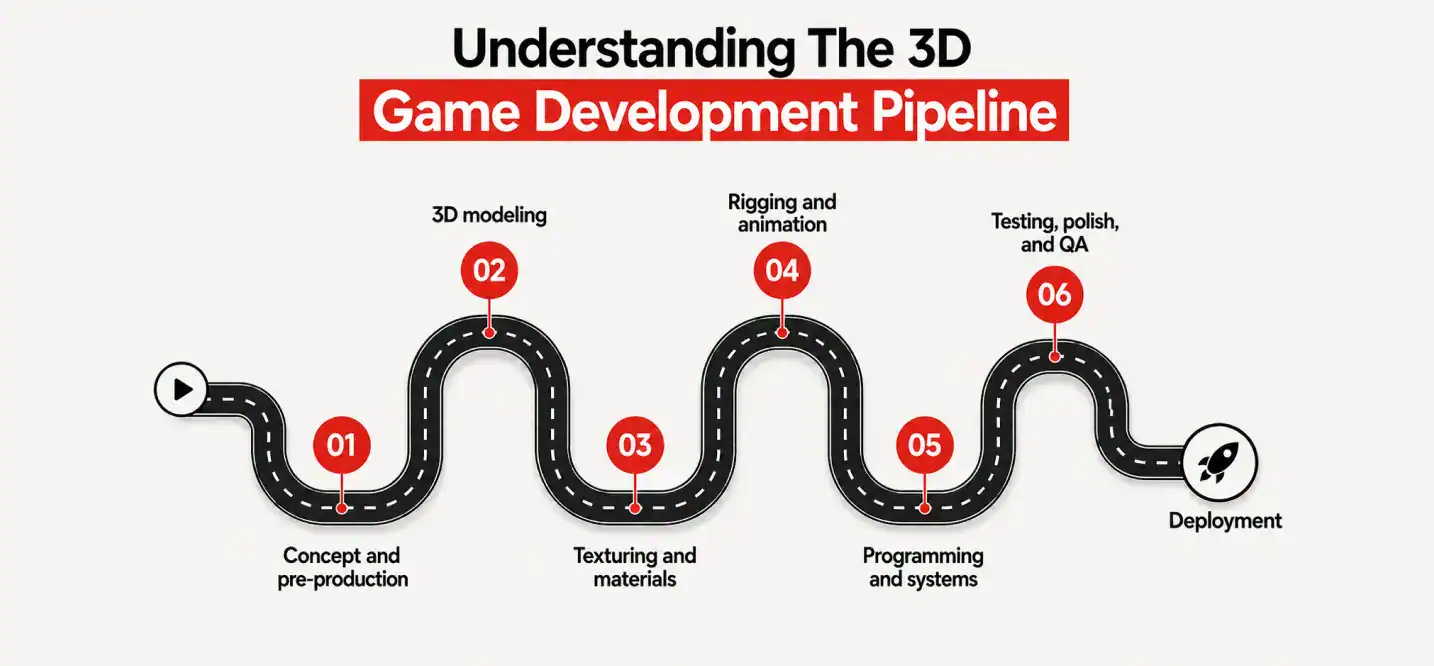
Every 3D game, whether it’s a tiny mobile puzzle or a AAA blockbuster, moves through roughly the same production pipeline. Knowing this pipeline early saves beginners a ton of wasted effort.
- Concept and pre-production This is where you define the game, genre, mechanics, art style, target platform. Sketch it out on paper before you touch software. Skipping this step is the single biggest reason beginner projects stall halfway through.
- 3D modeling Artists build the characters, props, and environments as 3D meshes using tools like Blender, Maya, or 3ds Max. This stage alone can eat up 30-40% of a small project’s total development time, which is why many beginners choose to lean on a 3D game art outsourcing studio rather than learn modeling from zero while also learning to code.
- Texturing and materials Raw 3D models look grey and lifeless until textures are applied, colors, surface detail, reflectivity, roughness. This is what makes a sword look like metal and not plastic.
- Rigging and animation Characters need skeletons (“rigs”) so they can move. This is one of the more technical parts of the pipeline, and it’s exactly where a lot of beginners get stuck. If your project has a hero character or NPCs, working with a 3D character design services provider can shortcut months of trial and error.
- Programming and systems This is where movement, combat, AI, inventory, and everything interactive comes to life through code.
- Testing, polish, and QA Roughly 20-30% of total project time in professional studios goes into testing and fixing bugs, a number beginners consistently underestimate.
- Deployment Packaging and publishing the final build to a platform like Steam, the App Store, or Google Play.
| Pipeline Stage | What Happens | Common Tools | Typical Share of Project Time |
| 1. Concept & Pre-production | Define genre, mechanics, art style, scope | Paper, Notion, Miro | 5–10% |
| 2. 3D Modeling | Build characters, props, and environments | Blender, Maya, 3ds Max | 25–35% |
| 3. Texturing & Materials | Add color, surface detail, realism | Substance Painter, Blender | 10–15% |
| 4. Rigging & Animation | Add skeletons and movement to characters | Blender, Maya, Mixamo | 15–20% |
| 5. Programming & Systems | Build movement, AI, combat, UI logic | Unity (C#), Unreal (C++/Blueprints), Godot (GDScript) | 20–25% |
| 6. Testing, Polish & QA | Find and fix bugs, balance gameplay | In-engine playtesting, bug trackers | 20–30% |
| 7. Deployment | Package and publish the final build | Steam, App Store, Google Play | 5% |
Understanding this full 3D game development pipeline upfront means you won’t be caught off guard when modeling takes longer than you expected, or when testing eats a third of your timeline.
Key Essentials For 3D Game Development
Before you start “making a 3D game,” there are a handful of essentials every beginner should have in place.
A game engine. This is your foundation, the software that renders your world, handles physics, and runs your code. Unity currently powers 51% of all games released on Steam, making it the most widely used engine in the industry, while Unreal Engine claims about 31% of total units sold, meaning it disproportionately powers bigger, higher-budget titles. Godot, meanwhile, has exploded in popularity, its GitHub stars grew from around 25,000 in 2020 to over 100,000 by 2026, making it the fastest-growing free option on the market.
3D modeling software. Blender is the standard free choice, used by hobbyists and professional studios alike.
A clear scope. This might be the most underrated essential. Beginners routinely try to build the next open-world epic as their first project. Don’t. Start small.
Basic scripting knowledge. You don’t need to be a software engineer, but understanding simple logic (if this happens, then that happens) will take you far. Unity uses C#, Unreal uses C++ (with a visual scripting option called Blueprints), and Godot uses GDScript, which reads a lot like Python.
Reference and asset sources. Pre-made 3D models, animations, and sound effects save enormous time when you’re starting out.
Good 3D game design isn’t about mastering every tool, it’s about understanding which few tools you actually need for your specific project, and getting comfortable with them.
How To Develop Your 3D Game From Scratch?
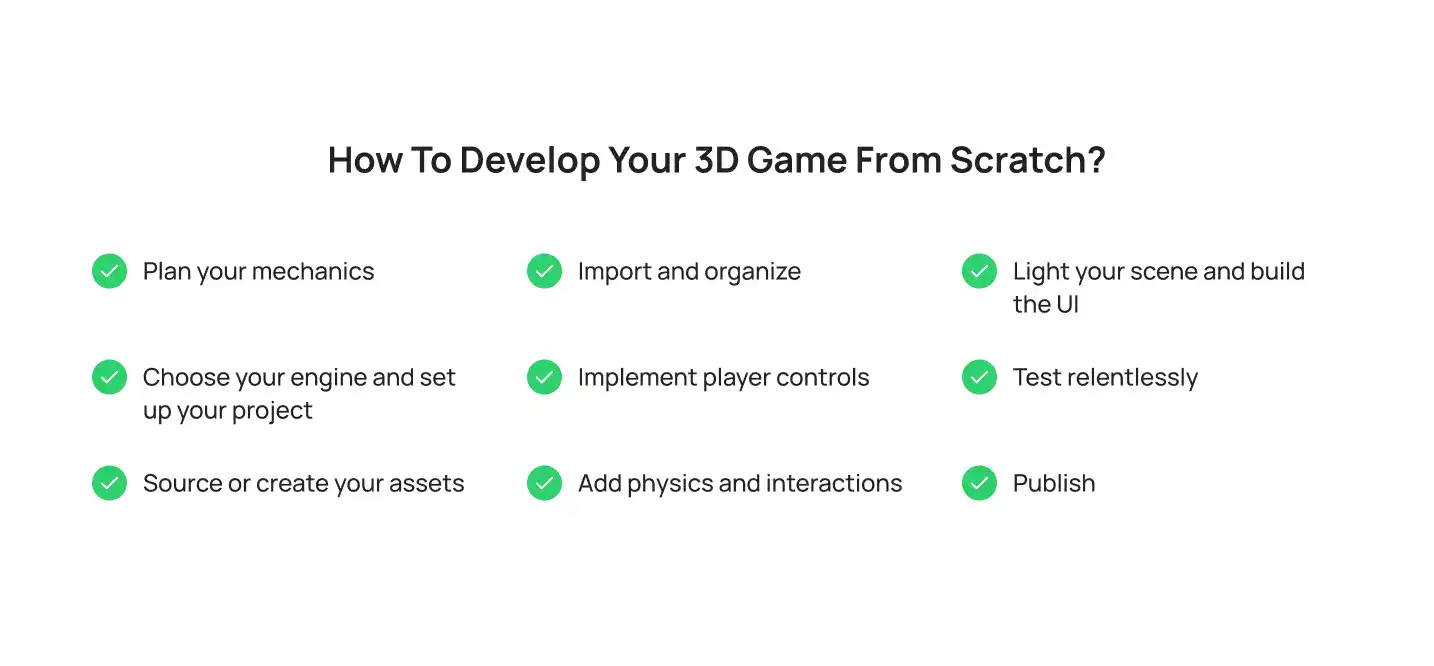
Alright, let’s get practical. Here’s a step-by-step breakdown of how to create 3D games, from a blank project to a playable build.
Step 1: Plan your mechanics
Before opening any software, write down what the player actually does. Do they run, jump, shoot, solve puzzles, build things? Sketch your camera type too, first-person, third-person, or top-down, because this decision shapes almost everything else you build.
Step 2: Choose your engine and set up your project
Pick Unity, Unreal, or Godot based on your goals (more on this below), install it, and create a new 3D project. Set your target platform (PC, mobile, or console) right at the start, retrofitting a mobile game for console later is painful.
Step 3: Source or create your assets
This is where most beginners either burn out or get stuck. You have three real options: model everything yourself in Blender, buy pre-made assets from a marketplace, or bring in a 3d game artist for hire to build custom characters and props that actually match your game’s vision. There’s no wrong answer here, it depends on your budget and timeline.
Step 4: Import and organize
Drop your models, textures, and animations into your project. Keep folders organized (Models, Textures, Scripts, Audio), a messy project file kills momentum fast.
Step 5: Implement player controls
Here’s a simple beginner-level movement script in Unity (C#) to give you a feel for what this looks like:
using UnityEngine; public class PlayerMovement : MonoBehaviour { public float speed = 5f; public float rotationSpeed = 200f; void Update() { float horizontal = Input.GetAxis(“Horizontal”) * rotationSpeed * Time.deltaTime; float vertical = Input.GetAxis(“Vertical”) * speed * Time.deltaTime; transform.Translate(0, 0, vertical); transform.Rotate(0, horizontal, 0); } }
That’s it, a foundation for forward, backward, and rotational movement. Everything else builds on top of this.
Step 6: Add physics and interactions
Apply colliders and rigidbodies so objects can collide, fall, and react. Add triggers for doors, pickups, or checkpoints.
Step 7: Light your scene and build the UI
Lighting sets the entire mood of a 3D game. Add health bars, menus, and score displays so the player has feedback on what’s happening.
Step 8: Test relentlessly
Play your own game dozens of times. Fix what breaks. Then get someone else to play it, you’ll be shocked what they find in five minutes that you missed after fifty hours.
Step 9: Publish
Export your build for your chosen platform and get it in front of players.
Worth knowing before you dive in: indie game development typically costs anywhere from $10,000 for a simple solo project up to $300,000+ for a polished 3D title with a small team, and most projects take anywhere from 6 months to 2 years depending on scope. Only around 20% of indie games break even in their first year, which isn’t meant to discourage you, but to set realistic expectations. Scope small, ship something, and improve from there.
| Project Scope | Typical Budget | Typical Timeline | Team Size |
| Simple solo 2D/3D mobile game | $10,000 – $15,000 | 4–8 weeks | 1 person |
| Small polished indie title | $50,000 – $60,000 | 6–12 months | 1–5 people |
| Mid-size indie game (custom 3D art) | $60,000 – $250,000 | 1–2 years | 5–10 people |
| Large, ambitious 3D indie/console title | $250,000 – $2M+ | 2+ years | 10–15+ people |
If your ambitions outgrow a solo weekend project, that’s usually the point where teams turn to dedicated 3d game development services to fill skill gaps in art, animation, or engineering without slowing the whole project down.
Best Beginner-Friendly Tools and Engines
What are the best beginner-friendly tools for 3D game development?
For most beginners, the winning combination is Unity + Blender. Unity’s documentation and tutorial ecosystem is enormous, which matters a lot when you’re stuck at 1 a.m. wondering why your character keeps falling through the floor. If you’re drawn to jaw-dropping visuals and don’t mind a steeper learning curve, Unreal Engine’s Blueprint visual scripting system lets you build gameplay logic without writing traditional code, a genuinely underrated feature for non-programmers.
What are the best free 3D game engines for beginners?
All three major engines, Unity, Unreal Engine, and Godot, offer free tiers, which is honestly one of the best things about getting into game dev in 2026. Unity Personal is free up to $200,000 in revenue or funding. Unreal Engine is free to use and only takes a 5% royalty after your game earns over $1 million, meaning it costs nothing until you’re genuinely successful. Godot is completely free and open-source with no royalties or revenue caps at all, which is a big reason it’s become the go-to choice for hobbyists searching for how to make a 3D game in Godot for beginners after Unity’s 2023 pricing controversy pushed a wave of developers to explore alternatives.
If you’ve searched for a Unity tutorial for beginners in PDF form, or looked for “Unity tutorial 3D” content on YouTube, know that Cubix has many tutorials and guides on their website available.
| Engine | Best For | Language | Pricing | Steam Market Share | Learning Curve |
| Unity | Mobile & indie 3D games | C# | Free up to $200K revenue/funding | ~51% of released games | Beginner-friendly |
| Unreal Engine | High-fidelity, AAA-style visuals | C++ / Blueprints (visual) | Free, 5% royalty after $1M revenue | ~31% of units sold (by revenue) | Steeper, but Blueprints help |
| Godot | Lightweight indie & hobby projects | GDScript (Python-like), C#, C++ | 100% free, open-source, no royalties | Fastest-growing (100,000+ GitHub stars in 2026) | Very approachable |
Where can I find free assets for my first 3D game project?
The Unity Asset Store and Unreal Marketplace both have large free sections with models, textures, and sound effects. Sketchfab, Poly Haven, and Kenney.nl are also popular for free, beginner-safe 3D assets. Using pre-made assets for your first project is completely normal, it lets you focus on learning gameplay and mechanics instead of getting stuck perfecting a single 3D model for three weeks.
| Resource | Best For | Cost | Notes |
| Unity Asset Store | Models, textures, full toolkits | Free + paid tiers | Huge library, plugs directly into Unity |
| Unreal Marketplace | High-fidelity environments & characters | Free + paid tiers | Best for AAA-style visuals |
| Sketchfab | Browsable, downloadable 3D models | Free + paid | Great for reference and prototyping |
| Poly Haven | HDRIs, textures, models | 100% free | Excellent quality, no attribution required |
| Kenney.nl | Low-poly, stylized game assets | 100% free | Perfect for prototypes and game jams |
| Mixamo | Character rigging & animation | Free | Auto-rigs and animates humanoid models in minutes |
Common Mistakes Beginners Make (and How to Dodge Them)
- Starting too big. An open-world RPG is not a first project. A single small level with one clear mechanic is.
- Skipping the planning stage. Jumping straight into the engine without a plan is the fastest route to an abandoned project, and project abandonment is genuinely common; Steam sees over 1,200 new indie titles released every month, and countless more never make it that far.
- Perfecting art before gameplay is fun. A beautiful game that isn’t fun to play won’t hold anyone’s attention. Prototype with basic shapes first.
- Ignoring performance early. Poly counts and texture sizes matter, especially for mobile 3D games. Fix this early, not after your game is already lagging.
- Trying to do everything alone. There’s no shame in outsourcing what isn’t your strength, most professional studios rely on specialists for art, animation, and character design rather than one person doing it all.
When Beginners Should Bring in Professional Help
At some point, most creators hit a wall, not because the idea is bad, but because 3D game development genuinely spans several specialized skill sets: modeling, rigging, animation, lighting, and programming. Trying to be excellent at all of them at once is a tall order for one person.
This is exactly why studios and solo developers alike lean on outsourced 3d game development services once a project moves past the prototype stage, bringing in specialists for the parts that are eating the most time, while keeping creative control over the vision.
Ready to Take Your 3D Game Further? Let’s Build It Together.
Turning a 3D game concept into a polished, market-ready product takes more than tutorials and free assets, eventually, it takes the right team. That’s where Cubix comes in.
Whether you need a full production partner or just extra hands on a specific piece of the pipeline, Cubix offers:
- 3D game development services, end-to-end production support, from prototype to launch, for PC, mobile, and console titles.
- 3D game art outsourcing, a dedicated studio for environments, props, and world-building art that matches your game’s tone.
- 3D game artists for hire, flexible access to skilled 3D artists without the overhead of a full in-house team.
- 3D character design services, memorable, market-ready characters built to fit your game’s world and story.
If you’ve got the idea and the drive, Cubix can help with everything in between. Get in touch with the Cubix team and let’s talk about what your first, or next, 3D game could look like.
Are you looking for more resources? Many beginners search for a free “guide to 3D game development for beginners” in PDF form, browse Reddit communities for honest, real-world advice from other beginners, or look up specific walkthroughs like how to make a 3D game in Unity for beginners or how to make a 3D game in Godot for beginners. These communities and free resources are a great supplement to hands-on practice, but nothing replaces actually opening the engine and building something, however small, today.
Want to discuss your project? Our experts are just a click away.
Contact UsFrequently Asked Questions
1. How to start 3D game development?
Start by picking one small idea, choosing a beginner-friendly free engine like Unity or Godot, and building a tiny playable prototype, even something as simple as a character walking around a single room. Learn by doing rather than watching endless tutorials before touching the software.
2. What is the 80/20 rule in game development?
It’s the idea that roughly 80% of your game’s polish and player experience comes from 20% of your total features. In practice, this means beginners should focus their time on the few core mechanics that make the game fun, rather than spreading effort thin across dozens of minor features that add little real value.
3. Is 30 too old to get into game dev?
Not even close. The average gamer today is 36 years old, and the industry is full of developers who switched careers in their 30s, 40s, and beyond. Game engines and tutorials are more beginner-friendly now than at any point in the industry’s history, so age is far less of a barrier than persistence and consistent practice.
4. Can I teach myself 3D modeling?
Yes. Tools like Blender are free, and there are thousands of free tutorials covering everything from basic shapes to full character modeling. It takes time and repetition to get comfortable, but plenty of working game artists are entirely self-taught.
5. How long does it take to make a 3D game as a beginner?
A very simple solo project can take anywhere from a few weeks to a few months. More ambitious indie 3D games with a small team typically take 6 months to 2 years. The honest answer is: it depends entirely on your scope, so keeping your first project small is the best way to actually finish it.
6. Do I need to know how to code to make a 3D game?
Not necessarily. Engines like Unreal offer visual scripting (Blueprints) that lets you build gameplay logic without traditional code. That said, learning at least basic scripting, even simple C# or GDScript, will give you far more control and make troubleshooting much easier down the line.