Key Takeaways
- You almost never need to rebuild your app to add AI. Most successful AI integrations run as a separate service that your existing app calls through an API, leaving your core codebase untouched.
- The fastest wins for integrating AI into an existing product are usually smart search, a support chatbot trained on your own content, content generation, document extraction, and personalization.
- Three architecture patterns cover almost every real-world project: the API wrapper, the sidecar service, and augmentation of an existing feature.
- Working with experienced AI integration services companies is typically far cheaper and faster than building an in-house AI team from scratch, especially for a first AI feature.
- A focused, well-scoped artificial intelligence systems integration project can go from idea to production in a matter of weeks, not months.
Here’s a stat worth sitting with: worldwide AI spending is projected to reach $2.59 trillion in 2026, a 47% jump from the year before. That is not hype money. It is money being spent by real product teams adding real features to apps people already use every day.
If you run a product that already has users, a database, and a working codebase, you have probably asked the same question everyone else is asking right now: how do we add AI features without tearing the whole thing down and starting over? It’s a fair worry. Rebuilding a live product is expensive, risky, and slow. The good news is that it is almost never necessary.
Enterprise AI adoption has gone from a niche initiative to standard practice in a few short years. 91% of businesses now use AI in at least one capacity, up from 78% in 2024. Generative AI adoption specifically has doubled, jumping from 33% in 2024 to 65% in 2026. And it’s not just adoption that’s accelerating, the return is too. Companies report an average 3.7x ROI for every dollar spent on generative AI, and the median time it takes to see that return has shrunk from 24 months in 2024 to just 14 months today.
At the same time, this isn’t automatic. Roughly 39% of teams run into real friction connecting AI to legacy systems, and a large share of AI projects stall out simply because the scope got too big before anyone shipped anything. That’s where AI integration services come in, not to reinvent your product, but to slot working AI capability into it as cleanly and quickly as possible.
This guide walks through exactly how that process works: where AI pays off fastest in an app you already have, the architecture patterns that keep your core code safe, what it actually costs, the mistakes that turn a three-week project into a six-month one, and how to pick the right partner for the job.
Why “Rebuild the App” Is Almost Always the Wrong First Instinct

When a product team decides to add AI, the plan often starts small, “let’s add smart search”, and by the third meeting it has quietly turned into “let’s redesign the platform as an AI-native application.” That scope creep is the single biggest reason integrating AI takes six months instead of six weeks.
The better approach treats AI as an incremental engineering addition, not a transformation initiative. Gartner projects that 40% of enterprise applications will be integrated with task-specific AI agents by the end of 2026, up from under 5% in 2025, and the companies hitting that number aren’t rebuilding from scratch. They’re adding one capability at a time to systems their users already trust.
Before any code gets written, it helps to answer one question: what is the specific thing your users are doing right now that AI could do noticeably better? That answer, not a platform redesign, should shape your entire business context AI systems integration plan.
The Five Places AI Pays Off Fastest in an App You Already Have
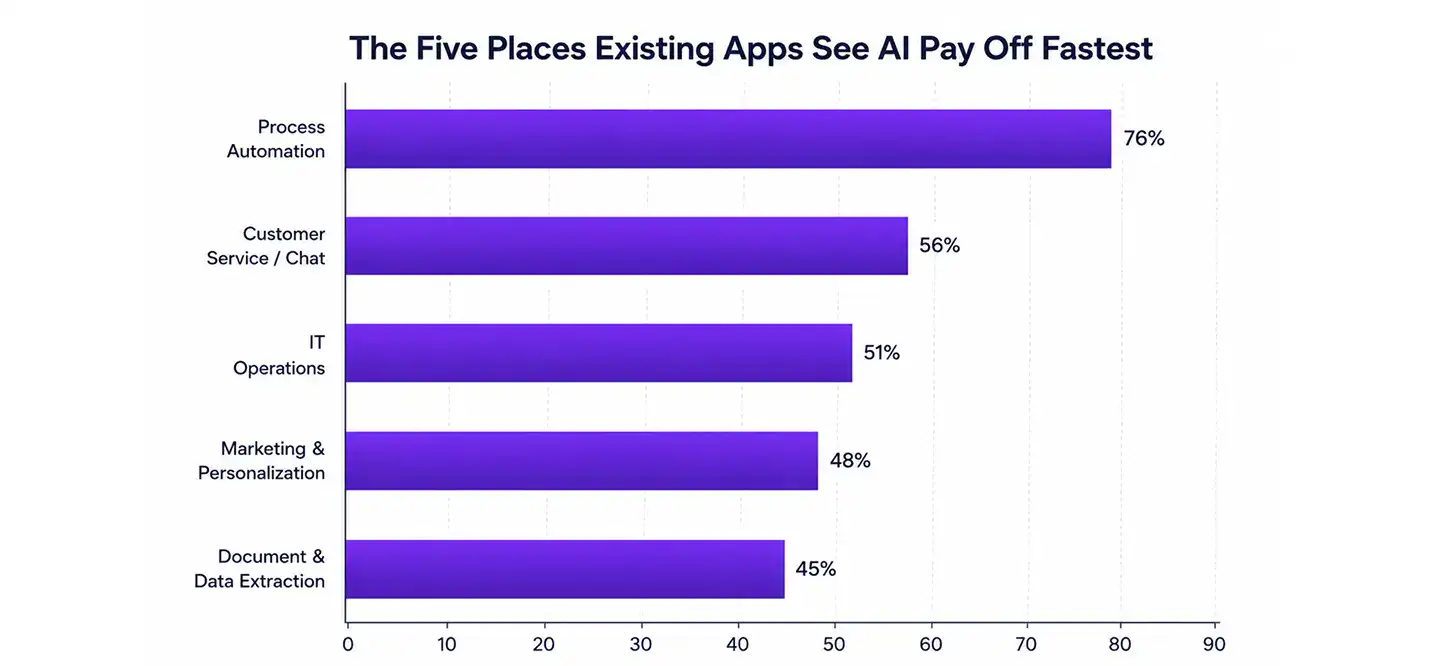
Not every part of a product benefits equally from AI. In practice, five areas consistently deliver the best return for the least disruption:
- Search that understands intent, not just keywords. Semantic search built on vector embeddings can be layered onto an existing database, no migration required. Users type what they mean, not the exact word your system expects, and get useful results either way.
- A support chatbot that actually knows your product. A retrieval-based chatbot trained on your own documentation and support history behaves very differently from a generic AI assistant. One team that deployed this approach saw support ticket volume drop by 62% in the first month.
- Content generation at the point of need. A “generate first draft” button next to a blank text field, a suggested reply, an auto-filled form, these typically need just one well-designed API call to a language model.
- Document and data extraction. Vision-capable models can now pull structured data out of PDFs, invoices, and forms with 90–95% accuracy, removing manual data entry almost entirely.
- Personalization that adapts. Recommendations, dashboards, and highlighted content that respond to real user behavior instead of static rules. AI-driven personalization has been shown to improve customer retention by up to 30%.
| AI Feature | Typical Build Effort | Where It Plugs In | Best For |
| Semantic / smart search | 1–3 weeks | Existing database via vector index | Content-heavy apps, marketplaces |
| Support chatbot (RAG-based) | 2–4 weeks | Sits beside your help center / knowledge base | Apps with high support ticket volume |
| Content generation assist | Under 1 week | Single API call from existing UI | Editors, CRMs, form-heavy tools |
| Document/data extraction | 2–4 weeks | Routes uploads through an AI API | Fintech, insurance, logistics apps |
| Behavioral personalization | 3–6 weeks | Reads existing event/analytics data | Dashboards, e-commerce, media apps |
For teams that need something more specialized than an off-the-shelf API, think fraud scoring, demand forecasting, or computer vision, custom deep learning solutions are usually the better long-term investment, since they’re trained on your specific data rather than general-purpose patterns.
Want to discuss your project? Our experts are just a click away.
Contact UsA Step-by-Step Process for How to Integrate AI Into an Existing App
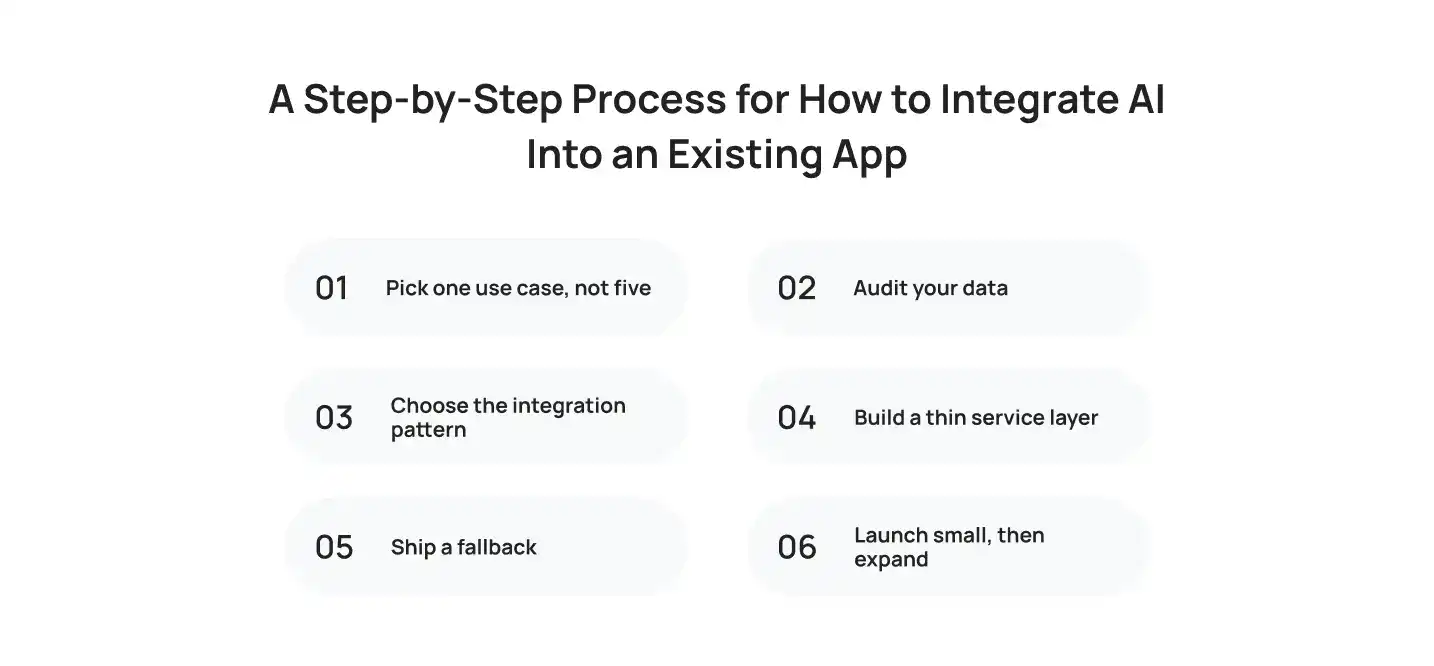
Here’s what a well-run artificial intelligence systems integration project typically looks like, whether you’re working on a mobile app, a SaaS dashboard, or figuring out how to integrate AI into a website for the first time.
Step 1: Pick one use case, not five. Choose the single feature that solves a real, visible pain point. Resist the urge to plan for every AI feature you might eventually want.
Step 2: Audit your data. AI output is only as good as what it’s fed. Check whether the data you’d need is clean, accessible, and large enough to be useful before committing to a build.
Step 3: Choose the integration pattern. Decide whether the feature will run as an API wrapper, a sidecar, or an augmentation of an existing feature (more on this below).
Step 4: Build a thin service layer. Your main app should never talk directly to an AI vendor. A small, swappable service layer sits in between, handling prompts, rate limits, caching, and fallback behavior.
Step 5: Ship a fallback. If the AI feature is unavailable, your app should quietly fall back to its old behavior rather than breaking for users.
Step 6: Launch small, then expand. Get the first version in front of real users, measure what happens, and use that data to decide what to build next.
Three Architecture Patterns That Keep Your Core Code Untouched
Regardless of your tech stack, almost every successful AI system integration project follows one of three patterns.
| Pattern | How It Works | Core Codebase Impact | Good For |
| API Wrapper | Your app calls a thin service layer that talks to the AI provider | None, one file changes if you switch providers | Chatbots, content generation, search |
| Sidecar | A parallel service reads existing data and writes AI outputs to new tables/endpoints | None, sidecar can fail without breaking the app | Analytics, summarization, insights |
| Augmentation | AI enhances one existing feature without replacing it | Minimal, the base feature still works without AI | Smart compose, formula suggestions, autofill |
If your product’s core workflow is order-to-cash, the same logic applies: teams frequently ask whether you can you integrate o2c process automation software with existing systems without disrupting finance operations, and the answer is generally yes, using the sidecar or API-wrapper pattern to keep the accounting core untouched while AI handles matching, anomaly detection, or invoice extraction alongside it.
For teams building on top of OpenAI or similar providers, ChatGpt API integration solutions are usually the fastest path from idea to a working prototype, since most of the heavy lifting, prompt design, rate limiting, response formatting, is already solved.
What AI Integration Actually Costs
Cost is usually the first question a stakeholder asks, and the honest answer is: it depends heavily on whether you build in-house or bring in outside help.
| Approach | Typical Annual/Project Cost | Time to First Working Version | Notes |
| In-house AI engineering team | $1M – $1.8M/year (fully loaded) | 4–6+ months | Makes sense at real scale or with proprietary data needs |
| Outsourced integration partner | $30,000 – $80,000/project | 2–6 weeks | Best for a first AI feature or MVP validation |
| Third-party API only (DIY) | Usage-based, often under $5,000/month | 1–4 weeks | Works for simple, single-feature integrations |
Support automation specifically shows just how fast these numbers add up. AI-handled support tickets typically cost $0.50 to $1.05 each, compared to $8 to $12 for a human-handled ticket, a 12x to 24x cost difference per interaction. Companies that deploy AI in customer service report cutting support costs by 30% on average, with the top quartile hitting 53% reductions.
“The teams that get real value from AI integration aren’t the ones with the biggest budget, they’re the ones who picked one problem worth solving and shipped it properly before moving to the next one,” says Salman Lakhani, CEO of Cubix.
Common AI Integration Mistakes (and How to Avoid Them)
| Mistake | What Happens | Fix |
| Trying to add AI everywhere at once | Scope explodes, nothing ships | Pick one high-value feature, ship it, then expand |
| Building AI logic directly into core app code | Vendor lock-in, AI failures break unrelated features | Isolate AI behind a service layer your app calls like any other API |
| Skipping fallback behavior | Feature breaks entirely if the AI service goes down | Always default to pre-AI behavior when AI is unavailable |
| Ignoring data quality | Poor outputs, users stop trusting the feature | Audit and clean data before development starts |
| Choosing the model before the use case | Wasted engineering time on the wrong architecture | Define the problem first, then pick the right AI provider |
On that last point, it’s worth being honest that there is no single “best” AI provider for every job, the right choice depends on the task, your data sensitivity, latency needs, and budget. Generative AI integration services partners typically evaluate multiple providers (OpenAI, Anthropic, Google, and others) against your specific use case rather than defaulting to whichever model is trending that month.
How to Choose the Right AI Integration Partner
Whether you’re comparing an AI integration tool you can self-serve or looking at full-service AI integration company options, a few things separate a partner worth hiring from one that will slow you down:
- Track record with production systems, not just prototypes or demos.
- Willingness to start small. A partner pushing a six-month platform overhaul before understanding your actual use case is a red flag.
- Clear data and architecture audit process before any code gets written.
- Experience across both traditional ML and generative AI, since not every problem needs a large language model.
- A plan for maintenance, not just delivery, AI features need monitoring and occasional retraining as user behavior shifts.
Larger organizations evaluating enterprise-grade options sometimes start by researching ibm ai integration services or similar big-vendor offerings; these can be a fit for heavily regulated industries with existing vendor relationships, but they’re often overkill, and slower to deploy, for a mid-sized product team trying to ship one well-scoped AI feature.
Why Businesses Choose Cubix for AI Integration Services
Cubix has spent over a decade building software for companies that can’t afford downtime or a broken user experience while new capability gets added. That experience shapes how the team approaches every AI integration services engagement: start with the smallest version of the feature that proves real value, build it on a proper service-layer architecture, and expand only once real users have validated it.
As a full-stack AI Software Development Company, Cubix works across the entire AI stack, from lightweight API integrations that ship in weeks to deeper, custom-trained models for teams whose data or domain is too specialized for generic providers. For companies exploring AI integration examples relevant to their own industry, the team has shipped semantic search, RAG-based support assistants, fraud detection layers, and personalization engines into existing production apps without a single rebuild.
Cubix’s game development studio has also put this same philosophy to work inside live titles, adding AI-driven matchmaking, dynamic difficulty, and behavior-based player retention features into existing games without touching core gameplay code. As one member of Cubix’s game development team put it: “Players never notice the AI plumbing underneath, they just notice the game got smarter without changing what they already loved about it.”
For teams whose use case calls for deeper language understanding, internal knowledge search, document intelligence, or a domain-specific assistant, Cubix’s work as a large language models development company covers everything from fine-tuning to full RAG pipeline design.
Ready to Add AI to Your App? Here’s the Cubix Approach
Getting from “we want AI in our app” to a working feature in production doesn’t need to be complicated, and it definitely doesn’t need to start with a rebuild. Cubix’s process is built around exactly the principles covered in this guide:
- Discovery call to identify the single highest-value AI feature for your product and users.
- Data and architecture audit to confirm technical feasibility before any code is written.
- Rapid build using the API-wrapper, sidecar, or augmentation pattern that fits your codebase.
- Production launches with fallback logic, so your app never breaks if the AI layer has an off day.
- Iteration based on real usage, expanding the feature (or adding the next one) once the data backs it up.
Whether you’re a startup validating your first AI feature or an enterprise team assessing artificial intelligence systems integration across a much larger stack, Cubix, a trusted Custom AI development company, can scope, build, and ship it without putting your existing product at risk.
Want to discuss your project? Our experts are just a click away.
Contact UsFrequently Asked Questions
1. What is a $900,000 AI job?
It’s a term that went viral after a 2023 Netflix job posting for a machine learning product manager listed total compensation up to $900,000. It wasn’t a base salary, it represented the ceiling of a package that included base pay, bonuses, and stock. Today the term is used more broadly for senior AI leadership roles (like Chief AI Officer or Head of Applied AI) whose total compensation crosses that threshold.
2. Who are the big 4 AI agents?
There’s no single official list, but in the enterprise agent space, OpenAI, Google, Microsoft, and Anthropic are most commonly cited as the leading players shaping how businesses deploy AI agents in 2026.
3. What are the top 3 AI providers?
OpenAI, Google (Gemini), and Anthropic (Claude) are typically named as the three leading providers of large language models for businesses, though Microsoft’s enterprise reach (largely built on OpenAI’s models) puts it firmly in the same conversation.
4. Which AI is best for integration?
There isn’t a single best option, it depends on your use case, latency needs, budget, and data sensitivity. Many ai integration services companies work across multiple providers and choose per-feature rather than committing to one model for everything.
5. How can I integrate AI features into my existing mobile app?
The same principles apply as with web apps: pick one use case, build it behind an API layer, and connect it to your app through a lightweight SDK or REST call rather than rebuilding the app’s core logic.
6. What are the key benefits of adding AI features to an established mobile application?
Faster task completion, lower support costs, better personalization, and higher retention, all without disrupting the workflows your existing users already know.
7. What are the best AI integration services for adding machine learning to an app?
Look for partners with production experience (not just prototypes), a clear data-audit process, and the ability to work across both traditional ML and generative AI, depending on what your use case actually needs.
8. How to assess the technical feasibility of integrating AI into an existing enterprise system?
Start with a data audit, how much relevant data you have, how clean it is, and how accessible it is, followed by an architecture review of how an AI service layer would connect to your existing systems.
9. Which companies offer AI integration tools for app developers?
Major cloud providers (AWS, Google Cloud, Microsoft Azure), model providers (OpenAI, Anthropic), and specialized development partners like Cubix all offer tools or full-service ai integration services, depending on how much you want to build versus outsource.
10. What are the typical costs associated with AI integration services for a mid-sized company?
Most mid-sized companies working with an outsourced partner can expect a first AI feature to cost between $30,000 and $80,000, with a production version live in four to eight weeks.
11. Step-by-step guide to adding AI-powered chatbots to an existing application?
Audit your support content, build a retrieval pipeline that connects your knowledge base to a language model, deploy it as a sidecar or API wrapper, and add a clear handoff to a human agent for anything the bot can’t resolve confidently.
12. How to integrate an AI agent into an app?
Define the specific task the agent should handle, give it scoped access to the tools or data it needs through an API layer, and add monitoring so you can see what it’s doing and step in if it goes off track.
13. How do I set up an AI agent?
Start narrow, one task, one set of tools, rather than building a general-purpose agent. Most successful early deployments are single-purpose agents that do one job reliably, not broad autonomous systems.
14. How to integrate AI into an existing project?
Follow the same core steps regardless of project size: pick a single use case, audit your data, isolate the AI logic behind a service layer, and ship with a fallback in place.