

Connecting an application to an electronic health record (EHR) sounds straightforward until the development team encounters different resource structures, authorization requirements, vendor restrictions, and incomplete data. FHIR APIs give healthcare applications a standardized way to exchange clinical information, but a successful integration still requires careful implementation.
A national analysis of U.S. hospitals found that 70% enabled patient access through apps built to meet FHIR specifications. That adoption creates opportunities for patient portals, remote monitoring platforms, care coordination tools, and other healthcare applications to retrieve information from existing EHR systems. However, API availability does not guarantee that every EHR supports the same resources, search parameters, or write operations. The hospital adoption analysis highlights why implementation needs to account for actual vendor capabilities rather than assume uniform access.
EHR integration using FHIR APIs involves discovering an EHR’s supported capabilities, registering the application, establishing secure authorization, requesting the required FHIR resources, and validating the returned data. The process also requires vendor-specific testing and production monitoring.
This guide explains how to connect an external healthcare application to an existing EHR, using a patient-facing application as the running example. The application will retrieve a patient’s demographics, medications, allergies, appointments, and lab results without replacing the EHR or duplicating its role as the clinical system of record.
Key Takeaways
- FHIR APIs allow healthcare applications to exchange structured clinical data with compatible EHR systems.
- An EHR’s CapabilityStatement identifies supported resources, interactions, search parameters, and implementation details.
- SMART on FHIR commonly handles user authorization through OAuth 2.0-based workflows.
- FHIR resources such as Patient, Observation, Condition, and Medication Request represent different types of clinical information.
- US Core profiles help standardize how U.S. healthcare data is structured and exchanged.
- Testing must cover authorization, resource mapping, data accuracy, pagination, error handling, and vendor-specific behavior.
- Production integration requires secure token management, monitoring, rate-limit handling, and ongoing compatibility checks.
What Is EHR Integration Using FHIR APIs?
EHR integration using FHIR APIs connects an external application to an electronic health record system so the two systems can exchange healthcare information through standardized interfaces.
FHIR, or Fast Healthcare Interoperability Resources, is a healthcare data exchange standard developed by HL7. It represents information as resources, each describing a specific clinical or administrative concept. For example, a Patient resource contains demographic information, while an Observation resource can represent a blood pressure reading or laboratory result.
A FHIR API exposes these resources through a standardized interface, typically using RESTful HTTP requests and JSON or XML representations.
Consider a healthcare company developing a mobile application that lets patients review their medical records. Instead of creating a separate medical history database and asking patients to enter everything manually, the application connects to their existing EHR.
The integration can retrieve:
- Patient demographics and identifiers
- Clinical encounters and appointment details
- Diagnoses and health conditions
- Medication orders and statements
- Allergies and intolerances
- Laboratory results and vital signs
The EHR remains the primary system of record. The application requests authorized information and presents it through its own interface.
FHIR integration can also support write operations, such as submitting patient-generated information or updating certain records. However, read and write capabilities depend on the EHR’s implementation, authorization rules, and the application’s permitted access.
How Does FHIR Connect an Application to an EHR?
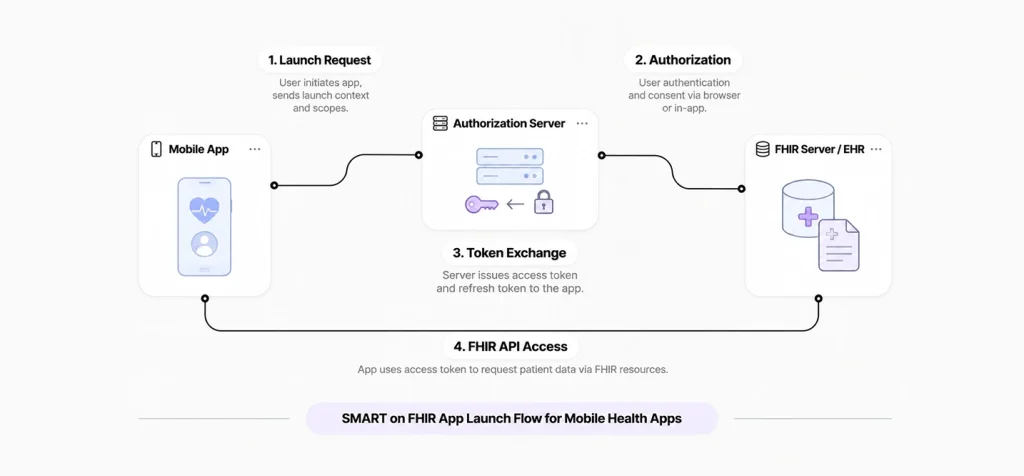
FHIR connects an application to an EHR through a client-server interaction. The application sends an authenticated request to the EHR’s FHIR endpoint, and the EHR returns the requested resource or a search result.
A typical integration architecture contains five components:
- Patient or clinician application: The interface through which a user views or submits information.
- Application backend: Handles API requests, business logic, data processing, and secure token management.
- Authorization server: Authenticates the user and determines what information the application can access.
- FHIR API endpoint: Receives requests and returns supported FHIR resources.
- EHR system: Stores and manages the underlying clinical records.
The request flow generally looks like this:
User opens the application → application starts authorization → user grants permitted access → backend requests FHIR resources → EHR returns data → application validates and displays the information.
For example, when a patient opens the medication section of the app, the backend may send a request for MedicationRequest resources associated with that patient’s record. The EHR checks the access token and applicable permissions before returning the matching information.
The application then processes the response, handles references to related resources, and displays the medication details.
This architecture keeps the integration logic on the backend rather than exposing sensitive credentials or access tokens in the mobile or web client. It also gives the development team a controlled place to validate incoming data, manage errors, and apply application-specific rules.
What Do You Need Before Starting an EHR FHIR Integration?
Before writing integration code, the team needs to establish the application’s use case, target EHR, data requirements, and access permissions. These decisions determine which FHIR resources, profiles, authorization scopes, and API operations the integration will need.
A practical readiness checklist includes the following.
| Requirement | What to Establish |
| Integration purpose | Patient access, clinical workflow, remote monitoring, care coordination, or another use case |
| Target EHR | Epic, Oracle Health, or another EHR platform |
| FHIR version | The version supported by the target endpoint |
| Required data | Patient, Observation, Condition, MedicationRequest, and other resources |
| Access type | Patient-facing, clinician-facing, or backend system access |
| Authorization | Supported SMART on FHIR workflow and OAuth scopes |
| Data standards | Applicable US Core profiles and terminology requirements |
| Vendor access | Developer registration, sandbox credentials, approvals, and production access |
| Security requirements | Data protection, access controls, audit logging, and applicable HIPAA safeguards |
The team should also document whether the application needs read-only access or must create or update information in the EHR. These are different integration requirements. An API that supports retrieving patient records may not support writing clinical data.
For a broader view of the technical and operational requirements involved in healthcare projects, see the healthcare software development requirements guide.
How Do You Check an EHR’s FHIR API Capabilities?
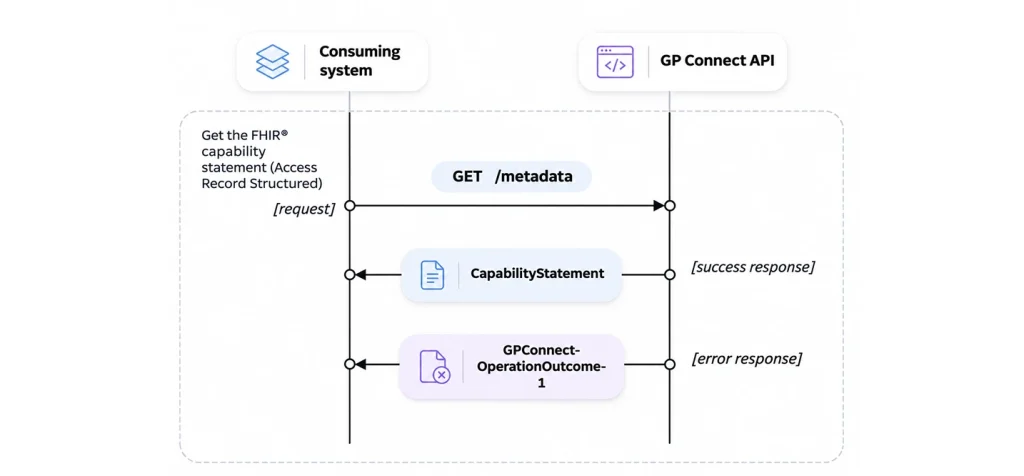
Check the EHR’s CapabilityStatement before building resource requests. This FHIR resource describes the server’s supported interactions, resource types, search parameters, and implementation details.
A FHIR server commonly exposes its capability statement through the metadata endpoint:
GET {FHIR_BASE_URL}/metadata
Accept: application/fhir+json
The response describes what the server supports. It may include:
- FHIR version
- Supported resource types
- Available RESTful interactions, such as read, search, create, and update
- Supported search parameters
- Resource profiles and implementation guides
- Security and authorization details
- Supported operations and formats
For example, the application may need to retrieve Patient, Observation, and MedicationRequest resources. The capability statement helps establish whether the EHR supports those resources and which interactions are available.
A simplified response might identify:
{
"resourceType": "CapabilityStatement",
"fhirVersion": "4.0.1",
"format": [
"json"
],
"rest": [
{
"mode": "server",
"resource": [
{
"type": "Patient",
"interaction": [
{ "code": "read" },
{ "code": "search-type" }]}]}]}
This is an illustrative example, not a complete vendor response. Actual capability statements contain additional details and may differ between EHR installations.
The team should compare the returned capabilities against the application’s requirements. If the application needs to search Observation resources but the server does not support the required search parameter, the team must identify an alternative approach before proceeding.
The FHIR R4 CapabilityStatement specification defines how servers describe their supported capabilities.
Check the EHR’s Implementation Guide and Profiles
A resource being available does not mean the EHR represents every field in the same way. Implementation guides and profiles add constraints to standard FHIR resources, helping define which elements, extensions, and terminology bindings an implementation should support.
For U.S. healthcare integrations, US Core is particularly relevant. It defines profiles and minimum expectations for exchanging common clinical data through FHIR.
The US Core Implementation Guide describes profiles, required elements, terminology bindings, and supported interactions. The development team should identify the applicable version and compare its requirements with the target EHR’s capabilities.
This step matters when integrating with multiple EHR vendors. Two systems may both support the Patient resource while differing in the profiles, extensions, search parameters, and data elements they expose.
How Do You Integrate an EHR System Using FHIR APIs?
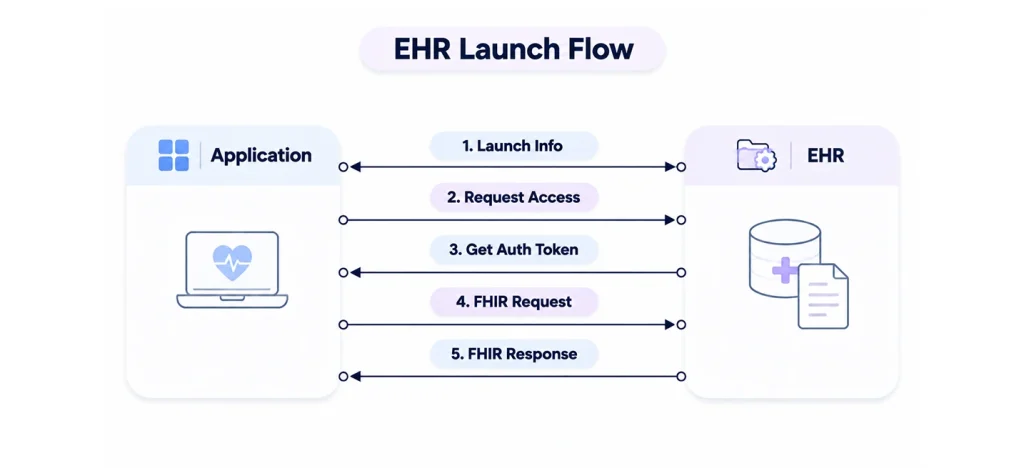
Integrating an EHR through FHIR APIs involves a sequence of implementation steps, from registering the application to retrieving and validating clinical resources.
The exact workflow varies by vendor, but the following process provides a practical starting point.
1. Register the Application With the EHR Vendor
The application must be registered with the EHR platform before it can use protected APIs. Registration usually establishes the application’s identity and provides the credentials needed for authorization.
Depending on the vendor and application type, registration may require:
- Application name and description
- Application type and intended use
- Redirect URIs
- Requested FHIR resources and access scopes
- FHIR version
- Security and privacy information
- Developer or organizational details
For example, Epic’s developer documentation explains how developers create applications, configure supported APIs, select a FHIR version, and obtain non-production and production client IDs.
Oracle Health also has a registration process for consumer and provider or system access applications. Developers can review its API access and registration requirements before testing against its available environments.
Registration requirements are not identical across vendors. A successful registration with one EHR does not automatically authorize the application to connect to another.
2. Configure the FHIR Endpoint and Environment
After registration, configure the endpoint and credentials for the target environment.
Most vendors provide separate environments for development or sandbox testing and production. The sandbox allows developers to test API requests using sample or synthetic patient data without accessing live clinical records.
Keep environment-specific configuration separate. This typically includes:
- FHIR base URL
- Client ID
- Authorization endpoint
- Token endpoint
- Redirect URI
- Supported FHIR version
- Required scopes
Do not hardcode credentials or production endpoints into the application. Store sensitive configuration in an appropriate secrets-management system and restrict access to authorized services.
3. Discover the Authorization Configuration
Before requesting protected resources, the application needs to identify the EHR’s authorization endpoints and supported SMART capabilities.
SMART on FHIR implementations commonly publish configuration metadata at:
GET {FHIR_BASE_URL}/.well-known/smart-configuration
The response can identify authorization and token endpoints, supported capabilities, and other authorization details.
The application uses this information to configure its authorization flow rather than assuming that every EHR uses identical endpoint addresses or settings.
4. Obtain an Access Token
Once the application has the necessary configuration, it starts the authorization process. For a patient-facing or clinician-facing application, this commonly involves the SMART authorization code flow.
After the user authenticates and grants the requested access, the authorization server returns an authorization code. The application exchanges that code for an access token and uses the token to call the FHIR API.
The token represents the access granted by the authorization server. It does not give the application unrestricted access to the patient’s entire record.
5. Retrieve the Required FHIR Resources
With a valid access token, the backend can send requests to the EHR’s FHIR endpoint.
For example, the application may retrieve a patient record using:
GET {FHIR_BASE_URL}/Patient/{patient-id}
Authorization: Bearer {access-token}
Accept: application/fhir+json
To retrieve observations associated with a patient, it may send:
GET {FHIR_BASE_URL}/Observation?patient={patient-id}
Authorization: Bearer {access-token}
Accept: application/fhir+json
These are illustrative requests. The actual resource identifiers, search parameters, scopes, and endpoint behavior must match the target EHR’s implementation.
The backend should also handle common HTTP responses:
| Response | Meaning | Application Response |
| 200 OK | Request succeeded | Process the returned resource or Bundle |
| 400 Bad Request | Invalid request or unsupported parameter | Review request syntax and server requirements |
| 401 Unauthorized | Missing, invalid, or expired authentication | Reauthorize or refresh the token when supported |
| 403 Forbidden | Access is not permitted | Check scopes, user permissions, and access policies |
| 404 Not Found | Resource or endpoint was not found | Verify the resource ID and endpoint |
| 429 Too Many Requests | Rate limit reached | Apply the vendor’s retry guidance |
| 5xx | Server-side failure | Apply controlled retry and error handling |
A successful HTTP response does not automatically mean the application received complete or clinically usable information. The returned resource still needs validation and processing.
6. Process the Response and Update the Application
The backend parses the FHIR response, checks required fields, resolves relevant references, and converts the information into the application’s internal data model.
For example, an Observation may contain a code, value, unit, effective date, and reference to a patient. The application should not assume that every Observation represents the same type of clinical measurement.
The development team must interpret the resource using its codes, profiles, and context before presenting it to the user.
This also prevents the application from treating a missing value, an inactive medication, or an outdated clinical observation as current information.
How Does SMART on FHIR Authentication Work?
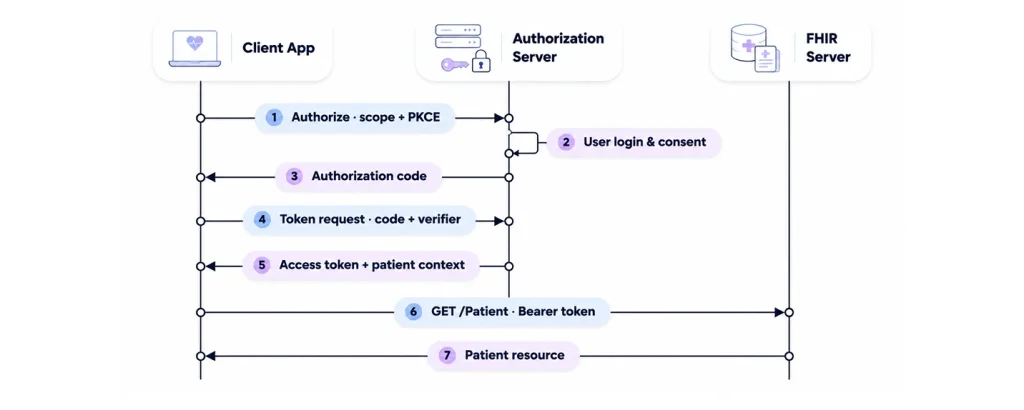
SMART on FHIR provides an authorization framework that allows applications to connect securely to FHIR systems. It builds on OAuth 2.0 and defines how applications discover authorization endpoints, request permissions, and access protected resources.
For a patient-facing application, the common workflow is the OAuth 2.0 authorization code flow with PKCE.
The process generally works as follows:
- The application starts a standalone launch or receives an EHR launch.
- It discovers the EHR’s SMART configuration.
- It redirects the user to the authorization endpoint.
- The user authenticates and approves the requested permissions.
- The authorization server returns an authorization code.
- The application exchanges the code for an access token.
- The backend uses the token to request authorized FHIR resources.
The application must validate the returned state value to protect against cross-site request forgery. PKCE adds protection to the authorization code exchange by requiring a verifier that matches the original challenge.
Request Only the Scopes the Application Needs
SMART scopes define the access an application requests. The scope format depends on the launch context and the type of access required.
For example:
patient/Observation.rs
patient/Condition.rs
patient/MedicationRequest.rs
openid
fhirUser
These are illustrative scope values. The application should request only the permissions required for its functionality, and the EHR determines which permissions it grants.
The distinction between user-facing and backend access also matters:
- Patient-facing applications commonly use patient-level scopes tied to an authenticated patient.
- Clinician-facing applications may use user-level scopes and an EHR launch context.
- Backend services may use a system-to-system authorization model, such as the SMART Backend Services approach, when supported and appropriate.
Do not use a patient-facing authorization flow for a backend service simply because both applications access FHIR resources. Their identities, permissions, and security requirements differ.
The SMART App Launch specification describes the authorization workflow, launch context, scopes, and token exchange requirements.
Which FHIR Resources Should an EHR Integration Use?
The resources an EHR integration needs depend on the application’s purpose. A patient portal, remote monitoring platform, clinical decision support application, and billing system will not require the same data.
For a patient-facing application, common resources include:
| FHIR Resource | Information Represented | Example Use |
| Patient | Demographics and patient identifiers | Display patient profile |
| Practitioner | Healthcare professional details | Show the patient’s care team |
| Organization | Healthcare organization information | Identify the treating facility |
| Encounter | Clinical visits and interactions | Display visit history |
| Observation | Lab results, vital signs, and measurements | Show blood pressure or test results |
| Condition | Diagnoses and health conditions | Display medical history |
| AllergyIntolerance | Allergies and intolerance records | Present allergy information |
| MedicationRequest | Medication orders or prescriptions | Show prescribed medications |
| MedicationStatement | Medication use reported or recorded | Display medication history |
| DiagnosticReport | Diagnostic and laboratory reports | Present report summaries |
| Appointment | Scheduled healthcare appointments | Display upcoming visits |
The application should not request every available resource by default. Start with the minimum data needed for the use case, then add resources as requirements become clear.
Understand the Difference Between Similar Resources
Some FHIR resources describe related concepts but serve different purposes.
For example, MedicationRequest represents an order or prescription, while MedicationStatement represents a record of medication use. An application that treats them as interchangeable may show a prescription as proof that a patient is currently taking the medication.
Likewise, Observation represents an individual measurement or finding, while DiagnosticReport can group and summarize diagnostic results. A report may reference one or more Observation resources.
These distinctions matter when displaying clinical information. The application should preserve the resource’s meaning rather than flattening every record into a generic medical-history entry.
How Do You Map and Process FHIR Data Across EHR Systems?
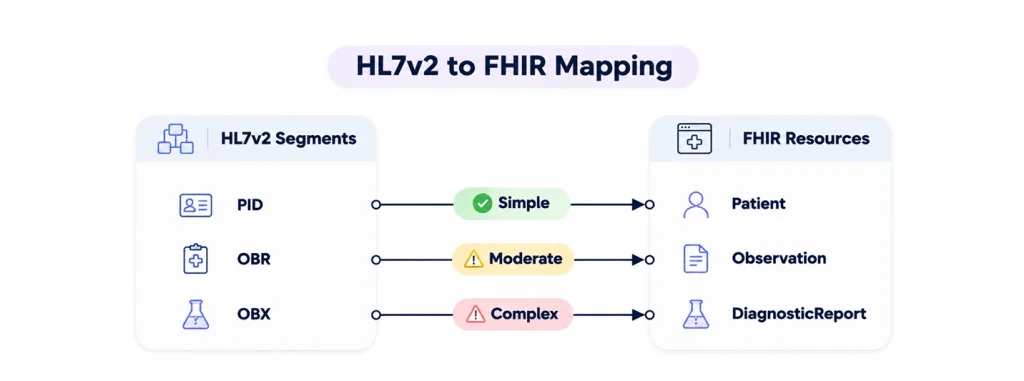
FHIR data mapping translates resource structures, codes, identifiers, and references into the application’s internal data model without changing their clinical meaning.
FHIR standardizes resource formats, but it does not remove every variation between implementations. Different EHRs may use different profiles, extensions, terminology systems, and data-population rules.
A reliable mapping process should address the following areas.
1. Map Resource Fields and Profiles
Start by identifying the fields required by the application and mapping them to the corresponding FHIR elements.
For example, a patient profile may use the Patient resource’s name, birth date, gender, and identifiers. The application should also account for multiple names, multiple identifiers, missing fields, and vendor-specific extensions.
Do not assume that every field will be populated. A field that is optional in a resource may be absent in a valid response.
2. Normalize Clinical Terminologies
Clinical codes give data a consistent meaning across systems. However, the application must understand the code system and its context rather than relying only on display text.
Common terminology systems include:
- SNOMED CT: Clinical concepts, findings, and diagnoses.
- LOINC: Laboratory tests, observations, and clinical measurements.
- RxNorm: Normalized names for clinical drugs.
- ICD-10-CM: Diagnosis and classification codes.
- UCUM: Units of measure.
For example, a laboratory result should retain its code, value, unit, reference range when supplied, and relevant interpretation. Converting every result into a plain-text label can remove information needed for accurate display or downstream processing.
3. Resolve References Between Resources
FHIR resources can reference other resources. An Observation, for example, may reference a Patient, Practitioner, Encounter, or related resource.
The application must resolve references when it needs the related information. It should also handle references that point to resources the current user or application cannot access.
A reference should not be treated as proof that the referenced resource is available in the same response.
4. Handle Bundles and Pagination
FHIR search operations commonly return a Bundle containing matching resources and metadata. A response may include only one page of results, even when more records match the search.
The application should inspect the Bundle’s links and follow the next link when present. It should not construct its own pagination URL or assume that the server uses a particular page-number format.
For example, a patient with a long medical history may have more Observation records than the EHR returns in its first response. If the application processes only that first page, it may display incomplete results.
The FHIR search specification explains search results, Bundles, and pagination behavior.
5. Preserve Clinical Context and Data Provenance
Clinical information should retain enough context for the application to interpret it correctly.
Depending on the resource, relevant context may include:
- Clinical effective date and recorded date
- Status and category
- Source organization or practitioner
- Encounter association
- Code system and coded value
- Units and reference ranges
- Resource version and update information
For example, an old blood pressure reading should not appear as a current measurement simply because it is the most recently retrieved record in a partial response.
The application should also distinguish between missing data and negative findings. An absent allergy record does not necessarily mean the patient has no allergies.
How Do You Test an EHR FHIR Integration?
Testing should verify that the application can authenticate, retrieve the correct resources, interpret the data accurately, and handle failures without exposing protected health information.
A FHIR integration should be tested at several levels.
| Testing Area | What to Verify |
| API connectivity | Correct base URL, endpoints, HTTP methods, and response formats |
| Authorization | Token exchange, scopes, expiration, refresh behavior, and access denial |
| Resource retrieval | Correct patient context, search parameters, and returned resources |
| Data mapping | Accurate field mapping, terminology, units, and references |
| Pagination | Complete retrieval of multi-page search results |
| Error handling | Invalid requests, missing resources, expired tokens, and rate limits |
| Vendor compatibility | Actual behavior across the target EHR environments |
| Security | Access restrictions, sensitive-data handling, and audit events |
| End-to-end workflow | Complete user journey from login to displaying or submitting data |
Test Against the EHR Vendor’s Sandbox
A vendor sandbox helps developers test API requests before connecting to production data. Use the sandbox to validate registration, authorization, resource access, and vendor-specific behavior.
However, sandbox testing is not a substitute for production readiness. Test data may be synthetic, resource coverage may be limited, and production environments may enforce different permissions or operational requirements.
Validate Clinical Data, Not Just API Responses
A 200 OK response confirms that the server successfully handled the request. It does not confirm that the application interpreted the clinical information correctly.
For example, test whether:
- A medication order is distinguished from a medication statement.
- An Observation retains its code, unit, and effective date.
- A DiagnosticReport’s referenced results are handled correctly.
- Missing fields do not create misleading default values.
- Duplicate resources do not appear as separate clinical events.
- Historical information is not presented as current.
Clinical validation should involve appropriate healthcare subject-matter experts when the application displays or uses information that could influence care decisions.
What Challenges Can Affect EHR Integration Using FHIR APIs?
FHIR integration can encounter problems even when both systems support the same standard. Most issues arise from differences in implementation, access permissions, data quality, and operational behavior.
| Challenge | Why it Happens | How to Address It |
| Inconsistent resource support | EHRs expose different resource types and interactions | Review each vendor’s CapabilityStatement |
| Different profiles and extensions | Implementations apply different constraints to standard resources | Map supported profiles and validate extensions |
| Authorization failures | Requested scopes or user permissions do not allow access | Verify SMART configuration and least-privilege scopes |
| Missing clinical information | Source records may be incomplete or unavailable | Handle missing fields without inventing values |
| Terminology differences | Systems may use different codes or display conventions | Preserve code systems and apply validated terminology mapping |
| Incomplete search results | The server returns paginated Bundles | Follow the server-provided next links |
| Vendor-specific restrictions | API access may require approval, activation, or additional agreements | Confirm vendor requirements before development |
| Rate limits and downtime | EHR APIs may restrict request volume or experience outages | Use backoff, monitoring, and controlled retry logic |
1. Different FHIR Versions and Profiles
Two EHR systems may support FHIR but expose different versions or profiles. An integration built around one vendor’s implementation may fail when connected to another system.
The solution is to define a supported FHIR baseline, inspect each target server, and use a mapping layer to manage implementation differences. Avoid assuming that a resource available on one endpoint will behave identically on another.
2. Restricted Read and Write Operations
An EHR may allow an application to retrieve patient information but restrict the creation or modification of clinical records.
Write access can require additional scopes, workflow permissions, validation, or vendor approval. Before implementing a write operation, confirm that the target EHR supports it and understand how the operation affects the clinical record.
3. Inconsistent or Incomplete Data
FHIR standardizes how information is represented, not the completeness or accuracy of the source record. A valid resource may contain optional fields that are absent, historical information, or references that the application cannot resolve.
The application should preserve the source data’s status and context, clearly handle unavailable information, and avoid presenting assumptions as clinical facts.
How Do You Deploy and Maintain an EHR FHIR Integration?
Deploying an EHR integration requires production authorization, secure configuration, operational monitoring, and a process for handling changes to the vendor’s API.
Before release, confirm that the vendor has approved the application for production access and that the required credentials and endpoints are available. Complete the applicable security review, validate the production authorization flow, and test the actual workflows with approved access.
1. Prepare the Production Environment
The production checklist should include:
- Production FHIR base URL and client credentials
- Approved redirect URIs and application registration
- Secure storage for access and refresh tokens
- HTTPS communication and appropriate encryption safeguards
- Role-based access controls
- Audit logging for sensitive operations
- Monitoring for API failures and authorization errors
- Rate-limit and retry policies
- Backup and incident-response procedures
For healthcare applications that create, receive, maintain, or transmit electronic protected health information, the organization must assess applicable HIPAA obligations and implement appropriate safeguards. Technical integration alone does not establish HIPAA compliance.
2. Monitor API Performance and Failures
Production monitoring should track API availability, response times, error rates, authorization failures, and rate-limit responses.
Logs should contain enough technical context to troubleshoot issues without unnecessarily recording protected health information, access tokens, or other secrets.
When an API returns a temporary server error or rate-limit response, the application can use controlled retries with exponential backoff and jitter, following the vendor’s guidance. Avoid blindly retrying non-idempotent write operations because the original request may have succeeded even if the client did not receive the response.
3. Maintain Compatibility as EHRs Change
EHR vendors may update API capabilities, authorization requirements, supported profiles, and endpoint behavior. The development team should periodically review vendor documentation, test changes in non-production environments, and update integration mappings when necessary.
A monitoring and maintenance process also helps identify expired credentials, unexpected data changes, and broken workflows before they affect users.
For a broader look at the safeguards involved in healthcare technology, see this guide on HIPAA compliance in healthcare app development.
Conclusion
Integrating EHR systems using FHIR APIs requires more than sending HTTP requests and parsing JSON responses. The development team must verify the EHR’s capabilities, configure the correct authorization workflow, retrieve supported resources, preserve clinical context, and test vendor-specific behavior. Data mapping, pagination, error handling, and production monitoring are just as important as establishing the initial API connection.
For healthcare organizations building patient applications, clinical platforms, or connected healthcare solutions, the integration architecture should account for existing EHR workflows instead of forcing a new application into a generic data model. Cubix’s healthcare software development team can help plan and build custom healthcare applications and integrations around the systems, data requirements, and workflows an organization already uses.
Create a smoother path between your app and the EHR
Contact Us
Frequently Asked Questions
1. What Is the Difference Between EHR Integration and FHIR Integration?
EHR integration connects an application with an electronic health record system. FHIR integration is one way to establish that connection using HL7’s standardized healthcare data exchange framework.
2. Do All EHR Systems Support FHIR APIs?
No. Many modern EHR systems support FHIR APIs, but available resources, FHIR versions, profiles, search parameters, and operations vary by vendor and implementation.
3. What Is Required for EHR Integration Using FHIR APIs?
You typically need access to the target EHR’s FHIR endpoint, application registration, supported FHIR version, authorization configuration, required scopes, and a clear list of resources and operations. Vendor approval and production access may also be necessary.
4. Which FHIR Resources Are Commonly Used in EHR Integration?
Common resources include Patient, Encounter, Observation, Condition, AllergyIntolerance, MedicationRequest, MedicationStatement, DiagnosticReport, and Appointment. The required resources depend on the application’s functionality.
5. Is SMART on FHIR Required for EHR Integration?
Not for every FHIR integration. SMART on FHIR is commonly used for secure user-facing application access, but other authorization approaches may apply to backend services or vendor-specific integrations.
6. Can FHIR APIs Write Data to an EHR?
Yes, when the EHR supports the required write interactions and grants the application appropriate permissions. API access does not automatically include permission to create or update clinical records.
7. How Do You Test FHIR API Integration With an EHR?
Start with the vendor’s sandbox to test application registration, authorization, resource retrieval, data mapping, pagination, and error handling. Then complete security and end-to-end testing before production deployment.