Key Takeaways
- Localization adapts the whole game for a region.
- Translation is only one piece of the job.
- Plan for text, fonts, UI, audio, store pages, and ratings.
- Build for localization early. Late fixes cost more.
- Test every language in the real build.
- Start with two or three languages. Add more when data backs it up.
- Track results by region after launch.
Newzoo estimates 3.58 billion people will play games worldwide in 2025. That is over 60% of the online population. Your game probably speaks to a small slice of them.
Here is the problem. Many studios launch in one language and hope for the best. Players in other regions open the store page and move on. Others try the game, hit a broken menu, and quit. That is lost revenue, and it is avoidable.
This guide explains the workflow, the costs, and the testing steps. You will also get a rollout checklist. It suits studios, producers, and founders planning an international game launch.
What Is Game Localization?
Game localization adapts a game for players in a new region. It covers text, voice, art, UI, and rules. The goal is simple. The game should feel like it was made for them. Video game localization and game localization mean the same thing.
Say you built a farming game. A player in Brazil opens it. The menus are in English. The harvest festival means nothing to them. The price shows in dollars. Localization fixes all of that.
It changes the language. It also changes the dates, currencies, jokes, images, and even colors.
Why bother? CSA Research surveyed 8,709 consumers in 29 countries. The result: 76% prefer product details in their own language. That study covered online shoppers, not only gamers. The pattern still fits game store pages.
Localization vs Translation
Translation swaps words from one language to another. Localization goes further. It asks if the meaning, tone, and feel still work. A joke that lands in English may fall flat in Korean. Game translation is one task inside localization.
Localization vs Culturalization vs LQA
These three terms get mixed up a lot. Here is a simple way to separate them.
| Term | What it means | Who does it | When it happens | Example |
|---|---|---|---|---|
| Translation | Converts text into another language | Translators | Mid production | “Start Game” becomes “Iniciar juego” |
| Localization | Adapts text, audio, art, UI, and formats | Localization team, engineers, linguists | Across production | Switch date formats and currency symbols |
| Culturalization | Reviews content for cultural, religious, or political fit | Cultural consultants, narrative leads | Design and pre-launch | Replace a gesture that is rude in one region |
| LQA | Tests localized builds for language and display bugs | Native-speaking testers | After integration, before launch | Catch a button label cut off in German |
In short, translation changes words. Localization changes the experience. Game culturalization checks for fit and risk. Game LQA proves it all works in the build.
Ready to Take Your Game Global?
Contact Us
Why Game Localization Matters
Players Want Games in Their Language
Players read menus, quests, and store pages. They want that text to feel natural.
- Clear menus cut confusion in the first session.
- Natural dialogue keeps story fans engaged.
- Local store pages build trust before the first tap.
Revenue and Reach in New Markets
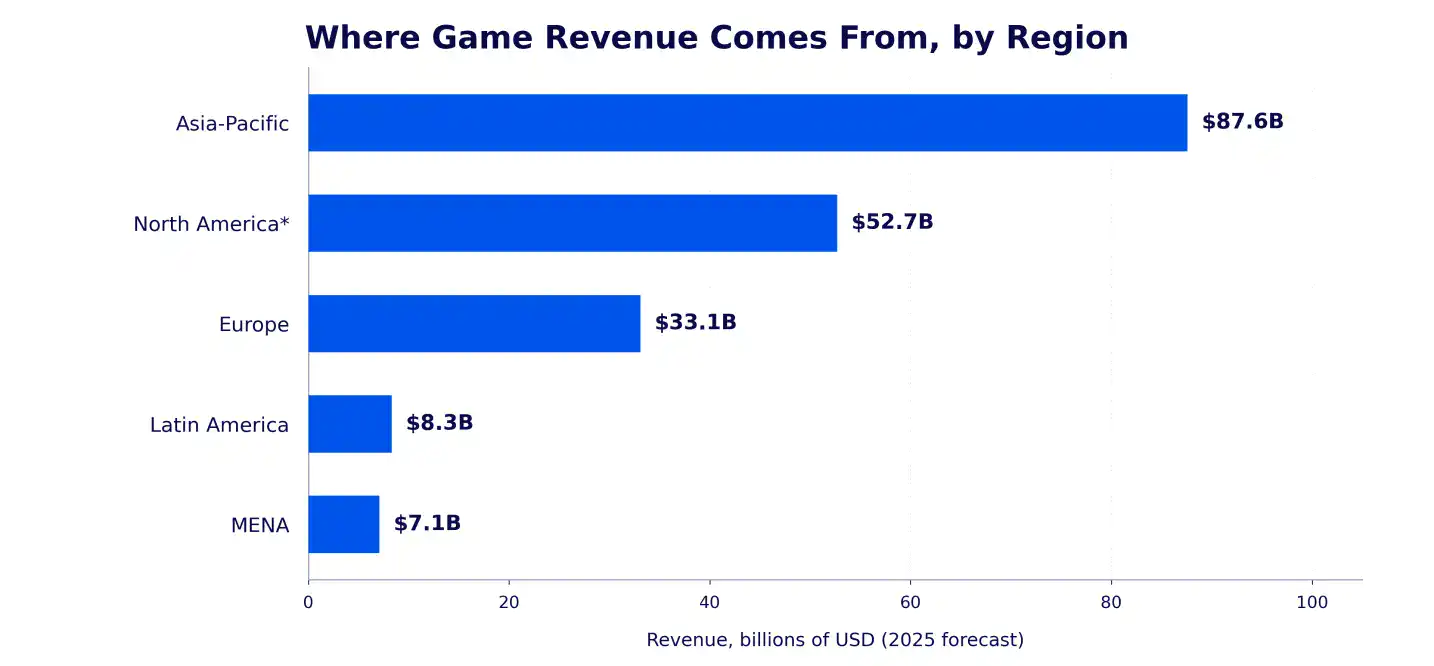
Money is spread across the globe. Newzoo’s 2025 forecast puts Asia-Pacific at $87.6 billion. That is 46% of global game revenue. Europe adds $33.1 billion. Latin America adds $8.3 billion. The Middle East and North Africa add $7.1 billion.
Localization can also lift results fast. An older Distimo study tracked apps that added a native language. Their iPhone downloads rose more than 128% the next week. Revenue rose about 26%. China and Japan saw the biggest download gains. The data is old. Treat it as a signal, not a promise.
The Cost of Skipping It
Skipping localization does not save money. It delays the bill.
- Store pages convert worse in new regions.
- Reviews mention language problems.
- Local rivals take your share.
- Late fixes cost more than early planning.
What Gets Localized in a Game
Localization touches more than text. Use this section as your scope list.
Text and Text Expansion
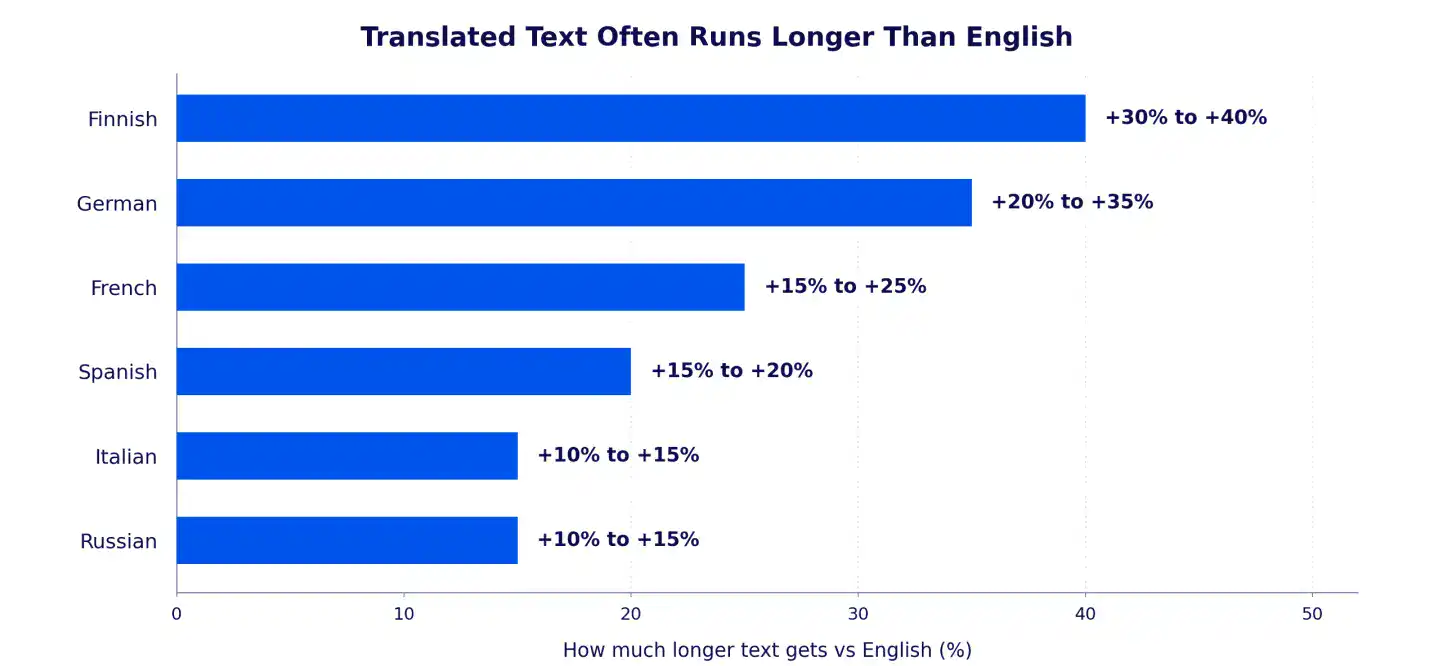
Text is the biggest piece. Dialogue, menus, quests, tooltips, and error messages all count. Translated text often runs longer than English. W3C guidance says short strings can grow 100% to 200%. “Save” becomes “Enregistrer” in French. The button must fit it.
- Add at least 30% extra room to buttons and labels.
- Test with pseudo-localization before real translations arrive.
- Give translators character limits.
- Never glue strings together in code.
Fonts and Scripts
Not every font has every character. Chinese, Japanese, and Korean need large character sets. Arabic and Hebrew read right to left. Your whole layout may need to flip.
- Test glyph coverage for each language.
- Mirror menus and progress bars for right-to-left scripts.
- Set fallback fonts.
- Check font licenses for every region.
UI and Layout
Your UI is where most localization bugs show up. Good design leaves room to grow. Cubix builds flexible layouts through its Game UI/UX Design work. Strong UI work starts before the first translation arrives.
- Use flexible containers, not fixed widths.
- Use icons where the meaning is clear.
- Format numbers, dates, and currency per locale.
- Keep text out of image files.
Voiceover and Audio
Voiceover is the priciest part for many games. Each language needs actors, scripts, direction, and studio time. Lip sync adds more work. Subtitles are a cheaper start.
- Record key story lines first.
- Send scripts with scene context.
- Match subtitle timing to the audio.
- Consider text-only for casual mobile games.
Store Listings and Screenshots
Your store page is the first impression. Localize the title, description, keywords, and screenshots. App Store Connect lets you localize titles, keywords, descriptions, and screenshots.
- Research keywords in each market.
- Do not translate keywords word for word.
- Localize screenshot captions.
- Test variants where the store allows it.
Age Ratings and Regional Compliance
Rules change by region. Rating bodies include ESRB, PEGI, USK, CERO, and GRAC. Content that passes in one region may need edits in another. Some markets also require local approvals before launch. China is the best-known case. Privacy, payments, taxes, and loot box laws vary too. Ask a legal expert in each target market.
Accessibility
Localization and accessibility work together. Longer text can break captions. Wrong fonts can hurt readability. Check both in every language.
- Offer subtitles with speaker names and adjustable size.
- Use readable fonts and strong contrast.
- Do not rely on color alone.
- Add visual cues for important audio cues.
- Localize labels for screen readers.
| Game element | What changes | Common risk | Quick fix |
|---|---|---|---|
| Text | Language, tone, length | Overflow and truncation | Character limits, pseudo-localization |
| Fonts | Scripts and glyphs | Missing characters | Fallback fonts, glyph tests |
| UI | Layout, direction, formats | Broken menus | Flexible containers |
| Voiceover | Voice, timing, lip sync | High cost, sync errors | Record key lines first |
| Store listing | Title, keywords, images | Weak search visibility | Local keyword research |
| Ratings and compliance | Age rules, local approvals | Launch delays | Check rules early |
| Accessibility | Subtitles, contrast, labels | Captions break in long text | Test every language |
Game Localization Workflow
A clear game localization workflow keeps costs and bugs down. Here is the path from prep to launch. Competition makes Polish matter. SteamDB counted over 19,000 new games on Steam in 2025. Quality in every language helps you stand out.
Step 1. Prepare the Game for Localization
Move all text out of the code. Store it in string files. Hard-coded text creates painful rework. This step is called internationalization.
- Give every string an ID.
- Support Unicode.
- Build layouts that can grow.
- Add notes for translators.
Teams that build and prepare together avoid rework. Cubix plans multilingual game development from the start. Strings, fonts, and layouts are ready early.
Step 2. Pick a Tool and Set Up the Pipeline
A translation management system holds strings, glossaries, and memory together.
- Connect the tool to your code repository.
- Build a glossary and a style guide.
- Add screenshots for context.
- Turn on pseudo-localization.
Step 3. Translate and Adapt
Give translators context. Share screenshots, character notes, and tone guides. Use native linguists who play games. Add a review pass. Machine translation can speed up drafts. Humans should review anything players read.
Step 4. Integrate Strings Into the Build
Load the translated strings into the game. Check variables, plurals, and line breaks. Fix font issues now. Small bugs are cheap at this stage.
Step 5. Test and Fix
Run game localization testing on the real build. Native speakers play each language and log bugs. Developers fix them. Testers verify the fixes. The LQA section below covers this in detail.
Step 6. Launch and Update
Launch in waves if you can. Watch ratings and reviews by region. Keep the pipeline open for patches. Every update adds new strings.
Roles Involved
- Producer: owns the schedule and budget.
- Localization manager: runs vendors, tools, and the glossary.
- Translators and editors: adapt the text.
- Engineers: build the string system and fix bugs.
- QA testers: check language, display, and function.
- Community manager: gathers player feedback by region.
How to Choose Your Launch Languages
You do not need 20 languages on day one. Pick with data. Game language support should follow your players.
Look at Your Player Data First
- Check store analytics by country.
- Check wishlists by region.
- Read community channels and support emails.
- Note where traffic is high but conversion is low.
Check Market Size and Competition
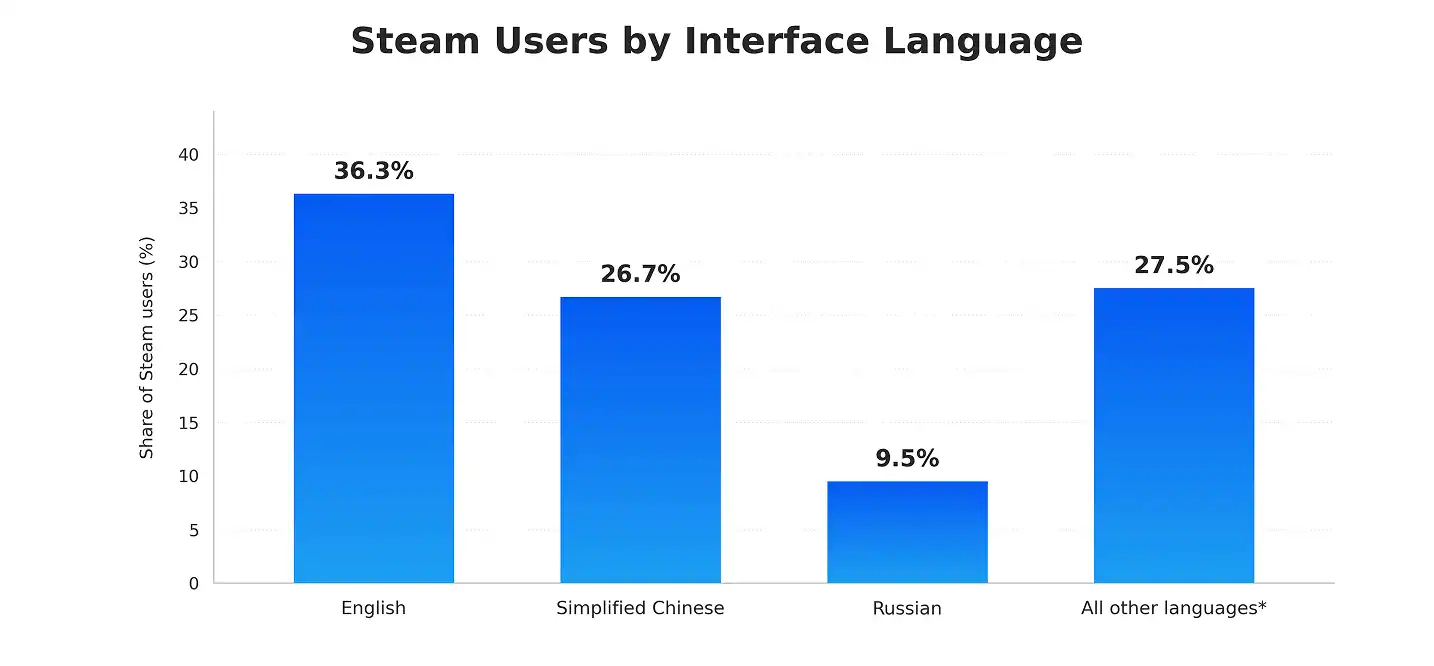
Steam data helps here. Steam’s June 2025 survey put English at 36.31%. Simplified Chinese came second at 26.73%. Russian followed at 9.46%. Monthly results swing, so check the latest numbers.
Think About Platform and Payment Habits
Newzoo links Middle East and Africa growth to mobile-first players. Payment habits matter too. Local wallets, carrier billing, and price points change conversion. A Mobile Game Development company can help you plan these early.
Start Small, Then Scale
- Phase 1: your home language plus two or three high-signal languages.
- Phase 2: add languages that your data supports.
- Phase 3: expand into harder markets with higher effort.
| Language or region | Market signal | Effort level | When to add |
|---|---|---|---|
| Spanish | Wide reach across many countries | Low to medium | Early |
| German | Strong European market | Medium (long words) | Early to mid |
| French | Wide reach in Europe and Africa | Medium | Early to mid |
| Russian | 9.46% of Steam users in June 2025 | Medium | PC-focused games |
| Simplified Chinese | 26.73% of Steam users in June 2025 | High (approvals for China) | When you can handle compliance |
| Japanese | High polish and tone expectations | High | After core markets |
| Arabic | Fast-growing MENA region | High (right-to-left) | When you plan for MENA |
Effort levels are a rough guide, not a verified benchmark.
Locale Rollout Checklist
Your store page is a locale too. CSA says 40% will not buy from foreign-language sites. Use this checklist for global game publishing.
Before You Translate
- Pick launch languages with data.
- Audit the code for hard-coded text.
- Build a glossary and a style guide.
- Set character limits for key UI.
- Choose your tools and vendors.
During Production
- Send translators screenshots and context.
- Freeze text before each translation batch.
- Test layouts with pseudo-localization.
- Check fonts for every script.
- Review sensitive content for culture and ratings.
Before Launch
- Run LQA on the real build in every locale.
- Localize store titles, keywords, and screenshots.
- Confirm age ratings and legal needs by region.
- Test payments, prices, and tax display.
- Set a baseline for your KPIs.
After Launch
- Watch reviews and ratings by language.
- Fix urgent language bugs fast.
- Compare KPIs by locale after 30 days.
- Update the glossary with player feedback.
- Plan the next language wave.
Game Localization Testing and LQA
LQA tests localized builds for language, display, and function bugs. Native speakers play the real build and log issues.
What Is Game LQA?
Game LQA stands for linguistic quality assurance. It is a subset of regular QA. It focuses on the localized versions only. A perfect translation file can still fail in the game.
What Testers Look For
- Truncated or overlapping text.
- Wrong or missing fonts.
- Broken variables and placeholders.
- Audio and subtitle mismatches.
- Untranslated strings.
- Cultural or tone problems.
Functional vs Linguistic Testing
Linguistic testing checks meaning, grammar, tone, and terms. Functional testing checks that the game still works. Language switching, string loading, and button prompts all belong here. You need both.
When to Test
Test early with pseudo-localization. Run full LQA once strings are in the build. Retest after every fix. Cubix runs Game Testing Services that fit into this stage.
Proof helps. One vendor case study covers a DLC released in 16 languages. Testers found over 20 critical localization bugs. This is one case, not an industry average.
Game Localization Cost
Cost depends on word count, language count, voiceover, tools, and testing.
What Drives the Price
- Word count and repeated strings.
- Number of languages.
- Voiceover and studio time.
- Tools and engineering work.
- LQA hours.
Rates vary. Lokalise lists Western Europe rates at $0.10 to $0.18 per word. Rare language pairs can cost more. Per-word rates often exclude testing.
Example Budget With Assumptions
This is an example, not a verified benchmark. Here are the assumptions.
- Game: a mid-size mobile game with 40,000 source words.
- Languages: German, French, Spanish, Brazilian Portuguese, and Japanese.
- Translation memory cuts billable words by 25%, to 30,000.
- Average rate: $0.12 per word.
- Voiceover: 150 key lines in 2 languages at $50 per line.
- LQA: 40 hours per language at $25 per hour.
- Engineering: about 100 hours at $60 per hour.
- Tools and project management: $4,000 flat.
- Store listings: $400 per language.
| Cost item | Calculation | Cost |
|---|---|---|
| Translation | 30,000 words x $0.12 x 5 languages | $18,000 |
| Voiceover | 150 lines x 2 languages x $50 | $15,000 |
| Engineering | 100 hours x $60 | $6,000 |
| LQA testing | 40 hours x $25 x 5 languages | $5,000 |
| Tools and project management | Flat estimate | $4,000 |
| Store listings | $400 x 5 languages | $2,000 |
| Total | $50,000 |
Voiceover takes 30% of this budget. A text-only launch would cost about $35,000 here.
Ways to Save Money
- Use translation memory to reuse past work.
- Build a glossary early.
- Plan before production, not after.
- Localize in phases.
- Start with subtitles, then add voice where it pays off.
- Keep text out of images.
Common Game Localization Mistakes
CSA found 65% prefer native content, even when quality is poor. That makes weak translation tempting. Do not read it as permission to cut corners. One widely cited case is a Modern Warfare 2 line. A Japanese version flipped the meaning of a key scene. Context matters.
- Hard-coded text. Move every string into files before translation starts.
- No context for translators. Send screenshots, notes, and character guides.
- Ignoring text expansion. Test with pseudo-localization and leave 30% room.
- Skipping LQA. Test the real build in every language.
- Weak glossary. Name one owner and lock approved terms.
- Word-for-word store keywords. Do local keyword research instead.
- Too many languages too soon. Launch in phases and follow the data.
How to Measure Localization Success
Newzoo says only 44% of players spend money on games. That is about 1.6 billion people. Good localization should help more players convert in each region.
KPIs to Track
- Store page conversion by locale.
- Day 1, Day 7, and Day 30 retention by locale.
- Payer conversion and revenue per user.
- Refund rate.
- Store rating and review tone by language.
- Support tickets by language.
- Localization bugs found after launch.
How to Validate Quality
- Have a native reviewer sample the text.
- Gather feedback in community channels.
- Track bug counts for each language.
- Run a short survey after launch.
Failure Signals
- Low ratings in one region only.
- Reviews that mention bad language.
- Sudden churn after the tutorial.
- Rising support tickets about menus.
- Strong installs but weak payers.
Risks and Long-Term Maintenance
Content Updates and Version Control
Every patch adds new strings. Track changes by string ID. Freeze text before each batch goes out. Keep one source of truth.
Data and Security
Vendors may see unreleased builds and story. Protect that access.
- Use NDAs.
- Limit access by role.
- Watermark shared builds.
- Remove vendor access when work ends.
Governance
- Keep a style guide for each language.
- Name a glossary owner.
- Set an approval flow for new terms.
- Review quality on a regular schedule.
Scaling to More Languages
Adding languages is easier with a clean pipeline. An Online Game Development company can plan updates and languages together.
Your Next-Step Checklist
- Audit your code for hard-coded text.
- Pick two or three launch languages with data.
- Build a glossary and a style guide.
- Choose your tools and vendors.
- Set a budget with a text-only option.
- Plan LQA for every language.
- Prepare localized store pages.
- Check age ratings and local rules.
- Set KPIs and a 30-day review.
- Plan how updates will flow into each language.
How Cubix Supports Game Localization
Cubix offers game development, mobile game development, UI/UX design, and testing. That mix helps localization run smoothly.
Game Development and Localization Under One Roof
One team can prepare strings, fonts, and layouts early. That cuts rework later.
UI/UX, Fonts, and Layout Readiness
Cubix designs screens that handle longer text and new scripts. That keeps menus clean in every language.
Testing and LQA Support
Cubix testers can check localized builds before launch. That helps you catch bugs players would notice first.
Start Your Global Game Launch With Cubix
Going global is a big step. A clear plan makes it easier.
- A review of your game and target markets.
- A plan for languages, tools, and testing.
- Clear scope and budget assumptions.
- Support from build to launch.
Launch Your Game in New Markets With Confidence
Contact Us
Frequently Asked Questions
1. What is game localization?
Game localization adapts a game for players in a new region. It covers text, audio, art, UI, and rules. The goal is a natural experience.
2. How is localization different from translation?
Translation converts words. Localization adapts the full experience. It includes formats, visuals, tone, and cultural fit.
3. What is localization QA?
Localization QA, or LQA, tests the game in the real build. Native speakers look for language, display, and function bugs. It happens before launch.
4. How do games launch across regions?
Studios prepare the code, pick languages, translate, and test. Then they launch in waves. They also localize store pages and check local rules. Then they track results by region.
5. How much does it cost?
It depends on word count, languages, voiceover, and testing. Our example budget for five languages is $50,000. Treat that as an illustration, not a quote.