Key Takeaways
- AI now supports every stage of the software development lifecycle, from planning and design to deployment and maintenance.
- Developers using AI assistants complete common coding tasks significantly faster while spending more time solving complex engineering problems.
- The biggest productivity gains often come from AI-assisted planning, testing, documentation, and DevOps rather than code generation alone.
- Most businesses achieve faster results by customizing foundation models instead of building AI models from scratch.
A few years ago, AI tools mostly helped developers autocomplete code. Today, they assist with almost every part of software development. Product managers use AI to organize requirements. Designers generate UI concepts in minutes. Developers write cleaner code with AI assistants. QA engineers create test cases automatically. DevOps teams predict outages before customers even notice them.
At LlamaCon 2025, Microsoft CEO Satya Nadella shared that 20% to 30% of the code in Microsoft’s repositories is now generated by AI. GitHub’s research found that developers using AI coding assistants completed coding tasks up to 55% faster than those working without them. Meanwhile, Atlassian’s 2025 State of Teams report revealed that 99% of developers save time with AI, while 68% save more than 10 hours every week.
That doesn’t mean AI is replacing software engineers. It means software engineers are spending less time on repetitive work and more time solving real problems. And that’s a big difference. AI-powered software development is becoming the standard rather than the exception.
AI Has Changed the Software Development Workflow
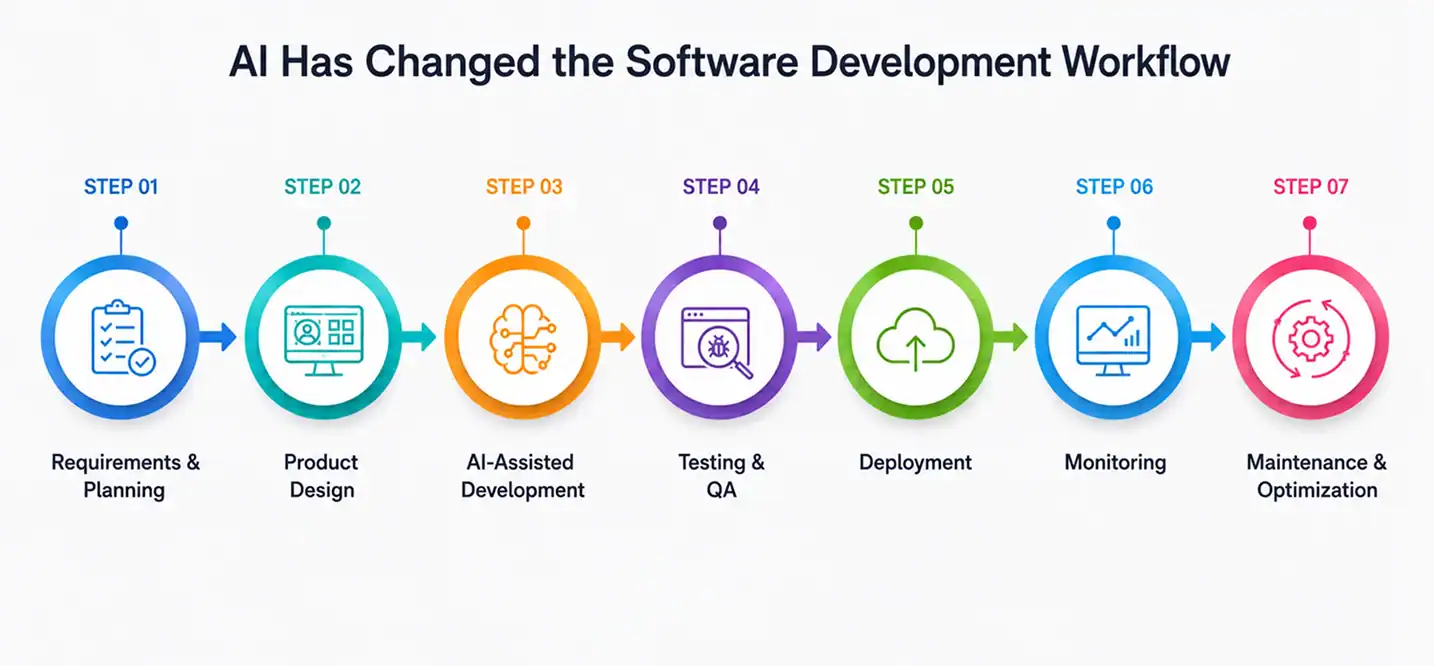
First, teams relied on long planning cycles and sequential development. Then Agile changed everything by making software delivery more flexible. Today, AI is driving another shift. But this time, the change isn’t about replacing a methodology. It’s about improving every stage within it.
From Waterfall to AI-Assisted Development
Here’s how software development has changed over the last five decades.
| Development Era | How Teams Worked | Biggest Challenge |
| Waterfall (1970s–1990s) | Sequential phases with little flexibility | Slow feedback and costly changes |
| Agile (2001 onward) | Short development sprints with continuous iteration | Manual planning and repetitive engineering work |
| AI-Assisted Development (Today) | Human expertise supported by AI throughout the SDLC | Governance, security, and responsible AI adoption |
McKinsey estimates that generative AI could contribute between $2.6 trillion and $4.4 trillion in annual economic value across industries, with software engineering among the functions expected to see the largest productivity gains.
AI Is Helping Throughout the SDLC
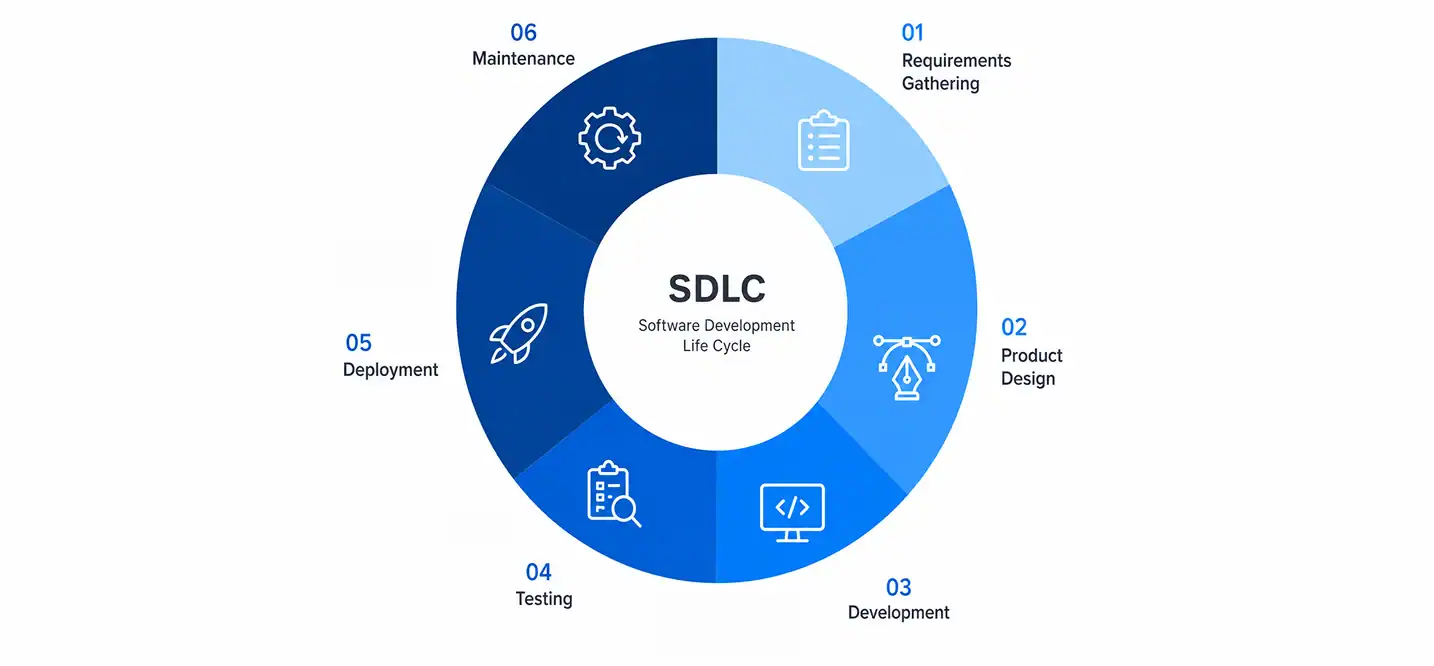
Modern software teams are using generative AI for software development from the very beginning of a project until long after deployment.
Here’s what that looks like.
| SDLC Phase | How AI Helps |
| Requirements Gathering | Meeting transcription, user story creation, requirement summaries |
| Product Design | Wireframe generation, UI suggestions, accessibility improvements |
| Development | Code generation, debugging, documentation, refactoring |
| Testing | Automated test cases, regression testing, bug detection |
| Deployment | CI/CD automation, infrastructure monitoring, rollback recommendations |
| Maintenance | Log analysis, anomaly detection, technical debt reduction |
Why Software Teams Are Investing in AI Now
Three years ago, AI adoption often started with individual developers experimenting with coding assistants.
Today, entire engineering organizations are building AI into their workflows.
Why?
Because the return on investment is becoming difficult to ignore.
According to Stack Overflow’s Developer Survey, AI adoption among professional developers continues to rise rapidly, with developers using AI not only for code generation but also for learning new technologies, explaining unfamiliar code, debugging, and documentation.
Atlassian’s 2025 research adds another layer to this trend.
Among developers already using AI:
- 99% report measurable time savings.
- 68% save more than 10 hours every week.
- Many teams spend those saved hours improving software quality instead of simply writing more code.
AI Is Changing Developer Roles. Not Eliminating Them.

Whenever a new technology improves productivity, people naturally ask the same question.
“Will AI replace software developers?”
Here’s how responsibilities are shifting.
| Traditional Development | AI-Assisted Development |
| Writing repetitive code | Reviewing and improving AI-generated code |
| Manual documentation | Validating AI-generated documentation |
| Finding bugs manually | Investigating AI-detected issues |
| Creating test cases | Expanding AI-generated test coverage |
| Routine refactoring | Making architectural decisions |
“The best software is built by talented teams who know how to use AI to remove repetitive work, make smarter decisions, and focus on creating real value for users. The future belongs to developers who combine technical expertise with intelligent automation.”
– Salman Lakhani, CEO, Cubix
Generative AI Works Best When It Knows Your Business
Some companies begin with a Pre-built Model that already supports coding, document analysis, or automation. Others develop custom models that understand internal terminology, workflows, and proprietary data.
Choosing between these approaches depends on several factors:
- The complexity of your software
- Industry regulations
- Data privacy requirements
- Budget
- Time to market
If you’re exploring this topic further, our guide to the Ultimate List of Large Language Models compares today’s leading LLMs and where each one performs best.
Organizations building more advanced AI capabilities often work with a Large Language Model development company that can fine-tune models, integrate enterprise knowledge bases, and deploy AI securely within existing systems. The same applies to businesses investing in broader machine learning development services.
Where AI Saves the Most Time During Software Development

Research from the Project Management Institute (PMI) consistently shows that poor requirements gathering is one of the leading causes of project delays and budget overruns.
Today, product teams commonly use AI to:
- Convert meeting recordings into structured requirements.
- Summarize stakeholder discussions.
- Generate user stories and acceptance criteria.
- Organize product backlogs.
- Identify missing requirements before development starts.
- Estimate timelines based on similar projects.
- Highlight project risks early.
For example, Microsoft Teams, Zoom, Google Meet, and Notion AI now generate automatic meeting summaries and action items, reducing hours of administrative work every week.
AI Is Making Developers Faster, Not Replacing Them
Let’s address the biggest question first.
Can AI write software?
Yes.
Can AI build an entire production-ready application on its own?
Not yet.
According to GitHub’s controlled productivity study, developers using GitHub Copilot completed coding tasks up to 55% faster than developers working without AI assistance.
This is where generative AI and software development come together in practical ways.
The Rise of AI-Powered IDEs
One of the biggest changes over the past two years has been the rapid growth of the AI-powered integrated development environment.
- Traditional IDEs helped developers write code.
- Modern IDEs actively participate in development.
Some of today’s most widely used AI coding environments include:
| AI Development Tool | Primary Strength | Best For |
| GitHub Copilot | Code completion and suggestions | General software development |
| Cursor | AI-first coding experience | Large codebases and refactoring |
| Claude Code | Code reasoning and debugging | Enterprise development |
| Gemini Code Assist | Google Cloud integrations | Cloud-native applications |
| Windsurf | Agentic software development | Multi-file project automation |
Testing Is Becoming One of AI’s Biggest Success Stories

Today’s QA teams use AI powered tools for software development to automate large parts of the testing process while improving software quality.
AI can now:
- Generate test cases automatically.
- Identify missing test coverage.
- Predict which areas are most likely to fail.
- Detect visual UI inconsistencies.
- Prioritize high-risk defects.
- Recommend regression test suites.
Here’s how the workflow compares.
| Traditional QA | AI-Assisted QA |
| Manual test creation | AI-generated test cases |
| Full regression testing | Intelligent regression selection |
| Manual UI comparison | Visual AI testing |
| Static defect tracking | Predictive bug analysis |
| Reactive testing | Continuous automated testing |
The result?
Teams spend less time repeating manual work and more time investigating meaningful issues.
Cubix Insight
If you’re exploring conversational AI as part of your development roadmap, our related resources can help you go deeper:
- What Is GPT-4? explains how one of today’s most influential language models works and where it fits into enterprise software.
- DeepSeek vs ChatGPT compares two leading AI models for different business and development use cases.
- How to Integrate ChatGPT Into Your Business walks through practical implementation strategies for existing products.
The AI Tools Modern Engineering Teams Actually Use
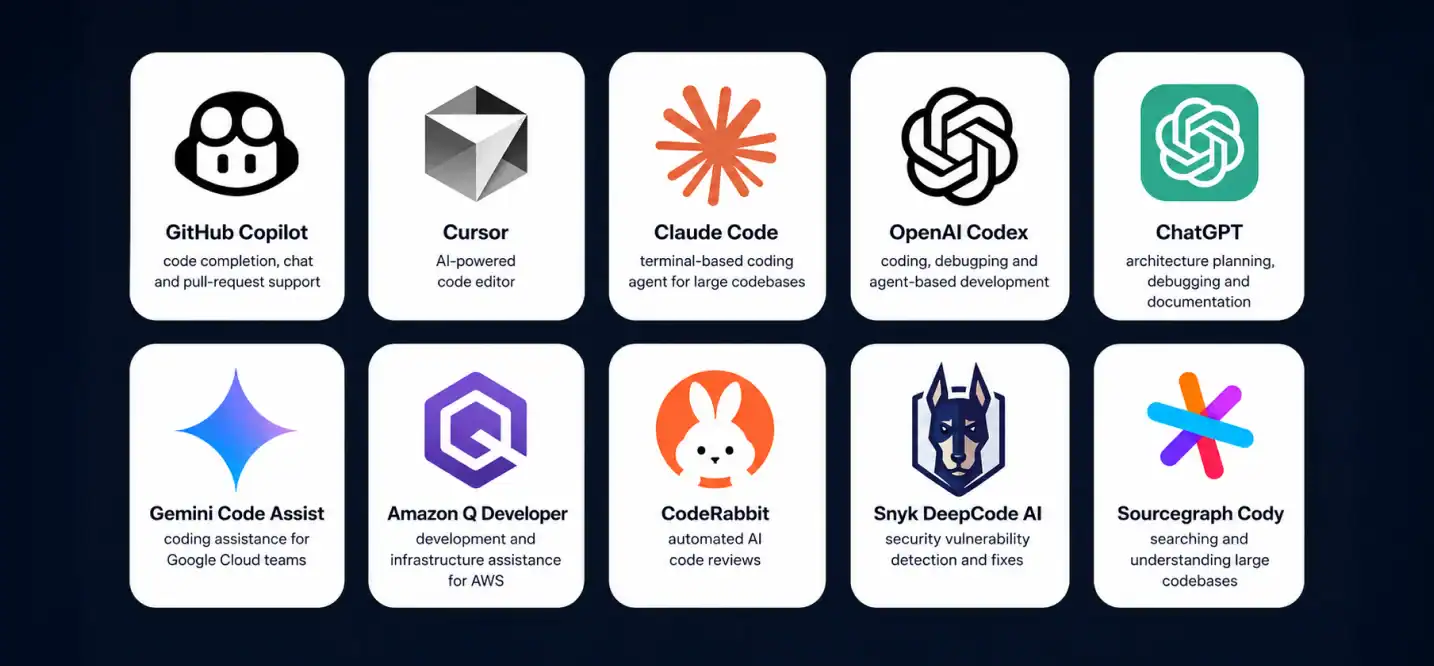
| Development Stage | Common AI Tools | What They Help With |
| Planning | Notion AI, Jira AI, Microsoft Copilot | Requirements, meeting summaries, sprint planning |
| UI & UX Design | Figma AI, Galileo AI, Uizard | Wireframes, interface ideas, design variations |
| Coding | GitHub Copilot, Cursor, Claude Code, Gemini Code Assist | Code generation, debugging, refactoring |
| Testing | Testim, Mabl, Functionize | Automated testing, regression testing, visual QA |
| Documentation | Notion AI, Mintlify | Technical documentation, API documentation |
| DevOps | Datadog AI, Dynatrace Davis AI, New Relic AI | Monitoring, incident detection, infrastructure optimization |
Not Every Business Needs a Custom AI Model
| Approach | Best For | Time to Launch | Cost |
| Pre-trained AI Model | General business automation | Fast | Low |
| Fine-tuned Foundation Model | Industry-specific applications | Medium | Medium |
| Custom AI Model | Highly specialized enterprise use cases | Longer | High |
When Does a Custom AI Solution Make More Sense?
Sometimes, a pre-trained model isn’t enough.
Organizations operating in highly regulated industries often need much tighter control over their AI systems.
- Financial institutions.
- Healthcare providers.
- Government agencies.
- Large enterprises with proprietary knowledge.
In these cases, companies often work with a Large Language Model development company to build customized AI applications that align with security, compliance, and business requirements.
Choosing the Right AI Platform Matters More Than Choosing the Most Popular One

Before selecting an AI powered app development platform, ask a few practical questions.
| Question | Why It Matters |
| What business problem are we solving? | AI should support a measurable business outcome. |
| Will customer data remain secure? | Security and compliance should come first. |
| Can the platform integrate with existing systems? | Avoid creating isolated AI tools. |
| Can the solution scale with future growth? | AI workloads often grow faster than expected. |
| Does it support governance and monitoring? | Responsible AI requires visibility and oversight. |
Cubix Insight
One of the biggest mistakes businesses make is choosing AI tools before defining the problem they’re trying to solve.
If you’re exploring customer-facing AI features, our related resources can help:
- Build a Custom AI Chatbot for Your Business explains how organizations create AI assistants that understand their own products, services, and customers.
- How to Build AI Agents explores the next step beyond chatbots, where AI systems can plan tasks, make decisions, and interact with other software autonomously.
How to Choose an AI-Powered Development Workflow Platform
Use this checklist before making a decision.
| Evaluation Criteria | Why It Matters |
| Integration with Git repositories | Developers shouldn’t switch between multiple tools. |
| Security and compliance | Protects proprietary code and customer data. |
| Support for multiple programming languages | Useful for organizations with diverse technology stacks. |
| Collaboration features | Helps engineering teams work consistently. |
| Scalability | Supports larger projects as your business grows. |
| Analytics and reporting | Measures adoption and productivity improvements. |
Just as importantly, define success before rollout. Ask questions like:
- Are developers spending less time on repetitive work?
- Has code review become faster?
- Are release cycles shorter?
- Has software quality improved?
How to Find a Partner for AI-Powered Application Development
If you’re wondering how to find a partner for AI-powered application development, ask these questions during the evaluation process.
| Question | Why It Matters |
| Have they built production AI applications before? | Experience reduces implementation risks. |
| Do they understand your industry? | Industry knowledge leads to better solutions. |
| Can they integrate AI with existing systems? | AI rarely works in isolation. |
| Do they follow responsible AI practices? | Governance, transparency, and security matter. |
| Can they support the solution after launch? | AI products require continuous improvement. |
- Ask for real case studies.
- Ask how they measured project success.
- Ask what challenges they encountered.
How to Hire a Vendor for AI-Powered App Development
Technical capabilities
- Which LLMs do you support?
- Can you work with multiple AI providers?
- Do you build Retrieval-Augmented Generation (RAG) systems?
- How do you evaluate AI model performance?
Security
- How is customer data protected?
- Are enterprise deployments supported?
- What compliance standards do you follow?
Development process
- How will AI integrate with our current architecture?
- What happens if AI produces inaccurate results?
- How do you monitor models after deployment?
AI Adoption Is Becoming a Competitive Advantage
Every major technology shift follows a similar pattern. Early on, companies debate whether they should adopt it. Later, the discussion changes.
Instead of asking “Should we use AI?”, businesses begin asking “How quickly can we implement it responsibly?”
We’re already seeing that shift.
Gartner predicts that by 2028, the vast majority of enterprise software engineers will use AI coding assistants as part of their daily workflow. At the same time, organizations are expanding AI beyond software development into customer service, operations, finance, marketing, and product management.
Build AI Solutions That Deliver Real Business Value with Cubix
Adding AI to your software is about solving real business problems, improving team productivity, and creating better experiences for your users.
At Cubix, we help businesses build AI-powered applications that fit their goals, workflows, and long-term growth plans.
From custom AI applications to Large Language Model development company solutions and machine learning development services, our team supports every stage of your AI journey. s.
Frequently Asked Questions
1. How is AI changing software development today?
AI automates repetitive tasks such as documentation, code generation, testing, debugging, and deployment monitoring. This allows development teams to focus more on architecture, innovation, and solving customer problems.
2. Is generative AI replacing software developers?
No. Generative AI is improving developer productivity rather than replacing developers. Engineers are increasingly responsible for reviewing AI-generated code.
3. Should businesses build their own large language model?
In most cases, no. Businesses usually benefit more from adapting existing foundation models or pre-trained models to their workflows. Building a custom model is generally reserved for highly specialized enterprise applications.
4. What are the biggest benefits of AI-powered development for businesses?
AI-powered development helps businesses accelerate software delivery, reduce manual work, improve code quality, automate testing, and enhance collaboration across teams. It also enables faster innovation by allowing developers to focus on solving complex business challenges instead of repetitive engineering tasks.
5. What should businesses consider before adopting AI-powered development tools?
Before adopting AI-powered development tools, businesses should evaluate their security and compliance requirements, integration with existing systems, scalability, governance capabilities, and the specific business problems they want AI to solve.