Healthcare software development involves more than building applications to store patient records or manage appointments. Healthcare organizations depend on multiple interconnected systems, and when those systems cannot exchange accurate information, clinical workflows suffer. A capable EHR or hospital management platform is only useful when it works reliably with the rest of the healthcare technology environment.
This is a real interoperability challenge. According to the ONC’s 2023 hospital survey, 71% of U.S. hospitals routinely had access to necessary clinical information from outside providers, but only 42% reported that clinicians often used it when treating patients. Access to data alone isn’t enough. Healthcare software must make that data usable across clinical workflows and systems.
That requires careful decisions around software architecture, HL7 and FHIR integration, data security, regulatory requirements, and system reliability.
This guide explains how healthcare software is planned, designed, developed, integrated, tested, and maintained. It covers the major types of healthcare systems, architecture and technology choices, functional and technical requirements, security considerations, development costs, and the challenges organizations should evaluate before starting a healthcare software development project.
Key Takeaways
- Healthcare software development covers clinical, administrative, and patient-facing systems.
- Software architecture, technology selection, and integration requirements shape system reliability and scalability.
- HL7, FHIR, APIs, and data standards support interoperability between healthcare platforms.
- Security, HIPAA compliance, and data protection must be considered throughout development.
- Testing must validate both technical functionality and clinical workflows.
- Development costs depend on software complexity, integrations, features, and long-term maintenance.
- AI, IoT, predictive analytics, and wearable devices are expanding healthcare software capabilities.
- Choosing the right development partner requires evaluating healthcare experience, integration expertise, security practices, and ongoing support.
What Is Healthcare Software Development?
Healthcare software development is the process of designing, building, integrating, and maintaining software that supports patient care and healthcare operations. It includes solutions for hospitals, clinics, laboratories, healthcare providers, and healthtech organizations.
Unlike conventional software, healthcare systems must handle sensitive patient data, clinical workflows, regulatory requirements, and interoperability with other medical platforms. These factors influence software architecture, database design, API integration, access controls, and infrastructure.
Healthcare software typically includes:
- Clinical information systems: EHR and EMR platforms, clinical decision support systems, and e-prescribing tools.
- Administrative platforms: Hospital management, practice management, medical billing, coding, and revenue cycle management systems.
- Patient-facing applications: Telehealth, appointment booking, prescription management, and remote patient monitoring apps.
- Specialized systems: Laboratory information systems and medical imaging platforms.
Organizations can build custom healthcare software, configure an existing platform, or adopt an off-the-shelf product. Custom development offers greater control over workflows and integrations, while ready-made solutions can reduce initial development time but may have functional limitations.
From frontend interfaces and backend services to databases, APIs, and cloud infrastructure, healthcare software engineering connects these components into reliable systems that support clinical documentation, patient data management, care coordination, and healthcare administration.
What Are the Different Types of Healthcare Software?

Healthcare organizations use different software systems to manage patient records, coordinate clinical activities, handle administration, and support diagnosis and treatment. Some platforms serve a specific department, while others connect workflows across an entire hospital or healthcare network.
1. Electronic Health Record (EHR) and Electronic Medical Record (EMR) Software
EHR and EMR systems store patients’ medical information, including diagnoses, treatment histories, prescriptions, allergies, and clinical notes. Physicians and nurses use these records to review patient history and document care.
The key difference is their scope. An EMR generally contains a patient’s records within one practice or organization, while an EHR is designed to support broader information sharing across healthcare providers.
2. Hospital Management Software
Hospital management software coordinates the administrative and operational activities of a hospital. It supports patient admission, discharge and transfer, bed allocation, staff scheduling, resource management, and departmental reporting. Hospital administrators and operational teams use it to manage day-to-day hospital activities.
3. Practice Management Software (PMS)
Practice management software helps clinics and independent medical practices manage their administrative workflows. It typically handles patient registration, appointment scheduling, insurance verification, billing, and practice administration. Front-office staff, practice managers, and billing teams are its primary users.
4. Revenue Cycle Management (RCM) Software
RCM software manages the financial process from patient registration and insurance eligibility checks to claims submission and payment collection. It supports medical billing and coding, claim tracking, denial management, and revenue reporting. Billing specialists and finance teams use it to manage reimbursements and reduce revenue leakage.
5. Laboratory Information Systems (LIS)
A laboratory information system manages the workflow of medical testing, from test orders and specimen tracking to result processing and reporting. Laboratory technicians use it to coordinate testing activities and maintain accurate records. LIS platforms can also exchange orders and results with EHR systems.
6. Telehealth and Remote Patient Monitoring (RPM) Software
Telehealth software enables patients to consult healthcare professionals remotely through video calls, messaging, and digital care platforms. Remote patient monitoring software collects health data from connected devices, such as blood pressure monitors and glucose meters, allowing providers to review patient readings outside clinical settings.
7. Clinical Decision Support (CDS) Software
Clinical decision support software helps healthcare professionals make informed decisions using patient data, clinical guidelines, and evidence-based recommendations. It can generate medication alerts, flag potential drug interactions, provide reminders, and support diagnostic or treatment decisions within clinical workflows.
8. Picture Archiving and Communication Systems (PACS)
PACS software stores, retrieves, and distributes medical images such as X-rays, CT scans, and MRIs. Radiologists and imaging teams use it to access diagnostic images across clinical departments. PACS commonly uses the DICOM standard to manage and exchange medical imaging data.
Overview of Healthcare Software Types
| Software Type | Primary Purpose | Main Users |
|---|---|---|
| EHR/EMR | Patient medical record management | Physicians and nurses |
| Hospital management | Hospital operations and resource coordination | Administrators and hospital staff |
| PMS | Medical practice administration | Practice managers and office staff |
| RCM | Billing, claims, and payment management | Billing and finance teams |
| LIS | Laboratory testing and result management | Laboratory technicians |
| Telehealth and RPM | Virtual care and remote patient monitoring | Patients and healthcare providers |
| CDS | Clinical decision support | Physicians and other clinicians |
| PACS | Medical image storage and retrieval | Radiologists and imaging teams |
These systems often need to exchange information rather than operate independently. For example, an LIS sends test results to an EHR, while PACS makes diagnostic images available to radiologists and treating physicians. This is why integration and interoperability are important considerations when developing healthcare software.
Why Do Healthcare Organizations Invest in Custom Software Development?
Healthcare organizations often outgrow the capabilities of generic software. A hospital, for example, may need to coordinate multiple departments, connect diagnostic systems, and manage patient information across different locations. Custom healthcare software development helps address these requirements by adapting the system to existing workflows and technical infrastructure.
1. Accommodating Complex Clinical and Administrative Workflows
Hospitals, clinics, and specialty practices rarely follow identical workflows. A hospital may need coordinated admission, discharge, and transfer processes, while a specialty clinic may require specific treatment documentation and approval steps. Custom software can reflect these workflows instead of forcing staff to adapt to rigid, predefined processes.
2. Connecting Disconnected Healthcare Systems
Healthcare organizations often use separate platforms for EHR management, laboratory testing, medical imaging, billing, and scheduling. When these systems operate in silos, staff may need to enter the same information multiple times or switch between applications to find patient data. Custom integrations connect these platforms through APIs and standards such as HL7 and FHIR, supporting more consistent data exchange.
3. Improving Patient Data Accessibility
Clinicians need timely access to accurate patient information, including medical histories, test results, prescriptions, and treatment records. Custom software can bring relevant information into centralized interfaces and provider dashboards while maintaining role-based access controls. This reduces the need to search across disconnected systems.
4. Automating Repetitive Healthcare Operations
Manual administrative tasks consume time that staff could spend on patient care. Custom platforms can automate appointment scheduling, patient registration, billing workflows, routine notifications, and documentation tasks. Automation also helps reduce duplicate data entry and avoidable processing errors.
5. Supporting Organization-Specific Requirements
A multi-location hospital network may need shared patient records and centralized reporting, while a specialized care provider may require department-specific workflows. Custom development accommodates these differences through configurable modules, permissions, integrations, and reporting structures without relying on one rigid system for every department.
6. Modernizing Legacy Healthcare Infrastructure
Older healthcare systems may still support critical operations but lack modern APIs, security capabilities, or compatibility with newer platforms. Replacing everything at once can disrupt clinical workflows. A gradual modernization approach allows organizations to integrate legacy systems, migrate data in stages, and replace outdated components while keeping essential services operational.
Custom Healthcare Software vs. Off-the-Shelf Solutions: Which Should You Choose?
The choice between custom healthcare software and an off-the-shelf platform comes down to how well an existing product supports your workflows, integrations, and long-term requirements. Custom development offers greater control, but it usually requires more upfront investment. Ready-made platforms are quicker to implement, although their limitations can become a problem as operational needs grow.
| Evaluation Factor | Custom Healthcare Software | Off-the-Shelf Software |
|---|---|---|
| Workflow customization | Built around specific clinical and administrative requirements | Uses predefined workflows with limited configuration |
| Initial investment | Generally higher | Generally lower |
| Integrations | Can support specific integration requirements | Depends on available APIs and connectors |
| Maintenance | Managed internally or through a development partner | Usually handled by the vendor |
| Scalability | Depends on architecture and infrastructure decisions | Depends on vendor capabilities and product limits |
| Ownership | Intellectual property terms are defined by contract | Usually licensed or subscription-based |
| Custom functionality | Greater control over features and system behavior | Limited to available features and extensions |
When Does Custom Healthcare Software Make Sense?
Custom development is worth considering when existing platforms cannot support essential operational or technical requirements. It may be the better option when an organization:
- Manages complex clinical workflows across multiple departments or locations.
- Needs integrations with several EHR, LIS, PACS, or billing systems.
- Provides specialized medical services that require dedicated functionality.
- Needs to modernize legacy systems without disrupting ongoing operations.
- Requires greater control over data architecture, security, or system behavior.
When Should You Use an Existing Healthcare Platform?
An off-the-shelf solution may be more practical when an organization’s requirements are relatively standard. Consider an existing platform when:
- Common workflows such as scheduling, billing, and patient registration meet operational needs.
- The product already supports required EHR integrations and healthcare standards.
- Budget or implementation time is limited.
- The organization does not need extensive customization.
- The vendor provides reliable maintenance, security updates, and technical support.
What About a Hybrid Approach?
Custom and off-the-shelf software are not mutually exclusive. Healthcare organizations can use an established platform for standard functions and develop custom modules or API integrations for specific requirements. For example, a hospital might retain its existing EHR while building a custom patient portal or connecting a separate laboratory system.
This approach can reduce development costs while addressing gaps in existing software. The important consideration is whether the platform supports the required integrations and allows enough control over data exchange and workflows.
What Does Healthcare Software Architecture Look Like?

Imagine a patient books an appointment through a hospital’s mobile app. Later, the doctor opens the patient’s record, orders a blood test, and reviews the result when the lab finishes processing it.
From the patient’s perspective, this looks like one straightforward process. Behind the scenes, however, several parts of the software work together. One displays the app, another checks the appointment, another stores patient information, and others communicate with the hospital’s laboratory and EHR systems.
That’s what healthcare software architecture does. It defines how these different parts work together so information reaches the right place and each action happens correctly.
Think of it as a hospital’s digital operating system. Let’s follow the appointment example to understand what each part actually does.
1. Frontend and User Interface Layer: What People See and Use
The frontend is the part of the software people interact with. When a patient opens the hospital app, the screens showing doctors, appointment slots, and medical records belong to this layer.
Different users see different interfaces because they have different responsibilities:
- Patients can book appointments, view prescriptions, and check test results.
- Physicians can review medical histories, document diagnoses, and update treatment plans.
- Nurses can record patient observations and medication administration.
- Administrative staff can manage admissions, schedules, billing, and reports.
For example, when a patient selects a doctor and taps “Book Appointment,” the frontend collects that information and sends the request to the software’s backend. It doesn’t decide whether the appointment is available. It simply captures the patient’s action and displays the response.
Access controls also determine which screens and information each user can access. A patient, for instance, shouldn’t see another patient’s medical records.
2. Application and Business Logic Layer: The Rules Behind Each Action
Now, what happens after the patient taps “Book Appointment”?
The application layer handles the rules that determine what the software should do. It checks whether the selected doctor has an available slot, whether the appointment details are valid, and whether the booking follows the hospital’s scheduling rules.
If everything checks out, the system confirms the appointment and moves the process forward. If the slot is already taken, it returns an appropriate message instead.
The same layer handles other workflows, such as patient registration, billing calculations, prescription requests, and clinical documentation.
In simple terms, the frontend receives the user’s action, while the application layer decides how the system should handle it.
3. Backend Services and API Layer: How Different Parts Communicate
The backend handles the processing that users don’t see. It receives requests from the frontend, connects to the required services, and returns the results.
APIs act as communication channels between different parts of the software. Think of an API as a defined way for two systems to exchange requests and information without needing to understand each other’s internal code.
For example, when the patient requests an appointment:
- The frontend sends the booking request through an API.
- The backend verifies the user’s identity and checks their access permissions.
- The application logic processes the booking rules.
- The backend communicates with the database to save the appointment.
- The API returns the booking status to the frontend.
REST APIs commonly support communication between application components. FHIR APIs can also allow authorized applications to exchange structured healthcare information with compatible EHR systems.
4. Database and Healthcare Data Layer: Where Patient Information Lives
Every time a patient books an appointment, updates their details, or receives a test result, the system needs somewhere to store that information.
That’s the database layer’s job. It stores information such as patient demographics, medical histories, diagnoses, prescriptions, appointments, and clinical notes.
Different types of healthcare information may require different storage systems. Structured records can be stored in relational databases, while medical documents and imaging files may use specialized storage solutions.
For example, after the appointment is confirmed, the backend saves its details in the database. When the physician opens the patient’s record later, the system retrieves the relevant information and sends it back to the physician’s dashboard.
The database also needs safeguards to maintain data accuracy, control access, and prevent unauthorized changes.
5. Integration and Interoperability Layer: Connecting the Hospital’s Other Systems
A hospital rarely runs everything through one application. It may have a separate EHR, laboratory information system, medical imaging platform, pharmacy system, and billing solution.
The integration layer allows these systems to exchange information.
Let’s return to the patient’s appointment. During the consultation, the physician orders a blood test. The healthcare platform sends that order to the hospital’s Laboratory Information System (LIS). Once the lab completes the test, the LIS sends the result back so it can be associated with the patient’s record and reviewed by the physician.
The same process applies to other connections:
- EHR and EMR systems: Exchange patient records and clinical information.
- LIS platforms: Send laboratory orders and test results.
- PACS: Make medical images available to authorized clinicians.
- Pharmacy systems: Support prescription-related workflows.
- Medical devices: Transfer patient measurements into monitoring platforms.
Standards help these systems understand the information they exchange. HL7 and FHIR support healthcare data exchange, while DICOM is commonly used for medical imaging.
Without this layer, staff may have to switch between systems or enter the same information more than once.
6. Cloud Infrastructure and Deployment Layer: What Keeps Everything Running
All these components need computing resources, storage, networks, and a reliable environment to operate. That’s where infrastructure comes in.
Healthcare software may run on cloud platforms, on-premises servers, or a combination of both. The choice depends on the organization’s technical requirements, security considerations, and existing infrastructure.
Infrastructure also handles responsibilities that users rarely notice:
- Hosting: Runs the application and its backend services.
- Scaling: Allocates additional resources when system demand increases.
- Monitoring: Tracks performance and identifies service problems.
- Backups: Maintains recoverable copies of important data.
- Disaster recovery: Helps restore systems after major outages or infrastructure failures.
For a hospital, these capabilities matter because an unavailable system can interrupt appointment scheduling, access to patient records, and other essential workflows.
How the Architectural Layers Work Together?
Here’s the complete flow using our hospital example:
| Step | What Happens | Architectural Component |
|---|---|---|
| 1 | The patient selects a doctor and submits an appointment request. | Frontend |
| 2 | The system receives the request and checks the user’s identity. | Backend and API |
| 3 | The software checks availability and applies scheduling rules. | Application logic |
| 4 | The confirmed appointment is saved. | Database |
| 5 | Appointment details are shared with connected hospital systems where required. | Integration layer |
| 6 | The patient sees a booking confirmation. | Frontend |
| 7 | The application continues running, with infrastructure monitoring and supporting its services. | Cloud infrastructure |
The same pattern applies when a physician retrieves a patient’s medical history or receives a laboratory result. A user action triggers a request, the backend processes it, the required information is retrieved or exchanged, and the result appears in the relevant interface.
One important point: these layers aren’t necessarily separate applications or physical servers. They’re logical responsibilities within the overall system. A smaller platform might handle several of them in one application, while a large hospital network may use multiple services and infrastructure components.
How to Choose an Architecture for Healthcare Software?
Once the main components are defined, the next question is how to organize them. The answer depends on the size of the platform, the number of connected systems, and how frequently different parts need to change.
Three common architectural approaches are:
- Modular architecture: Organizes the application into functional sections, such as patient management, scheduling, and billing. Each module has a defined responsibility, making it easier to update one area without unnecessarily affecting others.
- Microservices architecture: Splits the application into smaller services that can be developed, deployed, and scaled independently. A large hospital network might use separate services for appointments, billing, and patient records. However, this approach requires more work to manage communication, monitoring, and data consistency.
- Event-driven architecture: Allows one part of the system to notify other components when something happens. For example, when a laboratory result becomes available, the LIS can publish an event that prompts the EHR to update the patient’s record or notify the physician.
These approaches can also work together. A healthcare platform might use modular architecture for its core application and event-driven components for laboratory updates or notifications.
A smaller clinic may have no need for microservices. A modular application could handle its requirements with less operational complexity. A large hospital network with multiple locations, high transaction volumes, and numerous integrations may need a more distributed architecture.
The goal isn’t to use the most advanced architecture. It’s to make sure the system can handle its clinical workflows, exchange information reliably, and remain manageable as requirements change.
What Technologies Are Used in Healthcare Software Development?
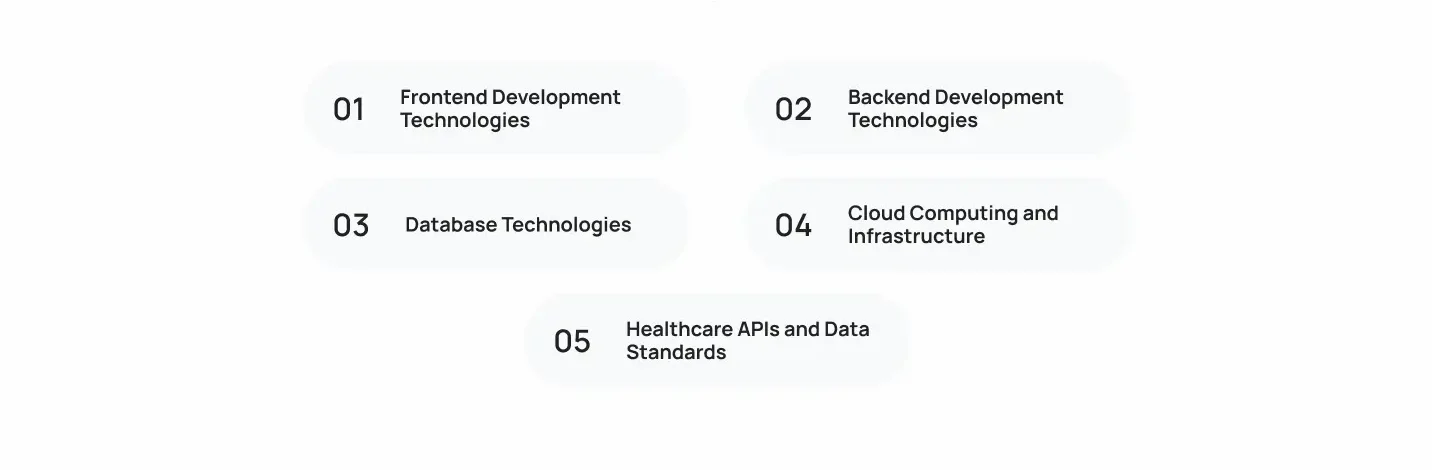
Healthcare software uses different technologies for frontend interfaces, backend processing, data storage, cloud infrastructure, and system integration. The technology stack depends on the application’s architecture, security requirements, integration needs, existing infrastructure, and the development team’s expertise.
1. Frontend Development Technologies
Frontend technologies build the interfaces patients, clinicians, and administrative staff use.
- React: Builds interactive web interfaces, including patient portals and provider dashboards.
- Angular: Supports complex web applications with structured components and forms.
- Vue.js: Builds flexible, responsive web interfaces.
- Swift and Kotlin: Develop native iOS and Android applications.
- React Native and Flutter: Support cross-platform mobile app development through shared codebases.
2. Backend Development Technologies
Backend technologies handle application logic, APIs, authentication, data processing, and system communication.
- Java and Spring Boot: Build enterprise applications, backend services, and APIs.
- Python with Django or FastAPI: Supports web applications, API development, and data processing.
- Node.js: Handles backend services and API requests using JavaScript or TypeScript.
- C# and .NET: Supports enterprise applications and backend systems, particularly within Microsoft-based environments.
3. Database Technologies
Databases store and manage patient records, appointments, clinical documents, and other healthcare information.
- PostgreSQL: Relational database suited to structured records and transactional data.
- MySQL: Manages structured application data and database relationships.
- Microsoft SQL Server: Supports enterprise data management and Microsoft-based systems.
- MongoDB: Stores document-oriented data with flexible structures where appropriate.
Database selection should account for data integrity, consistency, access controls, retrieval performance, and storage requirements. Medical images and large clinical documents may require specialized storage rather than the primary application database.
4. Cloud Computing and Infrastructure
Cloud platforms provide the computing, storage, networking, and managed services needed to run healthcare applications.
- AWS: Offers cloud computing, databases, storage, and monitoring services.
- Microsoft Azure: Supports cloud infrastructure and integration with Microsoft-based environments.
- Google Cloud: Provides computing, storage, data management, and analytics services.
- Docker: Packages applications and their dependencies into containers.
- Kubernetes: Orchestrates container deployment, scaling, and management.
Infrastructure planning should also cover monitoring, backups, disaster recovery, encryption, and access controls. Using a cloud provider does not automatically make a healthcare application HIPAA-compliant. Organizations must configure their environments correctly and meet applicable regulatory and contractual requirements.
5. Healthcare APIs and Data Standards
Healthcare systems use APIs and data standards to exchange information across different platforms.
- HL7: Supports healthcare data exchange through messaging standards, including HL7 v2.
- FHIR Resources: Define standardized structures for exchanging data such as patient records, appointments, and clinical observations.
- SMART on FHIR: Supports application authorization and launch within compatible healthcare systems.
- DICOM: Standardizes the storage and exchange of medical imaging information.
- USCDI: Defines standardized health data classes and elements for interoperable information exchange in the United States.
Healthcare Software Technology Stack at a Glance
| Technology | Primary Role |
|---|---|
| React / Angular / Vue.js | Web interfaces |
| Swift / Kotlin | Native mobile applications |
| React Native / Flutter | Cross-platform mobile applications |
| Java / Python / Node.js / .NET | Backend development |
| PostgreSQL / MySQL / SQL Server | Relational data management |
| MongoDB | Document-oriented data storage |
| AWS / Azure / Google Cloud | Cloud infrastructure |
| REST APIs | Application communication |
| HL7 / FHIR | Healthcare data exchange |
| SMART on FHIR | Application authorization and launch |
| DICOM | Medical imaging exchange |
The final stack should match the system’s complexity and operational requirements. A smaller healthcare application may need a straightforward architecture, while an enterprise platform may require multiple backend services, specialized data storage, and integrations with legacy systems.
What Are the Requirements for Developing Healthcare Software?
Before development begins, healthcare organizations need to define what the software must do, which systems it needs to connect with, what data it will handle, and which regulatory obligations apply. These requirements guide architecture, technology selection, development scope, and testing.
1. Functional Requirements
Functional requirements define the tasks the software must perform and the workflows it must support. Depending on the application, these may include:
- Patient and provider management.
- Clinical documentation and medical records.
- Appointment scheduling and patient registration.
- Medical billing, claims, and reporting.
- Notifications and reminders.
- Patient-provider communication.
- Role-specific workflows for clinicians and administrative staff.
2. Technical Requirements
Technical requirements establish how the application will operate and connect with other systems. Teams need to define:
- System architecture: Application structure, services, and deployment model.
- Database design: Data storage, relationships, and retrieval requirements.
- API specifications: Communication between internal modules and external platforms.
- Infrastructure: Cloud, on-premises, or hybrid hosting requirements.
- Integration capabilities: Connectivity with EHR, LIS, PACS, and other healthcare systems.
- Performance and availability: Expected workloads, response times, uptime, and recovery needs.
3. Healthcare Data Requirements
Healthcare software must handle patient information accurately and consistently. Development teams should establish:
- Data formats and structures: Standards such as HL7 and FHIR for information exchange.
- Patient identification: Reliable methods for matching records to the correct patient.
- Clinical terminology: Consistent coding systems such as SNOMED CT, LOINC, and RxNorm, where applicable.
- Data exchange: Requirements for sharing information across healthcare platforms.
- Data validation: Checks for accuracy, completeness, and consistency.
- Data migration and retention: Rules for transferring existing records, preserving data integrity, and retaining information.
4. Security and Regulatory Requirements
Security and compliance requirements depend on the software’s purpose, the data it handles, and the organization’s role. For U.S. healthcare applications, teams should assess applicable HIPAA obligations and define:
- PHI protection: How protected health information is collected, accessed, processed, and stored.
- Access management: Role-based permissions, authentication, and least-privilege access.
- Encryption: Protection of data in transit and at rest.
- Audit trails: Records of access, changes, and important system activities.
- Business Associate Agreements (BAAs): Agreements with vendors or service providers when HIPAA requires them.
5. Usability and Accessibility Requirements
Healthcare software must work for people with different roles, technical abilities, and accessibility needs. Requirements should cover:
- Role-specific interfaces: Relevant information and functions for each user group.
- Clinical workflow efficiency: Clear navigation and minimal unnecessary steps.
- Accessibility: Support for applicable accessibility standards, including WCAG.
- Device compatibility: Consistent functionality across desktop, tablet, and mobile devices.
- Readability and navigation: Clear labels, readable content, and predictable interface behavior.
Defining these requirements early helps prevent architectural changes, integration gaps, and compliance issues later in development. It also gives the team clear criteria for evaluating whether the finished software meets the organization’s needs.
How Does Healthcare Software Integration and Interoperability Work?
Healthcare organizations often use separate systems for patient records, laboratory testing, medical imaging, prescriptions, and hospital operations. Integration connects these systems, while interoperability allows them to exchange information in formats they can interpret and use.
For example, when a physician orders a blood test, the order must reach the laboratory system. Once testing is complete, the result needs to return to the patient’s clinical record. APIs, integration services, and healthcare data standards make this exchange possible.
1. HL7 and FHIR Standards for Healthcare Data Exchange
HL7 and FHIR help healthcare systems exchange structured clinical and administrative information. They use different approaches:
- HL7 v2: Uses message-based communication to exchange information such as patient admissions, laboratory orders, and test results. It remains widely used in hospital integrations.
- FHIR: Uses standardized data structures called Resources, such as Patient, Observation, Medication, and Appointment. FHIR commonly supports RESTful APIs for accessing and exchanging these resources.
FHIR-based integration may also require data mapping and transformation. For example, two systems might represent the same clinical information differently. Integration services map their fields and terminology into compatible formats before transferring the data.
FHIR supports modern API-based exchange, but it does not replace every existing HL7 interface. Healthcare organizations often need to support both.
2. How SMART on FHIR Supports Healthcare Applications
SMART on FHIR provides a framework for connecting applications to FHIR-enabled healthcare systems. It handles application authorization and launch context so an approved application can access permitted patient information.
Its main components include:
- OAuth 2.0: Provides the authorization framework for granting and managing application access.
- Application authorization: Controls which data an application can request.
- Patient and user context: Identifies the relevant patient and, where applicable, the logged-in healthcare professional.
- EHR launch: Allows compatible applications to launch from within an EHR interface.
- FHIR Resource access: Enables authorized applications to retrieve permitted clinical information.
This allows third-party applications to work with EHR data without building a separate connection for every system.
3. Understanding United States Core Data for Interoperability (USCDI)
The United States Core Data for Interoperability (USCDI) defines standardized health data classes and elements for exchanging information across the U.S. healthcare ecosystem.
Its data categories include:
- Patient demographics and information.
- Clinical notes.
- Medications.
- Allergies and intolerances.
- Laboratory results.
- Procedures and vital signs.
- Encounter information.
USCDI helps establish which information should be represented consistently when healthcare systems exchange records. It is a standardized data set, not an API or messaging protocol. FHIR and other applicable standards provide ways to exchange the information.
4. Integrating EHR, EMR, and Hospital Systems
EHR and EMR integration connects patient records with other clinical and administrative platforms. The goal is to keep relevant information accessible without requiring staff to enter or retrieve the same data across disconnected systems.
Common integration requirements include:
- Patient information: Demographics, medical histories, allergies, and medications.
- Clinical documentation: Notes, diagnoses, and treatment records.
- Encounter information: Visit details, procedures, and clinical updates.
- Appointment data: Scheduling information and provider availability.
- Cross-system workflows: Sharing relevant information between clinical, administrative, and diagnostic platforms.
Integration may use HL7 messages, FHIR APIs, vendor-specific APIs, or a combination, depending on the systems involved.
5. Integrating PACS, LIS, and CPOE Systems
Hospitals also need to connect specialized systems that manage diagnostic and clinical workflows.
- PACS: Stores, retrieves, and distributes medical images. DICOM provides the standard for communicating and managing imaging information.
- Laboratory Information Systems (LIS): Receive laboratory orders, track specimens, process test results, and send results to connected clinical systems.
- Computerized Provider Order Entry (CPOE): Allows clinicians to enter medication, laboratory, and diagnostic orders electronically and route them to the appropriate systems.
These integrations help coordinate the process from ordering a test to making its results available for clinical review. DICOM supports imaging exchange, while HL7 and FHIR can support other clinical data exchanges.
6. Healthcare Data Migration and Validation
When replacing or modernizing a healthcare platform, organizations must transfer existing records without losing their accuracy or meaning. Data migration typically involves:
- Data extraction: Retrieve records from legacy databases and applications.
- Data transformation: Convert fields, formats, and terminology into structures supported by the new system.
- Patient record matching: Confirm that records belong to the correct individuals and identify duplicates.
- Data integrity checks: Verify that relationships, values, and required information remain intact.
- Migration testing: Test sample records and workflows before moving the full dataset.
- Post-migration validation: Reconcile migrated records against the source and investigate discrepancies.
Validation should cover more than whether records were copied successfully. Teams must also check that clinical information remains complete, correctly associated with patients, and usable in the new system.
Healthcare Integration Standards and Technologies at a Glance
| Standard or Technology | Role in Healthcare Software |
|---|---|
| HL7 | Message-based healthcare information exchange |
| FHIR | Structured healthcare data exchange through APIs |
| SMART on FHIR | Application authorization and launch |
| USCDI | Standardized health data classes and elements |
| DICOM | Medical imaging communication and management |
| PACS | Medical image storage, retrieval, and distribution |
Successful interoperability requires more than connecting APIs. Systems must also agree on data formats, patient identities, clinical terminology, and access permissions. Without these checks, information may transfer successfully but still be incomplete, mismatched, or misunderstood by the receiving system.
What Is the Healthcare Software Development Process?
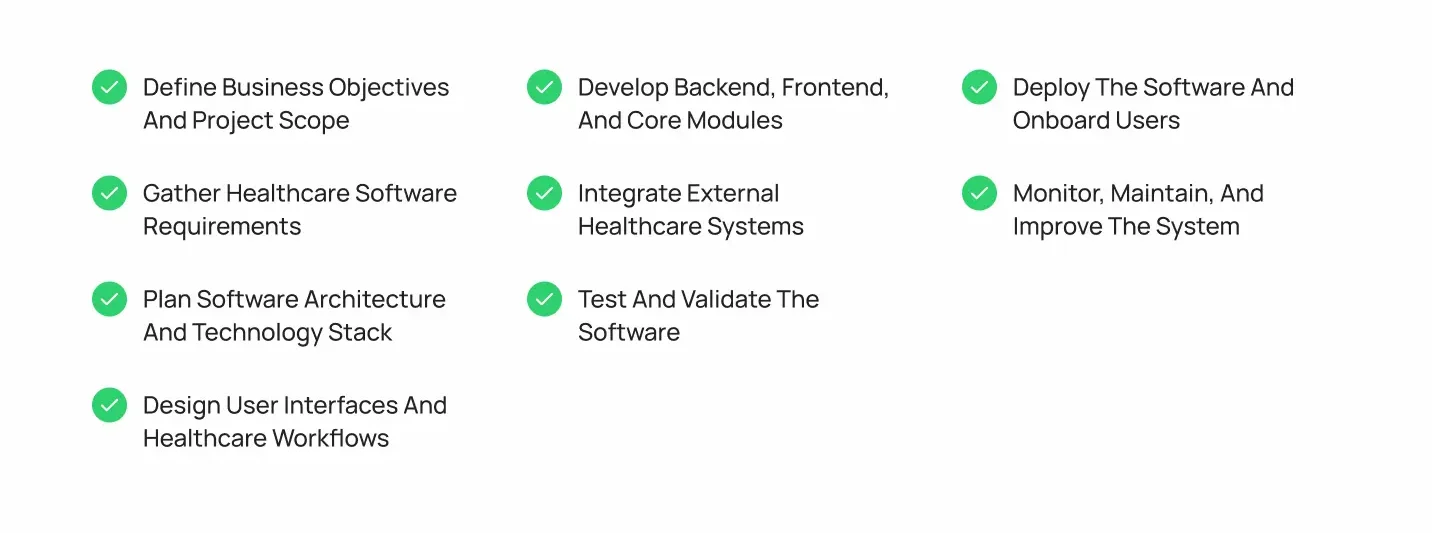
Healthcare software development follows a structured engineering process, starting with project discovery and ending with deployment and ongoing maintenance. Each stage builds on the decisions made earlier, from defining clinical workflows to validating integrations and preparing the system for real-world use.
Step 1. Define Business Objectives and Project Scope
Start by identifying the problem the software needs to solve. A hospital may want to replace outdated patient management systems, connect disconnected departments, or automate administrative workflows.
The discovery stage establishes:
- Operational problems and project objectives.
- Intended users, including patients, clinicians, and administrators.
- Clinical and administrative stakeholders.
- System boundaries and required capabilities.
- Project scope, priorities, budget, and constraints.
Deliverable: A project scope document outlining objectives, users, key requirements, and expected outcomes.
Step 2. Gather Healthcare Software Requirements
The development team works with stakeholders to understand how the software should function. This involves reviewing existing workflows, identifying technical dependencies, and documenting regulatory considerations.
Key activities include:
- Interviewing clinicians, administrators, and other stakeholders.
- Mapping clinical and administrative workflows.
- Defining functional and technical requirements.
- Identifying healthcare data and security requirements.
- Documenting integration needs and third-party dependencies.
Deliverable: A requirements specification covering system functionality, technical needs, integrations, and compliance considerations.
Step 3. Plan Software Architecture and Technology Stack
With the requirements established, architects define how the system will be structured and which technologies will support it.
This includes:
- Selecting a suitable architecture, such as modular or microservices-based.
- Defining frontend, backend, database, and integration components.
- Designing healthcare data models.
- Selecting programming languages, frameworks, and databases.
- Planning API integrations and interoperability standards.
- Defining cloud, on-premises, or hybrid infrastructure requirements.
Deliverable: A technical architecture and technology plan that guides implementation.
Step 4. Design User Interfaces and Healthcare Workflows
Designers translate requirements into interfaces that support the actual work of patients, clinicians, and administrative staff.
The design stage covers:
- Patient portals and mobile application interfaces.
- Physician dashboards and clinical documentation screens.
- Administrative interfaces for scheduling and billing.
- Workflow mapping and navigation.
- Wireframes and interactive prototypes.
- Usability reviews with relevant stakeholders.
Deliverable: Approved interface designs, prototypes, and workflow specifications.
Step 5. Develop Backend, Frontend, and Core Modules
Developers build the application components according to the approved architecture and designs.
Core development activities include:
- Implementing application logic and backend services.
- Building databases and data models.
- Developing REST and healthcare APIs.
- Creating web and mobile interfaces.
- Implementing authentication and authorization.
- Developing modules for patient management, scheduling, records, and billing.
Development typically happens in smaller releases so teams can review functionality before completing the entire platform.
Deliverable: Working application modules and backend services ready for integration and testing.
Step 6. Integrate External Healthcare Systems
The team connects the application with the healthcare platforms and services it needs to communicate with.
This may involve:
- EHR and EMR integration.
- Laboratory and pharmacy system connectivity.
- PACS and medical imaging integration.
- Medical device connectivity.
- Third-party healthcare APIs.
- HL7 and FHIR-based data exchange.
Developers test these connections to verify that information transfers correctly, follows expected formats, and reaches the intended systems.
Deliverable: Integrated system components with validated data exchange workflows.
Step 7. Test and Validate the Software
Healthcare software needs more than basic functionality checks. Testing must confirm that the application works reliably, protects sensitive information, and supports the intended clinical workflows.
The testing process includes:
- Functional testing: Checks whether features behave as specified.
- Integration testing: Verifies communication between internal modules and external healthcare systems.
- Security testing: Evaluates authentication, access controls, vulnerabilities, and data protection.
- Performance testing: Checks response times, system capacity, and stability under expected workloads.
- Clinical workflow validation: Confirms that the software supports intended healthcare processes and handles clinical information correctly.
- Regression testing: Ensures updates don’t break existing functionality.
Deliverable: Test results, resolved defects, and validation evidence supporting release readiness.
Step 8. Deploy the Software and Onboard Users
Once testing is complete, the team prepares the production environment and moves the application into operation.
Deployment activities include:
- Configuring production infrastructure.
- Migrating existing healthcare data, where required.
- Planning staged releases or a controlled system rollout.
- Training clinicians, administrators, and other users.
- Setting up monitoring and support processes.
- Preparing rollback and recovery procedures.
A phased rollout can help organizations identify operational issues before making the system available across all departments.
Deliverable: A production-ready application, migrated data where applicable, and trained users.
Step 9. Monitor, Maintain, and Improve the System
Deployment doesn’t mark the end of healthcare software development. The system needs ongoing technical support to remain secure, reliable, and compatible with changing requirements.
Post-deployment work includes:
- Monitoring application performance and availability.
- Applying security patches and software updates.
- Fixing bugs and resolving integration issues.
- Maintaining infrastructure, backups, and recovery systems.
- Improving features based on user feedback.
- Upgrading dependencies and supporting systems.
Deliverable: A maintained application with regular updates, performance improvements, and ongoing technical support.
Where Does Agile Development Fit Into the Process?
Agile development supports an iterative approach rather than waiting until the entire application is built before collecting feedback. Teams divide work into smaller development cycles, often called sprints, and review completed functionality with stakeholders.
This is particularly useful in healthcare projects because clinicians and administrators need to verify whether interfaces and workflows match actual operational practices. Their feedback can inform the next development cycle before the same issue spreads across multiple modules.
Agile doesn’t remove the need for architecture planning, documentation, security reviews, or validation. It gives teams a structured way to incorporate feedback throughout development while maintaining those engineering requirements.
How Do You Ensure Healthcare Software Security and Compliance?
Healthcare software handles sensitive patient information and supports clinical operations, making security an architectural and operational responsibility. Organizations need safeguards that protect data, control system access, detect suspicious activity, and address applicable regulatory requirements.
1. Understand Applicable Healthcare Regulations
Before development, organizations must identify which regulations apply to their software and operations. For U.S. healthcare systems, key considerations include:
- HIPAA Privacy Rule: Governs how covered entities and their business associates use and disclose Protected Health Information (PHI).
- HIPAA Security Rule: Establishes administrative, physical, and technical safeguards for electronic Protected Health Information (ePHI).
- HIPAA Breach Notification Rule: Defines notification responsibilities following breaches of unsecured PHI.
- State privacy laws: May introduce additional requirements for handling consumer health information, depending on the state and organization.
- FDA requirements: May apply when software functions meet the definition of a medical device, including certain Software as a Medical Device (SaMD) and clinical decision support functions.
Regulatory applicability depends on the organization’s role, the software’s intended use, the information it handles, and the relevant legal framework.
2. Implement Role-Based Access Control (RBAC)
Role-Based Access Control restricts system access according to each user’s responsibilities. A physician, nurse, billing specialist, and administrator should not automatically have access to the same information or functions.
Key safeguards include:
- User roles and permissions: Define which records and functions each role can access.
- Least-privilege access: Grant only the permissions necessary to perform assigned tasks.
- Authentication and authorization: Verify user identities and enforce access permissions.
- Multi-factor authentication (MFA): Add another verification step for sensitive accounts and system access.
- Access reviews: Regularly review permissions and revoke unnecessary access.
3. Protect Healthcare Data Through Encryption
Encryption helps prevent unauthorized parties from reading sensitive information if data is intercepted or exposed.
Important safeguards include:
- Encryption at rest: Protect stored patient records, databases, backups, and files.
- Encryption in transit: Secure information exchanged between applications, APIs, and external systems.
- Key management: Control how encryption keys are generated, stored, rotated, and accessed.
- Secure data storage: Apply appropriate storage permissions and protect sensitive information across environments.
- Secure transfers: Use protected communication channels when moving data between healthcare systems.
Encryption should be selected and configured according to the organization’s security risk assessment and applicable requirements.
4. Maintain Audit Trails and System Monitoring
Healthcare systems need visibility into who accessed patient information, what actions they performed, and when those activities occurred.
Audit and monitoring capabilities should cover:
- User activity: Record logins, access attempts, and important user actions.
- Patient record access: Track when records are viewed, created, or modified.
- Administrative activity: Log permission changes, configuration updates, and account management.
- Security event monitoring: Detect unusual access patterns, failed login attempts, and suspicious activity.
- Incident investigation: Preserve relevant logs to support security reviews and incident response.
Audit trails help organizations investigate potential unauthorized access and identify weaknesses in system security.
5. Manage Third-Party Access and Business Associate Agreements
Healthcare software often depends on external providers, including cloud hosting companies, analytics vendors, integration partners, and software service providers. Their access to patient information must be controlled.
Organizations should:
- Evaluate third-party security practices before granting access.
- Limit vendor permissions to the services they need to perform.
- Monitor external access and review it periodically.
- Define data protection and incident reporting responsibilities in contracts.
- Establish Business Associate Agreements (BAAs) when HIPAA requires them.
A BAA documents the business associate’s responsibilities for safeguarding PHI and establishes permitted uses, disclosures, and other contractual obligations. Not every technology vendor automatically qualifies as a business associate; the relationship depends on the services provided and whether they involve PHI.
For a more detailed breakdown of application-level safeguards, see our guide to HIPAA compliance considerations for healthcare applications.
How Do You Test and Validate Healthcare Software?
Healthcare software testing must cover more than whether individual features work. It must also verify that patient records remain accurate, clinical workflows behave as expected, and connected systems exchange information correctly. Errors in medication orders, lab results, patient identities, or clinical calculations can affect care delivery, not just application performance.
1. Functional and Regression Testing
Functional testing checks whether each feature works according to its requirements. This includes validating forms, user inputs, scheduling, patient records, billing operations, and other application workflows.
Regression testing follows code changes, updates, or new integrations. It confirms that existing functionality still works and that changes have not introduced defects in previously tested workflows.
2. API and Integration Testing
Integration testing verifies communication between the healthcare application and external systems, such as EHR platforms, laboratories, pharmacies, and imaging systems.
Key checks include:
- API requests and responses follow the expected specifications.
- Patient records, orders, and results transfer without data loss or incorrect mapping.
- Authentication and authorization restrict access appropriately.
- Failed requests, timeouts, and unavailable services trigger appropriate error handling.
- Third-party integrations continue to work under expected and failure conditions.
3. Performance and Load Testing
Performance testing evaluates how the software behaves under normal and peak workloads. It should assess concurrent users, response times, database queries, transaction processing, and system availability.
This is particularly important for hospitals and large healthcare networks, where delays or downtime can disrupt access to patient records and clinical services.
4. Security and Vulnerability Testing
Security testing checks whether the application protects sensitive healthcare data and prevents unauthorized access. It typically includes vulnerability assessments, penetration testing where appropriate, authentication and access-control checks, encryption verification, and security configuration reviews.
Testing should also verify that users can access only the information and functions permitted by their roles.
5. Usability and Accessibility Testing
Usability testing evaluates whether patients, clinicians, and administrative staff can complete tasks without unnecessary steps or confusion. It covers navigation, interface consistency, readability, and clinical workflow efficiency.
Accessibility testing checks whether the interface works for users with disabilities and follows applicable accessibility standards. User acceptance testing (UAT) allows representative users to evaluate the software against real operational requirements before deployment.
6. Clinical Workflow and Data Validation
Clinical validation checks whether the software handles healthcare information and workflows correctly in its intended environment. It goes beyond confirming that a feature produces a technical response.
Testing should verify:
- Clinical data accuracy: Patient demographics, diagnoses, medications, allergies, and other records remain accurate.
- Workflow consistency: Clinical actions follow the intended sequence and preserve relevant patient context.
- Order and result handling: Medication orders, lab requests, and test results reach the correct records and users.
- Data integrity: Information remains complete and consistent across databases, interfaces, and connected systems.
- Intended-use validation: The software performs as expected for its defined clinical or operational purpose.
Software that qualifies as a Software as a Medical Device (SaMD) may require additional risk-based verification and validation, along with applicable FDA regulatory considerations. The specific requirements depend on the software’s intended use, functionality, and device classification.
A healthcare software release should be based on documented test results, resolved defects, and evidence that critical workflows perform as intended. For clinical systems, technical correctness alone is not enough; the software must also behave reliably in the workflows where it will be used.
How Much Does Healthcare Software Development Cost?
Healthcare software development can cost approximately $25,000 to $500,000 or more, depending on the software type, features, integrations, and regulatory requirements. A focused application for a clinic may require a smaller investment, while enterprise healthcare platforms can involve significantly more engineering work.
The following estimates provide a general starting point for custom development:
| Healthcare software type | Estimated development cost |
|---|---|
| Basic patient or clinic application | 75,000 |
| Telemedicine platform | 150,000 |
| Custom EHR/EMR system | $300,000+ |
| Remote patient monitoring platform | $$200,000 |
| Hospital management system | $500,000+ |
These are indicative estimates, not fixed prices. A smaller MVP with limited functionality may cost less, while enterprise deployments with extensive integrations, data migration, and advanced security requirements can exceed these ranges.
The main factors influencing healthcare software development cost include:
- Software type and complexity: Clinical platforms typically require more specialized workflows than basic patient applications.
- Features and modules: EHR documentation, billing, scheduling, reporting, and provider dashboards add development effort.
- Architecture and infrastructure: Scalability, cloud hosting, high availability, and disaster recovery affect both engineering and infrastructure costs.
- Third-party integrations: Connecting EHRs, laboratories, pharmacies, imaging systems, and insurance platforms requires additional work.
- Data migration: Extracting, mapping, cleaning, and validating existing patient records can increase project scope.
- Security and regulatory requirements: Access controls, encryption, audit trails, risk assessments, and applicable compliance obligations add engineering and testing work.
- Development team composition: Costs depend on the involvement of engineers, architects, QA specialists, UX designers, and healthcare domain experts.
- Testing and maintenance: Clinical workflow validation, security testing, performance testing, and post-launch support should be included in the budget.
Initial Development Costs vs. Long-Term Ownership Costs
The initial development budget covers building and deploying the software. Total ownership costs also include cloud infrastructure, technical support, security updates, software upgrades, integration maintenance, and ongoing testing.
As a rough planning estimate, annual maintenance and support may cost 15% to 25% of the initial development budget, depending on the system’s complexity and support requirements.
For example, a healthcare platform with a $150,000 initial development cost could require around $22,500 to $37,500 annually for maintenance and support. Organizations should account for these recurring expenses before approving the project budget.
For a detailed breakdown by software type, development phase, and cost driver, see our guide to healthcare software development cost.
How Long Does Healthcare Software Development Take?
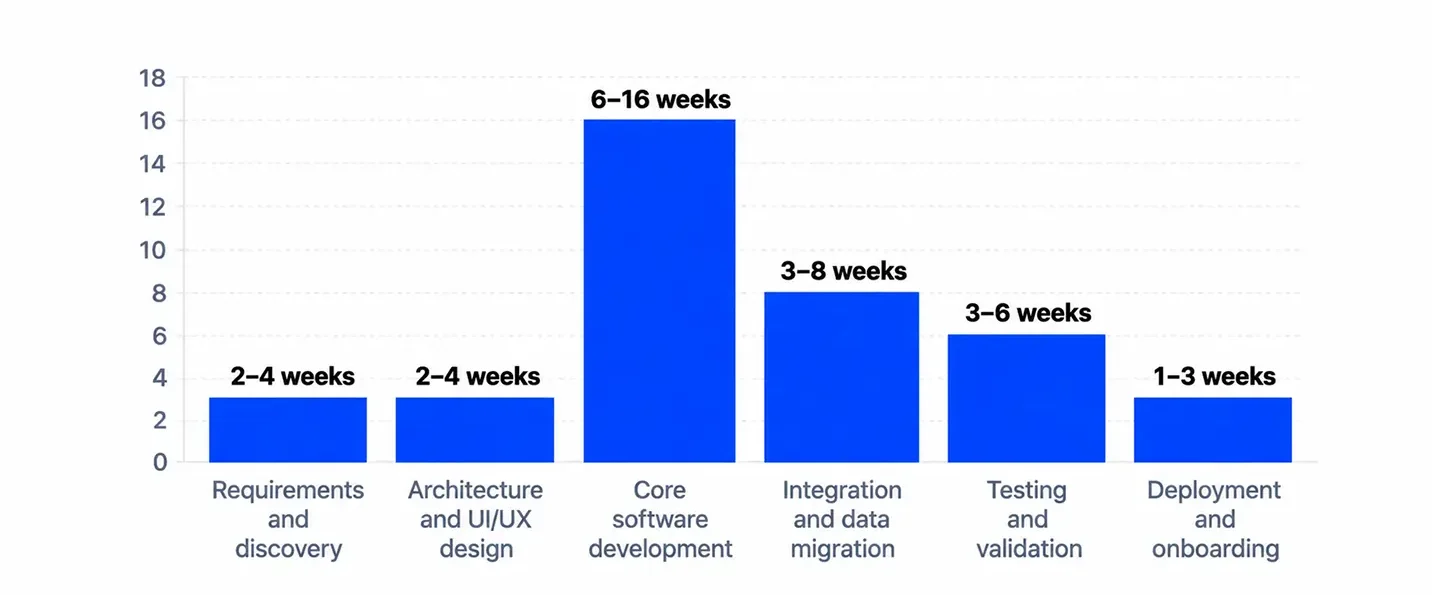
Healthcare software development can take 3 to 12 months or longer, depending on the system’s complexity, number of features, integration requirements, and regulatory considerations. A basic patient application may take a few months, while an enterprise EHR or hospital management platform requires a longer development cycle.
Typical development timelines include:
| Development Stage | Estimated Timeline |
|---|---|
| Requirements and discovery | 2–4 weeks |
| Architecture and UI/UX design | 2–4 weeks |
| Core software development | 6–16 weeks |
| Integration and data migration | 3–8 weeks |
| Testing and validation | 3–6 weeks |
| Deployment and onboarding | 1–3 weeks |
These stages may overlap, so the total project duration is not necessarily the sum of every estimate.
What Factors Affect the Development Timeline?
Several factors can extend or shorten the project schedule:
- Software complexity: EHRs and hospital platforms take longer than basic patient applications.
- Feature scope: More modules and custom workflows increase development time.
- Third-party integrations: Connecting EHRs, laboratories, pharmacies, and medical devices requires additional testing.
- Data migration: Large or inconsistent legacy datasets need more preparation and validation.
- Security and regulatory requirements: Risk assessments, security reviews, and clinical validation add time.
- Stakeholder approvals: Delayed feedback from clinical and administrative teams can slow development.
A clearly defined scope, early integration planning, and regular stakeholder feedback help keep the project on schedule. An MVP can also shorten the initial release by prioritizing essential workflows before adding advanced functionality.
What Challenges Should You Consider During Healthcare Software Development?
Healthcare software challenges can emerge at different stages of development, from initial requirements and architecture to integration, deployment, and maintenance. Identifying them early helps teams avoid costly changes and operational problems later.
1. Integrating With Legacy Healthcare Systems
Development Stage: Requirements Gathering and System Architecture
Hospitals may rely on older EHR platforms, laboratory systems, or billing software with outdated interfaces, proprietary data formats, or limited API support. Some systems may only support older HL7 messaging standards or require custom integration middleware.
How to address it: Assess existing systems during discovery, document their supported interfaces and data formats, and plan integration middleware or custom adapters where necessary. Consider gradual modernization instead of replacing every legacy system at once.
2. Maintaining Data Consistency Across Platforms
Development Stage: Data Modeling, Integration, and Migration
Patient information moves between EHRs, laboratories, pharmacies, and other systems. Different patient identifiers, duplicate records, delayed synchronization, and incorrect data mapping can create conflicting information.
How to address it: Establish patient-matching rules, use standardized data formats and terminology, and implement validation checks during data exchange. Test migration and synchronization processes before deployment.
3. Managing Complex Clinical Workflows
Development Stage: Requirements Gathering and UX Design
Clinical workflows vary across departments, specialties, and healthcare organizations. A process designed for a physician may not suit a nurse, pharmacist, or administrative team. Approval requirements and access permissions can also differ.
How to address it: Map workflows with clinical and administrative stakeholders before designing interfaces. Define role-specific permissions and validate wireframes and prototypes with representative users.
4. Scaling Systems Without Affecting Performance
Development Stage: Architecture and Performance Testing
As patient records, transactions, connected devices, and concurrent users increase, applications can experience slower response times or database bottlenecks. These problems become more disruptive during peak hospital activity.
How to address it: Design infrastructure around expected workloads, optimize database queries, and use load testing to identify bottlenecks before release. Continue monitoring resource utilization as usage grows.
5. Maintaining Availability and Disaster Recovery
Development Stage: Infrastructure Planning, Deployment, and Maintenance
System outages can interrupt access to patient records, scheduling, prescriptions, and other essential workflows. Hardware failures, cyber incidents, and infrastructure disruptions can also affect data availability.
How to address it: Plan backups, define recovery time and recovery point objectives (RTO and RPO), and test restoration procedures. Set up infrastructure monitoring, documented downtime procedures, and disaster recovery plans before production deployment.
6. Managing Third-Party Dependencies
Development Stage: Integration and Ongoing Maintenance
Healthcare platforms often depend on external APIs, cloud services, EHR vendors, payment providers, and medical device integrations. Vendor restrictions, service outages, API changes, and discontinued versions can disrupt connected workflows.
How to address it: Review vendor documentation and service-level commitments before integration. Use versioned APIs, implement appropriate error handling, monitor external dependencies, and regularly test integrations after vendor updates.
7. Encouraging Adoption Among Healthcare Professionals
Development Stage: UX Design, User Acceptance Testing, and Deployment
Even technically sound software can fail to gain adoption if it adds unnecessary steps to clinical work. Poor navigation, unfamiliar interfaces, insufficient training, and workflows that do not reflect daily practice can frustrate users.
How to address it: Involve clinicians and administrative staff during design and user acceptance testing. Provide role-specific training, collect feedback after deployment, and refine workflows based on actual usage.
How Do You Choose a Healthcare Software Development Company?
Choosing a healthcare software development company requires more than comparing portfolios and development rates. The right partner should understand healthcare workflows, integrate with existing medical systems, build secure architecture, and support the software after deployment.
Evaluate potential vendors across these areas:
1. Evaluate Healthcare Software Engineering Experience
Look for experience with clinical information systems, hospital platforms, EHRs, patient applications, and healthcare workflows. Ask about projects similar to yours and the technical challenges the team handled.
2. Review Healthcare Integration Capabilities
Check the vendor’s experience with EHR integration, HL7, FHIR APIs, laboratory systems, medical imaging, and third-party connectivity. Ask how they handle data mapping, synchronization failures, and legacy system limitations.
3. Assess Architecture and Technology Expertise
Review their approach to system architecture, database design, cloud infrastructure, scalability, and legacy modernization. The team should be able to explain why its proposed architecture fits your requirements.
4. Verify Security and Compliance Knowledge
Assess their understanding of PHI handling, access controls, encryption, audit logging, risk assessment, and applicable regulations such as HIPAA. Clarify security responsibilities and BAA requirements where applicable.
5. Examine Testing and Clinical Validation Practices
Check whether the vendor covers functional, integration, performance, security, and clinical workflow testing. Ask how defects are documented and resolved before deployment.
6. Review Projects and Post-Deployment Support
Examine relevant case studies, technical challenges, and measurable outcomes. Also confirm whether the vendor handles bug fixes, monitoring, security updates, infrastructure support, and software upgrades.
7. Compare Vendors Using a Weighted Scorecard
Use this simple framework to compare shortlisted companies against the same criteria.
| Evaluation area | Weight |
|---|---|
| Healthcare engineering experience | 20% |
| Integration capabilities | 20% |
| Security and compliance | 20% |
| Architecture and technology | 15% |
| Testing and validation | 10% |
| Projects and client references | 10% |
| Maintenance and support | 5% |
| Total | 100% |
Rate each vendor from 1 to 5 for every category, then calculate its weighted score:
Weighted score = (Rating ÷ 5) × Weight
A score of 85 or above indicates a strong candidate, while a lower score highlights areas that need further review. Treat the result as a comparison tool, not a substitute for technical due diligence.
Before signing, review the vendor’s technical proposal, speak with the engineers handling the project, verify client references, and agree on project scope, deliverables, source code ownership, and support terms.
Cubix works with healthcare organizations to engineer custom software around their operational requirements, system architecture, and integration needs. Evaluate the proposed team and technical approach against the same criteria you use for any shortlisted development partner.
How Are Emerging Technologies Changing Healthcare Software Development?
Emerging technologies help healthcare software process clinical data, automate routine tasks, and support patient monitoring. Their implementation must account for data accuracy, security, and clinical oversight.
1. Artificial Intelligence in Healthcare Software
AI supports several healthcare workflows:
- Clinical decision support: Flags potential risks and abnormal results.
- Medical image analysis: Helps identify patterns in X-rays, CT scans, and MRIs.
- Administrative automation: Assists with claims processing and document classification.
- Clinical documentation: Converts conversations into draft clinical notes.
- Predictive workflows: Identifies patients who may need follow-up.
AI outputs require clinical evaluation and ongoing accuracy monitoring.
2. Generative AI in Healthcare Systems
Generative AI uses language models to summarize clinical notes, retrieve medical information, draft patient communications, and assist with documentation.
Implementations should use trusted data sources, protect PHI, validate generated content, and require human review before clinical information enters patient records.
3. IoT and Connected Medical Devices
Connected devices collect and transmit health measurements to healthcare platforms. Common applications include glucose monitoring, connected cardiac devices, and blood pressure monitoring.
Software must support device connectivity, secure data transmission, synchronization, and validation of incoming measurements.
4. Predictive Analytics in Healthcare
Predictive analytics uses historical and real-time data to identify patterns and estimate potential outcomes. Applications include:
- Patient risk assessment.
- Hospital readmission prediction.
- Staffing and resource forecasting.
- Population health analysis.
- Hospital capacity planning.
Reliable predictions require quality datasets, model evaluation, and checks for bias.
5. Wearable Technology and Remote Patient Monitoring
Wearables and remote patient monitoring (RPM) systems collect health data outside clinical settings. Healthcare platforms can connect these devices to patient dashboards and EHR systems.
Development considerations include device compatibility, data synchronization, measurement accuracy, patient consent, secure transmission, and alert management.
Conclusion
Healthcare software development involves more than building applications. It requires a clear understanding of clinical workflows, secure architecture, reliable integrations, and ongoing system maintenance. From defining requirements to testing and deployment, each stage affects how well the software supports healthcare operations and patient care.
If you’re planning a new healthcare platform or modernizing an existing system, start by identifying your technical requirements, integration needs, and long-term priorities. Cubix works with healthcare organizations to build custom solutions around these needs. Explore our healthcare software development services to see how we approach healthcare software projects.
Planning a healthcare software project? Talk to Our Experts.
Contact UsFrequently Asked Questions
1. How long does it take to develop healthcare software?
A basic healthcare application may take 3–6 months, while complex platforms such as EHR or hospital management systems can take 6–12 months or longer.
2. What technologies are used in healthcare software development?
Common technologies include React, Angular, Java, Python, .NET, PostgreSQL, AWS, Azure, HL7, and FHIR. The stack depends on the software’s requirements and integrations.
3. What regulations apply to healthcare software in the United States?
HIPAA applies to covered entities and business associates handling protected health information. Depending on the software’s intended use, state privacy laws and FDA requirements may also apply.
4. What is the difference between custom and off-the-shelf healthcare software?
Custom software is built around an organization’s specific workflows and integration needs. Off-the-shelf software offers existing functionality but may provide less flexibility.
5. How do you maintain healthcare software after deployment?
Maintenance includes security updates, bug fixes, infrastructure monitoring, performance optimization, integration updates, backups, and ongoing testing.