Choosing an iOS app development framework affects how an application renders its interface, accesses Apple device features, shares code with other platforms, and handles future updates. The decision also shapes the skills required to build and maintain the product.
The opportunity is substantial. According to an Apple-commissioned study of the U.S. App Store ecosystem, the App Store facilitated $406 billion in developer billings and sales in 2024. That figure includes physical goods and services, digital goods and services, and in-app advertising. It reflects the scale of the market supported by apps, but building a successful product still requires the right technical foundation.
The best frameworks for iOS app development include SwiftUI, UIKit, Flutter, React Native, Kotlin Multiplatform, .NET MAUI, and Ionic with Capacitor. They differ in how they build interfaces, interact with native APIs, and share application code across platforms.
This guide examines each framework’s architecture, capabilities, limitations, and suitable applications. It also covers supporting Apple frameworks and practical criteria for choosing a stack based on your product requirements.
Key Takeaways
- SwiftUI is a strong choice for building modern native iOS interfaces, while UIKit remains useful for complex layouts and established applications.
- Flutter and React Native support cross-platform development with a shared codebase, but differ in UI rendering and native integration.
- Kotlin Multiplatform lets teams share business logic while keeping the iOS interface native.
- .NET MAUI suits teams working with C# and Microsoft’s development ecosystem, while Ionic with Capacitor fits web-based applications that need iOS support.
- Apple frameworks such as Core Data, SwiftData, Core ML, and ARKit extend app capabilities but do not replace primary UI frameworks.
- The right framework depends on your app’s requirements, native API needs, performance expectations, team expertise, and long-term maintenance plans.
Build your iOS app with Cubix's expert development team
Contact UsWhat Are iOS App Development Frameworks?
iOS app development frameworks are software platforms that provide reusable components, APIs, and development patterns for building applications. They handle common tasks such as rendering interfaces, managing user interactions, accessing device features, and organizing application logic.
Some frameworks are designed specifically for Apple’s operating systems. SwiftUI and UIKit, for example, provide tools for building native iOS interfaces. Others, including Flutter and React Native, support cross-platform development through shared code.
Frameworks are only one part of the development stack. A typical iOS project also uses:
- Programming languages: Swift, Objective-C, Dart, JavaScript, TypeScript, Kotlin, or C#, depending on the framework.
- Xcode: Apple’s integrated development environment for writing code, managing projects, running simulators, debugging, and building applications.
- iOS SDK: Apple’s collection of APIs for accessing system capabilities such as notifications, location, camera, and biometrics.
- Libraries and packages: Third-party or platform-provided components for networking, analytics, image handling, and other functions.
- Testing tools: XCTest, XCUITest, and additional tools for validating functionality, performance, and device compatibility.
These technologies serve different purposes. Swift is a programming language, while SwiftUI is a UI framework. Xcode is a development environment, and the iOS SDK exposes the APIs that applications use to interact with the operating system.
Understanding these distinctions helps when evaluating the technologies used in mobile app development.
Native vs. Cross-Platform iOS Frameworks: What’s the Difference?
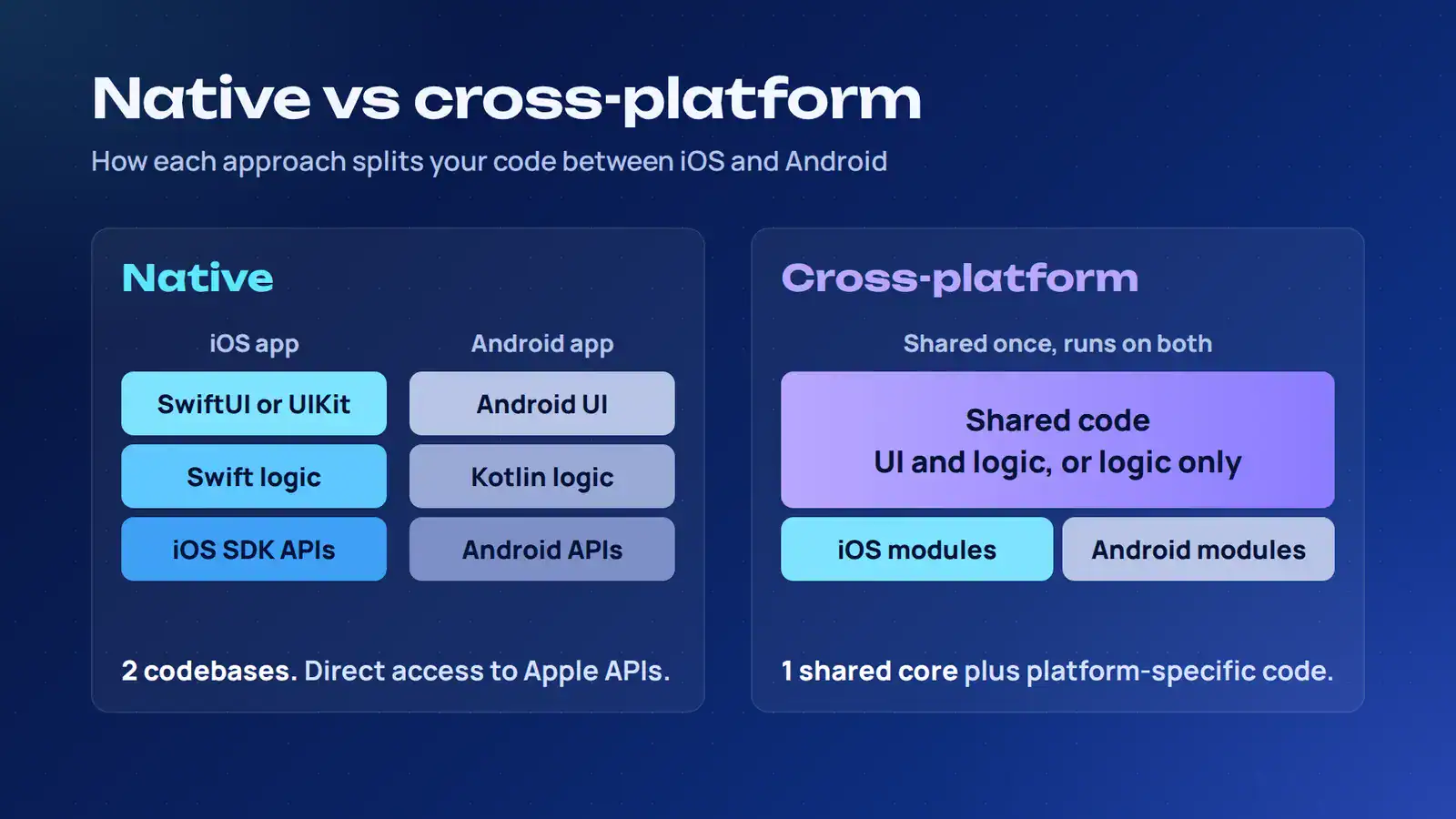
Native and cross-platform development differ primarily in how they implement application interfaces and share code. Native development uses Apple’s frameworks to build specifically for iOS, while cross-platform frameworks reuse selected application layers across multiple operating systems.
The architectural choice affects interface behavior, platform integration, code organization, and maintenance.
Native iOS App Development Frameworks
Native iOS development uses Apple’s SDK and frameworks to build applications specifically for Apple platforms. Swift and Objective-C are the primary programming languages, while SwiftUI and UIKit handle interface development.
Native applications can interact directly with iOS APIs for capabilities such as:
- Face ID and Touch ID authentication.
- Camera, microphone, and media processing.
- Location services and MapKit.
- Push notifications and background tasks.
- HealthKit and Apple Watch integrations.
- Augmented reality through ARKit.
- Apple Pay and other platform services.
The interface is built using Apple’s UI components and follows the operating system’s interaction patterns. Developers can also customize views, animations, gestures, and navigation to meet application-specific requirements.
Native development is a strong architectural fit for products that depend on deep Apple integrations, specialized device behavior, or highly customized iOS experiences. Its main cost consideration is platform duplication: an Android version generally needs its own implementation, testing, and maintenance.
Cross-Platform iOS App Development Frameworks
Cross-platform frameworks let developers reuse application code across iOS and Android. The amount of shared code depends on the framework and architecture. Some share the UI and business logic, while others focus on common services and data layers.
For example, Flutter uses a shared widget-based UI system. React Native uses React components that map to native platform views. Kotlin Multiplatform can share business logic while leaving the iOS interface in SwiftUI or UIKit.
This approach can reduce duplicated implementation when both platforms support similar workflows. It does not eliminate platform-specific engineering. Native integrations, background processing, permissions, and operating-system conventions may still require separate implementations.
| Factor | Native Development | Cross-platform Development |
|---|---|---|
| Application code | Separate iOS and Android implementations | Shared code for selected or most application layers |
| UI architecture | SwiftUI or UIKit on iOS | Framework-specific UI or native UI with shared logic |
| Device integration | Direct access to Apple APIs | Native modules, plugins, or platform-specific code |
| Platform behavior | Designed specifically for iOS | Depends on framework and implementation |
| Team skills | Swift, Objective-C, and iOS development | Dart, JavaScript, Kotlin, C#, or web technologies |
| Maintenance | Separate platform codebases | Shared updates plus platform-specific maintenance |
| Common fit | iOS-focused products and deep Apple integrations | Products targeting multiple platforms with overlapping requirements |
A useful distinction is whether the product needs the same interface across platforms or only shared business logic. A consumer app with a consistent branded interface may suit Flutter. A financial application that needs platform-specific user experiences but shared transaction rules may be a better candidate for Kotlin Multiplatform.
What Are the Best Frameworks for iOS App Development?
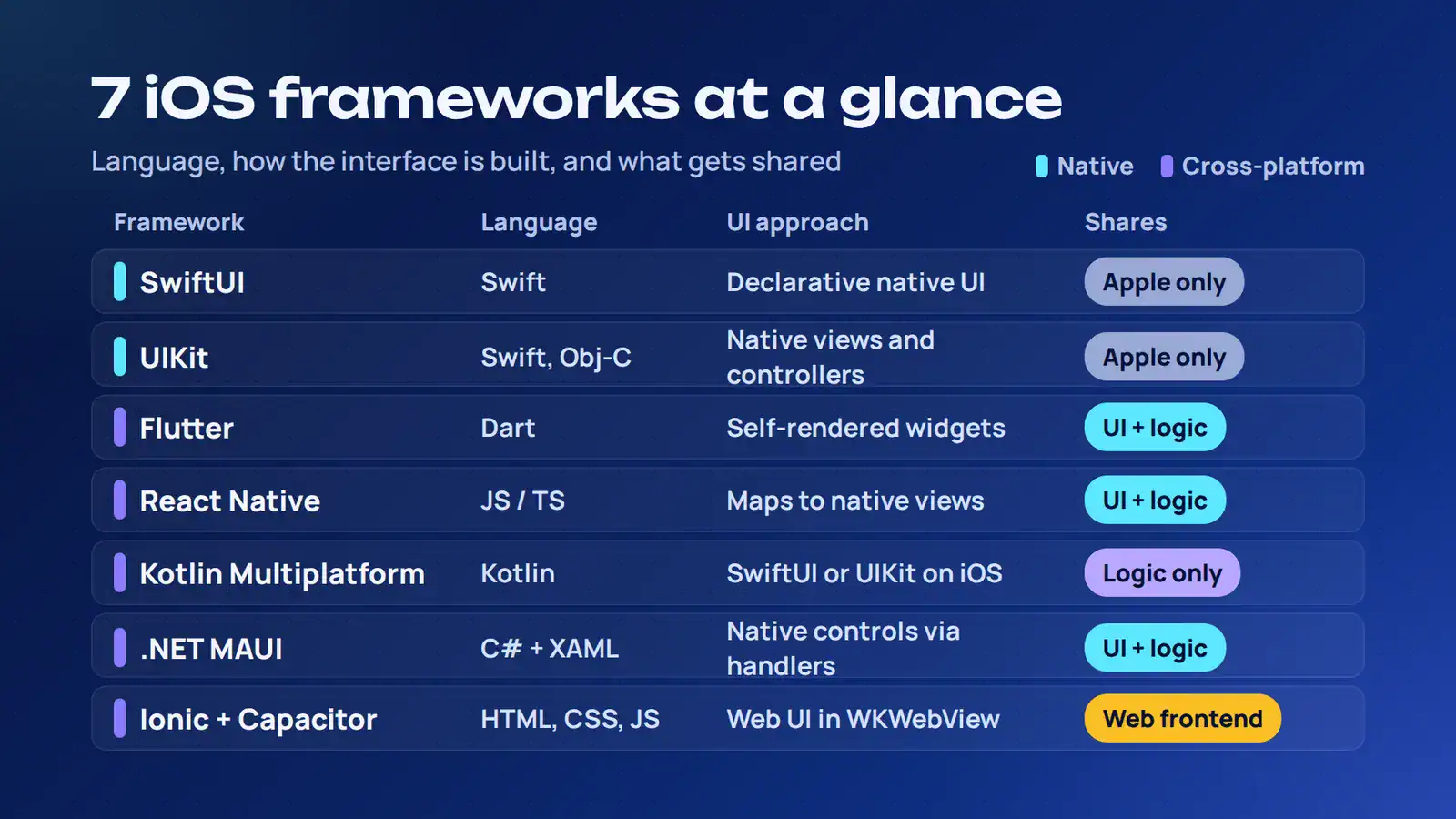
The best iOS framework depends on the application’s interface, platform integrations, code-sharing requirements, and development environment. SwiftUI and UIKit are native options, while Flutter, React Native, Kotlin Multiplatform, .NET MAUI, and Ionic with Capacitor support different cross-platform architectures.
1. SwiftUI: Best for Modern Native iOS Interfaces
SwiftUI is Apple’s declarative UI framework for building interfaces across iOS, iPadOS, macOS, watchOS, and visionOS. Developers describe the interface for a given application state, and SwiftUI updates the relevant views when that state changes.
It uses Swift and provides a composition-based approach to interface development. Views, modifiers, and property wrappers help organize layouts and connect the UI to application data. Apple’s SwiftUI documentation covers its view system, layout tools, and data flow model.
Important Capabilities
- Declarative views and reusable UI components.
- State management and data flow through property wrappers and observable models.
- Built-in components for navigation, forms, lists, and animations.
- Xcode previews for inspecting interface changes during development.
- Integration with UIKit for components that need its capabilities.
Advantages
SwiftUI reduces the amount of code needed to describe and update an interface. Its declarative model is well suited to data-driven screens, forms, dashboards, settings, and onboarding flows.
It also gives developers a consistent way to build interfaces across Apple’s platforms, with platform-specific adaptations where needed.
Limitations
SwiftUI’s available APIs and behavior vary by operating system version. Applications supporting older iOS releases may need compatibility checks or UIKit implementations for certain features. Some specialized interactions also require UIKit when SwiftUI does not expose the necessary control.
Best suited for: New native iOS applications, data-driven interfaces, business dashboards, and products built primarily for Apple’s ecosystem.
2. UIKit: Best for Complex and Highly Customized iOS Applications
UIKit is Apple’s established framework for building graphical interfaces on iOS. It provides views, view controllers, controls, event handling, navigation, and animation APIs.
UIKit applications are commonly written in Swift or Objective-C. Developers structure interfaces using components such as UIView, UIViewController, UITableView, and UICollectionView, with Auto Layout managing relationships between views. Apple’s UIKit documentation describes its interface architecture and available APIs.
Important Capabilities
- View hierarchies and view-controller lifecycle management.
- Touch and gesture recognition.
- Collection views and table views for complex data layouts.
- Custom drawing, transitions, and animations.
- Accessibility and interface behavior controls.
Advantages
UIKit offers granular control over interface behavior and has a mature set of APIs for complex iOS applications. It remains important for existing products built around view controllers, custom navigation, and specialized UI components.
It is also useful when a project requires a capability that is not adequately covered by its SwiftUI implementation.
Limitations
UIKit requires more explicit management of views, constraints, and interface updates. Developers may need to write additional code to keep the UI synchronized with application state, particularly in large interfaces.
That added control can be valuable, but it also means the architecture needs clear separation between view controllers, data handling, and business logic.
SwiftUI and UIKit interoperability: Apple supports using SwiftUI views inside UIKit applications and embedding UIKit views or view controllers in SwiftUI interfaces. This allows incremental migration instead of requiring a complete UI rewrite. See Apple’s SwiftUI and UIKit integration documentation.
Best suited for: Complex native applications, established UIKit projects, custom interface behavior, and products requiring detailed control over the iOS UI.
3. Flutter: Best for Cross-Platform iOS and Android Applications
Flutter is Google’s open-source UI framework for building applications from a shared codebase. It uses Dart and renders its own interface through the Flutter engine rather than relying on the operating system’s standard UI controls.
Flutter applications are built from widgets. These components define layout, appearance, navigation, and interaction. Developers combine them into a widget tree that describes the interface.
Important Capabilities
- Shared application UI for iOS and Android.
- Reusable widgets for layouts, controls, and navigation.
- Hot reload for rapid development iterations.
- Platform channels for communication with native code.
- Custom animations and graphics.
Architecture and Rendering
Flutter’s rendering model is a major distinction. It draws its own widgets instead of simply wrapping native iOS controls. Cupertino widgets can reproduce familiar iOS design patterns, but they remain Flutter-rendered components.
On iOS, Flutter’s rendering engine uses Apple’s Metal graphics API. Its architecture separates the framework, engine, and platform embedder, giving developers control over the visual output across supported devices. The Flutter architecture overview explains these layers.
Advantages
Flutter offers consistent visual rendering across platforms, which is useful when an application has a custom design system. Its widget composition also supports reusable UI components and structured interface development.
Limitations
Developers must account for platform conventions rather than assuming the operating system will automatically supply native controls. Device integrations may require plugins or platform channels, and specialized functionality can involve Swift or Objective-C code.
The framework’s engine also contributes to the application’s package size. Teams should measure startup time, memory use, and rendering behavior on target devices, particularly for applications with demanding graphics or animations.
Best suited for: Consumer applications, eCommerce platforms, booking products, business tools, and applications that need a consistent custom interface on iOS and Android.
4. React Native: Best for JavaScript-Based Cross-Platform Development
React Native is a cross-platform framework maintained by Meta. It uses JavaScript or TypeScript and React’s component model to build applications for iOS and Android. Unlike Flutter, React Native maps its UI components to native platform views.
Developers define interfaces using reusable components and manage application state through React patterns. The framework also supports native modules for functionality that requires platform-specific implementation.
Important Capabilities
- Shared application logic and reusable components.
- JavaScript and TypeScript support.
- Native modules for platform-specific integrations.
- Integration with existing native iOS and Android projects.
- A broad ecosystem of community packages.
Architecture
React Native’s New Architecture includes Fabric, TurboModules, and the JavaScript Interface (JSI). Fabric is the rendering system, TurboModules modernizes access to native modules, and JSI enables direct interaction between JavaScript and native code without relying on the old asynchronous bridge architecture.
These changes support more flexible communication between application code and native components. Meta documents the architecture in its React Native New Architecture guide.
Advantages
React Native is a natural option for organizations with React or JavaScript experience. Teams can reuse application logic and frontend development skills while building platform-specific applications.
Its native component approach also means standard interface elements use the operating system’s underlying views rather than being drawn entirely by a separate rendering engine.
Limitations
Package quality and compatibility need careful review. A dependency may not support the required iOS version, may lag behind React Native releases, or may require native configuration.
Applications with specialized hardware integrations or custom native behavior may also need Swift or Objective-C modules. Sharing JavaScript code does not remove the need to understand iOS development.
Best suited for: Social applications, eCommerce products, content platforms, business applications, and teams with established React expertise.
5. Kotlin Multiplatform: Best for Sharing Business Logic While Retaining Native iOS UI
Kotlin Multiplatform (KMP) lets developers share selected application code across platforms without requiring a shared UI. It is often used for business logic, networking, data models, and validation while retaining SwiftUI or UIKit for the iOS interface.
Kotlin code is organized into shared and platform-specific source sets. The shared module can be compiled and integrated into an iOS project as a framework, allowing Swift code to call its exposed functionality.
Important Capabilities
- Shared business logic for iOS and Android.
- Reusable networking and data-handling layers.
- Platform-specific implementations where APIs differ.
- Integration with Xcode projects.
- Gradual adoption within existing native applications.
KMP and Compose Multiplatform are Different
Kotlin Multiplatform is the broader technology for sharing code. Compose Multiplatform is a separate declarative UI framework that can be used to share interface code as well.
A project can use KMP to share authentication, validation, and data access while building the iOS interface in SwiftUI. Alternatively, it can use Compose Multiplatform when shared UI is part of the architecture.
Advantages
KMP lets teams decide which parts of the application should be shared. This is valuable when business rules must remain consistent across platforms but the interface should follow native design conventions.
It can also be introduced incrementally into an existing iOS application, avoiding the need to replace its entire architecture.
Limitations
The approach adds Kotlin and its build tooling to the iOS development environment. Developers need to account for Kotlin-to-Swift interoperability, framework integration, debugging, and the maintenance of shared modules.
The benefits are less compelling when there is little reusable business logic or when the team has no experience with Kotlin.
Best suited for: Enterprise applications, financial products, applications with complex business rules, and existing native apps that need shared logic across iOS and Android.
6. .NET MAUI: Best for Applications Built Around the Microsoft Ecosystem
.NET Multi-platform App UI (.NET MAUI) is Microsoft’s framework for building native mobile and desktop applications with C# and XAML. It supports iOS, Android, macOS, and Windows through a shared project structure.
Developers can reuse application logic and UI definitions while accessing platform-specific APIs when required. Microsoft’s .NET MAUI overview describes its architecture and supported platforms.
Important Capabilities
- Shared C# code across supported platforms.
- XAML for defining layouts and interface components.
- Integration with Visual Studio and the .NET ecosystem.
- Native API access through platform-specific code.
- Handlers for customizing how shared controls map to native controls.
Advantages
.NET MAUI fits organizations already using C#, .NET, and Microsoft development tools. Shared services, models, validation, and UI code can be maintained within a common project structure.
Its handlers also allow developers to customize platform-specific control behavior without abandoning the shared application architecture.
Limitations
The framework requires .NET expertise, and developers still need to understand platform-specific behavior when integrating iOS APIs. Third-party package compatibility and support should also be checked before committing to dependencies.
Xamarin should not be treated as an alternative for new projects. Microsoft ended support for Xamarin SDKs on May 1, 2024. .NET MAUI is the successor to Xamarin.Forms for cross-platform development. Microsoft’s Xamarin support policy provides the lifecycle details.
Best suited for: Enterprise applications, internal business tools, companion apps for Microsoft-based systems, and products maintained by established .NET teams.
7. Ionic with Capacitor: Best for Web-Based Applications Requiring iOS Support
Ionic with Capacitor lets teams package web-based application experiences as installable mobile apps. Ionic supplies UI components and development tools, while Capacitor provides the native runtime and connects JavaScript code with iOS and Android functionality.
The interface uses HTML, CSS, and JavaScript or TypeScript. Capacitor runs the application in a native container using WKWebView on iOS. Its plugin system connects the web layer with native APIs implemented in Swift, Objective-C, Java, or Kotlin. See the Capacitor iOS documentation.
Important Capabilities
- Web-based interface development.
- Integration with Angular, React, or Vue.
- Native device access through Capacitor plugins.
- Shared frontend code across supported platforms.
- Custom native plugins for application-specific requirements.
Advantages
Ionic with Capacitor is useful when an organization already has a web application or a team experienced in frontend development. Existing components, validation logic, and API integrations may be reused instead of rebuilt from scratch.
The plugin architecture also gives web developers access to common device features while allowing native developers to implement custom integrations when needed. The Capacitor plugin documentation explains how JavaScript communicates with native APIs.
Limitations
The WebView architecture may not suit applications that depend on complex native interactions, demanding graphics, or intensive real-time processing. Web-based interfaces also need careful testing for keyboard behavior, scrolling, navigation, accessibility, and device-specific layouts.
Custom integrations can require native iOS development, so the framework does not remove the need for Swift or Objective-C expertise in every project.
Best suited for: Internal business applications, customer portals, content-driven products, dashboards, and existing web applications that need mobile distribution.
Which Apple Frameworks Support iOS App Development?
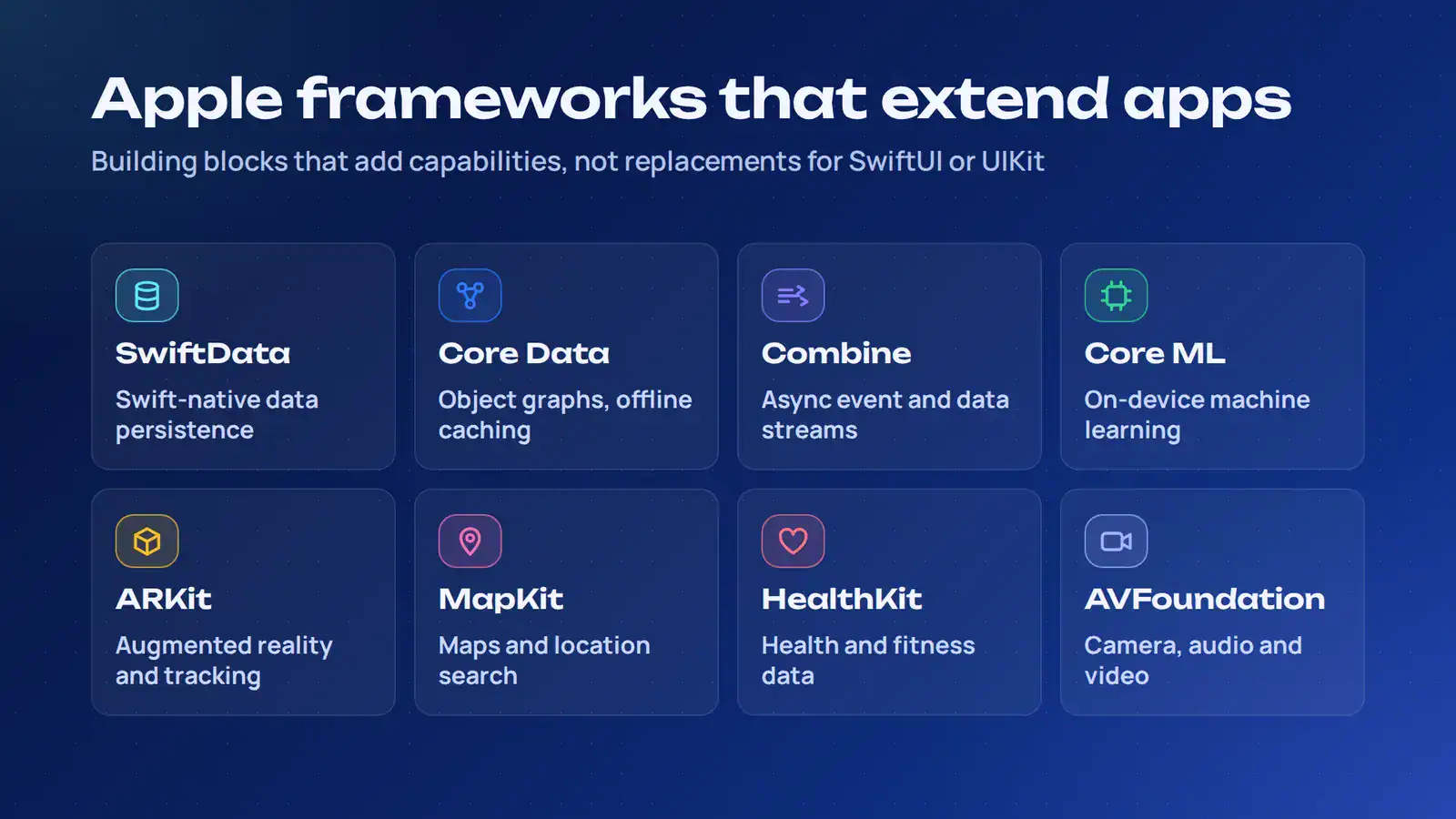
Apple provides specialized frameworks for application capabilities such as data persistence, machine learning, augmented reality, maps, health data, and media processing. These frameworks complement UI technologies such as SwiftUI and UIKit rather than replacing them.
A single iOS application may combine several of these technologies.
| Apple Framework | Main Function | Example Application |
|---|---|---|
| SwiftData | Data modeling and persistence | Saving user-created content and application records |
| Core Data | Object graph management and persistence | Offline data storage, caching, and complex relationships |
| Combine | Asynchronous event and data-stream processing | Responding to changing application data |
| Core ML | Integrating machine learning models | Image classification and on-device predictions |
| ARKit | Augmented reality and device tracking | Interactive product visualization |
| MapKit | Maps and location-based interfaces | Store locators and location search |
| HealthKit | Accessing health and fitness data | Fitness tracking and health applications |
| AVFoundation | Audio and video capture and processing | Camera features, recording, and media playback |
Some frameworks have overlapping use cases but different roles. SwiftData offers a modern persistence approach designed for Swift, with close integration into SwiftUI. Core Data remains relevant for established applications and projects that need its object graph, persistence, caching, or synchronization capabilities.
Combine handles streams of asynchronous events and values. It is useful for reactive data flows, although Swift concurrency features such as async and await may be more appropriate for straightforward asynchronous operations.
These supporting frameworks should be selected according to the application’s features and data architecture. They are building blocks within an iOS application, not competing alternatives to its primary UI framework.
How Do You Choose the Right iOS App Development Framework?
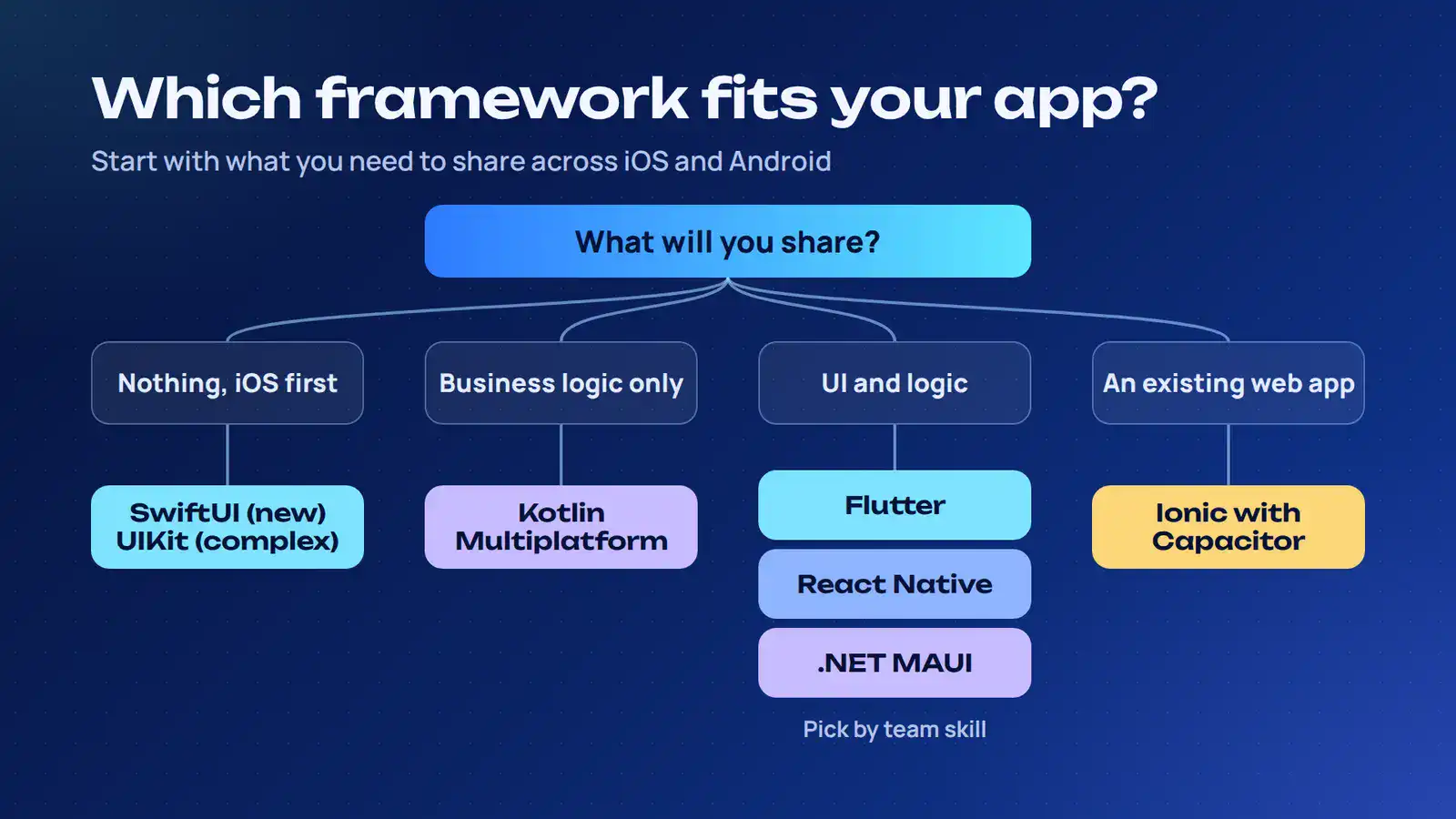
Choose a framework by matching its architecture to the application’s interface, device integrations, code-sharing requirements, and the team’s technical capabilities. The decision should account for the full product lifecycle, including testing, upgrades, and maintenance.
1. Define the Application Requirements
Document the features and operating environments before evaluating frameworks. A content platform has different needs from a banking application or an augmented reality product.
Identify:
- Target platforms, including iOS only or iOS and Android.
- Required device features, such as camera, GPS, Bluetooth, biometrics, or NFC.
- Interface complexity, animations, and interaction patterns.
- Offline functionality and background processing requirements.
- Data synchronization and backend integration needs.
- Accessibility and platform-specific design expectations.
This requirement list establishes which frameworks can support the product without extensive workarounds.
2. Evaluate Native API Access and Performance
Assess how closely the application needs to interact with iOS APIs. A product built around HealthKit, ARKit, advanced camera controls, or Bluetooth communication may need direct native integration.
Cross-platform frameworks can support many of these capabilities through plugins, modules, or platform channels. The practical question is whether those integrations meet the application’s requirements and can be maintained reliably.
Performance should be evaluated at the feature level. Rendering, startup time, memory use, network requests, and background behavior all influence the user experience. Benchmark demanding workflows on representative devices instead of assuming a framework will perform well or poorly based on its category.
3. Decide Which Application Layers to Share
Code reuse is an architectural decision, not an all-or-nothing feature.
- Shared UI and application logic: Consider Flutter or React Native.
- Shared business logic with native UI: Consider Kotlin Multiplatform.
- Shared C# application code and UI: Consider .NET MAUI.
- Existing web application with mobile requirements: Consider Ionic with Capacitor.
- iOS-specific interface and system integrations: Consider SwiftUI or UIKit.
The choice should reflect where platform behavior needs to differ. For example, a product may share API clients and validation rules while implementing navigation and authentication screens separately on iOS and Android.
4. Assess Team Expertise and Dependencies
The development team’s experience affects implementation speed, code quality, and long-term support.
A React team may have a shorter learning curve with React Native. A .NET organization may already have the infrastructure and skills needed for .NET MAUI. An iOS-focused team may find SwiftUI and UIKit easier to maintain.
Review the framework’s dependency ecosystem before adopting it. Check:
- Package maintenance and release activity.
- Compatibility with the required iOS SDK versions.
- Availability of native integrations.
- Debugging and automated testing support.
- Upgrade requirements and breaking changes.
- Developer availability for ongoing maintenance.
Framework selection should be part of the broader mobile app development process, not a decision made after the application architecture is already established.
5. Compare the Options Against Your Project
The following matrix provides a starting point for narrowing down the shortlist.
| Project Requirement | iOS App Framework to Consider | Main Reason |
|---|---|---|
| New native iOS interface | SwiftUI | Declarative UI and Apple ecosystem integration |
| Complex or established iOS application | UIKit | Detailed control over views and interactions |
| Shared custom UI across iOS and Android | Flutter | Consistent widget-based rendering |
| Existing JavaScript or React team | React Native | Reuses React patterns and JavaScript/TypeScript skills |
| Shared business logic with native UI | Kotlin Multiplatform | Separates common logic from platform-specific interfaces |
| Existing Microsoft development environment | .NET MAUI | Shared C# and XAML development |
| Existing web application needing mobile support | Ionic with Capacitor | Reuses web technologies and provides native plugins |
Budget should be evaluated alongside architecture. A shared codebase may reduce duplicated implementation, but native integrations, specialized testing, and maintenance still contribute to the total project cost. Review the factors that influence mobile app development cost before finalizing the stack.
What Mistakes Should You Avoid When Choosing an iOS Framework?
Framework selection can create technical debt when teams prioritize popularity or short-term development speed over architectural fit. The following mistakes can lead to unnecessary rewrites, dependency problems, and higher maintenance costs.
- Selecting a framework based only on popularity: A widely adopted framework may still lack the native integration or UI control your product requires.
- Assuming cross-platform means no native development: Camera, Bluetooth, background tasks, and other device features may require native modules or custom plugins.
- Treating frameworks as interchangeable: SwiftUI, UIKit, Flutter, and Kotlin Multiplatform solve different problems. Comparing them without considering their architectural roles leads to poor decisions.
- Replacing a working native application unnecessarily: Rebuilding an established UIKit application in a cross-platform framework may introduce migration costs without delivering enough value.
- Ignoring dependency health: Unmaintained packages, incompatible native modules, and delayed updates can block framework upgrades or introduce security risks.
- Testing only in simulators: Real devices reveal issues involving hardware, memory, network conditions, camera access, and operating-system behavior.
- Underestimating maintenance: Framework upgrades, SDK changes, dependency updates, and App Store requirements continue after the first release.
Testing, security, and release validation should be included in the technical evaluation. Review how the chosen stack supports automated testing, dependency management, performance monitoring, and ongoing updates. These considerations should be built into the application architecture rather than added near launch.
Choose an iOS App Framework That Fits Your Application
Framework selection should follow the product architecture. Consider the required iOS capabilities, interface behavior, code-sharing strategy, team expertise, and maintenance commitments before choosing a technology.
For complex native integrations or an iOS-first product, SwiftUI and UIKit offer direct access to Apple’s development ecosystem. Cross-platform frameworks are worth evaluating when shared application code supports a clear product or operational requirement.
If you’re planning a new iOS application or modernizing an existing product, explore Cubix’s iOS app development services to discuss the architecture and technology stack suited to your application.
Need Help Choosing Your iOS App's Tech Stack? Talk to Our Team.
Contact UsFrequently Asked Questions
1. Which framework is best for iOS app development?
SwiftUI is a strong choice for new native iOS interfaces, while UIKit suits complex applications and established projects that need detailed UI control. Flutter and React Native are common options when the product also targets Android.
2. Is SwiftUI better than UIKit?
SwiftUI uses declarative UI development and reduces the code needed to describe interface updates. UIKit offers established controls and detailed interface management. Both can be integrated within the same application, so the choice can vary by feature.
3. Which framework is best for developing iOS and Android apps?
Flutter and React Native support shared UI and application logic across iOS and Android. Kotlin Multiplatform is suitable when developers want to share business logic but retain native interfaces on each platform.
4. Can you develop an iOS app without Swift?
Yes. Frameworks such as Flutter, React Native, .NET MAUI, and Ionic with Capacitor use Dart, JavaScript or TypeScript, C#, and web technologies. Native integrations may still require Swift or Objective-C.
5. Are cross-platform frameworks suitable for enterprise iOS apps?
Yes. Cross-platform frameworks can support enterprise applications, including financial platforms, business dashboards, and internal tools. Evaluate their security controls, native integrations, testing support, performance, and long-term maintenance against the application’s requirements.