
Building a mobile app without a plan is like driving without a map. You burn time and money to end up somewhere you never intended. The mobile app development process gives you structure, so every decision connects back to a goal.
At Cubix, we’ve helped businesses across industries build apps that ship, launch successfully, and scale. Our services for mobile app development have enabled organizations to bring innovative fintech platforms, healthcare solutions, consumer applications, and other digital products to market. Along the way, we’ve gained firsthand insight into what drives project success and what causes initiatives to stall, exceed budgets, or fall short of expectations.
This guide reflects the 10 key stages of the mobile app development lifecycle we use with every client. The blog walks you through each step, including the key stakeholders involved, estimated timelines, and common mistakes to avoid.
Whether you’re a startup or an enterprise, this roadmap applies.
What Is the Mobile App Development Process?
The mobile application development process is the end-to-end workflow that takes an app from idea to a live product. It covers everything from strategy and planning to design, development, testing, launch, and ongoing maintenance.
Think of it as a blueprint. Without a structured process, teams work in silos, priorities become unclear, timelines slip, and products launch with features users do not actually need.
The opportunity is massive. There are more than 3.9 million apps available on the Google Play Store alone, competing for users’ attention. Standing out requires more than a great idea. It demands a disciplined development process that validates assumptions, aligns stakeholders, and delivers real value to users.
The mobile software development process standardizes how teams build, so quality is consistent, and results are predictable.
Read More: Scalable Mobile App Development: Our Process from Sprint Planning to Launch
Why a Structured App Development Lifecycle Matters
A structured mobile app development lifecycle does three things well.
First, it reduces wasted effort. Teams know what comes next and why. There’s no guessing, no rework because a designer built the wrong screens, and no developer writing code for a feature that got cut.
Second, it keeps costs in check. The earlier you catch a problem, the cheaper it is to fix. Discovering a UX flaw in wireframes costs almost nothing. Fixing it after development ships costs 30 times more, according to IBM’s Systems Science Institute.
Third, it produces better apps. A structured process forces you to validate assumptions early, test thoroughly, and iterate based on real user data instead of internal opinions.
Most apps die not because the technology failed, but because the team never understood what problem they were solving. At Cubix, our 350+ tech team ensures every project starts with a clear understanding of what we’re building and why, guided by our leadership team. – Salman Lakhani, Founder and CEO of Cubix
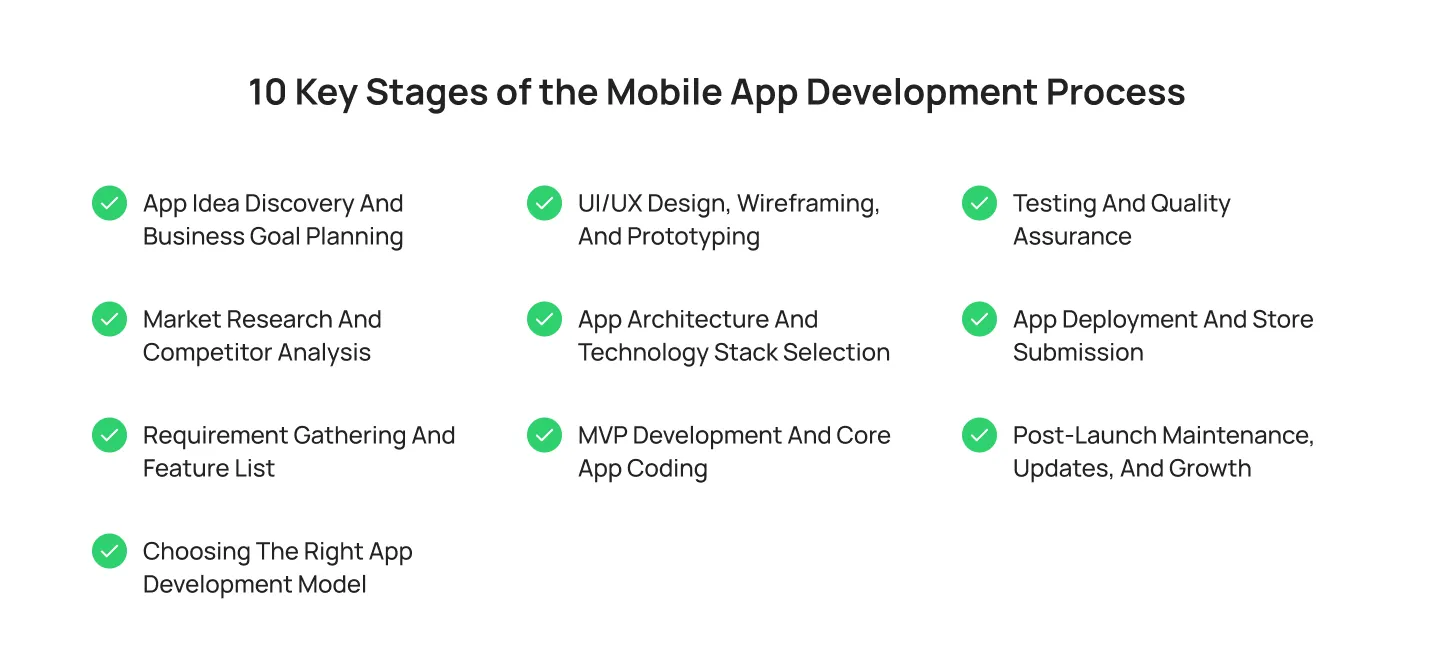
10 Key Stages of the Mobile App Development Process
Every successful app begins with a clear understanding of the problem it solves and the audience it serves. This stage focuses on defining business goals, target users, key features, and success metrics before development begins.
1. App Idea Discovery and Business Goal Planning
Every app starts with a question: what problem does this solve, and for whom?
Discovery is not a brainstorming session. It’s a focused analysis of your business goals, target users, and success metrics. You define what winning looks like before you write a single line of code.
Questions we ask our clients in this stage:
- What pain point does your app address?
- Who is your target audience?
- What success looks like for you after 6 months, 12 months, and 24 months?
- What is your monetization model?
Teams that focus on skipping this stage build apps that impress internally but confuse users externally. Spend real time on this stage. It pays off in every subsequent stage.
2. Market Research and Competitor Analysis
You need to know who else is building in your space and what users already expect.
Run a proper competitor audit. Download their apps. Read their reviews. Map what they do well and where users complain. App store reviews are a goldmine. Users tell you exactly what they want and what frustrates them.
Research should also include market trends, user behavior patterns, and emerging technologies that could impact your product. Understanding these factors helps you make informed decisions about features, pricing, and positioning.
You’re not copying competitors. You’re finding the gap they’ve left open. The goal is to identify opportunities to deliver a better user experience, solve an unmet need, or serve a specific audience more effectively.
3. Requirement Gathering and Feature List
Now you translate discovery and research into a concrete feature list. This becomes your product requirements document (PRD).
Define every feature carefully and clearly: what it does, who uses it, and why it exists. Then prioritize ruthlessly. Not every feature belongs in version one.
Use the MoSCoW method:
- Must Have: core functionality without which the app doesn’t work
- Should Have: important but not critical for launch
- Could Have: nice-to-have if time allows
- Won’t Have: out of scope for now
A lean, well-defined feature list prevents scope creep, which is the number one cause of budget overruns in mobile phone application development.
4. Choosing the Right App Development Model
Your development model determines how you build, how fast, and at what cost.
The main options:
- Native development builds separately for iOS and Android. Best performance, highest cost.
- Cross-platform development (React Native, Flutter) shares a single codebase across platforms. Faster to build, lower cost, slightly lower performance ceiling.
- Hybrid development wraps web code in a native shell. Easiest to maintain, but limited in accessing device-native features.
- PWA (Progressive Web App) runs in browsers with app-like behavior. No app store needed. Limited functionality.
Your choice depends on budget, timeline, performance requirements, and audience. If 80% of your users are on one platform, start there. For mobile app development projects where speed matters, cross-platform is often the right call.
5. UI/UX Design, Wireframing, and Prototyping
This is where your app becomes visible for the first time.
Start with wireframes: black-and-white, low-fidelity screens that show layout and flow without distraction. Then move to high-fidelity designs with color, typography, and brand elements. Finally, build a clickable prototype.
Test the prototype with real users before development starts. Watch where they get confused. Observe what they expect to click that isn’t clickable. Fix it now.
Good UX design is not decoration. Apps with poor UX lose 25% of users after a single use. That’s not a UX problem; it’s a revenue problem.
The design stage also establishes your design system: a library of reusable components, colors, and patterns that keeps the app consistent and speeds up development.
6. App Architecture and Technology Stack Selection
Your app’s architecture is its foundation. Get this wrong, and you pay for it every day the app is live.
Architecture decisions include:
- Frontend framework (React Native, Flutter, Swift, Kotlin)
- Backend infrastructure (Node.js, Python, Ruby on Rails)
- Database (PostgreSQL, MongoDB, Firebase)
- Cloud provider (AWS, Google Cloud, Azure)
- API design (REST, GraphQL)
- Authentication and security protocols
A scalable architecture handles growth without requiring a full rebuild at 10,000 users. Many startups skip this thinking and then face a complete rewrite at exactly the moment traction arrives.
Involve your senior engineers here. Architecture decisions made in a hurry create technical debt that compounds over time.
7. MVP Development and Core App Coding
Now you build. The goal is a minimum viable product: the leanest version of your app that delivers core value to users.
An MVP is not a half-built app. It’s a complete, functional product that focuses on the one or two things that matter most to your users. Everything else waits.
Development typically runs in sprints, usually two weeks. Each sprint delivers working, testable features. Product owners review and approve at the end of each sprint.
This stage is where AI in mobile app development creates real advantages. AI tools now assist with code generation, automated testing, and smart feature suggestions. Teams using AI-assisted development report 30-40% faster build times.
Keep the MVP tight. Ship it. Learn from real users. Then build from there.
8. Testing and Quality Assurance
Testing is not a phase you do at the end. It runs in parallel with development throughout the project.
Types of testing your app needs:
- Unit testing: individual components work as expected.
- Integration testing: components work together correctly.
- UI testing: the interface behaves as designed.
- Performance testing: the app handles load without crashing or slowing.
- Security testing: User data is protected, and vulnerabilities are patched.
- User acceptance testing (UAT): real users confirm the app works for their needs.
Bugs found in QA cost a fraction of what bugs found post-launch cost. A single major bug after launch on a high-traffic app can cost tens of thousands of dollars in lost revenue, refunds, and reputation damage.
Test on real devices, not just simulators. iOS and Android behave differently across device types, screen sizes, and OS versions.
9. App Deployment and Store Submission
Your app is ready. Now it needs to pass the review.
App Store Optimization (ASO) directly impacts organic downloads. Apps that rank highly for relevant keywords generally receive more visibility and installs than lower-ranked competitors.
Apple’s App Store and Google Play both have review processes. Apple typically takes 24-48 hours, but can extend up to two weeks for complex apps. Google’s review is usually faster, 3-7 days, but this varies.
Prepare your store listing with care.
- App name and subtitle with target keywords
- Description that leads with user benefit
- High-quality screenshots and a preview video
- App icon that stands out on a crowded screen
- Privacy policy and compliance disclosures
Before submission, verify that analytics, crash reporting, and performance monitoring tools are properly configured. This ensures you can track performance and user engagement from day one.
Plan a soft launch first. Release to a limited audience or geographic region, gather feedback, monitor performance, and address issues before scaling to a broader release.
10. Post-Launch Maintenance, Updates, and Growth
Launch is not the finish line. It’s the starting line.
Post-launch is where most of the real work happens. You monitor performance, respond to user feedback, fix bugs, and release updates.
Apple and Google regularly update their operating systems. Your app needs to stay compatible, or it gets removed from the store. Security patches matter. Performance improvements matter.
Growth comes from data. Instrument your app with analytics from day one. Track where users drop off, which features get used most, and what causes uninstalls. Use that data to prioritize your next release.
Ongoing services for mobile app development include maintenance, feature development, and performance optimization. Teams that invest here see significantly higher lifetime value from their app.
Common Mistakes Businesses Make During App Development
These mistakes appear consistently across failed app projects.

- Skipping discovery. Teams jump to design before understanding the user. The result is an app that looks polished but doesn’t solve a real problem.
- Building too many features at once. Feature overload delays launch, increases cost, and buries the core value proposition. Build less, launch faster, and learn more.
- Ignoring platform guidelines. Apple and Google have strict UI and UX guidelines. Apps that violate them get rejected or receive poor ratings.
- Not testing on real devices. Simulators don’t catch everything. Real device testing finds problems that matter to actual users.
- Treating launch as the endpoint. Apps that stop receiving updates lose users and app store rankings within months.
- Underestimating the backend. Many teams focus on the front-end experience and under-invest in the backend. A beautiful app with a slow backend is a bad app.
How Long Does the Mobile App Development Process Take?
The timeline depends on complexity, team size, and how well-defined the requirements are.

- Simple apps: Basic functionality on a single platform, typically completed in 3-6 months.
- Medium-complexity apps: Multiple features and cross-platform support, usually requiring 6-9 months.
- Complex apps: Enterprise-grade solutions with integrations, advanced workflows, or AI capabilities, often taking 9-18 months.
The biggest time variable is not development. It’s decision-making. Teams that take weeks to approve designs or sign off on requirements extend timelines dramatically. Move fast on decisions.
A clear app development roadmap with agreed milestones keeps timelines honest. Build in a buffer for QA and store review. Don’t plan to ship the day development ends.
Who Is Involved in the App Development Lifecycle?

A typical mobile app development team includes:
- Product Manager: Owns the vision, the roadmap, and stakeholder communication.
- UX Designer: Maps user flows and interaction patterns.
- UI Designer: Creates the visual design and design system.
- Mobile Developers: Build iOS and/or Android front ends.
- Backend Developers: Build APIs, databases, and server infrastructure.
- QA engineers: Design and run testing protocols.
- Project Manager: Coordinates timelines, resources, and communication.
- DevOps Engineer: Manages deployment pipelines and infrastructure.
On smaller teams, some of these roles overlap. That’s fine. What matters is that each function is covered by someone accountable for it.
Mobile App Development Process for Startups vs Enterprises

The process is the same. The priorities differ.
Startups need speed. The goal is to validate the core hypothesis with real users as fast as possible. Ship an MVP, get feedback, and iterate. Cost efficiency matters. Cross-platform development often makes more sense here.
Enterprises need control. The goal is reliability, security, compliance, and integration with existing systems. Longer planning cycles are acceptable if they reduce downstream risk. Native development is common because performance requirements are higher.
Both benefit from the same 10-stage process. Startups compress timelines and reduce scope. Enterprises extend timelines and add governance. The structure stays the same.
How Cubix Handles the Mobile App Development Process
Cubix follows a structured, milestone-driven process across every engagement. Every project starts with a discovery workshop that produces a clear product brief, technical requirements document, and project roadmap before any design or development begins.
Design goes through review cycles with stakeholder sign-off at the wireframe and prototype stages. Development runs in two-week sprints with weekly status updates. QA runs continuously, not just at the end.
Whether the goal is to make phone applications for enterprises, consumers, or specialized industries, Cubix teams follow a disciplined process that keeps projects aligned with business objectives. Post-launch, teams provide ongoing maintenance, feature releases, and performance monitoring. Apps built on unclear processes fail. Apps built on a structured process scale.
FAQs
1. What is the mobile app development process?
The mobile app development process is a structured workflow that takes an app from idea to a live product. It covers 10 stages: discovery, market research, requirements, development model selection, UI/UX design, architecture, MVP development, QA, deployment, and post-launch maintenance.
2. How long does it take to develop a mobile app?
Simple apps take 3-6 months. Medium-complex apps take 6-9 months. Complex enterprise apps take 9-18 months. The timeline depends on feature scope, team size, and how quickly stakeholders make decisions.
3. What are the stages of app development?
The 10 key stages are: idea discovery and goal planning, market research, requirement gathering, development model selection, UI/UX design and prototyping, architecture and stack selection, MVP development, QA and testing, deployment and store submission, and post-launch maintenance.
4. What is the difference between native and cross-platform app development?
Native development builds separate apps for iOS and Android, delivering the best performance at a higher cost. Cross-platform development uses one codebase for both platforms, reducing cost and time while slightly limiting performance. The right choice depends on your budget, timeline, and user base.
5. What does an MVP mean in app development?
MVP stands for Minimum Viable Product. It’s the leanest version of your app that delivers core value to users. An MVP is a complete, functional product focused on the most essential features, built to validate product-market fit before investing in a full build.
6. Why do most mobile apps fail after launch?
Most apps fail because they stop improving. The app store algorithm rewards fresh, updated apps. Users expect regular improvements. Apps that don’t release updates lose rankings, accumulate negative reviews, and eventually get uninstalled. Post-launch maintenance is not optional.