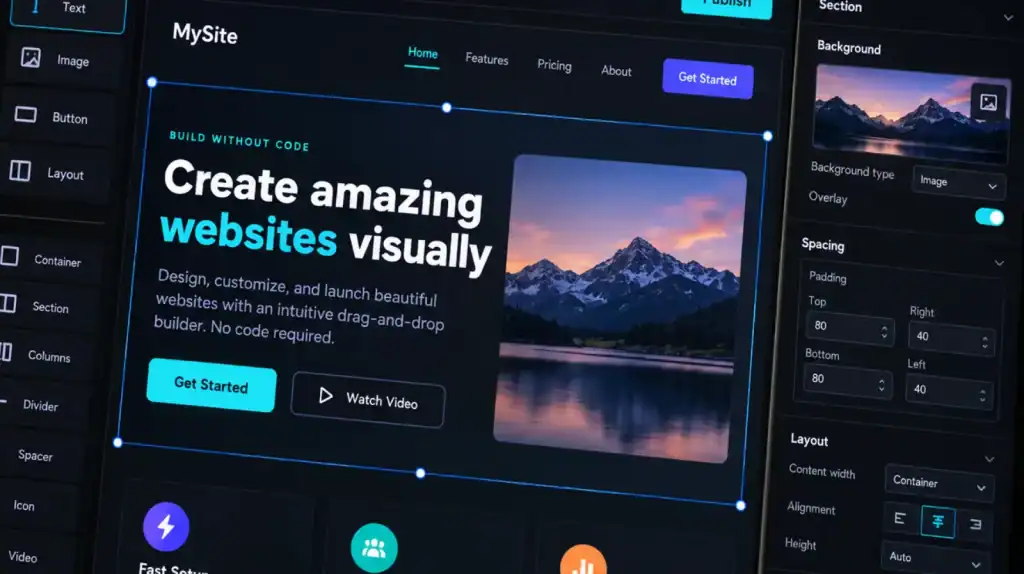
Building software no longer always starts with writing thousands of lines of code. Visual application builders, workflow designers, prebuilt components, APIs, and automated deployment tools can now turn business requirements into working applications with little or no traditional programming.
The shift is significant, but no-code development is not the same as removing technology from the development process. A no-code application still depends on data models, business logic, integrations, authentication, permissions, hosting, testing, and ongoing maintenance.
Adoption also extends beyond developers. In a Microsoft study conducted by Edelman Data x Intelligence, 82% of low-code or no-code users said these technologies provided an opportunity to improve their development knowledge and technical skills.
That makes no-code development useful for more than rapid app creation. It changes who can participate in software delivery and how development teams divide work.
Key Takeaways
- No-code development lets users build applications and automate processes through visual interfaces instead of writing traditional source code.
- No-code platforms typically provide visual UI builders, workflows, databases, integrations, authentication, permissions, and deployment tools.
- No-code does not eliminate technical considerations such as data architecture, API design, security, scalability, testing, and governance.
- It works particularly well for internal tools, workflow automation, dashboards, forms, portals, prototypes, and straightforward business applications.
- Complex applications with specialized logic, demanding performance requirements, highly customized experiences, or extensive integrations may require low-code or custom software development.
- No-code can reduce development effort, but the total cost also depends on platform licensing, users, integrations, usage limits, maintenance, and future migration requirements.
- Security depends on both the platform’s capabilities and how the application is configured, deployed, integrated, and governed.
- The right approach is not to ask whether no-code is better than traditional development. The better question is whether it provides enough control for the application’s requirements.
What Is No-Code Development?
No-code development is a software development approach that allows users to create applications, automate workflows, and manage business processes through visual interfaces rather than manually writing programming code.
Instead of building an application entirely with languages such as JavaScript, Python, Java, or C#, users work with visual components, configuration panels, templates, drag-and-drop interfaces, workflow builders, forms, data models, and prebuilt integrations.
IBM describes no-code as an approach that enables users to create applications and automate business processes without writing code, using visual interfaces and prebuilt components.
No-Code Development vs. Traditional Software Development
The main difference is how application behavior is created and controlled.
In traditional development, developers write and maintain source code that defines the application’s interface, business logic, data handling, integrations, security controls, and other behavior.
In no-code development, much of that implementation is abstracted behind a visual development environment. The user configures components and rules while the platform handles significant portions of the underlying implementation.
This does not mean the application has no software logic. It means the developer or business user interacts with that logic at a higher level of abstraction.
That distinction matters because no-code platforms can simplify implementation without eliminating the underlying engineering concerns.
How Does No-Code Development Work?
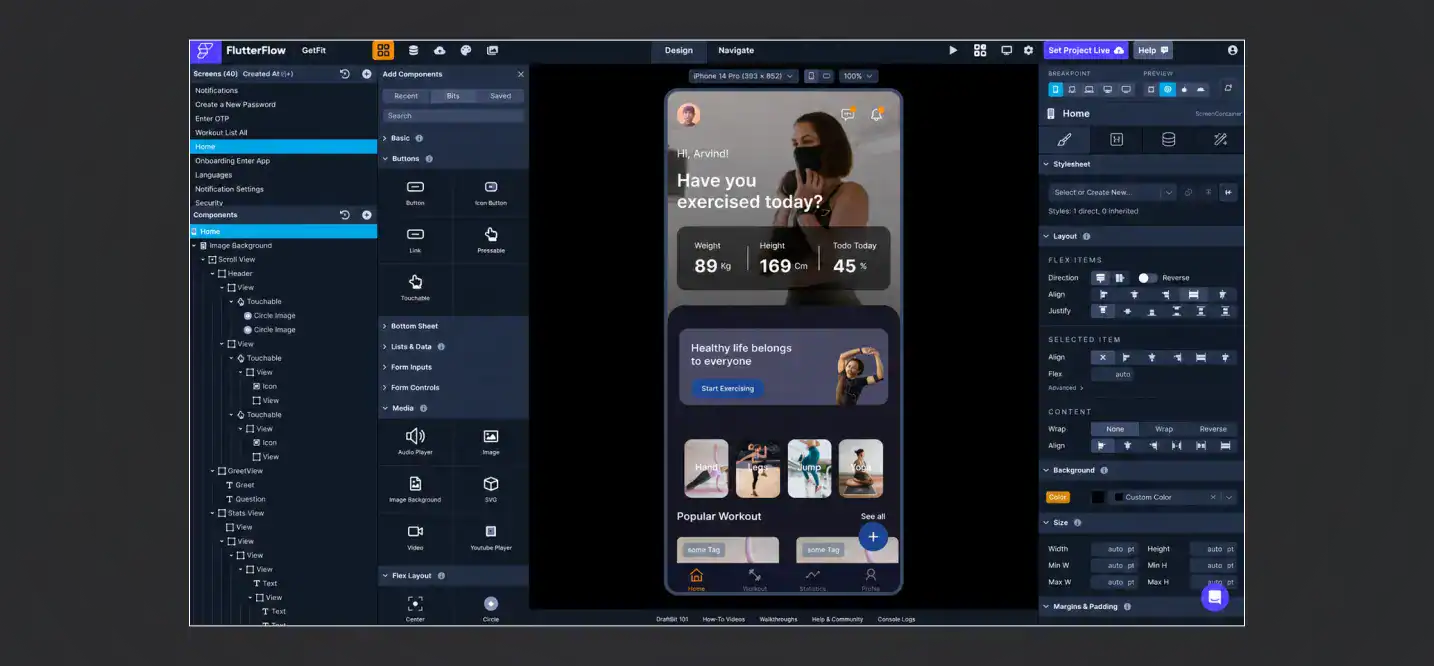
A typical no-code development platform combines several layers that would otherwise require separate development work.
1. Visual Interface and Application Builder
The visual builder is the part users interact with directly. It may provide:
- Drag-and-drop UI components
- Forms and input fields
- Navigation elements
- Tables and dashboards
- Responsive layouts
- Templates
- Reusable components
- Conditional visibility
- Visual page configuration
Users can assemble application screens without manually creating the front-end code.
2. Data Modeling and Databases
Applications still need structured data.
A no-code platform may provide a built-in database or connect to an external data source. Users can configure entities, fields, relationships, records, validation rules, and data permissions through visual interfaces.
For example, a customer service application could contain:
Customer → Ticket → Agent → Status → Resolution
The platform then uses those relationships to display, update, filter, and process information throughout the application.
The important point is that no-code does not remove data architecture. It changes how that architecture is represented.
3. Business Logic and Workflow Automation
Business rules can usually be represented through visual workflows.
A workflow might look like:
New lead → Validate information → Assign sales representative → Send notification → Create follow-up task
Instead of writing conditional statements and event handlers manually, users configure triggers, conditions, actions, approvals, and notifications through a workflow editor.
This is particularly useful for business process automation where the underlying logic is structured and repeatable.
4. APIs and Third-Party Integrations
Modern applications rarely operate in isolation.
No-code platforms can connect applications to external services through:
- REST APIs
- Webhooks
- Prebuilt connectors
- Authentication services
- Payment systems
- CRM platforms
- Marketing platforms
- Cloud storage
- Communication tools
- Business databases
For example, a lead-generation application could capture a form submission, create a CRM record, trigger an email, and notify a sales team through connected services.
The complexity depends on the integration. A simple prebuilt connector may require only configuration, while an unusual API integration with complex authentication, data transformation, or asynchronous processing may require more technical work.
5. Authentication and Access Control
No-code applications can also include authentication and authorization features.
Depending on the platform, users may configure:
- User registration and login
- Single sign-on
- Multi-factor authentication
- Roles
- Permissions
- Record-level access
- Administrative privileges
- Session management
This becomes particularly important when applications handle customer, financial, employee, healthcare, or other sensitive information.
6. Testing and Deployment
A no-code application still needs testing before production.
Teams may need to verify:
- Form validation
- Workflow conditions
- API responses
- Permissions
- Data integrity
- Error handling
- User roles
- Mobile responsiveness
- Performance
- Integration behavior
Once the application passes testing, the platform may handle deployment through its own hosting and release infrastructure.
What Are the Core Components of a No-Code Development Platform?
Although platforms differ considerably, most no-code development environments combine several common capabilities.
| Component | What it does |
|---|---|
| Visual app builder | Creates application screens and user interfaces |
| Workflow builder | Defines business processes, triggers, conditions, and actions |
| Data layer | Stores and organizes application data |
| Integrations | Connects the application to external systems and APIs |
| Authentication | Handles user identity and login |
| Access control | Defines roles, permissions, and data access |
| Templates | Provides prebuilt application structures |
| Automation | Executes recurring or event-driven tasks |
| Testing tools | Helps validate application behavior |
| Deployment | Publishes applications to users or production environments |
| Analytics | Tracks application activity and business data |
| Administration | Supports governance, users, environments, and configuration |
The difference between platforms often comes down to how much control they provide over these layers.
What Can You Build With No-Code Development?
No-code is most effective when the application’s requirements fit the capabilities of the chosen platform.
1. Internal Business Applications
Companies can build applications for:
- Employee onboarding
- Inventory management
- Request management
- Approval workflows
- Project tracking
- Internal directories
- Operations management
These applications often involve structured data and predictable workflows, making them suitable for visual development.
2. Workflow Automation
No-code tools can automate repetitive processes such as lead routing, approvals, notifications, document processing, and task assignment.
For more complex automation requirements, businesses can also combine no-code platforms with broader workflow automation solutions to connect business processes across multiple systems.
3. Customer Portals and Business Tools
No-code can support customer-facing portals, booking systems, forms, service dashboards, and account management applications when the platform provides the necessary authentication, database, customization, and integration capabilities.
4. Websites and Web Applications
Visual development platforms can create websites and web applications without requiring developers to manually build every interface component.
However, highly customized web development, complex front-end interactions, or demanding performance requirements can push a project beyond the practical limits of a no-code platform.
5. Dashboards and Reporting Applications
No-code platforms are also useful for dashboards that combine business data with filters, charts, tables, and role-specific views.
6. MVPs and Prototypes
No-code can shorten the path from an idea to a functional prototype.
A product team can test workflows, validate user requirements, and collect feedback through MVP development before investing in a larger engineering effort.
What Are the Benefits of No-Code Development?
No-code development can provide several practical advantages when the application fits the platform.
1. Faster Application Development
Visual components and prebuilt functionality reduce the amount of repetitive implementation work.
Teams can configure common application features instead of developing every component from scratch.
2. Lower Barrier to Development
Business analysts, operations teams, product managers, and other non-developers can participate directly in application creation.
This creates a model commonly associated with citizen development, where business users build applications within defined organizational controls.
3. Faster Prototyping
No-code platforms make it easier to create functional prototypes rather than relying exclusively on static designs.
Teams can test workflows and user interactions earlier in the product lifecycle.
4. Reduced IT Backlogs
Straightforward business applications do not always need to compete with complex engineering projects for developer capacity.
A governed no-code approach can allow business teams to address simpler requirements while professional developers focus on systems that require deeper engineering.
5. Easier Workflow Automation
Visual workflow builders make repetitive processes easier to represent and automate.
This can reduce manual data entry, repetitive approvals, notifications, and handoffs between teams.
6. Business and IT Collaboration
No-code does not have to mean business teams working independently of IT.
A stronger operating model combines business knowledge with IT oversight for architecture, security, integrations, governance, and production management.
What Are the Limitations of No-Code Development?
No-code is not a universal replacement for software engineering.
1. Limited Customization
A platform can only expose the functionality it supports.
If the application requires a highly unusual interaction, custom rendering engine, specialized algorithm, or proprietary workflow, the available configuration options may not be enough.
2. Complex Business Logic
Simple rules are easy to represent visually. Complex rules can become difficult to understand when dozens of conditions, branches, dependencies, and workflows are combined.
At that point, visual configuration can become its own form of technical complexity.
3. Integration Constraints
A platform may provide connectors for popular services but offer less flexibility for uncommon systems.
API rate limits, authentication requirements, data transformation, webhooks, custom endpoints, and asynchronous processing can all introduce additional complexity.
4. Performance and Scalability Considerations
No-code does not automatically guarantee application performance at scale.
Performance can depend on the platform’s runtime, database architecture, API limits, workflow execution model, concurrency limits, caching capabilities, and data volume.
A simple internal application and a high-traffic consumer platform have very different technical requirements.
5. Vendor Lock-In
No-code applications can become dependent on a platform’s proprietary data structures, workflows, components, integrations, hosting environment, and pricing model.
Before committing to a platform, businesses should understand:
- Whether data can be exported
- What happens if the platform changes pricing
- Whether workflows can be migrated
- Which integrations are proprietary
- Whether applications can run elsewhere
- How much custom functionality can be introduced
6. Limited Access to Underlying Code
Traditional development gives engineering teams direct control over source code and infrastructure.
A no-code platform abstracts much of that implementation. This improves accessibility but can limit the ability to optimize or modify behavior at a low level.
7. Security and Governance Challenges
The ability for business users to create applications can also introduce governance risks.
Without clear controls, organizations can end up with duplicated applications, unmanaged integrations, excessive permissions, inconsistent data handling, or shadow IT.
Gartner specifically highlights the need to support and govern low-code/no-code development services so citizen developers can build applications safely and effectively at scale.
No-Code vs. Low-Code vs. Custom Software Development
These approaches sit at different levels of development control.
| Factor | No-Code | Low-Code | Custom Software Development |
|---|---|---|---|
| Primary users | Business users and citizen developers | Developers and technical teams | Professional development teams |
| Coding requirement | Little to none | Some coding may be required | Full coding control |
| Development speed | High for supported use cases | High | Depends on scope |
| Customization | Platform-dependent | Higher | Highest |
| Infrastructure control | Usually limited | Moderate to high | High |
| Complex logic | Limited to moderate | Moderate to high | High |
| Integrations | Prebuilt connectors and APIs | APIs and custom extensions | Fully customizable |
| Scalability control | Platform-dependent | Greater control | Full architectural control |
| Vendor dependency | Often high | Moderate to high | Depends on architecture |
| Best suited for | Internal tools, automation, simple apps | Business applications requiring extensions | Complex or highly specialized products |
IBM similarly distinguishes no-code from low-code by noting that low-code environments generally allow developers to automate generic development work while retaining greater control over custom implementation.
The important distinction is not that one approach is universally better. It is the amount of control, customization, and engineering responsibility a project requires.
No-Code vs. AI-Assisted Development: What’s the Difference?
AI is changing how software can be created, but AI-assisted development and no-code development are not identical.
1. Traditional No-Code Development
Users construct applications through visual components, configuration, workflows, and templates.
The user decides what components and rules to combine.
2. AI-Assisted No-Code
AI can help generate workflows, interfaces, formulas, data structures, or application components from natural-language instructions.
The user still operates within the platform’s available capabilities.
3. AI Code Generation
AI coding tools can generate actual source code from prompts. Developers can then inspect, modify, test, and deploy that code.
Research from IBM describes visual low-code approaches and natural-language AI programming as complementary approaches, while noting that AI-generated code still requires users to work with textual code in many scenarios.
The distinction matters because AI can reduce the effort required to create software without eliminating the need for engineering judgment.
Who Uses No-Code Development?

No-code development can involve several roles.
1. Citizen Developers
Citizen developers are business users who create applications outside traditional software engineering roles.
They understand the business problem deeply but may have limited programming experience.
2. Business and Operations Teams
Operations, HR, finance, sales, marketing, and customer service teams can use no-code tools to automate processes and build internal applications.
3. Product Teams
Product teams can use no-code development for prototypes, experiments, workflow validation, and early-stage MVPs.
4. IT Teams
IT departments can establish platform standards, manage environments, control access, review applications, and oversee integrations.
5. Professional Developers
Developers can use no-code platforms for straightforward application components while concentrating their engineering effort on complex systems, integrations, architecture, and custom functionality.
Is No-Code Development Secure?
No-code security depends on both the platform and its implementation.
A platform should be evaluated for capabilities such as:
- Authentication and single sign-on
- Multi-factor authentication
- Role-based access control
- Encryption in transit and at rest
- Audit logging
- Data residency controls
- Backup and recovery
- Environment separation
- API security
- Secrets management
- Permission management
- Compliance support
- Administrative controls
Organizations should also establish governance rules covering who can create applications, which data they can access, which integrations are approved, how applications are reviewed, and what happens when an application is retired.
Security should be treated as part of the application’s lifecycle rather than a feature switched on at the end. NIST’s Secure Software Development Framework provides a useful reference for integrating security practices throughout software development and delivery.
Is No-Code Development Actually Cheaper?
No-code can reduce development effort, but cheaper development does not automatically mean lower total cost of ownership.
A realistic cost assessment should include:
| Cost area | What to consider |
|---|---|
| Platform subscription | Per-user, per-app, per-environment, or usage-based pricing |
| Implementation | Configuration, setup, migration, and integration work |
| Integrations | API access, connectors, middleware, and third-party services |
| Maintenance | Updates, workflow changes, troubleshooting, and administration |
| Scaling | Higher usage, users, storage, transactions, or environments |
| Governance | IT oversight, security reviews, testing, and administration |
| Migration | Future cost of moving data or rebuilding the application |
| Custom extensions | Developer work required when platform capabilities are insufficient |
For a small internal application, no-code may be significantly more economical than building everything from scratch.
For a large application with extensive integrations and platform-specific dependencies, licensing and migration costs can change the calculation.
The right comparison is therefore total cost of ownership, not simply the initial development cost.
When Should You Use No-Code Development?
No-code is generally a strong fit when:
- The application uses relatively straightforward business logic.
- The platform supports the required data model.
- Required integrations already exist.
- The user experience does not require extensive custom behavior.
- Speed matters more than complete architectural control.
- The application is internal or has a predictable audience.
- The business process is likely to remain within the platform’s capabilities.
- The organization has adequate governance and platform administration.
For example, a company could use no-code to build an employee onboarding workflow that collects information, creates records, routes approvals, sends notifications, and tracks completion.
The same company might choose custom development for a complex customer-facing product requiring unique interactions, high concurrency, specialized integrations, and complete control over infrastructure.
When Is Custom Software Development a Better Fit?

Custom development becomes more relevant when a product’s requirements extend beyond the capabilities of a no-code platform.
Typical scenarios include:
- Complex business rules
- High transaction volumes
- Real-time processing
- Highly customized user experiences
- Specialized algorithms
- Advanced AI or machine learning
- Complex third-party integrations
- Strict data and compliance requirements
- Multi-platform product architecture
- Custom infrastructure requirements
- Deep performance optimization
- Full ownership of source code and architecture
A custom application also provides greater control over the technology stack, application architecture, database design, APIs, deployment model, testing strategy, and long-term evolution.
For organizations evaluating this route, working with a custom software development company can provide access to engineering, architecture, QA, and product expertise beyond what a no-code platform exposes.
How to Choose a No-Code Development Platform
Choosing a platform should start with the application requirements, not the platform’s feature list.
Evaluate these areas before committing:
- Application type: Is it an internal tool, customer-facing application, workflow, portal, dashboard, or MVP?
- Data model: Can the platform represent the entities, relationships, validation, and volume you need?
- Integrations: Does it support the APIs, databases, SaaS products, and authentication systems you already use?
- Customization: Can you create the required UI, workflows, and business rules?
- Security: Does it support your authentication, authorization, encryption, logging, and compliance requirements?
- Scalability: What happens as users, transactions, records, and integrations increase?
- Performance: Are there limits on API calls, workflow execution, database queries, or concurrency?
- Deployment: How are applications released, tested, monitored, and rolled back?
- Governance: Can IT manage users, environments, permissions, applications, and integrations?
- Portability: Can data, workflows, and application assets be exported?
- Pricing: How does the platform charge for users, applications, environments, storage, and usage?
- Exit strategy: What would happen if the platform no longer met your technical or business requirements?
This evaluation becomes especially important when the application is expected to remain in production for years.
Popular Types of No-Code Development Platforms
No-code platforms are not all designed for the same purpose. They can generally be grouped by what they help users build.
| Platform type | Typical applications |
|---|---|
| No-code app builders | Internal and customer-facing business applications |
| Workflow automation platforms | Process automation, approvals, notifications, and integrations |
| Database application builders | Data-driven tools, dashboards, and operational systems |
| Website builders | Marketing websites and content-driven experiences |
| Form and portal builders | Data collection, customer portals, and service requests |
| E-commerce builders | Online stores and transactional websites |
| Automation and integration platforms | Connecting SaaS products, APIs, and business workflows |
The right category depends on the problem being solved. A platform optimized for marketing websites may not be appropriate for a transactional business application, just as a workflow automation tool may not provide enough control for a customer-facing product.
What Is the Future of No-Code Development?
No-code development is likely to become increasingly connected with AI-assisted application creation, automation, reusable components, and integrated development platforms.
The boundaries between no-code, low-code, professional development, and AI-assisted coding are also becoming less rigid. Gartner’s research on low-code adoption increasingly addresses AI-augmented development alongside governance and application delivery.
The practical direction is not necessarily a world without developers. Instead, software development is becoming more layered.
Business users can handle simpler application requirements, while professional developers focus on architecture, security, integrations, performance, custom functionality, and systems that require deeper engineering control.
Conclusion
No-code development makes software creation more accessible through visual builders, prebuilt components, workflows, integrations, and configuration. But it does not remove the need for sound data architecture, security, testing, governance, and long-term maintenance.
For internal tools, workflow automation, dashboards, and straightforward business applications, no-code can be a practical way to build and validate solutions quickly. More complex products may require greater control over performance, integrations, architecture, and customization.
The right approach depends on the application’s requirements, constraints, and long-term goals. When those requirements call for deeper engineering control, explore how Cubix builds custom software solutions for complex digital products and business applications.
Looking Beyond No-Code? Let's Bring Your Idea to Life
Contact UsFAQs About No-Code Development
1. What is no-code development?
No-code development is an approach to building applications and automating processes through visual interfaces, prebuilt components, workflows, and configuration instead of traditional source-code development.
2. How does no-code development work?
Users create interfaces, data structures, workflows, integrations, permissions, and other application behavior through visual development tools provided by a no-code platform.
3. What can you build with no-code?
Common use cases include internal business applications, dashboards, forms, portals, workflow automation, booking systems, prototypes, and other applications supported by the platform.
4. Is no-code development really code-free?
From the user’s perspective, no-code platforms can require little or no traditional programming. However, the platform still relies on software code and technical infrastructure underneath the visual interface.
5. What is the difference between no-code and low-code?
No-code is designed to minimize or eliminate the need for manual programming, while low-code typically gives developers visual tools alongside the ability to write custom code when greater control is required.
6. Is no-code development secure?
It can be secure when the platform provides appropriate security controls and the application is configured and governed correctly. Security requirements should be evaluated before selecting a platform.
7. What are the limitations of no-code development?
Common limitations include restricted customization, platform dependency, integration constraints, performance considerations, vendor lock-in, and reduced access to underlying implementation details.
8. Is no-code cheaper than custom software development?
It can reduce initial development effort for suitable applications, but total cost depends on platform licensing, implementation, integrations, maintenance, scaling, and potential migration costs.
9. Can no-code applications scale?
Some can scale effectively within their platform’s architecture and limits. Applications with high concurrency, complex processing, large datasets, or specialized performance requirements may require a different development approach.
10. Will no-code development replace software developers?
No-code can reduce the amount of manual development required for certain applications, but professional developers remain important for architecture, security, complex integrations, performance, custom functionality, and systems that require deeper technical control.