
Key Takeaways
- Enterprise applications connect core departments such as sales, finance, HR, and operations in one shared system.
- ERP, CRM, SCM, and HRMS are the main enterprise application types businesses use to manage daily operations.
- Enterprise software helps teams reduce manual work, improve data visibility, and make faster decisions.
- The global enterprise application market is valued at USD 399.8 billion in 2026, showing strong demand for connected business software.
- Choose an enterprise application based on your biggest business need, integration requirements, security standards, and future growth plans.
The main types of enterprise applications include ERP, CRM, SCM, HRMS, BI, project management tools, accounting and financial systems, POS systems, and workflow automation platforms. Each one manages a specific business function, and most companies run several of these together to keep data connected across departments.
Running a business today means juggling data, teams, and processes across departments. That’s where the enterprise applications step in. They connect the dots between sales, finance, HR, and operations, so nothing falls through the cracks.
This demand shows up clearly in the numbers. The global enterprise application market is valued at USD 399.8 billion in 2026 and is projected to reach USD 625.7 billion by 2030, growing at a CAGR of 11.8% from 2025 to 2030.
If you’re building a custom solution instead of buying off-the-shelf software, working with an Enterprise App Development Company can help you design a system that fits your exact workflow rather than forcing your team to adapt to generic software.
Whether you run a startup or manage a large organization, understanding enterprise applications helps you choose the right tools for growth. This guide breaks down every major category, shows real examples, and explains how to pick the right one for your business.
Need Enterprise Software? Let’s Build It Around Your Business
Contact UsWhat Are Enterprise Applications?
Enterprise applications are software systems built to support large-scale business operations. They handle everything from customer data to inventory tracking, and they connect multiple departments under one digital roof.
Unlike simple consumer apps, enterprise software works at scale. It supports hundreds or thousands of users at once, and it integrates with other systems your business already runs.
How Do Enterprise Applications Work?
Enterprise applications pull data from across your organization into a central system. As a result, teams no longer work off separate spreadsheets or disconnected tools.
Here’s the basic flow:
- Data enters the system through user input, sensors, or connected apps
- The application processes and stores that data in a shared database
- Different departments access the same information in real time
- Reports and dashboards turn raw data into decisions
Because everything runs on shared infrastructure, updates in one department show up instantly in another. A sales order, for example, can trigger inventory updates and finance records at the same time.
Key Characteristics of Enterprise Applications
Enterprise software shares a few core traits, no matter the vendor or industry:
- Scalability: Handles growing users, data, and transactions without breaking down
- Integration: Connects with other business tools like email, payment gateways, or ERP systems
- Security: Protects sensitive business and customer data with strict access controls
- Customization: Adapts to specific workflows, industries, or company policies
- Multi-user access: Supports teams working from different locations at the same time
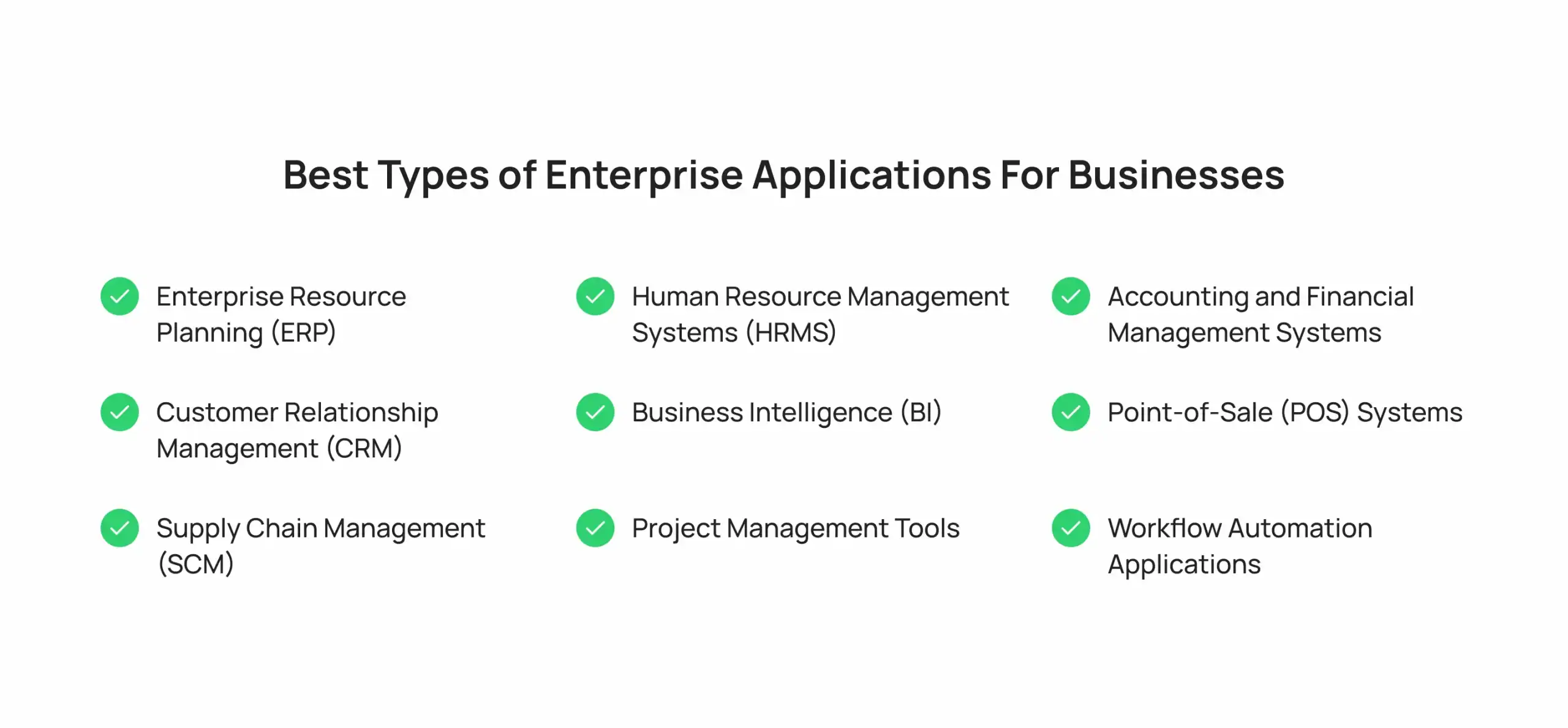
Best Types of Enterprise Applications For Businesses
The best enterprise applications for businesses integrate core operations, automate repetitive tasks, and scale across departments. Top solutions include Enterprise Resource Planning (ERP), Customer Relationship Management (CRM), and Supply Chain Management (SCM) platforms, etc. Each one solves a specific operational problem, and most mid-size to large companies use several of these together.
1. Enterprise Resource Planning (ERP)
ERP software centralizes core business functions like finance, procurement, manufacturing, and supply chain into one system. Instead of managing each function separately, your team works from a single source of truth.
The global ERP software market was valued at $77.1 billion in 2025 and is projected to reach $83.2 billion in 2026, with cloud deployment already holding over 54% of the market share. This growth reflects how many businesses now treat ERP as a baseline requirement, not a luxury.
Common Uses
- Financial consolidation: Combines accounting data from every department into one ledger
- Procurement management: Tracks purchase orders and vendor contracts in real time
- Manufacturing planning: Schedules production runs based on live demand data
- Inventory control: Syncs stock levels across warehouses and locations
2. Customer Relationship Management (CRM)
CRM platforms track every interaction you have with customers and prospects. Sales reps use them to manage leads, marketing teams use them to run campaigns, and support teams use them to resolve tickets faster.
The CRM software market reached $79.6 billion in 2025 and is expected to hit $86.4 billion in 2026, with cloud-based CRM systems accounting for nearly 60% of that market. That shift toward cloud makes sense, since remote and hybrid teams need access to customer data from anywhere.
Common Uses
- Lead tracking: Monitors prospects as they move through the sales pipeline
- Campaign management: Runs and measures marketing outreach from one dashboard
- Customer support: Logs tickets and past interactions for faster resolutions
- Sales forecasting: Predicts revenue based on deal stage and history
3. Supply Chain Management (SCM)
SCM software manages the flow of goods, from raw materials to finished products reaching customers. It tracks suppliers, shipments, warehouses, and demand forecasts in one connected system.
Manufacturing and retail businesses rely on SCM to avoid stockouts and reduce waste. When supply chain data connects with your ERP system, you get a much clearer picture of costs and delivery timelines.
Common Uses
- Supplier coordination: Manages orders and delivery schedules with vendors
- Logistics tracking: Monitors shipments from origin to final destination
- Demand forecasting: Predicts stock needs based on sales trends
- Warehouse management:Organizes storage and picking for faster fulfillment
4. Human Resource Management Systems (HRMS)
HRMS platforms handle everything from hiring and payroll to performance reviews and benefits administration. They replace paper files and scattered spreadsheets with one digital record for every employee.
HR teams use these systems daily, so ease of use matters as much as feature depth. A clunky HRMS creates more manual work, not less.
Common Uses
- Payroll processing: Calculates wages, taxes, and deductions automatically
- Recruitment tracking: Manages job postings and candidate pipelines
- Performance reviews: Stores goals, feedback, and evaluation history
- Benefits administration: Handles enrollment and updates for employee benefits
5. Business Intelligence (BI)
BI tools turn raw business data into charts, dashboards, and reports that leaders can actually use. Instead of guessing, decision-makers see exactly what’s working and what isn’t.
The global BI market was valued at $34.82 billion in 2025 and is projected to grow to $37.96 billion in 2026, driven largely by rising demand for real-time, data-driven decisions. This matters because data-driven organizations are significantly more likely to acquire new customers and stay profitable compared to companies that still rely on gut instinct.
Common Uses
- Executive dashboards: Display key metrics for leadership at a glance
- Sales analysis: Identifies top-performing products, regions, or reps
- Trend forecasting: Spots patterns in historical data to guide planning
- Report automation: Generates recurring reports without manual data pulls
6. Project Management Tools
Project management software helps teams plan tasks, assign deadlines, and track progress across departments. These tools keep everyone aligned, even when team members work in different time zones.
Most modern project management platforms also integrate with communication tools like Slack or Microsoft Teams. Therefore, updates flow naturally into the channels teams already use every day.
Common Uses
- Task assignment: Distributes work items with clear owners and deadlines
- Progress tracking: Shows project status through boards or timelines
- Resource planning: Balances workloads across team members
- Cross-team collaboration: Keeps updates visible to everyone involved
7. Accounting and Financial Management Systems
These applications manage invoicing, expense tracking, payroll, and financial reporting. Smaller businesses often start here before adding a full ERP system later.
Accurate financial software reduces manual errors and keeps your books audit-ready. In addition, it gives finance teams real-time visibility into cash flow instead of waiting for month-end reports.
Common Uses
- Invoicing: Creates and sends bills to clients automatically
- Expense tracking: Logs and categorizes business spending
- Financial reporting: Generates profit, loss, and cash flow statements
- Tax preparation: Organizes records needed for accurate tax filing
8. Point-of-Sale (POS) Systems
POS systems process transactions at checkout, whether that’s a physical store or an online store. Modern POS platforms also track inventory, generate sales reports, and manage customer loyalty programs.
Retail and hospitality businesses depend on POS systems that work fast and stay reliable, especially during peak hours. A slow checkout process costs sales and frustrates customers.
Common Uses
- Transaction processing: Handles payments at checkout, in-store or online
- Inventory sync: Updates stock counts automatically after each sale
- Sales reporting: Tracks daily, weekly, and monthly revenue trends
- Loyalty programs: Manages customer rewards and repeat purchase tracking
9. Workflow Automation Applications
Workflow automation tools handle repetitive tasks like approvals, notifications, and data entry, so employees can focus on higher-value work. They connect different apps together and trigger actions automatically.
Common Uses
- Approval routing: Sends requests to the right person automatically
- Data entry automation: Moves information between systems without manual input
- Notification triggers: Alerts teams when a task or status changes
- App integration: Connects separate tools so data flows between them
The workflow automation market was valued at $23.77 billion in 2025 and is expected to reach $26.01 billion in 2026. Interestingly, by the end of 2026, roughly 40% of enterprise applications are expected to include task-specific AI agents, up from less than 5% in 2025. That’s a fast shift, and it shows how automation and AI are merging inside business software.
If your team is exploring how mobile-first workflows fit into this picture, this guide on mobile app development breaks down what businesses need to know before investing in a mobile solution.
What Are Examples of Enterprise Applications?
These enterprise software examples cover the tools most businesses touch on a daily basis. Many companies mix and match platforms from different vendors, then connect them through APIs or middleware.
Sometimes the clearest way to understand enterprise application examples is to see them side by side. Here’s a quick reference table:
| Type | Examples | Primary Use |
| ERP | SAP, Oracle, Microsoft Dynamics | Business operations |
| CRM | Salesforce, HubSpot | Customer management |
| HRMS | Workday, SAP SuccessFactors | Human resources |
| BI | Power BI, Tableau | Data analytics |
| SCM | SAP SCM, Oracle SCM | Supply chain management |
| Project Management | Jira, Asana, Microsoft Project | Project planning |
| Accounting | QuickBooks, Xero | Financial management |
| POS | Shopify POS, Square | Sales and payments |
| Workflow Automation | Zapier, Microsoft Power Automate | Process automation |
What Are the Benefits of Enterprise Applications
Investing in the right types of enterprise applications pays off across the entire organization. Here’s what businesses typically gain:
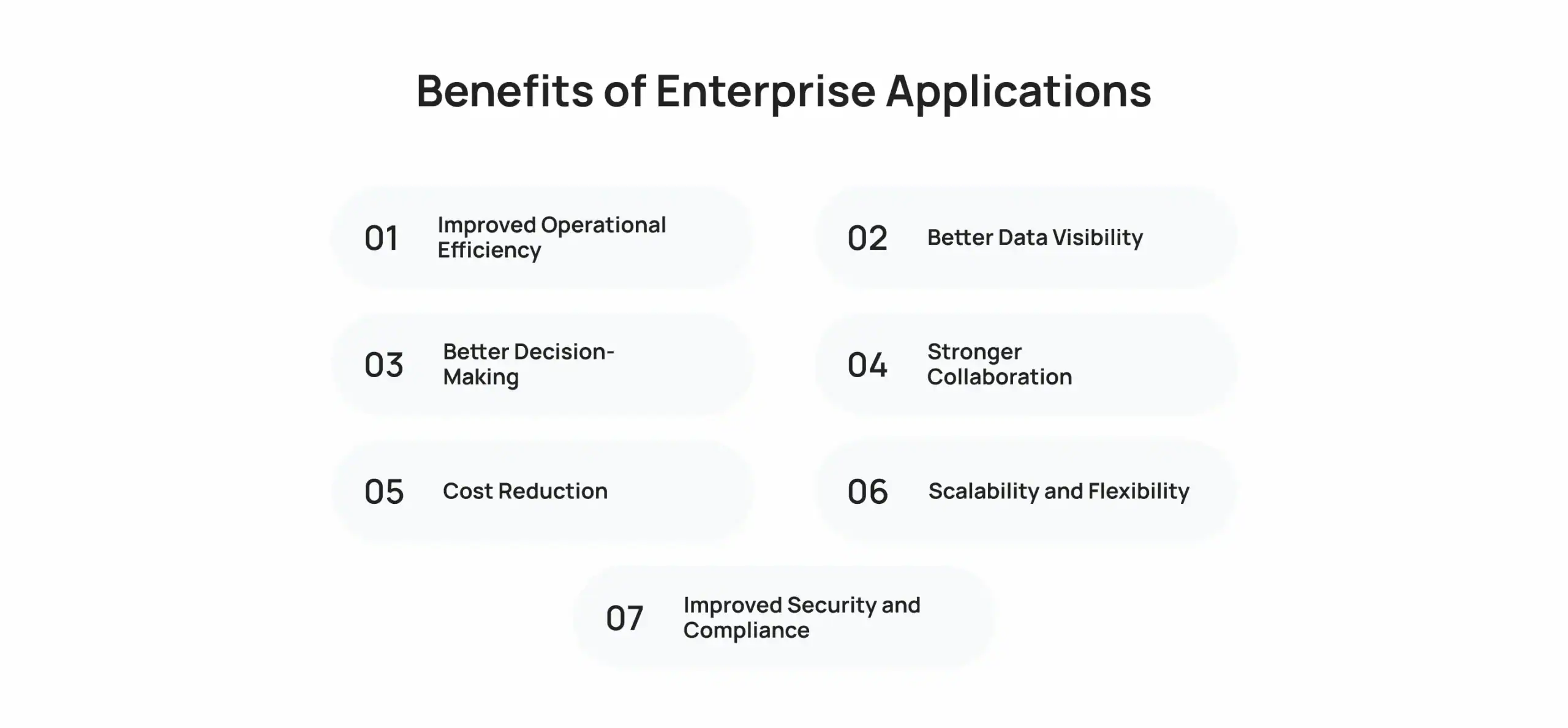
1. Improved Operational Efficiency
Automated workflows and centralized data mean fewer manual tasks and fewer bottlenecks. Employees spend less time chasing information and more time doing actual work.
2. Better Data Visibility
When every department feeds data into the same system, leaders see the full picture instead of isolated snapshots. This visibility helps catch problems early, before they turn into bigger issues.
3. Better Decision-Making
With real-time dashboards and reports, executives don’t have to wait weeks for updated numbers. As a result, they can act on current information rather than outdated assumptions.
4. Stronger Collaboration
Enterprise applications break down silos between departments. Sales, marketing, and finance teams work off the same customer and revenue data, so nobody duplicates effort.
5. Cost Reduction
Fewer manual errors, less duplicate software, and streamlined processes all add up to real savings. Over time, the return on a well-implemented system often outweighs the upfront cost.
6. Scalability and Flexibility
As your business grows, enterprise software should grow with you. Cloud-based platforms in particular make it easy to add users, features, or storage without a full system overhaul.
7. Improved Security and Compliance
Enterprise-grade platforms come with access controls, encryption, and audit trails built in. This matters even more if your business handles sensitive customer or financial data. For a deeper look at protecting your systems, check out this breakdown of enterprise app security best practices.
How to Choose the Right Enterprise Application

Picking from the many enterprise application categories available can feel overwhelming. Here’s a practical approach to narrow it down.
1. Identify the Business Problem
Start with the actual problem you’re trying to solve, not the software itself. Are you losing sales leads? Struggling with inventory accuracy? Define the pain point first.
2. Check Integration Capabilities
Your new application needs to talk to the tools you already use. Otherwise, you’ll end up with more data silos instead of fewer.
3. Evaluate Scalability
Choose software that can handle your business in three years, not just today. Switching platforms later costs time and money and disrupts your team.
4. Compare the total cost of ownership
Look beyond the sticker price. Factor in implementation costs, training time, ongoing support, and any custom development you’ll need.
5. Review Security and Compliance
Check whether the platform meets industry regulations relevant to your business, such as HIPAA, GDPR, or PCI DSS. This step matters even more if you handle customer payment data.
6. Assess Usability and Vendor Support
A powerful system nobody wants to use won’t help your business. Test the interface with your actual team, and check how responsive the vendor’s support team really is.
If off-the-shelf platforms don’t quite fit, building custom enterprise applications with an experienced development partner often solves the gap between what’s available and what your business actually needs.
Difference Between an Enterprise Application and a Business Application
People often use these terms interchangeably, but they’re not quite the same thing.
| Factor | Enterprise Application | Business Application |
| Scale | Built for large organizations with many users | Often built for smaller teams or single departments |
| Complexity | Highly complex, with multiple integrated modules | Simpler, focused on one specific function |
| Cost | Higher investment, often custom-built | Lower cost, frequently off-the-shelf |
| Customization | Deep customization for specific workflows | Limited customization options |
| Examples | SAP, Oracle, Salesforce | QuickBooks, Trello, basic invoicing tools |
Understanding this difference helps you set realistic expectations before you start shopping for business applications versus full enterprise platforms.
Why Cubix Is the Right Choice for Enterprise App Development
Choosing between hundreds of off-the-shelf tools isn’t always the right move. Sometimes your business needs software built around your exact processes, not the other way around.
Cubix builds custom enterprise software solutions for companies that need more than a generic platform can offer. The team handles everything from initial strategy to deployment and ongoing support.
Here’s what sets Cubix apart:
- Deep experience across ERP, CRM, and workflow automation projects
- A dedicated team of mobile app developers for businesses that need enterprise tools on the go
- Proven expertise as an Android App Development Company for teams building cross-platform enterprise solutions
- A security-first approach to protecting sensitive business data
If mobile access matters for your enterprise rollout, this article on the business benefits of mobile app development explains why more companies are prioritizing mobile-first enterprise tools.
Final Thoughts
Understanding the different types of enterprise applications gives you a clear starting point before you invest in new software. Every business runs on a mix of these systems, whether that’s ERP for operations, CRM for customer relationships, or BI for smarter decisions.
The right combination depends on your industry, team size, and growth goals. Start with your biggest operational gap, then build outward from there.
Whether you choose off-the-shelf platforms or invest in custom enterprise applications, the goal stays the same: connect your teams, protect your data, and make faster decisions. That’s what good enterprise software delivers.
Ready to Modernize Your Business? Let’s Build the Right Solution
Contact UsFrequently Asked Questions
1. What are enterprise applications?
Enterprise applications are large-scale software systems that support core business functions across multiple departments. They centralize data, connect teams, and scale to handle high user volumes and complex workflows.
2. What is the difference between an enterprise application and a business application?
Enterprise applications are built for large organizations with complex, multi-department needs, while business applications often serve smaller teams or single functions. Enterprise systems also cost more and require deeper customization.
3. What are the 7 different types of application software?
Common categories include word processors, spreadsheets, database software, web browsers, presentation software, communication tools, and enterprise applications like ERP or CRM. Each type handles a distinct task, from writing documents to managing large-scale business data.
4. What are the different types of business applications?
Business applications include accounting software, CRM, project management tools, HR platforms, and inventory systems. They range from simple single-function tools to full enterprise-grade platforms depending on company size.
5. What are examples of enterprise applications?
Examples include SAP and Oracle for ERP, Salesforce and HubSpot for CRM, Workday for HR, and Power BI for analytics. These platforms support large organizations with complex, multi-department workflows.
6. What are the four major enterprise applications?
The four major types are ERP, CRM, SCM, and HRMS. Together, they cover operations, customer relationships, supply chains, and workforce management.
7. What is the difference between an Enterprise application vs web application?
An enterprise application supports internal business operations across departments, often with complex integrations. A web application is simply software accessed through a browser, which could be enterprise-grade or a basic consumer tool.