Key Takeaways
- Vibe coding prioritizes speed: It helps developers quickly build prototypes, test ideas, and explore features without spending too much time on manual coding.
- AI assisted engineering focuses on quality: It combines AI-generated code with human review, structured testing, security checks, and proper architecture to build production-ready software.
- Working code isn’t always secure code: AI-generated code can contain vulnerabilities, outdated dependencies, and logic errors, making code review and security testing essential.
- Choose the approach based on project needs: Vibe coding works best for low-risk experiments, while AI assisted engineering is better for customer-facing apps, enterprise platforms, and complex software.
- A structured AI workflow delivers better results: Clear requirements, code reviews, automated testing, CI/CD, and production monitoring help teams use AI without compromising software quality.
AI has changed how software gets built. Not subtly. Not eventually. Right now.
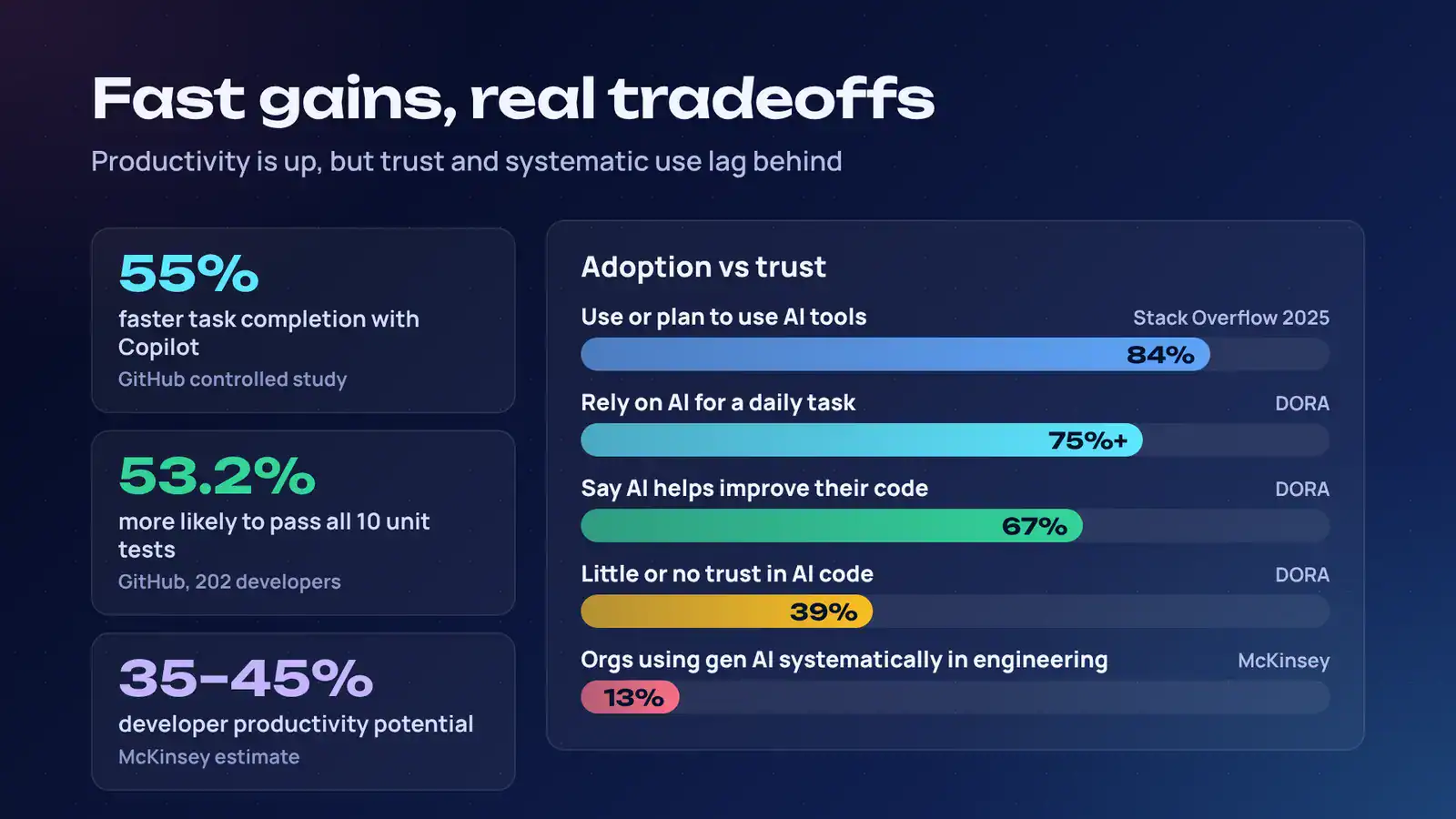
Stack Overflow’s 2025 Developer Survey found that 84% of developers use or plan to use AI tools in their development process, up from 76% the year before. More than half of professional developers now use AI tools daily.
But adoption is not the same thing as mastery.
You have probably seen two very different approaches appear inside the same team. One developer opens an AI assistant, describes what they want, accepts the output, runs the app, and keeps iterating. Another uses AI to accelerate implementation, then reviews every change, writes tests, checks security, and treats the generated code as a draft rather than a finished product.
The first is often called vibe coding. The second is AI assisted development, or more precisely, AI assisted engineering. Both use AI. Both can produce working software. But they carry very different levels of risk, ownership, and production readiness.
This guide breaks down vibe coding vs AI assisted development in practical terms: what each approach means, when to use it, where it fails, and how to build an AI coding workflow that helps you move fast without shipping problems.
If you are evaluating AI software development services for a serious product, the distinction matters even more. You can explore Cubix’s AI software development company capabilities to see how disciplined AI engineering works in practice.
Partner with Cubix to build secure, scalable AI solutions
Contact UsWhat Is Vibe Coding?
What is vibe coding? It is a development approach where you describe what you want in natural language, let an AI model generate most of the code, and judge the result mainly by whether it works.
Computer scientist Andrej Karpathy coined the term in February 2025. His original idea was blunt: give in to the vibes, embrace the speed of AI, and stop obsessing over every line of code.
In practice, vibe coding usually looks like this:
- You type a prompt: “Build a dashboard that shows monthly revenue by region.”
- The AI generates the interface, logic, and data wiring.
- You run it.
- Something looks wrong.
- You say, “Make the chart bigger,” or “Use a darker theme,” or “Fix the login error.”
- The AI changes the code.
- You repeat until the result feels right.
That is the appeal. You stay in the creative loop. You do not get stuck reading documentation, configuring build tools, or debugging syntax at midnight.
Vibe coding is especially useful when the cost of being wrong is low. A prototype. A landing page. A design experiment. An internal reporting tool. A quick proof of concept that helps stakeholders understand an idea.
The problem appears when “it runs” becomes the only quality bar.
Vibe coding often means the developer does not fully read, understand, or own the generated code. That can be fine for a disposable demo. It becomes dangerous when that same code handles authentication, payments, customer data, third-party APIs, or business logic that must survive for years.
So the real question is not whether vibe coding works. It does. The question is whether the output deserves to become production software.
What Is AI Assisted Engineering?
What is AI assisted engineering? It is a broader, more disciplined approach to building software with AI.
You still use AI to generate code, explain unfamiliar systems, create tests, summarize documentation, refactor legacy modules, and suggest fixes. But you do not hand over responsibility for the result.
The engineer remains accountable.
AI assisted engineering treats AI as a powerful collaborator, not an autonomous decision-maker. The developer defines the problem, reviews the implementation, validates behavior, checks security, and ensures the code fits the system’s architecture.
That difference sounds small. It is not.
In vibe coding, the prompt is often the specification. In AI assisted engineering, the prompt is only one input. The specification also includes acceptance criteria, edge cases, security requirements, performance expectations, test coverage, deployment constraints, and architectural boundaries.
A useful way to think about it:
- Vibe coding asks, “Does this look and behave the way I wanted?”
- AI assisted engineering asks, “Is this correct, secure, maintainable, observable, and safe to deploy?”
The second question is harder. It is also the one your customers, security team, and future developers will care about.
AI assisted engineering is the foundation of mature AI powered software development. It uses AI to remove repetitive work while preserving human judgment where it matters most.
Vibe Coding vs AI Assisted Development: The Core Differences
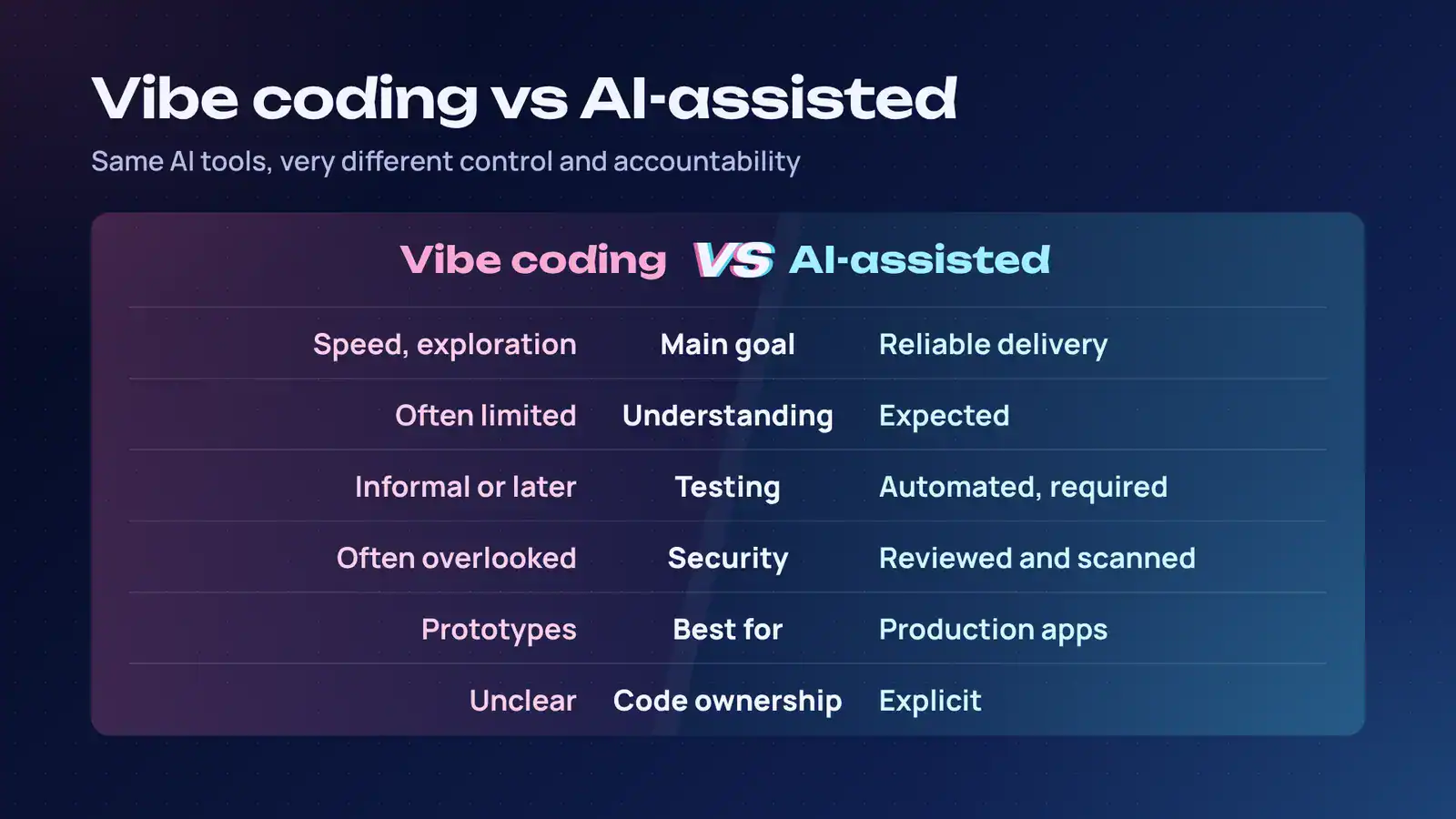
The phrase AI assisted coding vs vibe coding can sound like a debate over labels. It is not. The difference is in how much control, review, and accountability surround the AI-generated work.
| Area | Vibe coding | AI assisted development |
|---|---|---|
| Main goal | Speed, exploration, creative momentum | Reliable, maintainable delivery |
| Developer’s role | Prompter, curator, tester by observation | Engineer, reviewer, architect, owner |
| Code understanding | Often limited | Expected |
| Testing | Often informal or postponed | Automated, repeatable, required |
| Security | Frequently overlooked | Reviewed, scanned, and monitored |
| Architecture | Emerges from prompts | Deliberately designed |
| Documentation | Often missing | Created and maintained |
| Best use case | Prototypes and experiments | Production applications |
| Failure cost | Usually low | Can be high |
| Code ownership | Unclear | Explicit |
Neither approach is inherently bad. Vibe coding is excellent for discovery. AI assisted engineering is necessary for delivery.
The mistake is treating a weekend prototype as if it were ready for customers simply because it looks polished in a browser.
When to Use Vibe Coding
When to use vibe coding? Use it when speed matters more than durability, and when the consequences of failure are contained.
Good use cases include:
- Product prototypes and clickable demos
- Landing pages and marketing experiments
- Internal dashboards with non-sensitive data
- Design explorations
- Hackathon projects
- Data-analysis scripts
- Early validation of a new feature
- Learning a new framework or API
- Creating throwaway utilities
Vibe coding is also useful for highly creative work. If you are exploring interaction patterns, visual ideas, or unusual user flows, a conversational coding environment can help you test ten ideas in the time it used to take to build one.
But use a green-light and red-light test.
Green light:
- The project is disposable or easily rebuilt.
- No sensitive customer data is involved.
- You can manually verify the output.
- Security failures would not cause real harm.
- The code will not become a long-term dependency.
Red light:
- The app handles payments, health data, personal data, or authentication.
- The code will be maintained by a team.
- It connects to production databases or third-party systems.
- Compliance requirements apply.
- Downtime or data leakage would damage the business.
Can vibe coding be used for production software? Yes, but not in its purest form.
You can start with vibe coding, then promote the result through proper engineering: code review, automated tests, dependency scanning, security analysis, observability, documentation, and deployment controls. The vibe gets you started. The engineering makes it safe to ship.
When to Use AI Assisted Engineering
When to use AI assisted engineering? Whenever the software needs to last, scale, or be trusted.
That includes:
- Customer-facing SaaS products
- Mobile and web applications
- Enterprise platforms
- Payment and billing systems
- Healthcare, fintech, and legal software
- Data pipelines
- API integrations
- Multi-team codebases
- Systems with compliance requirements
- Products with long-term maintenance needs
AI assisted engineering is not slower for the sake of caution. It is structured speed.
A good AI coding workflow uses AI at every stage, but keeps humans responsible for decisions that affect users, security, and business outcomes.
For example:
- AI helps draft implementation options.
- The team selects an approach based on architecture and constraints.
- AI generates boilerplate, tests, documentation, and migration scripts.
- Engineers review the changes.
- CI/CD runs automated checks.
- Security tools scan dependencies and code.
- The team monitors real-world behavior after release.
That is how AI assistants can improve the software development lifecycle for large teams. They reduce repetitive work, improve documentation, and accelerate review, but they do not remove the need for engineering standards.
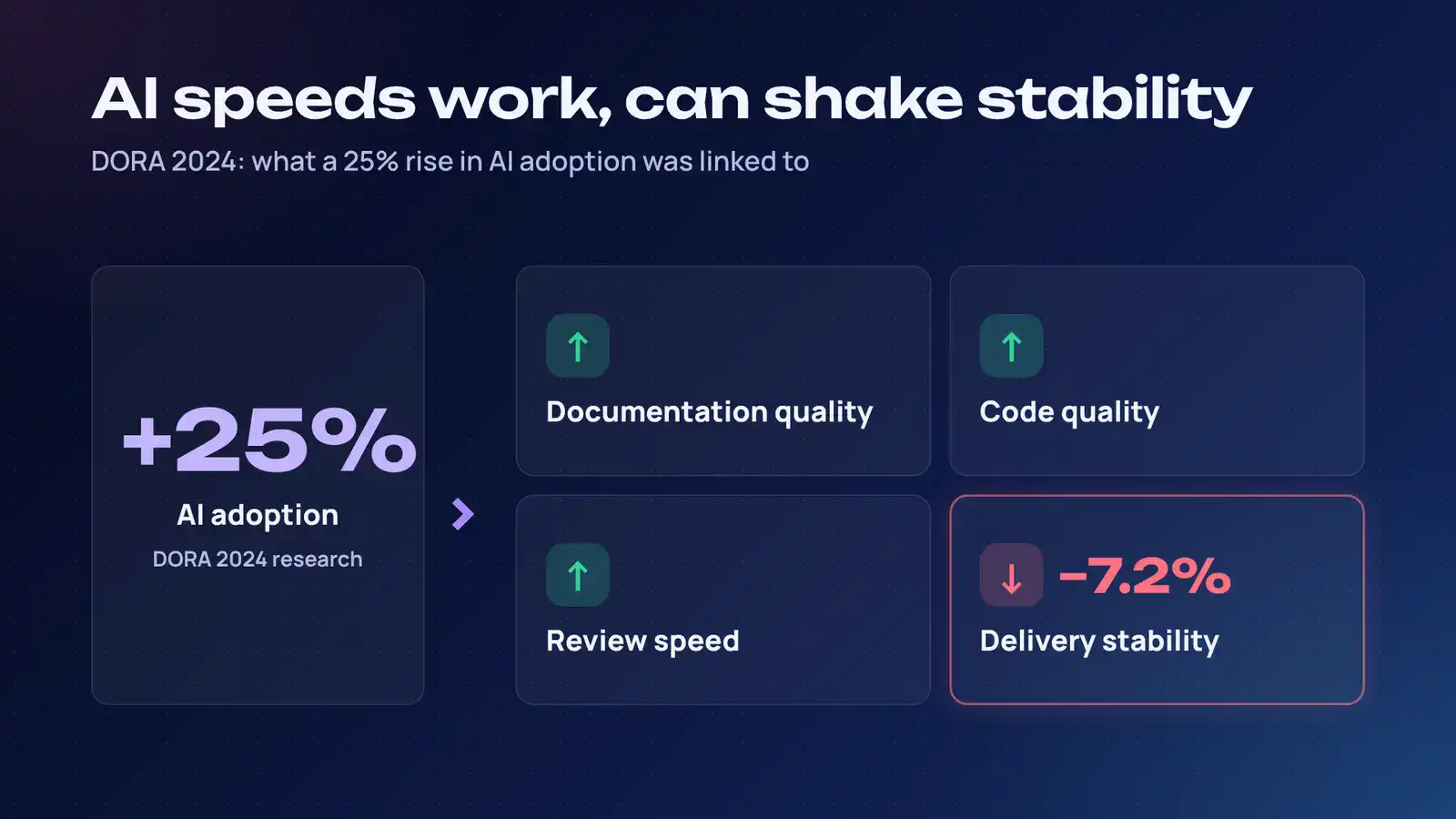
DORA’s 2024 research found that a 25% increase in AI adoption was associated with improvements in documentation quality, code quality, and review speed. But the same research found an estimated 7.2% reduction in delivery stability as AI adoption increased.
That is the central lesson: AI can make individual work faster while making the overall system less stable if teams skip quality controls.
For a deeper look at structured delivery practices, read Cubix’s guide to AI powered development and how software teams build smarter.
The Data: Fast Gains, Real Tradeoffs
It is easy to get swept up in productivity claims. The data is more nuanced.
GitHub’s early controlled study found that developers using Copilot completed a coding task about 55% faster than developers without it. A later GitHub study of 202 experienced developers found that those with Copilot access were 53.2% more likely to pass all 10 unit tests, suggesting that AI assistance can support functional quality when used carefully.
McKinsey estimates that generative AI can improve developer productivity by 35% to 45%. Yet its survey also found that only 13% of organizations systematically use generative AI in software engineering.
That gap matters. Many companies have AI tools. Fewer have an operating model for using them well.
DORA found that more than 75% of respondents rely on AI for at least one daily professional responsibility. The same report found that 67% of respondents said AI helps them improve their code, while 39% reported having little or no trust in AI-generated code.
That tension is healthy.
Developers are using AI because it removes friction. They remain cautious because they have seen what happens when generated code enters production without scrutiny.
And the security data explains why.
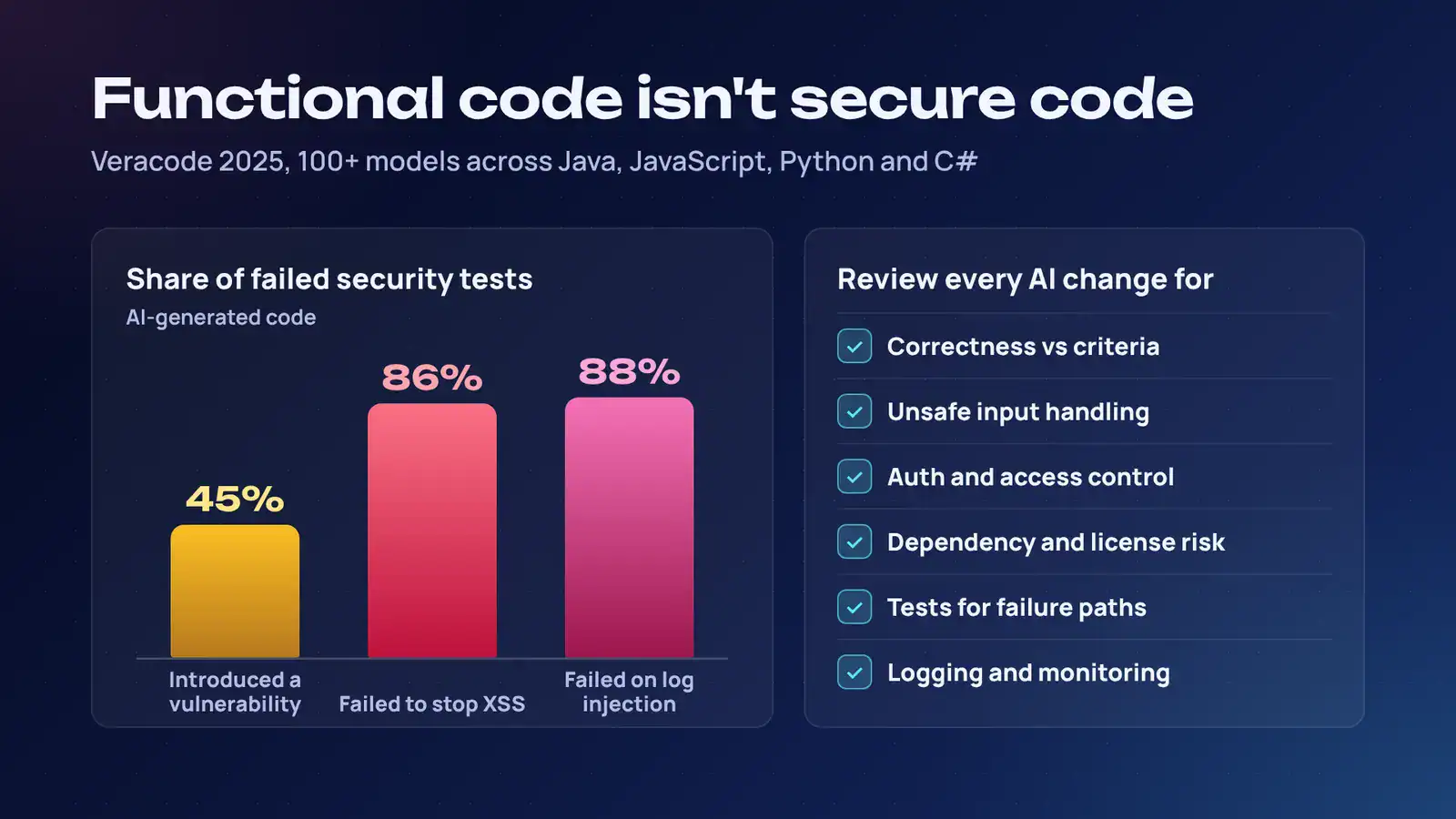
Veracode’s 2025 GenAI Code Security Report analyzed more than 100 large language models across Java, JavaScript, Python, and C#. It found that AI-generated code introduced security vulnerabilities in 45% of test cases. The study also found that models failed to secure code against cross-site scripting in 86% of cases and log injection in 88% of cases.
Functional code is not secure code.
A demo can pass a quick manual test and still contain SQL injection, insecure deserialization, weak cryptography, broken access control, or unsafe handling of user input.
That is why AI generated code review is not optional.
AI Generated Code Review: Your Non-Negotiable Layer
If your team uses AI to write code, you need a review process designed for AI-generated code.
Traditional code review still matters. But it is not enough to ask, “Does this look reasonable?”
AI-generated code can be clean-looking, well-commented, and functionally correct while still hiding serious issues. It may use an outdated library, mishandle authentication, expose an API key, ignore tenant isolation, or create a subtle race condition.
Your AI generated code review process should check for:
- Correctness against acceptance criteria
- Security vulnerabilities and unsafe input handling
- Authentication, authorization, and access-control issues
- Dependency risks and license concerns
- Error handling and edge cases
- Test coverage, especially for failure paths
- Performance and scalability concerns
- Data privacy and compliance requirements
- Architecture fit and avoidable duplication
- Maintainability and clear naming
- Observability, logging, and alerting
A useful rule: if AI wrote it, someone must be able to explain it.
That does not mean every line needs to be rewritten by hand. It means the reviewing engineer should understand what the code does, why it was chosen, how it fails, and what happens when the assumptions behind it change.
For teams building serious products, AI review should sit alongside QA, security testing, and production monitoring. Cubix explains this broader approach in its article on QA, security, and the development process.
Software Architecture with AI
AI changes implementation speed. It does not remove the need for architecture.
Software architecture with AI means using AI to support design decisions, not to replace them.
AI can help you:
- Compare architectural options
- Draft API contracts
- Generate data models
- Identify duplicated logic
- Suggest refactoring paths
- Explain unfamiliar code
- Create infrastructure templates
- Produce documentation
- Surface potential failure modes
But it should not decide your system boundaries, data ownership model, security posture, or long-term technical strategy on its own.
Why? Because AI optimizes for the request in front of it. Architecture optimizes for the system over time.
A model may happily generate a new service, a new database table, or a new dependency because it solves the immediate prompt. Six months later, your team may be dealing with duplicated logic, unclear ownership, inconsistent data models, and integration sprawl.
Good architecture creates guardrails:
- Clear service boundaries
- Defined API contracts
- Consistent data models
- Reusable components
- Centralized authentication and authorization
- Standardized logging and monitoring
- Controlled dependency adoption
- Documented decision records
AI can work quickly inside those guardrails. Without them, it can accelerate chaos.
Building a Practical AI Coding Workflow
You do not need to choose between creativity and discipline. The strongest teams use both.
Here is a practical workflow.
1. Define the problem before prompting
Write down the user problem, success criteria, constraints, and non-goals.
A prompt like “Build a customer portal” is too vague. A better starting point is: “Build a customer portal where users can view invoices, download PDFs, and update billing details. Do not store card data. Follow our existing design system.”
2. Use vibe coding for discovery
Let AI generate rough interfaces, sample flows, and quick prototypes.
This is where you explore. Move fast. Try variations. Do not invest heavily in code quality yet.
3. Convert the winning prototype into a specification
Once the concept works, document the behavior.
Include user stories, acceptance criteria, data requirements, security needs, integrations, edge cases, and performance expectations.
4. Shift to AI assisted engineering
Now use AI to implement the production version.
Break the work into smaller tasks. Use version control. Create focused pull requests. Require tests. Keep architecture boundaries visible.
5. Review with intent
Do not review only for style. Review for correctness, security, maintainability, and business logic.
Ask: “What could this code do that we did not intend?”
6. Automate the safety net
Use CI/CD, unit tests, integration tests, static analysis, dependency scanning, secret detection, and security scanning.
AI can generate tests, but humans should decide whether those tests actually protect the important behavior.
7. Monitor after release
Track errors, latency, usage, security events, and business metrics.
AI-generated code may behave differently under real traffic, real data, and real user behavior.
8. Feed lessons back into the workflow
When you find a repeated issue, update your prompts, coding standards, review checklists, and architecture guidelines.
Your AI workflow should improve with every release.
Choosing the Right AI Coding Tools for Developers
There is no single best tool. The right choice depends on your stack, security requirements, team size, and workflow.
When evaluating AI coding tools for developers, look for:
- IDE integration
- Support for your primary languages and frameworks
- Repository and codebase context
- Test-generation capabilities
- Security and dependency awareness
- Review and pull-request support
- Agent capabilities for multi-step tasks
- Clear data privacy and retention policies
- Administrative controls for enterprise teams
- Compatibility with CI/CD and cloud platforms
AI coding agents are becoming more capable, but they still need boundaries. An agent that can edit files, run commands, access repositories, and deploy code needs permissions, audit trails, and human approval for high-risk actions.
To understand how to design those systems responsibly, read Cubix’s guide on how to build AI agents.
When to Hire AI Software Developers
Some teams can adopt AI assisted development internally. Others need outside help.
Consider whether to hire AI software developers when:
- You need to ship a production AI product quickly.
- Your team lacks experience with LLMs, retrieval, agents, or evaluation.
- Security, compliance, or data privacy requirements are complex.
- You need to integrate AI into an existing enterprise system.
- You want a scalable architecture rather than a one-off prototype.
- You need ongoing maintenance, monitoring, and model evaluation.
A professional AI software development partner should bring more than prompt-writing skills. Look for experience in product strategy, software architecture, security, data engineering, QA, and production operations.
Cubix provides generative AI development services for teams that need AI systems designed for real business use, not just demonstrations.
If your product depends on language models, large language model development requires additional discipline. You need to think about model selection, prompt design, context retrieval, evaluation, cost control, safety, and versioning. Cubix’s large language model development company page outlines that type of work.
And if your application uses an LLM directly, traditional software testing is not enough. You also need LLM application testing to evaluate accuracy, hallucinations, prompt injection risks, retrieval quality, safety, and consistency. Cubix covers this in its guide to LLM application testing.
Final Takeaway
Vibe coding helps you discover what to build. AI assisted engineering helps you build something worth keeping.
The teams that win will not be the ones that blindly accept every AI suggestion. They will be the ones that combine AI speed with engineering judgment: clear requirements, strong architecture, automated tests, security review, observability, and accountable humans.
That is how you turn AI-generated code into AI generated code for production applications rather than a fast track to technical debt.
If you need help building that kind of system, explore Cubix’s AI software development solutions and see how professional AI software development can support your next product.
Transform AI-generated ideas into production-ready software with Cubix
Contact UsFrequently Asked Questions
1. What is vibe coding?
Vibe coding is an AI-driven development approach where you describe an outcome in natural language, let AI generate most of the code, and validate the result mainly by running it. The term was coined by Andrej Karpathy in February 2025.
2. What is AI assisted engineering?
AI assisted engineering is a disciplined approach where AI accelerates coding, testing, documentation, and review, while engineers retain responsibility for architecture, quality, security, and production readiness.
3. What are the main differences between vibe coding and AI assisted engineering?
Vibe coding prioritizes fast exploration and often involves limited review of generated code. AI assisted engineering prioritizes reliable delivery, with human ownership, testing, security review, and architectural control.
4. Can vibe coding be used for production software?
Yes, but only after the output passes through production safeguards: code review, automated testing, security scanning, documentation, monitoring, and deployment controls.
5. When should teams use vibe coding?
Use it for prototypes, design experiments, internal tools, landing pages, and low-risk exploratory work where failure is cheap and the code is unlikely to become long-term infrastructure.
6. When should teams use AI assisted engineering?
Use it for production applications, multi-team platforms, regulated systems, customer-facing products, and any software that must remain secure, maintainable, and scalable.
7. Do AI assistants improve software development workflows?
They can. DORA found that higher AI adoption was associated with better documentation quality, code quality, and review speed. But it also found a negative estimated effect on delivery stability, so workflow discipline matters.
8. Which AI-powered code generation services integrate with common IDEs?
Many modern AI coding tools integrate with popular IDEs such as VS Code, JetBrains IDEs, and cloud-based development environments. Choose based on language support, repository context, security controls, testing support, and workflow integration rather than demo speed alone.