
Key Takeaways
- AI integration adds intelligence to existing systems without requiring immediate platform replacement.
- Begin with one measurable use case, such as invoice extraction, customer support automation, fraud detection, or demand forecasting.
- Clean, accessible, governed data matters more than choosing the latest model.
- APIs, middleware, data pipelines, and phased modernization reduce risk during migration.
- Human review remains essential for financial, legal, healthcare, safety, and compliance decisions.
- Measure outcomes through accuracy, latency, uptime, adoption, cost savings, and workflow completion time.
- A phased legacy migration strategy delivers faster value than a large, high-risk system rewrite.
Legacy systems often run core business operations, yet they struggle to support modern AI capabilities. AI integration with legacy systems helps organizations add automation, predictive analytics, intelligent search, document processing, and AI assistants without replacing stable business-critical platforms.
The need is clear. McKinsey’s 2026 State of AI research shows that companies are expanding AI across more business functions, including software development, operations, and customer service. However, scaling remains difficult when data, workflows, and applications remain disconnected.
Most organizations do not need a full rip-and-replace program. Instead, they need a secure integration layer that connects their existing ERP, CRM, database, or mainframe environment to AI services. In the third stage of planning, companies often use system integration services to connect older applications, cloud tools, data sources, and APIs without disrupting daily operations.
Ready to modernize your legacy systems with AI?
Contact UsWhat Is AI Integration for Legacy Systems?
AI integration for legacy systems means connecting artificial intelligence models, services, or workflows to older business software and infrastructure. The legacy platform remains operational while AI handles selected tasks or provides recommendations.
This model avoids unnecessary disruption. Rather than replacing the entire system, teams improve the parts that create delays, errors, or high manual workloads.
For further reading, see Cubix’s guide to enterprise digital transformation and legacy modernization, which explains phased modernization, cloud readiness, and integration planning.
Common legacy systems that support AI integration include
- ERP systems for finance, procurement, and inventory
- CRM platforms with customer and sales records
- Mainframe applications handling transactions
- On-premises SQL, Oracle, DB2, and file-based databases
- Older web applications with limited APIs
Why Integrate AI Into Legacy Systems?
Legacy platforms contain valuable business logic and historical data. Replacing them often takes years, costs millions, and introduces operational risk. AI enables teams to improve decision-making and workflow speed while retaining proven infrastructure.
McKinsey estimates that corporate AI use cases have a long-term productivity potential of $4.4 trillion globally. Realizing that value requires organizations to connect AI with actual workflows, data, and systems of record.
AI integration supports several practical outcomes:
- Automate manual data entry from invoices, forms, contracts, and emails
- Predict demand, equipment failures, churn, fraud, or payment risk
- Summarize records and support tickets for employees
- Improve enterprise search across structured and unstructured data
- Help developers understand and update older codebases
- Give employees guided answers from approved internal knowledge
How to Prepare a Legacy System for AI Integration
Preparation determines whether the integration delivers a stable result or creates new technical debt. Before selecting a model or vendor, evaluate the current environment, data, business priorities, and operating constraints.
Assess the Existing System and Dependencies
Start by mapping applications, databases, APIs, file transfers, batch jobs, user roles, and third-party dependencies. Review programming languages, database versions, authentication methods, data flows, and workflows that cannot tolerate downtime.
This assessment helps identify the safest integration point. In many cases, an API wrapper or middleware layer is less disruptive than modifying the legacy application directly.
Identify AI Use Cases and Business Priorities
Start with a specific workflow problem rather than a broad goal such as adding generative AI. Prioritize use cases that occur frequently, consume significant employee time, use accessible data, and have measurable outcomes.
For example, reducing invoice processing time from 12 minutes to four minutes provides a clear target, while “use AI in finance” does not.
Evaluate Data Readiness
AI integration depends on reliable and properly governed data. Check whether data is complete, consistent, accessible, and clearly defined. Also review data ownership, permissions, duplicates, outdated records, and the amount of historical data available for the intended AI use case.
Define the Target AI Integration Architecture
Design the architecture so the AI capability connects to the legacy core through a controlled integration layer rather than requiring major changes to the existing system.
A typical setup includes the legacy application, APIs or middleware, a governed data layer, an AI service for inference or prediction, and monitoring and human-approval controls.
This separation supports AI integration with legacy systems while reducing disruption to existing operations.
Step-by-Step Roadmap for Migrating Legacy Systems to AI-Driven Platforms
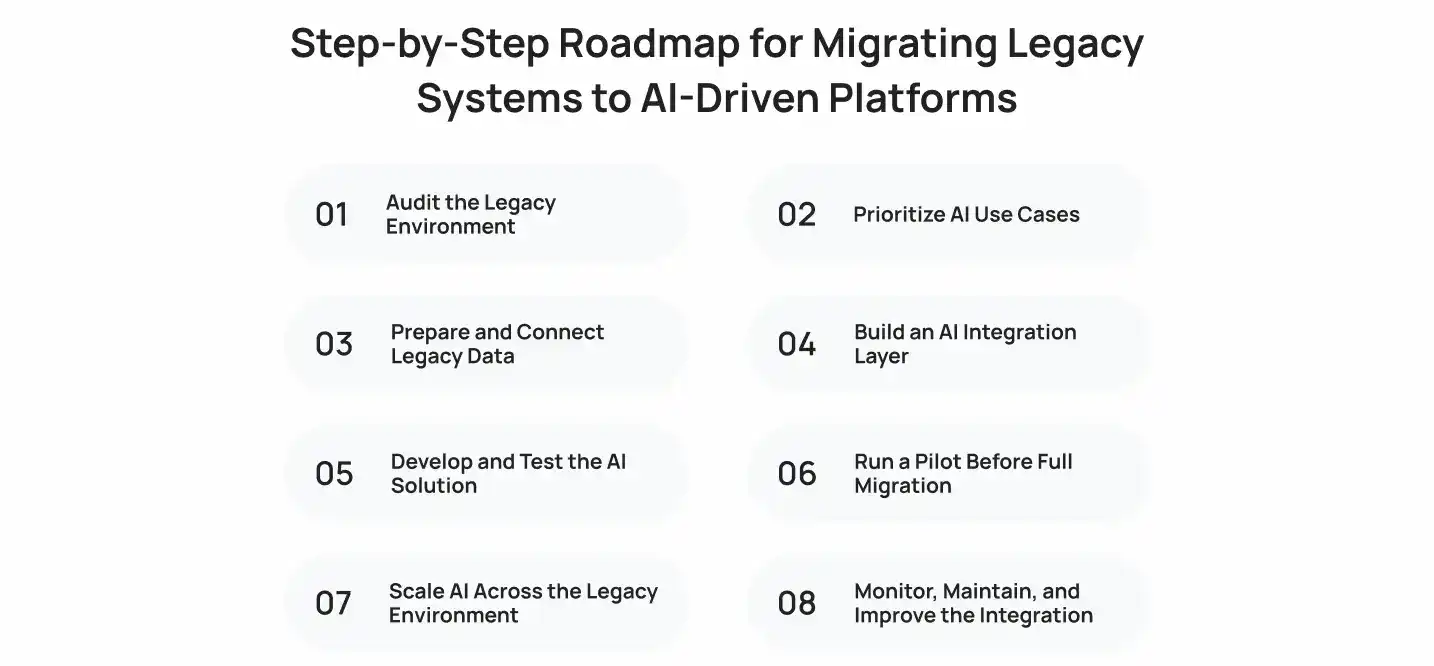
Migrating legacy systems to AI-driven platforms requires a phased roadmap that prepares data, updates infrastructure, and reduces disruption during the transition.
Step 1: Audit the Legacy Environment
Create a full inventory of applications, interfaces, infrastructure, data stores, security controls, and operational dependencies. Rank components by business criticality and technical risk.
Also identify unsupported software, tightly coupled modules, and manual processes. These areas often need an integration layer before AI services can connect safely.
Step 2: Prioritize AI Use Cases
Score each use case by business value, data availability, technical feasibility, risk, and expected time to production.
Start with a workflow that has clear input and output. Document classification, support-ticket routing, knowledge search, and invoice extraction often work well because teams can test accuracy quickly.
Step 3: Prepare and Connect Legacy Data
Extract data through available APIs, database replication, secure file transfers, event streams, or scheduled batch jobs. Then standardize formats, remove duplicates, validate fields, and apply access rules.
For structured records, use validation rules and master data management. For documents, use OCR, metadata tagging, and retrieval pipelines. For generative AI, use retrieval-augmented generation so the model responds from approved, current enterprise information.
Step 4: Build an AI Integration Layer
Create a service layer between the legacy application and the AI model. This layer manages authentication, prompt templates, model routing, output validation, rate limits, caching, fallbacks, and audit logs.
This approach also supports connecting SaaS platforms with legacy enterprise systems. For example, middleware can synchronize data between an on-premises ERP, a cloud CRM, and an AI-powered support platform without exposing the ERP directly.
Step 5: Develop and Test the AI Solution
Test more than model accuracy. Verify the full workflow under realistic conditions.
Your test plan should cover:
- Output accuracy and relevance
- Incorrect, incomplete, or harmful responses
- Response time under expected load
- Failed API calls and fallback behavior
- Access control and data leakage risks
- Audit logs and traceability
- User acceptance and exception handling
Use representative business data, not only clean sample data. Real-world edge cases reveal where the system needs rules, confidence thresholds, or human approval.
Step 6: Run a Pilot Before Full Migration
Launch the AI capability with a limited team, business unit, or workflow. Run it in parallel with the existing process when possible.
A pilot should answer three questions:
- Does the AI improve the target metric?
- Can users trust and operate the workflow?
- Does the integration remain reliable under normal conditions?
Step 7: Scale AI Across the Legacy Environment
After the pilot meets its goals, extend the integration to more users, datasets, and workflows. Scale gradually to avoid performance bottlenecks and governance gaps.
Reuse shared components, including:
- Authentication and role-based access controls
- API gateway and integration connectors
- Data quality checks
- Prompt and model evaluation tools
- Monitoring dashboards
- Approval workflows
- Incident response processes
Step 8: Monitor, Maintain, and Improve the Integration
AI systems change over time. Data patterns shift, user behavior evolves, vendors update models, and regulations change. Continuous monitoring keeps the solution useful and safe.
Track accuracy, latency, error rates, data drift, costs, adoption, and business impact. Review low-confidence outputs and user feedback regularly. Then refine rules, prompts, retrieval sources, models, and workflow design.
Best Practices for AI Integration With Legacy Systems Migration
A successful migration requires a focused approach that limits disruption while preparing legacy systems for AI. These practices help teams manage technical risks, protect existing workflows, and scale AI integration gradually.
Start With a High-Value, Low-Risk Use Case
Begin with a narrow workflow that has measurable benefits and limited operational risk. Good early projects include document extraction, support triage, enterprise search, and internal knowledge assistants.
This approach proves the value of AI integration with legacy systems before you invest in larger process changes.
Modernize Only What AI Integration Requires
Do not rewrite stable applications simply because they are old. Instead, expose the required functions through APIs, adapters, event streams, or secure data pipelines.
Use targeted legacy code migration only when a component blocks security, scalability, or integration. This reduces cost and protects proven business logic.
Keep Human Oversight for Critical Decisions
Require human review for decisions involving payments, credit, benefits, medical care, hiring, compliance, or legal actions. AI should provide recommendations, summaries, or risk scores, while authorized employees make final decisions.
Set confidence thresholds. For example, route invoices with a 95% extraction confidence score automatically, but send lower-confidence documents to an operations reviewer.
Build Security and Governance Into the Architecture
Security cannot be an afterthought. Define who can access which data, what the AI can do, where data is stored, and how teams review model behavior.
Your governance plan should include:
- Role-based access and least-privilege permissions
- Encryption in transit and at rest
- Data retention and deletion rules
- Model and prompt version control
- Audit trails for AI outputs and user actions
- Vendor risk assessments
- Red-team testing for misuse and prompt injection
- Human escalation paths for exceptions
Challenges In AI Integration for Legacy Systems
Integrating AI with legacy systems can be difficult because of outdated technology, fragmented data, security requirements, and limited integration options. Identifying these challenges early helps teams choose the right integration approach and avoid unnecessary system changes.
Outdated Architecture and Technology Dependencies
Older systems often use unsupported languages, tightly coupled code, undocumented interfaces, or batch-only processing. These constraints complicate real-time AI workflows.
A façade API, adapter, or event-driven layer often solves the problem without forcing a full legacy code migration program.
Data Silos and Poor Data Quality
Data often sits across spreadsheets, on-premises databases, archived files, and disconnected applications. Inconsistent customer IDs, missing fields, and duplicate records reduce model quality.
Establish data ownership, quality rules, and a controlled access layer before deploying AI.
Security, Compliance, and Access Constraints
Regulated industries must protect sensitive records and explain automated actions. Healthcare, finance, insurance, and public-sector systems need strict data boundaries, auditability, and approval workflows.
Choose deployment options that match your requirements. That can include private cloud, virtual private cloud, on-premises inference, or managed services with defined data controls.
Integration and Compatibility Issues
Legacy software often lacks modern APIs. It may also rely on proprietary protocols, fixed data formats, or scheduled jobs.
Middleware, robotic process automation, API gateways, and secure data replication help bridge these gaps. However, teams should avoid screen scraping when a stable API, file interface, or database connector is available.
AI Integration Approaches for Legacy Systems

Organizations can connect AI to legacy systems in several ways, depending on system architecture, data requirements, and modernization goals. The right approach minimizes changes to the existing environment while providing AI with controlled access to required data and functions.
API-Based Integration
API-based integration exposes selected legacy functions through REST, GraphQL, SOAP, or event APIs. The AI service calls those controlled endpoints instead of touching the database directly.
Use this approach when the application already has reliable interfaces or when developers can safely add an API façade.
Middleware and Integration Layers
Middleware sits between systems and handles routing, transformation, security, orchestration, and monitoring. It is useful when several applications need to exchange data with AI services.
This method supports complex integration with legacy systems because it separates the legacy application from changing cloud, AI, and SaaS tools.
Strangler Fig Pattern
The strangler fig pattern replaces parts of a legacy system gradually. Teams build modern services around the old platform, redirect selected functions to the new services, and retire old components after validation.
Use this pattern when the organization needs long-term modernization, not only an AI feature.
Data Pipeline Integration
Data pipeline integration copies or streams approved legacy data into a modern analytics environment. AI models work on the replicated data while the legacy system remains the transaction system of record.
This approach works well for forecasting, anomaly detection, reporting, personalization, and data quality analysis.
How to Measure the Success of AI Integration
Measure technical performance and business outcomes together. A highly accurate model still fails if users cannot access it, trust it, or fit it into their workflow.
You can also review its guide to adding AI to an existing app for API wrappers, sidecar services, and safe production rollout practices.
AI Performance and Accuracy
Track metrics that match the use case, such as precision, recall, F1 score, document extraction accuracy, false-positive rates, and unsupported-answer rates. Also measure human overrides to identify where AI outputs need improvement.
System Performance and Reliability
Monitor API response time, uptime, error rates, queue backlog, service availability, fallback usage, and integration failures. Set clear service-level objectives based on the workflow, such as fast responses for customer support tools.
Business and Operational Impact
Measure processing time, cost per transaction, error reduction, cases handled per employee, revenue impact, and compliance exceptions. Focus on whether AI improves the workflow instead of only tracking model activity.
User Adoption and Process Improvement
Review active users, repeat usage, task completion, time saved, user feedback, and manual workarounds. Low adoption usually signals a workflow, usability, training, or trust issue that needs attention.
How Much Does It Cost to Integrate AI With a Legacy System?
AI integration costs depend on system complexity, data quality, security requirements, and project scope. A focused proof of concept costs less than a multi-system modernization project.
A practical legacy migration strategy starts with discovery to identify technical and data-related cost drivers early.
| Project scope | Typical cost | Typical timeline | What it includes |
| AI discovery and architecture assessment | $10,000 to $30,000 | 2 to 4 weeks | System audit, data review, use-case ranking, roadmap |
| Single AI proof of concept | $25,000 to $75,000 | 4 to 8 weeks | One workflow, basic connector, testing, pilot dashboard |
| Production AI integration | $75,000 to $250,000 | 3 to 6 months | APIs, middleware, data preparation, security, monitoring, rollout |
| Multi-system AI modernization | $250,000 to $1 million+ | 6 to 18 months | Multiple legacy platforms, enterprise governance, data platform, phased migration |
| Ongoing support and optimization | $3,000 to $25,000+ per month | Ongoing | Monitoring, model evaluation, updates, cloud costs, support |
AI Integration With Legacy Systems: How Can Cubix Help?
Cubix Ai helps organizations assess legacy environments, identify practical AI use cases, prepare enterprise data, and build secure integration layers. The goal is to add useful AI capabilities without disrupting critical applications, teams, or daily operations.
For projects that need custom models, AI assistants, document intelligence, forecasting, or workflow automation, Cubix provides AI development services that cover discovery, data preparation, model integration, testing, deployment, and ongoing improvement.
A successful project requires more than connecting an AI API. It requires architecture planning, access control, testing, fallbacks, governance, and user adoption. Cubix can help you establish these foundations while supporting legacy modernization AI initiatives in phases.
Have an AI migration plan in mind? Let’s build it
Contact UsFrequently Asked Questions
1. How to modernize a legacy system?
Modernize a legacy system by assessing dependencies, improving security, exposing APIs, cleaning data, and replacing high-risk components in phases. Avoid a full rewrite unless the system cannot meet performance, compliance, or integration requirements.
2. How to integrate AI into legacy systems?
Connect AI through APIs, middleware, data pipelines, or sidecar services. Keep the legacy platform as the system of record, then use AI for tasks such as prediction, document extraction, search, classification, and workflow automation.
3. What are some effective strategies for migrating legacy systems?
Use phased migration, API enablement, the strangler fig pattern, cloud modernization, and data pipeline integration. Start with one workflow, run a pilot, measure results, and expand based on proven value.
4. What are the primary challenges of integrating AI into existing enterprise resource planning systems?
Common ERP challenges include siloed data, limited APIs, complex business rules, access controls, custom workflows, and downtime restrictions. Middleware and governed data access help reduce these risks.
5. Top tools for automating AI migration in legacy IT environments
Useful tools include API gateways, integration platforms, ETL and ELT tools, workflow automation platforms, cloud AI services, observability tools, and infrastructure-as-code platforms. Select tools based on your architecture, data sensitivity, and operational needs.
6. Cloud platforms offering managed AI services for on-premises data and applications
AWS, Microsoft Azure, and Google Cloud offer managed AI services that can connect with on-premises environments through secure networking, hybrid cloud tools, and private connectivity. Select the platform based on data residency, compliance, existing cloud use, and model requirements.
7. How to evaluate AI migration services for legacy system upgrades
Evaluate providers based on legacy system experience, data engineering skills, security practices, integration methods, governance capabilities, testing process, support model, and clear success metrics. Ask for a phased roadmap and a realistic cost estimate.
8. How can AI improve data quality and analytics within aging database systems?
AI can identify duplicates, classify records, detect anomalies, standardize formats, enrich missing fields, and flag suspicious values. It also improves analytics by finding trends, forecasting outcomes, and delivering natural-language insights from approved data sources.