Key Takeaways
- ChatGPT cannot natively generate 3D files like STL, OBJ, or FBX. It only outputs text and code.
- It can write parametric code (OpenSCAD, or Python for Blender) for simple hard-surface props, and it can write prompts for image and 3D generation tools.
- Dedicated AI 3D generators like Meshy and Tripo convert a prompt or image into a textured mesh, but the output almost always needs cleanup before it’s game-ready.
- Most studios lean on generative AI for research, brainstorming, and coding. Very few use it for finished, shippable 3D art.
- Poly count, topology, rigging, and platform optimization are where AI-generated models usually fall short, and where a professional 3D art team earns its keep.
- A blended workflow, AI for early concepts and iteration, professional artists for game-ready production, is what most working studios actually use.
ChatGPT is the generative AI tool of choice for 74% of game industry professionals who already use generative AI, according to GDC’s 2026 State of the Game Industry survey. That’s a lot of developers typing prompts into ChatGPT every week. A fair number of them eventually ask the same question: can ChatGPT actually make the 3D models their game needs?
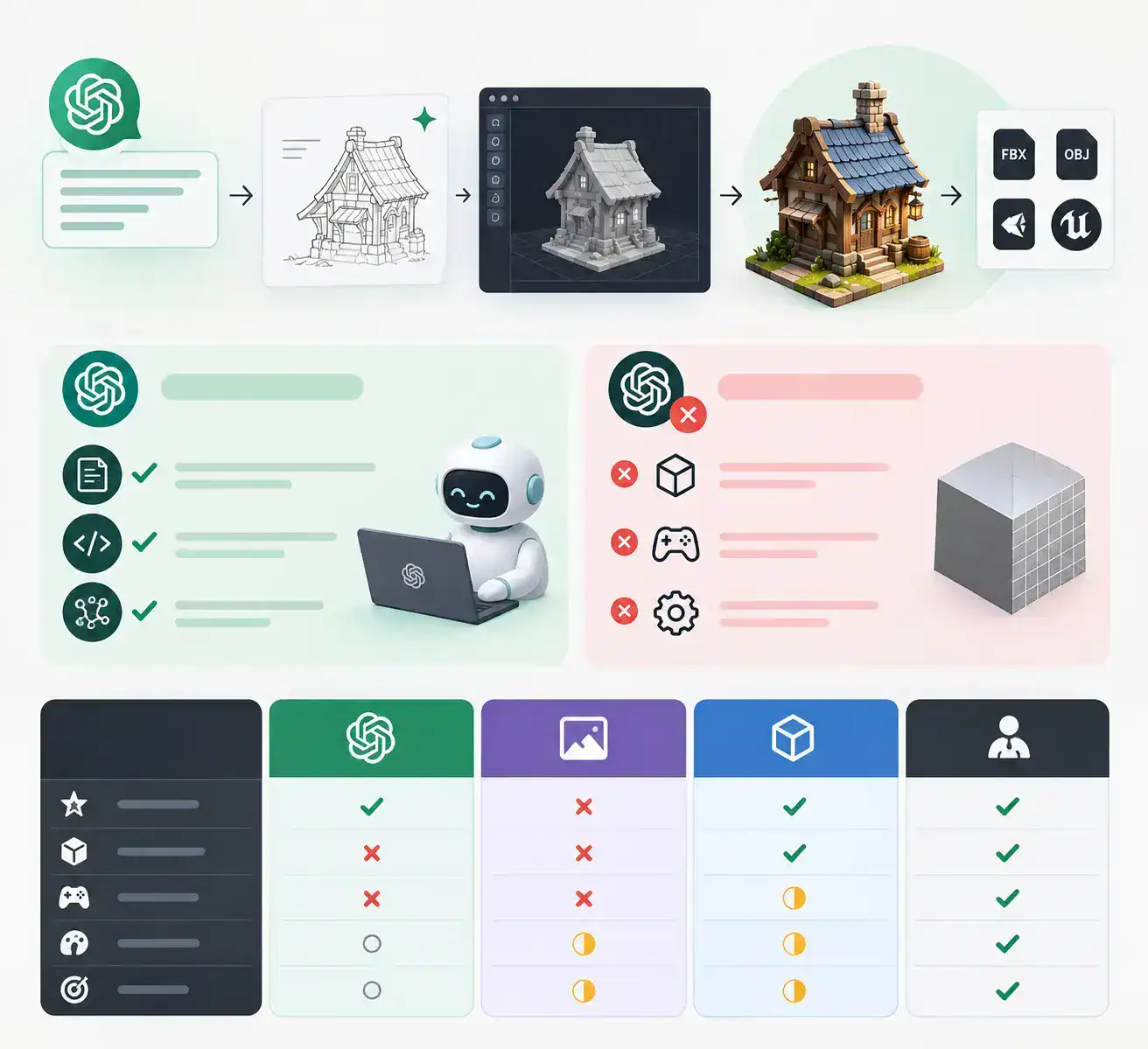
The honest answer is no, not on its own. ChatGPT is a language model. It has no 3D geometry engine sitting behind it, so it can’t hand you a finished mesh the way an art tool would. What it can do is play a genuinely useful role in a longer pipeline, one that starts with a text prompt and ends with a textured, rigged, engine-ready asset, as long as you plug in the right tools between those two points.
This guide walks through exactly what ChatGPT can and can’t do for 3D modeling, the real workflow studios use to turn a prompt into a usable game asset, the tools worth knowing (Meshy, Tripo, and others), the mistakes that waste the most time, and a straight answer on cost: when a DIY AI pipeline is genuinely enough, and when you need a professional 3D art team like Cubix’s to get an asset that will actually hold up in Unity or Unreal.
Got an app idea worth building? Let’s make it happen
Contact UsCan ChatGPT Actually Make 3D Models?
ChatGPT cannot output a binary 3D file. No .STL, no .OBJ, no .FBX. It generates tokens, not vertices, so there’s no mesh, no UV layout, and no texture sitting inside a chat response waiting to be downloaded.
What it can genuinely do is narrower, but still useful:
- Write descriptive prompts. ChatGPT is good at turning a rough idea (“a rusted sci-fi shotgun for a survival game”) into a detailed, specific prompt you can feed into an image or 3D generator.
- Write parametric code. For simple, hard-surface geometry, ChatGPT can generate OpenSCAD scripts or Python code for Blender that build a shape when you run it.
- Coordinate a connected 3D generator. By 2026, some setups let ChatGPT connect to a separate 3D generation service through a plugin-style connection, so a textured model can come back inside the same conversation. Something else is still doing the actual generating. ChatGPT is coordinating the request, not producing the geometry itself.
Here’s how that stacks up against the other tools people reach for when they hear “AI 3D modeling”:
| Capability | ChatGPT (native) | AI image generator (GPT Image, Midjourney) | Dedicated AI 3D generator (Meshy, Tripo) | Professional 3D art studio (Cubix) |
| Primary output | Text, code scripts (Python, OpenSCAD) | 2D images | Textured mesh (GLB, FBX, OBJ) | Game-ready, rigged, optimized 3D asset |
| Native 3D geometry | No | No | Yes, but often needs cleanup | Yes, production quality |
| Game-engine readiness | Requires manual coding and compiling | Requires full manual 3D remodeling | Partial; topology and rigging often need work | Built for direct engine import |
| Art direction control | Low, text only | Medium | Medium, style drifts across a batch | High, dedicated artists follow your style guide |
| Best for | Prompt writing, simple parametric props | Concept art, mood boards, pitch decks | Fast first-pass meshes, prototypes | Hero assets, full asset sets, shipping quality |
Is Game Development Actually Using AI for 3D Art? What the 2026 Data Shows
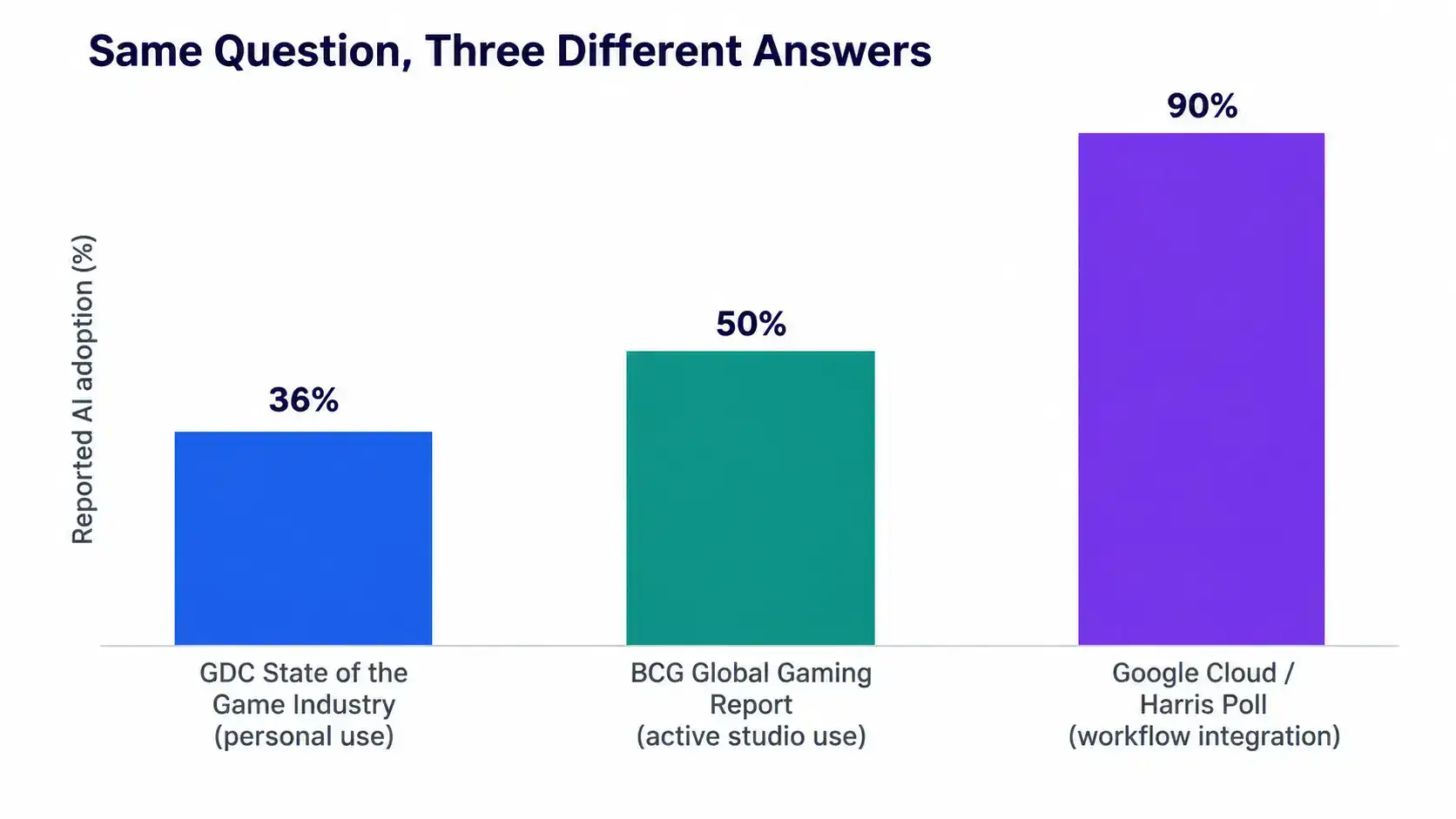
Ask three different surveys how much of the game industry uses AI, and you’ll get three different answers, because they’re measuring different things.
GDC’s 2026 State of the Game Industry survey, based on more than 2,300 professionals, found that 36% personally use generative AI tools as part of their job. The BCG 2026 Global Gaming Report puts active AI use inside studio production at around 50%. A Google Cloud and Harris Poll survey of 615 developers found that 90% now integrate AI into their workflows somewhere. None of these numbers are wrong. They’re just asking different questions, personal use versus studio-wide production versus any workflow touchpoint at all.
Separately, a16z’s Games AI Survey found that 73% of studios already use some AI tool, 88% expect it to become a standard part of their pipeline, and 54% want to train or fine-tune their own proprietary models rather than rely on generic tools long-term, largely to protect their IP and keep a consistent art style.
Where does that usage actually go? This is the part that matters most if you’re hoping AI will replace your art budget.
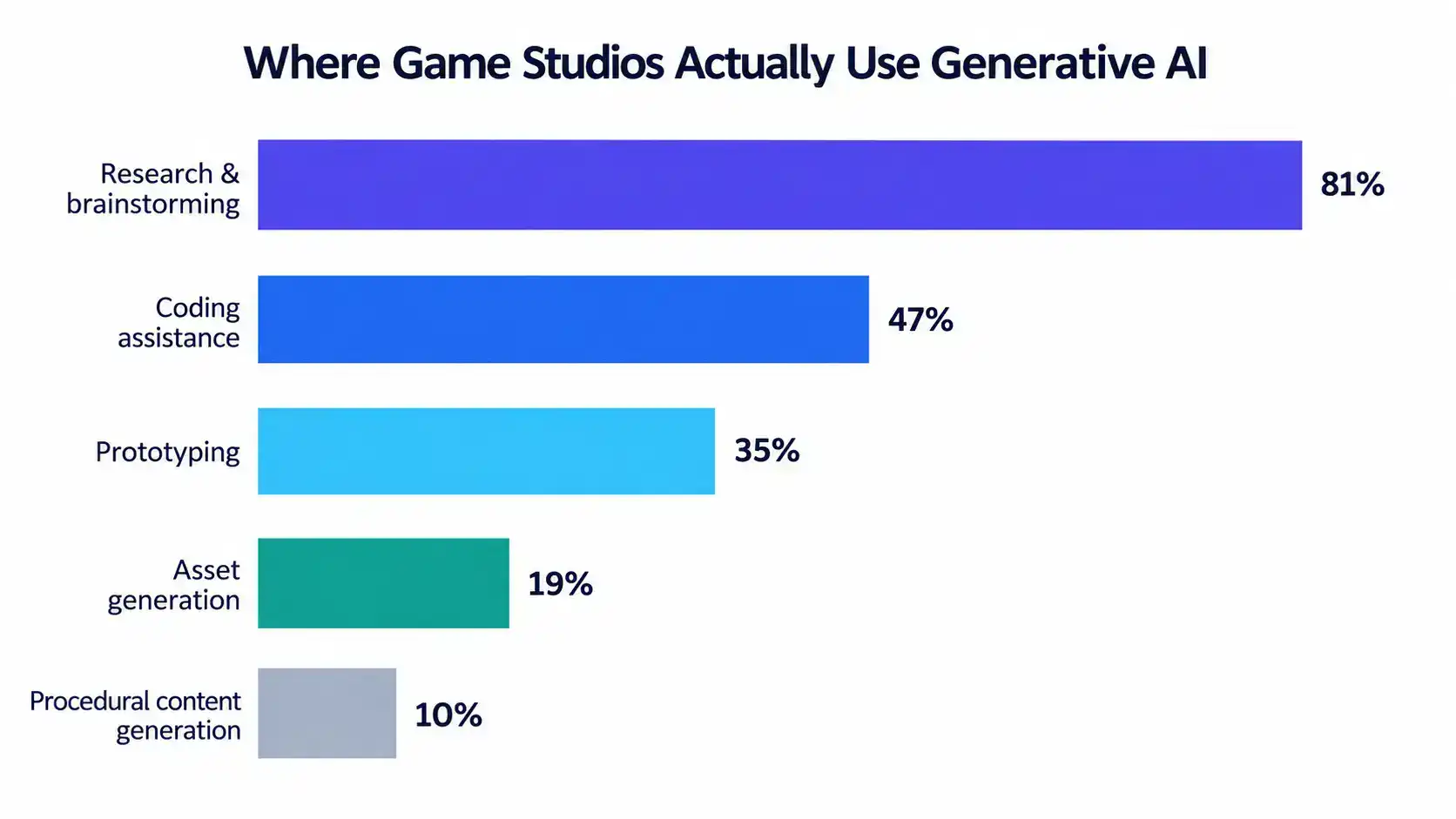
According to GDC’s breakdown, 81% of generative AI users apply it to research and brainstorming, 47% to coding assistance, and 35% to prototyping. Asset generation sits at just 19%, and procedural content generation at 10%. AI is heavily used at the start of the process, exploring ideas and speeding up scripts, and far less used to produce anything that ships as-is.
There’s an interesting counterpoint on Steam. More than 7,900 games carried official AI disclosures in 2025, and by early 2026 roughly 30.8% of new Steam releases disclosed some AI use, with visual and asset generation making up around 60% of those disclosures. Solo developers and small teams are shipping AI-generated art directly far more often than larger studios are, which tracks: they have less at stake in art-direction consistency and smaller budgets to begin with.
The Real Workflow: From ChatGPT Prompt to Game-Ready 3D Asset
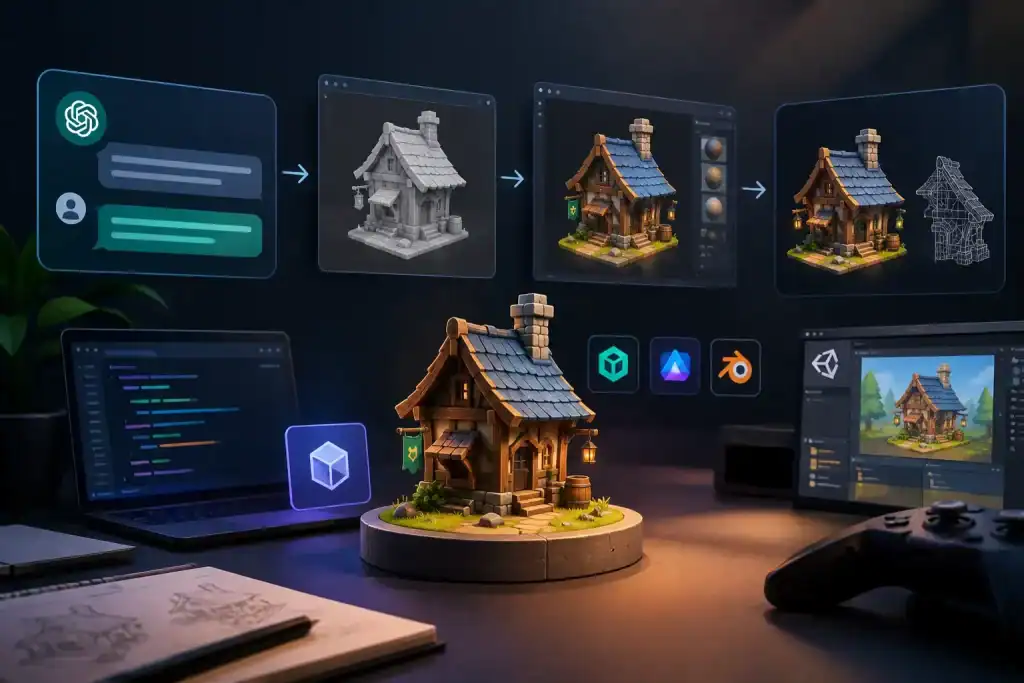
If you’re going to use ChatGPT as part of your 3D pipeline, this is the sequence that actually works, used by teams going from a prompt to something they can drop into an engine.
- Write the concept prompt in ChatGPT. Describe the object’s function, silhouette, materials, and target art style. Vague prompts like “cool sci-fi crate” produce unusable results. Specific prompts, with dimensions, material, and use case, don’t.
- Generate a clean reference image. Feed your prompt into an image generator and ask for a single object on a plain white background, evenly lit, no shadows. A busy background will corrupt the next step.
- Convert the image into a 3D mesh. Upload the reference to a dedicated AI 3D generator such as Meshy or Tripo. Tripo alone has raised more than $50 million from investors including Alibaba and Baidu Ventures, and says it now serves over 6.5 million creators and 90,000 developers, who’ve generated close to 100 million models between them. This is not a niche category anymore.
- Retopologize and set the poly budget. Raw AI output is rarely optimized for a game engine. This step brings the triangle count down to something your target platform can actually run.
- UV unwrap, texture, rig, and build LODs. This is where a model becomes an asset: clean UVs, a PBR texture pass, a working skeleton if it needs to animate, and lower-detail versions for distance rendering.
- Import, test, and get art-direction sign-off. Drop it into Unity or Unreal, check performance and draw calls, and compare it against your style guide before it goes anywhere near a build.
Steps 4 through 6 are exactly where most DIY pipelines stall out. They’re technical, repetitive, and engine-specific, which is also exactly the work a dedicated 3D art outsourcing team is built to absorb.
Meshy vs Tripo vs ChatGPT Alone: Picking the Right Tool for the Stage You’re At
| Tool | Speed | Rigging & animation | Output consistency | Best fit |
| ChatGPT alone | Instant (text/code only) | None | N/A, no mesh produced | Prompt writing, simple parametric props via code |
| Meshy | Full pipeline (text/image → model → texture → rig) in minutes | Built-in auto-rigging, hundreds of animation presets | Strong for stylized characters and props | Teams that want one platform to cover generation through rigging |
| Tripo | Base mesh in roughly 10 seconds | Supports rigging, cleaner starting topology | Strong for structure and multi-view accuracy | Technical artists who want a cleaner base to build on |
| Professional studio (Cubix) | Scoped to project timeline | Full custom rigging to your spec | Fully art-directed and consistent across the whole asset set | Hero assets, full games, anything shipping to players |
Neither Meshy nor Tripo “wins” outright. Meshy tends to be faster to a finished-looking asset with animation baked in. Tripo tends to hand you cleaner geometry that’s easier to optimize later. Both are worth testing against the same prompt before you commit a pipeline to one of them, and both still expect a human to check the output before it goes anywhere near a shipping build.
How to Prompt ChatGPT (and AI 3D Tools) for Better Results
- Change one variable at a time. Adjust color, material, or shape separately so you can tell what actually moved the result.
- Demand a clean, shadowless background. Every extra shadow or prop in the reference image is something the 3D generator will try to model.
- Use code only for simple, hard-surface shapes. A bracket, a crate, or a threaded cap works well as an OpenSCAD script. A character or creature does not.
- Put all dimensional variables at the top of any script. This makes it easy to adjust scale or proportions later without regenerating from scratch.
- State your engine and poly budget up front. Tell the tool (or write it into your own prompt) whether this is a mobile prop or a console hero character before you generate anything.
- Ask for multi-angle turnarounds. Front, side, and back views generated together keep the model consistent from every angle.
- Prompt for function over decoration. AI tools tend to add ornamental detail nobody asked for. Explicitly ask for clean, minimal geometry.
- Plan for retopology before you generate your “final” pass. Know that whatever comes out will get reworked, so don’t over-invest credits chasing a perfect first result.
Common Mistakes Teams Make with AI-Generated 3D Assets
Mistake 1: Expecting a direct mesh export
Typing “give me an STL of a phone case” into ChatGPT and expecting a file back is the single most common misunderstanding. ChatGPT generates tokens, not geometry. Pair it with a 3D generator, or ask it for buildable code instead.
Mistake 2: Ignoring the poly and draw-call budget
A gorgeous AI render can still be an unusable asset if nobody checked the triangle count against the target platform. A mobile scene that needs to stay under roughly 50,000 total polygons has no room for a single 40,000-triangle prop.
Mistake 3: Feeding busy scenes into image-to-3D tools
If your reference image has a background, a shadow, or a second object in frame, the 3D generator will often fuse it into the primary mesh. Isolate the object first.
Mistake 4: Skipping retopology and rigging prep
Rushing a raw AI mesh straight into a scene without cleaning up the topology is how teams end up with characters that deform badly the first time they’re animated.
Mistake 5: Assuming the AI understands materials
A shiny render doesn’t mean the model understands tensile strength, flex, or how a material actually behaves under your engine’s shader. Use AI for the shape, and a human for anything that needs to function correctly.
Mistake 6: Using AI output directly as a hero asset without art-direction review
One AI-generated character might look fine in isolation. Twenty of them, generated across different sessions, rarely hold a consistent style. Anything a player will look at closely needs a pass from someone accountable for the whole game’s art direction.
Is Your AI-Generated Model Actually Game-Ready?
Before anything ships, run it through a quick technical check. Poly budgets vary a lot by platform, and this is usually the first thing an AI-generated model gets wrong.
| Platform tier | Typical poly budget | Texture resolution | LODs typically used |
| Mobile / AR prop | 100–2,000 triangles | 512×512–1024×1024 | 1–2 |
| Mobile hero character | 1,500–5,000 triangles | 1024×1024 | 2 |
| Console/PC background prop | 5,000–10,000 triangles | 1024×1024–2048×2048 | 2–3 |
| Console/PC hero character | 10,000–40,000 triangles | Up to six 2048×2048 maps | 3–7 |
Beyond the poly count, check for non-overlapping UVs, correct normals, a rig that matches your existing animation set, and textures that fit inside your memory budget. None of this is visible in a quick render, which is exactly why it gets missed.
What Does It Actually Cost? DIY AI vs Freelance vs a Dedicated 3D Art Team
| Asset type | Complexity | Typical cost range |
| 3D character (rigged), mobile-optimized | Mid-complexity | $1,500 – $4,000 |
| 3D character (rigged), PC/console quality | High detail | $4,000 – $12,000 |
| 3D environment set | Modular | $3,000 – $10,000 |
| UI kit (full set) | Mobile game | $2,000 – $6,000 |
An AI-assisted DIY pass can cost as little as $20 to $100 in generation credits, but that number hides the real cost: your own hours spent on retopology, texturing, rigging, and fixing whatever the AI got wrong. Freelance and outsourced production adds 20-30% on top of the raw asset cost for revisions, engine integration, and project management, according to industry pricing guides, and that’s true whether you hire independently or go through a studio.
Where this actually nets out depends on volume and consistency needs. For a single throwaway prototype, the AI-only route is genuinely the cheapest option available. For a full game with dozens or hundreds of assets that all need to look like they belong in the same world, a dedicated team, whether that’s a full outsourced pipeline or hiring dedicated 3D artists at roughly $25 to $150 an hour to slot into your existing workflow, tends to cost less overall than the hours lost re-doing AI output that didn’t hold up.
Where Cubix Fits In
ChatGPT and tools like Meshy and Tripo are genuinely good at the first mile of 3D art: fast concepts, pitch decks, early prototypes, and testing whether an idea is even worth building. That’s real value, and there’s no reason to avoid it.
The last mile is a different problem. Game-ready topology, a consistent art style held across hundreds of assets, rigs that match your animation pipeline, and optimization tuned to your specific mix of platforms, that work is still done by people who do it every day, not by a single AI generation pass.
That’s the gap Cubix’s game art team is built to close. With 18+ years in game development and 350+ artists, designers, and developers who’ve shipped 250+ games, Cubix runs a full 3D art outsourcing pipeline covering modeling, texturing, rigging, animation, and optimization, taking a concept (AI-assisted or otherwise) all the way to something that imports cleanly into your engine. If you already have a pipeline and just need more hands, you can hire dedicated 3D artists who slot directly into your team.
If you’re still at the idea stage, Cubix’s concept art team can take your AI-generated references and turn them into a real, approved art direction before a single polygon gets modeled. And for teams that want the whole build handled end to end, from 3D game development through launch, that’s covered too.
The teams getting the most out of AI right now aren’t choosing between ChatGPT and a professional studio. They’re using AI to move fast at the start, and a real art team to make sure what ships actually looks and performs the way it’s supposed to.
Ready to Turn Your AI Concepts Into a Shippable Game?
If you’ve got AI-generated concepts sitting in a folder and you’re not sure what it’ll take to turn them into game-ready assets, that’s exactly the conversation Cubix’s game development service has every week. Request a consultation and get a straight answer on scope, timeline, and cost, before you spend another AI credit guessing.
From app idea to launch, our experts are here to help
Contact UsFrequently Asked Questions
1. Can ChatGPT create STL files?
No. ChatGPT cannot generate or export binary STL, OBJ, or FBX files directly. It can write code, such as an OpenSCAD script, that you copy into a separate compiler to produce a 3D file yourself. For anything beyond simple parametric shapes, pairing ChatGPT’s prompt-writing ability with a dedicated AI 3D generator is the more practical route.
2. Can I use ChatGPT to make 3D models for Unity or Unreal directly?
Not directly. ChatGPT can write C# scripts for Unity or Python scripts for Blender that help you build or manipulate geometry, and it can draft prompts for image-to-3D tools. The actual mesh still needs to come from a 3D generator or a human artist, then get imported, optimized, and tested inside the engine itself.
3. Are AI-generated 3D game assets good enough to ship?
It depends heavily on the asset’s role. Background props, early prototypes, and placeholder assets are often fine straight out of a tool like Meshy or Tripo. Hero characters, anything a player will see up close, or any asset that needs to match a consistent art style across a whole game, typically needs cleanup, retopology, and rigging work from a professional artist before it’s ready.
4. What’s the best AI tool for 3D game assets in 2026?
There isn’t a single winner. Meshy tends to offer the most complete pipeline, generation through rigging and animation, in one platform, which suits teams that want speed. Tripo tends to produce cleaner starting topology that’s easier for technical artists to optimize further. Testing both against the same prompt on your actual asset type is the fastest way to know which fits your workflow.
5. How much does professional 3D game art cost compared to AI tools?
A single AI-generated asset can cost as little as $20 to $100 in tool credits, though that excludes the time spent cleaning it up. A professionally outsourced, rigged 3D character typically runs $1,500 to $4,000 for mobile-quality work and $4,000 to $12,000 for PC or console quality, while hiring a dedicated 3D artist through a studio like Cubix runs roughly $25 to $150 an hour. For a handful of assets, AI is cheaper. For a full game that needs consistent, shippable art, professional production usually costs less overall once you account for revision time.