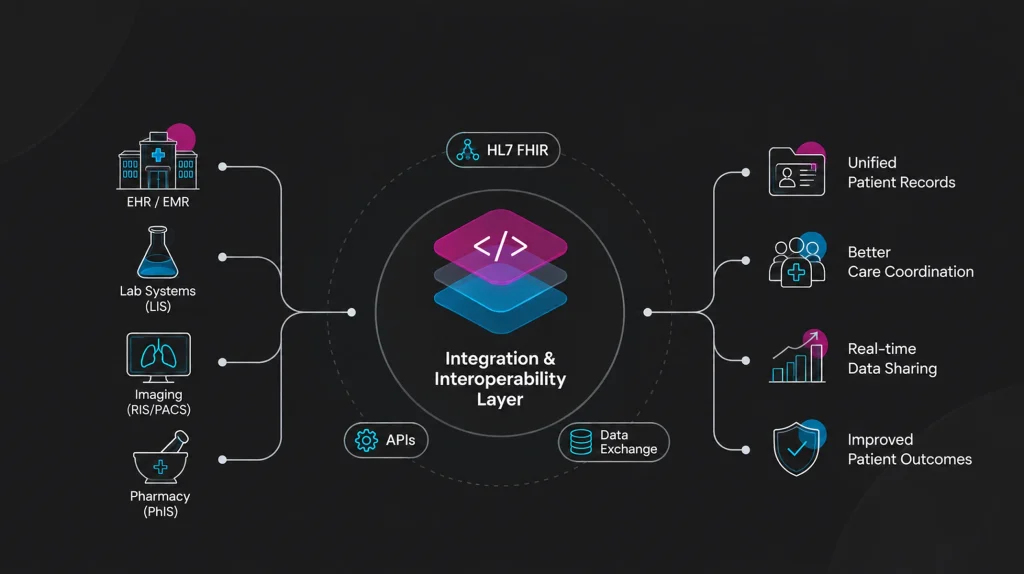
A hospital may use an EHR for patient records, a laboratory system for test results, a separate platform for imaging, and another application for billing. If these systems cannot exchange information reliably, staff must retrieve records manually, enter the same data more than once, or work with incomplete patient information.
Healthcare software integration connects these applications so they can exchange data and coordinate clinical and administrative workflows. Interoperability goes further: it ensures that connected systems can interpret and use the information they receive.
The gap between data access and practical use remains significant. According to an ASTP/ONC analysis of U.S. hospitals, 71% routinely had access to necessary clinical information from outside providers, but only 42% reported that clinicians often used that information when treating patients. Making data available does not automatically make it useful. Systems must exchange it in a format, context, and workflow that clinicians can rely on.
This guide explains how healthcare software integration works, which systems and standards are involved, how integration architecture is designed, and what organizations should consider when implementing and maintaining reliable data exchange.
Key Takeaways
- Healthcare software integration connects EHRs, laboratory systems, pharmacies, billing platforms, patient portals, and other applications.
- Interoperability requires more than data transfer. Connected systems must interpret and use exchanged information consistently.
- HL7 v2, FHIR, C-CDA, DICOM, X12, and NCPDP support different healthcare data exchange requirements.
- APIs, middleware, interface engines, event-driven architecture, and batch processing serve different integration needs.
- Reliable integrations depend on data mapping, patient identity matching, validation, access controls, and error monitoring.
- HIPAA safeguards apply to relevant ePHI handled by connected systems. Using an integration standard does not automatically make a solution compliant.
What Is Healthcare Software Integration?
Healthcare software integration is the process of connecting two or more healthcare applications, platforms, or data sources so they can exchange information and support coordinated workflows.
For example, a physician creates a blood test order in an electronic health record (EHR). The order moves to a laboratory information system (LIS), which manages the test. Once the laboratory processes the specimen, the LIS sends the result back to the EHR for clinical review.
A typical integration involves five components:
- Source system: The application where information originates, such as an EHR or pharmacy platform.
- Destination system: The application that receives and uses the information.
- Integration interface: The connection between systems, such as an API, HL7 interface, or middleware connector.
- Data transformation: The process of converting information into a structure or format the receiving system supports.
- Validation and routing: Checks that confirm the data is usable and direct it to the correct destination.
An integration can be one-way or bidirectional. A one-way interface might send patient demographics from an EHR to a billing application. A bidirectional integration might synchronize appointment updates between a patient portal and a practice management system.
The direction of exchange should reflect data ownership. If the EHR owns clinical records and the billing platform owns payment transactions, the integration needs rules that prevent one application from unintentionally overwriting the other’s authoritative information.
What Is the Difference Between Healthcare Integration and Interoperability?
Healthcare integration establishes the technical connection between applications. Healthcare interoperability means those applications can exchange information and interpret it consistently enough to use it.
| Healthcare Software Integration | Healthcare Interoperability |
| Connects applications and systems | Enables meaningful information exchange between connected systems |
| Focuses on interfaces, data transfer, and routing | Focuses on data structure, meaning, and use |
| May rely on APIs, HL7 messages, or middleware | Requires compatible standards, terminology, and workflows |
| Can connect two specific applications | Can support exchange across different organizations and platforms |
Consider two systems that successfully transfer a laboratory result. If one records a value in milligrams per deciliter and the other interprets it using a different unit or reference range, the connection has worked, but the information may not be usable without additional mapping.
That is the difference between moving data and making it interoperable.
What Are the Main Layers of Healthcare Interoperability?
Healthcare interoperability involves several related capabilities:
- Foundational interoperability: Systems can establish a connection and exchange data.
- Structural interoperability: Exchanged information follows a recognized format and structure, allowing the receiving system to identify its fields.
- Semantic interoperability: Both systems interpret the information consistently, including clinical codes, units, and terminology.
- Organizational interoperability: The exchange fits the participating organizations’ policies, responsibilities, and workflows.
These layers build on one another. A system may receive a correctly formatted message but still fail to interpret a diagnosis or use the information in the intended clinical workflow.
Why Do Healthcare Organizations Need Software Integration?
Healthcare organizations need software integration to reduce information silos and coordinate work across clinical and administrative applications. Without reliable exchange, staff may retrieve records from separate systems, enter the same information multiple times, or reconcile conflicting data.
The main benefits include:
- More complete patient information: Connecting EHRs, laboratories, imaging systems, and other applications helps authorized clinicians access relevant information from different care settings.
- Better clinical coordination: Lab results, medication information, imaging reports, and encounter details can reach the systems used by the people responsible for care.
- Less duplicate data entry: Staff do not have to manually reproduce the same information across disconnected applications.
- Connected revenue cycle workflows: Clinical documentation and encounter data can support charge capture, claims preparation, eligibility checks, and billing.
- Improved patient access: Patient portals and mobile applications can retrieve authorized health information and submit supported patient-reported data.
- More useful reporting: Data from different systems can be consolidated for analytics, quality reporting, and population health analysis.
Clinical integration connects systems involved in diagnosis and treatment. Administrative integration connects registration, scheduling, insurance, claims, and billing. Many healthcare organizations need both.
Which Healthcare Systems Need to Be Integrated?
The systems involved depend on an organization’s services, existing technology, and data-sharing requirements. A hospital may need dozens of interfaces, while a small practice may only need connections between its EHR, laboratory provider, pharmacy network, and billing application.
| Healthcare System | Information Exchanged | Common Integration Use Case |
| Electronic Health Records (EHR) | Patient demographics, diagnoses, medications, encounters, and clinical notes | Sharing patient records across applications |
| Electronic Medical Records (EMR) | Clinical notes, treatment history, and patient records | Connecting practice software with other clinical tools |
| Laboratory Information Systems (LIS) | Lab orders, specimen details, and test results | Sending orders and returning diagnostic results |
| Radiology Information Systems (RIS) | Imaging orders, scheduling, and reports | Coordinating radiology workflows |
| Picture Archiving and Communication Systems (PACS) | Medical images and related metadata | Making diagnostic images accessible to authorized systems |
| Practice Management Systems (PMS) | Appointments, registration, and billing information | Synchronizing administrative workflows |
| Revenue Cycle Management (RCM) systems | Charges, claims, payments, and denials | Connecting clinical and financial records |
| Pharmacy systems | Prescriptions, medication history, and refill information | Transmitting prescriptions and medication updates |
| Telehealth platforms | Visit details, encounter information, and clinical notes | Updating patient records after virtual consultations |
| Patient portals and mobile apps | Appointments, patient-reported information, and health records | Giving patients authorized access to health information |
Healthcare environments may also include clinical decision support systems, medical device platforms, remote patient monitoring applications, and health information exchanges. The different types of software used in healthcare article provides more context on the systems organizations may need to connect.
Common Healthcare Software Integration Examples
- EHR and laboratory system integration: A physician creates a lab order in the EHR. The LIS receives it and associates it with the appropriate patient and specimen. After testing, the LIS sends the result to the EHR for clinical review.
- EHR and imaging system integration: A clinician orders an X-ray, MRI, or CT scan. The imaging workflow receives the order, while PACS stores the study. The EHR can display the report and provide access to the relevant images through supported interfaces.
- EHR and pharmacy integration: A prescriber sends an electronic prescription through an authorized e-prescribing workflow. The pharmacy system receives it and can return supported status or medication-related information.
- EHR and billing integration: Clinical and encounter information moves into billing or revenue cycle systems. The receiving application uses relevant data for charge capture, claim preparation, and payment workflows.
- Patient app and EHR integration: A patient portal retrieves authorized information such as appointments, medication lists, and clinical results. Depending on the application and permissions, patients may also submit questionnaires or other health information for the care team.
Not every integration should allow both systems to update every field. Each project needs clear data ownership rules to prevent conflicting records.
Which Standards Make Healthcare Software Integration Possible?

Healthcare integration standards define how information is structured, identified, transmitted, and interpreted. Different standards serve different purposes, so an organization may use several within the same architecture.
| Standard | Main Purpose | Common Use |
| HL7 v2 | Messaging between healthcare applications | Patient admissions, lab orders, results, and operational events |
| HL7 FHIR | Resource-based healthcare data exchange | APIs, patient applications, and clinical data access |
| C-CDA | Structured clinical documents | Continuity-of-care and clinical summary exchange |
| DICOM | Medical imaging data and communication | Radiology, PACS, and imaging workflows |
| X12 | Electronic administrative transactions | Insurance eligibility, claims, and remittance advice |
| NCPDP | Pharmacy-related electronic transactions | E-prescribing and medication-related exchange |
| LOINC | Standardized identifiers for observations and tests | Laboratory results and clinical measurements |
| SNOMED CT | Clinical terminology | Diagnoses, findings, procedures, and clinical concepts |
| RxNorm | Standardized medication terminology | Medication identification and exchange |
These standards are not interchangeable. HL7 v2 and FHIR support different exchange approaches, DICOM addresses medical imaging, and X12 supports administrative transactions. Terminology standards such as LOINC and SNOMED CT help preserve the meaning of clinical information.
How Do HL7, FHIR, and Other Healthcare Standards Work Together?
A healthcare integration may use several standards within one workflow.
For example, a laboratory system might send a result through an HL7 v2 message. Another application may expose the same information through a FHIR API. LOINC can identify the laboratory observation, while UCUM units can represent its measurement units. The receiving application still needs to interpret the values, patient identifiers, timestamps, and clinical context correctly.
FHIR is particularly relevant to modern application integration because it defines modular data resources and exchange mechanisms based on established web technologies. The HL7 FHIR specification describes resources, RESTful interactions, terminology, security, and implementation requirements.
FHIR does not make every healthcare system automatically compatible. Implementations can differ in supported resources, profiles, terminology bindings, authorization rules, and API behavior. Developers must verify what each endpoint actually supports.
Internal link: Add the dedicated article on [the differences between HL7 and FHIR] once its final URL is available.
What Are USCDI, US Core, and TEFCA?
U.S. healthcare interoperability also relies on initiatives and frameworks that help standardize data exchange across organizations.
- United States Core Data for Interoperability (USCDI): Defines a standardized set of health data classes and elements for interoperable exchange.
- US Core: Provides FHIR implementation guidance and profiles that specify how certain U.S. health data should be represented and exchanged.
- Trusted Exchange Framework and Common Agreement (TEFCA): Establishes a framework for nationwide health information exchange through participating networks and organizations.
These initiatives have different roles. USCDI identifies data elements, US Core guides their technical representation in FHIR implementations, and TEFCA provides a framework for broader information exchange.
The ASTP/ONC USCDI resource explains the data classes and elements included in the U.S. interoperability framework.
How Does Healthcare Software Integration Work?
A healthcare integration receives information from a source application, processes it, and delivers it to a destination system in a format that the system can use. Most integrations follow six steps, although the exact workflow depends on the interface and data being exchanged.
Step 1: Identify the Source and Destination Systems
The integration team identifies which applications need to communicate and what information must move between them.
This includes defining:
- Which system creates or owns each data element.
- Which application needs to receive the information.
- Whether the exchange is one-way or bidirectional.
- Which events should trigger data exchange.
- Whether information must move in real time, near real time, or in scheduled batches.
For example, an EHR may be the source of a laboratory order, while the LIS owns the resulting test data. The integration should preserve that distinction.
Step 2: Choose the Integration Interface
The next step is selecting a connection method supported by both systems.
Common options include:
- FHIR or REST APIs: Allow applications to request, create, update, or search supported healthcare resources.
- HL7 v2 interfaces: Exchange structured messages for events such as patient admissions, orders, and results.
- Vendor-specific APIs: Provide access to functionality or data exposed through a particular healthcare platform.
- Middleware connectors: Link applications that use different protocols or data structures.
- Secure file exchange: Supports workflows where scheduled file transfers are appropriate.
The choice depends on the source system’s capabilities, vendor restrictions, data requirements, and expected exchange frequency. An organization cannot assume that a system supports every standard simply because its vendor describes it as interoperable.
Step 3: Map and Transform Healthcare Data
Connected systems may represent the same information differently. Data mapping defines how a field or value in one application corresponds to the equivalent information in another.
A laboratory result, for example, may contain:
- Patient and order identifiers.
- Test name and standardized code.
- Result value and measurement unit.
- Reference range.
- Collection and result timestamps.
- Result status.
The integration must preserve the relationships between these fields. Sending a value without its unit or clinical context can make the result misleading.
Data transformation may involve converting formats, mapping local codes to standard terminology, normalizing dates, and handling missing or conflicting values. The rules should be documented and tested rather than buried in custom code.
Step 4: Match Patient Records and Validate Information
Before an incoming record is attached to a patient chart, the receiving system needs to establish which patient it belongs to.
Patient matching may use medical record numbers, assigning organization identifiers, demographic attributes, and other available information. The process should account for duplicate records, incomplete demographics, and conflicting identifiers.
Validation checks should confirm that:
- Required fields are present.
- Identifiers follow expected formats.
- Dates and values are valid.
- Codes belong to supported terminology sets.
- The message or resource matches the expected structure.
- The data is associated with the correct patient and encounter.
If the system cannot establish a sufficiently reliable match, it should route the record for review rather than silently attaching it to a potentially incorrect chart.
Step 5: Secure and Transmit the Data
The integration layer must verify that the sending application is authorized to exchange the information and that the receiving application is permitted to access it.
Depending on the architecture, this may involve OAuth 2.0, signed tokens, mutual TLS, API scopes, service accounts, or other authentication and authorization controls. The connection should also protect information during transmission.
The specific controls depend on the systems, data, and applicable security requirements. A successful API response does not prove that the exchange was authorized or that the data was handled appropriately.
Step 6: Monitor the Integration and Handle Errors
Data exchange needs monitoring after deployment. A system may be reachable while individual messages still fail because of invalid fields, rejected codes, expired credentials, or downstream application errors.
A production integration should account for:
- Failed messages and API requests.
- Retry policies for temporary failures.
- Duplicate message prevention.
- Error queues and alerts.
- Message acknowledgments and delivery status.
- Data reconciliation between systems.
- Logs for troubleshooting and audit purposes.
- API and interface version changes.
Retries need careful handling. If a request succeeds but the acknowledgment is lost, blindly resending it may create duplicate records. Idempotency controls and message identifiers help prevent that outcome.
What Are the Main Types of Healthcare Software Integration?
Healthcare systems can connect through several architectural approaches. The right method depends on how many applications need to communicate, how quickly information must move, and how much transformation or routing is required.
| Integration method | How it works | Best suited for | Main consideration |
| Point-to-point integration | Two applications connect directly | A small number of systems with stable requirements | Connections become harder to manage as systems grow |
| API-based integration | Applications exchange data through defined APIs | Modern applications and vendor-supported interfaces | API availability, permissions, rate limits, and versioning |
| Middleware integration | An intermediary layer routes and transforms data | Multiple applications with different formats and protocols | Requires configuration and maintenance |
| Interface engine integration | A healthcare-focused engine processes and routes messages | Environments with multiple HL7-based interfaces | Message mapping and engine management can become complex |
| Event-driven integration | Systems publish and consume events when data changes | Workflows that need responsive updates | Requires reliable event delivery and duplicate handling |
| Batch integration | Data moves at scheduled intervals | Reporting, bulk synchronization, and legacy workflows | Information may not be immediately available |
| ETL/ELT pipelines | Data is extracted, loaded, and transformed for downstream use | Analytics, reporting, and data consolidation | Not usually suitable for immediate clinical workflows |
Which Healthcare Integration Method Should You Choose?
Each method solves a different problem:
- Use direct APIs when both systems expose suitable interfaces and the workflow requires application-level data exchange.
- Use middleware or an interface engine when several applications need centralized routing, transformation, and monitoring.
- Consider event-driven integration when a change in one system should trigger an action in another without waiting for a scheduled transfer.
- Use batch processing when periodic updates are acceptable, such as nightly data synchronization.
- Use ETL or ELT when the objective is to consolidate data for analytics, reporting, or a data warehouse.
- Keep point-to-point connections for a limited number of stable integrations where an additional architectural layer would not justify its cost.
A hospital connecting multiple laboratory, radiology, and registration systems may benefit from a centralized interface engine. A patient-facing application retrieving data from an EHR may use the vendor’s FHIR API instead.
For organizations evaluating custom integration work, Cubix system integration services cover connections between healthcare systems, including EHR, billing, and scheduling platforms.
What Does a Healthcare Software Integration Architecture Look Like?
A healthcare integration architecture defines how applications connect, how information moves between them, and which components handle security, transformation, routing, and monitoring.
A typical architecture may include these components:
| Architecture Component | Responsibility |
| Source and destination applications | Generate, send, receive, and use healthcare data |
| API gateway | Manages API access, routing, and traffic policies |
| Interface engine or middleware | Connects systems and handles message transformation and routing |
| FHIR server or data exchange layer | Exposes or manages healthcare data through supported FHIR interfaces |
| Mapping and terminology services | Align data fields and clinical codes |
| Identity matching service | Helps associate incoming information with the correct patient |
| Authentication and authorization layer | Controls which users and systems can access data |
| Monitoring and logging | Tracks message delivery, errors, and system activity |
These components do not have to exist as separate products. Some may be capabilities within an integration platform, EHR, cloud service, or custom application.
Direct Integration vs. Middleware-Based Architecture
A direct integration connects one application to another without a centralized intermediary. It can work when only a few systems need to exchange information and their interfaces are stable.
Middleware-based architecture introduces a shared layer between applications. Instead of maintaining a separate connection for every system pair, applications can connect through a central integration service that handles routing, transformation, and monitoring.
| Direct Integration | Middleware-Based Integration |
| Fewer components for simple connections | Centralized routing and transformation |
| Straightforward for two systems | Better suited to multiple connected systems |
| Each connection may require separate logic | Shared services can reduce duplicated integration logic |
| Changes may affect individual interfaces | Changes to shared components can affect several workflows |
Middleware does not remove complexity. It centralizes some of it. The integration layer still needs capacity planning, access controls, monitoring, failure handling, and version management.
A centralized data repository is another option when an organization needs to aggregate information from several systems for reporting, analytics, or broader data access. It is not a mandatory component of every operational integration.
How Do You Integrate Legacy Healthcare Systems With Modern Applications?
Legacy applications often remain essential to clinical and administrative operations. Replacing them may be expensive, disruptive, or impractical, so integration teams connect them to newer systems through adapters and intermediary services.
Common approaches include:
- Use existing HL7 v2 interfaces where available.
- Build adapters for proprietary or older application interfaces.
- Transform legacy messages into structures supported by modern applications.
- Introduce FHIR interfaces through an integration layer when the use case supports them.
- Preserve source identifiers and data provenance during transformation.
- Validate exchanged information against the original records.
- Deploy interfaces in phases and test them against real workflow scenarios.
For example, an older laboratory system may continue sending HL7 v2 messages while a newer patient application retrieves selected results through a FHIR API. The integration layer can translate between these interfaces without requiring an immediate replacement of the laboratory platform.
Converting a legacy message into a FHIR resource does not automatically resolve inconsistent codes, missing fields, or differences in clinical workflows. Those issues still need mapping, validation, and clinical review.
What Challenges Affect Healthcare Software Integration?
Healthcare integration projects often fail at the boundaries between systems. One application may use a different data structure, another may expose limited APIs, and a third may interpret clinical terminology differently.
| Integration Challenge | Why it Happens | How to Address It |
| Legacy system compatibility | Older applications use outdated interfaces or proprietary formats | Use adapters, interface engines, and phased modernization |
| Inconsistent data formats | Systems structure the same information differently | Apply mapping, transformation, and validation rules |
| Terminology mismatches | Clinical codes and descriptions may differ | Use standardized terminologies such as LOINC and SNOMED CT where appropriate |
| Patient identity mismatches | Records may have incomplete or conflicting identifiers | Apply identity matching and duplicate-resolution workflows |
| Vendor API limitations | Access, rate limits, and supported resources vary by vendor | Review documentation, test endpoints, and plan for API constraints |
| Data synchronization delays | Systems may use different update schedules | Select event-driven, near-real-time, or batch workflows |
| Failed messages and duplicate records | Network issues and retry behavior can interrupt exchanges | Use retries, idempotency, error queues, and reconciliation |
| Integration maintenance | Vendor updates and changing requirements can break connections | Monitor interfaces, manage versions, and test changes before deployment |
Terminology mismatches deserve particular attention. Two systems may use different local codes for the same laboratory test. A terminology service or mapping table can align those codes with a recognized standard, but the mapping needs clinical validation. A technically valid mapping can still be wrong if it equates concepts that are not clinically equivalent.
Patient matching is another high-impact concern. Incorrectly associating an incoming result with another patient’s chart can create clinical risk. Matching rules should account for identifier quality, duplicates, and uncertain matches rather than relying on a single demographic field.
The integration team also needs to plan for operational failures. Messages can be delayed, rejected, or processed more than once. Monitoring, reconciliation, and clear ownership of failed transactions are part of the architecture, not optional post-launch tasks.
How Do You Secure Healthcare Software Integrations and Meet HIPAA Requirements?

Healthcare integrations that create, receive, maintain, or transmit electronic protected health information (ePHI) must be included in the organization’s security and compliance program. The HIPAA Security Rule requires covered entities and business associates to implement reasonable and appropriate administrative, physical, and technical safeguards to protect ePHI.
The HHS HIPAA Security Rule explains the requirements for protecting the confidentiality, integrity, and availability of electronic health information.
For integration architecture, key safeguards include:
- Access controls: Restrict access to authorized users, applications, and services. Use role-based permissions or other appropriate access models.
- Authentication: Verify the identity of users and connected applications before granting access.
- Authorization: Limit each connection to the data and operations required for its purpose.
- Transmission security: Protect ePHI while it moves between applications and networks.
- Audit controls: Record and review relevant activity involving systems that contain or use ePHI.
- Integrity protections: Guard against improper alteration or destruction of information.
- Risk analysis: Assess threats introduced by interfaces, third-party connections, cloud services, and data flows.
- Business Associate Agreements: Establish required contractual safeguards when a vendor or integration partner qualifies as a business associate.
Encryption, access controls, audit logging, and secure API authentication should be designed into the integration rather than added after the data flow is operational.
A standard such as FHIR does not make an application HIPAA-compliant by itself. Compliance depends on the complete environment, including how access is managed, how data is protected, how risks are assessed, and how the organizations involved meet their responsibilities.
How Do You Plan and Implement a Healthcare Software Integration Project?
A healthcare software integration project should begin with workflow and data requirements, not a decision to use a particular API or platform. The engineering team needs to understand what information must move, who owns it, and how the receiving application will use it.
Step 1: Define Integration Requirements
Document the systems, users, workflows, and data elements involved. Specify whether the integration needs one-way or bidirectional exchange, how frequently data must move, and what should happen when a transaction fails.
Requirements should include:
- Source and destination applications.
- Data elements and clinical context.
- Exchange direction and frequency.
- Patient and encounter identification rules.
- Expected response times.
- Security and access requirements.
- Error handling and reconciliation needs.
Step 2: Assess Existing Systems and Vendor Capabilities
Review each system’s technical documentation and available interfaces. Confirm which standards, APIs, resources, message types, and authentication methods are supported.
Identify vendor approval processes, API access restrictions, rate limits, licensing requirements, and test environments. These constraints can affect the architecture and project schedule.
Step 3: Select the Integration Architecture
Choose the connection model based on the number of systems, data complexity, and operational requirements.
A direct API connection may be sufficient for a focused application integration. A hospital environment with multiple HL7 interfaces may need a centralized interface engine. A data warehouse project may require batch pipelines instead of real-time clinical messaging.
Many healthcare environments use a combination of these methods.
Step 4: Define Data Mapping and Validation Rules
Create a mapping specification that documents how source fields correspond to destination fields. Include terminology mappings, identifier rules, date and time handling, units, required fields, and the treatment of missing or conflicting values.
Clinical stakeholders should review mappings that affect diagnoses, medications, observations, and other clinically meaningful data.
Step 5: Develop and Test the Integration
Test each interface before connecting it to production workflows. Testing should cover:
- Connectivity and authentication.
- Data structure and field mapping.
- Terminology and code validation.
- Patient and encounter matching.
- Duplicate and out-of-order messages.
- Failed requests and retry behavior.
- Access permissions and audit logging.
- End-to-end workflow outcomes.
Testing should include realistic edge cases, not only successful transactions with complete data.
Step 6: Deploy in Phases
A phased rollout limits the impact of unexpected problems. Start with a controlled environment or limited workflow, compare exchanged data with source records, and confirm that users can complete the intended tasks.
Define rollback procedures and operational ownership before expanding the integration to more departments or applications.
Step 7: Monitor and Maintain the Integration
After launch, track failed transactions, synchronization issues, API changes, security events, and data-quality problems. Review vendor updates and changes to supported standards or implementation guides before they affect production systems.
A structured healthcare software development process helps teams account for requirements, integration, testing, deployment, and ongoing improvement across the wider product lifecycle.
How Long Does Healthcare Software Integration Take?
There is no reliable universal timeline. A simple connection between two applications with compatible APIs is very different from a multi-system hospital integration involving legacy interfaces, clinical data mapping, and several vendor environments.
The main factors affecting delivery time include:
- Number of systems and vendors involved.
- Availability and quality of existing APIs.
- Complexity of data mapping and terminology.
- Legacy system limitations.
- Security, validation, and testing requirements.
- Number of clinical and administrative workflows.
- Vendor access and approval processes.
A realistic estimate requires a technical assessment of the systems and workflows before development begins.
When Should You Build a Custom Healthcare Integration Solution?
An existing integration platform or vendor connector may be sufficient when it supports the required systems, data, and workflows. Custom development becomes more relevant when standard connectors cannot handle the organization’s technical or operational requirements.
A custom integration solution may be appropriate when:
- Existing connectors do not support required workflows or data elements.
- Applications rely on proprietary or legacy interfaces.
- Data transformation rules are specific to the organization.
- Several applications need a shared integration layer.
- The organization needs custom access controls or workflow orchestration.
- Available integration products cannot meet the required level of control or scalability.
Should You Use an Existing Integration Platform or Build a Custom Solution?
| Consideration | Existing Integration Platform | Custom Integration Solution |
| Initial implementation | Often quicker for supported systems | Requires architecture and development work |
| Custom workflows | Limited by platform capabilities | Can be designed around specific workflows |
| Vendor compatibility | Depends on available connectors | Can support custom adapters and interfaces |
| Control over architecture | Constrained by platform capabilities | Greater control over components and data flow |
| Maintenance | Depends partly on the provider | Requires an internal or external engineering team |
| Long-term flexibility | Depends on product roadmap and extensibility | Can evolve with the organization’s technical requirements |
The decision should account for more than initial development effort. Compare licensing, vendor dependency, integration coverage, maintenance responsibilities, data ownership, and the cost of supporting future changes.
Custom development is not automatically the better option. If a supported platform already handles the required workflows reliably, building another integration layer may add unnecessary complexity.
For healthcare organizations developing a new clinic platform or extending existing practice software, custom software for healthcare clinics covers requirements to consider before choosing a development approach.
What Does Healthcare Software Integration Cost?
Integration costs depend on the number of systems, vendor access, data complexity, interface type, and testing requirements. A single API connection is not comparable to a multi-system hospital integration involving legacy applications and bidirectional clinical workflows.
The main cost drivers include:
- Number of interfaces: Each connected system may require separate configuration, mapping, and testing.
- Vendor access: Licensing, approval processes, API restrictions, and documentation can affect implementation effort.
- Data transformation: Local codes, inconsistent fields, and terminology mapping require additional engineering and validation.
- Legacy compatibility: Older systems may need adapters or an interface engine.
- Security requirements: Authentication, authorization, encryption, logging, and risk controls must be implemented and tested.
- Ongoing support: API changes, vendor updates, monitoring, and error resolution create recurring costs.
Integration work should be estimated separately within the wider project budget so organizations can understand the cost of each connection and its long-term support requirements. See the healthcare software development cost breakdown for additional budgeting considerations.
How Do You Maintain Healthcare Software Integrations After Launch?
Healthcare integrations require ongoing monitoring because vendor APIs, software versions, security requirements, and operational workflows can change after deployment.
Maintenance should cover:
- Interface monitoring: Track availability, response times, failed messages, and delayed transactions.
- API and standards updates: Review changes to vendor endpoints, supported resources, and implementation guides.
- Security maintenance: Rotate credentials, review permissions, patch dependencies, and investigate suspicious activity.
- Data reconciliation: Identify missing, duplicated, or inconsistent records after interface failures.
- Regression testing: Verify that updates do not break existing workflows.
- Documentation: Keep interface specifications, mapping rules, dependencies, and operational procedures current.
Maintenance is not limited to fixing defects. It keeps connected applications compatible and helps prevent small interface changes from disrupting clinical or administrative workflows. The healthcare software maintenance cost guide explains the recurring costs associated with support, infrastructure, security, and integration upkeep.
Conclusion
Healthcare software integration is more than connecting applications and transferring records. Reliable exchange depends on compatible interfaces, accurate data mapping, patient identity matching, secure transmission, and workflows that make information usable. An integration that moves data but loses its clinical meaning or fails to deliver it to the right patient record has not solved the underlying problem.
Healthcare organizations connecting existing platforms or developing new digital health products need an architecture that accounts for current workflows and long-term maintenance. Cubix healthcare software development services can help plan and build custom healthcare solutions around system requirements, data exchange needs, and the technical constraints of the existing environment.
Connect Your Healthcare Technology Without Disrupting Existing Workflows.
Contact Us
Frequently Asked Questions About Healthcare Software Integration
1. What Is Healthcare Software Integration?
Healthcare software integration connects applications such as EHRs, laboratory systems, pharmacies, and billing platforms so they can exchange information and support coordinated workflows.
2. What Is the Difference Between Integration and Interoperability in Healthcare?
Integration establishes the technical connection between systems. Interoperability ensures those systems can exchange and interpret information consistently enough to use it in their workflows.
3. What Are the Most Common Healthcare Integration Standards?
Common standards include HL7 v2, HL7 FHIR, C-CDA, DICOM, X12, and NCPDP. Terminologies such as LOINC, SNOMED CT, and RxNorm help standardize the meaning of exchanged data.
4. How Do EHR Systems Integrate With Other Healthcare Applications?
EHRs commonly connect through APIs, HL7 messages, vendor-specific interfaces, or middleware. The integration method depends on the EHR’s capabilities, vendor restrictions, and the data being exchanged.
5. What Is the Role of FHIR in Healthcare Software Integration?
FHIR defines standardized healthcare data resources and exchange mechanisms, commonly through RESTful APIs. It helps applications exchange structured health information, but implementation profiles, terminology mapping, and compatible workflows still matter.
6. Is Healthcare Software Integration Required for HIPAA Compliance?
HIPAA does not require every healthcare application to integrate with other systems. However, organizations must apply appropriate safeguards when integrations involve ePHI and meet their applicable HIPAA obligations.
7. How Do You Migrate Data Between Healthcare Systems?
Healthcare data migration involves extracting information from a source system, mapping and transforming it, validating its accuracy, and loading it into the destination system. Patient identity, data quality, and clinical context must be preserved.
8. How Do You Test a Healthcare Software Integration?
Testing should verify connectivity, data mapping, patient matching, authentication, authorization, message delivery, error handling, and end-to-end workflow behavior.
9. What Are the Biggest Challenges in Healthcare System Integration?
Common challenges include legacy system compatibility, inconsistent data formats, terminology mismatches, patient identity errors, vendor API limitations, security requirements, and ongoing maintenance.