Key Takeaways
- AI can cut game development timelines significantly. Our train transit simulation game was completed in 5 months instead of an estimated 10, with all milestones delivered on time.
- AI works best on repetitive, well-defined tasks. It speeds up coding, prototyping, debugging, documentation, UI development, and backend work.
- Human developers remain essential. Architecture, game design, performance optimization, code review, and quality decisions still require experienced developers.
- AI can reduce development costs. Fewer hours spent on repetitive tasks can lower costs, but savings depend on project scope, complexity, and how AI is used.
- The best results come from combining AI with human expertise. Clear requirements, reusable code, proper testing, and developer oversight help teams move faster without compromising quality.
Every studio, founder, and product manager in the games industry is asking the same question right now: does AI actually make game development faster, or is it just hype?
We wanted a real answer, not a opinion piece or a vendor claim. So instead of speculating, we measured it on a live client project.
The short version: on a complex train transit simulation game, AI-assisted game development helped us deliver in 5 months a project that would have taken around 10 months without AI. Roughly 50% of the development work, across both frontend and backend, was assisted by AI, and every milestone was delivered on time.
That is a meaningful result, but the number alone doesn’t tell you much. What matters is where the time was saved, where it wasn’t, and what a team needs to do to repeat it. In this post, the team at our game development studio walks through the project, the exact workflow we followed, what AI handled well, where humans still had to lead, and what you should expect if you plan to use AI on your own mobile game.
Build Your Mobile Game Faster with AI-Powered Development Expertise
Contact UsThe Short Answer: How AI Speeds Up Mobile Game Development
If you only have a minute, here is what we learned.
AI speeds up game development by compressing the work that is repetitive, well-defined, and easy to verify. In practice, that means:
- Boilerplate and scaffolding. Project setup, data models, standard UI components, and API endpoints that follow familiar patterns.
- Repetitive systems. Game logic that is similar across many objects or states, where one good example can be extended quickly.
- Debugging support. Reading an error, tracing likely causes, and suggesting fixes in minutes instead of hours.
- Documentation. Turning working code into clear explanations so the whole team stays aligned.
- Prototyping. Getting a playable or testable version of an idea in front of the team far sooner.
AI does not speed up the parts of game development that depend on taste and judgment: deciding what is fun, how the game should feel, how systems should be architected for the long term, or when performance is good enough for real devices.
So does AI reduce mobile game development costs? It can, mainly because fewer development hours are needed to reach the same milestones. But it does not remove the need for skilled engineers. In our experience, AI changes how developers spend their time, not whether you need them. If you’re new to the overall pipeline, our guide to the mobile game development process is a good primer before going further.
As a mobile game development team, we’ve found that the biggest gains come from using AI deliberately at specific points in the workflow rather than everywhere at once. The rest of this post shows how.
The Project: A Train Transit Simulation Game
To test AI-assisted game development honestly, we needed a project that was complex enough for the results to mean something.
We were building a train transit simulation game for a client. Because of the NDA we operate under, we can’t name the client, but we can talk about the shape of the work. The game simulates a city train system, which means many interacting parts need to work together reliably:
- A simulation layer that models how trains, routes, and schedules behave over time
- A frontend that lets players visualize and interact with the transit network
- A backend that handles data, system logic, and the rules that keep the simulation consistent
- Hard milestones agreed with the client from the start
This made it a strong test case for a few reasons. Simulation games are system-heavy, which means a lot of code is spent on state, rules, and data flow rather than on a single flashy mechanic. They also have many components that depend on each other, so mistakes compound quickly. And because the client had fixed milestones, we couldn’t hide behind a flexible timeline.
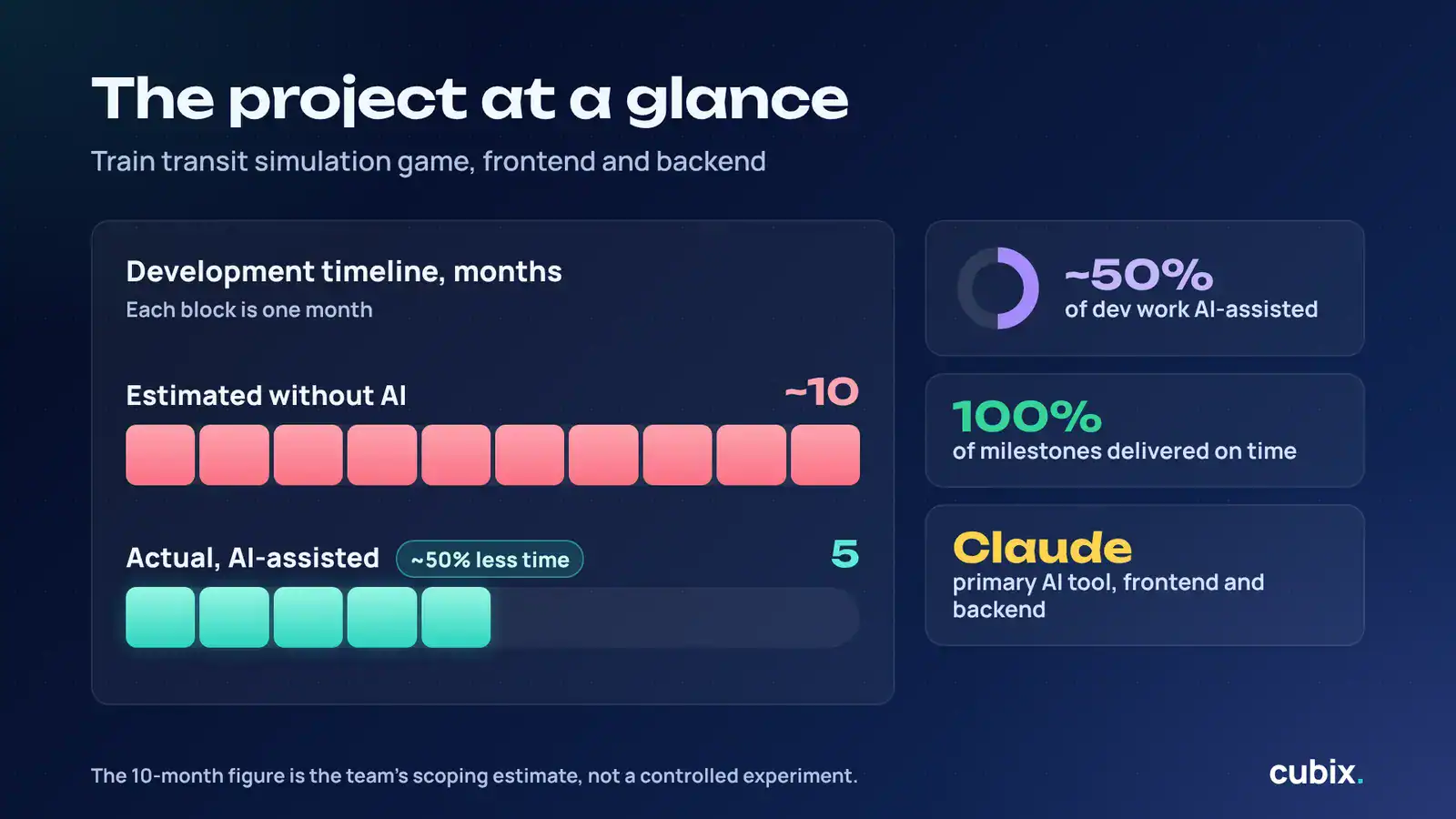
Here are the numbers at a glance:
- Actual timeline: 5 months
- Estimated timeline without AI: around 10 months
- Share of development work assisted by AI: roughly 50%
- Milestones delivered on time: all of them
- Primary AI tool: Claude, used across frontend and backend
A caveat worth stating plainly: the “10 months without AI” figure is our team’s estimate based on the scope and our experience with comparable builds, not a controlled experiment where two teams built the same game. It is still the most honest comparison available on a real client project, and it reflects how we scope work when AI isn’t part of the plan.
Our AI-Assisted Mobile Game Development Workflow, Step by Step
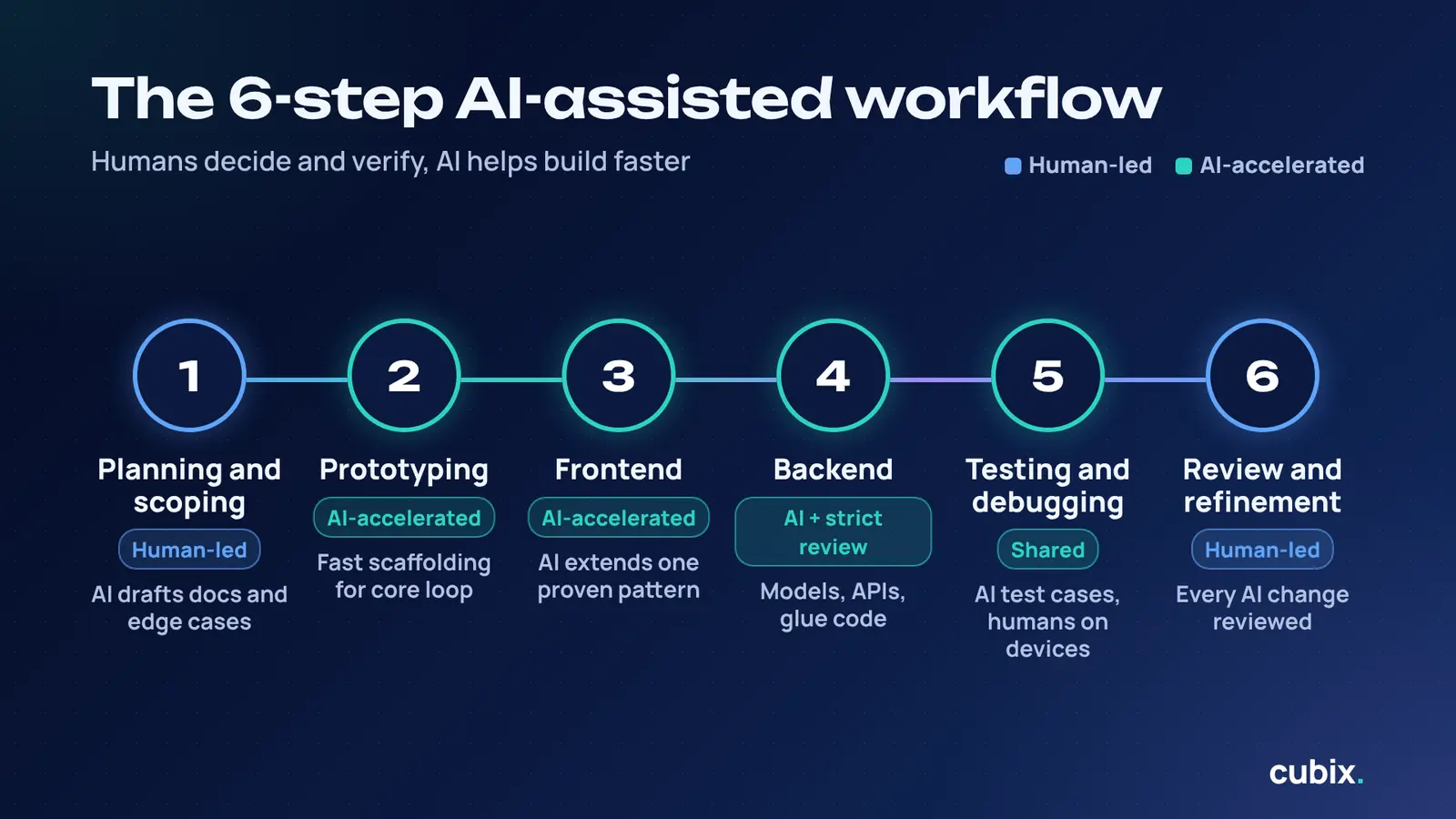
Most conversations about AI and game development stay abstract. Here is the actual workflow we followed, and where AI and humans each took the lead. If you want to compare it with a traditional pipeline, our complete guide to the game development process covers the standard stages in depth.
The overall pattern was simple: humans decided what to build and how it should be structured; AI helped build it faster; humans verified the result.
Step 1: Planning and Scoping (Human-Led)
Every successful project starts with clear requirements, and AI can’t fix unclear ones. We began the way we always do, with the client’s goals, the core simulation rules, and a milestone plan.
Where AI helped was in the supporting work around planning. We used it to break larger requirements into smaller technical tasks, to draft technical documentation, and to think through edge cases early. It acted like a fast second pair of eyes asking, “Have you considered what happens when this condition fails?”
The decisions, though, stayed with the team. Which features mattered most, what belonged in each milestone, and how to sequence the work were all human calls. AI made the planning faster to document, not smarter to decide.
Step 2: Prototyping the Core Mechanics
Mobile game prototyping with AI is where the time savings start to show up early. In a simulation, the biggest risk is usually whether the core loop works: do the systems interact the way the design intends?
Instead of spending weeks hand-building a throwaway prototype, we used AI to generate working scaffolding for the core systems quickly, then refined it. This let the team and the client see the simulation behave as early as possible, catch design problems while they were cheap to fix, and build confidence before committing to the full build.
A practical tip: treat AI-generated prototype code as disposable by default. Its job is to answer a question fast. Once you know the answer, rebuild the parts that matter with proper structure.
Step 3: Frontend Development
On the frontend, Claude assisted with the work that tends to eat the most calendar time on a project like this: interface components, data-driven visual elements, and the logic that connects what the player sees to what the simulation is doing.
The pattern that worked best was to establish a clear example first, such as one well-built component or one correctly wired screen, and then use AI to extend it across similar cases. AI is very good at following an established pattern consistently. It is much less reliable when asked to invent the pattern itself.
Our developers still made the calls on interaction design, responsiveness, and how the interface should feel on real mobile devices. Those are areas where something can be technically correct and still feel wrong.
Step 4: Backend Development
The backend of a simulation carries a lot of weight: data handling, system logic, and the rules that keep everything consistent. Here, AI helped with structured, well-defined work such as data models, API endpoints, and the glue code between services.
Because backend errors can quietly corrupt the entire simulation, we were especially careful here. AI-generated backend code went through the same review standards as anything written by hand, and in some cases stricter ones. Speed is only valuable if the foundation stays reliable.
Step 5: Testing and Debugging
Testing is one of the most underrated places to use AI. We used it to help generate test cases, to reason about failure scenarios, and to speed up debugging. Pasting in an error and the surrounding code and getting a set of plausible causes in seconds changes how quickly a developer can move through a bug list.
That said, AI can only test what it can reason about from the code and context it’s given. It doesn’t play the game the way a QA tester does. Human testing on real devices remained essential, particularly for performance and for the kind of edge cases that only show up through actual play.
Step 6: Review and Refinement
This step is non-negotiable. Every piece of AI-assisted code was reviewed by a developer who understood both the code and the project. We checked for correctness, consistency with our standards, performance implications, and maintainability.
It’s tempting to treat this as the step to skip when deadlines are tight. In our experience it’s the opposite: review is what makes it safe to move fast everywhere else.
If you want the full picture of how our studio structures delivery from start to finish, you can read more about how we approach the mobile game development process from concept to launch.
What AI Did Well, and Where Humans Still Led
This is the question we hear most often: can AI write game code, and can AI build a complete mobile game?
Here is our honest answer. AI can write a large amount of game code, and do it well, but it cannot build a complete game on its own. A finished game is more than code. It is a set of design decisions, an architecture, a performance budget, a feel, and a long list of trade-offs. AI contributes to all of these indirectly, but it doesn’t own any of them.
Where AI Excelled
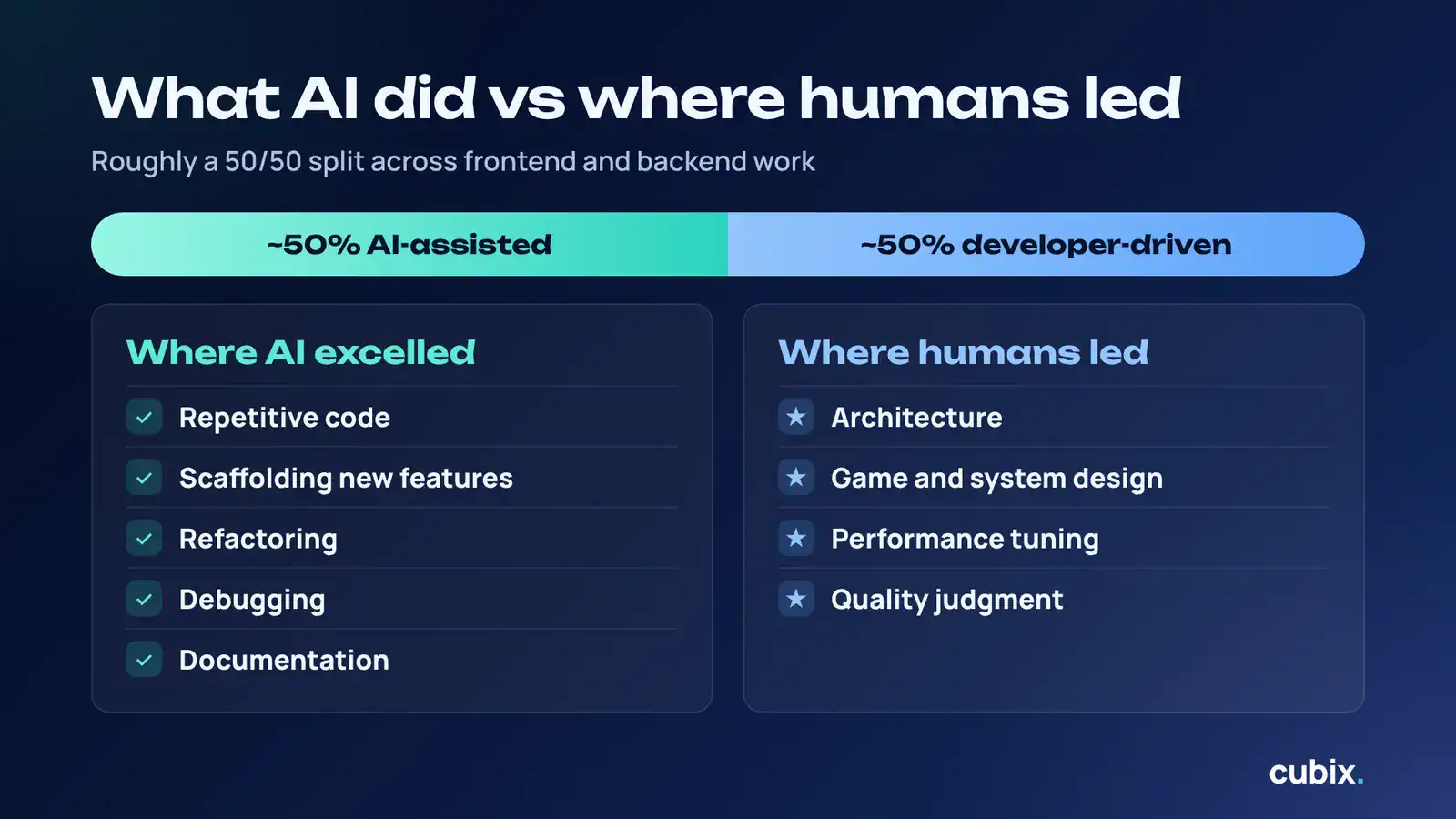
- Repetitive code. Once a pattern was established, AI could extend it across dozens of similar cases quickly and consistently.
- Scaffolding. Setting up the structure for new features, screens, and services took a fraction of the usual time.
- Refactoring. Cleaning up and reorganizing code as the project evolved was faster with AI suggesting and developers approving.
- Debugging. Narrowing down likely causes of an issue saved real hours across the project.
- Documentation. Keeping explanations and technical notes current is a task teams usually let slip. AI made it far easier to keep up.
Where Humans Led
- Architecture. Deciding how the systems fit together, and how they would scale, was a human responsibility. A poor architecture decision made early costs far more than any time AI can save later.
- Game and system design. What the simulation should model, how the player should interact with it, and what makes it engaging all came from people.
- Performance tuning. Mobile devices have real constraints. Judging whether something runs well on actual hardware requires testing and experience.
- Quality judgment. Knowing when something is “good enough” and when it isn’t is still a human skill.
Why the 50/50 Split Matters
About half of the development work was AI-assisted, and the other half was driven directly by developers. That balance wasn’t an accident. It reflects a practical truth: the half AI is good at is the half that consumes the most time, and the half it isn’t good at is the half that determines whether the project succeeds.
This is the principle behind how we approach AI game development as a studio. AI is an accelerator for skilled developers, not a substitute for them.
AI Tools for Game Development: What We Used and What to Look For
The market for AI tools for game development is crowded and changing quickly, so it helps to think in categories rather than in specific product names.
The Main Categories
- AI coding assistants. These help write, explain, debug, and refactor code. This was the most impactful category for us.
- Asset generation tools. These help create concept art, textures, audio, and other assets. They are useful for early ideas and placeholders, though final-quality assets usually still need artist involvement.
- Testing and QA tools. These help generate test cases and flag potential issues.
- Project and documentation tools. These help keep requirements, tasks, and technical notes organized.
What We Used
How to Choose the Right AI Coding Tools for Game Developers
If you’re asking which AI tools are best for mobile game development, the honest answer is that it depends on your team and your project. These are the questions we’d ask:
- How well does it handle context? Games involve many connected systems. A tool that can reason across a larger codebase is more useful than one that only handles isolated snippets.
- How reliable is the output? Look at how often suggestions work without heavy rework.
- Does it fit your workflow? The best tool is the one your developers will actually use every day.
- What are the data and security terms? This matters a lot for client work under NDA, as in our case.
- Does it support your tech stack? Check that it works well with the engine and languages you use.
Pair AI with Reusable Code
One more point that often gets overlooked: AI works best when it’s paired with solid foundations. Game development using existing code libraries, such as proven systems for common features, means AI doesn’t have to generate everything from zero. A reusable code library for game development gives AI a consistent pattern to follow, which improves the quality of what it produces and reduces the amount of review needed. Combining reusable code with AI is one of the most effective ways to move quickly without cutting corners, and it’s central to how we approach rapid mobile game development.
Timeline and Cost: What Does AI Actually Change?
How Long Does It Take to Develop a Mobile Game?
There’s no single answer, because timelines depend on scope, platform, art requirements, multiplayer features, and more. A simple casual game can be built in a few months, while a complex, system-heavy game can take many months to a year or more. For a real-world look at timelines, see how we approached building a multiplayer game in 16 weeks.
How Long Does It Take to Build a Mobile Game Using AI?
In our case, a project we estimated at around 10 months was completed in 5. That’s about a 50% reduction in calendar time, on a complex simulation, with all milestones met.
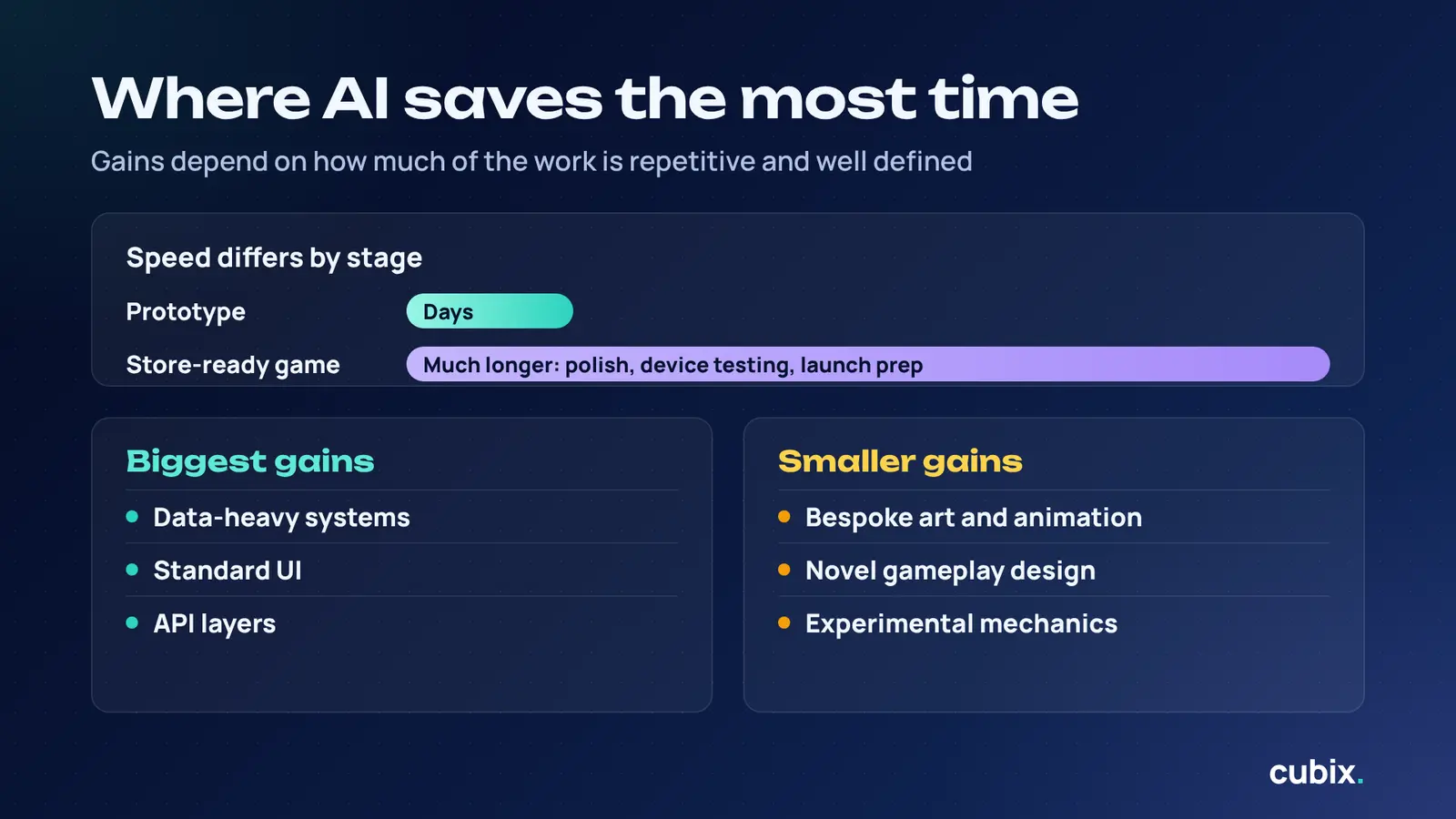
Your results will vary. The gains tend to be largest on projects with lots of repetitive or well-defined work, such as data-heavy systems, standard UI, and API layers, and smaller on projects where most of the effort goes into art, animation, or novel gameplay design.
Can You Make a Mobile Game in a Few Days?
You can make a prototype in a few days with AI assistance, and that’s genuinely powerful for testing an idea. A production-ready game that is stable, polished, tested on real devices, and ready for the app stores is a different matter. Speed in prototyping doesn’t translate into speed in every other stage, such as polish, testing, and launch preparation.
Does AI Reduce Mobile Game Development Costs?
Often, yes, but not automatically. If AI reduces the number of development hours needed to hit your milestones, the cost of those hours goes down. But you still need experienced developers to direct the AI, review its output, and make design and architecture decisions. The savings come from using skilled people more efficiently, not from replacing them.
It’s also worth remembering that a faster launch has value of its own. Reaching the market or your client’s deadline sooner can matter as much as the direct cost savings.
Lessons Learned and Best Practices
If you’re planning to use AI-assisted game development on your own project, these are the practices that made the biggest difference for us.
1. Be specific with prompts and context. The quality of AI output depends heavily on the quality of the input. Clear requirements, relevant code, and well-defined constraints lead to better results and less rework.
2. Keep humans in the review loop. Every piece of AI-generated code should be reviewed by someone who understands the project. This is what keeps speed from turning into technical debt.
3. Use AI where tasks are repeatable. The more defined and pattern-based the task, the better AI performs. Save your senior developers’ attention for the decisions that need judgment.
4. Set code standards early. Agree on structure, naming, and patterns at the start. When the AI has a consistent standard to follow, its output stays consistent too, and the codebase remains maintainable as it grows.
5. Establish a pattern, then extend it. Build one example the right way, then let AI replicate it. This is far more effective than asking AI to design the pattern from scratch.
6. Don’t skip testing. AI can introduce subtle errors that look correct at a glance. Rigorous testing, including on real devices, catches what code review alone may miss.
7. Be honest about limitations. Tell clients and stakeholders where AI is helping and where it isn’t. Trust is easier to maintain when expectations are realistic.
Is AI-Assisted Game Development Right for Your Project?
AI-assisted game development isn’t the right fit for every project, but it’s a strong one for many. It tends to deliver the most value for:
- Startups on tight timelines that need to reach the market or an investor milestone quickly
- Complex simulations and system-heavy games with lots of logic, data, and repeatable structure
- MVPs and prototypes where fast validation matters more than polish
- Teams with budget constraints that need to get more out of every development hour
It’s less transformative for projects dominated by bespoke art, highly experimental mechanics, or creative work where the main bottleneck isn’t code.
If you’re weighing this approach, the right partner matters as much as the technology. A good AI game development partner knows where AI helps, where it doesn’t, and how to keep quality high while moving fast. Our AI game development services combine experienced developers with AI-assisted workflows, and our mobile game development team can take your project from concept to launch, whether you need custom mobile game development or a faster route to an MVP.
Conclusion
So, how much faster can AI make mobile game development? On our train transit simulation game, the answer was about twice as fast: 5 months instead of an estimated 10, with roughly half of the development work AI-assisted and every milestone delivered on time.
But the more important lesson is how that speed was achieved. AI handled the repetitive, pattern-based, and easily verified work. Experienced developers handled the architecture, design, review, and quality decisions. Neither would have delivered the same result alone.
If you’re planning a mobile game and want to move faster without compromising quality, we’d love to talk. Get in touch with our game development studio to discuss how AI-assisted game development could shorten your timeline and get your game into players’ hands sooner.
Turn Your Game Idea Into Reality, Faster with AI
Contact UsFrequently Asked Questions
1. Can AI build a complete mobile game?
Not on its own. AI can write a large share of the code, speed up prototyping, and help with testing, but a complete game also needs design decisions, architecture, performance tuning, and quality judgment. The best results come from skilled developers using AI to accelerate their work.
2. How long does it take to build a mobile game using AI?
It depends on scope, but AI can shorten timelines significantly. On our train transit simulation game, a project estimated at around 10 months was delivered in 5. Simpler games may take less time, while complex ones will take longer. Prototypes can come together in days.
3. Does AI reduce mobile game development costs?
Often, yes. Fewer development hours are needed to reach the same milestones, which lowers cost. However, you still need experienced developers to guide AI and review its work, so savings come from efficiency rather than from removing skilled people from the process.
4. Can AI write game code?
Yes. AI can write game code for features like UI, data handling, game logic, and APIs, and can help with debugging and refactoring. That code still needs to be reviewed and tested by developers to make sure it’s correct, efficient, and consistent with the rest of the project.
5. Which AI tools are best for mobile game development?
There’s no single best tool. AI coding assistants like Claude are the most impactful category for development speed, while asset generation and testing tools add value in other areas. Choose based on context handling, output reliability, workflow fit, security terms, and tech stack support.
6. Can you make a mobile game in a few days?
You can build a prototype in a few days with AI assistance, which is great for validating an idea. A polished, tested, store-ready game takes much longer, because polish, device testing, and launch preparation can’t be rushed without hurting quality.