Augmented reality effects have become a familiar part of social media. Users add virtual makeup, animated objects, face filters, and interactive 3D elements to videos with just a few taps. Behind these experiences are creator platforms that let people build and publish their own effects.
TikTok Effect House is one example. Since its launch, effects created by its community have inspired more than 21 billion videos and generated over 8.6 trillion views globally, according to TikTok’s Effect House announcement.
Building a similar platform involves more than adding filters to a camera. It requires a visual creation environment, an AR runtime, tracking capabilities, asset management, and a publishing system. This guide explains the core features, development process, technology choices, and costs involved.
Key Takeaways
- Building a platform like TikTok Effect House requires more than AR filters; it needs an integrated editor, tracking system, rendering engine, asset pipeline, and publishing workflow.
- A visual editor with node-based scripting helps creators build interactive effects without coding every behavior.
- Face, body, and hand tracking should be selected based on the target devices and intended user experience.
- Real-time preview, asset optimization, and device compatibility are essential for smooth AR performance.
- Start with core creation and publishing features, then introduce advanced tools and AI-assisted creation based on creator needs.
- Development costs can range from $75,000 to $600,000+, depending on editor complexity, AR capabilities, infrastructure, and platform scope.
- Privacy, content moderation, and user-generated content controls should be built into the platform from the beginning.
- Monetization options include brand partnerships, premium creator tools, marketplace commissions, enterprise subscriptions, and usage-based plans.
Ready to Build Your AR Effects Platform? Let's Make It Happen
Contact UsWhat Is TikTok Effect House?
<strong>TikTok Effect House</strong> is an AR creation platform that allows creators to build interactive effects for TikTok. It includes tools for designing scenes, importing assets, adding visual behavior, testing effects, and submitting them for publication.
Its workspace brings several tools together, including a scene panel, asset library, preview window, inspector, visual scripting editor, and material editor.
A platform with similar capabilities would let creators:
- Build AR effects using visual tools instead of writing every interaction from scratch.
- Import and organize 2D and 3D assets.
- Add face, body, and hand tracking.
- Preview effects in real time.
- Test, package, and publish completed effects.
- Track effect performance through creator analytics.
The main challenge is connecting these tools into one reliable creation and publishing workflow.
Why Build a Custom AR Effect Creation Platform?
A business may want to develop its own platform rather than depend entirely on an existing AR tool. The reasons usually come down to control, audience, and product requirements.
A custom platform can support:
- Brand-specific experiences: Build effects around a company’s products, campaigns, or visual identity.
- Creator communities: Give influencers, designers, and users a shared environment to create and distribute effects.
- Platform ownership: Control the creation tools, publishing rules, user experience, and data infrastructure.
- Custom integrations: Connect AR effects with e-commerce platforms, social networks, marketing systems, or other business applications.
The scope depends on the intended audience. A platform for internal marketing teams will need different permissions and publishing controls than a public creator marketplace. Planning the product around these requirements is a core part of custom mobile app development.
Essential Features of an AR Effect Builder Platform
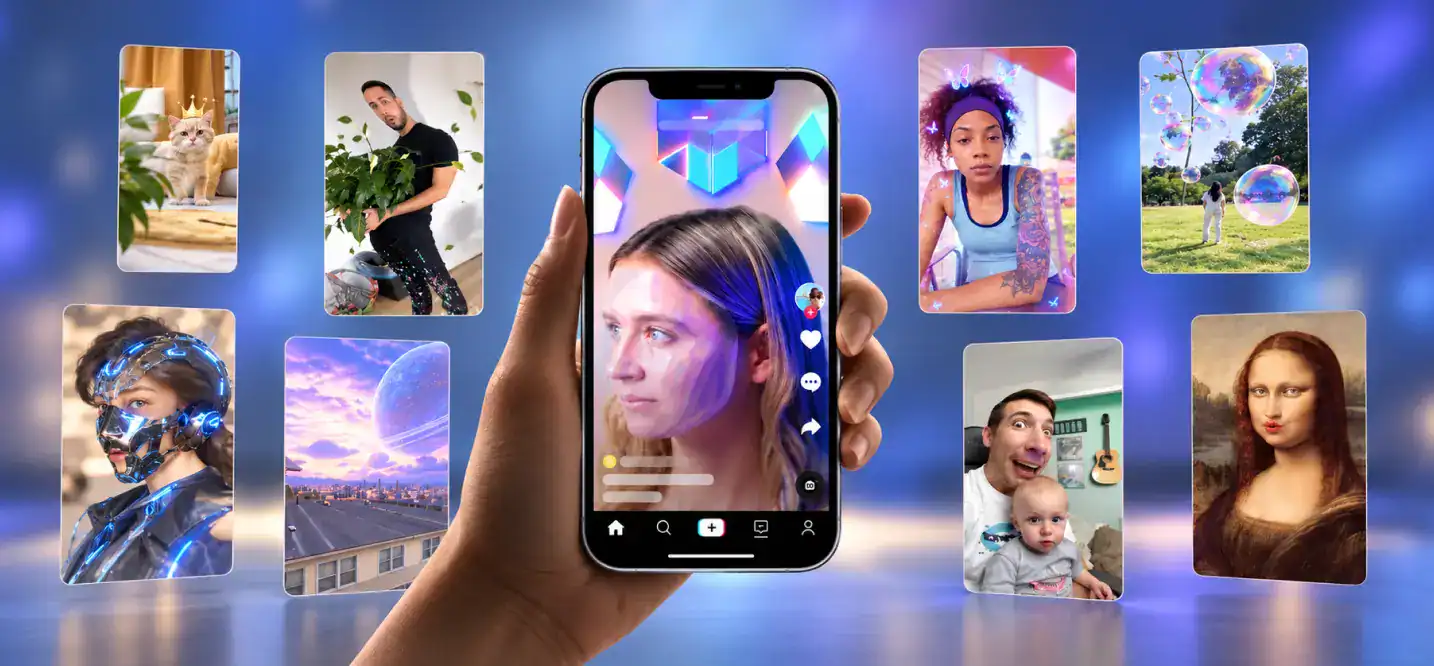
The features below form the foundation of a social media AR platform. The first release does not need every advanced tool, but it should support the complete journey from effect creation to publication.
1. Visual Editor and Node Graph System
A visual editor lets creators build effects by arranging objects, connecting behaviors, and adjusting properties.
A node graph editor is particularly useful. Instead of writing code for every interaction, creators connect nodes that represent actions, conditions, inputs, and outputs. TikTok’s Visual Scripting documentation provides an example of this approach.
The editor may include:
- Scene graph: Organizes objects, cameras, lights, and other scene elements in a hierarchy.
- Visual scripting engine: Connects events and actions through nodes.
- Material editor: Controls surface appearance, textures, and lighting properties.
- Shader graph: Creates custom visual effects through connected shader nodes.
- VFX editor: Builds particle effects such as sparks, smoke, and animated backgrounds.
These tools should share a consistent interface. Creators should be able to move between editing, scripting, and previewing without rebuilding their work.
2. AR Asset Library and Import Pipeline
Creators need a straightforward way to access and manage visual assets. An AR asset library can include 2D images, 3D models, textures, materials, animations, audio, and ready-made templates.
The 3D asset import pipeline should validate file formats, texture sizes, polygon counts, and other performance requirements before assets enter a project.
An AR template engine can also speed up creation. Users could start with a face filter, virtual try-on layout, or interactive scene and customize it instead of building everything from scratch.
3. Face, Body, and Hand Tracking
Tracking capabilities allow digital objects to respond to a person’s movements.
Common options include:
- Face mesh tracking: Maps effects to facial geometry and landmarks.
- Body pose estimation: Detects body position and movement.
- Hand gesture recognition: Identifies hand positions and gestures to trigger interactions.
Apple’s ARKit face geometry documentation explains how face geometry can support face-based AR experiences. Google’s ARCore Augmented Faces guide describes face mesh tracking for Android-supported devices.
The platform should select tracking capabilities based on device support. Not every phone offers the same sensors or processing capacity.
4. Real-Time Preview and Rendering
Creators need to see how an effect behaves before publishing it. A real-time preview system should show changes as they edit a scene, including object placement, animations, lighting, and tracking behavior.
The AR runtime engine handles the execution of these effects on supported devices. It should manage rendering, camera input, tracking data, and interactions without creating noticeable delays.
GPU particle systems can support demanding visual effects, but they need performance limits. Excessive particles, high-resolution textures, and complex shaders can affect frame rates, especially on lower-end phones.
5. Creator Dashboard and Project Management
A creator dashboard gives users a place to manage their projects and published effects.
Useful features include:
- Project creation and editing.
- Draft and published effect lists.
- Asset and template management.
- Submission status and review feedback.
- Effect analytics, such as views, shares, and usage.
- Account settings and team permissions.
For larger platforms, role-based access and centralized administration become important. These requirements are similar to those found in enterprise mobile app development.
6. Effect Packaging, Version Control, and Publishing
A finished effect needs to be packaged before it can reach users. The packaging process should bundle the required assets, scripts, dependencies, and configuration files.
Version control helps creators update effects without losing previous versions. It also gives platform administrators a way to review changes and roll back problematic releases.
A publishing workflow should include:
- Automated validation and performance checks.
- Submission to the platform.
- Content and policy review.
- Approval or revision requests.
- Publication and distribution through a content delivery network (CDN).
TikTok’s effect submission guide offers a practical example of a review-based publishing process.
7. AI-Assisted Effect Creation
AI can make effect creation easier, particularly for users who do not have 3D design or development experience.
Possible features include:
- Generating textures and visual assets from prompts.
- Suggesting materials, animations, or scene layouts.
- Converting simple instructions into node-based behaviors.
- Recommending templates based on a creator’s idea.
- Detecting missing assets or potential performance issues.
AI should assist the creator rather than control the entire workflow. Users still need to inspect, edit, and test generated content before publishing it. For more implementation ideas, see AI features for mobile apps.
How to Develop a Platform Like TikTok Effect House
Developing this type of platform requires coordinated work across the editor, AR engine, backend, and publishing infrastructure. A practical development process looks like this.
Step 1: Define the Product Scope
Start by deciding who will use the platform and what they should be able to create.
For example, a brand-focused platform may prioritize product visualization and campaign templates. A public creator platform may need a wider asset library, collaboration tools, analytics, and content moderation.
Define the first release around a manageable set of use cases. This keeps the project focused and makes technical decisions easier.
Step 2: Select the AR Runtime and Framework
Choose the technology responsible for tracking, rendering, and running effects.
Common options include:
| Technology | Best Suited For |
|---|---|
| Unity with AR Foundation | Cross-platform AR experiences using supported provider plugins |
| ARKit | AR features for Apple devices |
| ARCore | AR features for supported Android devices |
| Unreal Engine | High-fidelity 3D visuals and complex rendering |
| Custom AR runtime | Specialized rendering or platform-specific requirements |
The right choice depends on supported devices, rendering requirements, team expertise, and how much control the product needs. An experienced AR VR app development agency can help assess these trade-offs before implementation.
Step 3: Build the Visual Creation Environment
Develop the editor where users assemble scenes and define interactions. This includes the scene graph, node graph, material controls, asset browser, and preview window.
Keep the editor modular. For example, visual scripting should be separate from the rendering layer so the team can update one without rewriting the entire system.
Step 4: Integrate Tracking and Rendering
Add the tracking features required by the product, such as face, hand, and body tracking. Connect tracking data to the scene and rendering systems so virtual objects respond to real-world movement.
Test on different devices early. A feature that runs smoothly on a high-end phone may perform poorly on an older model.
Step 5: Develop the Backend and Asset Infrastructure
The backend manages creator accounts, projects, assets, submissions, permissions, and analytics.
It should also support secure asset storage, version history, and CDN-based distribution. If the platform serves multiple creator groups or business customers, plan for access controls and infrastructure that can handle growing usage.
Step 6: Add AI Features
Once the core editor works, introduce AI features that solve specific creator problems. Start with practical functions such as asset suggestions or prompt-based texture generation rather than building a large set of AI tools at once.
Step 7: Test, Moderate, and Publish Effects
Test effects for tracking accuracy, device compatibility, loading time, rendering performance, and crashes.
Add moderation checks for inappropriate content, unsafe interactions, and policy violations. Automated checks can catch common issues, while human review handles cases that require judgment.
Step 8: Launch an MVP and Improve It
Release the first version with a limited set of creation tools, templates, tracking features, and publishing controls. Gather feedback from creators and monitor which tools they actually use.
A focused MVP is often a better starting point for a smaller team. This is particularly relevant when planning mobile app development for startups.
How Much Does It Cost to Build a Platform Like TikTok Effect House?
Developing a platform like TikTok Effect House can cost anywhere from $75,000 to $600,000 or more, depending on the editor, AR capabilities, and publishing infrastructure.
Here is a practical breakdown:
| Platform Scope | Estimated Development Cost | What it Includes |
|---|---|---|
| Basic MVP | 120,000 | Basic visual editor, selected AR filters, face tracking, asset imports, project dashboard, and effect preview |
| Mid-level platform | 300,000 | Node-based visual scripting, face and hand tracking, material editor, templates, asset management, and publishing workflow |
| Advanced platform | 600,000+ | Advanced scene and shader editors, body tracking, GPU particle systems, AI-assisted creation, analytics, moderation, and scalable infrastructure |
These estimates assume a custom-built product with a professional development team. The actual mobile app development cost will depend on the number of supported platforms, backend complexity, editor capabilities, and integrations.
The biggest cost drivers are:
- AR engine and tracking: Integrating face, hand, and body tracking across supported devices.
- Visual editor: Building the node graph, scene editor, material controls, and real-time preview.
- Asset infrastructure: Supporting 3D imports, asset optimization, storage, and CDN delivery.
- Backend development: Managing creator accounts, projects, permissions, analytics, and publishing.
- Security and moderation: Protecting accounts, reviewing effects, and managing user-generated content.
- Testing: Checking tracking accuracy, rendering performance, and compatibility across devices.
You should also budget for post-launch maintenance, cloud hosting, storage, and ongoing feature updates. Adding advanced tools after launch can be more cost-effective than building the entire Effect House feature set into the first release.
Technical Challenges to Plan For

Several engineering challenges can affect the platform after launch.
- Device fragmentation: Different phones have different cameras, processors, sensors, and AR capabilities. Use device compatibility checks and performance profiles.
- Rendering performance: Complex effects can cause lag or overheating. Optimize assets, shaders, and particle systems.
- Asset compatibility: Imported models and textures may vary in format and quality. Validate files before they enter a project.
- Scalability: Popular effects can generate sudden traffic. Use scalable storage, caching, and CDN distribution.
- Content moderation: User-generated effects can include inappropriate or misleading content. Combine automated screening with human review.
Protecting User Privacy
Face and body tracking require particular care because they process information about people. The platform should collect only the data needed to run an effect and avoid storing raw camera footage or biometric data unless there is a clear, justified need.
Use clear consent notices, secure data transmission, limited retention periods, and deletion controls. The FTC’s policy statement on biometric information outlines business concerns around privacy, security, and the handling of biometric information.
For a broader mobile security checklist, see how to ensure mobile app security.
How Can You Monetize an AR Effects Platform?
The business model should fit the creators and audience the platform serves. Common options include:
- Brand partnerships: Charge brands for sponsored effects and campaign placements.
- Premium creator tools: Offer advanced templates, assets, or editing capabilities through paid plans.
- Marketplace commissions: Take a fee from transactions involving paid effects or creator assets.
- Enterprise subscriptions: Provide businesses with private workspaces, branded templates, and campaign management tools.
- Usage-based plans: Charge based on asset storage, rendering resources, or platform usage.
A platform can combine several models, but monetization should not make basic creation unnecessarily difficult. A healthy creator ecosystem needs useful free tools and a clear reason to pay for advanced features.
Conclusion
Building a platform like TikTok Effect House means creating a complete AR production environment, not just a collection of filters. The editor, tracking system, runtime engine, asset pipeline, backend, and publishing workflow must work together.
Start with the core creation and publishing experience, test it with real creators, and expand the toolset based on actual usage. If you’re planning a custom creator platform, a custom mobile app development company with AR engineering experience can help turn the product requirements into a workable architecture and development roadmap.
Have an AR platform idea? Let's map out how to build it
Contact UsFrequently Asked Questions
1. What does it take to build a platform like TikTok Effect House?
You need a visual editor, AR runtime, tracking capabilities, asset library, creator dashboard, backend infrastructure, and an effect publishing system. AI tools can be added as the platform matures.
2. How much would a social AR platform cost?
The cost depends on the number of features, supported devices, editor complexity, and backend requirements. A focused MVP costs less than a full platform with advanced visual tools and creator analytics.
3. What tech stack is needed for an AR effects platform?
A typical stack may include Unity or Unreal Engine, ARKit, ARCore, a backend framework, cloud storage, a database, and a CDN. The final selection depends on platform requirements.
4. How do creators publish effects on such a platform?
Creators build and test an effect, package its assets and dependencies, and submit it for review. Once approved, the platform publishes and distributes it to supported users.
5. How do you moderate user-generated AR effects?
Use automated checks for file integrity, prohibited content, and performance issues. Add human review for submissions that require contextual judgment, and provide a process for reporting published effects.
6. How do you monetize an effects platform?
Common models include brand partnerships, premium creator subscriptions, marketplace commissions, enterprise plans, and usage-based pricing.
7. What are the biggest technical challenges?
Device compatibility, real-time rendering, tracking accuracy, asset optimization, infrastructure scalability, and content moderation are among the main challenges.
8. How long does it take to build an MVP?
The timeline depends on the editor, tracking features, supported devices, and team size. A limited MVP can be developed faster than a platform with advanced visual scripting and a full creator marketplace.
9. How much does it cost to hire an AR developer?
Hiring an AR developer can cost around 75 per hour, depending on experience, location, and technical specialization. Developers with experience in ARKit, ARCore, Unity, and custom tracking systems may charge more. See the cost of hiring an AR developer for a closer breakdown.
10. How much does VR app development cost?
VR app development can range from $30,000 for a relatively simple experience to $200,000 or more for complex applications with custom environments, interactions, and advanced features. The final budget depends on the platform, 3D assets, interaction design, and development requirements. Explore the cost of VR app development for more details.