
Key Takeaways
- Enterprise applications need security, scalability, and integration built in from day one.
- Features like SAML, OAuth 2.0, and MDM protect company data.
- Workflow automation and real-time sync boost daily productivity.
- Customization lets enterprise apps fit different departments and teams.
- Choosing the right development partner, like Cubix, shapes long-term success.
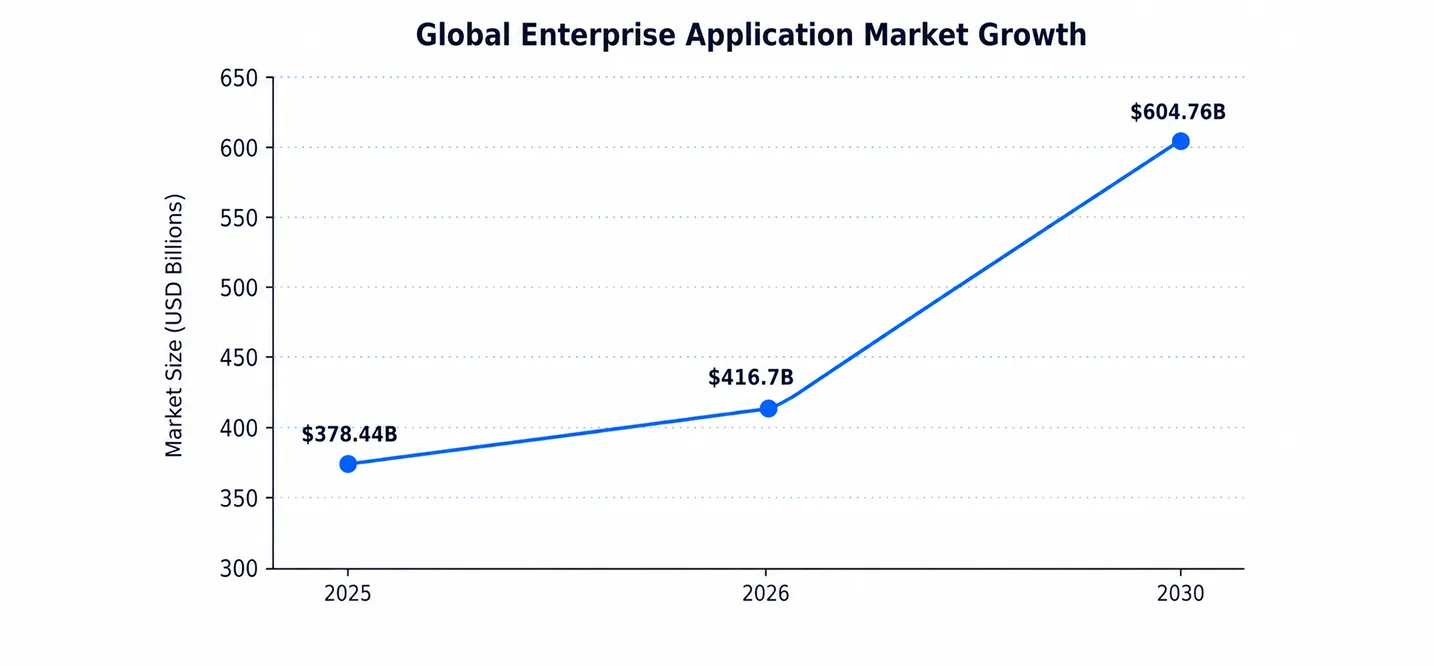
Here is a number that should stop you. The global enterprise application market is worth $416.7 billion in 2026. That is not a typo. Businesses are pouring money into software that runs their daily operations. And most of that spending goes toward one goal. They want apps that actually work under pressure.
But here is the catch. Not every enterprise app earns its price tag. Some slow teams down instead of speeding them up. Some leak data instead of protecting it. Some cannot handle a thousand users, let alone ten thousand. The difference between a good enterprise app and a great one comes down to features. Real, tested, built-for-scale features. Not buzzwords on a sales page.
That is what this guide covers. We will walk through the features that separate winners from write-offs. We will look at security, automation, integration, and mobility. We will back it up with real numbers, not guesses. And if you are exploring Enterprise App Development Solutions, this will help you know exactly what to ask for.
Want to discuss your project? Our experts are just a click away.
Contact UsWhat Is an Enterprise Application?
An enterprise application is software built for a whole organization. It is not a single-user tool. It connects departments, data, and daily workflows. Think HR systems, CRM platforms, or supply chain tools.
These apps differ from consumer apps in one big way. They serve hundreds or thousands of users at once. They also carry more weight. A crash in a consumer app is annoying. A crash in an enterprise app can halt a whole business.
The SaaS enterprise applications market alone is expected to hit $372.41 billion in 2026. That growth shows how much businesses now depend on these systems. If you want a deeper primer, this Mobile App Development guide breaks down the basics further. Enterprise software features must handle scale, speed, and security together. Miss one, and the whole system feels shaky.
Consumer apps chase convenience. Enterprise apps chase reliability. That is not a small distinction. A retail app can crash for a minute with little harm. An inventory system crashing during a busy shift can cost real money. This is why enterprise application features get built with far more testing, far more redundancy, and far more planning than most people realize.
Core Features Every Enterprise Application Needs
Every strong enterprise app shares a common feature set. These are not optional extras. They are the baseline. Below is a quick breakdown of what to expect from any serious build.
Core Enterprise Application Features
| Feature | What It Does | Why It Matters |
| Workflow Automation | Automates repetitive tasks | Cuts manual work and errors |
| Real-Time Synchronization | Updates data instantly across devices | Keeps teams aligned |
| Audit Logs | Tracks every action in the system | Supports compliance and trust |
| Role-Based Access | Limits access by job role | Reduces internal risk |
| Customization | Adapts the app to specific teams | Improves adoption |
| Scalability | Handles growing users and data | Prevents costly rebuilds |
Workflow Automation
Workflow automation removes the boring, repetitive stuff. Think approvals, notifications, and data entry. Automation has been shown to cut manual data entry by over 30%. That frees up staff for real work. It also cuts down on human error.
Real-Time Synchronization
Real-time sync means every user sees the same data instantly. No stale spreadsheets. No mismatched reports. This matters more as teams spread across time zones. Enterprises today run an average of 897 different applications. Real-time sync keeps all of them speaking the same language.
Audit Logs
Audit logs record who did what and when. They are not glamorous, but they save companies during audits. They also help teams catch mistakes before they become disasters.
Role-Based Access and Scalability
Role-based access limits what each person can see or change. A sales rep should not touch payroll data. A junior employee should not approve large purchases. This keeps risk contained without slowing teams down.
Scalability rounds out the core list. An app that works for 50 users must also work for 5,000. That means the backend needs to grow without a full rebuild. Cloud infrastructure makes this possible, and we will cover that in more detail shortly.
Customization, Configuration, and User Administration
No two enterprises run the same way. That is why customization matters so much. A finance team needs different dashboards than a sales team. A good enterprise app lets you configure workflows, permissions, and views without rebuilding the whole system.
This flexibility pays off fast. Businesses that invest in Custom Mobile App Development Benefits often see faster adoption across departments. Custom builds fit real workflows instead of forcing teams to adapt.
User provisioning matters just as much. Admins need to add, remove, or adjust access in seconds. Slow provisioning creates security gaps. It also frustrates new hires waiting on access. Teams like Cubix build admin panels that keep this process simple, so IT teams are not buried in support tickets.
Good administration tools also include bulk actions. Imagine onboarding fifty new hires in one day. Nobody wants to set up fifty accounts by hand. A strong enterprise app lets admins import users, assign roles, and set permissions in a few clicks, not a few hours.
Security Features That Protect Enterprise Applications
Security is not a nice-to-have anymore. It is the reason many enterprise projects exist. The numbers make that clear. The global average cost of a data breach hit $4.99 million in 2026. That is a 12% jump from the year before. In the US, that number climbs to $11.5 million.
AI-driven attacks are making things worse. These attacks rose 56% year over year. They also add close to $1 million to the average breach cost. This is why security features cannot be an afterthought. Review this Enterprise App Security Checklist before you start any build.
Authentication Protocols Compared
| Protocol | What It Does | Best For |
| SAML | Exchanges identity data between systems | Enterprise single sign-on |
| OAuth 2.0 | Grants limited access without sharing passwords | Third-party app access |
| OpenID Connect | Adds identity verification on top of OAuth 2.0 | Login and identity checks |
SOC 2 Compliance
SOC 2 is a security standard many enterprise buyers now require. It proves a vendor handles data responsibly. Without it, many enterprise deals simply do not close. It covers access controls, monitoring, and data handling practices.
MDM (Mobile Device Management)
MDM lets IT teams manage company data on employee devices. It matters more as remote work grows. MDM tools can lock, wipe, or restrict devices if they are lost or stolen. This keeps sensitive data from walking out the door.
Together, these security layers work as a system, not separate parts. SAML and OAuth 2.0 handle who gets in. SOC 2 proves the process is trustworthy. MDM protects the device itself. Skip any one layer, and the whole chain weakens.
Integration Features That Connect the Enterprise
An enterprise app rarely works alone. It needs to talk to other systems. ERP, CRM, payment tools, and more. This is where integration features earn their keep.
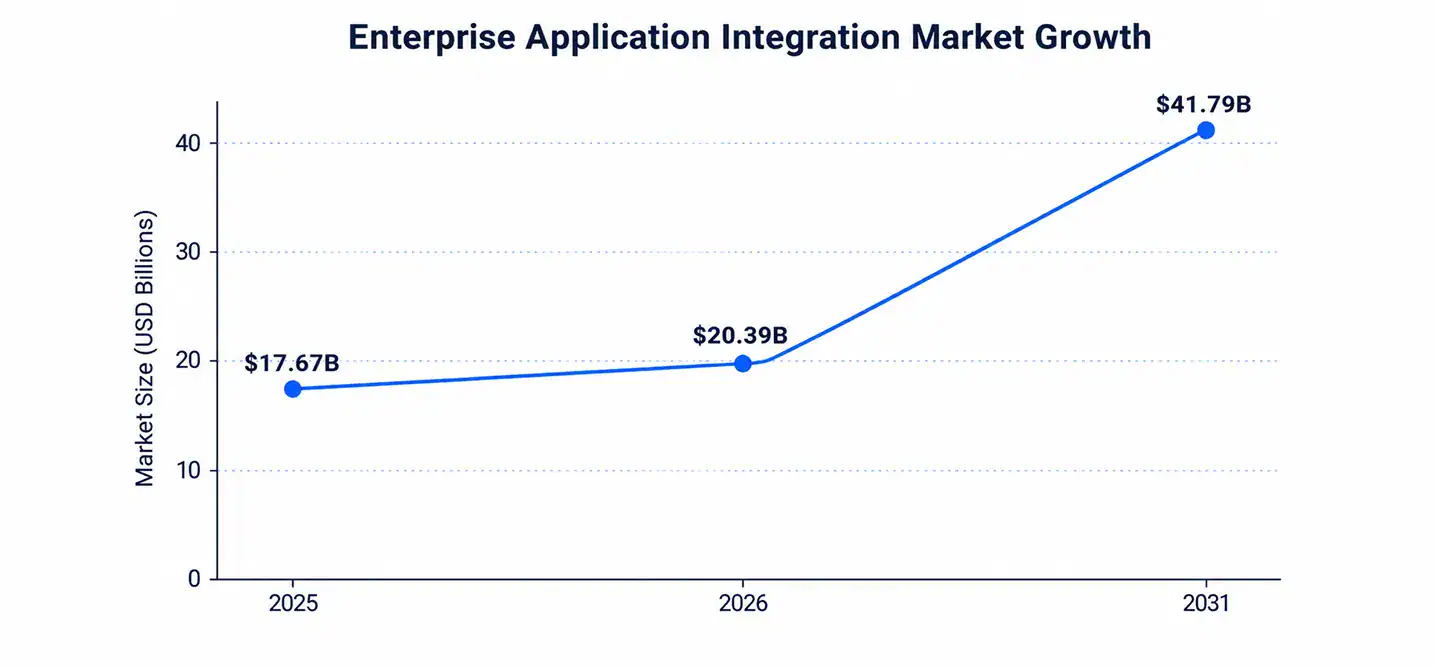
The enterprise application integration market is set to reach $20.39 billion in 2026. It is expected to nearly double by 2031. That growth is not random. Companies now treat integration as a competitive edge, not a technical detail. Enterprises adopting reusable API models report integration timeline cuts of 40% to 60%.
Cloud and Microservices
Cloud-based architecture is now the default for enterprise builds. Microservices break large apps into smaller, independent pieces. Each piece can scale on its own. This setup avoids one broken feature crashing the whole system. It also speeds up updates, since teams can ship changes to one service without touching the rest. Cubix often recommends this approach for clients planning long-term growth.
North America currently leads in this shift, holding a 37.6% share of the integration market. That lead comes from mature cloud budgets and API-first thinking. But other regions are catching up fast, especially as low-code integration tools open the door to smaller IT teams.
Enterprise Mobility Features for a Mobile Workforce
Work does not happen only at desks anymore. Enterprise mobility features let employees work from phones, tablets, or laptops securely.
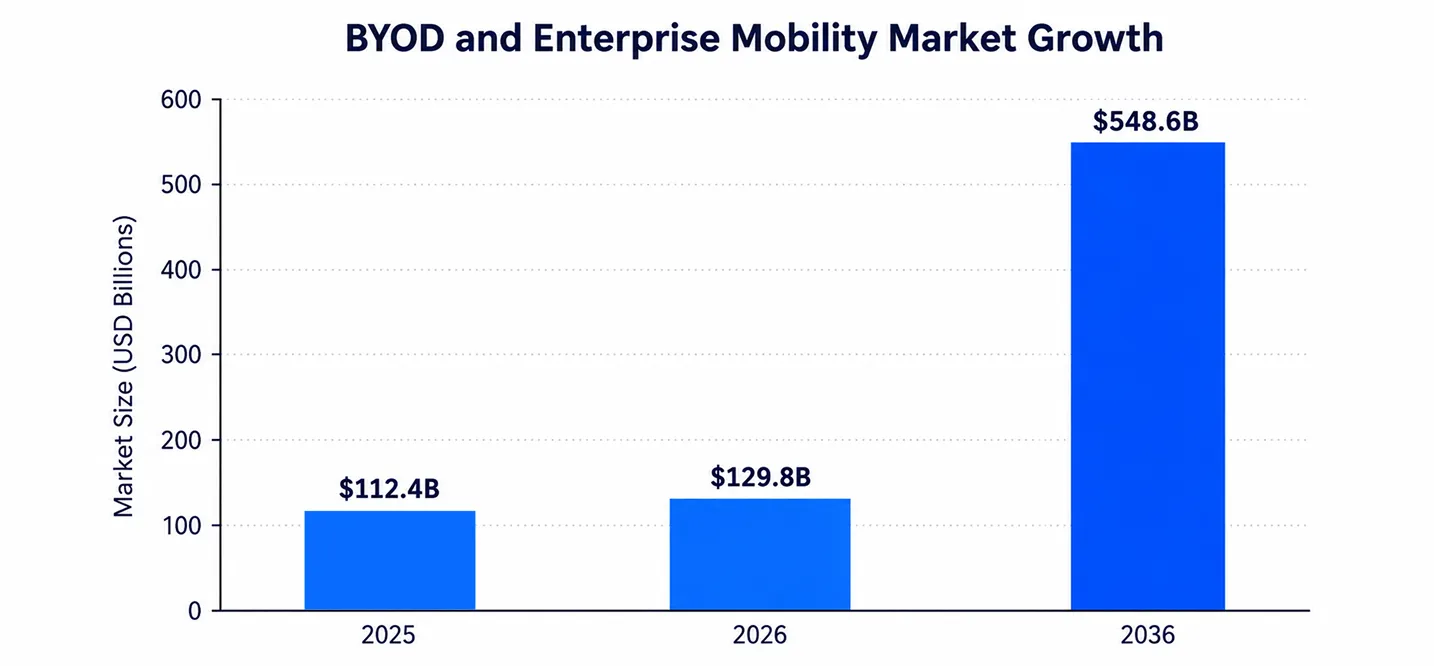
The BYOD and enterprise mobility market is projected to hit $129.8 billion in 2026. It is expected to reach $548.6 billion by 2036. That is a massive shift in how people work. Around 67% of workers already use personal devices at the office. These devices add nearly two extra work hours per day.
Mobility features must include secure logins, offline access, and device management. Want to see where this space is headed? Check out these Top Enterprise Mobility Trends for more context. Features of enterprise mobility solutions should always balance flexibility with control.
Workflow Automation and Real-Time Sync in Practice
It helps to see automation in action, not just in theory. Here is a simple comparison of manual versus automated processes.
Manual vs Automated Enterprise Processes
| Task | Manual Process | Automated Process |
| Expense Approval | Days of email chains | Instant routing and approval |
| Data Entry | Manual, error-prone | Auto-filled and validated |
| Reporting | Weekly manual pulls | Real-time dashboards |
| Onboarding | Paper forms, delays | Digital workflows, same-day access |
Automation like this has cut manual data entry work by more than 30% across enterprise software users. That is hours given back to real, valuable work every single week.
Business Value: Why These Features Matter
Features are not just technical checkboxes. They drive real business outcomes. Companies using strong integration suites report an average ROI of 345% over three years. That is a serious return for getting the fundamentals right.
The broader market backs this up too. The enterprise application market is projected to reach $604.76 billion by 2030. Businesses are not spending this much on features they do not need. They are investing in tools that cut costs and speed up decisions. For more context on the payoff, read about the Business Benefits of Mobile App Development.
Types of Enterprise Applications (With Examples)
Enterprise applications come in many shapes. Each type solves a different business problem. Here is a quick reference table.
Types of Enterprise Applications
| Type | Example | Primary Use |
| ERP | SAP, Oracle | Manages core business processes |
| CRM | Salesforce | Tracks customer relationships |
| SCM | Manhattan Associates | Manages supply chains |
| BI Tools | Power BI, Tableau | Turns data into insights |
| Enterprise Mobility Apps | Custom field-service apps | Supports mobile workforces |
Enterprise resource planning tools alone hold a 31.6% share of the enterprise application market in 2026. That share reflects how central ERP has become to daily operations. Understanding these types of enterprise applications helps you scope your own project correctly.
Native vs Hybrid: Choosing the Right Tech Stack
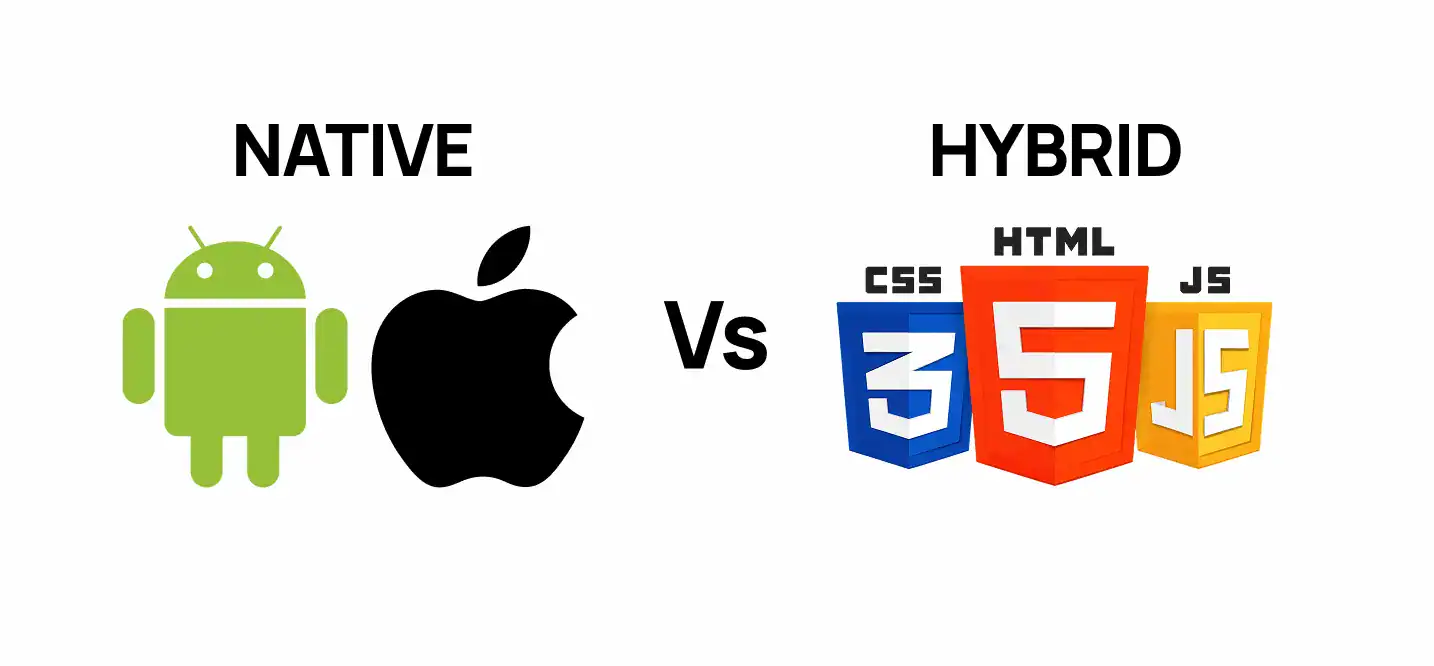
Once features are set, the next question is technology. Should you build native or hybrid? Native apps run faster and use device features fully. Hybrid apps ship faster and cost less upfront.
There is no single right answer. It depends on your users, your budget, and your timeline. This detailed guide on Native vs. Hybrid for Enterprise Apps walks through the trade-offs in plain language. Cubix helps enterprise clients weigh these options before writing a single line of code.
A field service team might need native performance for GPS and camera access. A back-office reporting tool might do just fine as a hybrid build. The right choice saves both money and future headaches, so it is worth getting right early.
How Cubix Builds Enterprise Applications That Last
Features only matter if they are built well. That is where a development partner makes the difference. Cubix has spent years building enterprise-grade software for companies that cannot afford downtime.
The Cubix approach starts with discovery, not code. Every project begins by mapping real workflows, not assumptions. From there, the team builds with security, scalability, and integration as core requirements, not add-ons.
Cubix also brings in experienced mobile app developers who understand both consumer polish and enterprise-grade reliability. That combination is rare. Most teams are strong in one area but weak in the other.
Every build also goes through structured QA before launch. Enterprise software carries too much risk to skip this step. Bugs caught early cost far less than bugs found after go-live, especially once thousands of employees rely on the system daily.
Why Businesses Choose Cubix for Enterprise App Development
Enterprise projects carry real risk. Choosing the wrong partner can cost months and millions. Cubix reduces that risk with a track record built on complex, high-stakes builds.
Clients choose Cubix for a few clear reasons. The team understands compliance requirements like SOC 2 from day one. They design for scale, not just launch day. They also stay involved after launch, since enterprise software never truly stops evolving.
If you are ready to build an enterprise application with the right features baked in, Cubix is ready to talk. A short discovery call can save months of costly guesswork later.
Enterprise software is a long-term investment. It deserves a partner who thinks past launch day. That is the mindset Cubix brings to every engagement, from the first workflow diagram to years of post-launch support.
Want to discuss your project? Our experts are just a click away.
Contact UsFrequently Asked Questions
1. What are the most important features of an enterprise application?
Security, scalability, integration, and automation top the list. Without these, an app will struggle as your business grows.
2. How is an enterprise application different from a consumer app?
Enterprise apps serve many users across departments. They demand stronger security, compliance, and uptime than typical consumer apps.
3. Why is security essential for enterprise applications?
A single breach can cost millions and damage trust. Security features protect both company data and customer information.
4. Which authentication features should an enterprise app include?
Look for SAML, OAuth 2.0, and OpenID Connect. These protocols manage secure, reliable user logins.
5. How do enterprise applications integrate with ERP and CRM systems?
Most use APIs and middleware to connect systems. This allows data to flow smoothly between platforms.
6. Should an enterprise application support offline access?
Yes, especially for field teams. Offline access with sync-on-reconnect keeps work moving without a constant connection.
7. What analytics and reporting features do enterprise apps need?
Real-time dashboards, custom reports, and export tools are essential. These help leaders make faster, informed decisions.
8. How can an enterprise application scale across departments and regions?
Cloud infrastructure and microservices support this kind of growth. They let teams add users and features without rebuilding the system.
9. What compliance standards may apply to an enterprise application?
This depends on industry and region. Common standards include SOC 2, GDPR, and HIPAA for healthcare data.
10. How do you measure whether an enterprise application is successful?
Look at adoption rates, error reduction, and time saved. Strong ROI and user satisfaction are also key signals.