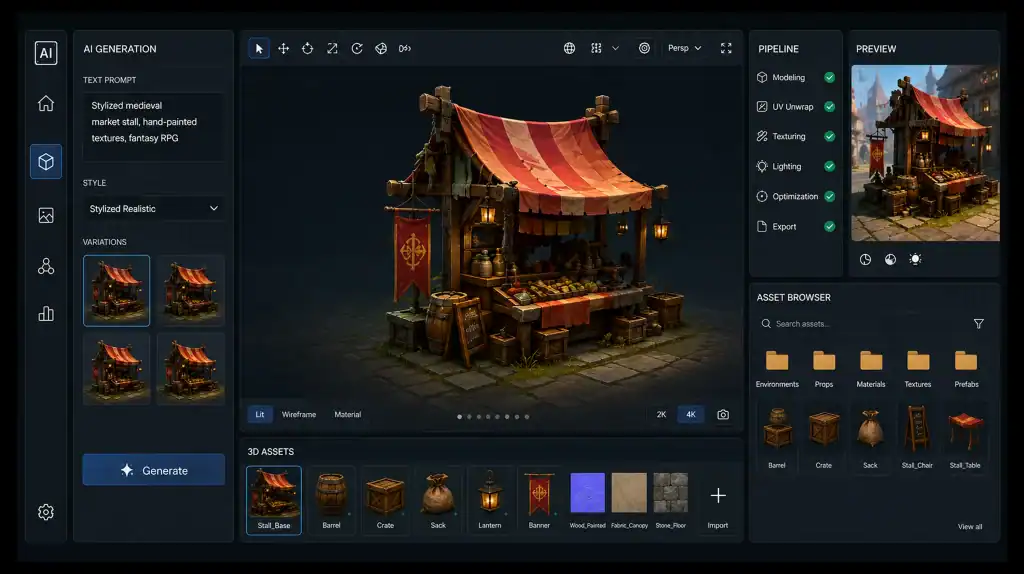
Creating game art at scale has always meant balancing creative ambition with production time. As games demand more characters, environments, props, textures, and visual variations, studios are looking for ways to produce more without stretching their teams and timelines.
Generative AI is quickly becoming part of that conversation, influencing how studios approach creativity and production. The broader rise of generative AI in video games is changing where these tools can contribute, but it is also raising questions about quality, originality, and creative control. The latest GDC State of the Game Industry report found that 36% of game industry professionals use generative AI as part of their jobs, yet 52% believe it is having a negative impact on the industry. Among visual and technical artists, that figure rises to 64%.
The contrast points to a bigger question: can AI actually make game art production faster without making it less consistent, distinctive, or production-ready?
The answer depends less on how quickly AI can generate an image or model and more on how those outputs fit into the broader game art pipeline. Used thoughtfully, AI can accelerate certain stages of production while artists remain in control of the creative direction.
So, where does generative AI actually fit, and how can studios use it without losing their style? Let’s take a closer look.
Where Does Generative AI Fit Into a Game Art Pipeline?
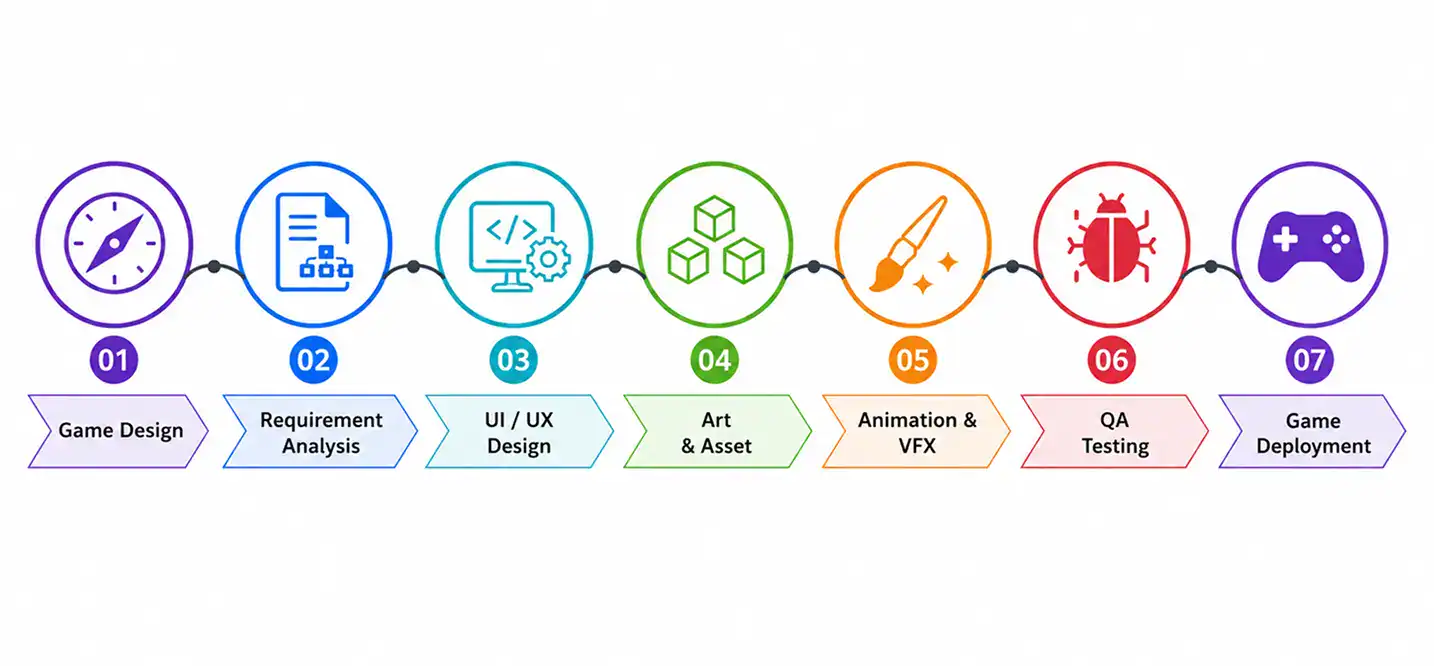
Generative AI works best as a supporting layer within the game art pipeline, not as a replacement for the entire production process. It can help teams explore ideas, produce variations, and accelerate selected production tasks while artists and technical teams remain responsible for the final output.
A typical AI-assisted game art pipeline looks like:
1. The AI-Assisted Game Art Workflow
The process starts with a clear art direction and production brief. Artists define what needs to be created, establish references, and set the visual requirements before AI generation begins.
AI can then produce initial concepts or asset variations for the team to evaluate. Selected outputs move to artists for refinement before entering the technical stages of the pipeline.
From there, the asset follows the studio’s established process for technical preparation, quality checks, optimization, and engine integration.
2. Where AI Enters the Production Process
AI can support different stages depending on the studio’s needs:
- Concept Exploration: Generate and compare early visual ideas.
- Asset Variations: Create alternatives for approved concepts or designs.
- Texture Development: Explore different surface treatments and material variations.
- High-Volume Production: Support repetitive asset tasks where consistent outputs are achievable.
- Prototyping: Quickly test visual directions before committing significant production resources.
The right use case depends on the asset, production stage, and level of creative and technical control required.
The next question is what AI can actually produce for a game, from concept art and characters to environments, textures, and 3D assets.
What Game Assets Can Generative AI Create?
Generative AI can support game art teams across multiple asset types, from early concepts to preliminary 3D assets. Its applications span both 2D and 3D content, with different production requirements for each.
1. AI Concept Art for Games
Concept art is one of the most accessible uses of generative AI in game development. Artists can use text prompts, reference images, or both to explore characters, environments, props, weapons, and other visual elements.
Rather than replacing concept artists, AI can generate multiple directions for evaluation before a design is finalized.
2. AI Character Asset Generation
Generative AI can produce variations of character appearances, clothing, accessories, silhouettes, and other visual elements.
These outputs can support early exploration, with selected concepts serving as references for detailed modeling, texturing, and character production.
3. AI Environment Asset Generation
Game environments include buildings, terrain, vegetation, furniture, props, and background details. Generative AI can help teams explore environmental concepts and create variations before detailed production begins.
For a broader look at how visual assets contribute to immersive game worlds, see our guide to video game art and design for immersive worlds.
4. AI Texture Generation for Games
AI can generate or modify surface appearances for materials such as stone, wood, metal, fabric, and concrete. These outputs can provide starting points for material creation or help artists explore variations for existing assets.
5. AI 3D Asset Generation for Games
Generative AI can create preliminary 3D models from text prompts, images, or other references. These outputs can help teams visualize concepts or accelerate initial asset creation. Cubix’s overview of 3D game art provides additional context on creating 3D assets for games.
AI-generated models may still require refinement and technical preparation before production.
What Are the Best Generative AI Tools for Game Art?
Generative AI tools now support different parts of game art production, from concept exploration and textures to 3D asset generation. The following tools stand out for their capabilities across these use cases, with the right choice depending on the studio’s specific production needs.
1. Best AI Tools for 2D Game Art
- Scenario — Built specifically for creative production and gaming, with custom model training and workflows for characters, props, environments, sprites, and other game visuals.
- Leonardo AI — Supports image generation and editing for concept art, characters, environments, and other 2D game-art applications.
- Adobe Firefly — Provides generative image creation and editing within Adobe’s broader creative ecosystem.
- Midjourney — Particularly useful for visual exploration and developing early concept directions.
2. Best AI Tools for 3D Game Asset Generation
- Meshy — Focused on AI-generated 3D assets, with capabilities covering modeling, texturing, rigging, and exports for game-development workflows.
- Tripo — Provides text-to-3D and image-to-3D generation, with workflows aimed at game developers and technical artists.
- Rodin by Hyper3D — A 3D generation model available through platforms such as Leonardo AI, supporting image-to-3D generation and formats such as GLB.
These tools can shorten the path from an idea or reference to a preliminary 3D asset, although the resulting models still need to be evaluated against the requirements of the game’s production pipeline.
3. Best AI Tools for Game Textures and Materials
- Adobe Substance 3D Sampler — Designed for creating and editing materials and textures, including AI-assisted material generation from images.
- Scenario — Provides seamless PBR texture generation and other game-focused asset workflows.
4. Best AI Tools for Maintaining Game Art Style Consistency
- Scenario — Its custom model training and reference-based workflows make it particularly relevant for studios that need new assets to remain aligned with an established visual direction.
- Leonardo AI — Provides reference-based generation and model capabilities that can help teams maintain greater control over recurring visual elements.
- Meshy — Its 3D Agent can generate batches of assets with a consistent visual direction, making it relevant for larger 3D asset sets.
Style consistency remains dependent on the workflow surrounding the tool, not simply the tool itself. The platform needs to give artists sufficient control over references, models, and variations.
5. Generative AI Game Art Tools Compared
| Tool | Primary Strength | 2D | 3D | Textures | Style Control |
| Scenario | Game-specific visual generation | Yes | No | Yes | High |
| Leonardo AI | 2D generation and creative exploration | Yes | No | Yes | Medium |
| Adobe Firefly | Generative image creation and editing | Yes | No | Yes | Medium |
| Midjourney | Concept and visual exploration | Yes | No | No | Medium |
| Meshy | 3D asset generation | No | Yes | Yes | Medium |
| Tripo | Text/image-to-3D generation | No | Yes | Yes | Medium |
| Rodin | AI-generated 3D models | No | Yes | Yes | Medium |
| Substance 3D Sampler | Material and texture creation | No | No | Yes | High |
The comparison shows why studios should select tools according to the asset they need to create, rather than looking for one platform to handle every part of game art production.
How Should a Studio Choose the Right AI Game Art Tool?
Before adopting a tool, studios should evaluate:
- Asset Type: Concept art, 2D assets, textures, or 3D models.
- Creative Control: Control over references, visual direction, and variations.
- Workflow Compatibility: How easily outputs fit existing creative and production tools.
- Customization: Ability to support the studio’s visual requirements.
- Output Quality: Whether results provide a useful production starting point.
- Commercial Use: Current licensing and usage terms for commercial projects.
The best tool is not necessarily the one with the most features. It is the one that solves a specific production need without adding unnecessary work elsewhere in the pipeline.
Next, we look at how much generative AI can actually speed up game art production.
Next, we look at the question that matters most to production teams: how much can generative AI actually speed up game art production?
How Does Generative AI Speed Up Game Art Production?
The biggest advantage of generative AI in game art is not simply that it can create an asset quickly. Its greater value comes from reducing the time teams spend exploring possibilities, producing variations, and moving from an initial idea to something they can evaluate.
For studios managing large volumes of visual content, even small reductions at these stages can add up across the production pipeline.
1. Faster Concept Exploration
Artists can generate multiple visual directions from an initial brief instead of developing every possibility manually. This allows teams to explore different compositions, character designs, environments, props, and other ideas before settling on a direction.
The benefit is particularly noticeable during early development, when teams are still deciding what an asset should look like.
2. Faster Asset Variations
Once a visual direction has been established, generative AI can help produce variations of an existing idea. Teams can explore different appearances, designs, or configurations without starting every variation from scratch.
This can be useful when a game requires many related assets rather than a single unique design.
3. Faster Prototyping
Generative AI can also shorten the gap between an idea and a visual prototype. Instead of waiting for a fully developed asset before evaluating a concept, teams can create an early representation and use it to make creative decisions sooner.
This allows artists and designers to identify promising directions before committing significant production resources.
4. Scaling Large Asset Libraries
Games with extensive environments or large collections of characters, props, and other visual elements can benefit from AI-assisted variation and generation.
Rather than treating every asset as an entirely independent creation, teams can use AI to accelerate parts of a repeatable production process. The greatest potential comes when the studio needs volume and variation within an established creative direction.
5. Where AI’s Time Savings Can Disappear
The time required to generate an output is not the same as the time required to deliver a finished game asset. Generated content may still need artist review, revisions, technical adjustments, and QA. This is why the impact of AI on modern game development should be measured by production outcomes, not generation speed alone. Studios should track the time and cost required to turn an AI output into a production-ready asset.
That distinction is what separates a genuinely faster game art pipeline from one that simply generates more content.
The next challenge is maintaining a consistent visual identity as those assets are generated at scale.
How Do You Maintain Game Art Style Consistency With AI?
Generating individual game assets is easier than making them feel like they belong to the same game. Game art style consistency with AI requires clear visual rules, reliable references, and controlled generation.
1. Start With a Defined Game Art Style
Before using AI for asset generation, teams should establish a clear visual foundation covering:
- Color Palette: Primary, secondary, accent, and environmental colors.
- Shape Language: Sharp, geometric, organic, exaggerated, or simplified forms.
- Lighting: Preferred intensity, direction, contrast, and mood.
- Materials: How surfaces such as metal, wood, stone, fabric, and skin should appear.
- Character Proportions: Consistent proportions for characters, NPCs, and creatures.
- Realism Level: Realistic, stylized, cartoon, low-poly, or semi-realistic treatment.
- Environment Rules: How architecture, vegetation, terrain, and props fit the visual direction.
These guidelines give artists and AI tools a shared visual target. See Cubix’s complete guide to video game art styles for a deeper look at defining visual direction.
2. Build a Reference System Before Generating Assets
A style guide becomes more effective when supported by concrete visual references rather than descriptions such as “stylized” or “realistic.”
A useful reference system can include:
- Style References: Examples of the overall visual language.
- Character Sheets: Approved proportions, clothing, facial features, and design details.
- Environment References: Architecture, terrain, vegetation, and prop examples.
- Material Libraries: Approved surfaces, textures, colors, and treatments.
- Approved Assets: Existing assets that demonstrate the desired quality and style.
- Generation Guidelines: Instructions on what AI should preserve, avoid, or emphasize.
This gives new generations a consistent starting point.
3. Generate Variations From Approved Directions
Generating every asset independently can quickly create visual inconsistency. Instead, teams should build new assets from approved visual directions.
For example, an approved character design can serve as the reference for related NPCs, while established prop, building, or material designs can guide subsequent variations.
This creates families of assets that share recognizable characteristics rather than hundreds of unrelated AI-generated designs.
4. Keep Human Art Direction in the Loop
AI can generate variations, but artists should decide which outputs fit the game’s creative direction. They remain responsible for:
- What Gets Approved: Select outputs that match the established style.
- What Gets Rejected: Remove inconsistent designs or unwanted details.
- What Gets Modified: Refine promising outputs before production.
- What Becomes a Future Reference: Add successful assets to the reference library.
This creates a feedback loop where approved work helps guide future generations.
5. Maintain Consistency Across Large Asset Sets
As asset libraries grow, the same visual rules need to apply across:
- Characters: Proportions, silhouettes, clothing, and detail levels.
- NPCs: Distinct variations that still share the same visual language.
- Props: Shape language, materials, scale, and detailing.
- Environments: Architecture, vegetation, terrain, lighting, and density.
- Textures: Color, surface detail, material response, and resolution.
- Asset Variations: New versions that retain the defining characteristics of approved designs.
The goal is not to make every asset identical. Consistency means variation within boundaries. AI can generate more possibilities, but the studio’s visual system determines which ones belong in the game.
The AI-Assisted Game Art Workflow: Human Direction + AI Generation
Generative AI becomes more useful in game art when it operates within clearly defined responsibilities. The goal is not to decide whether AI or artists should control the entire process, but to determine which parts of the workflow each is better suited to handle.
A practical AI-assisted model separates generation, creative judgment, technical preparation, and validation so that each stage has clear ownership.
1. What AI Should Handle?
AI is most useful for tasks that benefit from rapid generation and iteration. Depending on the project, this can include:
- Generating Initial Concepts: Produce early visual ideas from briefs and references.
- Creating Variations: Explore alternative designs based on an established direction.
- Supporting Repetitive Tasks: Assist with work that requires producing large numbers of related visual elements.
- Exploring Visual Possibilities: Help teams test ideas before committing significant artist time.
- Creating Preliminary Assets: Produce starting points that artists can develop further.
The purpose is to reduce the amount of repetitive or exploratory work artists need to perform manually, rather than remove artists from the process.
2. What Should Artists Handle?
Artists remain responsible for the creative decisions that determine whether an asset belongs in the game.
Their role includes:
- Interpreting the Creative Direction: Turn the game’s visual requirements into practical artistic decisions.
- Selecting Outputs: Identify generations that are worth developing further.
- Refining Assets: Correct visual problems and develop promising outputs into stronger artwork.
- Maintaining the Intended Look: Ensure individual assets remain aligned with the project’s artistic direction.
- Making Creative Decisions: Decide when an AI-generated result should be changed, rejected, or developed further.
AI can produce options, but an experienced artist determines which option serves the game.
3. What Should Technical Artists and Developers Handle?
Once an asset moves beyond its creative development, technical considerations become increasingly important.
Technical artists and developers can be responsible for:
- Preparing Assets: Adapt assets to the technical requirements of the project.
- Integrating Assets: Bring approved content into the appropriate game-development environment.
- Managing Technical Requirements: Ensure assets follow the project’s established technical specifications.
- Supporting Engine Integration: Prepare assets for their intended use within the game.
This division keeps creative decisions with the art team while ensuring that generated content can move through the established production process.
4. Why Is Human-in-the-Loop the Strongest Model?
The most practical approach is a human-in-the-loop workflow:
This model treats generative AI as a production capability rather than an autonomous artist. AI contributes speed and generation capacity, while people remain responsible for the decisions that determine what ultimately enters the game.
For studios, that distinction matters. The objective is not to maximize the amount of AI-generated content. It is to use AI where it adds value while keeping creative ownership and production decisions with the people responsible for the game.
The next question is how this AI-assisted model compares with traditional game art production and outsourcing.
AI-Generated Game Assets vs Traditional Art Outsourcing
Generative AI does not make traditional game art production obsolete. For many studios, the more useful question is which production model provides the right balance of creative control, scalability, speed, and technical expertise.
The choice generally comes down to three approaches: building an in-house art team, outsourcing production to a specialized partner, or combining AI-assisted generation with human artists and technical specialists.
| Factor | In-House Art Team | Traditional Outsourcing | AI-Assisted Hybrid |
| Creative control | High | Depends on partner | High |
| Concept exploration | Medium | Medium | Fast |
| Asset variations | Medium | Medium | Fast |
| Scaling | Team-dependent | High | High |
| Cleanup | Standard | Standard | May be higher |
| Technical readiness | High | Partner-dependent | Human validation required |
| Style consistency | High with strong direction | Process-dependent | Requires controlled workflow |
| AI-specific licensing | Low | Low | Requires additional review |
1. In-House Game Art Production
An in-house team gives studios direct control over creative decisions and makes collaboration between artists, designers, developers, and art directors easier.
This model suits studios with long-term production plans, established art teams, or games where visual identity is a major differentiator. The trade-off is scalability, as expanding the team requires additional hiring, management, infrastructure, and training.
2. Game Art Outsourcing
Traditional outsourcing extends production capacity without requiring studios to build every capability internally. Specialized partners can provide additional artists, established workflows, and expertise across different asset types.
This approach works well for large asset backlogs, specialized requirements, or temporary increases in production capacity. Cubix provides dedicated 2D and 3D game art outsourcing capabilities.
The key consideration is maintaining alignment with the studio’s creative direction through clear references, specifications, communication, and review processes.
3. AI-Assisted Hybrid Production
The hybrid model combines AI generation with art direction, specialist artists, and technical production. AI can accelerate concept exploration and asset variations, while human teams retain creative control and can use 2D game art outsourcing to expand production capacity.
This approach can increase asset throughput while maintaining human oversight and access to specialist skills.
The next question is what quality-control checks an AI-generated asset should pass before entering production.
What Quality-Control Steps Should AI-Generated Game Assets Pass?
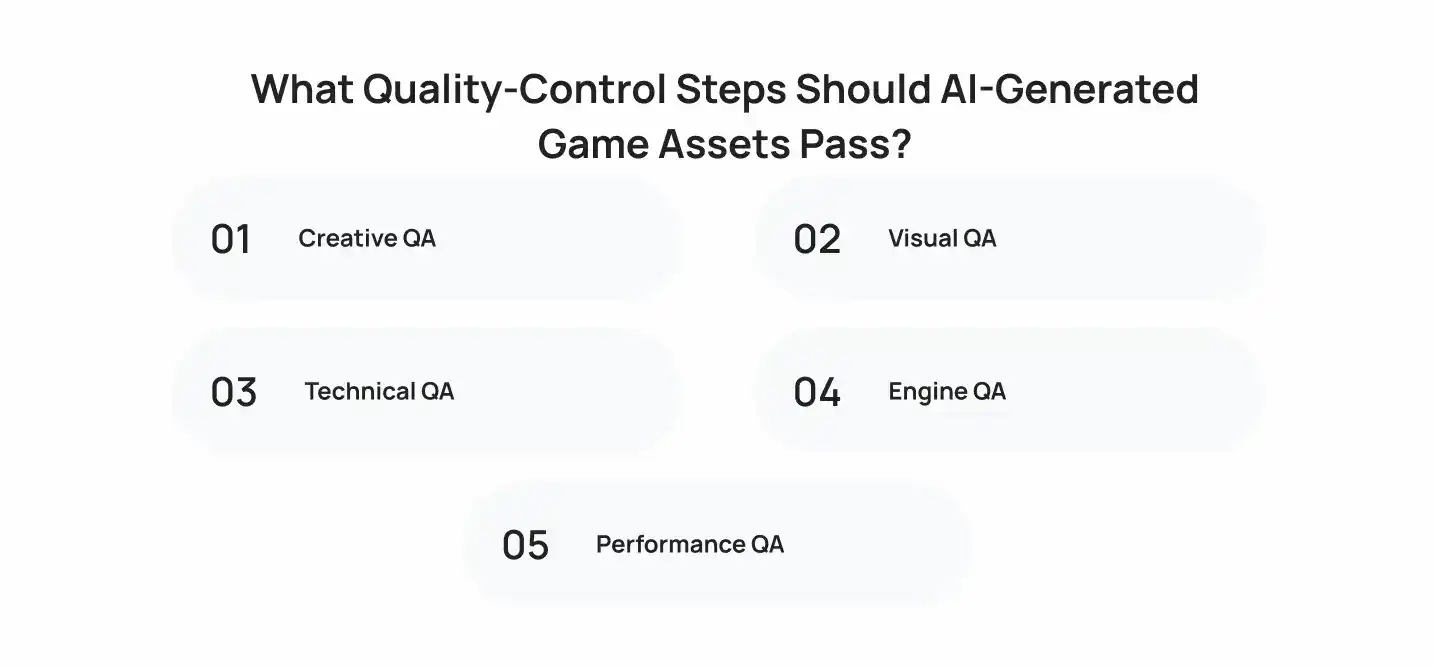
An AI-generated asset can look convincing at first glance and still fail to meet the requirements of a commercial game. Quality control therefore needs to evaluate more than visual appearance. Before an asset enters production, teams should verify that it meets the project’s creative, visual, technical, and performance requirements.
1. Creative QA
The first check is whether the asset actually fits the game’s creative direction.
Artists should review its design, proportions, visual language, level of detail, and overall suitability for its intended role. An asset that looks polished but feels inconsistent with the rest of the game should not move forward simply because it was generated successfully.
2. Visual QA
Visual inspection should identify obvious generation artifacts and inconsistencies that may not be acceptable in the final game.
Depending on the asset, teams may check for:
- Unnatural Details: Distorted shapes, faces, hands, objects, or surface features.
- Inconsistent Materials: Surfaces that do not behave or appear consistently.
- Visual Artifacts: Unwanted patterns, deformation, noise, or other generation errors.
- Texture Issues: Seams, stretching, repetition, or unwanted details.
- Unnecessary Detail: Visual complexity that does not contribute to the asset’s intended use.
3. Technical QA
An asset also needs to satisfy the technical specifications established for the project. Depending on the asset type, this can include checking:
- Topology
- UV Mapping
- Polygon Count
- Texture Resolution
- PBR Materials
- Level of Detail (LOD)
- Rigging and Skinning
- Collision Requirements
- File Formats
These checks are particularly important for AI-generated 3D assets, where a visually successful model may still require substantial technical preparation.
For a deeper look at the broader stages involved in preparing game assets, see Cubix’s guide to the game asset creation process.
4. Engine QA
Before an asset becomes part of the game, it should be tested in the target engine rather than evaluated only as an isolated file.
Teams should confirm that the asset imports correctly, behaves as expected, uses the appropriate materials and shaders, and works properly with the project’s existing systems.
5. Performance QA
Teams should verify that an AI-generated asset does not introduce unnecessary performance overhead. Depending on the game and platform, checks may include draw calls, memory usage, texture footprint, polygon count, loading behavior, and runtime performance.
An AI-generated asset is production-ready only when it meets the same performance and quality standards as traditionally created assets.
With those standards established, the next question is whether generative AI can make large-scale game asset production more cost-effective.
Is Generative AI More Cost-Effective for Large Game Asset Libraries?
Generative AI can reduce the effort involved in producing large volumes of game art, but lower generation costs do not necessarily mean lower production costs. For studios managing hundreds or thousands of assets, the better metric is cost per production-ready asset.
1. Don’t Measure the Cost of Generation Alone
An AI tool may generate an asset in minutes, but extensive artistic refinement, technical cleanup, or revisions can reduce those initial savings.
Studios should therefore compare the total resources required to take an asset from brief to production-ready state, not the generation cost alone.
2. What Determines the Real Cost?
The overall cost of an AI-assisted asset pipeline can include:
| Cost Factor | What It Covers |
| AI Tool or Model Fees | Subscriptions, credits, API usage, or model access |
| Artist Review | Time spent selecting and evaluating outputs |
| Creative Refinement | Editing, redesigning, and correcting generated content |
| Technical Art | Retopology, UVs, rigging, materials, LODs, and optimization |
| QA | Creative, visual, technical, engine, and performance checks |
| Licensing Review | Assessing usage rights and commercial restrictions |
| Integration | Preparing and implementing assets within the game |
| Rework | Additional work when an output fails to meet requirements |
The balance varies by asset type. A simple texture variation may require little refinement, while a complex character or 3D environment can demand considerably more work after generation.
3. Where AI Can Deliver the Biggest Efficiency Gains
Generative AI can deliver the biggest efficiency gains when studios need high asset volume, frequent variations, or rapid exploration. It can help teams produce more options from established visual directions without developing every asset from scratch.
The real value comes when the time saved outweighs the cost of review, refinement, and technical preparation. The goal is to increase the number of production-ready assets delivered within the available budget.
What Are the Risks of Using Generative AI for Game Assets?
Generative AI can speed up game art production, but it also introduces risks that studios need to manage. The biggest concerns involve ownership, consistency, technical quality, hidden production effort, and dependence on AI tools.
1. Copyright and Ownership Uncertainty
Studios need to understand how AI-generated assets can be used commercially before adding them to a released game. Tool terms, training data, output rights, and the level of human contribution can all affect how an asset can be used and protected.
Studios should therefore review:
- The Tool’s Commercial-Use Terms
- How Generated Outputs Are Licensed
- Whether User Inputs or Outputs Can Be Used to Train Models
- Any Restrictions on Commercial Distribution
- The Level of Human Contribution to the Final Asset
- Requirements for Keeping Records of AI-Assisted Work
For commercially released games, legal review should happen before large-scale asset generation rather than after assets have already been integrated into production.
2. Inconsistent Style and Quality
Generating assets independently can introduce differences in proportions, materials, lighting, and visual language. An asset may also look convincing at first glance while containing details that do not fit the game’s established art direction.
3. Technical Readiness Issues
A visually impressive AI-generated asset is not automatically game-ready. 3D models may still require work on topology, UVs, materials, rigging, polygon counts, optimization, and engine compatibility before entering production.
4. Technical Problems in 3D Assets
Visual quality does not guarantee production readiness. AI-generated 3D assets can require additional work involving topology, UVs, materials, textures, rigging, deformation, polygon counts, and optimization before they can be used effectively in a game engine.
For example, a model may have:
- Unnecessarily Dense Geometry
- Poor or Fragmented UV Layouts
- Inconsistent Topology
- Incorrect Scale or Pivot Placement
- Weak Material Separation
- Missing or Incomplete PBR Maps
- Problems With Rigging or Deformation
5. Hidden Production Costs
Faster generation does not always mean faster production. If generated assets require significant review, refinement, cleanup, and rework, some of the initial time savings can disappear. Studios should therefore measure the cost and time required to reach a production-ready asset.
This is particularly important for large asset libraries. Generating thousands of assets is only useful if the team can process, validate, and integrate them efficiently.
Studios should therefore track not only generation speed but also:
- Approval Rate
- Average Refinement Time
- Technical Cleanup Time
- Rework Rate
- Percentage of Assets Reaching Production
- Total Cost Per Production-Ready Asset
6. Dependence on External AI Tools
AI pipelines can also become dependent on third-party platforms whose pricing, usage limits, models, export options, or terms may change. Studios should consider how easily their workflow can adapt if a particular tool becomes unavailable or no longer meets production requirements.
With those risks understood, the next step is turning the technology into a repeatable process that a studio can actually implement.
How to Build a Generative AI Game Art Pipeline?
Building a generative AI game art pipeline is less about adding an AI tool and more about understanding where it fits within modern game production. The evolution of games with artificial intelligence has moved from isolated experiments toward applications that can support different stages of development, making a structured pipeline increasingly important.
1. Define Where AI Adds Value
Start by identifying asset types and production stages where AI can genuinely reduce effort. Concept exploration, asset variations, background props, and texture creation may offer stronger opportunities than assets requiring complex animation or highly specific technical requirements.
2. Establish Art and Technical Standards
Define the visual and technical requirements assets must meet before generation begins. This can include approved references, dimensions, texture resolutions, polygon budgets, naming conventions, file formats, and engine requirements.
Clear standards reduce the amount of rework later in the pipeline.
3. Choose Tools Around the Pipeline
Select AI tools based on the assets they need to produce and how well their outputs fit the existing production environment. Consider factors such as export formats, customization, consistency, API access, commercial terms, and compatibility with the studio’s existing software.
4. Create Review and Approval Gates
Every generated asset should pass through defined checkpoints before reaching the game. Artists can review creative quality, technical artists can validate production readiness, and QA teams can check the asset in its actual game environment.
5. Measure and Refine the Pipeline
Track metrics such as generation time, approval rate, refinement effort, rework, and cost per production-ready asset to determine whether AI is actually improving production.
The goal is not to generate the most content, but to consistently produce production-ready assets with less overall effort. This also makes choosing the right AI game development partner an important part of the process.
How to Choose an AI Game Development Partner?
Studios looking for outside support should evaluate an AI game development company based on more than its ability to use generative tools. The right partner should bring more than AI tools to the table. Look for a team that understands how generative AI fits into real game development, from art direction to technical implementation.
1. Check Game Development Experience
Look for experience across:
- 2D and 3D game art
- Character and environment development
- Game engines such as Unity and Unreal
- Asset optimization and technical art
- End-to-end game development
2. Evaluate AI Capabilities
Ask how the partner actually uses AI across game production:
- Which asset types can AI support?
- Where does human artist involvement remain necessary?
- Which AI tools and models do they work with?
- Can they integrate AI into an existing production pipeline?
3. Review the Art Portfolio
Don’t judge AI capabilities from AI-generated demos alone. Review completed game assets and look for:
- Consistent visual quality
- Strong art direction
- Production-ready 2D and 3D assets
- Character and environment quality
- Experience with large asset libraries
4. Understand Their QA Process
A reliable partner should have clear checks for:
- Visual and style consistency
- Topology and UVs
- Materials and textures
- Rigging and deformation
- Engine compatibility
- Performance and optimization
5. Consider Scalability
For projects with hundreds or thousands of assets, assess whether the partner can scale production without sacrificing quality.
Consider their:
- Team capacity
- Project management
- Communication process
- Asset review system
- Ability to handle ongoing iterations
6. Clarify Ownership and Licensing
Before production starts, establish:
- Commercial usage rights
- AI tool licensing terms
- Ownership of final assets
- Treatment of AI-assisted artwork
- Documentation of AI-generated content
The strongest partner combines game development expertise, artistic direction, AI capabilities, and production discipline. That’s what turns generative AI from an experimental tool into a practical part of a game art pipeline.
What Cubix’s Game Development Experience Says About the Production Side
AI-generated assets still need to work within a real game. Cubix’s experience with game art, engine integration, optimization, and complete game development provides relevant production expertise for studios exploring AI-assisted workflows.
WAGMI Defense: A Production-Focused Example
Cubix’s work on WAGMI Defense involved building a futuristic multiplayer tower defense game in Unity, with a distinctive sci-fi art direction and a diverse collection of game assets.
The project demonstrates the importance of:
- Consistent Art Direction: Maintaining a defined visual identity across game assets.
- Engine Integration: Preparing assets for use within an actual game environment.
- Technical Production: Balancing art requirements with gameplay, performance, and other technical systems.
WAGMI Defense did not use generative AI for its game assets. Its relevance is the production expertise required to turn game art into a functional, cohesive experience.
Conclusion
Generative AI can accelerate game art production, but generating assets is only the beginning. The real value comes from integrating AI into a controlled pipeline where artists guide the creative direction, technical teams prepare assets for production, and QA ensures consistency and quality.
For studios managing large asset libraries, the most effective approach is not replacing artists with AI. It is combining AI for speed, artists for direction, technical teams for production readiness, and QA for quality.
FAQs
1. Is Generative AI Good for Game Art?
Yes, when used selectively. Generative AI can accelerate concept exploration, asset variations, prototyping, and repetitive production tasks. Artists and technical teams still need to review and prepare outputs for production.
2. Can AI Generate 3D Game Assets?
Yes. AI tools can generate characters, props, environments, and other 3D assets from text, images, sketches, or reference material. However, many outputs still require retopology, UV work, materials, rigging, optimization, or other technical preparation.
3. How Does AI Maintain a Consistent Game Art Style?
Studios can improve consistency by establishing clear art direction, using approved references, generating within defined visual parameters, and keeping artists involved in the review process.
4. Is AI-Generated Game Art Cheaper Than Traditional Art?
It can be, particularly for large asset libraries and rapid variations, but generation cost is only part of the equation. Artist review, refinement, technical cleanup, QA, licensing, and integration all contribute to the final cost.
5. Can AI-Generated Assets Be Used in Commercial Games?
Potentially, studios should review the specific AI tool’s commercial-use terms and applicable copyright and licensing requirements before using generated assets in a commercial release.
6. Will Generative AI Replace Game Artists?
Generative AI is more likely to change how game artists work than eliminate the need for them. Artists remain important for creative direction, refinement, consistency, technical preparation, and decisions about what ultimately belongs in the game.
7. What Is the Best AI Tool for Game Asset Creation?
There is no single best tool for every game project. The right choice depends on whether the studio needs 2D concepts, 3D models, textures, variations, or style-consistent assets, as well as the tool’s export options and fit with the existing pipeline.
8. Should Studios Use AI for Every Game Asset?
No. AI is most useful where it provides a measurable production advantage. Highly specific hero assets or technically complex content may still be better suited to traditional artist-led production, while AI can support exploration and high-volume asset creation.