Learning to code is one thing. Building a mobile app that handles real user data, works across different devices, and remains reliable after release is another. If you want to become a mobile app developer, knowing where to start can be just as challenging as learning your first programming language.
There is a reason software development remains a career worth exploring. The U.S. Bureau of Labor Statistics projects employment for software developers to grow by 16% from 2024 to 2034, much faster than the average for all occupations. This figure covers software developers broadly, not mobile app developers alone, but it reflects the wider demand for people who can build and maintain software.
You do not need to master every programming language or framework before you can start building apps. What you need is a focused learning path, hands-on practice, and a clear understanding of how applications work beyond their interfaces.
This guide explains the skills to learn, how to choose between Android, iOS, and cross-platform development, what projects to build, and how to prepare for your first mobile developer role.
What Does a Mobile App Developer Do?
A mobile app developer builds and maintains applications for smartphones and tablets. Depending on the role, that can mean creating user interfaces, connecting an app to backend services, managing stored data, fixing bugs, or preparing releases for app stores.
The work extends beyond writing code. Developers need to understand how an app behaves on real devices, what happens when a network request fails, how permissions affect functionality, and how changes can introduce bugs into existing features.
Common responsibilities include:
- Building app features: Implementing screens, navigation, forms, notifications, and other interactions.
- Connecting backend services: Integrating REST APIs for authentication, payments, search, and data retrieval.
- Managing application data: Storing, updating, and retrieving information locally or through remote databases.
- Testing and debugging: Identifying crashes, incorrect behavior, performance problems, and device-specific issues.
- Improving app quality: Addressing accessibility, security, responsiveness, and memory usage.
- Preparing releases: Configuring builds, checking platform requirements, and submitting apps for distribution.
- Maintaining existing apps: Fixing defects, supporting new operating system versions, and introducing features without breaking existing functionality.
What Types of Mobile App Developers Can You Become?
The three main paths are Android development, iOS development, and cross-platform development.
| Development path | Common technologies | Primary focus |
|---|---|---|
| Android developer | Kotlin, Android Studio, Android SDK | Apps for Android phones, tablets, and other supported devices |
| iOS developer | Swift, Xcode, iOS SDK | Apps for iPhone and other Apple platforms |
| Cross-platform developer | React Native, Flutter | Apps that share much of their code across multiple platforms |
These roles share programming fundamentals, debugging, testing, and software design principles. The main differences are the languages, frameworks, platform APIs, and development workflows they use.
If you are exploring the profession, this overview of mobile app development provides additional context on how mobile applications are built and maintained.
What Skills Do You Need to Become a Mobile App Developer?

You do not need to learn every technology at once. Start with programming fundamentals, then build the skills required to turn code into a working application.
1. Programming Fundamentals and Object-Oriented Programming
Before learning advanced mobile frameworks, get comfortable with the building blocks of programming:
- Variables, data types, operators, and control flow.
- Functions, collections, and data structures.
- Classes, objects, and object-oriented programming concepts.
- Basic algorithms and problem-solving.
- Error handling, debugging, and reading documentation.
These concepts transfer between languages. Once you understand functions, data structures, and how to trace a bug, learning another language becomes easier because you are adapting familiar ideas rather than starting from scratch.
Practice by writing small programs without copying a complete solution. For example, build a simple expense calculator, validate user input, or write a function that sorts and filters a list of records.
2. Mobile UI/UX Principles
Mobile interfaces have their own constraints. Screen space is limited, users interact through touch, and an app needs to behave predictably across different screen sizes and accessibility settings.
Learn how to implement:
- Screen layouts, navigation, forms, and reusable UI components.
- Loading indicators, error messages, and empty states.
- Input validation and clear feedback for user actions.
- Accessible text, touch targets, and interface controls.
- Layouts that adapt to supported screen sizes and orientations.
You do not need to become a professional designer. You should, however, understand how to translate a design into a functional interface without sacrificing usability.
3. REST API Integration and JSON
Most production apps need data that cannot live entirely on a user’s device. A shopping app might retrieve product details from a backend, while a scheduling app may need to sync appointments across devices.
That requires understanding how mobile apps communicate with servers.
Learn the basics of:
- HTTP requests and responses.
- REST API endpoints and status codes.
- JSON parsing and data models.
- Authentication and authorization flows.
- Asynchronous operations and network error handling.
- Loading states, timeouts, and retry behavior.
A successful API integration is not just one that works when the network is fast. Your app should also handle unavailable services, invalid responses, expired sessions, and interrupted connections without confusing the user.
4. Mobile Database Management
Apps often need to retain information between sessions or work when a connection is unavailable. This is where local persistence and database concepts become useful.
Understand the difference between:
- Local storage: Data saved on the device, such as user preferences or cached information.
- Local databases: Structured data stored and queried on the device.
- Remote databases: Data managed through backend services and accessed over a network.
- Caching and synchronization: Techniques for reducing repeated requests and keeping local data consistent with remote data.
You should also learn how to handle data updates, schema changes, and conflicting information. These decisions become especially important when an app needs to preserve existing user data during upgrades.
5. App Testing, Performance, and Security
An app that runs successfully on your own phone is not necessarily ready for other users.
Developers need to test functionality, investigate crashes, and understand how their code behaves under different conditions.
Focus on these areas:
- Unit testing: Checking individual functions or components.
- Integration testing: Verifying that connected parts, such as an API client and data layer, work together.
- UI and end-to-end testing: Checking important user journeys through the interface.
- Regression testing: Making sure new changes do not break existing functionality.
- Performance optimization: Investigating slow startup, unnecessary network requests, memory usage, and unresponsive interfaces.
- Security: Protecting sensitive data, validating access, and avoiding insecure storage or exposed credentials.
For a more structured understanding of mobile security, the OWASP Mobile Application Security project provides security standards and testing guidance specifically for mobile applications.
6. Git, Version Control, and Collaboration
Professional development rarely happens in a single file on one computer. Developers need to track changes, review code, work with teammates, and understand how a change affects the rest of a project.
Learn to use Git for commits, branches, merging, and reviewing changes. GitHub provides a place to host repositories and collaborate through pull requests and issue tracking.
The Pro Git book is a useful free resource for learning version control from the basics.
You should also practice explaining your technical decisions. Being able to describe why you chose a data structure, how you fixed a bug, or what you would improve in a project is valuable when working with a team and interviewing for a role.
Choose Your Mobile App Development Path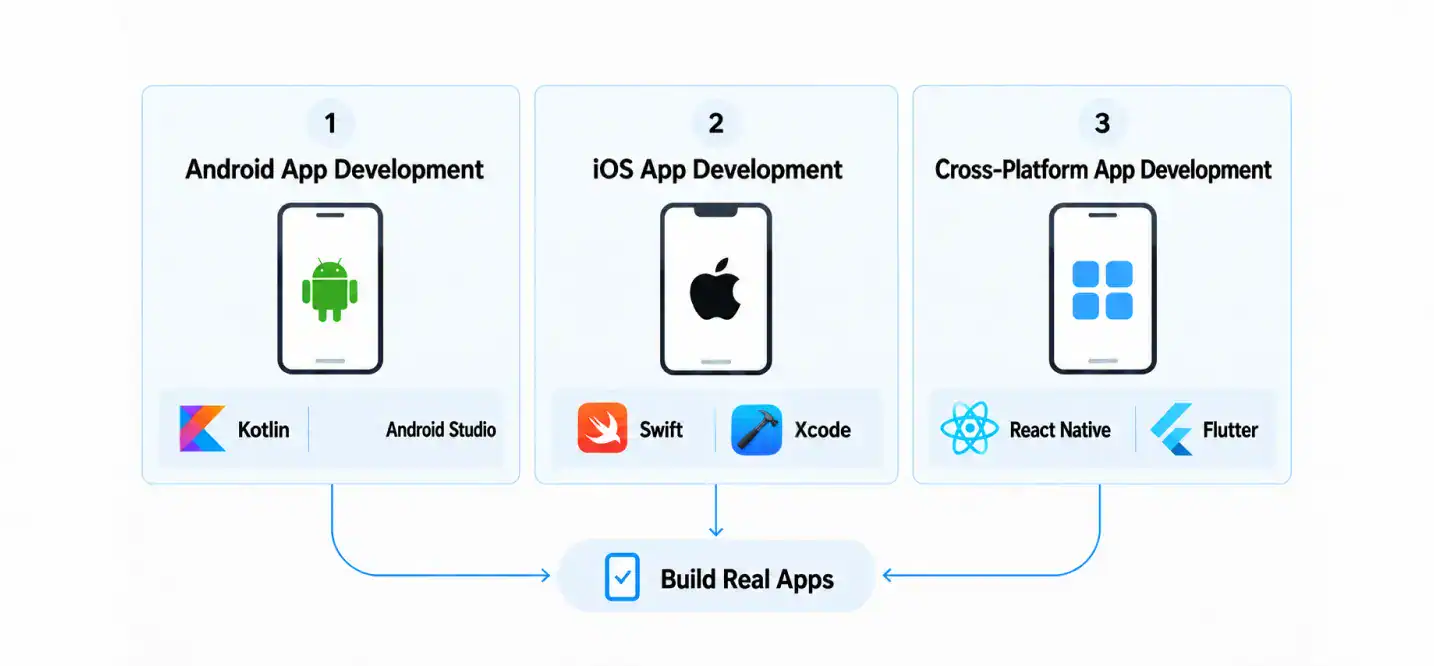
Once you understand the fundamentals, choose one development path and learn it well enough to build a complete application. Trying to learn Kotlin, Swift, JavaScript, Dart, and several frameworks simultaneously can leave you with surface-level knowledge of all of them.
1. Android App Development
Android development is a good starting point if you want to build applications for the Android ecosystem.
What to learn:
- Kotlin and its core language features.
- Android Studio and the Android SDK.
- User interfaces with Jetpack Compose or Android’s view-based UI system.
- Navigation, application lifecycle, permissions, and background work.
- API integration, local persistence, and testing.
- Build configuration and Google Play release requirements.
Kotlin is officially supported for Android development, and Google’s learning materials provide a path from programming basics to building Android apps. You can start with the official Android development resources.
Java is also used in existing Android projects, so familiarity with it can help when working with older codebases or libraries.
2. iOS App Development
iOS development focuses on building applications for Apple’s mobile ecosystem. The core learning path includes Swift, Apple’s development tools, and the conventions that shape iOS applications.
What to learn:
- Swift syntax, types, functions, and data structures.
- Xcode and the iOS SDK.
- SwiftUI for declarative interfaces, alongside UIKit where needed.
- Navigation, state management, and data persistence.
- Networking, permissions, testing, and debugging.
- App signing, distribution, and App Store requirements.
Xcode provides the tools used to build, test, optimize, and submit apps for Apple platforms. Apple’s official app development training introduces SwiftUI, navigation, state, persistence, and error handling through practical lessons.
3. Cross-Platform App Development
Cross-platform development allows teams to share much of an application’s code across platforms. It can be useful when a product needs both Android and iOS versions without maintaining entirely separate implementations for every feature.
Two common options are:
- React Native: Uses JavaScript or TypeScript and React concepts to build mobile interfaces, with native platform capabilities available through supported APIs and integrations.
- Flutter: Uses Dart and its own UI framework to build applications across multiple platforms.
Shared code does not eliminate platform-specific work. Developers still need to test on Android and iOS, handle permissions and native integrations, and address differences in platform behavior.
Read this cross-platform app development guide for more context on the approach, then explore React Native for mobile app development if that framework interests you.
Should You Learn Native or Cross-Platform Development First?
There is no universal winner. Your choice should reflect the roles you want to pursue and the kind of apps you want to build.
| Consideration | Native Development | Cross-platform Development |
|---|---|---|
| Main learning focus | One platform’s languages, APIs, and conventions | A shared framework and its platform integrations |
| Code reuse | Usually requires separate platform implementations | Allows substantial code sharing |
| Platform-specific features | Direct access to native APIs | May require plugins or native code for some features |
| Best fit | People who want to specialize in Android or iOS | People interested in building for multiple platforms with shared code |
For beginners, the most practical approach is to choose one path, complete a project, and understand how the app works from interface to data storage. You can broaden your skills once you have a solid foundation.
Which Tools and Technologies Should You Learn?
The right tools depend on your specialization. You do not need to install everything on this list before you start coding.
| Tool or Technology | What it Does |
|---|---|
| Android Studio | Provides the IDE, debugger, emulator, and build tools for Android development |
| Xcode | Supports development, testing, debugging, and distribution for Apple platforms |
| Software development kit (SDK) | Provides platform APIs, libraries, and tools needed to build applications |
| Git | Tracks changes to source code and helps developers manage versions |
| GitHub | Hosts repositories and supports collaboration and code review |
| REST APIs and JSON | Enable apps to exchange structured data with backend services |
| Firebase | Offers services that can support authentication, data storage, analytics, crash reporting, and other app needs |
| Google Play Console | Supports Android app publishing, release management, and store listings |
| App Store Connect | Supports Apple’s app submission, distribution, and app management workflows |
An SDK is not the same as a programming language. Kotlin and Swift are languages; Android Studio and Xcode are development environments; and SDKs provide the platform-specific interfaces and tools applications use.
Firebase is also not a replacement for understanding backend architecture. It can simplify common tasks, but you still need to understand authentication, data access rules, error handling, and the security implications of the services you integrate.
For a broader comparison of development stacks, frameworks, and tooling, see Cubix’s overview of mobile app development technologies, tools, and frameworks.
Follow This Mobile App Development Roadmap Step by Step
A useful mobile app development roadmap connects each learning stage to something you can actually build. The goal is not to finish a checklist of courses. It is to become capable of solving increasingly complex problems without relying on step-by-step instructions.
Step 1: Learn Programming Fundamentals
Choose the language associated with your intended development path and learn its basic syntax, data types, functions, control flow, and data structures.
Start with small exercises. Write a program that calculates totals, validates form input, or filters a collection of records. When something fails, investigate the error rather than replacing your code with a solution you do not understand.
Your milestone: You can write and debug small programs independently and explain how they work.
Step 2: Set Up Your Development Environment
Install the IDE, SDK, and supporting tools for your chosen platform. Create a starter project, run it in an emulator or simulator, and learn how to read build errors and use the debugger.
Get familiar with the project structure, dependencies, configuration files, and the process of running a development build.
Your milestone: You can create, run, and modify a simple mobile application on a supported emulator or device.
Step 3: Build a Functional User Interface
Create a small application with several screens. Add navigation, forms, lists, and buttons, and make sure the interface responds correctly to user input.
Do not focus only on how the screens look. Handle empty data, invalid input, loading states, and navigation back to previous screens. These details make an interface usable rather than merely presentable.
Your milestone: You can build a multi-screen app with predictable navigation and sensible interaction behavior.
Step 4: Connect APIs and Manage Data
Build an application that retrieves information from an API and displays it. Add appropriate loading indicators, handle failed requests, and decide which information needs to persist locally.
For example, a weather app can retrieve forecast data, display it in a list, and show a useful error when the service is unavailable. An expense tracker can save entries locally and allow users to review them later.
Your milestone: Your app can retrieve, display, and store data without failing whenever the network or input behaves unexpectedly.
Step 5: Learn App Architecture and Testing
As an app grows, putting all its logic in one screen or file becomes difficult to maintain. Learn to separate interface code, business logic, and data access where appropriate.
You do not need to apply a complex architecture to every beginner project. The goal is to understand separation of concerns and organize code so it can be tested and changed without creating unnecessary dependencies.
Android’s app architecture guidance is one example of how platform documentation explains maintainable application structure.
Start testing the logic that matters most, then add integration and UI tests for important user journeys. Test failure cases as well as the successful path.
Your milestone: You can explain your app’s structure, test its core behavior, and fix problems without rewriting everything.
Step 6: Complete and Prepare a Portfolio Project
Choose a project that solves a clear problem and take it beyond the prototype stage. Add validation, handle errors, test key workflows, and clean up the code.
If you plan to publish it, learn about release builds, signing, app permissions, privacy disclosures, store assets, and platform review requirements. Publication is useful experience, but it is not mandatory for every portfolio project. A well-documented app with a working demo can also demonstrate your skills.
Your milestone: Someone else can run or evaluate your project, understand what it does, and inspect how you built it.
Step 7: Prepare For Entry-Level Developer Roles
Organize your projects and repositories so that reviewers can understand your work without guessing how to run it. Practice discussing your architecture, the bugs you encountered, the tests you wrote, and the trade-offs you made.
Review programming fundamentals, basic algorithms, API handling, debugging, and the framework you use. Apply for internships and junior roles that match your current capabilities.
Your milestone: You can demonstrate a working application, explain your code, and talk through common technical problems without depending on a tutorial.
For a closer look at how these skills fit into a professional project, explore the mobile app development process.
What Projects Should You Build for a Mobile App Developer Portfolio?
Your portfolio should show that you can make decisions, solve problems, and complete working software. Five unfinished tutorial projects are less persuasive than two well-built apps that you understand thoroughly.
Start with projects that introduce one new technical challenge at a time.
| Project idea | Skills it can demonstrate |
|---|---|
| Task manager | UI development, navigation, forms, local data persistence |
| Weather app | REST API integration, JSON parsing, loading and error states |
| Expense tracker | Data modeling, database operations, validation, reporting |
| Booking app | Forms, authentication flows, API integration, application state |
| Location-based app | Location permissions, maps integration, handling unavailable data |
What Makes a Portfolio Project Worth Showing?
Include the following for each substantial project:
- A clear purpose: Explain the problem the app solves and who it is for.
- A working demonstration: Provide screenshots, a demo video, or a build where practical.
- Readable source code: Organize the project so reviewers can follow its structure.
- A useful README: Explain setup, dependencies, core features, and how to run the app.
- Evidence of testing: Describe the important workflows and edge cases you tested.
- Technical decisions: Explain why you chose a particular architecture, storage method, or API integration.
- Known limitations: Be honest about what is incomplete and what you would improve.
Avoid copying a tutorial project and presenting it as original work. Tutorials can teach useful patterns, but your portfolio should show what you can implement, adapt, and explain yourself.
How Long Does It Take to Become a Mobile App Developer?
There is no fixed timeline for becoming a mobile app developer. Your progress depends on previous programming experience, time available for practice, the complexity of your chosen stack, and how much work you do independently.
A more useful way to measure progress is by learning stage.
| Stage | Main Goal | Evidence of Progress |
|---|---|---|
| Programming foundations | Understand core language concepts | You can write and debug small programs |
| Mobile fundamentals | Build interfaces and navigation | You can complete a multi-screen app |
| Data and architecture | Connect APIs and manage stored data | Your app handles normal and error cases |
| Testing and release | Improve reliability and prepare a build | You can test core workflows and create a release build |
| Portfolio and job preparation | Demonstrate practical ability | You can explain and defend your technical decisions |
Someone who already knows a programming language may move through the early stages faster than someone learning programming for the first time. Studying consistently helps, but completing a course or publishing one app does not automatically make someone job-ready.
Your aim should be to progress from following instructions to making your own technical decisions. That is a stronger measure of readiness than the number of hours you have studied.
If you need to understand how project scope and complexity affect delivery schedules, see this overview of the mobile app development timeline.
Do You Need a Degree to Become a Mobile App Developer?
A computer science or software engineering degree can provide a structured foundation in programming, algorithms, databases, operating systems, and software engineering. It may also help candidates qualify for employers that require formal education.
However, a degree is not the only way into the field. Some developers learn through bootcamps, online courses, independent study, internships, or practical experience.
| Learning Route | Potential Advantages | What to Consider |
|---|---|---|
| Computer science or software engineering degree | Structured curriculum, theoretical foundations, broader computing knowledge | Requires a longer commitment and tuition costs may be significant |
| Coding bootcamp | Focused curriculum and guided project work | Quality, depth, and career support vary between programs |
| Self-study | Flexible schedule and control over learning priorities | Requires discipline, a structured plan, and independent practice |
Employer expectations differ by company and role. Review job descriptions for the positions you want, then compare their requirements with your current skills.
Whatever route you choose, make sure it includes hands-on development. Understanding a concept in a lesson is different from using it to solve a problem in an application.
How Do You Get Your First Mobile App Developer Job?
Once you can build and explain complete projects, shift your attention toward demonstrating that you can contribute to a development team.
What Employers Look for in Junior Developers
Entry-level job requirements vary, but common expectations include:
- Working knowledge of one mobile platform or framework.
- The ability to write, read, and debug code.
- Basic experience with APIs, data persistence, and testing.
- Familiarity with Git and collaborative workflows.
- A portfolio that demonstrates completed work.
- Clear communication and a willingness to learn from feedback.
You do not need to know every framework listed in a job description. However, you should understand the core requirements you claim to have and be able to demonstrate them.
How to Prepare for Technical Interviews
Prepare to explain how your projects work, not just which technologies they use. Interviewers may ask why you chose a particular data model, how you handled an API failure, or how you would investigate a crash.
Practice programming exercises, debugging, basic data structures, and questions related to your chosen platform. Review your own projects before interviews so you can discuss your decisions and the limitations you would address with more time.
Where to Find Entry-Level Opportunities
Look for junior mobile developer positions, internships, graduate programs, and roles that offer mentorship. Company career pages and professional communities can also help you find opportunities.
You can gain relevant experience through collaborative projects and open-source contributions. Even a small contribution can teach you how to read someone else’s code, follow project conventions, and respond to review feedback.
Apply when you can demonstrate the core skills required for a role. Waiting until you know every tool and framework can delay your progress unnecessarily.
How Can You Grow Your Mobile App Development Career?
Your first mobile development role is a starting point, not the end of the learning process. As you gain experience, you can take responsibility for more complex features, improve system design decisions, and help other developers solve problems.
Possible career directions include:
- Mid-level and senior mobile developer: Handle more complex features, improve code quality, and make broader technical decisions.
- Mobile architect: Design application structures, evaluate technical approaches, and address system-level concerns.
- Platform specialist: Develop deeper expertise in Android or iOS APIs, performance, and platform-specific behavior.
- Cross-platform specialist: Focus on shared-code architecture, framework integration, and multi-platform delivery.
- Technical lead or engineering manager: Guide implementation, coordinate work, and support a team’s technical development.
Career progression depends on the work you do, the responsibilities you take on, and the needs of the organizations you join. Keep learning through documentation, code reviews, practical projects, and feedback from experienced engineers.
Conclusion
To become a mobile app developer, start with programming fundamentals, choose a platform or framework, and build your skills through complete projects. Learn to integrate APIs, manage data, test your code, and prepare releases. As you progress, focus on solving problems independently and explaining the technical decisions behind your work. Those abilities are more useful than trying to learn every tool at once.
If you’re interested in how these skills translate into production applications, exploring the work of professional mobile app developers can help you understand the engineering involved in building and maintaining apps. Looking at real development requirements is also a useful way to identify which skills you want to strengthen as you plan your own career.
Planning an App? Let’s Map Out Your Development Path
Contact UsFrequently Asked Questions
1. What skills do you need to become a mobile app developer?
You need programming fundamentals, mobile UI development, API integration, data management, testing, debugging, and version control. The specific languages and tools depend on your chosen platform.
2. How long does it take to become a mobile app developer?
It depends on your prior experience, study time, and project complexity. Measure progress by your ability to build, test, and explain complete applications rather than by a fixed deadline.
3. Should you learn iOS or Android first?
Choose the platform that matches your interests, available tools, and target roles. Start with one platform and build a complete project before expanding your skills.
4. Is native or cross-platform development better for beginners?
Native development builds platform-specific expertise, while cross-platform frameworks allow substantial code sharing. Neither is universally better; choose based on your goals and the types of roles you want.
5. Which programming languages are most useful for mobile app development?
Swift is central to native iOS development, and Kotlin is commonly used for Android. JavaScript or TypeScript with React Native, and Dart with Flutter, are other options for cross-platform development.
6. Can you become a mobile app developer without a degree?
Yes. Some developers enter through self-study, bootcamps, or practical experience. Employer requirements vary, so build a strong portfolio and check the qualifications requested for your target roles.
7. What is the average mobile app developer salary in the United States?
Salary varies by location, experience, employer, and specialization. Check current U.S. salary data for the relevant occupation and distinguish mobile-specific estimates from broader software developer figures.
8. How do you build a mobile app developer portfolio?
Build a few complete apps that demonstrate UI development, data handling, error management, and testing. Include readable code, setup instructions, screenshots, and explanations of your technical decisions.
9. Where can you learn mobile app development for free?
Start with official Android and Apple documentation, free programming lessons, framework documentation, and practical coding exercises. Build your own projects alongside the lessons rather than only watching tutorials.
10. Which certifications help mobile app developers advance their careers?
Certifications can demonstrate knowledge of a particular platform or technology, but their value depends on the role and employer. Practical projects and relevant experience should remain central to your career development.