A PHP security flaw can put a website at risk before its own application code gets a chance to handle a request. That makes a vulnerability in the PHP runtime more than a developer concern: it can affect the server, the applications running on it, and the data those applications process.
PHP remains a major part of the web. According to W3Techs’ PHP usage statistics, PHP is used by a substantial majority of websites whose server-side programming language is known. When a flaw affects the runtime itself, the potential reach extends across many types of websites and web applications.
The current PHP issue involves two critical vulnerabilities, CVE-2026-109618 and CVE-2026-109619, which can allow unauthenticated remote code execution on affected systems. The PHP project has released security updates, and organizations should identify their PHP deployments and apply the appropriate fixes promptly.
The key is to confirm which PHP version is actually running, determine whether the relevant patch is installed, and check for signs of compromise if the server may have been exposed. Here is how to assess the risk and respond.
What Is the PHP Issue and Why Is It a Security Concern?
PHP is a server-side scripting language used to build dynamic websites, process form submissions, interact with databases, manage sessions, and power content management systems and web applications. Because PHP executes on the server, a flaw in its runtime can create risks beyond an individual website feature.
The current PHP issue concerns two critical remote code execution (RCE) vulnerabilities:
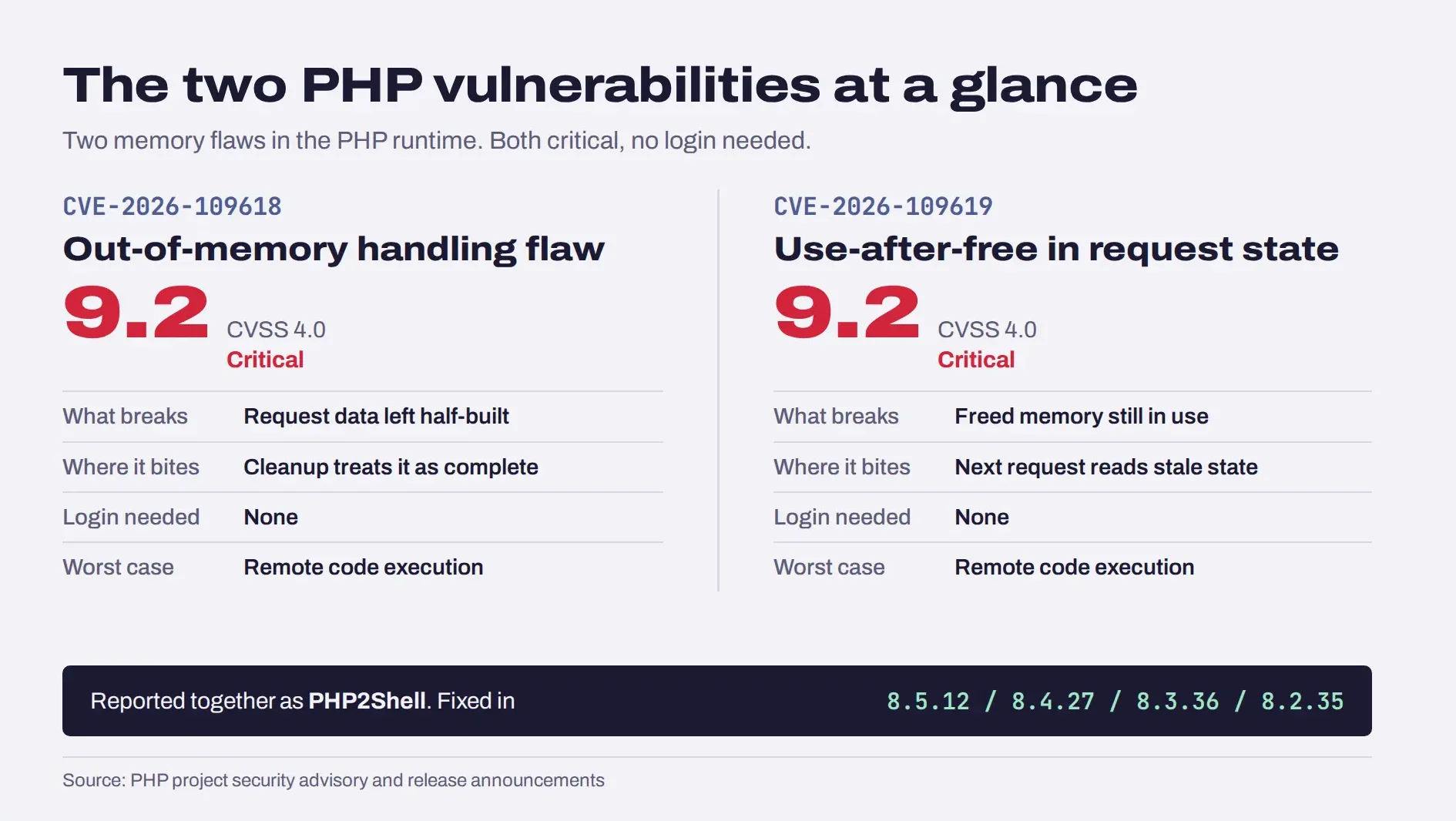
- CVE-2026-109618: An out-of-memory handling flaw can interrupt PHP while internal request data is only partially initialized. Subsequent cleanup may handle that data incorrectly.
- CVE-2026-109619: Internal state associated with a request can persist after its underlying memory has been freed. A later request handled by the same worker may encounter that stale state.
Both vulnerabilities have been associated with the name PHP2Shell in security reporting. Each received a CVSS 4.0 severity score of 9.2, classified as critical. The technical descriptions and affected releases are documented in the Google Cloud security analysis of the PHP flaws.
Remote code execution means an attacker may be able to make a vulnerable system execute code they control. The consequences depend on the deployment, the privileges of the affected process, and other security controls. However, because these flaws can be triggered without authentication under vulnerable conditions, they require urgent attention.
The important distinction is that a vulnerable PHP installation is not automatically a compromised server. Organizations need to establish exposure, apply the appropriate fix, and investigate suspicious activity where necessary.
How Do the PHP Vulnerabilities Work?
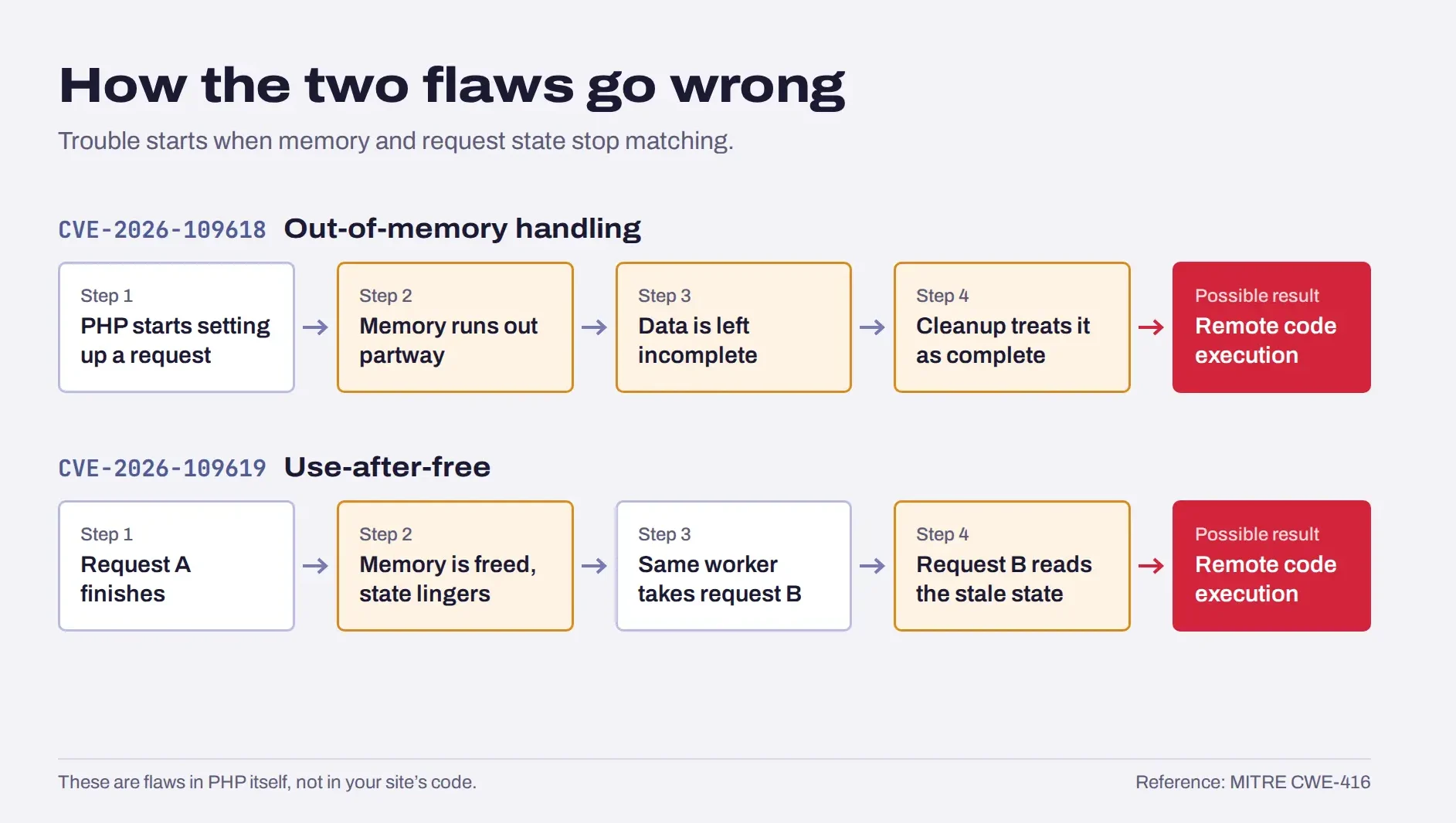
Both flaws involve PHP’s internal memory and request-handling behavior, but they arise through different conditions.
1. CVE-2026-109618: How an Out-of-Memory Error Can Create a Security Risk
Programs need memory to store and process data. When an application cannot allocate enough memory, it must handle that failure safely and leave its internal state consistent.
In this case, an out-of-memory condition can interrupt PHP while request-related structures are only partially initialized. If cleanup code subsequently treats those structures as fully initialized, it may access or process invalid internal data.
That inconsistency can create an exploitable memory-safety condition. Under the affected circumstances, the flaw can lead to remote code execution.
2. CVE-2026-109619: How a Use-After-Free Bug Creates a Security Risk
A use-after-free vulnerability occurs when software continues to access memory after that memory has been released. The released memory may be reused for something else, so the old reference can point to data that no longer has the expected meaning.
In the PHP issue, request-related internal state can survive after its backing memory has been freed. A later request handled by the same worker may use that stale state before normal initialization resets it.
This is a memory-safety problem inside the runtime, not simply a mistake in a website’s form validation or business logic. The MITRE CWE-416 reference explains the general mechanics and risks of use-after-free vulnerabilities.
3. What Does Remote Code Execution Mean for a PHP Website?
If an attacker successfully exploits an RCE flaw, they may be able to execute unauthorized code with the permissions available to the affected PHP process. Depending on those permissions and the server’s configuration, that could enable them to:
- Read or alter application files accessible to the process.
- Access data or credentials available to the application.
- Modify website content or install malicious code.
- Disrupt the application or use the compromised server as a foothold for further attacks.
These are potential consequences, not proof that every affected website has experienced them. The actual impact must be assessed against the system’s configuration, privileges, exposed services, and evidence of exploitation.
What Risks Do the PHP Vulnerabilities Create for Websites?
The risk extends beyond a website becoming unavailable. If a vulnerable PHP runtime is compromised, the attacker may gain access to resources available to the affected process.
1. Server compromise: Attackers may attempt to execute commands, alter files, or establish persistence, depending on the access they obtain.
2. Data exposure: If the PHP process can access customer records, application configuration, database credentials, or API keys, those resources may be at risk.
3. Service disruption: Malicious code or exploitation attempts can interrupt application behavior, consume resources, or damage files and data.
4. Further attacks: A compromised web server may become a starting point for attempts to access other systems. Whether that is possible depends on network segmentation, service permissions, and credential access.
5. Business and compliance consequences: Organizations may need to investigate, restore services, rotate credentials, assess data exposure, and determine whether notification obligations apply.
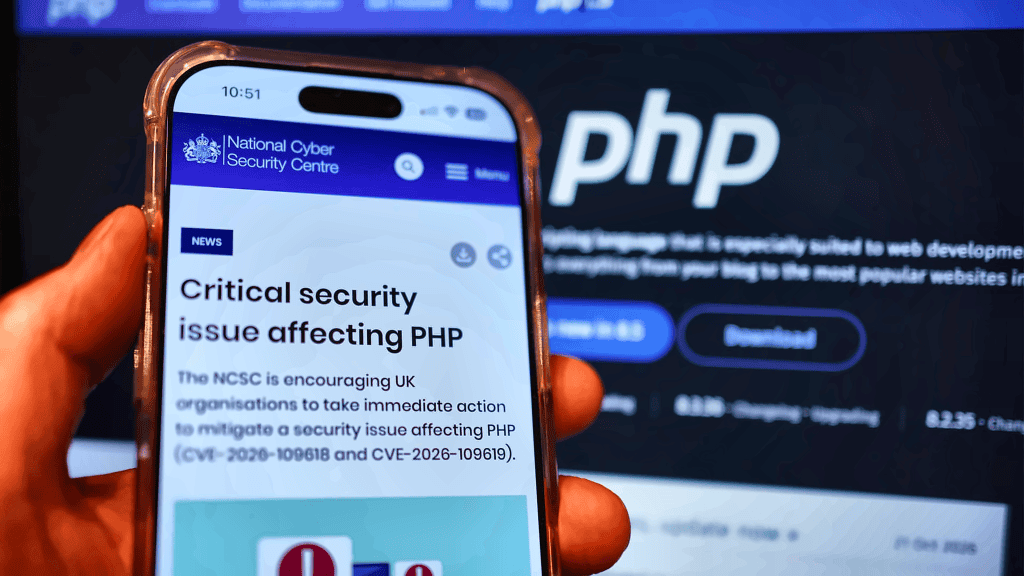
The UK National Cyber Security Centre’s advisory on the PHP security issue urges organizations to take immediate action. For businesses, the sensible response is to prioritize exposed systems, patch them, and assess whether any compromise occurred rather than assume either that an attack happened or that no attack was possible.
Which PHP Versions Are Affected by the Vulnerability?
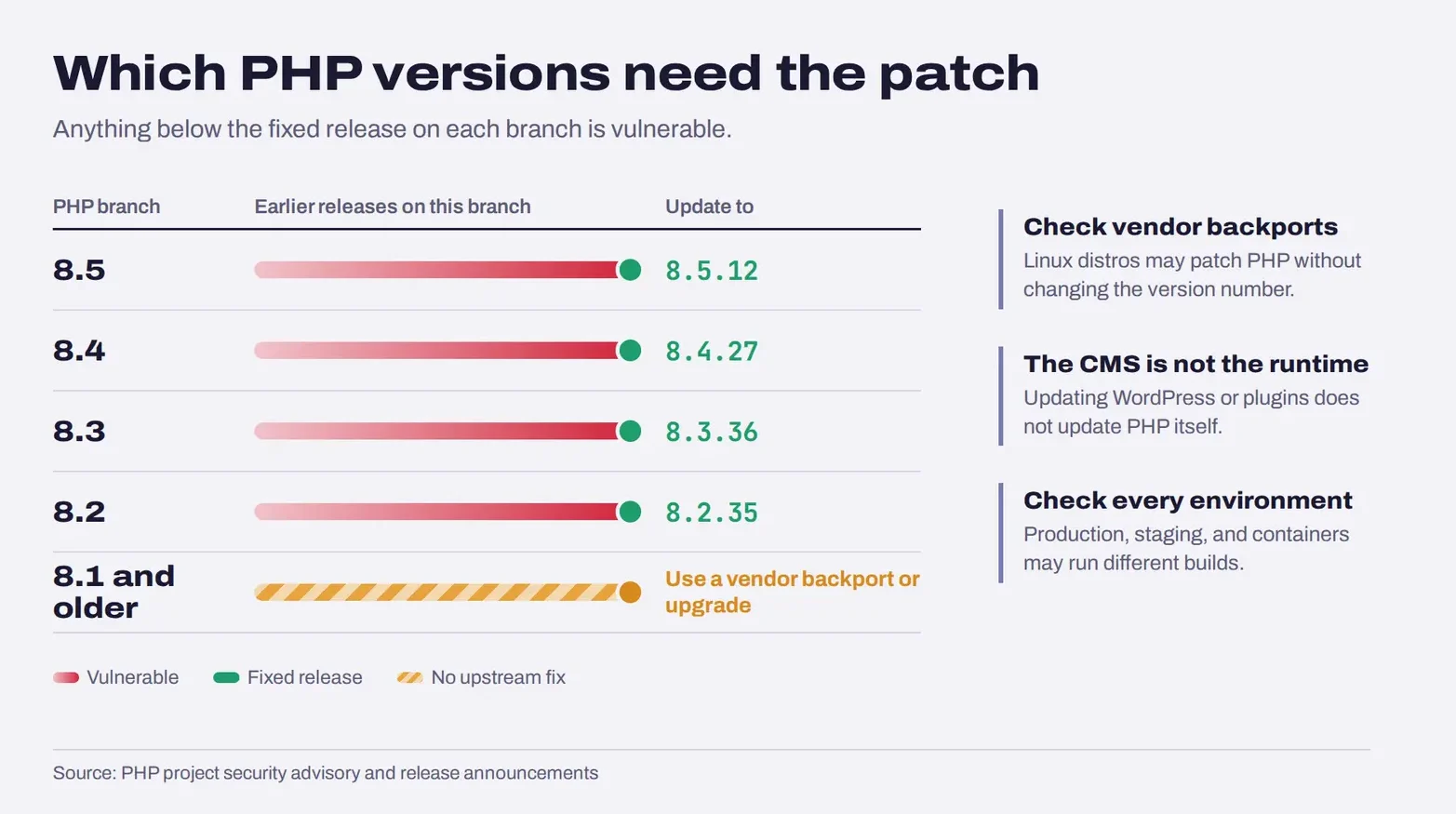
The affected version range is broad. The PHP project’s published information identifies vulnerable releases through PHP 8.5.11, with fixes available in the following releases.
| PHP branch | Fixed release |
|---|---|
| PHP 8.5 | 8.5.12 |
| PHP 8.4 | 8.4.27 |
| PHP 8.3 | 8.3.36 |
| PHP 8.2 | 8.2.35 |
| PHP 8.1 and older | Check vendor backports or upgrade |
The official PHP security advisory and release announcements provide the authoritative patch information. Confirm the appropriate release for your PHP branch and operating environment before making changes.
A few details matter when interpreting the table:
- A version number is not always the full story. Linux distributions and long-term-support vendors may backport security fixes without adopting the same upstream version number. Confirm the package’s patch status with your vendor.
- Unsupported branches need extra care. The PHP project is not issuing fixes for PHP 8.1 and older through its upstream releases. Some vendors may provide backported fixes, so verify support rather than assume one exists.
- The PHP runtime is separate from the application. Updating WordPress, a plugin, or a framework does not necessarily update the PHP runtime used by the server.
- Different environments may use different versions. Production, staging, command-line jobs, containers, and separate applications may not share the same PHP installation.
If your hosting provider manages PHP for you, ask which runtime version is active and whether the relevant security patch has been applied. Do not rely solely on a control-panel label or an assumption that managed hosting updates every environment automatically.
How to Check Your PHP Version and Find Out If You’re Affected?
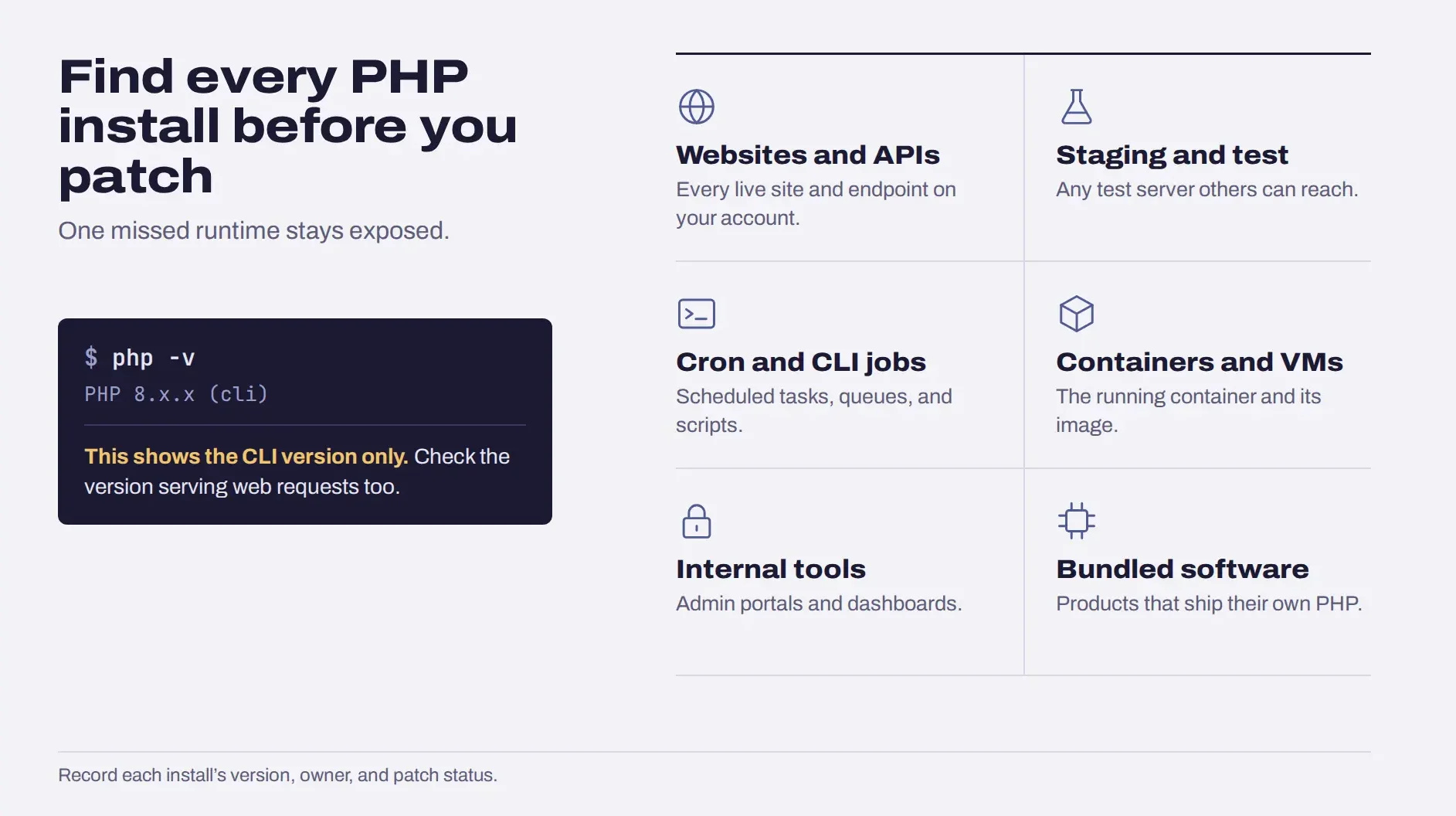
Before changing anything, establish which PHP runtime is actually serving your application. A version installed on a developer’s computer may differ from the one used by the live website.
1. Check the PHP Version Running on Your Server
Use the method appropriate for your hosting environment:
- Hosting control panel: Look for the PHP version assigned to the website or domain. Some hosts let you configure separate versions for different sites.
- Command line: If you have shell access, run php -v to check the CLI version.
- PHP-FPM or web server configuration: Confirm the version used by the web-serving process, particularly if the server has multiple PHP installations.
- Containers: Inspect the PHP version inside the running container and the image used to build it.
- Managed platforms: Check the platform’s runtime settings and deployment status.
One important caveat: php -v reports the command-line PHP binary. It does not necessarily show the version serving web requests. Check the web runtime separately before deciding that the application is patched.
Avoid publishing a public phpinfo() page to check your version. If you temporarily use a diagnostic script in a controlled environment, remove it immediately afterward because detailed configuration output can expose sensitive information.
2. Identify Every PHP Installation Your Business Uses
Checking the main website is a good start, but it may not cover the entire environment.
Create an inventory of:
- Production websites and APIs.
- Staging, test, and development environments that are reachable by others.
- PHP-based background jobs and command-line scripts.
- Containers and virtual machines.
- Internal applications, admin portals, and monitoring tools.
- Third-party appliances or software packages that bundle PHP.
Record each installation’s version, location, owner, exposure, and patch status. This helps prevent an overlooked service from remaining vulnerable after the primary website is updated.
3. Confirm Whether Your Hosting Provider Has Applied the Patch
If a hosting company or cloud platform manages the runtime, ask for confirmation of the actual fix. Find out whether you need to restart PHP workers, rebuild a container image, or redeploy the application.
For example, updating a package on a build machine will not fix a container that continues to run an older image. Similarly, updating one website’s PHP version does not prove that other sites on the same account have also been updated.
Does the PHP Vulnerability Affect WordPress Websites?
WordPress websites can be affected when they run a vulnerable PHP runtime. The risk comes from the PHP version serving the site, not simply from the fact that WordPress is installed.
WordPress relies on PHP to execute server-side code. If that runtime is vulnerable, updating WordPress core, themes, or plugins alone does not necessarily remove the underlying PHP flaw.
Website owners should:
- Check the PHP version assigned to their WordPress site.
- Confirm that the hosting provider has applied the relevant patch or vendor backport.
- Check other sites and environments under the same hosting account.
- Test the website after the runtime update, including login, publishing, forms, checkout, and important integrations.
WordPress’s official hosting requirements are a useful reference when planning supported runtime upgrades. However, meeting general WordPress requirements does not by itself confirm that a particular PHP security patch is installed.
The same principle applies to other PHP-based applications, including Drupal, Joomla, Magento, and Laravel projects. Their exposure depends on the PHP runtime and deployment, not just the application name.
How to Update PHP and Apply the Security Patch
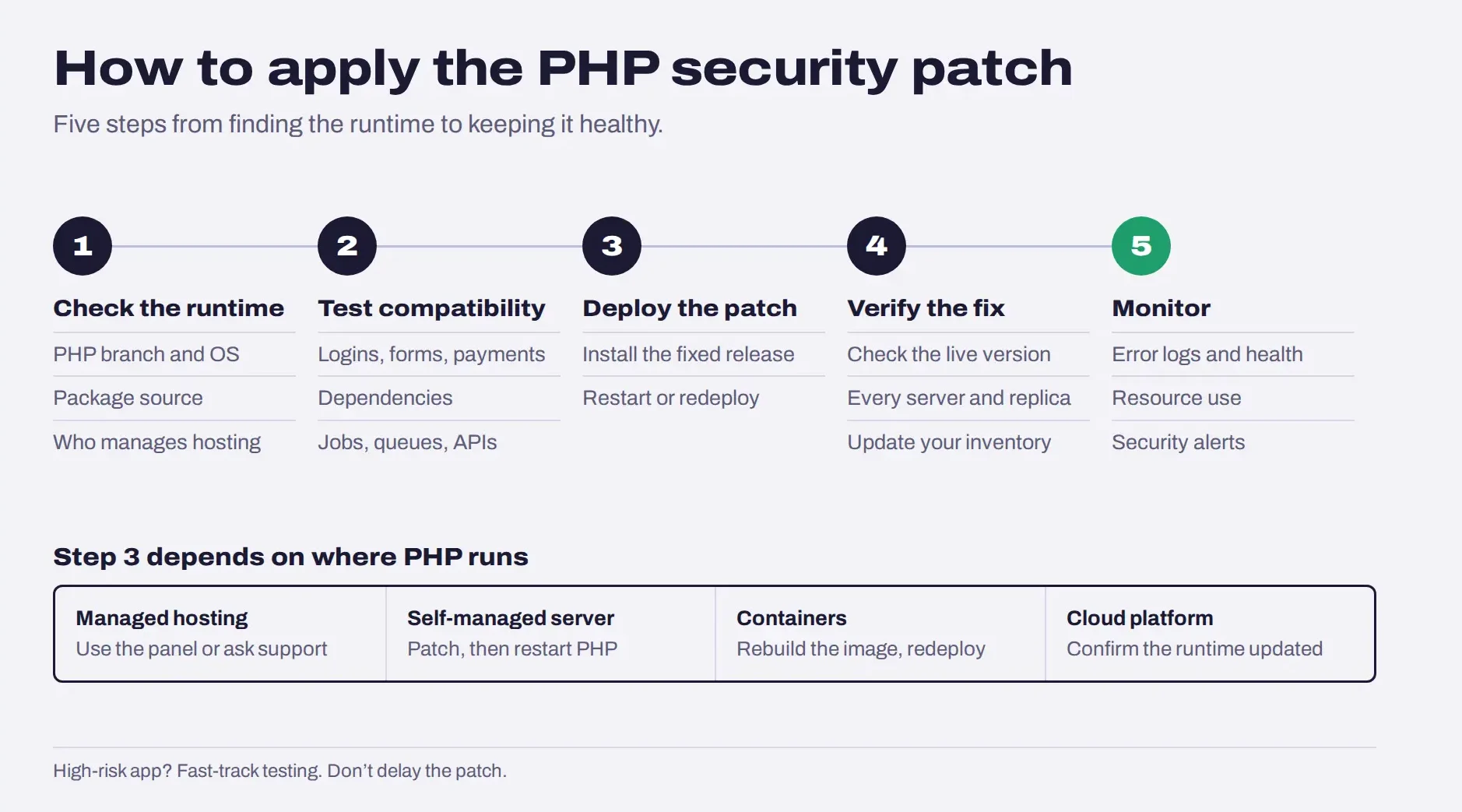
Once you identify an affected installation, apply the appropriate fix promptly. The exact procedure depends on whether you manage your own server, use managed hosting, or deploy PHP through containers or a cloud platform.
1. Confirm the Runtime and Choose the Correct Update
Identify the PHP branch, operating system, package source, and hosting arrangement. Use the corresponding fixed release or a verified vendor package containing the security fixes.
Do not assume that installing the newest PHP release is always the only option. The correct supported update depends on your application compatibility and environment. If your system runs an unsupported branch, plan a move to a supported version or confirm whether your vendor provides a security backport.
2. Test Application Compatibility
Where feasible, test the update in staging before deploying it to production. Check:
- Application startup and error logs.
- Database connections and authentication.
- Forms, uploads, payments, and other important workflows.
- Frameworks, extensions, and third-party dependencies.
- Scheduled jobs, queues, and API integrations.
The goal is to catch compatibility issues without leaving the production system exposed longer than necessary. For a high-risk public-facing application, prioritize the security fix and use an expedited testing and deployment process rather than postponing remediation indefinitely.
3. Deploy the Patch
The deployment method depends on the environment:
- Managed hosting: Use the provider’s supported PHP version controls or ask its support team to apply the update.
- Self-managed servers: Install the vendor-supported patched package and follow the server’s documented restart or reload procedure.
- Containers: Rebuild the image using a patched PHP base image, then redeploy the service.
- Cloud platforms: Confirm whether the platform updates the runtime automatically or requires you to rebuild and redeploy your application.
For a practical example, Google Cloud’s guidance for PHP deployments distinguishes between managed runtimes and customer-managed containers. A platform may update a managed runtime while a custom image remains unchanged until its owner rebuilds and redeploys it.
4. Verify the Fix
After deployment, confirm the PHP version or vendor package running in production. Check all relevant instances, not just one server or container.
Then verify that:
- The application responds as expected.
- PHP workers or services are using the patched runtime.
- Containers and deployment replicas have been replaced where required.
- Logs show no new application errors.
- The patch status is recorded in your asset inventory.
5. Monitor the Application After the Update
Watch error logs, application health, resource usage, and security alerts. If the system was exposed before patching, also investigate suspicious activity rather than treating a successful update as proof that the server is clean.
Testing is an important part of this process. Cubix’s software testing services include security testing, regression testing, and performance validation that can help teams assess application behavior after significant changes.
What If You Cannot Update PHP Immediately?
Sometimes an older application depends on libraries or extensions that prevent a straightforward runtime upgrade. That complicates remediation, but it does not make leaving a vulnerable public-facing system unchanged a safe long-term choice.
If you cannot patch immediately:
- Contact your hosting provider or vendor. Ask whether a verified security backport is available and when it will be applied.
- Prioritize exposed services. Address internet-facing applications and systems processing untrusted requests first.
- Reduce exposure. If an immediate fix is not feasible, consider restricting access or isolating the affected application from public networks until remediation is possible.
- Avoid relying on incomplete workarounds. A web application firewall or access restriction may reduce some exposure, but it should not be treated as a complete fix for these runtime vulnerabilities.
- Set a clear remediation deadline. Assign an owner and document the outstanding risk, dependencies, and next steps.
The PHP project’s published guidance states that there is no complete mitigation for these vulnerabilities and that updating is the safe course of action. If a legacy application blocks that update, the right next step is to resolve the compatibility issue or contain the vulnerable system while that work proceeds.
For applications that need ongoing patching, dependency upgrades, or runtime compatibility work, software maintenance and support services may be relevant. Confirm the exact service scope with the provider before relying on it for security remediation.
How to Check for Signs of a Compromised PHP Server?
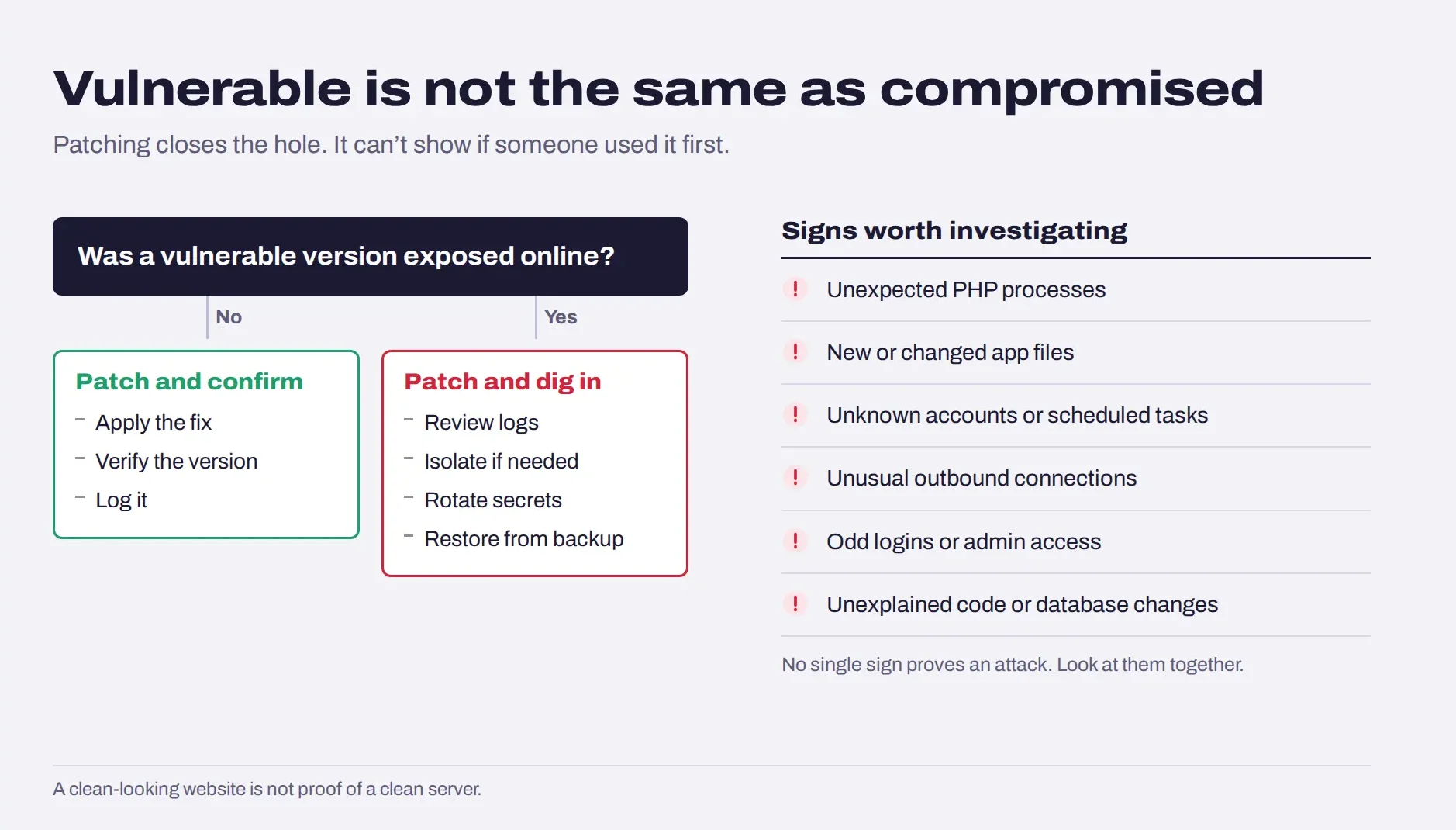
Patching removes the known vulnerability from a properly updated runtime, but it cannot tell you whether an attacker exploited the system before the patch was installed.
If the server was exposed while running a vulnerable version, review its activity and investigate any suspicious findings.
1. Review Logs and System Activity
Look for unexplained activity around the period of exposure, including:
- Unexpected processes or commands associated with PHP or the web server.
- New or modified files in application directories.
- Unrecognized user accounts, scheduled tasks, or startup mechanisms.
- Unusual outbound network connections.
- Suspicious authentication activity or unexpected access to sensitive endpoints.
- Unexpected changes to application code, configuration, or database records.
No single indicator proves exploitation. Investigators should correlate logs, timestamps, file changes, process activity, and network evidence to understand what happened.
2. Protect Credentials and Sensitive Data
If there is credible evidence of compromise, assess which secrets the affected process could access. Depending on the findings, you may need to rotate database credentials, API keys, application secrets, and other exposed credentials.
Do this from a trusted environment and ensure that replacement secrets are not immediately exposed to the same compromised system.
3. Contain and Investigate Suspected Compromise
If you suspect unauthorized code execution, involve your security or incident response team. Preserve relevant logs and evidence, isolate the affected system where appropriate, determine the scope of access, and restore from trusted sources if necessary.
A clean-looking website is not proof that its server is clean. Likewise, the presence of a vulnerable PHP version does not prove that an attacker succeeded. The response should be based on exposure and evidence.
How to Prevent Similar PHP Security Issues?
This incident reinforces the need for a repeatable vulnerability management process rather than one-off emergency updates.
1. Maintain a PHP asset inventory. Track runtimes across websites, APIs, containers, internal tools, and third-party products. Include an owner and a process for checking vendor security announcements.
2. Establish patch-management priorities. Prioritize vulnerabilities by severity, exposure, exploitability, and business impact. Critical issues affecting public-facing systems should have a clear escalation path.
3. Plan for end-of-life software. An application running an unsupported PHP branch may not receive fixes from the upstream project. Schedule upgrades before support ends and verify any vendor backport claims.
4. Manage dependencies. Review frameworks, PHP extensions, and third-party packages for compatibility and known security issues. A runtime upgrade may require dependency remediation first.
5. Limit application privileges. Run PHP processes with only the permissions they need. Keep sensitive credentials out of public directories, restrict access to secrets, and segment systems so a compromised application cannot automatically reach every other resource.
6. Use tested backups and recovery procedures. Backups help with restoration, but they should be protected from unauthorized modification and tested regularly.
7. Build security into development and release workflows. Code reviews, vulnerability scanning, regression testing, and controlled deployments help teams identify issues and respond consistently. Cubix outlines this approach in its article on QA and security throughout the software development lifecycle.
When Should You Modernize a Legacy PHP Application?
Not every PHP vulnerability requires a rebuild. If your application runs a supported branch and the appropriate patch is available, applying that patch may be the right immediate response.
Modernization becomes more important when the application cannot be maintained safely over time.
Consider a deeper upgrade or refactoring project if:
- The application relies on a PHP branch that no longer receives upstream security updates and no verified vendor patch is available.
- Old dependencies prevent migration to a supported runtime.
- Important business functions break whenever PHP or its extensions are updated.
- The application lacks reliable tests, staging, or a controlled deployment process.
- No one has a clear inventory of the runtime, dependencies, or systems that need patching.
The solution does not always need to be a complete rewrite. Depending on the application’s architecture, options may include replacing incompatible libraries, upgrading the framework, migrating to a supported PHP branch, isolating legacy components, or refactoring the parts that block safe updates.
For businesses that need to address those underlying engineering issues, Cubix’s custom software development services may be relevant to planning and implementing application upgrades or modernization work.
The priority is to restore a supported, patched runtime first. Broader modernization should then address the reasons the application was difficult to secure in the first place.
Final Takeaway
The most important step is to confirm which PHP runtime is actually serving your application and whether it has received the appropriate security fix. Do not assume that updating a CMS, relying on managed hosting, or patching one server has secured every PHP installation in your environment.
Apply the relevant patch promptly, verify the deployment, and investigate suspicious activity if the system was exposed. If an unsupported runtime or legacy dependency prevents a safe update, treat that as an urgent maintenance problem, not a reason to leave the vulnerability unresolved.
Worried About PHP Security? Let Cubix Help You Fix It
Contact UsFrequently Asked Questions About the PHP Issue
1. What Is the Latest PHP Issue?
The issue concerns two critical PHP runtime vulnerabilities, CVE-2026-109618 and CVE-2026-109619. Under vulnerable conditions, they can allow unauthenticated remote code execution. Organizations should check their installed PHP version and apply the relevant vendor-supported fix.
2. What Is the PHP2Shell Vulnerability?
PHP2Shell is the name used in security reporting for the two PHP vulnerabilities discussed in this article. They involve unsafe handling of internal request state and memory, and can lead to remote code execution on affected installations.
3. Which PHP Versions Are Affected?
The reported vulnerable range extends through PHP 8.5.11. Fixed releases are PHP 8.5.12, 8.4.27, 8.3.36, and 8.2.35. PHP 8.1 and older require particular attention because the upstream project no longer provides fixes for those branches; some vendors may offer backported patches.
4. How Do I Check My PHP Version?
If you have command-line access, run php -v to check the CLI version. For a live website, confirm the PHP version used by the web server or hosting provider as well, since it may differ from the CLI installation.
5. How Do I Update PHP to Fix the Vulnerability?
Install the appropriate fixed release or a verified vendor package containing the patch. Depending on your environment, you may need to change the hosting configuration, update server packages, rebuild a container image, or redeploy a cloud application. Verify the running version afterward.
6. Is WordPress Affected by the PHP Vulnerability?
A WordPress site can be affected if it runs a vulnerable PHP runtime. Updating WordPress core or its plugins does not necessarily patch PHP itself. Check the site’s runtime and confirm the hosting provider has applied the relevant fix.
7. Can a PHP Vulnerability Expose Passwords or API Keys?
Potentially, yes. If an attacker obtains code execution, they may be able to access credentials or other data available to the affected PHP process. The actual exposure depends on the application’s permissions, configuration, and the success of any exploitation.
8. What Should I Do If My Hosting Provider Has Not Patched PHP?
Contact the provider immediately and request a confirmed remediation timeline or details of a verified vendor backport. Prioritize public-facing services, reduce access where possible, and consider isolating the vulnerable application until a fix is available.
9. Does Updating PHP Remove Signs of an Earlier Compromise?
No. Updating addresses the vulnerability in the runtime, but it does not establish whether an attacker previously exploited it or remove every possible artifact of a compromise. Review relevant logs and system activity, investigate suspicious findings, and rotate potentially exposed credentials when warranted.