
Key Takeaways
- SSR renders HTML on the server before sending it to the browser, so users see content instantly instead of a blank page while JavaScript downloads.
- SEO gets a direct boost, search engine bots crawl fully-formed HTML on the first pass instead of waiting on a delayed JavaScript-rendering queue.
- The five-step SSR lifecycle, request, data fetch, HTML generation, delivery, and hydration, is the same core mechanic whether you build it manually or use a framework.
- Next.js is the production-recommended path for most teams, offering native getServerSideProps, automatic code-splitting, streaming, and edge support.
- Global state (Redux/Context) needs careful handling, a fresh store per request and safely serialized initial state to prevent hydration mismatches.
Here’s a number worth sitting with: 53% of mobile visitors abandon a site if it takes longer than 3 seconds to load, and every additional second of delay can cut conversions by up to 20%. If your React app is shipping a blank white screen while the browser downloads a fat JavaScript bundle, you’re not just losing a UX battle, you’re losing users, rankings, and revenue before they even see your product.
This is exactly the problem server-side rendering (SSR) was built to solve. In this guide, we’re going deep, what SSR actually is, how it works under the hood, when it makes sense (and when it doesn’t), how to implement it step by step, and how to avoid the mistakes that trip up most teams the first time they try it. Expect real stats, real code, real tables, and a few infographics along the way. Let’s get into it.
Want to discuss your project? Our experts are just a click away.
Contact UsWhat Is Server-Side Rendering (SSR) in React?
Server-side rendering is the process of generating full HTML content on the backend server before it’s sent to the browser. So, what is server side rendering, in plain terms? Instead of shipping an empty <div id=”root”></div> and making the browser do all the work, the server does the heavy lifting first and delivers a fully populated page.
Here’s the contrast that matters:
- Client-Side Rendering (CSR): The browser receives a near-blank HTML skeleton, downloads the JavaScript bundle, executes it, and then renders content on screen.
- Server-Side Rendering (SSR): The server runs your React components, converts them into real HTML markup, and sends that fully-formed page straight to the browser, visible instantly, before any JavaScript has even loaded.
So what is server side rendering (SSR) in React, specifically? It means using React’s server APIs (like renderToString or renderToPipeableStream) to render your component tree into HTML on the server for every request, or at build time, depending on your strategy, rather than leaving that job entirely to the client’s browser.
This single architectural decision is the foundation of React SSR, and it’s why so many production teams, from e-commerce platforms to SaaS dashboards, are re-evaluating their rendering strategy in 2026.
React and Server-Side Rendering: How It Actually Works Under the Hood
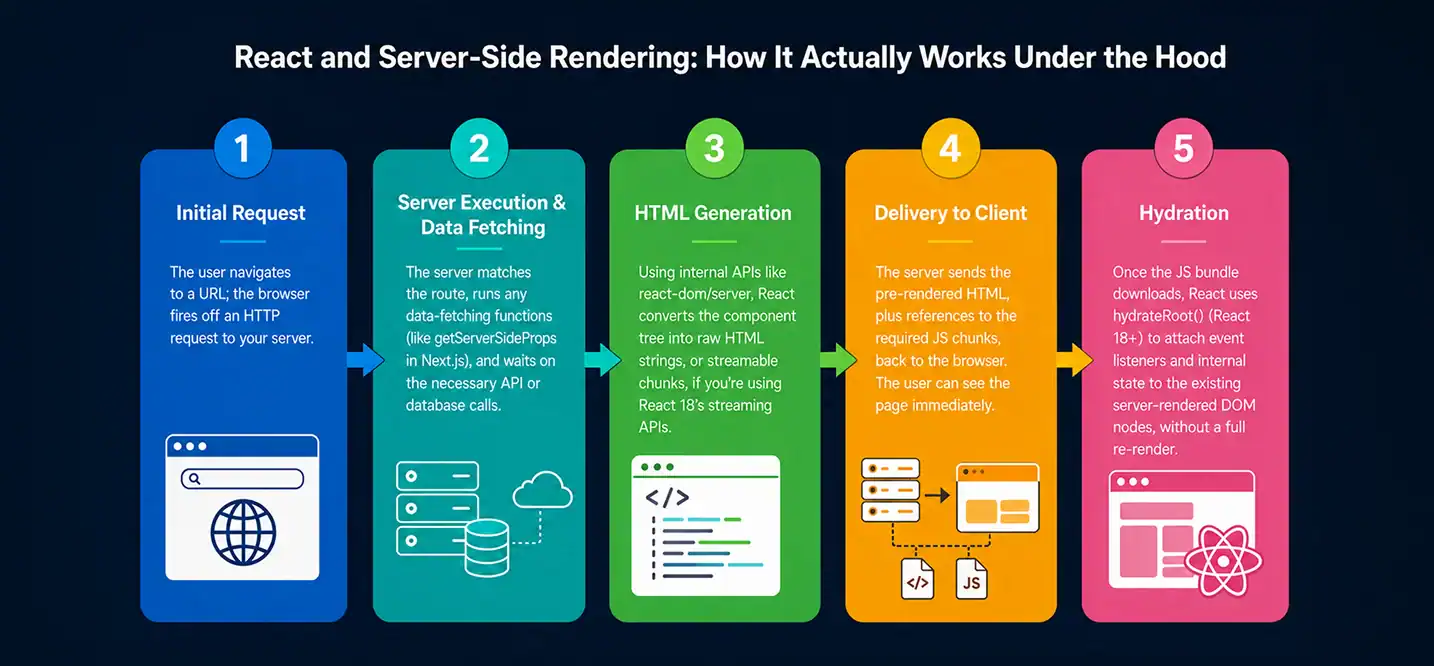
React js server rendering follows a five-stage lifecycle that bridges backend computation and frontend interactivity:
- Initial Request – The user navigates to a URL; the browser fires off an HTTP request to your server.
- Server Execution & Data Fetching – The server matches the route, runs any data-fetching functions (like getServerSideProps in Next.js), and waits on the necessary API or database calls.
- HTML Generation – Using internal APIs like react-dom/server, React converts the component tree into raw HTML strings, or streamable chunks, if you’re using React 18’s streaming APIs.
- Delivery to Client – The server sends the pre-rendered HTML, plus references to the required JS chunks, back to the browser. The user can see the page immediately.
- Hydration – Once the JS bundle downloads, React uses hydrateRoot() (React 18+) to attach event listeners and internal state to the existing server-rendered DOM nodes, without a full re-render.
This is the core mechanic behind server side rendering with react, and understanding it is non-negotiable if you want to debug hydration issues later (more on that shortly).
A quick stat to underline why this matters: Google’s own research has found that as page load time goes from 1 second to 5 seconds, the probability of a mobile visitor bouncing increases by 90%. SSR directly targets that first, critical window, the time before your JS bundle has even finished downloading.
SSR vs. CSR: What’s the Real Difference?
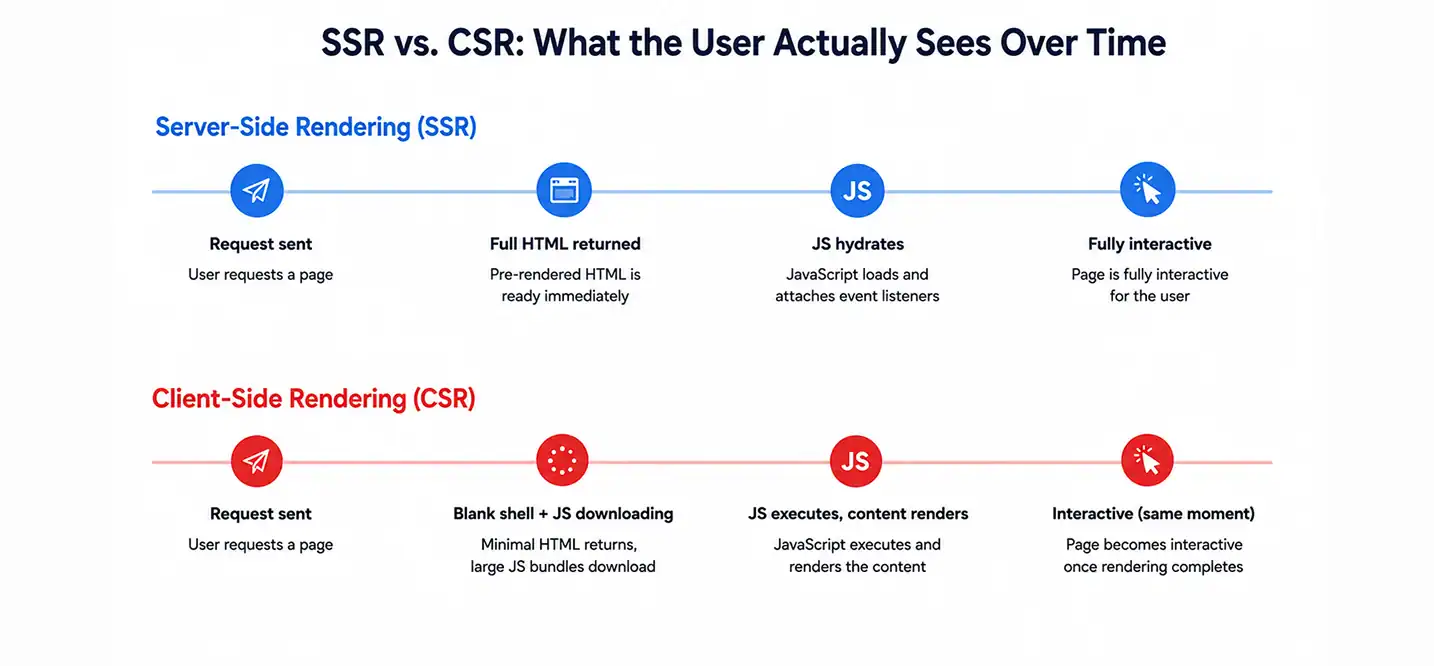
This is one of the most frequently asked questions in react and server side rendering discussions, what is the difference between client-side and server-side rendering, really?
| Feature | Server-Side Rendering (SSR) | Client-Side Rendering (CSR) |
| Initial Load Time | Faster, pre-rendered HTML is ready immediately | Slower, relies on downloading and executing large JS bundles |
| SEO Indexing | Excellent, bots easily crawl complete HTML | Poor to moderate, crawlers can struggle with empty JS shells |
| Server Load | Higher, computes UI and fetches data per request | Lower, serves static assets; client does all rendering |
| Time to Interactive | Delayed, page is visible but frozen until hydration completes | Synchronized, page becomes interactive as soon as it renders |
| Best Use Case | Content-heavy, SEO-critical, public-facing pages | Highly interactive, authenticated, app-like dashboards |
Why Is Server-Side Rendering Required for React and Redux?
If your app uses Redux (or any global state library) for state management, SSR introduces one extra wrinkle: state hydration. The store needs to be initialized on the server with the correct data, serialized into the HTML response (usually via a <script> tag containing window.__PRELOADED_STATE__), and then picked back up by the client store on hydration. Get this wrong, and you’ll see flickering content or hydration mismatches, we’ll cover how to avoid that in the state management section below.
What Are the Advantages and Disadvantages of Server-Side Rendering in React?
No rendering strategy is a free lunch. Here’s the honest breakdown.
Advantages
- Faster perceived load time, users see content before JS finishes downloading.
- Stronger SEO, search engines can crawl fully-formed HTML without executing JavaScript.
- Better performance on low-power devices, less client-side computation needed for the first paint.
- Improved social sharing, Open Graph tags and meta content are present in the initial HTML, so link previews render correctly.
Disadvantages
- Higher server load, every request may trigger a render cycle and data fetch, unlike CSR’s largely static delivery.
- Increased infrastructure complexity, you need a Node.js runtime (or a framework) running server-side, not just static file hosting.
- Slower Time to First Byte (TTFB) under heavy load if not cached properly.
- Hydration overhead, the page is visible but not interactive until JS finishes hydrating, which can create a confusing “why isn’t this button working” moment for users.
| Pros of SSR | Cons of SSR |
| Faster First Contentful Paint (FCP) | Higher server compute cost |
| Search-engine-friendly out of the box | More complex deployment/infrastructure |
| Better performance on low-end devices | Hydration mismatches if not handled carefully |
| Improves social media link previews | Slightly delayed Time to Interactive |
| Works well with dynamic, personalized content | Requires a persistent server (not purely static hosting) |
What Are the Pros and Cons of Server-Side Rendering with Express in React?
Running SSR through a custom Node.js + Express setup gives you maximum control, and maximum responsibility. Here’s how that specific approach shakes out.
Pros of the Express + React SSR approach:
- Full control over routing, caching, and middleware.
- No framework lock-in, you decide the architecture.
- Easier to integrate with existing Express-based backend services.
Cons of the Express + React SSR approach:
- You’re responsible for building your own code-splitting, bundling, and asset manifest logic.
- No built-in incremental static regeneration or edge functions, you’d have to build that yourself.
- Significantly more boilerplate compared to using a production framework like Next.js.
Step-by-Step Guide to Implement Server-Side Rendering in React Applications (Custom Setup)
If you’re wondering how to implement (SSR) server-side rendering in React if you have used create-react-app, here’s the catch: create-react-app is built entirely around client-side rendering and doesn’t support SSR out of the box. To add SSR, you either eject/reconfigure the build tooling manually, or migrate to a framework. Below is the manual approach using Node.js and Express, useful for understanding the mechanics even if you deploy with a framework in production.
1. Set Up Your Server Entry Point
To render your React application before transmitting it to the browser, you must first build a Node.js server, usually with Express. React’s server-rendering APIs are used by the server to process incoming requests and produce the first HTML. Because of this, viewers can view the content of the page before the JavaScript program loads completely.
Additionally, since the client runs in the browser and the server runs in Node.js, you’ll need distinct server and client entry points.
2. Configure Your Build Tooling
You’ll need Babel or ESBuild configured to transpile JSX for the server bundle separately from the client bundle, since the server runs in a Node.js environment, not a browser.
3. Hydrate on the Client
React must make the rendered HTML interactive after the server transmits it. Instead of creating the page from scratch, this process known as hydration connects React to the current HTML.
React adds event handlers and application logic to the server-rendered content via `hydrateRoot`. Verify that the markup produced by the server and the client match, as discrepancies may result in hydration problems or unexpected behavior.
4. Handle Data Fetching Before Render
Fetch any data your components need before calling renderToPipeableStream, and pass it down as props, this avoids waterfalls and ensures the HTML sent to the client already contains the data.
5. Serialize State for Hydration
If you’re using Redux or Context, serialize your initial state into the HTML response (inside a script tag) so the client can pick up exactly where the server left off, avoiding a mismatch.
This custom path teaches you the fundamentals, but at scale, it means reinventing route-based code splitting, caching, and streaming, which is exactly what production frameworks already solve.
What Are the Advantages of Using Next.js for Server-Side Rendering in React Applications?
Next.js has become the de-facto standard for server side rendering in React, and the adoption numbers back that up, Next.js consistently ranks among the top meta-frameworks in the State of JS survey, with the majority of React developers reporting they’d use it again.
Why Next.js Wins for SSR
- Native getServerSideProps, fetch data server-side per request with a simple exported function, no manual server wiring required.
- File-based routing, no manual route-matching logic to maintain.
- Automatic code-splitting, each page only ships the JS it needs.
- Built-in streaming SSR, React 18’s Suspense-based streaming works out of the box.
- Hybrid rendering, mix SSR, static generation (SSG), and client-side rendering on a per-page basis.
- Edge runtime support, deploy SSR functions closer to users geographically, reducing latency.
What Are the Best Tools for Server-Side Rendering in React?

| Tool / Framework | Best For | Notable Feature |
| Next.js | Full-featured production SSR | getServerSideProps, hybrid rendering, edge functions |
| Remix | Web-standards-based SSR | Loaders/actions built on native Fetch API |
| Express + react-dom/server | Custom, framework-free control | Maximum flexibility, maximum boilerplate |
| Gatsby | Static-first with SSR options | Great for content sites, hybrid SSG/SSR support |
| Astro (with React islands) | Partial hydration, content-heavy sites | Ships minimal JS, SSR by default |
How to Set Up Server-Side Rendering with Popular React Frameworks
Broadly, setup follows the same pattern regardless of framework:
- Install the framework (npx create-next-app for Next.js, or npx create-remix for Remix).
- Define your data-fetching function per route (getServerSideProps, a Remix loader, etc.).
- Configure environment variables for API endpoints and secrets, never expose secrets to the client bundle.
- Add caching headers (Cache-Control, stale-while-revalidate) to reduce repeated server computation.
- Deploy to an SSR-compatible host (see the hosting section below), plain static hosts won’t run your server functions.
Explain the Fundamental Architecture for Building a Server-Rendered React Project
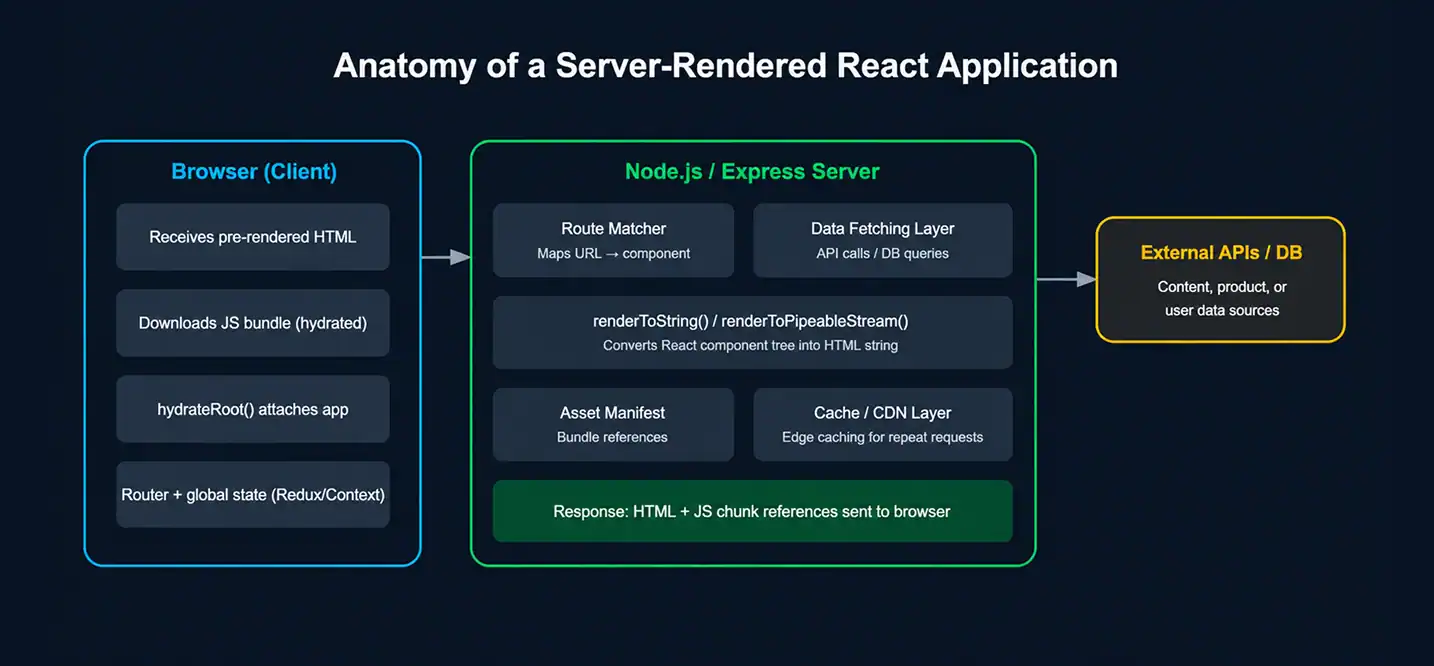
A production SSR architecture typically has five moving parts:
- Route Matcher, maps the incoming URL to the correct component/page.
- Data Fetching Layer, pulls data from APIs, databases, or CMS platforms before rendering starts.
- Render Engine, renderToString() or renderToPipeableStream() converts the component tree into HTML.
- Asset Manifest, tracks which JS/CSS chunks correspond to which route, so the correct <script> tags are injected.
- Cache/CDN Layer, sits in front of the render engine to serve repeat requests without re-computing HTML every time.
Which Companies Provide Hosting Solutions Optimized for React Server-Side Rendering?
| Hosting Provider | SSR Support | Standout Feature |
| Vercel | Native (built by the Next.js team) | Zero-config SSR + edge functions |
| Netlify | Native via Next.js runtime adapter | Built-in CDN + serverless functions |
| AWS (Amplify / Lambda@Edge) | Fully configurable | Deep infrastructure control at scale |
| Render | Native Node.js hosting | Simple deploys for custom Express SSR apps |
| Google Cloud Run | Container-based SSR | Auto-scaling containerized Node servers |
How Does Server-Side Rendering Specifically Improve Search Engine Visibility for Dynamic React Content?
This is where the benefits of server-side rendering in React for SEO really show up in the data. Search engine crawlers can execute JavaScript, but it’s resource-intensive and not guaranteed to happen quickly or completely, Google has publicly acknowledged that JS-heavy pages may go through a second, delayed “rendering” crawl pass, sometimes days after the initial crawl.
With SSR:
- Full HTML is available on the very first crawl pass, no waiting for a secondary JS-rendering queue.
- Meta tags, Open Graph data, and structured data (JSON-LD) are present immediately, improving how your pages appear in search results and social shares.
- Core Web Vitals improve, particularly Largest Contentful Paint (LCP), which is a direct Google ranking factor.
- Dynamic, personalized, or frequently-updated content (product listings, news feeds, search results pages) gets indexed accurately instead of showing a stale or empty shell to crawlers.
For content-heavy or e-commerce React applications specifically, this translates directly into organic traffic, pages that are fully crawlable tend to get indexed faster and rank more consistently than JS-shell equivalents.
For teams building recommendation engines, personalized product feeds, or AI-assisted content ranking into a server-rendered React app, working with a large language models development company can accelerate how quickly those features go from prototype to production.
Similarly, when personalization logic needs to run efficiently at the data-fetching layer of your SSR pipeline, custom deep learning solutions can help optimize what gets computed server-side versus cached, reducing the very server load that’s SSR’s biggest tradeoff.
What Are the Key Benefits of Using Server-Side Rendering for a React Application’s Initial Load Time?
- Reduced First Contentful Paint (FCP), content appears without waiting on JS execution.
- Reduced Largest Contentful Paint (LCP), critical content is part of the initial HTML payload.
- Lower dependency on client device performance, a low-end phone doesn’t need to compute the initial render itself.
- Better experience on slow networks, even a partial HTML download shows meaningful content, whereas CSR often shows nothing until the full JS bundle arrives.
Best Practices for Managing Global State in a Server-Rendered React Application
Global state (Redux, Zustand, Context API) is one of the trickiest parts of getting SSR right. Follow these practices to avoid hydration bugs:
- Create a fresh store per request, never reuse a single store instance across multiple server requests; this causes data leaking between users.
- Serialize initial state safely, escape the JSON you inject into the HTML to prevent XSS via script injection.
- Match server and client render output exactly, any conditional logic based on window or localStorage must be guarded behind useEffect or checks, since these don’t exist on the server.
- Avoid non-deterministic values in initial render, things like Date.now(), Math.random(), or Intl locale formatting can differ between server and client, causing hydration mismatches.
- Use selective hydration, with React 18’s Suspense, hydrate above-the-fold, interactive components first and defer less critical ones.
Architectural Best Practices for Production SSR
Beyond state management, a few practices consistently separate solid production SSR setups from fragile ones:
- Implement Streaming SSR, use renderToPipeableStream combined with Suspense placeholders to stream critical, above-the-fold HTML instantly, while slower, data-dependent components load asynchronously.
- Optimize data fetching, avoid over-fetching by constraining queries through pagination, filtering, or GraphQL to reduce payload weight and server compute time.
- Incorporate caching layers, deploy CDN (edge) caching or page-level cache headers to serve repetitive requests from memory instead of re-rendering on every hit.
- Manage hydration mismatches proactively, keep server and client output identical, and never rely on browser-only globals during the initial render phase.
Where AI Fits Into Modern SSR Architectures

As SSR applications scale, teams are increasingly layering intelligence on top of the rendering pipeline itself, predictive caching, personalized content assembly at the edge, and AI-driven data-fetching optimization that decides what to pre-render versus stream. This is where Artificial intelligence development services come into play, helping engineering teams build smarter, adaptive rendering and personalization layers on top of a standard SSR stack.
If you’re evaluating partners to build any of this out, it’s worth looking at an established AI Software Development Company that understands both the frontend rendering constraints and the backend AI infrastructure needed to make personalized SSR fast at scale.
Common SSR Mistakes to Avoid
- Reusing a single Redux/Context store across requests, leads to data bleeding between users.
- Fetching data inside useEffect for SSR pages, useEffect doesn’t run on the server, so this data will always be missing from the initial HTML.
- Ignoring caching entirely, re-rendering identical pages from scratch on every request unnecessarily inflates server costs.
- Referencing window, document, or localStorage unconditionally, these don’t exist during server rendering and will crash your render.
- Skipping streaming for large pages, without renderToPipeableStream and Suspense, users wait for the entire page to render before seeing anything.
Should You Use SSR for Your React App?
If your React application is public-facing, SEO-dependent, or needs to perform well on the first paint across a range of devices and networks, server-side rendering isn’t just a nice-to-have, it’s close to a requirement in 2026’s performance and search landscape. If you’re building an authenticated, internal, highly-interactive tool where SEO doesn’t matter, a well-optimized CSR (or even hybrid) approach may serve you just as well with less infrastructure overhead.
The good news: you rarely have to choose one extreme or the other anymore. Frameworks like Next.js let you mix SSR, static generation, and client-side rendering on a per-page basis, so you can apply SSR exactly where it earns its cost, and skip it where it doesn’t.
Start small: pick your highest-traffic, most SEO-critical pages, implement SSR there first with proper caching and streaming, and measure the before/after impact on Core Web Vitals and organic traffic. The data will tell you how far to take it from there.
Need Help Building a Production-Grade SSR React App?

Getting SSR right in production is a lot more than swapping createRoot for hydrateRoot. It means designing a rendering architecture that handles streaming, caching, hydration-safe state management, and, increasingly, AI-driven personalization at the data-fetching layer, all without tanking your server costs.
That’s exactly the kind of work Cubix does for engineering teams every day. As an AI Software Development Company, Cubix helps businesses architect fast, SEO-ready, server-rendered React applications and layer in intelligent features on top, from personalized content delivery to predictive caching.
Cubix’s engineers bring both frontend performance expertise and deep Artificial intelligence development services experience to the table. Get in touch with Cubix today to discuss your React SSR project and see how a dedicated team can help you ship a faster, more discoverable, more intelligent application.
Want to discuss your project? Our experts are just a click away.
Contact UsFrequently Asked Questions
1. What is the role of server-side rendering (SSR) in React applications?
SSR’s role is to shift the initial HTML-generation work from the browser to the server, so users see meaningful content faster and search engines can crawl fully-formed pages.
2. What is server-side rendering (SSR) in React, and what are its benefits?
It’s the technique of rendering React components into HTML on the server per request. Benefits include faster perceived load times, stronger SEO, and better performance on low-powered devices.
3. Does React use server-side rendering by default?
No, a standard React app created with create-react-app is client-side rendered by default. SSR requires additional server setup or a framework like Next.js or Remix.
4. When should you use SSR vs. CSR?
Use SSR for public, SEO-critical, content-heavy pages (marketing sites, product pages, blogs). Use CSR for highly interactive, authenticated, app-like interfaces (dashboards, internal tools) where SEO isn’t a priority.
5. Can you make server-side API calls directly from a React SSR component?
Yes, inside data-fetching functions like getServerSideProps, you can call APIs or databases directly on the server, without exposing those calls or credentials to the client.