Key Takeaways
- C++ and C# still run most of the game industry, but the right pick depends on your engine.
- Unity uses C#. Unreal Engine uses C++. Godot leans on GDScript and now C# too.
- Mobile games often favor C# or JavaScript for faster builds and easier ports.
- Python isn’t built for shipping games, but it’s great for prototypes, tools, and learning.
- AAA studios almost always want C++ skills. Indie teams have more flexibility.
- Picking a language really means picking an engine first. The language usually follows.
The gaming industry will pull in an estimated $205 billion in revenue in 2026. That’s more money than movies and recorded music combined, and every single one of those games runs on code someone had to write.
Behind every game is a programming language, and that choice isn’t random. Developers pick a language based on the engine they’re using, the platform they’re targeting, and the kind of game they want to build. Get it wrong, and you’re looking at months of rework. Get it right, and everything moves faster, from testing to launch.
Whether you’re building a mobile puzzle game, an indie platformer, or a full AAA title, the language you choose shapes almost everything that happens next. This guide walks through the languages that actually matter in 2026, the engines they power, and how they fit into modern game development services, so you can pick the right one for what you’re building.
Why the Programming Language You Pick Actually Matters
Picking a language isn’t just a technical detail. It shapes almost everything about how your project turns out.
It Decides Which Engine You Can Use
Most engines lock you into one main language. Choose Unity, and you’re writing C#. Choose Unreal, and C++ is your world. There’s not much wiggle room here.
It Affects Performance and Game Speed
Some languages run closer to the hardware. That means faster load times, smoother frame rates, and better performance on lower-end devices.
It Changes How Fast You Can Build and Launch
Simpler languages usually mean quicker development. That’s a big deal for small teams or solo developers working with tight budgets.
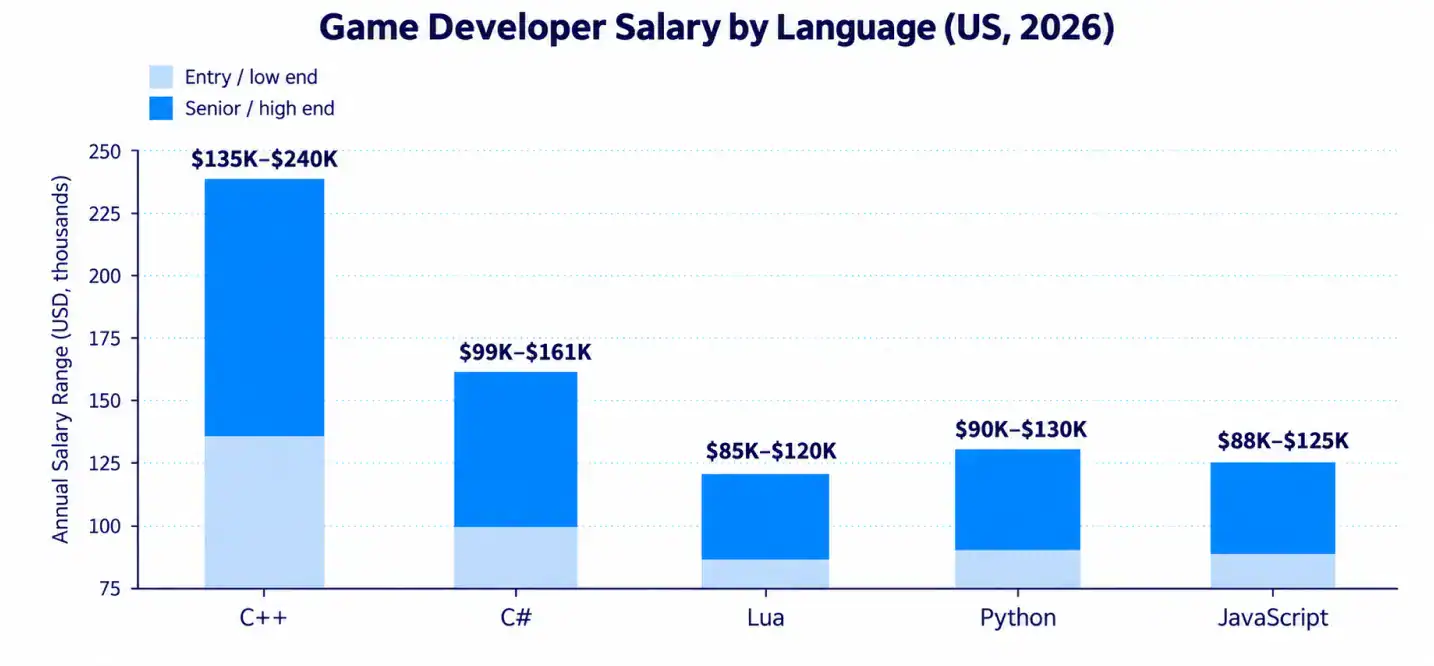
A quick reality check: senior C++ engine programmers in the US now earn between $160,000 and $240,000 a year. That single stat tells you how much weight this decision carries.
- Performance-heavy games lean toward C++
- Cross-platform mobile games lean toward C#
- Quick prototypes and tools often use Python
- Browser-based games usually run on JavaScript or TypeScript
Want to discuss your project? Our experts are just a click away.
Contact UsThe Most Popular Programming Languages in Game Development
Let’s go through the languages that actually show up in real, shipped games. Each one has its own strengths, and honestly, its own headaches too.
C++
C++ has held the top spot in game development for over 20 years. It gives developers direct control over memory and hardware, which is exactly what big, demanding games need.
- Powers Unreal Engine 5, CryEngine, id Tech 8, and Source 2
- Used by nearly every AAA studio, including Epic Games and Ubisoft
- Handles physics simulations and real-time rendering extremely well
- Has a steep learning curve for beginners
C#
C# is the friendlier cousin of C++. It’s the official scripting language for Unity, and it’s picked up serious traction with Godot 4 too.
- Cross-platform by design, so one codebase can hit mobile, PC, and console
- Easier syntax than C++, so newer developers pick it up faster
- Average US salaries range from $99,000 to $161,000
- Backed by a massive Unity developer community
Python
Python isn’t built for shipping polished games, but it still has a place in game development.
- Great for prototyping and testing ideas quickly
- Common in game development tools, scripts, and pipelines
- Simple syntax makes it a favorite for beginners learning to code
- Not fast enough for performance-heavy AAA titles
JavaScript and TypeScript
These two run the world of browser and instant games. If a game loads inside a web page, there’s a good chance JS or TS is behind it.
- Powers frameworks like Phaser 3 and PixiJS
- No downloads needed, games run right in the browser
- TypeScript adds structure, which helps on larger projects
- Not ideal for graphically intense 3D games
Lua
Lua quietly runs a huge chunk of the live-service gaming world.
- Powers Roblox, World of Warcraft, and Garry’s Mod
- Lightweight and fast, built to sit on top of a C++ engine
- Popular for mobile gacha games and live-service titles
- Considered one of the highest-value scripting languages to learn right now
GDScript
GDScript belongs to Godot, and it was built specifically to make game scripting simple.
- Syntax is close to Python, so it’s beginner-friendly
- Tightly integrated with Godot’s node-based scene system
- Fast to write, which speeds up development for small teams
- Limited outside of the Godot ecosystem
Here’s a quick side-by-side look at how these languages stack up:
Popular Game Development Languages at a Glance
| Language | Best For | Difficulty | Main Engine |
| C++ | AAA games, performance-heavy titles | Hard | Unreal Engine, CryEngine |
| C# | Cross-platform and mobile games | Medium | Unity, Godot 4 |
| Python | Prototyping and tools | Easy | Custom tools, pipelines |
| JavaScript/TypeScript | Browser and instant games | Medium | Phaser, PixiJS |
| Lua | Live-service and scripting | Easy-Medium | Roblox, WoW |
| GDScript | Beginner-friendly, indie games | Easy | Godot |
Which Language Powers Which Game Engine
Here’s the thing most beginners miss. You don’t really choose a language first. You choose an engine, and the language comes with it.
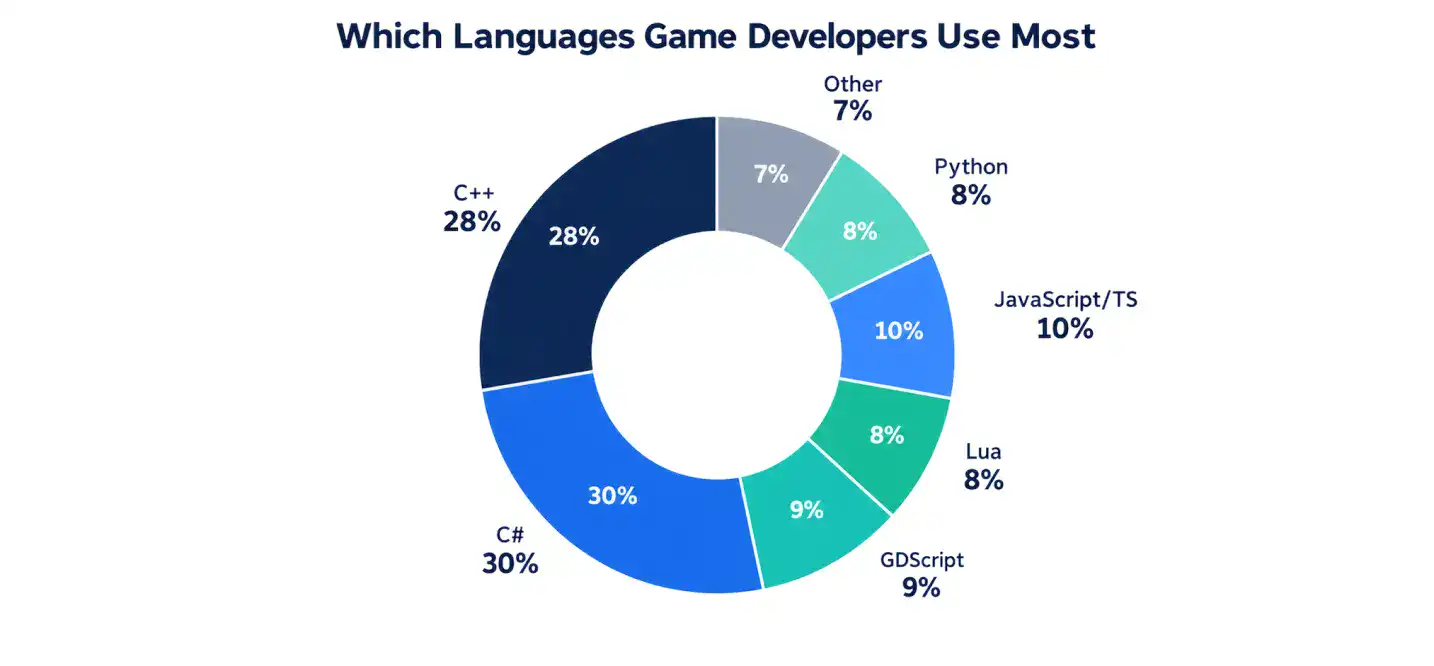
The chart above shows roughly how language use breaks down across the industry once you factor in engine popularity. C++ and C# together cover more than half of all active game development work.
Engine-to-Language Map
| Engine | Primary Language | Common Use Case |
| Unity | C# | Mobile, indie, AR/VR games |
| Unreal Engine | C++ | AAA and high-end PC/console titles |
| Godot | GDScript, C# | Indie and 2D/3D games |
| GameMaker | GML | 2D indie games |
| CryEngine | C++ | High-fidelity PC games |
| Cocos2d-x | C++, JavaScript, Lua | Mobile games |
| MonoGame | C# | Cross-platform indie titles |
| Open 3D Engine | C++ | Open-source 3D projects |
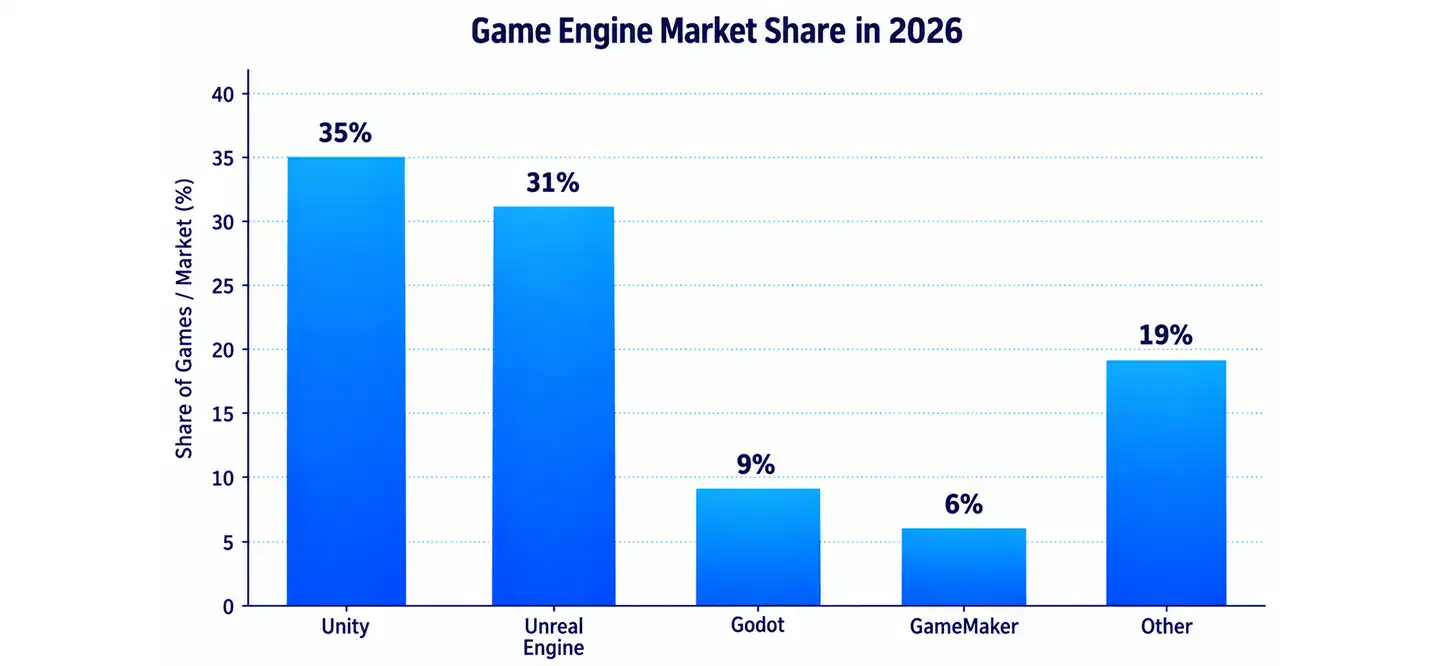
Unity alone covers roughly 35% of new game releases, which makes it one of the most in-demand skills for studios hiring right now. If you’re weighing your options for a full project, it helps to understand how a game development company actually structures these decisions around engine choice from day one.
For a deeper dive into how 3D pipelines work behind these engines, this guide on 3D Game Development breaks down the process step by step.
C++ vs C#: Which One Should You Learn First?
This is probably the most common question beginners ask. Honestly, there’s no universal right answer. It depends on where you want to end up.
When C++ Makes Sense
Go with C++ if your goal is working on AAA titles or engine-level programming. It’s the language behind Unreal Engine 5, and UE5-powered games earned 31% of all Steam revenue in 2024.
- You want to work at a major studio someday
- You care about squeezing out every bit of performance
- You’re comfortable with a longer learning curve
- You want to understand what’s happening under the hood
When C# Makes Sense
Go with C# if you want to move fast and build things without getting buried in complexity.
- You’re building for mobile or indie platforms
- You want the largest hiring pool and community support
- You’d rather spend more time designing gameplay than managing memory
- You want a language that works across both Unity and Godot 4
C++ vs C# Comparison
| Factor | C++ | C# |
| Performance | Excellent, close to hardware | Very good, slightly slower |
| Learning curve | Steep | Moderate |
| Main engine | Unreal Engine | Unity |
| Average US salary | ~$135,000 to $240,000 | ~$99,000 to $161,000 |
| Best for | AAA, engine work | Mobile, indie, cross-platform |
The salary gap makes sense once you consider the skill ceiling. C++ engineers often work closer to the engine itself, which takes years to master properly. Studios that specialize in C++ Game Development Services usually deal directly with this level of technical complexity for their clients.
Best Languages Based on the Type of Game You’re Building
Not every project needs the same toolkit. Here’s how the choice usually plays out by category.
Mobile Games
Mobile gaming alone is projected to bring in $107 billion in 2026. That’s a massive slice of the entire industry.
- C# through Unity remains the top pick for mobile
- JavaScript works well for lightweight, casual mobile games
- Faster build times matter more here than raw performance
AAA and Console Games
- C++ is close to mandatory for AAA studio work
- Teams need full control over memory and hardware
- Longer development cycles allow for the steeper learning curve
Indie and 2D Games
- GDScript and GameMaker’s GML are popular for small teams
- C# through Unity is also a strong, flexible choice
- Ease of use often matters more than raw performance here
Web and Browser Games
- JavaScript and TypeScript dominate this space
- No install required, which lowers the barrier for players
- Great for smaller-scope games and quick releases
Godot has grown fast in this mix too. Downloads jumped roughly 30% year over year after Unity’s 2023-2024 pricing changes pushed some developers to look elsewhere. If you’re planning a mobile-first project and want a team that’s already fluent in these tradeoffs, it’s worth exploring options to hire dedicated game developers who specialize in your platform.
How Game Development Teams Actually Use These Languages
The size of your team changes how these languages get used day to day.
Solo Indie Developers
- Usually pick one language and stick with it end to end
- GDScript or C# are common choices for speed and simplicity
- Limited time means fewer languages to juggle
Small Studios
- Often mix a primary language with a scripting layer
- C# for gameplay, plus some JavaScript for tools or web integration
- Balance between speed and flexibility matters most
AAA Studios
- Split teams by specialty: engine programmers, gameplay scripters, tools engineers
- C++ handles the engine and performance-critical systems
- Lua or proprietary scripting languages often handle gameplay logic on top
Working with an experienced game development company means you don’t have to figure this structure out alone. Studios that build games daily already know which language fits which role on the team.
Skills Beyond the Programming Language
Knowing a language is just one piece of the puzzle. Game developers also need:
- A solid grip on math, especially linear algebra and trigonometry
- Comfort with version control tools like Git
- Familiarity with engine-specific tools, not just raw code
- Basic understanding of game design principles
- Debugging and performance profiling skills
Learning to code is the starting point. Turning that into a shipped, polished game takes a whole different set of skills. If you’re curious how all of this fits together, this overview of Game Development walks through the bigger picture.
Common Mistakes Beginners Make Choosing a Language
Most beginners don’t stall out because coding is too hard. They stall out before they even start, stuck picking a language. Here are the traps that trip people up most.
Searching for the “Perfect” Language
This is the big one. New developers spend weeks reading comparison articles instead of writing a single line of code. That’s called analysis paralysis, and it’s a real productivity killer.
Here’s the truth. There’s no perfect language, only the right one for what you’re trying to build. Early on, what actually matters is learning core logic like loops, variables, and functions. Those concepts carry over to almost any language you pick up later.
Trying to Learn Too Many Languages at Once
It’s tempting to juggle Python, JavaScript, C++, and C# all in the same month. It feels productive, but it usually backfires.
- Syntax rules start blending together in your head
- Progress on any single skill slows way down
- Burnout shows up faster than real ability does
Most working developers built their careers on one language first. They went deep before they went wide, and that’s the smarter path for beginners too.
Choosing a Language That Doesn’t Match the Goal
Picking C++ because it sounds powerful, when all you want to do is build a simple 2D mobile game, is a setup for frustration. The language should follow the goal, not the other way around.
Quick Language Selection Guide by Goal
| Your Goal | Recommended Language | Why It Fits |
| Gentle intro to coding | Python | Readable syntax, minimal boilerplate |
| Web development | JavaScript | See results instantly in the browser |
| Mobile apps (native) | Swift (iOS) or Kotlin (Android) | Official languages for each platform |
| Game development | C# (with Unity) | Strong balance of power and simplicity |
Match your goal to a language, then stick with it long enough to finish one small project. That single habit will get you further than months of comparing options ever could.
Why Businesses Choose Cubix for Game Development
Building a game is one thing. Building one that actually performs, scales, and ships on time is a different challenge entirely. That’s where a company like Cubix comes in.
Cubix has spent years working across the exact languages and engines covered in this guide, from C++ heavy AAA-style projects to C# powered mobile titles.
- Deep experience with Unity, Unreal Engine, and Godot
- Dedicated C++ specialists for performance-critical builds
- Teams that handle everything from prototyping to full launch
- A track record with both indie-scale and enterprise-scale projects
Companies that want technical depth without hiring an in-house team often lean on studios that already understand this landscape inside and out. If your project needs serious engine-level work, C++ Game Development Services is worth a look.
Work With Cubix’s Game Development Experts
If you’ve made it this far, you already know the language decision is bigger than it looks. It shapes your timeline, your budget, and what your game can actually do.
Cubix takes that decision off your plate. Their teams already know which language fits which project, so you don’t have to guess.
- Get matched with developers who know your target engine
- Skip the trial and error of picking the wrong tech stack
- Work with a team that’s shipped titles across mobile, PC, and console
Want to discuss your project? Our experts are just a click away.
Contact UsFrequently Asked Questions
1. What programming language do most game developers use?
Most game developers use either C++ or C#, depending on the engine. C++ dominates AAA and performance-heavy titles, while C# leads in Unity-based and mobile projects.
2. Is C++ or C# better for game development?
Neither is universally “better.” C++ wins on raw performance and control, which matters for AAA games. C# wins on speed of development and ease of learning, which matters for indie and mobile projects.
3. Is C++ necessary for game development?
Not always. You only really need C++ if you’re working with Unreal Engine, CryEngine, or building performance-critical systems. Plenty of successful games are built entirely in C# or GDScript.
4. Is C# good for making games?
Yes, very much so. C# powers Unity, the most widely used engine by game count, and it now works with Godot 4 as well. It’s a strong, practical choice for most developers.
5. Can Python be used for game development?
Python can be used for prototyping, scripting, and building development tools, but it’s rarely used to ship a finished commercial game due to speed limitations.
6. What language does Unreal Engine use?
Unreal Engine is built in C++, and C++ is also the primary language developers use to build games inside it.
8. What language does Unity use?
Unity uses C# as its one and only supported scripting language for game logic.
9. What programming language does Godot use?
Godot uses GDScript as its native language, and it also supports C# as of Godot 4.
10. What is the easiest programming language for game development?
GDScript and Python are generally considered the easiest starting points, thanks to their simple, readable syntax.
11. Which programming language is best for making mobile games?
C# through Unity is the most common and practical choice for mobile game development, thanks to its cross-platform support and huge developer community.