Key Takeaways
- App development risk comes in five main flavors: technical, project management, security, UX, and legal.
- Scope creep and unclear requirements cause most budget and timeline blowouts.
- A simple risk register can catch problems before they become expensive.
- Security and compliance risks grow every year as regulations tighten.
- Third-party APIs and vendor lock-in quietly create long-term risk.
- Feature flags and rollback plans reduce the damage from bad releases.
- Working with an experienced partner like Cubix lowers most of these risks from day one.
Nearly 25% of users delete an app after one use, often because a risk nobody flagged in planning made it into production. That’s the real cost of skipping app development risk management: not a line item, but users who never come back.
Every app project carries risk. Budgets slip, timelines stretch, features change mid-build, and security holes surface after launch instead of before. None of this is rare, it’s the default outcome of building software without a plan.
This guide breaks down the five core categories of app development risk, technical, project management, security, UX, and legal, and shows you exactly how experienced teams catch them early. You’ll find a ready-to-use risk register template, real cost data on what these risks cost when missed, and the specific practices that prevent them.
Want to discuss your project? Our experts are just a click away.
Contact UsWhat Is App Development Risk Management?
App development risk management means spotting problems before they hurt your project. It’s not about avoiding every risk. That’s impossible. It’s about knowing which risks matter most, and having a plan ready.
Think of it like a pre-flight checklist. Pilots don’t expect every flight to fail. They just check the engine, the fuel, and the weather first. App teams should do the same thing with budgets, code, and data.
Most experienced teams, including a top app development company, break risk into five clear categories. Here’s how they break down.
The Five Core Categories of App Development Risk
| Risk Category | What It Covers | Common Example |
| Technical Risk | Code quality, bugs, performance | App crashes under heavy load |
| Project Management Risk | Timelines, budgets, scope | Feature list keeps growing |
| Security & Privacy Risk | Data protection, compliance | User data leaks through weak API |
| UX Risk | Usability, accessibility | Confusing navigation drives users away |
| Legal & Compliance Risk | Regulations, IP, app store rules | App gets rejected or fined |
A recent industry review found that 68% of software projects report at least one major risk event before launch. That’s more than two out of three projects. Risk isn’t the exception. It’s the default.
Common Project Risks: Scope, Budget, and Deadlines
Let’s start with the risks every founder fears most. These are the ones that eat your money and your patience.
Scope creep happens when new features keep getting added mid-project. It sounds harmless at first. “Just one more screen.” “Just one more button.” But each small addition adds hours, and hours add cost.
Budget overrun usually follows scope creep like a shadow. Studies show 52% of software projects exceed their original budget, often by 25% or more. Poor planning at the start is the biggest driver.
Missed deadlines come from a mix of unclear requirements and unrealistic timelines. When nobody agrees on what “done” looks like, nobody can predict when it will be finished.
Here’s what usually causes these three risks, and how to catch them early.
Project Risks and Early Warning Signs
| Risk | Early Warning Sign | Root Cause |
| Scope Creep | Frequent “small” feature requests | No locked requirements document |
| Budget Overrun | Invoices exceeding milestone estimates | Underestimated complexity at planning |
| Missed Deadlines | Sprints consistently running long | Unclear priorities, poor communication |
| Unclear Requirements | Team asks the same question twice | No shared product specification |
The fix isn’t complicated. Lock your requirements before development starts. Use a written scope document everyone signs off on. If you want a deeper breakdown of this stage, these tips for building a custom mobile app cover it well.
Technical and Quality Risks You Can’t Ignore
Even with a perfect plan, technical risk can sink a project. This is where code quality, testing, and performance live.
Technical debt builds up when teams cut corners to move fast. It feels fine at first. Then six months later, every small change breaks three other things.
Poor code quality and testing gaps are close cousins of technical debt. Skipping tests saves time today and costs triple tomorrow.
Device fragmentation is a mobile-specific headache. Thousands of screen sizes, OS versions, and hardware specs exist. An app that works perfectly on one phone might crash on another.
Poor app performance ties all of this together. Slow load times and laggy screens are the fastest way to lose a user.
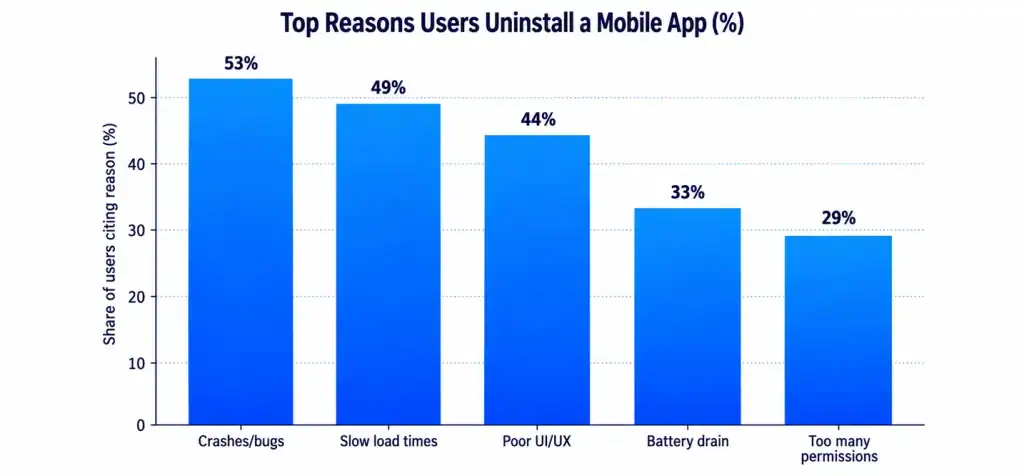
As the chart shows, crashes and bugs top the list of reasons users delete an app, at 53%. Slow load times aren’t far behind, at 49%. These aren’t small annoyances. They’re the top two reasons people give up on your product.
Fixing bugs early is also just cheaper. The chart below shows why.
A bug caught in testing costs far less than one caught after launch. Fixing a bug post-launch can cost up to 30 times more than catching it during design. That gap alone justifies investing in proper QA. For a full breakdown of technical pitfalls like these, this guide on app development challenges is worth a read.
Security, Privacy, and Compliance Risks
This is the category that keeps CTOs up at night, and for good reason.
Mobile app security risks include weak authentication, unencrypted data, and exposed APIs. Any one of these can let an attacker walk right in.
Data privacy and compliance rules keep getting stricter. GDPR in Europe. CCPA in California. HIPAA for healthcare apps. Miss one requirement, and you’re looking at fines, not just bad press.
API and third-party dependency risk is often overlooked. Your app is only as secure as the weakest API it connects to. If a partner’s system gets breached, your users’ data can be exposed too.
The cost of getting this wrong keeps climbing every year.
The average global data breach now costs $4.92 million, up from $4.24 million just a few years ago. That’s not a rounding error. That’s a budget-breaking event for most app companies.
Common Security Risks and Prevention Steps
| Security Risk | What Can Go Wrong | Prevention Step |
| Weak Authentication | Account takeover, credential theft | Multi-factor authentication |
| Unencrypted Data | Data exposed in transit or storage | End-to-end encryption |
| Insecure APIs | Backend systems exposed to attackers | API gateways and rate limiting |
| Poor Compliance Tracking | Regulatory fines, app store bans | Regular compliance audits |
| No Incident Response Plan | Slow, costly reaction to breaches | Documented breach response plan |
Good security isn’t a one-time task. It’s a habit built into every sprint. For a closer look at how to build that habit, check these mobile app security best practices. If your app handles sensitive data at scale, this enterprise app security checklist is also worth bookmarking.
Vendor, Team, and Dependency Risks
Not every risk lives in your code. Some live in your contracts and your team roster.
Vendor lock-in happens when your app depends too heavily on one platform or tool that’s hard to leave later. Switching later gets expensive, and sometimes nearly impossible.
Team turnover is a quieter risk, but a real one. When a key developer leaves mid-project, knowledge often leaves with them. Documentation gaps make this worse.
Third-party dependencies tie back into this too. If your outsourced partner underdelivers, switching mid-project isn’t simple or cheap.
A study on outsourcing risk found that switching development vendors mid-project can add 30-40% to total project cost, mostly from onboarding delays and rework. That’s a huge number to absorb for something entirely preventable. This piece on the hidden costs of switching software development partners breaks this down in more detail.
The fix here is picking the right partner from the start, one with a stable team and clear documentation practices.
Building a Risk Register: Your Early Warning System
A risk register is one of the simplest tools in project management. It’s just a running list of what could go wrong, how likely it is, and what you’ll do about it.
Most experienced teams update this weekly. It doesn’t need to be fancy. A shared spreadsheet works fine.
Sample Simplified Risk Register
| Risk | Likelihood | Impact | Owner | Mitigation Plan |
| Scope creep on payment module | High | High | Product Manager | Lock requirements, change control process |
| Third-party API downtime | Medium | High | Tech Lead | Add fallback provider |
| Key developer leaving | Low | High | Team Lead | Improve documentation, pair programming |
| Delayed app store approval | Medium | Medium | QA Lead | Submit early, review guidelines twice |
Risk registers work best alongside feature flags and rollback plans. Feature flags let you turn a new feature on or off without a full redeploy. If something breaks, you flip it off instantly. Rollback plans do the same thing for entire releases.
Together, these tools turn “we broke production” into “we fixed it in five minutes.” To see how this fits into a full build cycle, this breakdown of the mobile app development process shows where risk checkpoints belong. Here’s how risk exposure typically shifts across a project’s lifecycle.
Risk peaks early, during discovery and development, when requirements are still forming. It’s tempting to rush this stage. Don’t. Slowing down here saves time everywhere else.
Scaling Without Adding New Risk
Growth brings its own risks. An app that works fine for 10,000 users can fall apart at 500,000. Poor architecture decisions made early often don’t show up until scale hits. By then, fixing them means rebuilding core systems, not just patching code.
Studies suggest 44% of scaling failures trace back to architecture decisions made in the first three months of development. That’s a sobering number for teams tempted to skip planning to move faster.
Smart teams build for scale from day one, even if they don’t need it yet. This means choosing the right database structure, planning for load, and testing under real traffic conditions, not just ideal ones. This guide on scalable mobile app development goes deeper into what that looks like in practice.
Post-Launch Risk: Maintenance and Long-Term Costs
Launch day isn’t the finish line. It’s the starting line for a new set of risks.
Apps need constant updates. New OS versions break old code. Security patches can’t wait. Skip maintenance, and small issues pile up fast.
Many founders underestimate this cost. Annual maintenance typically runs 15-20% of the original development cost, every single year. Skipping it doesn’t save money. It just delays a bigger bill.
For a full breakdown of what ongoing costs to expect, this guide to mobile app maintenance costs lays it all out clearly.
Why the Right Development Partner Reduces Risk
Most of the risks in this article share one root cause: inexperience. Not necessarily a lack of talent, but a lack of pattern recognition. Teams who’ve shipped dozens of apps spot problems that first-time teams miss entirely.
Cubix has spent over a decade building apps across healthcare, fintech, logistics, and consumer tech. That range matters. A team that’s handled HIPAA compliance for a healthcare client already knows what to check before your fintech app hits the same wall.
Risk management isn’t a separate service Cubix bolts on at the end. It’s built into how projects run, from the first planning call through post-launch support. For a full look at what that process includes, this complete guide on mobile app development walks through it step by step.
How Cubix Helps You Manage Risk From Day One
Here’s what working with Cubix typically looks like from a risk standpoint.
Every project starts with a discovery phase that locks requirements before a single line of code gets written. This alone prevents most scope creep before it starts.
Security reviews happen throughout development, not just at the end. APIs get tested. Data flows get mapped. Compliance requirements get checked against your specific industry, whether that’s healthcare, finance, or retail.
Cubix also builds with scale in mind from day one, so growth doesn’t force a rebuild later. Post-launch, dedicated maintenance plans catch OS updates and security patches before they become emergencies.
If you’re planning an app and want a team that treats risk management as part of the build, not an afterthought, Cubix is worth a conversation. Reach out, and let’s map out your project’s risk profile before you write a single line of code.
Building an app and want to get ahead of these risks before they cost you time and money? Talk to Cubix about your project today.
Want to discuss your project? Our experts are just a click away.
Contact UsPeople Also Ask
What are the most common risks in mobile app development?
The most common risks fall into five buckets: technical bugs, project management issues like scope creep, security gaps, poor user experience, and legal or compliance failures. Most projects face at least one of these at some point.
How can I prevent scope creep in an app project?
Lock your requirements document before development starts. Use a formal change request process for any new feature added mid-project, so every addition gets evaluated for cost and time impact first.
How do app teams reduce budget overrun risk?
Build in a contingency budget, usually 15-20% above the base estimate. Track spending against milestones weekly, not monthly, so overruns get caught early instead of at the end.
What causes mobile app development delays?
Unclear requirements are the top cause. Others include underestimated technical complexity, slow client feedback loops, and third-party integrations that take longer than expected.
How should security risks be managed during app development?
Security should be reviewed at every development stage, not just before launch. This includes encrypting data, securing APIs, testing authentication, and running compliance checks specific to your industry.
How do third-party APIs create app project risk?
Your app inherits the security and reliability of every API it connects to. If a third-party service goes down or gets breached, your app and your users are affected too.
What is a mobile app risk register?
A risk register is a simple tracking document that lists potential risks, how likely they are, their impact, and a mitigation plan. Teams update it regularly throughout the project.
How can prototypes and MVPs reduce development risk?
Building a minimum viable product first lets you test core assumptions with real users before investing in the full feature set. This catches usability and market-fit issues early, when they’re cheap to fix.
How do I reduce vendor and team-dependency risks?
Choose partners with stable teams and strong documentation practices. Ask about developer turnover rates upfront, and make sure knowledge isn’t locked in one person’s head.
What should an app team do when a project risk becomes an issue?
Refer back to the risk register’s mitigation plan immediately. Communicate the issue to stakeholders early, and use tools like feature flags or rollback plans to limit damage while a permanent fix gets built.