Key Takeaways
- Enterprise iOS apps give businesses tighter security, fewer device headaches, and better employee adoption than most alternatives.
- Offline mode, push notifications, and MDM support are the features enterprises ask for the most.
- Field service, sales enablement, inventory tracking, and healthcare apps are leading the enterprise iOS wave right now.
- Swift and SwiftUI are now the default choice for serious enterprise builds, not just a nice-to-have.
- Security tools like Apple Business Manager and the Apple Developer Enterprise Program are non-negotiable for internal apps.
- Native iOS development usually beats hybrid for enterprise apps once you factor in performance and long-term cost.
- Cubix builds enterprise iOS apps that are secure, scalable, and actually get used by employees.
Here’s a number worth sitting with. Over 60% of enterprise mobility leaders now say iOS is their primary platform for internal apps. Not Android. Not a browser-based tool. iOS. That’s a big shift from a decade ago, when most companies just built one app and hoped it worked everywhere.
Employees expect the same smooth experience at work that they get on their personal phones. They don’t want to fumble through a clunky internal tool. They want something fast, clean, and simple to use. That expectation is pushing companies to invest in a real iOS app development guide built specifically for business needs, not just repurposed consumer apps.
This is where enterprise iOS app development earns its keep. It’s not about building the next flashy consumer app. It’s about solving real problems. Faster workflows. Safer data. Happier employees. And if you’re exploring what this looks like for your business, working with an experienced ios app development agency can save you months of trial and error. Let’s break down what enterprise iOS app development actually means, why it matters, and how to get it right.
Want to discuss your project? Our experts are just a click away.
Contact UsWhat Is Enterprise iOS App Development?
Enterprise iOS app development means building apps for internal business use, not the public App Store. Think employee tools, field apps, dashboards, and internal systems. These apps run on company-owned or BYOD iPhones and iPads, and they’re built to solve specific operational problems.
It’s different from consumer app development in almost every way. Consumer apps chase downloads and engagement. Enterprise apps chase efficiency, security, and reliability. Nobody’s rating your inventory app five stars. They just need it to work, every single time, especially in the field where a bad connection can’t be an excuse.
A good starting point is understanding the full scope of what counts as enterprise work. Our guide on Enterprise App Development Solutions breaks down the difference between departmental tools, company-wide platforms, and industry-specific apps. Roughly 74% of large enterprises now run at least one custom internal app, and iOS makes up a growing share of that number every year.
Why Businesses Choose iOS for Enterprise Apps
There’s a reason iOS keeps winning enterprise contracts. It’s not brand loyalty. It’s practical.
Apple controls both the hardware and the software. That means fewer device variations to test against, fewer surprises, and fewer support tickets. Compare that to the fragmented Android ecosystem, where hundreds of device models run different OS versions at once. For IT teams managing thousands of devices, that consistency is worth a lot.
Security is another big driver. iOS has built-in encryption, sandboxing, and strict app review processes. For industries handling sensitive data, that matters a lot. Our post on How iPhone Application Development Helps Businesses goes deeper into these advantages if you want the full picture.
Here’s a quick side-by-side to show why enterprises lean iOS for internal tools.
iOS vs Android for Enterprise App Deployment
| Factor | iOS | Android |
| Device fragmentation | Low, limited models | High, thousands of models |
| OS update adoption | Fast, most devices updated within weeks | Slow, varies by manufacturer |
| Built-in security | Strong sandboxing and encryption | Varies by device and OEM |
| MDM support | Mature, deeply integrated | Available but more fragmented |
| App review process | Strict, reduces malicious app risk | Less strict on sideloaded apps |
| Enterprise deployment tools | Apple Business Manager, DEP | Android Enterprise, varies by vendor |
About 68% of Fortune 500 companies issue iPhones or iPads as the default enterprise device. That’s not a coincidence. It’s a deliberate choice built around control, security, and consistency.
Key Features Every Enterprise iOS App Needs
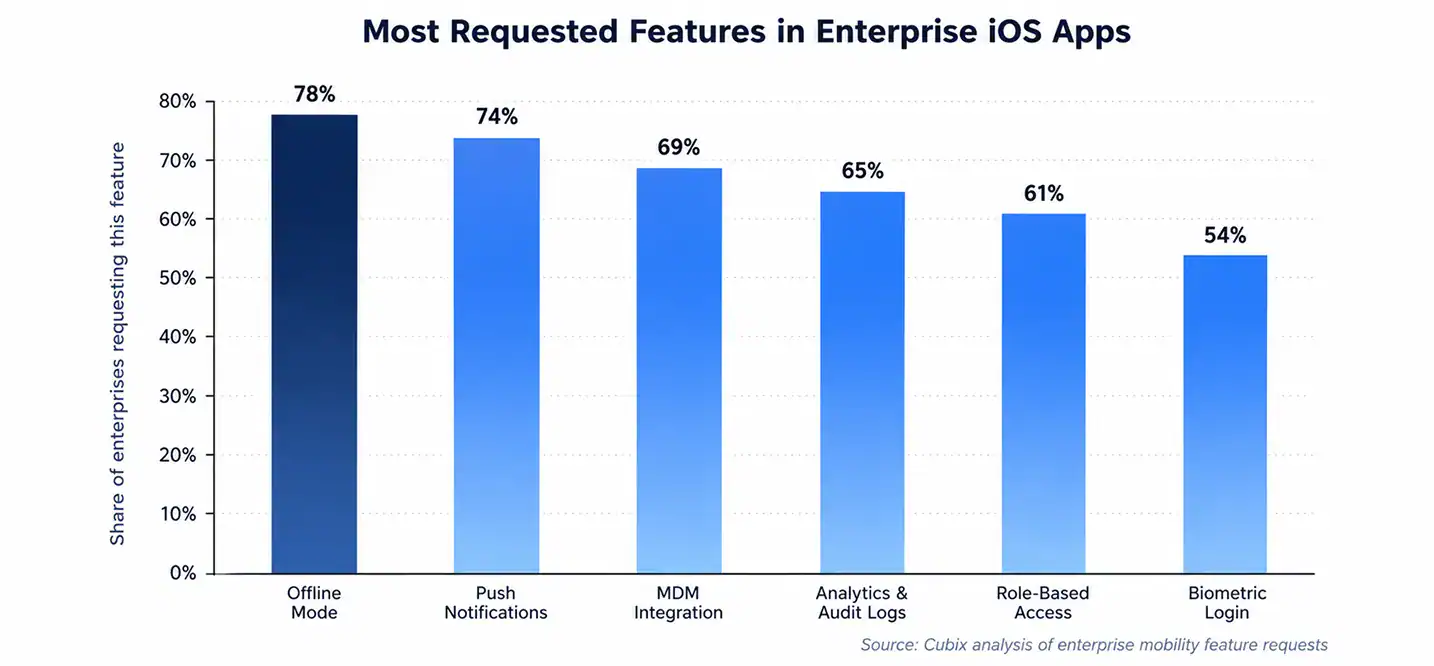
Not every feature matters equally. Some are must-haves. Others are nice extras. Here’s what actually moves the needle for enterprise users.
Offline mode tops the list, and for good reason. Field workers, warehouse staff, and sales reps don’t always have reliable internet. An app that breaks without Wi-Fi is an app people stop using. Offline-first design means data syncs the moment a connection comes back, no data loss, no frustration.
Push notifications keep teams in sync. A shift change, an urgent ticket, a stock alert. These need to reach the right person immediately, not sit unread in an inbox.
Analytics and audit logs matter more than most people realize going in. Enterprises need to know who did what and when. This isn’t just for compliance. It helps spot bottlenecks and improve workflows over time.
Enterprise iOS App Features and Their Business Impact
| Feature | What It Solves | Business Impact |
| Offline mode | Unreliable connectivity in the field | Keeps work moving without interruptions |
| Push notifications | Delayed communication | Faster response times across teams |
| MDM integration | Device management at scale | Centralized control over company devices |
| Analytics & audit logs | Lack of visibility into usage | Better compliance and decision-making |
| Role-based access | Data exposure risk | Employees only see what they need to |
| Biometric login | Weak password security | Faster, safer authentication |
Our detailed breakdown in iOS App Development Essentials covers how these features come together in real builds, not just theory.
Nearly 78% of enterprises rank offline functionality as a top priority when scoping a new app. That single stat shapes almost every architecture decision from day one.
Popular Use Cases Across Industries
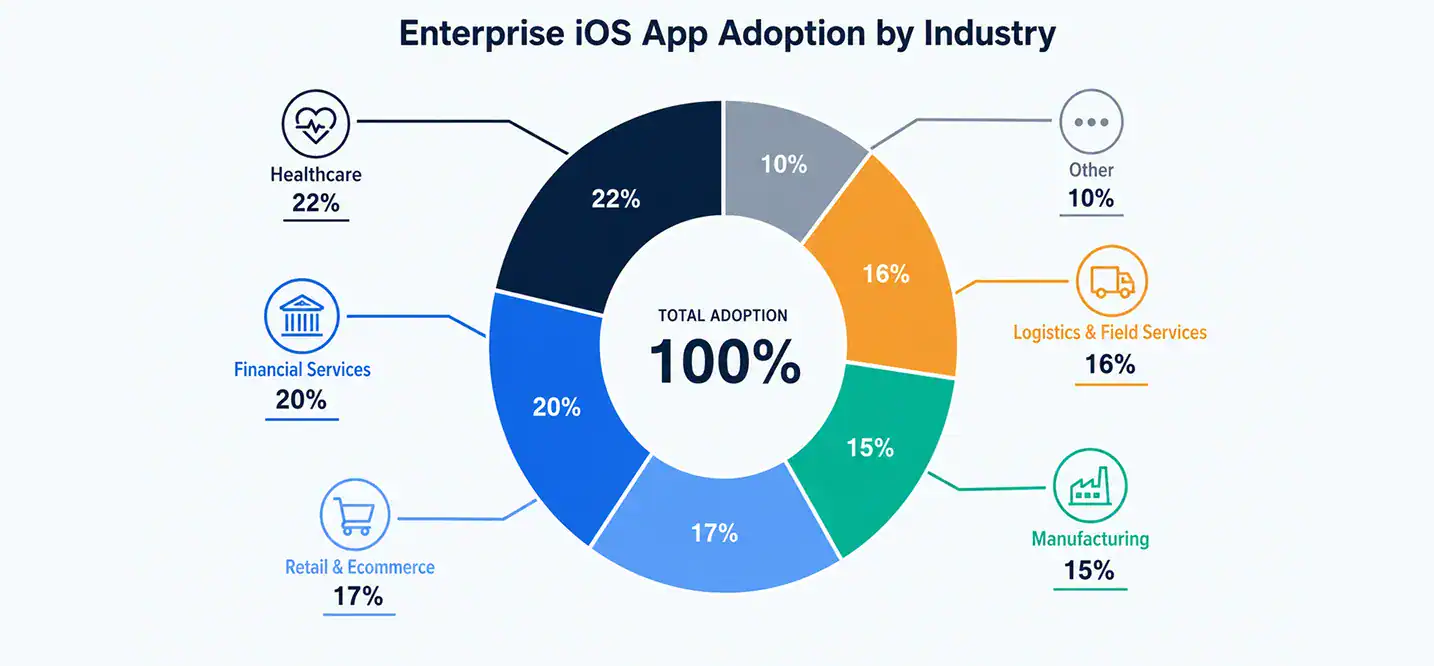
Enterprise iOS apps aren’t one-size-fits-all. Different industries use them in very different ways, and the best apps are built around the actual job, not a generic template.
Field service apps help technicians manage schedules, log repairs, and access manuals on-site. No more paper forms or phone calls back to the office for basic info.
Sales enablement apps put product catalogs, pricing, and customer history right in a rep’s pocket. Deals close faster when reps aren’t waiting on someone else to pull up data.
Inventory and asset tracking apps use barcode scanning and real-time syncing to keep warehouses accurate. Fewer manual counts, fewer errors, less lost inventory.
Healthcare and financial services apps carry the highest security bar of all. These apps often need HIPAA or PCI compliance built in from the start, not bolted on later.
Healthcare and financial services together account for over 40% of enterprise iOS deployments today. That makes sense. These are industries where a data breach isn’t just embarrassing, it’s a legal and financial disaster.
The Technology Behind Enterprise iOS Apps
Enterprise apps aren’t built with shortcuts. They’re built with tools designed for scale and reliability, and that starts with the language and framework choice.
Swift is Apple’s modern programming language, and it’s become the standard for serious iOS work. It’s fast, safe, and easier to maintain than older alternatives. SwiftUI builds on top of that, letting developers create clean, responsive interfaces with less code and fewer bugs.
Xcode is the development environment where it all comes together, and the iOS SDK gives developers access to device features like cameras, sensors, and biometrics. These aren’t optional extras. They’re the foundation every enterprise iOS app is built on.
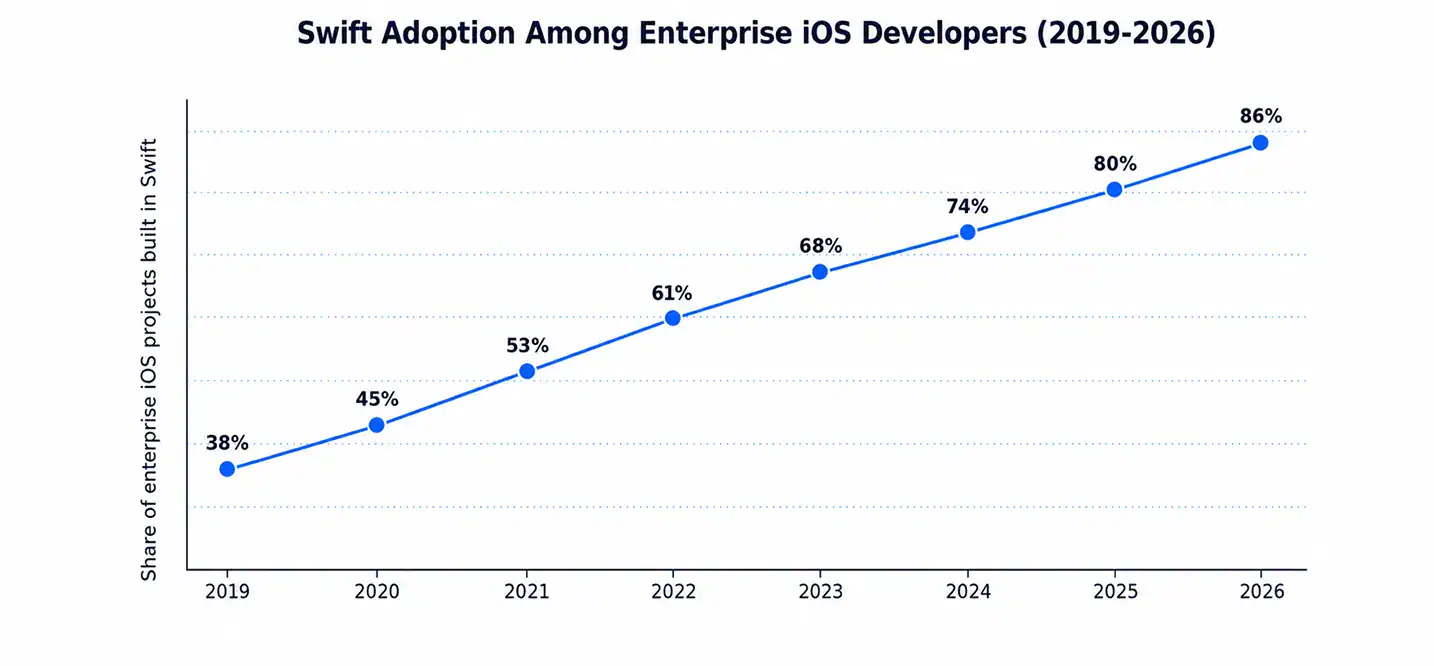
Swift adoption among enterprise iOS teams has climbed from under 40% in 2019 to over 85% today. That’s a massive shift in just a few years, and it shows how quickly the ecosystem has matured. For a closer look at why Swift dominates enterprise builds, check out Building iOS Apps with Swift.
Security and Compliance in Enterprise iOS Apps
Security isn’t a feature you add at the end. It has to be part of the plan from day one, especially for apps handling sensitive company or customer data.
Mobile Device Management (MDM) lets IT teams control, monitor, and wipe devices remotely if needed. Combined with Apple Business Manager, companies can push apps directly to employee devices without going through the public App Store. The Apple Developer Enterprise Program exists specifically for this kind of internal distribution at scale.
Enterprise iOS Security Layers and What They Protect
| Security Layer | What It Protects | Who Uses It |
| MDM | Device-level access and remote wipe | IT and security teams |
| Apple Business Manager | App and device distribution | Enterprise IT admins |
| Data encryption | Data at rest and in transit | All industries, especially healthcare/finance |
| Role-based access control | Sensitive internal data | Companies with tiered employee access |
| Audit logging | Compliance and accountability | Regulated industries |
Around 71% of enterprises say security is their top concern when planning a new internal app, ahead of even cost or timeline. If you’re planning a build, our Enterprise App Security Checklist is a solid place to start before writing a single line of code.
Native vs Hybrid: What’s Right for Enterprises?
This question comes up in almost every enterprise app conversation. Hybrid frameworks promise faster builds and one codebase for multiple platforms. It sounds efficient on paper.
But for enterprise apps, native usually wins. Performance matters more when you’re scanning barcodes all day or syncing large data sets in the field. Native apps also get faster access to new iOS features the moment Apple releases them, without waiting on a framework update.
Roughly 82% of enterprise apps rated as “mission-critical” are built natively rather than through a hybrid framework. That’s not a small margin. For the full comparison, our post on Native vs. Hybrid for Enterprise Apps walks through the tradeoffs in detail.
Deployment: App Store Connect, TestFlight, and Internal Distribution
Getting an enterprise app into employees’ hands works differently than a normal app launch. Most internal apps never touch the public App Store at all.
TestFlight is where beta testing happens before a wider rollout. It lets teams catch bugs with a small group before pushing to everyone. App Store Connect manages builds, versions, and metadata even for apps that stay private.
For truly internal distribution, companies use the Apple Developer Enterprise Program instead of the standard Apple Developer Program. The enterprise version skips App Store review entirely, letting IT push apps directly to company devices. Nearly 65% of large enterprises use this private distribution route instead of the public store for internal tools.
How Much Does Enterprise iOS App Development Cost?
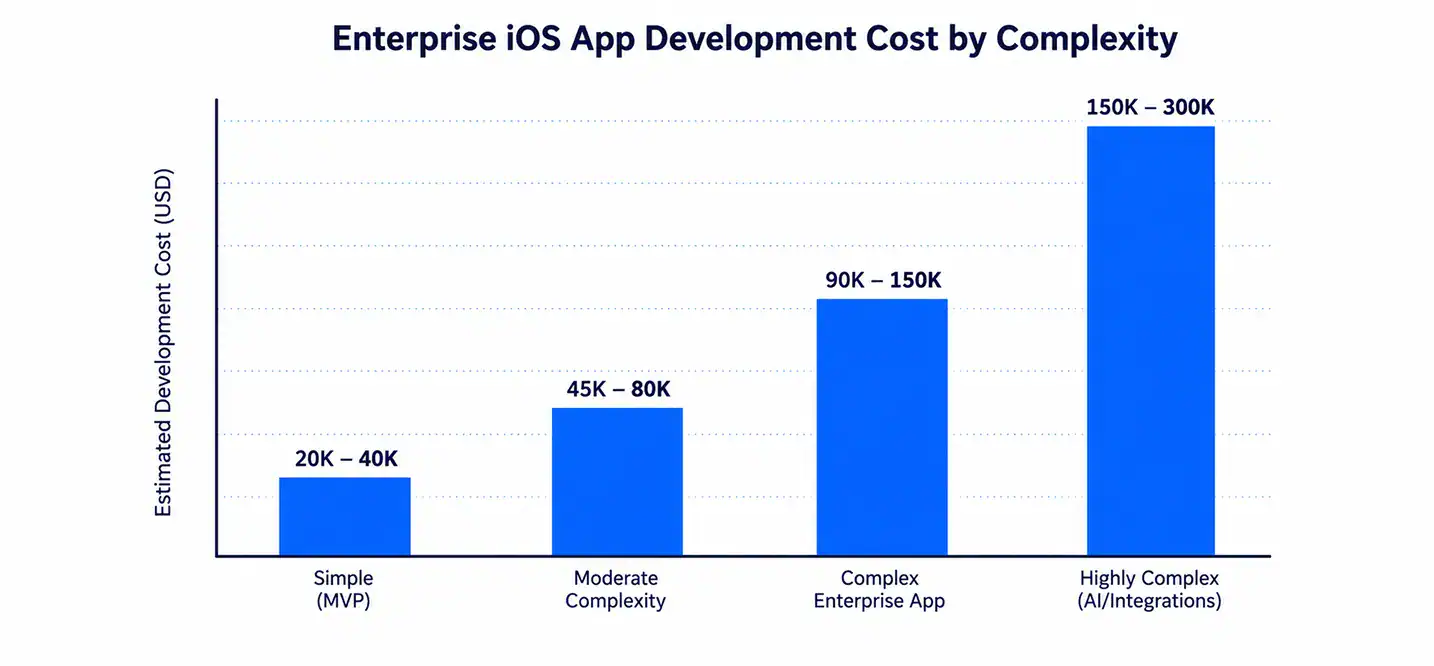
Cost is usually the first question, and honestly, it’s a fair one. The answer depends heavily on complexity, integrations, and how polished the final product needs to be.
A simple internal tool with basic features might cost far less than a complex app with AI, real-time syncing, and multiple system integrations. Team location and experience level also swing the number significantly.
Highly complex enterprise apps with deep integrations can run four to six times the cost of a simple MVP build. That gap is why scoping the project correctly at the start saves so much money later. For a full cost breakdown by feature and complexity tier, read iOS App Development Cost.
Design Matters: Following Apple’s Human Interface Guidelines
It’s tempting to treat design as an afterthought for internal apps. That’s a mistake. Employees judge internal tools the same way they judge any app on their phone.
Apple’s Human Interface Guidelines exist to make apps feel familiar and intuitive. Following them means less training time, fewer support questions, and faster adoption across teams. Apps that ignore these guidelines tend to feel clunky, even if the backend logic is solid.
Companies that follow HIG standards closely report up to 30% higher employee adoption rates for new internal tools compared to apps that skip design standards altogether. Good design isn’t cosmetic here. It’s functional.
Why Choose Cubix for Enterprise iOS App Development

Building an enterprise iOS app isn’t something to hand off to just anyone. It takes real experience with security, scale, and the specific quirks of business workflows.
Cubix has spent years building enterprise iOS app development services for companies across healthcare, finance, logistics, and retail. That range matters. It means the team understands compliance requirements, offline architecture, and MDM integration, not as buzzwords, but as things they’ve actually shipped.
Working with an experienced ios app development agency means fewer surprises during development and a smoother path to launch. Cubix brings that experience to every enterprise project, from the first planning call to post-launch support.
How Cubix Builds Secure, Scalable Enterprise iOS Apps
The process starts with discovery. Understanding the actual workflow problem before writing any code matters more than jumping straight to design. From there, Cubix moves through design, native Swift and SwiftUI development, MDM integration, and rigorous testing before deployment.
Security gets baked in at every stage, not tested for at the end. That includes encryption, role-based access, and compliance checks specific to the industry, whether that’s healthcare, finance, or logistics. Post-launch, Cubix stays involved with support and updates, because an enterprise app is never really “done.” It evolves as the business does.
If your team is exploring Enterprise App Development Solutions, Cubix can walk through what a custom build would look like for your specific workflow and industry.
Final Thoughts
Enterprise iOS app development isn’t a trend. It’s become the default way serious companies equip their teams. The numbers back it up, from adoption rates to security preferences to how fast Swift has taken over the ecosystem.
Getting it right means thinking past features and into workflow, security, and design from day one. That’s where experienced partners make the difference between an app that gets used and one that gets ignored after week one.
If you’re ready to talk through what an enterprise iOS app could look like for your business, Cubix is a good place to start that conversation.
Want to discuss your project? Our experts are just a click away.
Contact UsFrequently Asked Questions
1. What’s the difference between the Apple Developer Program and the Apple Developer Enterprise Program?
The standard Apple Developer Program is for apps distributed through the public App Store. The Enterprise Program is built specifically for internal-only apps distributed directly to company devices, skipping App Store review entirely.
2. How long does enterprise iOS app development usually take?
It varies by complexity, but a moderate enterprise app typically takes three to six months from discovery to launch, including testing and MDM integration.
3. Do enterprise iOS apps need to work offline?
For most industries with field or warehouse workers, yes. Offline mode is one of the most requested features because connectivity can’t always be guaranteed.
4. Is Swift required for enterprise iOS apps?
It’s not legally required, but it’s become the industry standard because of its performance, safety features, and long-term maintainability compared to older languages.
5. How does MDM help with enterprise app security?
MDM lets IT teams remotely manage, monitor, and wipe company devices if they’re lost or compromised, adding a critical security layer beyond the app itself.