Key Takeaways
- Post-launch maintenance is a budget line, not an afterthought. Plan for 20 to 25% of development cost annually.
- Set up monitoring before users find problems for you.
- Security is ongoing. Patch, audit, and test on a regular schedule.
- Build horizontal scaling capability into your architecture before you need it.
- Use blue-green deployments or canary releases to reduce the risk of updates.
- Prioritize bugs by impact, not by who complained loudest.
- Allocate time every sprint for technical debt reduction.
Launch day is not the finish line. It’s just the beginning.
Your app is live. Users are signing up. Traffic is climbing. Then an OS update breaks a core feature. A security patch slips through the cracks. Load times spike. Ratings drop. Revenue follows.
According to industry research, mobile apps lose nearly 77% of daily active users within the first three days if they fail to deliver a reliable experience. User retention depends on performance, security, and continuous improvement throughout the app’s lifecycle.
This is where most apps fail, not at launch, but in the months after it.
As a custom mobile app development partner, Cubix provides application maintenance and support to help businesses keep their apps secure, stable, and ready for growth. From performance monitoring to infrastructure scaling, Cubix ensures your application maintenance strategy evolves as user demands change.
This guide walks you through what mobile application maintenance actually looks like, how to scale without breaking things, and how to build a system that keeps your app reliable as it grows.
The Real Cost and Reality of App Maintenance
Many software owners treat app development as a one-time expense. They build the product, launch it, and assume the job is done. This mindset leads to broken software and abandoned applications. Software evolves over time and requires continuous maintenance to remain secure, compatible, and performant.
Budgeting for the Software Lifecycle
Budget for this before you launch, not after something breaks.
In 2026, the industry standard for annual maintenance has shifted to 20 to 25% of the initial development cost. However, for complex enterprise applications or those in highly regulated industries like fintech or healthcare, this can reach higher.
The estimated cost to maintain an app in 2026 ranges between $5,000 and $15,000 annually for a simple app and $50,000 to $150,000 or more per year for a complex app.
Monthly benchmarks show most apps cost between $2,000 and $6,000 per month to maintain. What drives that number up?
- Complexity. More features, third-party integrations, and edge cases mean more things to break.
- User base. More users create more server costs, more support requests, and more data to manage.
- Regulation. Apps in healthcare, finance, or legal domains carry compliance costs that don’t shrink over time.
- Coverage requirements. Standard business-hours support incurs no adjustment to the base cost, but 24/7 requirements add 20-40% to your maintenance budget.
Plan for the real number. A maintenance budget that’s too thin leads to reactive firefighting, which costs far more than proactive upkeep.
What Drives Costs Higher Than Expected
One of the biggest offenders is reactive refactoring. When refactoring is done under pressure or without clear intent, it can trigger regressions, require large-scale rewrites, and derail your roadmap. As one engineer put it: “Refactoring is one of the biggest enemies to scaling.”
Enterprises are now spending nearly 50% of their initial development budget on maintenance in the first year to keep up with hyper-dynamic shifts. If you’re not building for maintainability from day one, you’ll pay for it later.
Hidden Costs Teams Overlook
Some maintenance costs are easy to spot. Others build up quietly over time. Early shortcuts, outdated dependencies, and rushed fixes often create problems long after launch.
Watch for these hidden costs:
- Third party dependencies that break without warning
- API endpoints that fail under heavy traffic
- Technical debt that grows with every new feature
- Security vulnerabilities discovered after deployment
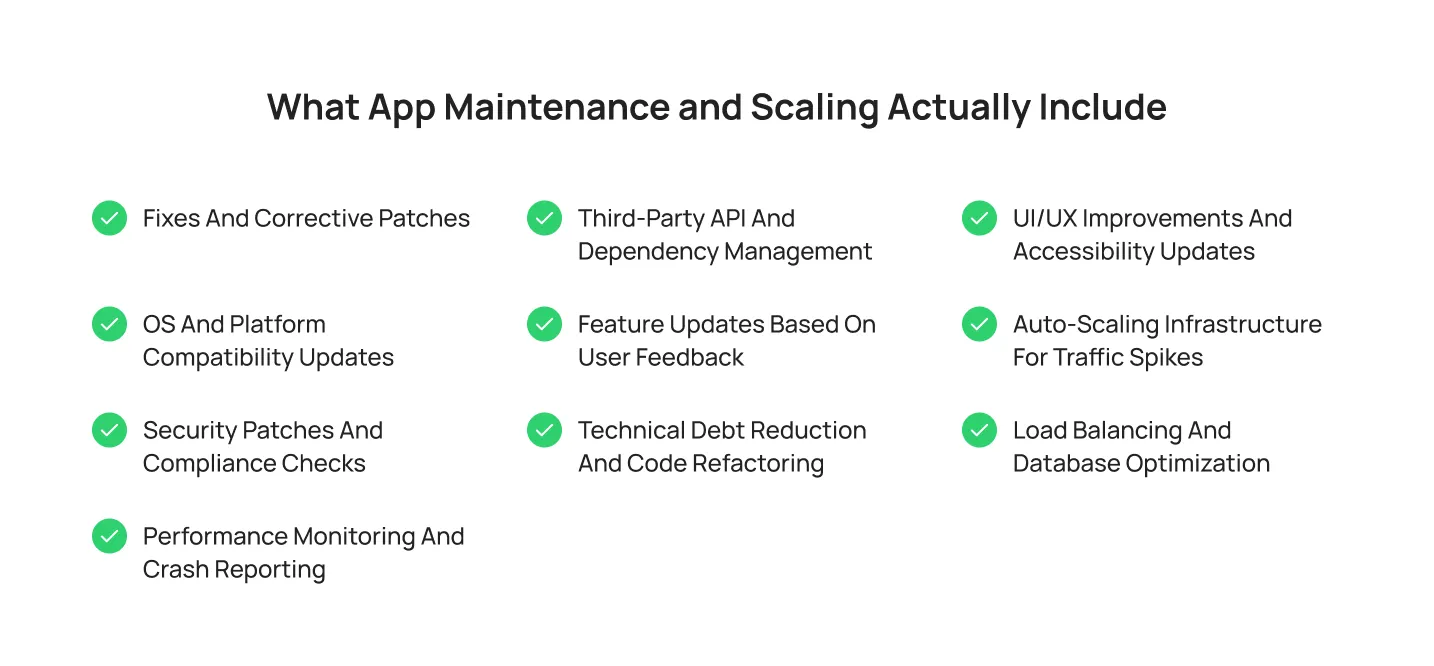
What App Maintenance and Scaling Actually Include
Launching your app is only the start. To keep users engaged, you need regular maintenance, performance monitoring, and infrastructure that scales as demand grows. The foundation for this growth starts with scalable mobile app development practices that prioritize performance and flexibility from day one.
1. Fixes and Corrective Patches
Every app ships with bugs. What matters is how quickly you find and fix them.
Not every issue deserves the same level of attention. A clear triage process helps your team focus on what affects users most.
Fix immediately (same day):
- Broken checkout or payment flows
- Login failures affecting users
- Data loss or corruption
- Security vulnerabilities
Fix within the current sprint:
- Features broken on specific devices or OS versions
- Intermittent API failures
- Crashes triggered by user actions
Queue for the next release:
- Non critical feature issues
- Edge case bugs affecting a small percentage of users
Batch into a cleanup sprint:
- Cosmetic issues
- Minor UI inconsistencies
- Copy errors
Maintenance rarely follows a straight line. A bug fix can reveal usability problems, while an OS update can expose opportunities for improvement. Build a triage system early so your team spends more time improving the app and less time reacting to issues.
2. OS and Platform Compatibility Updates
Apple and Google release major OS updates every year. If your app falls behind, features break, users get frustrated, and ratings suffer.
| Platform | Release Cycle | What Breaks |
| iOS | Annually | UI components, APIs, Neural Engine Integrations |
| Android | Annually + Quarterly | API Requirements, Permission Models, Policy Changes |
| Third Party SDKs | Varies | Authentication Flows, Maps, Payments, Analytics |
Third party SDKs also update frequently. While these updates improve security and performance, they can introduce breaking changes.
Track release calendars and start compatibility testing six to eight weeks before major OS launches. Early testing helps you avoid emergency fixes after users update their devices.
3. Security Patches and Compliance Checks
Security is an ongoing process. You cannot set it once and forget it.
According to Verizon’s 2025 Data Breach Investigations Report, third-party involvement in data breaches increased from 15% to 30% of all cases. That makes dependency management more important than ever.
A strong security schedule includes:
Every week:
- Monitor vulnerability feeds such as Snyk and Dependabot
- Review automated security scans
Every month:
- Rotate API keys and credentials
- Audit user permissions
Every six months:
- Run a full dependency audit
- Perform vulnerability scans
Every year:
- Conduct penetration testing
- Review compliance with GDPR, HIPAA, or PCI DSS
- Test your incident response plan
Outdated libraries create security risks. Regular maintenance helps you close gaps before attackers exploit them.
4. Performance Monitoring and Crash Reporting
You cannot fix issues you do not track. Monitoring gives your team visibility before users leave negative reviews.
Your monitoring stack should include:
- Crash reporting: Firebase Crashlytics and Sentry help identify crashes and their causes.
- Uptime monitoring: Datadog and New Relic alert teams when services fail.
- Performance tracing: Track API response times, database queries, and screen load times.
- User analytics: Tools like Mixpanel and Amplitude show where users drop off.
Poor performance and frequent crashes remain some of the biggest reasons users uninstall apps. Set alert thresholds before problems occur. If crash rates spike, your team should know immediately, not during the next meeting.
5. Third-Party API and Dependency Management
Your app probably relies on dozens of services it didn’t build: payments, maps, auth, analytics, and push notifications. Each one is a dependency you don’t fully control.
A third-party service you rely on, such as payment processing or maps, may change its integration rules. When that happens without warning, your app breaks.
What to track per dependency:
| Dependency Type | Risk Level | Check Frequency |
| Payment gateway (Stripe, Braintree) | Critical | Every Release |
| auth provider (Auth0, Firebase) | Critical | Monthly |
| Maps API (Google, Mapbox) | High | Quarterly |
| Analytics SDK | Medium | Quarterly |
| UI component libraries | Medium | Every sprint |
| Email/SMS services | Medium | Monthly |
Keep a dependency register. Know who owns each integration on your team. When a third party changes their API, you want to find out from their changelog, not from your users.
6. Feature Updates Based on User Feedback
The best roadmap input isn’t a product meeting. It’s your users telling you what’s broken, what’s missing, and what they stopped using.
Pull feedback from multiple places and cross-reference it:
- App store reviews: Look for patterns in 1-star and 2-star ratings rather than reacting to single complaints.
- In-App Feedback Prompts: Trigger surveys right after a user completes an action instead of interrupting them randomly.
- Support Tickets: Review common help desk issues weekly; your support team already knows the top problems.
- Behavioral Data: Analyze user funnels in your analytics tools to see exactly where people quit your app.
- Session Recordings: Watch real user playbacks to see the exact friction points faced right before leaving.
When the same problem shows up in all five sources, that’s your next sprint priority. When it only shows up in one, investigate before you build.
7. Technical Debt Reduction and Code Refactoring
Technical debt is the gap between the code you shipped under pressure and the code you’d write if you had time to do it right. Every team accumulates it. The teams that survive are the ones that pay it down on a schedule.
Industry estimates suggest teams that dedicate approximately 15% to 20% of development capacity to preventive maintenance avoid larger problems later.
Warning signs your technical debt is becoming a problem:
- New features take disproportionately long to ship
- Every change risks breaking something unrelated
- Onboarding a new developer takes weeks, not days
- Test coverage is falling as the codebase grows
- Engineers describe parts of the codebase as “untouchable.”
Schedule debt reduction into every sprint. Waiting until “we have time” means it never happens.
8. UI/UX Improvements and Accessibility Updates
Maintenance goes beyond backend systems. Your user experience directly affects retention. If your app feels slow or confusing, users leave.
Focus your UX updates in these areas:
Onboarding flow: Strong onboarding can improve retention by up to 50%. Review your onboarding experience every quarter and remove unnecessary steps.
Load times: Every 100 ms increase in load time reduces conversion by 7%. Use skeleton screens and lazy loading to keep the experience responsive.
Personalization: When your app remembers preferences and surfaces frequently used features, day 30 retention improves by 10 to 15%.
Accessibility: Accessible design expands your reach. Features like dark mode, voice input, and proper contrast help more people use your app effectively.
You do not need a complete redesign to improve UX. Small updates based on user data often deliver the biggest results.
9. Auto-Scaling Infrastructure for Traffic Spikes
Traffic spikes don’t send calendar invites. A product mentioned in a newsletter, a press hit, or a seasonal surge can bring 10x normal traffic in minutes. Your infrastructure needs to handle it without human intervention.
How auto-scaling works in practice:
- You define thresholds (CPU hits 70%, requests per second exceed X)
- A scaling policy triggers automatically
- New instances spin up and absorb the load
- Traffic is distributed across instances via a load balancer
- When demand drops, instances scale back down to reduce cost
For an application to auto-scale successfully, every component needs to auto-scale: the frontend, the backend, the database layer, and infrastructure elements such as load balancers.
The trap most teams fall into: they set up auto-scaling on their web tier and forget the database. Under load, the database becomes the bottleneck. Test the full stack under simulated peak traffic before you need it for real.
10. Load Balancing and Database Optimization
As your user base grows, your infrastructure must stay fast and reliable.
Load balancers distribute traffic across multiple servers, improving availability and preventing overload.
To optimize your database:
- Index frequently queried fields
- Optimize slow queries
- Use read replicas
- Archive unused data
- Monitor database performance regularly
A fast database supports a fast app. Monitor performance continuously so you can fix bottlenecks before users notice them.
How to Build a Post-Launch Maintenance Plan
A strong maintenance plan keeps your app stable, secure, and ready for growth. Instead of reacting to problems, create a schedule that helps your team stay ahead of them.

Organize maintenance tasks into predictable intervals:
Weekly: Review crash logs, resolve critical issues, and monitor server health.
Biweekly: Release minor updates and deploy non critical bug fixes.
Monthly: Update key SDKs, rotate credentials, and run security scans.
Quarterly: Audit performance, optimize databases, review APIs, and verify compliance requirements.
Twice a year: Test your app against upcoming iOS and Android releases and update design systems to support new devices.
Your plan should stay flexible. Priorities change when new OS updates, security issues, or user feedback demand immediate attention.
Keep your plan realistic. Real maintenance is fluid; an unexpected operating system update can instantly shift your priorities. Building strong triage and automation habits early prevents your team from spending every sprint firefighting instead of building.
Key App Metrics You Should Monitor After Launch
Downloads only tell part of the story. To understand how your app is performing, track metrics that reflect user behavior, stability, and performance.
- Retention Rate: Shows how many users return over time. Strong retention points directly to a better user experience.
- Crash Free Sessions: Measures app stability. Frequent crashes frustrate users and push them toward competitors.
- Daily Active Users (DAU) and Monthly Active Users (MAU): Track how often users engage with your app. Comparing both numbers tells you how sticky your product actually is.
- Churn Rate: Measures how many users stop showing up. A rising churn rate signals a performance or usability problem worth fixing now.
- API Response Time: Slow APIs create friction users notice immediately. Monitor response times regularly and fix bottlenecks before they compound.
- App Store Ratings and Reviews: User feedback surfaces problems that analytics miss entirely.
- Infrastructure Utilization: Track CPU, memory, and database usage to prevent performance issues before traffic growth exposes them.
Track metrics that influence real product decisions. Ignore the rest.
Common App Maintenance and Scaling Mistakes to Avoid
Small issues become expensive problems over time. Teams that maintain their apps consistently spend less time fighting fires and more time building. Here are some common mobile app maintenance and scaling mistakes you should avoid to support long-term growth:
- Ignoring Technical Debt: Shortcuts save time today and cost you more tomorrow. Schedule regular refactoring to keep your codebase manageable.
- Delaying Security Updates: Outdated libraries and dependencies are open doors for attackers. Apply security patches on a fixed schedule, not when you get around to it.
- Scaling Too Early: Don’t build infrastructure for millions of users when you have thousands. Scale based on actual demand, not projected optimism.
- Ignoring User Feedback: Analytics show what users do. Feedback explains why. Review ratings, support tickets, and surveys on a regular cadence.
- Skipping Backups: A backup only matters if it works when you need it. Test your recovery process and confirm your team can restore systems quickly.
- Monitoring Only Uptime: Your app can stay online and still deliver a poor experience. Monitor performance, latency, and user behavior alongside uptime.
- Neglecting Third Party Dependencies: Your app relies on services you don’t control. Review API changes, SDK updates, and provider announcements before they catch you off guard.
Read More: 15 Useful Tips for a Successful Mobile Application
In-House Maintenance vs. Outsourcing: How to Decide
Once your app goes live, maintenance becomes a permanent responsibility. The first real decision is whether to handle it internally or bring in an external team.
There’s no universal right answer. It depends on your budget, technical expertise, growth pace, and support requirements.
In-House Maintenance
Your internal team handles updates, bug fixes, security patches, and infrastructure management.
What works in your favor: full control over priorities, faster communication, deeper product knowledge, and direct visibility into your code and infrastructure.
What works against you: higher hiring and operational costs, difficulty finding specialized talent, ongoing training overhead, and limited coverage outside business hours.
In-house maintenance works best when you have a large engineering team, complex systems, or strict compliance requirements.
Outsourced Maintenance
An external team takes on monitoring, maintenance, and support responsibilities.
What works in your favor: lower operational costs, access to specialized expertise, faster scaling during growth periods, and no hiring or training overhead.
What works against you: less direct control over workflows, communication delays across time zones, an onboarding period before the team is fully productive, and service quality that varies by provider.
Outsourcing works well for startups and businesses focused on growth rather than day-to-day infrastructure management.
Key Factors to Consider
Before choosing a model, ask yourself:
- Does your team have the expertise to support the app long term?
- Do you need 24/7 monitoring and support?
- How fast do you expect your user base to grow?
- Do you need to meet compliance requirements like GDPR, HIPAA, or PCI DSS?
- Is hiring and retaining engineers cost-effective at your current stage?
Many companies land on a hybrid approach. They keep product development in-house and outsource monitoring, infrastructure management, or security operations. Pick the model that fits your resources and where you’re headed. Your app needs to stay secure, reliable, and ready to grow.
How Cubix Handles Post-Launch Maintenance and Scaling for You
Launching your app is the start, not the finish line. Keeping it secure, stable, and scalable takes consistent work after go-live.
Cubix provides end-to-end post-launch support, from continuous monitoring and bug fixes to scaling infrastructure as your user base grows. Because the same team stays involved after launch, they already know your app’s architecture, codebase, and integrations. That familiarity cuts response time when issues come up or platform updates introduce new requirements.
Here’s what that support covers:
- Continuous monitoring and crash reporting: Track performance, uptime, and error rates before issues reach your users.
- OS and platform updates: Test your app against new iOS and Android releases to stay compatible.
- Security and compliance: Audit dependencies, rotate credentials, and apply security patches on schedule.
- Infrastructure scaling: Optimize databases, configure load balancing, and adjust resources as traffic increases.
- Feature improvements: Use feedback from analytics, support tickets, and app store reviews to prioritize what gets built next.
With 350+ designers, developers, and strategists, Cubix supports businesses across fintech, healthcare, and beyond. If your app is live and your maintenance process is struggling to keep up, this is a good time to review your strategy.
From performance monitoring and security updates to infrastructure scaling and feature enhancements, Cubix helps businesses keep their applications reliable as they grow. Through its software maintenance and support services, the company ensures apps remain secure, compatible, and optimized in an evolving digital landscape.
If your app is live and your maintenance process is struggling to keep up, now is a good time to review your strategy.
The Bottom Line
Launching your app is step one. Long-term success comes from regular maintenance, security updates, performance monitoring, and infrastructure that scales with you. Invest in post-launch support and you reduce downtime, improve retention, and keep your app ready for what’s next. Treat maintenance as an ongoing strategy. Your app will hold up better as your users and their needs evolve.
Frequently Asked Questions
1. How long does app maintenance take?
App maintenance doesn’t stop. Budget 10 to 15 hours per week for basic bug tracking, server monitoring, and data backups. When Apple and Google release new OS versions, plan a dedicated two-week development sprint to update your app and test compatibility.
2. What does app scaling mean?
Scaling means upgrading your software architecture and cloud infrastructure to handle more users and transactions without slowing down or crashing. In practice, you set up auto-scaling servers, add load balancers, and optimize your database to absorb sudden traffic spikes automatically.
3. What is the average cost of app maintenance?
You’ll spend 20 to 25% of your initial development cost on annual maintenance. A simple app runs $5,000 to $15,000 per year. Complex enterprise platforms require $50,000 to $150,000 annually for hosting, security, and ongoing updates.
4. What happens if you don’t update your app?
Your app breaks. New mobile operating systems cause features to stop working. Unpatched security gaps expose user data. Your app store rankings drop as users leave and negative reviews accumulate.
5. How often should you update your app?
Ship minor bug fixes and security updates every two weeks. Release major feature updates every two to three months to keep your users engaged and your product competitive.