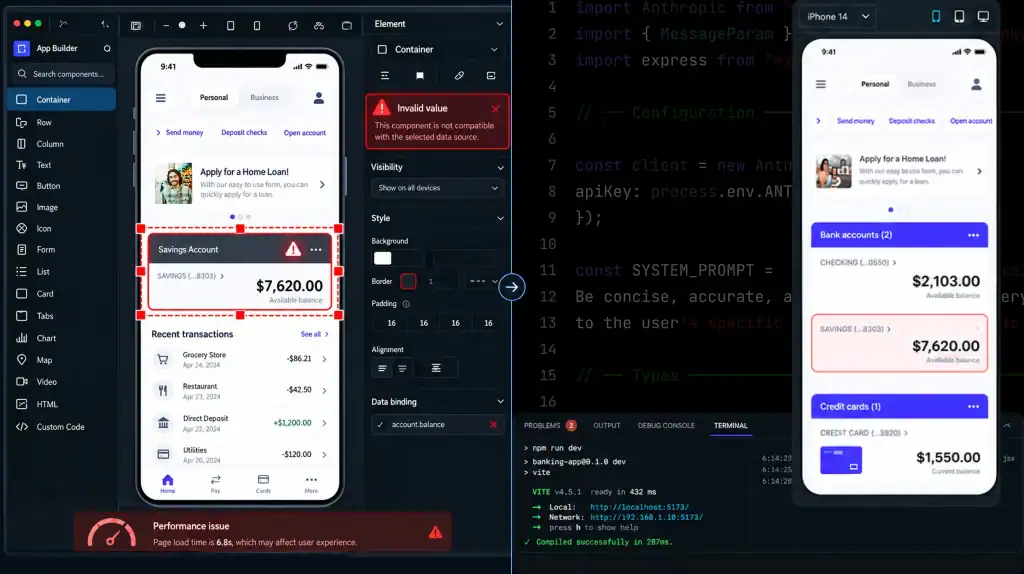
No-code apps rarely become a problem overnight. More often, the warning signs show up quietly: a workflow needs another workaround, an integration becomes harder to maintain, performance starts slipping, or a simple feature suddenly requires several plugins and automations.
That doesn’t make no-code a bad choice. In fact, 90% of no-code users surveyed by Zapier said their company had been able to grow faster because of its no-code usage, highlighting why businesses turn to these platforms in the first place.
The challenge starts when the application grows beyond what its platform can handle efficiently. No-code limitations can surface in areas such as performance, scalability, data management, integrations, security, customization, and infrastructure control. The key is knowing whether you’re dealing with a problem that can be optimized or a platform constraint that calls for custom development.
This guide breaks down the most common signs that a no-code app has outgrown its platform, what you can fix without rebuilding, and what a no-code to custom migration actually involves.
What Are No-Code Limitations?
No-code limitations are restrictions that prevent a visual development platform from supporting a requirement as efficiently, reliably, or flexibly as your application needs.
The limitation might be functional. A required business rule may not be possible without several workarounds. It might be technical, such as an API limit, database constraint, performance bottleneck, or restricted infrastructure access. It can also be financial when platform usage, premium features, plugins, and automation charges make the application’s total cost of ownership difficult to justify.
Common areas include:
| Area | What a limitation can look like |
| Functionality | A required feature cannot be implemented natively |
| Performance | Slow queries, pages, workflows, or background jobs |
| Scalability | Data, traffic, or processing requirements exceed practical platform capabilities |
| Integrations | APIs, webhooks, authentication, or third-party connections lack flexibility |
| Data | Difficult relationships, querying, exporting, or data portability |
| Infrastructure | Limited control over hosting, deployment, networking, or caching |
| Security | Insufficient control over access, logging, identity, or configuration |
| Cost | Usage-based charges and premium features increase the cost of growth |
The important distinction is that a platform limitation is not the same thing as a poorly configured application. A slow workflow might need optimization. A missing API capability may require a different architecture altogether.
That distinction should come before any decision to rebuild.
Do All No-Code Platforms Have the Same Limitations?

No. “No-code” describes a development approach, not a technical architecture.
A website builder, database-driven application platform, internal tool builder, and workflow automation platform can have completely different constraints. Some expose APIs and custom connectors. Others tightly control the backend. Some allow applications to use external databases, while others keep data inside the platform.
Even platforms with extensive customization still document specific limits. For example, Microsoft’s Power Apps documentation covers request limits, data-type limits, supported environments, embedding restrictions, and other configuration boundaries.
1. Website and Frontend Builders
These platforms are often well suited to content-driven websites, landing pages, portals, and straightforward customer experiences.
Limitations can emerge when the application requires:
- Complex server-side business logic
- Highly specialized interactions
- Custom backend processing
- Advanced data relationships
- Infrastructure-level control
2. Database-Driven App Builders
These platforms commonly connect interfaces and workflows to structured data.
As the application grows, review:
- Database relationships
- Query complexity
- Data volume
- API requests
- Workflow dependencies
- Data export options
3. Internal Tool and Workflow Platforms
These can be effective for operations, approvals, dashboards, and business process automation.
The pressure points are often:
- Complex authorization rules
- Cross-system workflows
- Custom authentication
- Advanced business logic
- Integration reliability
4. Automation Platforms
Automation tools can connect otherwise separate systems, but chains of dependent workflows can become difficult to maintain.
A single failed API call can affect several downstream processes. As automation grows, monitoring, retries, error handling, and dependency management become increasingly important.
So instead of asking, “When does no-code stop working?” ask:
“Does this particular platform support the workload, architecture, and level of control my application now requires?”
8 Signs Your No-Code App Has Outgrown Its Platform
One frustrating feature does not mean you need a custom application. The stronger signal is a recurring constraint that affects performance, product functionality, cost, security, or development velocity.
1. Workarounds Are Taking Longer Than the Feature Itself
A no-code workaround can be useful once. A system built almost entirely from workarounds is different.
You may notice:
- Several plugins are needed for one basic feature.
- A simple workflow requires multiple automation steps.
- Developers or operators maintain manual processes around the application.
- One change requires updates across unrelated workflows.
- Documentation becomes necessary just to explain how a workaround works.
This is often where no-code technical debt starts becoming visible.
The issue is not that workarounds exist. Software projects use workarounds in every development model. The problem is when the workaround becomes more complicated than the requirement it was created to solve.
2. Performance Problems Keep Returning
A no-code app can have performance problems for the same reasons any application can: inefficient data access, excessive processing, network dependencies, large payloads, or poorly structured workflows.
Look for patterns such as:
- Slow database queries
- Delayed automations
- Long-running background processes
- Increasing page or action latency
- Timeouts
- Performance degradation under realistic production workloads
Do not use an arbitrary user count as your definition of scalability. An application serving 500 users with complex transactions can face a very different workload from an application serving 50,000 users with simple reads.
For example, Microsoft explicitly notes that Power Apps performance can vary based on device processing power, memory, network connectivity, application complexity, and other applications running at the same time.
The useful question is therefore not “How many users can no-code handle?”
It is:
“Does the application remain within acceptable performance boundaries under the workload we actually expect?”
3. Your Core Feature Cannot Be Built Cleanly
This is one of the clearest no-code app limitations.
If your product depends on highly specialized business logic, custom algorithms, real-time processing, advanced backend operations, or a proprietary workflow that the platform does not support well, adding more plugins may only make the architecture harder to maintain.
Ask:
- Can the feature be implemented without excessive workarounds?
- Can it be tested reliably?
- Can it handle expected edge cases?
- Can the underlying logic be maintained as requirements change?
- Is the feature central to the product rather than a nice-to-have?
If the answer keeps pointing toward “not without fighting the platform,” custom development deserves serious consideration.
4. Integrations Have Become the Bottleneck
Integrations often expose no-code platform limitations before anything else.
Your application may depend on:
- CRM systems
- ERP platforms
- Payment gateways
- Identity providers
- Analytics systems
- Cloud services
- Internal APIs
- Third-party SaaS platforms
Problems appear when a required integration needs custom authentication, unusual payload handling, bidirectional synchronization, complex retry logic, or processing that the no-code platform cannot support directly.
A few connected services are manageable. A growing chain of dependent automations can become an operational risk.
At that point, an API gateway, custom backend service, integration layer, or event-driven architecture may be more appropriate than adding another connector.
5. Your No-Code Costs Keep Rising With Usage
The subscription price is only one part of the calculation.
Consider the full cost of operating the application:
Platform fees + usage charges + plugins + automation services + maintenance time + workaround development + migration risk
A platform may remain inexpensive at low usage but become significantly more expensive as the application adds users, workflows, storage, API calls, or premium capabilities.
That does not automatically make custom development cheaper. A custom application introduces engineering, hosting, monitoring, security, testing, and maintenance costs of its own.
The useful comparison is the total cost of ownership over the period you expect to operate and grow the product.
6. Your Data Model Is Becoming Difficult to Manage
Early applications often have simple data structures. Then requirements grow. A customer can have multiple accounts. An account can contain multiple projects. Projects can have permissions, transactions, files, events, and relationships with other systems. Suddenly, the data model that worked for an MVP becomes difficult to query and maintain.
Watch for:
- Duplicate records
- Complicated relationships
- Repeated data transformations
- Manual data cleanup
- Difficult reporting
- Slow queries
- Increasing dependency on automation for basic data operations
- Restricted access to underlying data
Data portability matters here too. The ability to export some application data does not necessarily mean you can reproduce the entire application’s underlying data model, business logic, workflows, permissions, and dependencies elsewhere.
7. You Need More Control Over Security or Infrastructure
No-code platforms can provide substantial security and governance capabilities, but requirements vary by platform, plan, architecture, and use case.
The gap becomes important when your application requires greater control over:
- Single sign-on
- Role-based access control
- User provisioning
- Audit trails
- Network configuration
- Deployment environments
- Data residency
- Encryption controls
- Logging and monitoring
- Compliance requirements
Security also extends beyond authentication. OWASP recommends security logging and monitoring as part of application security because logs help detect suspicious activity, investigate incidents, and troubleshoot access-control problems.
If your platform cannot provide the level of security control, observability, or infrastructure configuration your application requires, that is a legitimate architectural concern.
8. Development Velocity Is Going Down Instead of Up
This is easy to overlook because speed is one of the main reasons teams choose no-code.
Initially, a feature may take hours instead of days.
Later, the same application may require:
- More workflow changes
- More regression testing
- More plugin configuration
- More dependency management
- More manual troubleshooting
- More time understanding platform-specific behavior
When every new feature creates another layer of complexity, the original development-speed advantage can disappear.
This is often the point where technical debt becomes a product problem rather than a developer inconvenience.
Which No-Code Problems Can You Fix Without Rebuilding?

Not every limitation requires a rewrite.
Before moving to custom development, test whether the problem comes from the way the application is configured rather than from the platform itself.
1. Optimize Before You Migrate
Start with:
- Removing unnecessary automations
- Simplifying workflows
- Reducing duplicate API requests
- Reviewing database relationships
- Eliminating unused plugins
- Reducing unnecessary third-party dependencies
- Checking platform performance settings
- Measuring the slowest workflows and queries
Then retest the application using realistic production scenarios.
2. When Is Optimization Enough?
| Problem | Optimize first? | Consider migration when |
| Slow workflow | Yes | The platform remains the bottleneck |
| Complex automation | Yes | The workflow becomes fragile or unmaintainable |
| Rising platform costs | Yes | Costs continue increasing with core usage |
| Integration issue | Yes | Required API capability is unavailable |
| Data complexity | Yes | The platform cannot model the required relationships |
| Missing feature | Check platform options | The feature is core to the product and cannot be implemented reliably |
This step is important because rebuilding an application is not a performance optimization technique. It is an architectural decision.
How No-Code Technical Debt Builds Up
No-code technical debt develops when temporary shortcuts become permanent parts of the application.
A plugin solves a missing feature. Then another plugin depends on it. An automation connects the two. A manual process handles an exception. Six months later, nobody wants to change the workflow because one modification could affect five other processes.
Common sources include:
- Plugin dependency
- Platform-specific workarounds
- Duplicate workflows
- Undocumented business logic
- Fragile integrations
- Manual data corrections
- Complex automation chains
- Limited testing coverage
The technical debt impact becomes particularly visible when engineering time shifts from building product capabilities to maintaining old workarounds.
The next step is to identify which debt actually matters. Teams can identify and reduce technical debt by assessing the areas that create the greatest maintenance burden, delivery risk, and architectural friction.
Technical debt does not mean “rewrite everything.” It means understanding which compromises are now creating measurable problems.
When Should You Move From No-Code to Custom Development?
A better migration decision uses four steps:
Constraint → Business Impact → Failed Optimization → Migration Case
1. Identify the Constraint
Document the exact limitation.
Instead of writing:
“The app is getting too big.”
Write:
“The platform cannot process this workflow within the required response time under our production workload.”
Specific constraints are easier to evaluate.
2. Measure the Business Impact
Connect the technical problem to something measurable:
- Lost conversions
- Failed transactions
- Customer complaints
- Delayed releases
- Engineering hours
- Integration failures
- Increasing platform costs
- Operational errors
- Security requirements
3. Test Whether the Constraint Can Be Removed
Before migrating, check:
- Platform configuration
- API capabilities
- Database structure
- Workflow design
- Integration architecture
- Usage patterns
- Available platform upgrades
- Hybrid architecture options
4. Compare Staying vs. Migrating
Calculate both sides.
Cost of staying can include platform fees, workaround maintenance, operational inefficiency, delayed features, and increasing technical debt.
Cost of migrating can include architecture, engineering, data transformation, integrations, testing, infrastructure, training, and cutover.
A migration makes more sense when the current constraint has become a persistent business problem and optimization no longer addresses the root cause.
How Much Does It Cost to Rewrite a No-Code App?
There is no reliable universal price for rewriting a no-code application because the scope can vary dramatically.
A simple internal tool with a small database is fundamentally different from a customer-facing application with authentication, payments, integrations, complex workflows, and years of historical data.
What Drives No-Code Migration Cost?
| Cost factor | Why it matters |
| Feature complexity | More custom functionality requires more engineering |
| Data structure | Complex relationships may require schema transformation |
| Data volume | More records and files increase migration and validation work |
| Integrations | APIs, webhooks, payments, and external systems add dependencies |
| Authentication | Users, roles, permissions, and identity systems need careful migration |
| UI | Existing interfaces may need to be recreated or redesigned |
| Infrastructure | Hosting, monitoring, deployment, and security become part of the architecture |
| Testing | New functionality and migrated data require validation |
| Cutover | Production applications need a controlled transition |
The biggest mistake is estimating migration cost from the number of screens alone.
A five-screen application with ten integrations can require more migration work than a 20-screen application with simple data and workflows.
Full Rewrite vs Partial Migration
A full rewrite is not the only option.
| Approach | When it can make sense |
| Full rewrite | The platform constrains most of the application’s architecture |
| Partial migration | One or two modules create most of the technical problems |
| Hybrid architecture | Existing no-code components still work while custom services handle constrained workloads |
This component-level approach is consistent with broader application modernization guidance, where different components can follow different migration strategies instead of treating the entire application as one indivisible workload.
For organizations evaluating the broader off-the-shelf vs custom app development decision, the same principle applies: the architecture should follow the application’s actual requirements rather than a preference for one development model.
What Happens During a No-Code to Custom Migration?

A successful migration starts with discovery, not coding.
AWS migration guidance similarly emphasizes application assessment, dependency analysis, target architecture, testing, security validation, and cutover planning as parts of a structured migration process.
1. Audit the Existing Application
Document:
- Features
- User roles
- Workflows
- Data structures
- Integrations
- Plugins
- APIs
- Automations
- Business rules
- Platform dependencies
Do not rely only on existing documentation. Some no-code logic may exist inside workflows, conditional rules, formulas, plugins, or automations that were added over time.
2. Separate What Should Be Rebuilt From What Should Be Retired
A migration is an opportunity to remove accumulated workarounds.
Keep validated product behavior. Reconsider features that exist only because of old platform constraints.
This prevents the custom application from becoming a line-for-line recreation of the old technical debt.
3. Define the Target Architecture
Depending on the product, this may include:
- Web or mobile frontend
- Backend services
- Relational or NoSQL database
- API layer
- Authentication service
- Authorization model
- File storage
- Background jobs
- Caching
- Monitoring
- CI/CD pipeline
- Cloud infrastructure
For organizations moving toward a fully controlled application architecture, software development services can cover the engineering work across these layers.
4. Migrate and Validate the Data
Data migration is not simply exporting a spreadsheet and importing it into a new database.
You may need to transform:
- Tables
- Relationships
- IDs
- User records
- Permissions
- Files
- Timestamps
- Historical records
- Status values
- Reference data
AWS recommends validating migration components through deployment and testing rather than treating data or application transfer as a one-step operation.
5. Rebuild Integrations and Business Logic
Recreate the integrations that are still required, but reconsider how they should communicate.
A custom backend may replace a chain of automation steps with direct API calls, queues, scheduled jobs, or event-driven processing.
6. Test the New Application
Testing should cover more than whether each screen loads.
Include:
- Functional testing
- API testing
- Integration testing
- Data validation
- Permission testing
- Security testing
- Performance testing
- Regression testing
- User acceptance testing
7. Plan the Cutover
Depending on application complexity, teams may use:
- Parallel operation
- Incremental migration
- Initial data copy followed by synchronization
- Controlled maintenance windows
- Rollback procedures
Google Cloud’s migration guidance describes initial data copying, validation, synchronization of subsequent changes, cutover, and fallback planning as part of migration approaches for systems that cannot simply be switched over in one step.
What Happens to Your Data When You Leave a No-Code Platform?
This question deserves attention before the migration begins, not after the new application is already under development.
First, determine exactly what the platform lets you export.
That may include application data, but it does not necessarily mean you can export every part of the application’s architecture in a form that can be directly reused.
For example, Microsoft documents different export mechanisms for Power Apps and Dataverse, including solution export and data export. It also documents cases where specific data types or fields are not supported by certain import/export paths.
Can You Export Everything?
Check separately for:
- Structured records
- Relationships
- User accounts
- Files
- Images
- Metadata
- Permissions
- Workflow definitions
- Automation history
- API configurations
- Third-party integrations
The answer will depend on the platform and the type of data involved.
Data Migration Is More Than Exporting a CSV
A successful migration may require:
- Extracting the source data
- Mapping fields to the new schema
- Transforming incompatible values
- Preserving relationships
- Migrating files
- Recreating user roles
- Validating record counts
- Checking referential integrity
- Testing critical workflows
- Comparing old and new results
This is why data portability should be evaluated before selecting a no-code platform for a product with long-term requirements.
Validate Before Shutting Down the Old Platform
Keep the original system available until the migrated application has been validated against agreed requirements.
For critical applications, define:
- Backup procedures
- Data validation criteria
- Cutover conditions
- Rollback conditions
- Post-migration monitoring
How Long Does It Take to Rebuild a No-Code App With Custom Code?
There is no meaningful universal timeline.
The rebuild duration depends on:
- Number and complexity of features
- Data volume
- Data relationships
- Number of integrations
- Authentication requirements
- UI complexity
- Business logic
- Testing requirements
- Migration strategy
- Whether the migration is partial or complete
| Migration scope | Main timeline drivers |
| Single module | Feature complexity and integrations |
| Partial migration | Dependencies between old and new components |
| Full application | Features, data, integrations, testing, and cutover |
| Enterprise application | Security, compliance, infrastructure, testing, and governance |
A migration can also take longer when teams try to redesign the entire product at the same time. AWS notes that refactoring during migration adds complexity because the application is being changed while it is being moved.
For that reason, define what the migration must accomplish before expanding the project into a broader product redesign.
Can No-Code Apps Handle Enterprise Requirements?
They can, depending on the platform and requirements.
The right question is not whether no-code is “enterprise-ready” in the abstract. Evaluate the specific controls your application needs.
| Enterprise requirement | What to evaluate |
| Security | Encryption, access controls, secrets management, security configuration |
| Identity | SSO, RBAC, user provisioning, identity provider integration |
| Compliance | Required controls, certifications, auditability, data handling |
| Data governance | Ownership, retention, residency, export, access |
| Performance | Production workload, latency, reliability, concurrency |
| Integrations | APIs, authentication, webhooks, system compatibility |
| Infrastructure | Hosting, networking, deployment, environment control |
| Observability | Logging, monitoring, alerting, error tracking |
For example, a platform can support authentication while still lacking the precise identity, authorization, logging, or infrastructure controls required by a particular enterprise environment.
Requirements should be mapped to documented platform capabilities before architecture decisions are made.
Should You Build With Custom Code From the Start?
Not necessarily.
No-code can be a practical choice when the main objective is to validate a concept, automate a straightforward process, launch a simple product, or test demand without committing substantial engineering resources.
No-Code May Still Be the Right Choice When:
- The requirements are relatively straightforward.
- Product-market assumptions still need validation.
- Speed of experimentation is important.
- Required integrations are already supported.
- Expected workloads fit the platform.
- The application does not depend on highly specialized functionality.
- The platform provides sufficient data and security controls.
Custom Development May Make More Sense When:
- Proprietary business logic is central to the product.
- Architecture is part of the product’s differentiation.
- Complex integrations are fundamental to the application.
- Fine-grained infrastructure control is required.
- Security or compliance requirements are substantial.
- The product requires specialized performance characteristics.
- Long-term customization is expected.
The key is to make the architecture decision based on requirements rather than assuming that one development approach is always better.
No-Code to Custom Migration Checklist
Before starting a migration, work through this checklist:
- Document the current platform constraints
- Measure actual performance problems
- Identify workarounds and technical debt
- Audit integrations and APIs
- Map the current data model
- Check data export and portability
- Calculate current platform and maintenance costs
- Estimate the cost of staying on the platform
- Define the target architecture
- Decide between full, partial, or hybrid migration
- Plan authentication and user migration
- Rebuild critical functionality
- Validate migrated data
- Test integrations and permissions
- Run performance and security testing
- Define cutover and rollback procedures
- Monitor the application after launch
How to Scale Beyond a No-Code MVP
Moving away from no-code should not simply replace one set of limitations with another.
If the application started as an MVP, the next architecture should reflect what the product has actually learned about its users, workflows, data, and technical requirements. That may mean replacing one module, introducing a custom backend, or gradually moving the product into a more controlled architecture.
A thoughtful scaling beyond the MVP strategy can help teams avoid rebuilding features that have not been validated while addressing the technical constraints that now affect the product.
For mobile products specifically, the migration may also involve decisions around native capabilities, backend architecture, offline behavior, push notifications, authentication, and app-store deployment. Those requirements should be considered as part of the broader mobile app development architecture rather than treated as a simple interface rebuild.
Conclusion
No-code limitations rarely appear as one dramatic failure. More often, they show up as a pattern: workarounds keep multiplying, performance becomes harder to control, integrations become fragile, costs rise, and developers spend more time maintaining the platform-specific solution than improving the product. Those signals do not automatically mean it is time to rebuild. They mean the application deserves a proper technical and business assessment.
When optimization no longer removes the underlying constraint, a partial migration, hybrid architecture, or full custom rebuild can provide a more sustainable path. The goal is not to replace no-code for the sake of replacing it. It is to give the product the level of control, performance, flexibility, and maintainability that its current requirements actually demand.
Ready to Move Beyond No-Code? Explore Custom App Development
Contact Us
Frequently Asked Questions
1. What are the main limitations of no-code platforms?
The most common no-code limitations involve customization, performance, scalability, integrations, data management, infrastructure control, security configuration, and platform dependency. The exact limitations vary by platform, plan, architecture, and workload.
2. How do you know when a no-code app won’t scale?
Look at measurable production behavior rather than a fixed user threshold. Warning signs include increasing latency, workflow failures, database bottlenecks, rising usage costs, integration problems, and development workarounds that become harder to maintain.
3. What are the signs your no-code app needs to be rewritten?
Common signs include recurring performance problems, excessive workarounds, unsupported core functionality, fragile integrations, difficult data structures, inadequate security or infrastructure controls, rising total costs, and declining development velocity.
4. When should you move from no-code to custom development?
Consider moving when a platform constraint has a measurable business impact, reasonable optimization has failed to solve it, and the long-term cost of staying exceeds the value of retaining the existing architecture. The migration can be partial rather than a complete rewrite.
5. Is it expensive to migrate from no-code to custom?
Migration cost depends on application complexity, data structure, integrations, authentication, business logic, UI requirements, testing, infrastructure, and cutover strategy. A small internal application and a complex customer-facing product can have very different migration requirements.
6. What happens to your data when you switch from no-code?
The process depends on the platform. Data may need to be exported, transformed, mapped to a new schema, validated, and imported into the target database. User records, files, relationships, permissions, historical data, and integration dependencies may require separate migration planning.
7. How long does it take to rebuild a no-code app with custom code?
There is no universal timeline. The duration depends on the number of features, complexity of business logic, data volume, integrations, authentication, testing requirements, and whether the migration is partial or complete.
8. Can no-code apps handle enterprise requirements?
Some can support substantial enterprise use cases, but suitability depends on specific requirements. Security controls, SSO, RBAC, compliance, data governance, integrations, performance, infrastructure control, and observability should be evaluated against the platform’s documented capabilities.
9. What is technical debt in no-code applications?
No-code technical debt is the accumulated maintenance and architectural burden created by workarounds, plugins, fragile automations, undocumented business logic, integration dependencies, and platform-specific configurations. It becomes significant when these compromises slow development or increase operational risk.
10. Should I build with custom code from the start?
Custom code can make sense when the product depends on specialized functionality, complex integrations, strict security requirements, proprietary business logic, or significant architectural control. No-code can remain practical when requirements are straightforward, and the platform can support the expected workload and product roadmap.
11. What’s the right time to switch from no-code to custom development?
The right time is usually when you can clearly identify a platform constraint, quantify its impact, demonstrate that reasonable optimization cannot resolve it, and define a target architecture that addresses the underlying problem. That gives the migration a technical and business justification rather than making it a reaction to frustration.