More than 25% of packages in the Swift Package Index were already built for Android when the Swift project announced its Android SDK, showing that Swift is expanding beyond Apple’s platforms. The official Swift announcement marked an important step toward using Swift code in Android applications.
For businesses maintaining both iOS and Android apps, this creates an opportunity to reuse some existing code instead of rebuilding every feature separately. Swift can handle shared business rules, data processing, and other application logic, while Android-specific components still need to work with the platform’s APIs and development tools.
SCADE helps make this process more practical by providing tools for compiling Swift code for Android and connecting it with Java or Kotlin. However, using Swift for Android does not automatically make an entire iOS app, including its interface, compatible with Android.
This guide explains how Swift for Android works, how SCADE supports code sharing, which parts of an app you can reuse, and what to consider before choosing this approach.
Can You Use Swift for Android App Development?
Yes. Developers can compile Swift code for Android and integrate it into an Android application. Swift is no longer limited to Apple operating systems, although its use on Android requires an appropriate toolchain and a way to connect Swift code with Android’s runtime and APIs.
The important distinction is between using Swift to build application logic and trying to run an existing iOS app unchanged.
For example, a team might have an iOS app with Swift code that calculates subscription prices, validates user input, applies business rules, or processes data. If this logic does not depend on Apple-specific frameworks, developers may be able to reuse it in an Android app.
The Android app can then use Kotlin or Java for platform-specific functionality and its native interface. This approach can reduce duplicated logic, but the amount of reusable code depends on the app’s architecture and dependencies.
Teams evaluating their options should also consider the wider range of mobile app programming languages available for building and maintaining applications across platforms.
How Does Swift for Android Work?
Swift for Android relies on compilation and interoperability. Developers compile Swift source code for Android’s target architecture, package the resulting native code, and connect it to the Android application.
The process involves three main parts.
1. Compile Swift Code For Android
The official Swift SDK for Android supports cross-compilation, which means developers can build code on a host computer and produce binaries that run on Android.
The setup requires the Swift toolchain, the Swift SDK for Android, and the Android Native Development Kit (NDK). The NDK supplies platform-specific headers, libraries, and tools needed to build native Android binaries.
The official Swift SDK for Android guide explains how to configure the toolchain and compile Swift packages for Android targets.
Compiling Swift code is only one part of the process, however. An Android application also needs to package and load that code correctly.
2. Connect Swift Code with Java or Kotlin
Most Android applications use Kotlin or Java to work with Android APIs. Swift code therefore needs an interoperability layer when it is included in a typical Android project.
The Java Native Interface (JNI) is one mechanism for connecting Java or Kotlin code with native code. The Android JNI guidance covers the considerations involved in this interaction, including data conversion, memory management, and the cost of crossing the native interface.
Interoperability tools can simplify the process by exposing selected Swift types and methods to Java or Kotlin. Without such tooling, developers may need to build and maintain more of the integration layer themselves.
3. Keep Platform-Specific Functionality Separate
Some Swift code can be shared between iOS and Android, but code that relies on Apple-only frameworks may need changes or an alternative implementation.
For example, an iOS feature that uses an Apple-specific API cannot be assumed to work on Android simply because its surrounding code is written in Swift. Developers must check dependencies, replace unsupported functionality where necessary, and test the Android implementation.
This separation is easier to maintain when the app’s business logic is independent of its interface and platform services. Teams working on Android app development still need to account for Android APIs, lifecycle management, permissions, and platform-specific behavior, even when they reuse Swift code for core application logic.
What Is SCADE, and How Does It Help With Swift for Android?
SCADE is a platform for developing mobile application logic in Swift and using that code across iOS and Android. Its AppLogic approach focuses on non-UI code, allowing developers to share application logic while keeping platform-specific presentation separate.
SCADE provides several components that support this workflow:
- Swift compiler for Android: Compiles supported Swift source code for Android targets.
- Swift core libraries: Provides Android-compatible implementations of core components such as Foundation and libDispatch.
- Swift4j: Connects Swift functionality with Java and Kotlin.
- Gradle integration: Helps incorporate Swift compilation and generated interoperability code into Android projects.
According to the SCADE documentation, Swift4j supports interoperability with Java and Kotlin, while its Gradle tooling integrates Swift libraries into Android applications.
This can be useful when an organization already has a substantial Swift codebase and wants to reuse selected logic in its Android app. Rather than translating every business rule into Kotlin, the team can evaluate which components are suitable for sharing and connect them to the Android application.
SCADE is not the only way to use Swift on Android. The official Swift SDK provides another route, although the setup and integration work differ. The best choice depends on the project’s architecture, dependencies, tooling requirements, and the level of interoperability support needed.
How to Share Swift Code Between iOS and Android With SCADE
Sharing Swift code across platforms requires more than pointing two apps at the same source files. Developers need to identify reusable components, configure the build process, and test how the shared code behaves on each platform.
Step 1: Identify Reusable Application Logic
Start by reviewing the existing iOS codebase and separating business logic from platform-specific functionality.
Good candidates for reuse may include:
- Business rules and calculations
- Data models and validation logic
- Pricing and eligibility rules
- Data transformation and processing
- State management that does not depend on platform-specific APIs
Interface components, Apple-specific integrations, and code tied to unsupported frameworks may require separate implementations.
Step 2: Organize Shared Code Into a Reusable Swift Package
Place suitable logic in a Swift package that can be consumed by the iOS project and compiled for Android. Keep dependencies explicit and isolate platform-specific code where practical.
This structure helps teams identify which parts of the codebase can be maintained in one place. It also makes testing and dependency management easier than trying to reuse tightly coupled application code.
Conditional compilation and platform-specific implementations may still be necessary when the two operating systems require different behavior.
Step 3: Configure SCADE and the Android Build
Set up the required SCADE tooling and configure the Android project to reference the shared Swift package. SCADE’s Swift and Gradle integration manages the compilation and packaging workflow, while Swift4j helps expose supported Swift functionality to Java or Kotlin.
The exact configuration depends on the versions of Swift, SCADE, Gradle, and Android tooling used in the project. Follow the documentation for compatible versions rather than copying configuration from an unrelated setup.
Step 4: Call Shared Swift Functionality From Android
Once the Swift library is integrated, Android code can call the exposed functions and types through the interoperability layer.
For example, an Android app might call a shared Swift pricing function and display the returned result through its Kotlin-based interface. The business rule can remain in Swift, while the Android screen handles rendering, user interaction, and platform-specific behavior.
Keep the interface between Swift and Kotlin or Java clear. Passing large amounts of data or making excessive calls across the interoperability boundary can add complexity and performance overhead.
Step 5: Test the Shared Logic on Both Platforms
Shared source code does not guarantee identical behavior in every environment. Differences in dependencies, operating-system services, concurrency, networking, and data handling can affect how a feature works.
Test the shared logic independently, then verify it inside both applications. Check error handling, edge cases, performance, and compatibility whenever a dependency or toolchain changes.
Teams should also include Android-specific testing in their release process rather than assuming that successful iOS tests prove the Android implementation is ready.
What Can You Share Between iOS and Android With Swift?
The amount of reusable code depends on how closely it is tied to the operating system. Logic that operates on standard data structures is generally easier to share than functionality that relies on native UI frameworks or platform services.
| Component | Reuse potential | What to consider |
| Business rules | High when platform-independent | Confirm both apps require the same rules and behavior. |
| Calculations and validation | High | Test inputs, outputs, and edge cases across platforms. |
| Data models | Often high | Check serialization, dependencies, and platform-specific types. |
| Networking and data processing | Depends on dependencies | Verify library compatibility and platform networking requirements. |
| State management | Depends on architecture | Keep shared logic separate from platform-specific UI state. |
| User interface | Usually requires separate implementation | SwiftUI views do not automatically become Android UI components. |
| Platform integrations | Varies | Apple-specific APIs may need Android alternatives. |
| Notifications, permissions, and background tasks | Often platform-specific | Implement and test each platform’s lifecycle and permission behavior. |
The goal is not necessarily to share as much code as possible. It is to share the components that benefit from a common implementation without making the overall architecture harder to maintain.
SCADE vs. the Official Swift SDK for Android
SCADE and the official Swift SDK for Android both make it possible to compile Swift code for Android, but they serve different development needs. SCADE provides an integrated workflow focused on sharing application logic, while the official SDK provides the components needed to compile Swift packages for Android and integrate them through supported interoperability options.
| Consideration | SCADE | Official Swift SDK for Android |
| Main focus | Sharing Swift application logic across iOS and Android | Compiling Swift code for Android |
| Compilation | Provides a Swift compiler and Android build integration | Provides an Android SDK that works with the Swift toolchain |
| Java/Kotlin interoperability | Swift4j and related integration tools | The Swift project’s Java interoperability tools, including swift-java |
| Build integration | Includes Gradle tooling for Android projects | Requires developers to configure their build and integration workflow |
| Best fit | Teams seeking an integrated workflow for shared Swift logic | Teams wanting to build Swift packages for Android and manage their own integration |
Neither option automatically converts an existing iOS app into an Android app. Both require developers to assess dependencies, handle platform-specific functionality, and test the resulting application.
SCADE may be a practical choice when its integrated tooling matches the team’s workflow. The official SDK may suit teams that prefer a lower-level setup or want to manage more of the compilation and integration process themselves.
The broader decision also depends on whether Swift is the right fit for the project at all. Teams comparing approaches should review the available cross-platform app development options against their performance, maintenance, and platform-integration requirements.
What Are the Limitations of Swift for Android?
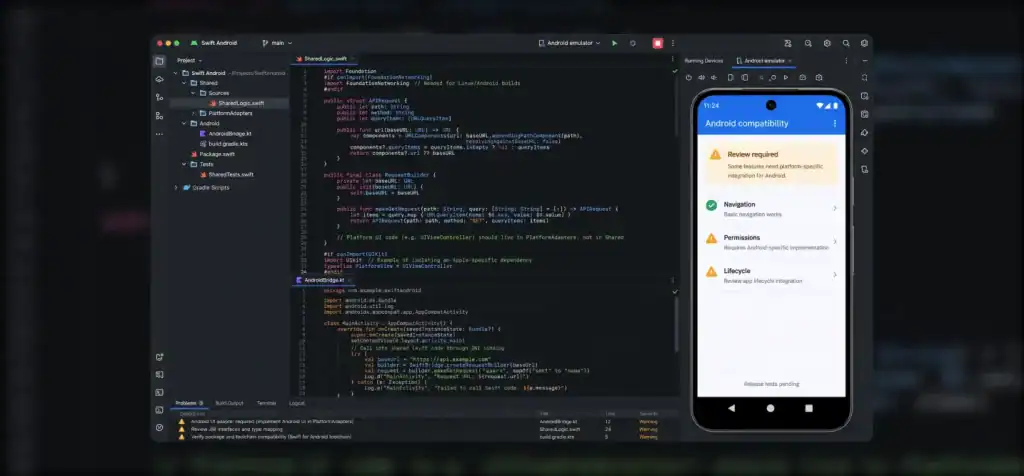
Swift for Android expands the options available to mobile teams, but it introduces trade-offs that should be considered before committing to a shared-code architecture.
1. Existing iOS Code May Need Changes
An iOS codebase can contain dependencies on Apple frameworks, APIs, or build assumptions that do not carry over to Android. Developers must identify these dependencies and replace or isolate unsupported functionality.
The more tightly business logic is coupled to the iOS environment, the more work may be needed before it can be reused.
2. Android Still Needs Platform-Specific Development
Android apps must follow Android’s conventions for UI, navigation, permissions, lifecycle management, and system integration. Sharing Swift logic does not remove these requirements.
Teams still need Android expertise to build, test, and maintain a production-ready app. If the project needs extensive platform-specific functionality, the shared Swift layer may cover only part of the codebase.
3. Interoperability Adds Complexity
Connecting Swift with Java or Kotlin introduces another boundary to manage. Developers need to consider data types, error handling, asynchronous operations, memory behavior, and the overhead of calls between languages.
Tooling can reduce this burden, but it does not eliminate the need for a clear interface and appropriate tests.
4. Dependencies and Toolchain Versions Need Attention
Not every Swift package supports Android, and compatibility can depend on the package’s dependencies and platform assumptions. Teams must verify package support and maintain compatible versions of the Swift toolchain, SDK, and build plugins. These issues are part of the wider cross-platform development challenges that teams should evaluate when planning a multi-platform application.
5. Testing Remains Platform-Specific
Shared logic can reduce duplicated implementation, but the final apps still run in different environments. Developers must test platform integrations, UI behavior, performance, and release builds separately. The right testing strategy validates both the shared code and how each platform consumes it.
When Should You Use Swift for Android?
Swift for Android is worth evaluating when you already have Swift code that contains meaningful, reusable application logic and want to use that logic in an Android app.
It may be a good fit when:
- Your iOS app has business rules or data-processing logic that can be separated from Apple-specific APIs.
- You want to reduce duplicated implementations of complex rules across two apps.
- Your team has Swift expertise and is prepared to maintain the Android integration.
- Your dependencies can be compiled for Android or replaced with compatible alternatives.
- You can support platform-specific UI, testing, and release workflows.
It may be less suitable when the existing codebase is heavily dependent on Apple frameworks, the app requires extensive native Android functionality, or the cost of maintaining a shared Swift layer outweighs the benefits.
Swift for Android should be assessed as an architectural choice, not simply a way to avoid learning Kotlin. Depending on the project, a native approach or another cross-platform framework may offer a more straightforward path. Teams considering broader cross-platform app development should compare the available options based on the code they can realistically reuse, the experience required, and long-term maintenance needs.
Conclusion
Swift for Android gives development teams another way to reuse code across iOS and Android. With the official Swift SDK or tools such as SCADE, suitable Swift logic can be compiled for Android and connected to an application written in Kotlin or Java.
The benefits depend on the codebase. Business rules and data processing may be good candidates for sharing, while user interfaces and platform-specific integrations usually need separate work. Teams should assess dependencies, tooling, interoperability, testing, and maintenance before choosing an approach.
If you’re planning a mobile product for both platforms, start by identifying what can genuinely be shared and what should remain native. A well-structured architecture can help reduce duplicated logic without compromising the experience users expect on either platform. Explore Cubix’s iOS app development services to discuss the requirements and architecture of your mobile project.
Reduce Development Duplication With a Smarter Strategy
Contact Us
Frequently Asked Questions
1. Can you build an Android app using Swift?
Yes. Developers can compile Swift code for Android and integrate it into an Android application. The app may use Swift for reusable logic while relying on Kotlin or Java for Android-specific functionality and UI. The amount of Swift code that can be reused depends on its dependencies and architecture.
2. Does Swift officially support Android?
The Swift project provides an official Swift SDK for Android that enables developers to cross-compile Swift code for Android targets. Developers still need to configure the toolchain, Android NDK, packaging, and integration with the application.
3. Can you share the same Swift code between iOS and Android?
Yes, if the code and its dependencies are compatible with both platforms. Business rules, calculations, and suitable data-processing components are common candidates. Code that depends on Apple-specific APIs or UI frameworks may require separate implementations.
4. Is SCADE required to use Swift on Android?
No. The official Swift SDK for Android offers a separate way to compile Swift code for the platform. SCADE provides its own tooling and interoperability workflow, which may simplify sharing Swift application logic in projects where its features fit the requirements.
5. Can Swift replace Kotlin for Android development?
Not in every part of an Android project. Swift can provide shared application logic, but Kotlin and Java remain widely used for Android APIs, platform integration, and native app development. Whether Swift can cover more of the application depends on the project’s requirements and the tools it adopts.
6. Does Swift for Android mean an iOS app will run on Android without changes?
No. Swift code can be compiled for Android, but an iOS app is more than its programming language. Its UI, framework dependencies, platform integrations, and build configuration may need separate Android implementations.