An app can work exactly as intended and still fail to keep users. The problem is often not the technology, but how difficult the product feels to use.
That is what UI/UX design addresses. UI shapes what users see and interact with, while UX shapes how they move through the product and accomplish their goals. Together, they influence whether an app feels clear, trustworthy, and easy to use.
The business case for getting this right is strong. McKinsey’s research across more than 300 publicly listed companies found that organizations with stronger design practices achieved 32 percentage points higher revenue growth and 56 percentage points higher total shareholder return growth than industry peers over a five-year period. The research describes this as a correlation, not proof that design alone caused the financial results.
So, what is UI/UX design, how are UI and UX different, and how can they affect an app’s success? Let’s start with:
Key Takeaways
- UI shapes what users see and interact with; UX shapes how they use an app.
- Good UI/UX reduces friction and makes key tasks easier to complete.
- User-centered design helps validate decisions before development.
- Accessibility, clarity, consistency, and performance are essential to good app design.
- Effective UI/UX can improve engagement, conversions, and retention.
- Design should be measured, tested, and improved after launch.
What Is UI/UX Design?
UI/UX design combines User Interface (UI) and User Experience (UX) design to create an application that is both usable and understandable.
UI focuses on the interface users directly see and interact with. UX considers the broader journey, including how users navigate the product, complete tasks, understand information, and recover from problems.
The two disciplines overlap, but they solve different problems.
What Is User Interface (UI) Design?
UI design deals with the visual and interactive elements of an application, including:
- Layout and visual hierarchy
- Typography
- Colors and contrast
- Buttons and controls
- Icons and imagery
- Forms and input fields
- Navigation components
- Loading, error, and success states
Good UI makes important information easy to recognize and actions easy to understand. It also creates consistency so similar elements behave and appear predictably throughout the app.
Want to discuss your project? Our experts are just a click away.
Contact UsWhat Is User Experience (UX) Design?
UX design focuses on how effectively users interact with the product as a whole.
It considers:
- Information architecture
- Navigation
- User flows
- Task completion
- Interaction logic
- Feedback
- Error recovery
- Accessibility
- Usability
For example, a banking app may include a money-transfer feature. UI determines how the transfer screen is presented, while UX determines how easily users can find the feature, select an account, enter the amount, review the transaction, confirm it, and understand what happens afterward.
UI shapes the interface. UX shapes the experience of using it.
UI vs UX Design: What’s the Difference?
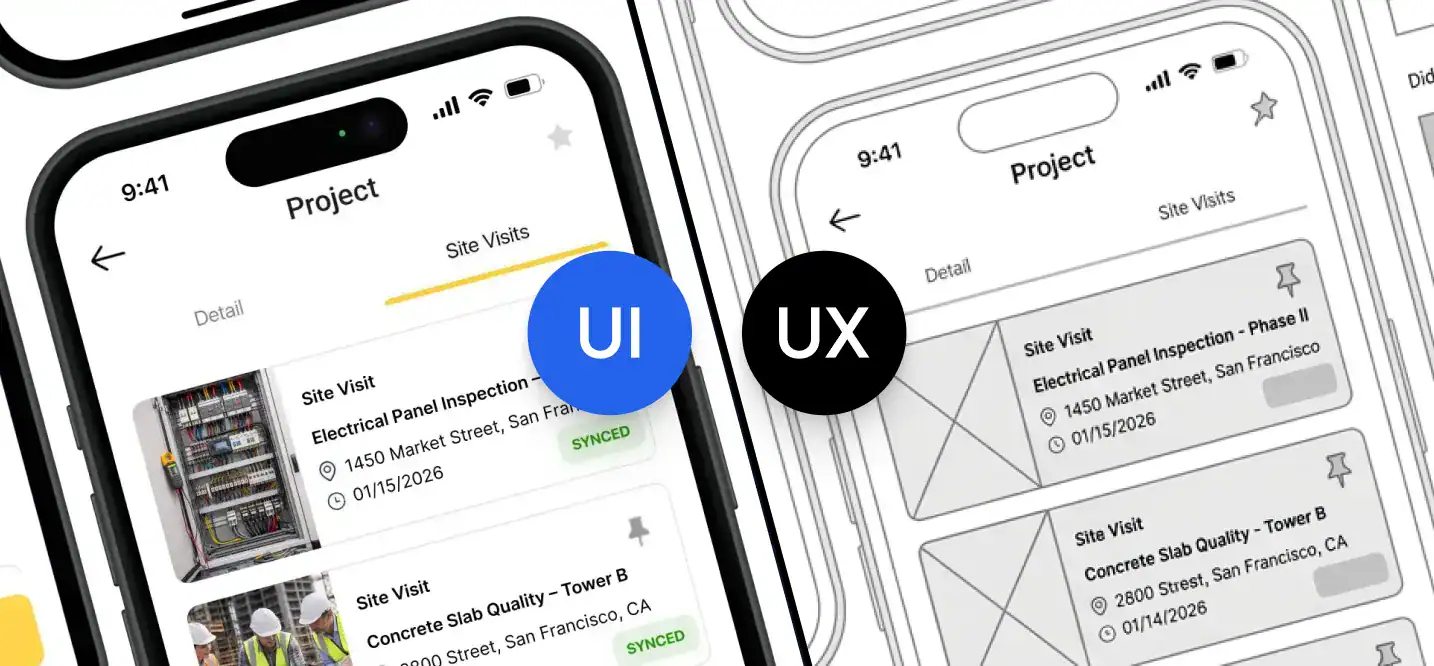
The easiest way to understand UI vs UX design is to look at what each discipline is responsible for.
| UI Design | UX Design |
| Focuses on the interface | Focuses on the overall experience |
| Deals with visual hierarchy | Deals with user flows and task completion |
| Includes typography, colors, icons, and components | Includes research, information architecture, navigation, and testing |
| Determines how information and actions are presented | Determines how users move through the product |
| Focuses on visual clarity and consistency | Focuses on usability and efficiency |
Consider an ecommerce checkout.
A checkout screen can look polished but still provide a poor experience if users have to complete unnecessary steps, cannot easily edit their order, or receive vague payment errors.
Conversely, a well-structured checkout can still frustrate users if important actions are difficult to see or the interface is visually inconsistent.
UI and UX therefore work best as one product discipline rather than two separate stages.
How UI and UX Work Together in an App?
UI and UX connect through the user’s journey.
A typical interaction looks like:
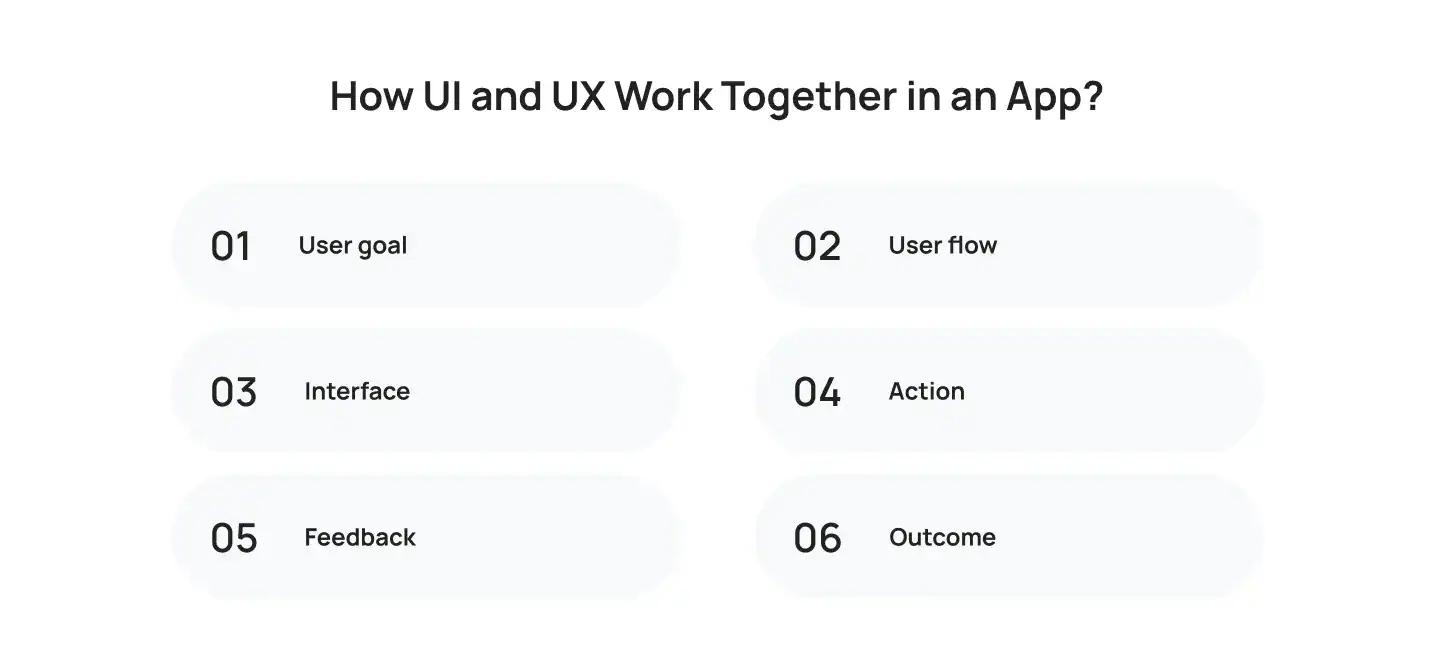
Suppose a food delivery app wants returning customers to reorder meals quickly.
UX might identify reordering as an important returning-user task and structure the flow around previous orders. UI then makes that action visible and understandable through appropriate placement, hierarchy, controls, and feedback.
The same relationship applies to:
- App onboarding
- Search and discovery
- Booking
- Payments
- Checkout
- Account management
- Forms
- Notifications
- Core feature activation
This is why mobile app design should start with user goals and product requirements rather than visual styling alone.
Why Is UI/UX Important for Apps?
The importance of UI/UX for apps comes down to one practical question: can users accomplish what they came to do without unnecessary effort? Here are the reasons:
1. UI/UX Reduces Friction
Every unnecessary step creates another opportunity for users to stop.
Common sources of friction include:
- Complicated navigation
- Excessive form fields
- Unclear labels
- Hidden actions
- Repeated data entry
- Poor error messages
- Unexpected interactions
Reducing friction does not always mean removing steps. A financial app, for example, may need identity verification or transaction confirmation. Good UX makes those necessary steps understandable rather than simply eliminating them.
2. UI/UX Helps Users Understand the Product
Users should be able to recognize where they are, what they can do, and what happens next.
Clear hierarchy, familiar patterns, focused onboarding, and useful feedback reduce the amount of effort required to understand an unfamiliar interface.
3. UI/UX Builds Trust
Trust matters even more when an app handles money, healthcare information, personal data, or business operations.
Clear transaction states, understandable permissions, predictable interactions, and useful error messages help users feel confident about what the application is doing.
4. UI/UX Makes Complex Features Usable
Apps increasingly include features such as AI recommendations, analytics dashboards, personalization, and multi-step workflows.
The underlying technology can be complex without making the user experience complex. UX helps organize that functionality into interactions that users can understand and operate.
How Does The UI/UX Design Impact App Success?
The impact of UI/UX design on app success becomes visible when design decisions are connected to user behavior and product metrics.
| UI/UX Improvement | Potential Impact |
| Simpler onboarding | Higher activation |
| Clearer navigation | Better feature discovery |
| Fewer unnecessary steps | Higher task completion |
| Better forms and validation | Lower abandonment |
| Clear feedback | Greater confidence |
| Accessible interactions | Wider usability |
| Better information architecture | Easier navigation |
1. Adoption
Users need to understand an app’s value before they can experience it. If onboarding or the first important workflow is confusing, some users may leave before reaching the product’s core functionality.
2. Engagement
Clear navigation and discoverable features make it easier for users to find functionality that matters to them.
Good engagement is not simply more time spent in the app. It is a meaningful interaction with the product.
3. Conversion Rate
Conversion depends on the type of application. It could mean:
- Completing a purchase
- Creating an account
- Starting a subscription
- Booking an appointment
- Requesting a quote
- Activating a feature
UI/UX influences the path between user intent and that action. Unclear calls to action, complicated forms, or unnecessary steps can interrupt that path.
4. Retention
Repeated friction becomes more costly over time.
If users continually struggle to navigate an app, complete tasks, or recover from errors, the product becomes harder to justify using.
UX therefore plays a role in whether the product remains useful and convenient after the initial download.
What Is User-Centered Design?
User-centered design means making product decisions based on evidence about real users rather than assumptions.
It does not mean allowing users to dictate every design decision. Instead, teams study user goals, behaviors, constraints, and pain points and use those findings to shape the product.
A practical loop is:
Research → Define → Design → Test → Improve
1. Start With the User’s Goal
Before designing a screen, identify what the user is actually trying to accomplish.
Ask:
- What is the user’s primary goal?
- What information do they need?
- What are they doing today?
- Where does the current process create friction?
- What constraints affect the task?
2. Map the Important Flow
Think about the complete journey instead of individual screens.
For example:
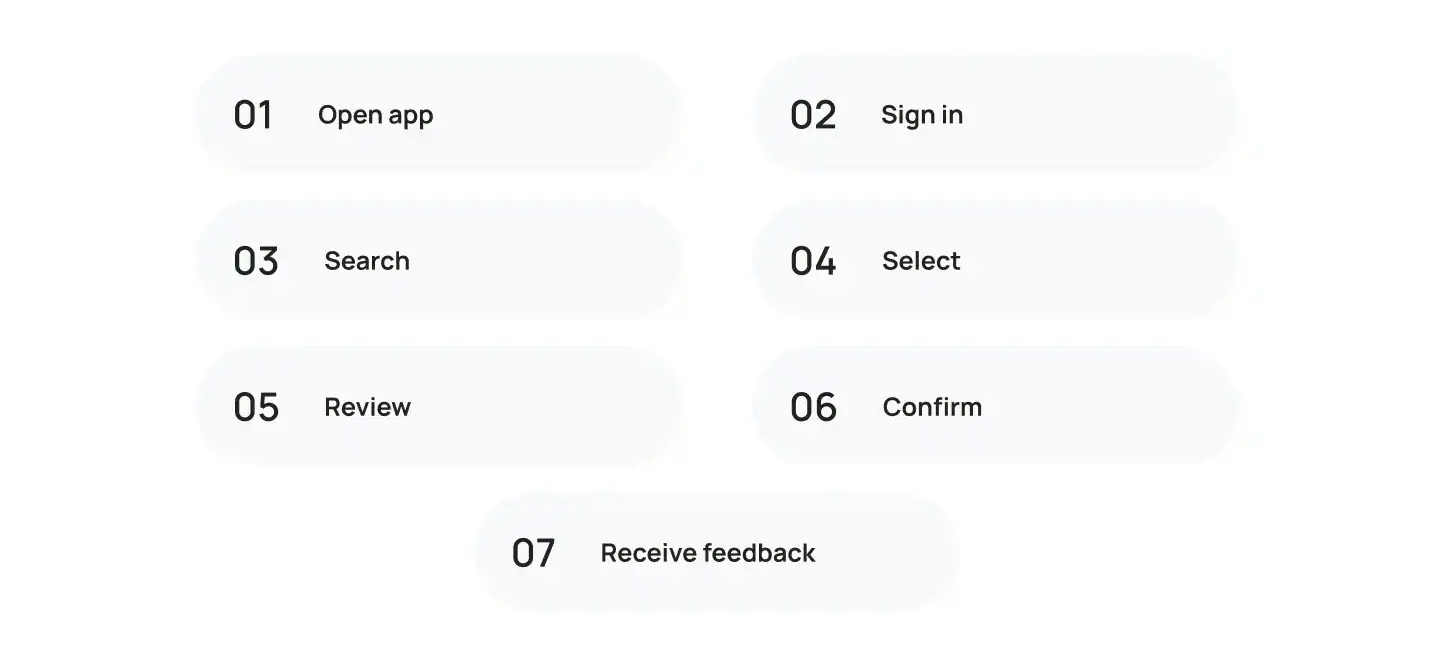
Each transition can introduce friction, so the experience needs to be considered as a connected flow.
3. Validate Before Building
Prototypes and usability tests allow teams to identify problems before they become expensive development changes. GOV.UK Service Manual recommends usability testing to observe users completing specific tasks, helping teams identify usability issues and improve the experience before launch.
4. Keep Learning After Launch
User-centered design does not stop at launch. Product analytics, reviews, support tickets, interviews, and usability testing can reveal where the experience needs improvement.
For a deeper look at how user behavior influences interface decisions, see Cubix’s guide to designing a mobile app with user psychology.
Where Do Wireframing and Prototyping Fit?
Wireframing and prototyping help teams test the structure and interaction of an app before the production-level mobile app development process begins.
1. Wireframing
Wireframes establish the basic structure of a screen and help answer:
- What information belongs here?
- What is the primary action?
- How should content be grouped?
- Where should users go next?
The focus is structure rather than visual polish.
2. Prototyping
A prototype adds enough interaction to simulate important parts of the product.
Teams can use it to evaluate:
- Navigation
- User flows
- Forms
- Interactions
- Content hierarchy
- Critical tasks
A confusing flow is considerably easier to change in a prototype than after several production components have already been developed.
What Makes Good UI/UX Design?
Good UI/UX is not tied to a particular visual style. A healthcare app and a gaming app can look completely different while following the same principles.
1. Clarity
Users should quickly understand:
- Where they are
- What they can do
- Which action matters most
- What happens after they act
2. Consistency
Similar components and actions should behave consistently.
This includes:
- Buttons
- Navigation
- Terminology
- Forms
- Feedback
- Interaction patterns
3. Accessibility
Accessibility should be considered during design rather than added as a final check.
Important considerations include:
- Readable text
- Adequate contrast
- Sufficient touch targets
- Clear focus states
- Screen-reader compatibility
- Alternatives to color-only communication
Apple’s Human Interface Guidelines recommend sufficiently sized controls and identify 44 × 44 points as the default control size for iOS and iPadOS.
4. Feedback and Error Recovery
Users need to know what happened after an action.
That includes:
- Loading states
- Validation
- Success messages
- Error states
- Progress indicators
- Recovery options
“Something went wrong” rarely provides enough information. A useful error explains the problem and, where possible, tells the user how to resolve it.
5. Performance
Performance is part of the experience.
A visually polished interface can still feel poor when screens load slowly, taps appear unresponsive, or network failures leave users unsure whether an action worked.
That makes UX partly an engineering concern, not only a design concern. So it is important to choose the right mobile app development agency or partner for your product’s UI/UX design.
How Does UI/UX Support Business Growth?
The connection between UI/UX and business growth becomes clearer when design is tied to product outcomes.
A better experience can help businesses:
- Increase feature adoption
- Reduce abandonment
- Improve completed transactions
- Support customer retention
- Improve satisfaction
- Differentiate the product
The important point is that UI/UX is not a guaranteed revenue multiplier.
Instead, it removes barriers between user intent and the actions that matter to the business.
For example, if customers want to purchase a product but repeatedly abandon the checkout because shipping information appears too late, improving that flow can address a measurable business problem.
The same principle applies to SaaS activation, healthcare bookings, fintech onboarding, marketplace transactions, and other app journeys.
How Do You Measure UI/UX Success?
The right UI/UX metrics depend on the product and its goals.
| Metric | What It Helps Identify |
| Activation rate | Whether users reach initial value |
| Task completion rate | Whether important workflows are usable |
| Conversion rate | Whether users complete target actions |
| Drop-off rate | Where users leave a journey |
| Retention | Whether the product continues to provide value |
| Support requests | Where users encounter recurring problems |
| Usability testing | Where users struggle with specific tasks |
1. Combine Analytics With User Research
Analytics can show where users are struggling.
Suppose 40% of users leave during a particular checkout step. That tells you where to investigate, but not necessarily why the problem exists.
Usability testing, interviews, surveys, and support data can provide that context.
The strongest approach combines behavioral evidence with direct observation.
2. Measure Complete Journeys
A single screen rarely tells the whole story.
Measure important workflows such as:
- Registration
- Onboarding
- Search
- Checkout
- Booking
- Subscription
- Core feature activation
If users open a registration page but rarely complete registration, changing the screen’s appearance may not solve the problem. The issue could be the number of fields, authentication requirements, validation, or another step in the flow.
UI/UX Design Best Practices for Modern Apps
The best UI/UX design practices are less about chasing visual trends and more about making products easier to use and improve.
- Design Around User Tasks: Start with what users need to accomplish rather than individual screens.
- Make Primary Actions Clear: Important actions should be easy to identify.
- Keep Interactions Consistent: Similar actions should behave in similar ways.
- Design Every State: Account for loading, empty, error, success, offline, and disabled states.
- Build for Accessibility: Consider accessibility during planning, design, development, and testing.
- Test Critical Flows: Validate important journeys with representative users.
- Use Data to Prioritize Changes: Fix problems based on severity, frequency, and business impact.
- Treat Performance as UX: Responsiveness and loading behavior directly affect the experience.
For a separate look at emerging interface patterns, see Cubix’s article covering How Does UI/UX Impact App Success? The distinction matters: trends can inform visual decisions, but they should not replace usability.
Common UI/UX Mistakes That Create Friction
Many app problems are not caused by a lack of features. They come from making existing features harder to use than necessary.
| Mistake | User Impact |
| Too many competing actions | Users struggle to decide what to do |
| Unclear navigation | Features become difficult to find |
| Long onboarding | Users reach the core experience later |
| Inconsistent components | Users have to relearn interactions |
| Poor error messages | Users do not know how to recover |
| Ignoring accessibility | Some users face unnecessary barriers |
| Skipping user testing | Problems survive into development |
| Ignoring post-launch data | Known friction remains unresolved |
One of the most expensive mistakes is assuming the internal team understands the product the same way users do.
Employees already know the terminology, workflows, and intended behavior. New users do not.
Testing exposes that gap before assumptions become product problems.
A Practical UI/UX Framework for App Teams
For a new app or an existing product that needs improvement, five questions can keep UI/UX decisions focused:
1. What Is the User Trying to Accomplish?
Define the specific task and desired outcome.
2. Where Could the User Get Stuck?
Identify friction points across the complete journey.
3. What Does the Interface Need to Communicate?
Prioritize information, actions, states, and relationships.
4. How Will We Validate the Experience?
Use the appropriate combination of:
- Prototypes
- Usability testing
- Interviews
- Surveys
- Product analytics
- A/B testing
5. How Will We Know It Improved?
Set a measurable success criterion before making the change.
If the problem is abandoned registration, for example, the success metric could be completed registrations rather than whether stakeholders think the redesigned screen looks better.
UI/UX Is More Than How an App Looks
UI/UX is ultimately about reducing the gap between what users want to accomplish and how easily the product lets them do it.
UI gives users a clear interface. UX organizes the journey around their goals. Together, they influence adoption, task completion, conversion, retention, accessibility, and how people perceive the product.
That is why UI/UX should be considered before development rather than treated as visual polish added at the end.
If you’re building a new application or improving an existing one, Cubix’s mobile app design services can help turn user requirements into a structured, testable, and scalable product experience.
Want to discuss your project? Our experts are just a click away.
Contact UsFrequently Asked Questions
UI design focuses on an application’s interface, including visual hierarchy, components, typography, controls, and interaction states. UX design focuses on the broader experience, including navigation, information architecture, workflows, usability, accessibility, and task completion.
UI/UX helps users understand an app, navigate its features, complete important tasks, and recover from errors. Good design reduces unnecessary friction and makes the product easier to learn and use.
Good design can reduce friction in workflows that contribute to business outcomes, such as purchases, subscriptions, bookings, and registrations. Research has also found a correlation between stronger design practices and better financial performance, although design alone does not determine revenue.
Important elements include usability, clarity, consistency, accessibility, efficient navigation, predictable interactions, useful feedback, and effective error recovery. These should be based on actual user needs rather than assumptions.
Current app design is increasingly influenced by personalization, adaptive interfaces, accessibility, meaningful motion, and more natural forms of interaction. However, trends should support the product’s usability and goals rather than dictate its design.
Methods include interviews, surveys, usability testing, behavioral analytics, contextual research, support-ticket analysis, and observation. The right method depends on the product question and stage of development.
The timeline depends on product complexity, number of workflows, research requirements, prototype fidelity, user groups, and testing rounds. A focused MVP generally requires less design work than a large application with multiple roles and complex workflows.