Key Takeaways
- App Store Optimization (ASO) is an ongoing process of refining your keywords, metadata, and visual assets to improve app visibility, attract users, and turn searches into downloads after launch.
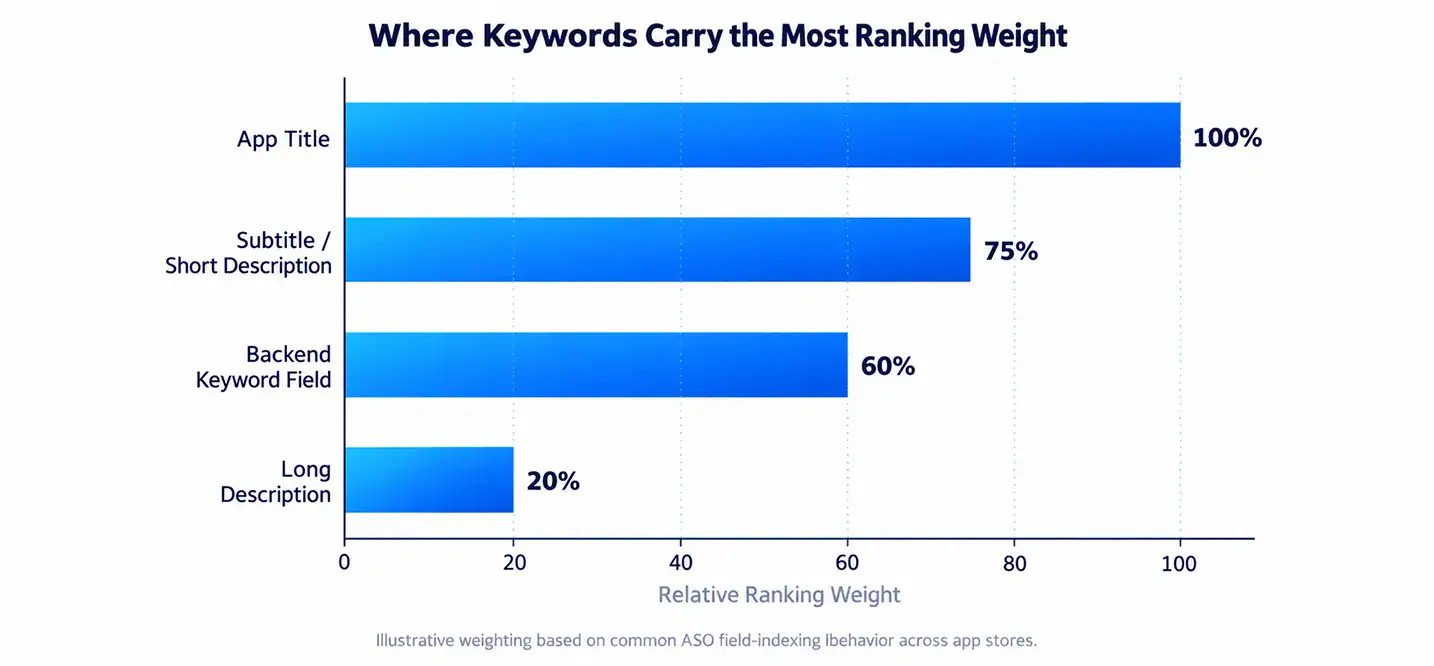
- Keyword placement in your title and subtitle carries the most ranking weight.
- Visuals like screenshots and preview videos directly affect your conversion rate.
- Localization can unlock new markets and expand your keyword reach.
- Reviews and ratings shape both your rankings and user trust.
- Tracking performance regularly helps you catch drops before they hurt downloads.
Roughly 65% of all app downloads start with a search. Not an ad. Not a feature banner. A person typed something into a search bar and your app either showed up or it didn’t.
That’s the part most teams get wrong. They pour weeks into building the app, ship it, and then just wait. Downloads don’t show up on their own. Somewhere between a billion Android apps and a couple million iOS apps, your listing has to earn its spot. That takes real, ongoing work on your keywords, your screenshots, your description, and your reviews.
This guide walks through exactly how to do that. We’ll cover keyword research, conversion-focused design, localization, testing, and how to track whether any of it is actually working. No fluff, just the stuff that moves the needle.
What Is App Store Optimization (ASO)?
App Store Optimization is the process of improving your app’s visibility inside the App Store and Google Play, so more people find it and more of those people actually hit “download.” Think of it as SEO, but for app stores instead of Google search.
It covers two jobs at once. First, ranking: getting your app to show up when someone searches a relevant term. Second, conversion: making sure that once someone lands on your page, they’re convinced enough to install it.
Why ASO Matters More After Launch
Pre-launch, you’re guessing at keywords. Post-launch, you have real data. Real search terms. Real conversion numbers. Real reviews coming in.
This is when ASO actually gets good. You can see which keywords are pulling impressions but not downloads. You can spot which screenshot is losing people. Ignoring ASO after launch is like opening a store and never updating the window display again.
Search still drives the majority of installs. On iOS specifically, App Store search accounts for about 65% of downloads on average, though that number shifts depending on whether you’re looking at games or utility apps. Miss that channel, and you’re leaving most of your organic growth on the table.
For a broader look at growth tactics beyond ASO, check out our guide on app marketing strategies.
ASO for iOS vs. Android: What’s Different
Apple’s App Store and Google Play don’t play by the same rules. Apple relies on a dedicated 100-character backend keyword field that users never see. Google Play, on the other hand, actually crawls and indexes the visible text in your full description, so wording there matters a lot more.
| Feature | Apple App Store | Google Play Store |
| Title character limit | 30 characters | 30 characters |
| Subtitle / short description | 30-character subtitle | 80-character short description |
| Dedicated keyword field | Yes, 100 characters (hidden) | No dedicated field |
| Long description indexing | Not indexed for search | Fully indexed (up to 4,000 characters) |
| Ranking update frequency | Every few days | Near real-time |
| Backend platform | App Store Connect | Google Play Console |
Because Google Play actually reads your long description, keyword stuffing there can hurt more than help if it reads unnaturally. Apple, by contrast, gives you a private field to load up on terms without touching your public copy.
One stat worth remembering: Apple has said search alone accounts for around 65% of App Store downloads, while Google Play users lean slightly more on browsing and recommendations. That gap alone should change how you split your effort between the two stores.
Keyword Research That Actually Works
Good keywords aren’t the ones with the biggest search volume. They’re the ones you can actually rank for.
Finding the Right Keywords
Start by listing every term a real user might type to find an app like yours. Not just feature words. Think about the problem they’re solving. “Budget tracker” is obvious. “Stop overspending apps” might convert better with far less competition.
Then run each term through a difficulty check. You want the sweet spot: decent search volume, but low-to-medium competition. A term with 10,000 searches a month and 200 competing apps is a much harder climb than one with 2,000 searches and 20 competitors.
Keep an eye on what your competitors rank for too. If three top apps in your category all rank for a term you’re missing, that’s a gap worth closing.
Where to Place Your Keywords
Not every field carries the same weight. Your title matters more than your description. Your subtitle matters more than your backend keywords. Where you put a term changes how much it counts.
| Field | Character Limit (iOS) | Approx. Ranking Weight |
| App Title | 30 | Highest |
| Subtitle | 30 | High |
| Backend Keyword Field | 100 | Medium-high |
| Long Description | 4,000 | Low (not indexed on iOS) |
Put your one or two most important terms in the title itself. It’s short, but it’s the single highest-weighted field on both stores. Save secondary and long-tail terms for the subtitle and backend field.
One thing a lot of teams skip: alternative localizations can expand your keyword index without changing your primary listing. Adding a Spanish (Mexico) localization to a US-targeted app, for example, can index you for additional English and Spanish terms in the same market. It’s a low-effort way to widen your net.
If keyword research feels overwhelming on your own, it’s worth working with a team that’s done it before. Cubix has run ASO cycles across dozens of app categories, and pattern recognition from that volume of testing is hard to replicate solo.
For more on turning that visibility into actual growth, see our post on app store keyword research and app marketing strategies.
Optimize Your Metadata for Conversion (CRO)
Ranking gets someone to your page. Conversion gets them to actually tap install. These are two different problems, and a lot of teams only solve the first one.
Title, Subtitle & Description
Your title and subtitle need to do double duty: rank for search terms and tell a human what the app actually does, fast. Nobody reads a full description before deciding. Most people glance, scroll screenshots, and decide within seconds.
Keep your first line of description punchy. Lead with the core benefit, not a list of every feature you’ve ever shipped.
Icon, Screenshots & Preview Video
Users spend somewhere around 3 to 5 seconds evaluating your listing before they decide. That’s not much time to make a case. Your icon and first two screenshots are doing almost all the persuading.
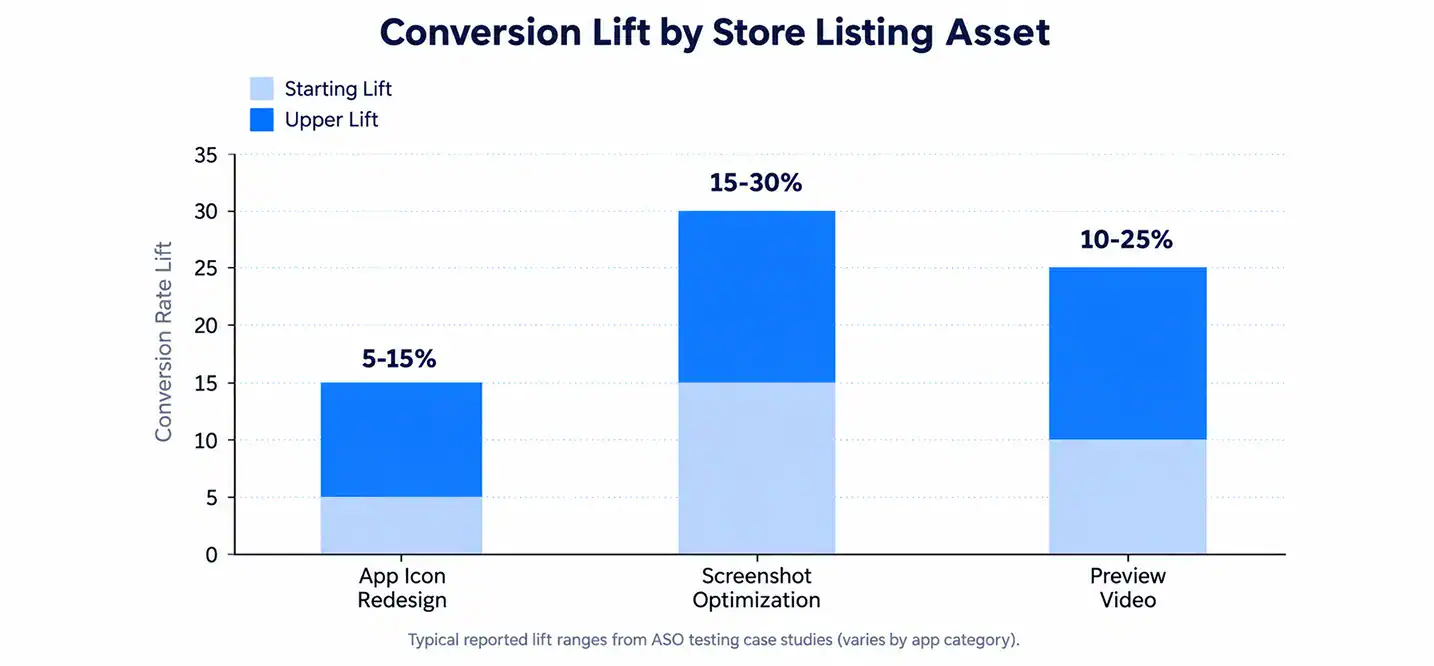
Screenshots that clearly show a benefit, not just a screen grab of the UI, consistently outperform generic feature shots. Apps that rework their screenshots with a clear benefit-first design have reported conversion increases of up to 30%.
A preview video isn’t required, but it earns its spot if your app has a strong visual hook, something that’s genuinely more interesting in motion than in a static frame. If your app is mostly text or forms, skip it and put that effort into screenshots instead.
Cubix’s design and ASO teams typically treat the first screenshot as the single most important pixel on the page. Get that one right before touching anything else.
Test your changes regularly, don’t just set your screenshots once and forget them. If downloads start slipping relative to impressions, that’s usually your first clue something on the page has gone stale. To dig deeper into turning traffic into installs, check out how to boost mobile app downloads.
Want to discuss your project? Our experts are just a click away.
Contact UsLocalization: Expand Your Reach
A localized listing isn’t just a translated one. It’s rewritten for how people in that market actually search and talk about the problem your app solves.
Google Play alone is available in over 40 languages across more than 190 countries, and Apple’s App Store isn’t far behind. If your listing only exists in English, you’re invisible to a huge slice of that audience by default.
| Market | Typical Download Lift After Localization |
| Portuguese (Brazil) | +45% |
| Japanese | +52% |
| Spanish (Mexico) | +38% |
| German | +29% |
| French | +24% |
The lift varies a lot by category and region, but the direction is almost always positive. Even a basic localization pass, title, subtitle, screenshots with translated text overlays, tends to outperform a fully English listing in non-English markets.
Start with your top three markets by current download volume, even without localization. Those are your existing demand signals. Localize there first before spreading thin across a dozen languages at once.
If you’re weighing whether it’s worth building out full local versions of your app versus just the store listing, our team that works on hire iOS app developers projects can walk you through what localization actually takes on the development side too.
A/B Testing Your Store Listing
Guessing what works is expensive. Testing it is cheap, relatively speaking. Both Apple (Product Page Optimization) and Google Play (Store Listing Experiments) let you run live tests against a portion of your traffic.
What to Test First
Start with your first screenshot. It carries the most weight of any single visual element, and small changes there tend to move numbers the most. After that, test your icon, then your title or subtitle wording.
Don’t test five things at once. Change one variable, measure it, then move to the next. Stacking changes makes it impossible to know what actually worked.
How Long to Run a Test
Most tests need at least a week or two of consistent traffic to produce a reliable read, longer if your app doesn’t get much daily traffic yet. Cutting a test short because early numbers look good (or bad) is one of the most common ASO mistakes.
Screenshot tests specifically tend to show meaningful lift ranges, often somewhere between 8% and 15% just from reordering or re-messaging the first image in the carousel. That’s a real number worth chasing before you touch anything else.
Once you’re testing regularly, it becomes a habit rather than a project. That habit is a big part of what separates apps that plateau from apps that keep climbing. See our full breakdown on how to market an app successfully for more on building that testing rhythm.
Build a Review & Ratings Strategy
Ratings aren’t just a trust signal for users. Both stores factor them into ranking too.
Timing Your Review Requests
Ask right after a positive moment, not the second someone opens the app for the first time. Someone who just completed a task, hit a milestone, or used a feature successfully is far more likely to leave a good review than someone who just installed and hasn’t done anything yet.
Spread these prompts out. If everyone gets asked on day one, your review pattern looks artificial to the store’s algorithms. A staggered approach over the first week or two reads as organic.
Responding to Reviews the Right Way
Reply to reviews, the good ones and the bad ones, especially in the first couple of weeks after launch. It signals to both users and the store that someone’s actually paying attention.
The math on ratings is stark. Jumping from a two-star average to a three-star average has been linked to conversion increases as high as 306%, and going from three to four stars can add another 89% or more on top of that. A single star, in other words, is not a small thing.
| Rating Change | Reported Conversion Lift |
| 2 stars → 3 stars | Up to 306% |
| 3 stars → 4 stars | Up to 89% |
| Below 3 stars | ~80% of users say they don’t trust the app |
Don’t let negative reviews sit unanswered. A calm, helpful public reply can undo a lot of the damage a one-star review does on its own.
Track & Measure Your ASO Performance
If you’re not tracking it, you’re just hoping. Set up rank tracking for your core keywords from day one and check it weekly, not monthly.
| Metric | What It Tells You |
| Keyword rank | Where you show up for target search terms |
| Impression-to-view rate | Whether your icon and title earn a tap |
| View-to-download rate (CVR) | Whether your page convinces people to install |
| Retention (Day 1, Day 7, Day 30) | Whether the app delivers on its listing’s promise |
| Rating trend | Whether recent updates are helping or hurting sentiment |
A good app store conversion rate typically lands somewhere around 25 to 27% depending on category, though this varies a lot between games, utilities, and subscription apps.
Rank movement isn’t instant. Most teams start seeing meaningful shifts after four to six weeks of consistent updates, not four to six days. Patience matters here as much as the tactics themselves.
For a deeper look at what a healthy post-launch cycle actually looks like, our guide on app store rank tracking and the mobile app development process covers how ASO fits into the bigger picture.
Common ASO Mistakes to Avoid Post-Launch
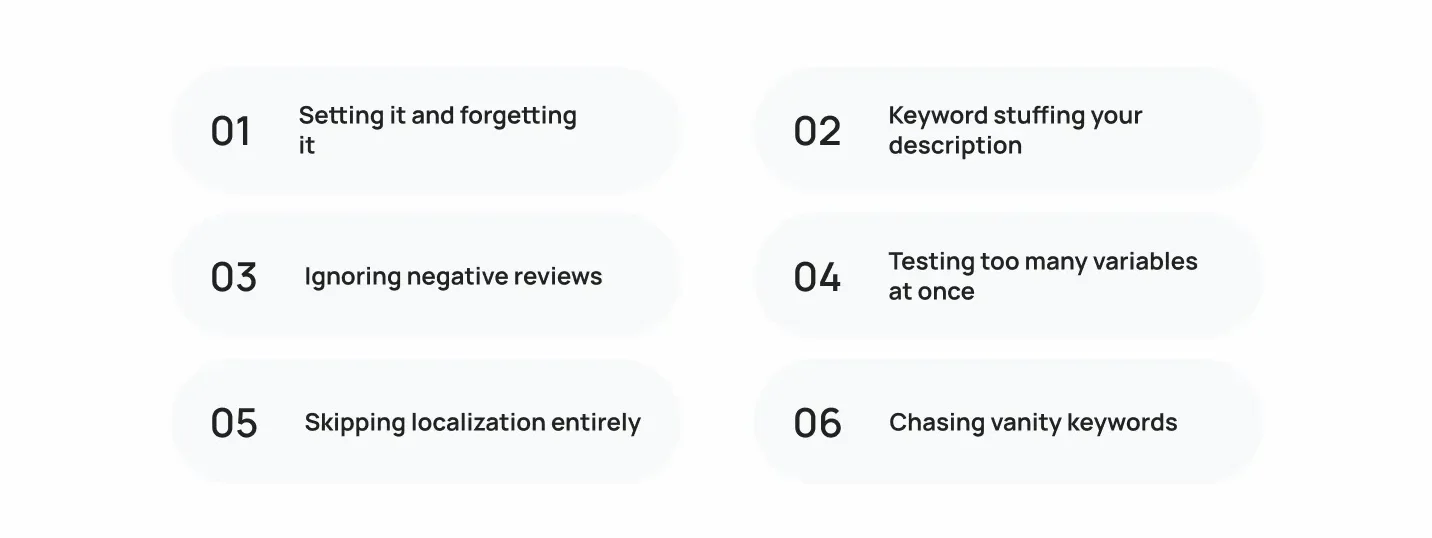
Even solid teams trip over the same handful of mistakes. Here’s what to watch for:
- Setting it and forgetting it. ASO is never “done.” Keywords shift, competitors update, algorithms change.
- Keyword stuffing your description. On Google Play especially, this reads as spam and can actually hurt your ranking.
- Ignoring negative reviews. Silence looks like indifference, both to users and to the store’s algorithm.
- Testing too many variables at once. You won’t know what actually caused the lift.
- Skipping localization entirely. You’re invisible in markets that could be a meaningful share of your downloads.
- Chasing vanity keywords. Ranking #1 for a term nobody searches doesn’t move downloads.
Nearly 90% of apps see almost no organic downloads after their first few weeks if none of this gets addressed. That statistic alone is reason enough to build ASO into your regular routine, not treat it as a launch-week checklist.
How Cubix Helps Apps Get Discovered

Building a great app and getting it found are two different skill sets, and most teams are stretched thin trying to do both well. That’s where Cubix comes in.
Cubix has worked across hundreds of app builds, spanning fintech, health, e-commerce, and enterprise tools, and has run ASO cycles alongside development on a huge range of them. That means keyword strategy isn’t guesswork. It’s informed by patterns seen across categories, markets, and store algorithm updates over time.
The approach is straightforward: research keywords with real competitive data, build metadata and visuals around conversion, localize where it matters, and keep testing after launch instead of walking away once the app ships. If you’re weighing what a build with ASO baked in from day one looks like, our page on iOS App Development breaks down how that process typically runs.
Ready to Grow Your Downloads? Partner with Cubix
Getting an app built is one milestone. Getting it discovered, downloaded, and kept, is the ongoing one. If your app has launched and downloads have stalled, that’s usually not a product problem. It’s an ASO one.
Cubix works with teams at every stage, whether you need a full ASO audit on an existing listing or want optimization built into a new app from the start. Pricing and scope depend on where you’re starting from, and our guide on mobile app pricing strategy is a good starting point if you’re mapping out budget.
Want a second opinion on why your downloads have plateaued? Reach out to Cubix and we’ll walk through what’s holding your listing back, and what a real ASO plan looks like for your app. You can also read more on how to market an app successfully for the bigger picture beyond just store optimization.
Want to discuss your project? Our experts are just a click away.
Contact UsFrequently Asked Questions
ASO is the ongoing process of improving your app’s visibility and conversion rate inside app stores. It matters most after launch because that’s when you have real search and download data to actually optimize against.
Review your keyword performance every few weeks, and make updates whenever you spot a term that’s underperforming or a new opportunity from competitor research. Apple limits how often backend keywords can change, so plan updates around app version releases.
Both stores factor ratings into ranking, and users rely heavily on star ratings to decide whether to download. Moving from a 3-star to 4-star average has been linked to conversion increases of up to 89%.
iOS uses a hidden 100-character keyword field and doesn’t index your long description for search. Android indexes your full visible description, so natural keyword placement there matters more.
Most apps start seeing meaningful keyword rank movement after four to six weeks of consistent, ongoing optimization. Conversion rate changes from visual tests can show up faster, often within one to two weeks of live testing.
Focus on your icon and first two screenshots first, since those carry the most weight in a user’s decision. Test one element at a time and give each test enough traffic to produce a reliable result.
Yes. Localized listings, including translated screenshots and descriptions, typically outperform English-only listings in non-English-speaking markets, sometimes by 25% or more.
Track keyword rank, impression-to-view rate, view-to-download conversion, and retention weekly using App Store Connect, Google Play Console, or a third-party rank tracking tool.
Paid ads (like Apple Search Ads) can accelerate visibility while your organic ASO builds momentum, but they work best as a complement to strong ASO, not a replacement for it.
The biggest ones are treating ASO as a one-time task, keyword stuffing your description, ignoring negative reviews, and testing too many changes at once instead of isolating variables.