An iOS app can look promising on paper but still fail if its requirements are unclear, its features are poorly tested, or its launch is rushed. A structured development process helps teams avoid these problems by turning an idea into a reliable application, one stage at a time.
The opportunity is significant. According to Apple’s 2025 App Store ecosystem report, the App Store ecosystem facilitated $1.3 trillion in developer billings and sales worldwide in 2024. Reaching users in this market requires more than building an app. Businesses need a clear product strategy, sound technical decisions, and a plan for maintaining the application after launch.
The iOS development lifecycle provides a framework for managing this work, from initial discovery to post-launch improvements. Here’s how its key stages fit together and what teams need to accomplish at each step.
What Is the iOS Development Lifecycle?
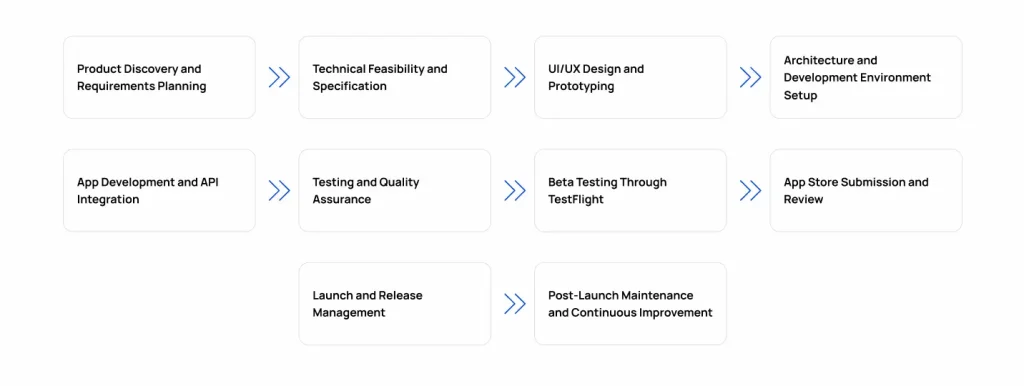
The iOS development lifecycle is the process of planning, designing, building, testing, releasing, and maintaining an application for Apple’s mobile operating system.
Unlike a simple coding workflow, it covers the decisions that shape the entire product, including user requirements, technical architecture, interface design, quality assurance, and App Store distribution.
The main iOS app development stages are:
- Product discovery and requirements planning
- Technical feasibility and specification
- UI/UX design and prototyping
- Architecture and development setup
- App development and API integration
- Testing and quality assurance
- Beta testing through TestFlight
- App Store submission and review
- Launch and release management
- Post-launch maintenance
These stages follow a general sequence, although teams may revisit earlier decisions as testing and user feedback reveal new requirements.
What Are the Key Stages of the iOS App Development Process?
Each phase should produce clear deliverables and resolve specific questions before the team moves forward. This makes progress easier to measure and reduces the risk of expensive changes late in development.
Stage 1: Product Discovery and Requirements Planning
Before development begins, the team needs to understand who the app serves, what problem it solves, and which features are essential to its success.
Product discovery establishes the scope and priorities that guide the rest of the project.
Key activities include:
- Researching the target audience and competing applications.
- Defining business objectives and measurable success criteria.
- Gathering functional and nonfunctional requirements.
- Prioritizing features and identifying the minimum viable product (MVP).
- Creating an initial product roadmap.
For example, a food delivery app may initially need restaurant listings, ordering, payment, and order tracking. Features such as personalized recommendations can be considered for later releases.
Deliverable: An agreed product scope, prioritized feature list, requirements, and initial roadmap.
Stage 2: Technical Feasibility and Specification
Once the requirements are clear, the team determines how to implement them. Technical planning helps identify integration challenges, platform constraints, security needs, and architectural decisions before they create delays.
Key activities include:
- Selecting appropriate technologies and frameworks.
- Defining the app architecture and data flow.
- Assessing backend services, APIs, and third-party integrations.
- Establishing supported iOS versions and device requirements.
- Identifying security, privacy, and performance requirements.
Swift is the primary choice for most new native iOS projects, while Objective-C may be appropriate for legacy applications or existing codebases. Teams should select technologies based on the product’s requirements rather than familiarity alone. This overview of programming languages for iOS app development provides further context.
The technical specification should also explain how the app will handle authentication, data storage, failed API requests, and interrupted network connections.
Deliverable: A technical specification covering the proposed architecture, integrations, technology choices, and major risks.
Stage 3: UI/UX Design and Prototyping
UI/UX design defines how users navigate the app and complete its core tasks. The objective is to make the experience intuitive, accessible, and consistent with the product’s purpose.
Key activities include:
- Mapping user journeys and navigation flows.
- Creating wireframes and visual designs.
- Building interactive prototypes.
- Testing usability and refining confusing interactions.
- Planning accessibility and error states.
Designers should follow Apple’s Human Interface Guidelines when making decisions about navigation, controls, typography, and accessibility.
The choice of interface framework also affects implementation. SwiftUI provides a declarative approach to interface development, while UIKit offers established tools and detailed control over views. The decision depends on the app’s requirements, deployment targets, and existing code. See this SwiftUI vs. UIKit comparison for more detail.
Designs should account for loading screens, empty results, validation errors, and denied permissions, not just the ideal user journey.
Deliverable: Approved user flows, wireframes, interface designs, and interactive prototypes.
Stage 4: Architecture and Development Environment Setup
Before implementing features, developers establish the project structure and tools needed to build and maintain the application.
Key activities include:
- Configuring the Xcode project and build settings.
- Establishing the app architecture and component structure.
- Setting up version control and code reviews.
- Managing external dependencies.
- Configuring development and testing environments.
Patterns such as Model-View-ViewModel (MVVM) can help separate interface logic from data and business logic, but the architecture should match the app’s complexity.
The team should also establish the bundle identifier, signing requirements, and build configurations early. These settings help ensure that the app can be built, tested, and prepared for distribution consistently.
Developers new to the ecosystem can refer to this guide on building iOS apps with Swift.
Deliverable: A configured codebase, agreed architecture, and repeatable development workflow.
Stage 5: App Development and API Integration
During development, engineers implement the approved features and connect the app to the services it needs.
Key activities include:
- Building screens, navigation, and core functionality.
- Integrating backend APIs and third-party services.
- Implementing authentication and session management.
- Handling local data storage and secure credentials.
- Adding platform capabilities such as notifications or location services when required.
- Managing errors and unexpected responses.
Integration requires particular attention. The iOS app and backend must agree on data formats, authentication behavior, and error responses. For example, a payment failure should produce a clear message and a safe recovery path rather than an incorrect order confirmation.
Developers should test features as they are implemented instead of waiting until the entire app is complete.
Deliverable: A functional application with its core features and integrations implemented.
Stage 6: Testing and Quality Assurance
Testing verifies that the app works as intended across supported devices, operating system versions, and usage scenarios. It should take place throughout development, not just before launch.
| Testing type | Purpose |
| Unit testing | Checks individual functions and components. |
| Integration testing | Verifies communication between the app, APIs, and other services. |
| UI testing | Checks whether users can complete key workflows. |
| Regression testing | Identifies problems introduced by code changes. |
| Performance testing | Examines responsiveness, memory use, and resource consumption. |
| Security and accessibility testing | Checks sensitive data handling and accessible interactions. |
Apple’s XCTest documentation covers testing capabilities available in the Xcode ecosystem.
Testing should include realistic failure scenarios, such as a lost network connection, denied permissions, expired sessions, invalid form inputs, and failed API requests. Teams should also verify accessibility features such as VoiceOver and Dynamic Type.
Defects need to be prioritized, fixed, and retested. Critical security issues and failures in essential workflows should prevent release until they are resolved.
Deliverable: Test results, a prioritized defect log, and confirmation that the app is ready for beta testing.
Stage 7: Beta Testing Through TestFlight
Beta testing lets a selected group of users try the application before its public release. It helps teams identify usability problems and defects that internal testing may miss.
Using TestFlight through App Store Connect, teams can distribute beta builds to internal and external testers.
Key activities include:
- Preparing and distributing a beta build.
- Recruiting testers who represent the intended audience.
- Asking testers to complete important user journeys.
- Collecting feedback and identifying recurring issues.
- Fixing defects and validating updated builds.
External testing may require a beta app review. TestFlight builds also have a limited testing period, so teams should plan their testing window accordingly.
Specific tasks, such as completing a purchase or updating account details, tend to produce more useful feedback than asking testers whether they like the app.
Deliverable: Validated beta builds, user feedback, and a prioritized list of remaining issues.
Stage 8: App Store Submission and Review
Before the app can be distributed through the App Store, the team must prepare a release build, complete the store listing, and submit the application for Apple’s review.
Key activities include:
- Archiving the app and checking its release configuration.
- Verifying code signing, certificates, provisioning profiles, and entitlements.
- Confirming the bundle identifier and version information.
- Preparing screenshots, descriptions, support details, and privacy disclosures.
- Checking compliance with applicable App Store requirements.
- Submitting the build through App Store Connect.
The bundle identifier must match the app record in App Store Connect. Apple’s app information reference explains how app identifiers and version information are managed.
The team should also review Apple’s App Review Guidelines before submission. Missing information, inaccessible demo accounts, or problems with core functionality can lead to delays or rejection.
Deliverable: A complete submission with a signed release build and the required store information.
Stage 9: Launch and Release Management
After approval, the app can be released according to its App Store availability and release settings. Teams should coordinate the launch and monitor the app’s initial performance.
Key activities include:
- Confirming the approved build and release settings.
- Coordinating marketing and customer support.
- Monitoring crashes, API failures, and key user journeys.
- Reviewing early user feedback.
- Preparing a process for responding to release issues.
Apple supports manual and automatic release options. Eligible app updates can also use an optional phased release, which gradually distributes an update to users with automatic updates enabled over seven days. Details are available in Apple’s phased release documentation.
A launch monitoring plan should cover backend services as well as the app itself. A technically stable app can still fail users if its authentication or payment services are unavailable.
Deliverable: A released application and a plan for monitoring and resolving early issues.
Stage 10: Post-Launch Maintenance and Continuous Improvement
The lifecycle continues after launch. Maintenance keeps the app secure and compatible, while usage data and feedback help teams decide what to improve next.
Key activities include:
- Monitoring crashes, errors, and performance.
- Reviewing analytics against the original success metrics.
- Addressing security vulnerabilities and dependency updates.
- Checking compatibility with supported iOS versions.
- Prioritizing fixes and new features based on user needs.
For example, if analytics show that users frequently abandon registration, the team can investigate whether the form is confusing, validation is failing, or a backend request is taking too long.
Improvements should be prioritized by impact. Security issues and widespread crashes usually take precedence over minor interface refinements.
Deliverable: Maintenance updates, performance improvements, and an updated product roadmap.
How Long Does the iOS App Development Lifecycle Take?
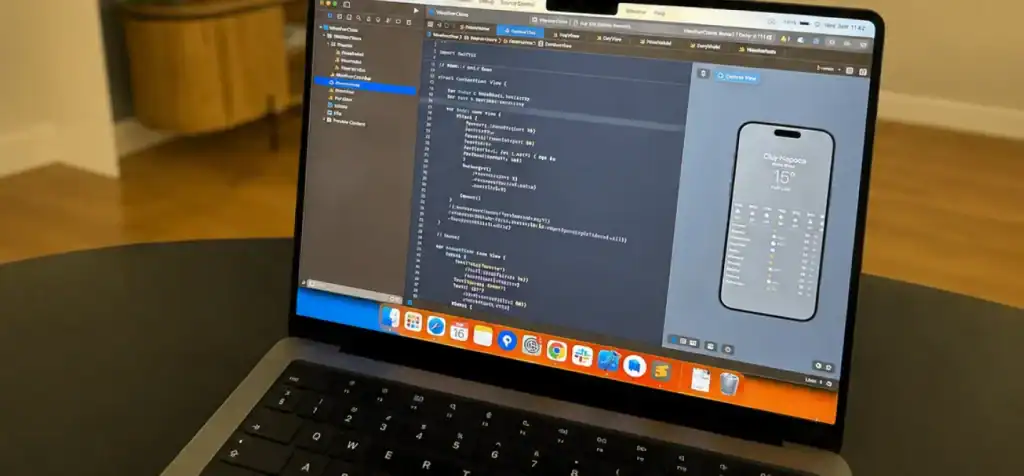
The timeline depends on the app’s feature set, technical complexity, team capacity, integrations, and testing requirements. A small utility app generally requires less work than an application involving payments, multiple user roles, or complex backend services.
The main factors affecting delivery are:
- Scope: More features and user journeys require additional design and development.
- Integrations: Third-party services and backend dependencies can introduce delays.
- Testing: Device coverage, accessibility requirements, and defect resolution affect readiness.
- Feedback: Stakeholder revisions and beta testing may require additional iterations.
- App Store review: Approval and release timing can vary, particularly if changes are requested.
Some activities can run in parallel, but teams should reserve time for testing, feedback, and release preparation rather than treating the launch date as guaranteed.
What Affects the Cost of iOS App Development?
Each lifecycle stage contributes to the overall budget. The main cost drivers include:
- Product discovery and requirements planning.
- UI/UX design and prototyping.
- App development and backend integration.
- Quality assurance and device testing.
- App Store preparation and release.
- Ongoing maintenance and updates.
Scope changes are another important factor. Adding features after development begins can affect architecture, design, implementation, and testing. A clearly defined MVP helps control these changes and keeps the initial release focused.
For a closer look at the variables involved, see this breakdown of iOS app development cost.
Common Mistakes That Delay iOS App Development
Teams can reduce avoidable delays by addressing these common problems early:
- Unclear requirements: An undefined scope leads to rework and conflicting expectations.
- Insufficient design validation: Usability problems discovered late can require significant changes.
- Late testing: Defects become harder to isolate when testing is postponed until the end.
- Overlooked security requirements: Privacy, permissions, and secure data handling should be planned from the start.
- Incomplete App Store preparation: Missing metadata or incorrect signing settings can delay submission.
- No post-launch plan: Without monitoring and maintenance, important issues may remain unresolved after release.
Clear ownership, regular testing, and defined decision points help teams address problems before they affect the launch.
Conclusion
The iOS development lifecycle gives teams a structured way to move from product idea to public release and ongoing improvement. Each stage addresses a different risk, from unclear requirements and technical limitations to release issues and changing user needs.
The key is to keep the process focused: define the scope, validate the design, build and test incrementally, prepare carefully for App Store review, and use post-launch data to guide improvements.
If you’re planning a new iOS application, an experienced iOS app development agency can help manage these stages from planning through release. For projects spanning multiple mobile platforms, a custom mobile app development company can help evaluate the right development approach for your product.
Planning an iOS App? Turn Your Idea Into Reality With Cubix
Contact Us
Frequently Asked Questions
1. What are the main stages of iOS app development?
The main stages are discovery, technical planning, design, architecture setup, development, testing, beta distribution, App Store review, launch, and maintenance.
2. How long does iOS app development take?
It depends on the app’s complexity, integrations, team capacity, and testing needs. The project plan should account for feedback and App Store review as well as development.
3. How does TestFlight fit into the release process?
TestFlight lets teams distribute beta builds to testers, gather feedback, and fix issues before submitting the app for its public App Store release.
4. How long does App Store review take?
Review duration varies. Approval and public availability are also separate steps because the release settings determine when an approved app becomes available.
5. Do I need a Mac to build iOS apps?
The standard native workflow uses a Mac running macOS and Xcode. Some cloud services support parts of the process remotely, but Apple’s development tools are commonly required for building, debugging, signing, and preparing native releases.
6. Should I build iOS first or Android first?
The decision depends on your target audience, budget, and product requirements. An iOS-first strategy may suit a business whose initial audience primarily uses iPhones. If you need to reach both platforms, compare the trade-offs in hybrid vs. native app development before choosing an approach.