
Key Takeaways and What You’ll Learn
- What is video game design and why it matters
- The complete game development process from start to finish
- The major stages of game development
- How to build a game from scratch
- How professional studios approach the video game development cycle
- Common mistakes beginners should avoid
- Tools, technologies, and strategies used by modern developers
Think about your favorite video game for a moment. Maybe it is Minecraft. Maybe it is Fortnite. Maybe it is Candy Crush or Among Us. Now imagine this: every one of those games started with a single idea.
No massive team. No million-dollar budget. No worldwide fan base. Just an idea.
Today, creating a game is more accessible than ever before. Powerful game engines, free learning resources, AI-powered tools, and beginner-friendly software have made game development possible for almost anyone willing to learn.
The numbers prove it. According to industry reports, the global gaming market is expected to surpass $300 billion in annual revenue before the end of the decade. At the same time, there are more than 3 billion gamers worldwide. That means there has never been a bigger audience for new games.
Yet many beginners ask the same questions:
- What is video game design?
- How do you design a video game?
- What is the first step in the game design process?
- How can I create a game if I have never done it before?
- Do I need a game designer degree to succeed?
The good news is that every successful developer started exactly where you are today.
Learning how to design a video game does not mean you need to become an expert artist, programmer, or designer overnight. Instead, it means understanding the game design process and following a proven path from idea to launch.
What Is Video Game Design?
Before learning how to make a video game, it is important to understand what video game design actually means.
Many beginners think game design and game development are the same thing. They are closely connected, but they are not identical.
Video game design focuses on creating the player’s experience. It involves deciding how the game works, what players do, what challenges they face, and what keeps them engaged.
Game development is the larger process that turns those ideas into a playable product.
In simple terms:
- Game design creates the vision.
- Game development brings that vision to life.
So, what is video game design in practice?
It includes creating:
- Game mechanics
- Rules and objectives
- Character systems
- Progression systems
- Rewards
- Level design
- User interface elements
- Overall user experience
For example, when Minecraft was first created, its core idea was simple: allow players to gather resources, build structures, and explore an open world. Those systems became the foundation of the entire game.
That foundation is known as the core gameplay loop.
Research shows that players decide whether they enjoy a game within the first few minutes of play. This is why strong game design is often more important than impressive graphics.
Many successful indie games prove this point.
Among Us became a global phenomenon despite having relatively simple visuals. The game’s social mechanics and player interactions created an experience that millions of people enjoyed.
Similarly, Stardew Valley was developed primarily by one person and went on to sell more than 30 million copies worldwide because of its engaging gameplay systems.
Understanding how video games are designed starts with understanding player behavior.
A good designer constantly asks:
- What motivates players?
- What makes them return?
- What challenges feel rewarding?
- What experiences feel memorable?
Step 1: Start With a Strong Game Idea
Every successful game begins with a simple question:
What will players actually do in this game?
Many beginners believe they need a revolutionary idea to succeed. In reality, some of the most successful games ever made started with very simple concepts.
- Minecraft focused on building and exploration.
- Candy Crush focused on matching colors.
- Among Us focused on finding an imposter.
The lesson is clear. A great game idea does not have to be complicated. It simply needs to be fun.
If you are wondering how to design your own video game, this is where you should start. Before writing code or creating art, spend time thinking about the experience you want players to have.
Ask yourself:
- Will players compete or cooperate?
- Is the game relaxing or challenging?
- Will it focus on action, strategy, exploration, or storytelling?
- What makes it different from similar games?
The best ideas often come from games you already enjoy.
Look at your favorite titles and identify what keeps you playing. You are not copying them. You are learning from them.
For example, Stardew Valley was inspired by farming games that already existed. However, its creator added deeper relationships, progression systems, and customization options that made the experience feel fresh.
This approach is common throughout the gaming industry. In fact, market research shows that many successful games are built on proven genres rather than completely new concepts. Players often enjoy familiar experiences with a unique twist.
Find a Problem Worth Solving
One useful technique in the game design process is identifying a player problem.
Think about questions like:
- What experience is missing from existing games?
- What frustrates players in similar titles?
- What would make a game easier, more exciting, or more rewarding?
Many successful games became popular because they solved a problem.
- Fortnite introduced faster matches and accessible building mechanics.
- Pokémon GO encouraged players to explore the real world.
- Roblox made game creation available to millions of users without advanced technical knowledge.
Think About Your Audience
Who is your game for?
This question is often overlooked by first-time developers. Yet successful studios spend months researching player behavior before entering production.
Consider:
- Age group
- Gaming experience
- Preferred platforms
- Playing habits
Mobile gamers often prefer shorter sessions. PC gamers may enjoy deeper systems and longer gameplay loops. Understanding your audience helps shape better design decisions throughout the project.
[blog_cta]
Step 2: Define Your Core Gameplay Loop
Once you have a strong idea, the next step is creating the foundation of your game.
This foundation is known as the core gameplay loop. The core gameplay loop is the set of actions players repeat throughout the game.
It is one of the most important concepts in the game design process because it determines whether players stay engaged or lose interest.
When people ask, “How do you design a video game?” The answer almost always starts here. Every successful game has a loop that keeps players coming back.
For example:
Minecraft
Loop:
- Gather resources
- Build structures
- Explore new areas
- Gather more resources
Candy Crush
Loop:
- Match pieces
- Complete objectives
- Earn rewards
- Unlock new levels
Clash of Clans
Loop:
- Collect resources
- Upgrade buildings
- Attack opponents
- Collect more resources
The actions are simple.
The repetition creates engagement.
Step 3: Create a Simple Game Design Document (GDD)
Once you have a clear game idea and a fun gameplay loop, it is time to organize everything into a plan. This is where a Game Design Document, often called a GDD, becomes important.
A Game Design Document is a blueprint for your game. It explains how the game works, what features it includes, and what experience you want players to have. Think of it as a roadmap that keeps your project moving in the right direction. Whether you are working alone or with a team, having a documented plan reduces confusion and prevents costly mistakes later in development.
Many beginner developers skip this step because they are eager to start building. However, professional studios spend significant time documenting ideas before entering production. A clear document helps everyone understand the vision and ensures that important features are not forgotten.
The good news is that your first GDD does not need to be 100 pages long. In fact, keeping it simple is often the better approach. A document between five and ten pages is usually enough for a beginner project.
Your game design document should include several key sections.
Game Overview
The first section should explain the game at a high level. Describe the genre, target audience, platform, and overall goal of the experience.
For example, your overview might say:
“A casual puzzle game for mobile devices where players solve environmental challenges by controlling time.”
This section gives anyone reading the document an immediate understanding of the project.
Core Gameplay and Mechanics
This section explains what players actually do inside the game. Describe the core gameplay loop, player actions, rewards, progression systems, and win conditions.
For example, if you are building a platformer, explain how players move, jump, collect items, defeat enemies, and advance through levels.
Clear documentation helps developers stay focused on the features that matter most. It also prevents unnecessary additions that can increase development time.
Story and Characters
Not every game needs a complex narrative, but documenting characters and story elements can improve consistency throughout the project.
Outline the main character, supporting characters, setting, and overall plot. Even simple games benefit from a clear theme because it helps guide art direction and gameplay decisions.
Games such as Hollow Knight and Stardew Valley became memorable not only because of their mechanics but also because of the worlds and characters players encountered throughout the experience.
Step 4: Choose the Right Game Engine
After documenting your vision, the next step is selecting the technology that will bring your game to life.
This is where choosing the right game engine becomes critical.
A game engine is the software framework used to build games. It provides the tools needed for programming, animation, physics, rendering, audio management, and many other essential systems.
Without a game engine, developers would need to create these systems from scratch, dramatically increasing development time and costs.
Today, several powerful engines dominate the industry, each offering unique advantages for different types of projects.
Unity
Unity remains one of the most popular choices among independent developers and small studios.
The engine is known for its accessibility, large community, and extensive learning resources. Many successful mobile games, indie games, and cross-platform titles have been built using Unity.
One major advantage of Unity is its flexibility. Developers can create 2D games, 3D games, mobile applications, AR experiences, and VR projects using the same platform.
For beginners learning how to make games for beginners, Unity often provides one of the smoothest learning curves available.
Unreal Engine
When discussing modern game development, it is impossible to ignore Unreal Engine.
Developed by Epic Games, Unreal Engine powers some of the most visually impressive games in the industry. Its advanced rendering capabilities make it a favorite choice for developers creating high-quality 3D experiences.
Recent industry surveys have shown Unreal Engine’s adoption continuing to grow among professional studios due to its graphical capabilities and powerful development tools.
If your project prioritizes realistic visuals, large environments, or advanced effects, Unreal Engine deserves serious consideration.
For a deeper comparison of both engines, read our guide on Unity vs Unreal Engine: Which Is Best for Indie Developers?
Godot
Godot has become increasingly popular among indie developers over the past few years.
The engine is free, open-source, lightweight, and supported by a growing community. Many beginners appreciate its simplicity and flexible scripting system.
Although Godot does not yet have the same market share as Unity or Unreal Engine, its popularity continues to rise among independent creators who want a cost-effective solution.
How to Choose the Right Engine
There is no universal answer because the best engine depends on your goals.
Consider the following factors:
- Game genre
- Team size
- Technical experience
- Budget
- Target platforms
- Art requirements
For example, a simple mobile puzzle game may not require the same technology stack as a large open-world RPG.
The most important thing is choosing an engine and committing to learning it. Many beginners waste months switching between tools instead of building actual projects.
Step 5: Plan the Stages of Game Development
Many first-time developers assume that building a game is simply a matter of coming up with an idea and then starting to code. In reality, successful games follow a structured workflow that guides the project from concept to launch.
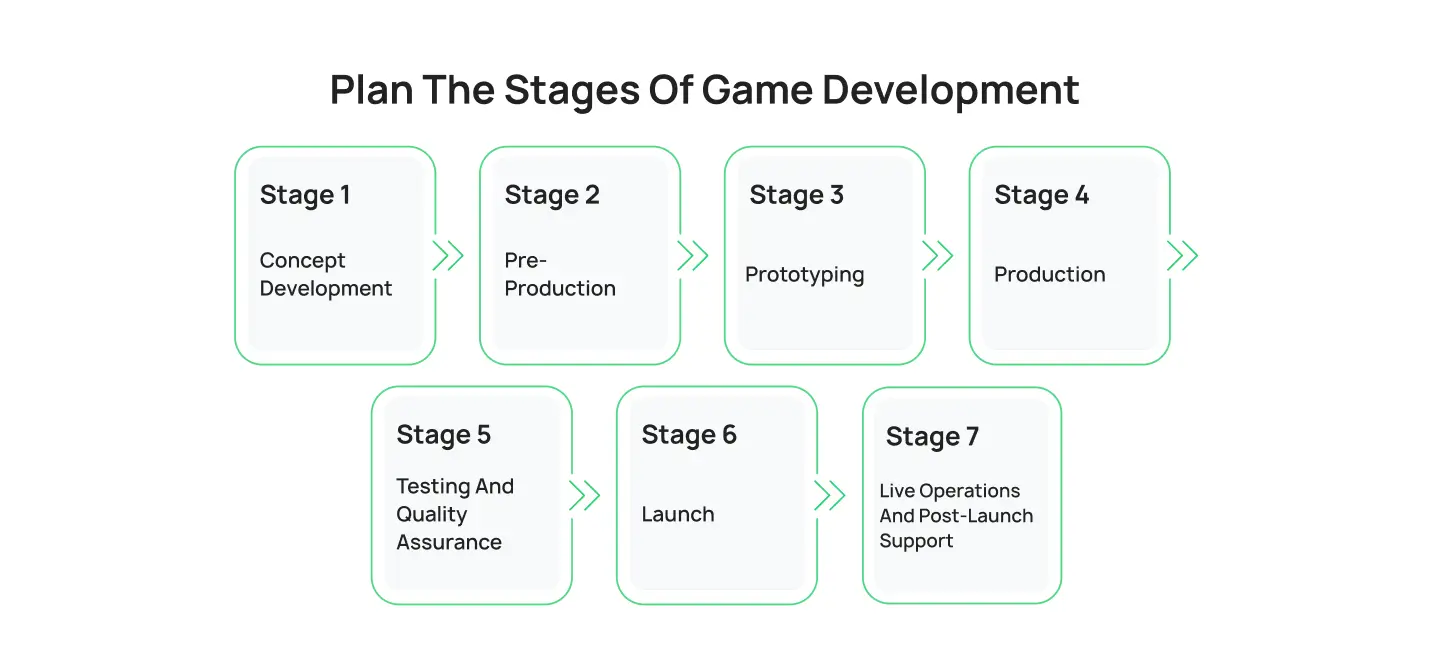
This workflow is commonly known as the game development life cycle.
Understanding the stages of game development helps you manage time, control costs, and avoid common mistakes that cause many projects to fail. Whether you are creating a simple indie title or a large commercial release, every project moves through a series of planned phases.
The exact workflow may vary between studios, but most projects follow a similar game development process.
When people discuss the video game development cycle, they are usually referring to seven major stages.
Stage 1: Concept Development
Every project begins with an idea.
This stage focuses on defining the game’s vision, target audience, genre, and key features. Developers conduct research, analyze competitors, and determine whether the concept is worth pursuing.
This is also where initial planning takes place. Teams begin estimating budgets, timelines, technical requirements, and potential challenges.
Many projects never move beyond this stage because developers realize the idea is too large or financially risky. While this may sound discouraging, it actually saves significant time and resources.
Stage 2: Pre-Production
Pre-production transforms a concept into a workable plan.
During this phase, developers create design documents, establish visual direction, choose technologies, and define production goals.
This stage often includes:
- Gameplay planning
- Character concepts
- Technical architecture
- Story development
- Prototype planning
Many industry experts consider pre-production one of the most important phases of game development because decisions made here affect the entire project.
Research from software development industries consistently shows that planning errors become significantly more expensive to fix later in production.
Stage 3: Prototyping
Before investing months or years into development, teams create prototypes.
A prototype is a simplified version of the game designed to test ideas quickly.
At this stage, graphics are usually basic. Characters may appear as simple shapes, and environments may consist of temporary assets. The goal is not visual quality. The goal is determining whether the gameplay is actually fun.
Many famous games changed dramatically during prototyping.
The original concepts for Fortnite, Portal, and Overwatch evolved significantly after early testing revealed what players enjoyed most.
Prototyping allows developers to identify problems early and improve designs before major resources are invested.
Stage 4: Production
Production is where most of the work happens.
This phase often represents the largest portion of the game development timeline. Artists create assets, programmers build systems, designers develop levels, and audio teams produce music and sound effects.
For many projects, production can consume more than half of the entire schedule.
During production, teams focus on:
- Character creation
- Environment development
- Animation
- Programming
- Level design
- User interface creation
- Audio implementation
Large AAA games can spend several years in production. Smaller indie projects may complete production in a few months, depending on scope.
This stage forms the core of the game development pipeline and is where the project begins to resemble the final product.
Stage 5: Testing and Quality Assurance
No game launches without bugs.
Testing helps identify technical issues, gameplay imbalances, performance problems, and user experience concerns before release.
Industry studies suggest that fixing issues during testing is significantly less expensive than resolving them after launch. This is one reason quality assurance remains a critical part of the development process.
Testing generally includes:
- Functional testing
- Performance testing
- Compatibility testing
- User experience testing
- Multiplayer testing
Developers often conduct alpha and beta testing to gather feedback from real players.
These testing phases provide valuable insights that internal teams may overlook.
Stage 6: Launch
Launch day is one of the most exciting moments in game development.
After months or years of work, the game becomes available to players.
However, launch is not the finish line.
Modern games require marketing campaigns, community management, server monitoring, and ongoing technical support. Many successful launches are supported by extensive preparation months before release.
This is also where developers begin analyzing player behavior and performance metrics.
Understanding how players interact with the game helps shape future updates and improvements.
Stage 7: Live Operations and Post-Launch Support
Many new developers forget that game production before and after launch are equally important.
Years ago, games were often considered complete once they reached store shelves. Today, many titles continue evolving long after release.
Popular games regularly receive:
- New content
- Balance updates
- Seasonal events
- Technical improvements
- Community-requested features
Games such as Fortnite, Roblox, and Genshin Impact have demonstrated how ongoing support can extend a game’s lifespan for years.
For many studios, post-launch operations become an essential part of long-term success.
Step 6: Design Characters, Worlds, and Visual Assets
Once the foundation of your game is in place, it is time to focus on something players notice immediately: visuals.
Graphics alone do not make a game successful, but they play a major role in creating memorable experiences. Strong visual design helps communicate information, build atmosphere, and strengthen emotional connections with players.
When learning how to create your own game, many beginners focus entirely on mechanics and overlook the importance of visual consistency.
Successful games combine both.
A player should immediately understand the tone, style, and personality of your game simply by looking at the screen.
Character Design Matters More Than You Think
Characters often become the face of a game.
Think about Mario, Sonic, Master Chief, Lara Croft, or Kratos. Even people who have never played their games can recognize these characters instantly.
Great character design is not just about appearance. It is about communication.
A well-designed character tells players something about their role, abilities, and personality before they speak a single line of dialogue.
When creating characters, consider:
- Appearance
- Silhouette
- Clothing
- Animations
- Personality traits
- Backstory
Strong character design improves immersion and makes the experience more memorable.
The Importance of User Interface Design
Every game needs a user interface.
Health bars, menus, maps, inventories, quest trackers, and settings screens all form part of the player’s interaction with the game.
A strong user interface should feel intuitive and easy to understand.
Studies consistently show that confusing interfaces increase player frustration and reduce retention rates.
Players should spend their time enjoying the game, not struggling to understand menus.
Creating a Better User Experience
The best games are designed around user experience.
User experience focuses on how players feel while interacting with your game.
Questions that designers frequently ask include:
- Is navigation easy?
- Are objectives clear?
- Is progression rewarding?
- Are controls responsive?
- Does the game respect the player’s time?
Successful games remove unnecessary friction and allow players to focus on having fun.
This is one reason why many developers conduct user testing throughout production.
Feedback helps reveal pain points that internal teams may overlook.
Choosing Between 2D and 3D Development
One of the biggest visual decisions involves choosing between 2D and 3D development.
Both approaches offer unique advantages. 2D games often require fewer resources and can be easier for beginners to develop.
3D art outsourcing provides greater immersion and allows for more complex environments and interactions.
If you are unsure which approach is best for your project, our guide on 2D vs 3D Game Development explores the strengths and challenges of each option in detail.
Step 7: Learn How to Code a Game
At some point, every game needs instructions that tell it how to behave.
- How does a character move?
- How does an enemy react?
- How does a player earn points?
- How does a level end?
The answer to all of these questions is code.
For many beginners, programming feels intimidating. However, learning how to code a game is much more approachable today than it was a decade ago. Modern game engines include tutorials, templates, visual scripting tools, and large online communities that make learning easier than ever.
The important thing to remember is that you do not need to become an expert programmer before building your first game.
Many successful developers started with basic projects and improved their skills over time.
Understanding Programming Languages in Game Development
Different engines use different programming languages.
- Unity primarily uses C#.
- Unreal Engine supports C++ and visual scripting through Blueprints.
- Godot uses GDScript, which is often considered beginner-friendly.
These programming languages allow developers to control gameplay systems, player interactions, artificial intelligence, animations, and much more.
According to developer surveys, C++, C#, and Python remain among the most commonly used programming languages across the gaming and software industries.
For beginners, C# is often recommended because of its readability and extensive learning resources.
Step 8: Build Your First Prototype
Now that you have a game idea, a documented plan, visual direction, and basic programming knowledge, it is time to build something playable.
This stage is often where the project begins to feel real. A prototype is a simplified version of your game designed to test concepts quickly. It focuses on gameplay rather than visual quality.
Many beginners mistakenly believe they need polished graphics before testing their ideas. Professional developers usually do the opposite. They test gameplay first.
Why Prototyping Is Essential
The purpose of a prototype is simple.
It answers one question:
Is the game fun?
This question matters more than almost anything else during early development. Many ideas sound exciting on paper but feel completely different when played. Prototyping helps uncover these issues before significant time and money are invested.
Industry experts often describe prototyping as one of the most cost-effective stages of the entire game development process because it reduces the risk of building systems that players do not enjoy.
How to Build a Game on Computer Successfully
If you are wondering how to build a game on computer, the answer is surprisingly straightforward:
- Choose an engine.
- Set up a game project.
- Build the core gameplay loop.
- Test frequently.
- Improve based on feedback.
These steps may sound simple, but they form the foundation of countless successful projects.
The key is consistency.
Working on your game regularly, even for a short period each day, creates steady progress over time.
The Goal of Your First Prototype
Your first prototype does not need to impress investors.
- It does not need beautiful graphics.
- It does not need advanced multiplayer systems.
- It only needs to prove that the idea works.
Many successful indie developers spent months refining simple prototypes before committing to full production.
Once players enjoy the core experience, you can confidently move forward into testing, balancing, and refining the game.
Step 9: Test, Improve, and Refine the Player Experience
Building a playable prototype is a major achievement.
However, creating the first version of a game is only half the challenge. The next step is making it better.
Testing is where developers discover what works, what does not work, and what needs improvement.
Even the most experienced studios rely heavily on testing because developers often become too familiar with their own projects. Players notice issues that creators may completely miss.
Why Testing Is Critical
Research within the gaming industry consistently shows that bugs and poor user experiences are among the most common reasons players abandon games.
A single frustrating issue can cause players to quit and never return.
Testing helps identify these problems before launch.
It also provides valuable insights into how players actually interact with your systems.
Sometimes players behave in ways developers never expected.
Testing reveals these patterns and allows teams to make informed improvements.
Alpha Testing
Alpha testing typically occurs during development. The game may still contain unfinished features, placeholder assets, and known bugs.
The goal is identifying major issues before wider testing begins. Developers often invite team members, friends, and trusted testers to participate in alpha testing.
This stage focuses on finding critical problems and ensuring the game functions correctly.
Beta Testing
Beta testing happens closer to launch. At this point, the game is usually feature-complete.
Developers invite larger groups of players to provide feedback and identify remaining issues.
Beta testing often reveals:
- Balance problems
- Performance issues
- User interface confusion
- Difficulty spikes
- Technical bugs
Many successful games have improved dramatically because of community feedback collected during beta phases.
Step 10: Understand the Full Game Development Timeline
One of the most common questions beginners ask is:
“How long does it take to make a game?”
The answer depends on the size and complexity of the project.
A simple puzzle game may take a few months to complete. A larger indie game may require one to three years of development. AAA games often spend four to seven years in production before launch.
According to industry reports, many independent developers spend between six months and two years creating their first commercial game. Larger studios often require hundreds of developers working together across multiple departments.
Understanding the game development timeline helps set realistic expectations.
Many beginners become discouraged because they underestimate how much work is involved. They compare their progress to games built by teams of hundreds of professionals.
Instead, focus on your own journey.
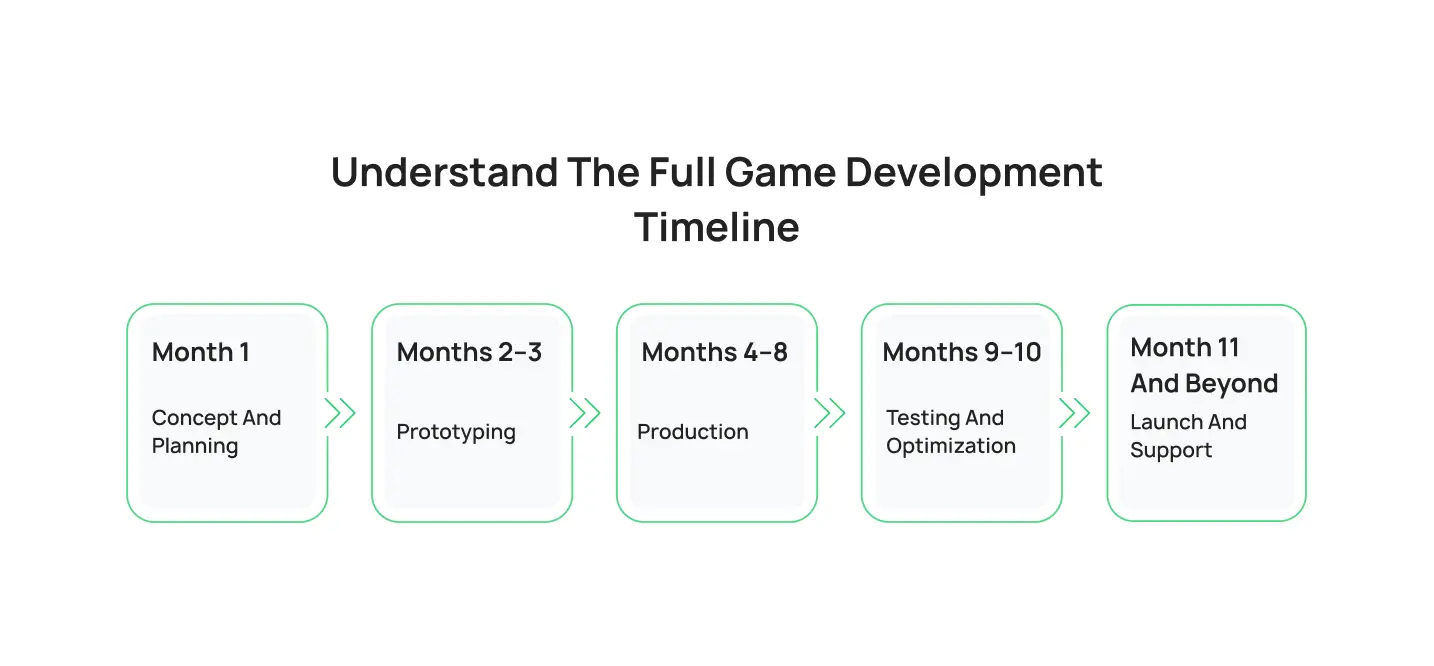
A realistic timeline for a beginner project might look like this:
Month 1: Concept and Planning
During this phase, you define the idea, create your game design document, choose a genre, and identify your target audience.
The goal is to establish a strong foundation before building anything.
Months 2–3: Prototyping
This stage focuses on testing core gameplay mechanics.
Developers build basic systems and determine whether the game is fun enough to continue developing.
Months 4–8: Production
Production includes programming, asset creation, level building, sound implementation, and gameplay expansion.
This phase usually consumes the majority of the schedule.
Months 9–10: Testing and Optimization
Developers identify bugs, improve performance, and gather player feedback.
This stage often reveals issues that require additional adjustments before launch.
Month 11 and Beyond: Launch and Support
After release, developers continue monitoring performance, fixing bugs, and supporting players.
For many successful games, post-launch development continues for years.
Should You Build Everything Yourself or Work With Experts?
As your project grows, you may discover that certain tasks require specialized skills.
This is completely normal.
Modern game development strategy often involves professionals from many disciplines, including programmers, artists, animators, writers, sound designers, quality assurance specialists, and producers.
While some developers prefer working alone, others accelerate development by collaborating with experienced professionals.
When Outsourcing Makes Sense
Outsourcing can be especially useful when a project requires skills that are difficult to learn quickly.
For example:
- Advanced programming systems
- Character animation
- Environment art
- Multiplayer infrastructure
- User interface design
Many studios use external partners to supplement internal teams and improve production efficiency.
This approach allows developers to focus on their strengths while experts handle specialized tasks.
Support for 2D Projects
Many independent developers choose to work with 2D game development services when creating platformers, puzzle games, educational titles, or casual mobile experiences.
Professional support can help accelerate production while maintaining visual and technical quality.
This approach is particularly useful for developers who have strong ideas but limited experience with art production or programming.
Support for Mobile Development
Mobile gaming continues to dominate the industry.
Industry reports estimate that mobile games account for more than half of global gaming revenue, making smartphones one of the largest gaming platforms in the world.
Because mobile development involves platform-specific requirements, optimization challenges, and monetization systems, many companies rely on mobile game development services to streamline production and improve performance across devices.
Learning From Industry Leaders
Studying successful studios is one of the fastest ways to improve your understanding of the development process.
Experienced companies often provide valuable insights into production workflows, project management, and design methodologies.
If you are researching the industry’s leading development partners, our guide covering the Top Game Development Companies provides useful information about some of the most recognized names in the field.
Similarly, if your focus is mobile gaming, our article on the Top Mobile Game Development Companies explores businesses that specialize in creating successful mobile experiences.
How Professional Teams Approach Development
Professional studios rarely rely on guesswork.
They follow structured workflows, conduct extensive testing, and use data to guide decisions throughout development.
This disciplined approach increases the likelihood of delivering high-quality products on schedule.
Many companies, including Cubix games, emphasize planning, iteration, user feedback, and continuous improvement throughout the development cycle.
The same principles can benefit developers of any size, including solo creators building their very first game.
Common Mistakes First-Time Game Designers Make
Learning from mistakes is part of the creative process. However, understanding common pitfalls can help you avoid unnecessary setbacks.
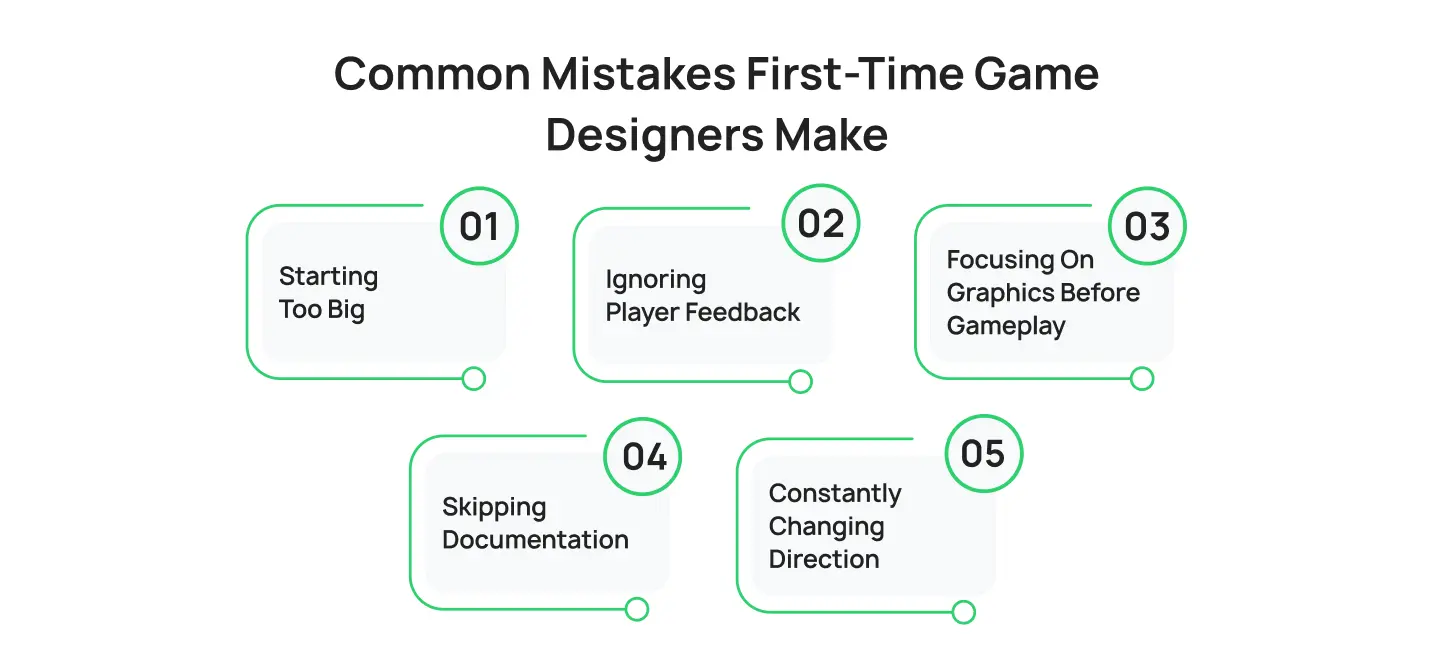
Starting Too Big
This is by far the most common mistake.
Many beginners attempt to build massive open-world games with dozens of systems, multiplayer features, and complex narratives.
The result is often burnout and unfinished projects. Starting small dramatically increases your chances of success. A completed small game teaches more than an unfinished large one.
Ignoring Player Feedback
Developers sometimes become emotionally attached to their ideas. While passion is important, ignoring player feedback can be dangerous. Successful games evolve through testing and iteration.
Players often reveal issues that developers overlook. Listening carefully helps improve the final experience.
Focusing on Graphics Before Gameplay
Visual quality matters, but gameplay matters more. Many successful indie games became popular because of engaging mechanics rather than cutting-edge graphics.
Always prioritize fun before visual polish.
Skipping Documentation
A lack of planning often creates confusion later. Without a clear game design document, projects can lose focus and become difficult to manage.
Documentation helps maintain consistency throughout development.
Constantly Changing Direction
Many developers abandon projects because they continuously chase new ideas. Every week introduces another feature, mechanic, or genre.
Progress slows, motivation drops, and the game remains unfinished. Commit to a vision and see it through.
Your First Game Starts With One Small Step
Designing your first game can feel overwhelming. There are mechanics to plan, systems to build, assets to create, and countless decisions to make along the way.
However, every successful developer started exactly where you are now.
- They began with an idea.
- They learned the fundamentals.
- They built prototypes.
- They tested their work.
And most importantly, they kept going.
[blog_cta_2]
FAQs
1. What is the first step in the game design process?
The first step in the game design process is developing a clear game idea. Before creating art, writing code, or designing levels, you should define the game’s genre, target audience, core gameplay loop, and overall objective.
2. How long does it take to develop a video game?
The timeline depends on the size and complexity of the project. A simple indie game may take a few months to develop, while larger games can take several years. Most beginner projects are completed within 6 to 12 months when the scope is kept manageable.
3. Do I need to know how to code to create a game?
Basic programming knowledge is helpful, but it is not always required. Many modern game engines offer visual scripting tools that allow beginners to create gameplay systems without extensive coding experience. However, learning programming can provide greater flexibility and control.
4. Which game engine is best for beginners?
Unity, Unreal Engine, and Godot are among the most popular options for beginners. Unity is often recommended for new developers because of its large community, extensive tutorials, and support for both 2D and 3D game development.
5. Can one person design and develop a video game?
Yes. Many successful indie games have been created by solo developers. While creating a game alone requires learning multiple skills, starting with a small project makes the process much more achievable.
6. What are the main stages of game development?
The main stages of game development include concept development, pre-production, prototyping, production, testing, launch, and post-launch support. Together, these stages form the complete game development life cycle that guides a project from idea to release.