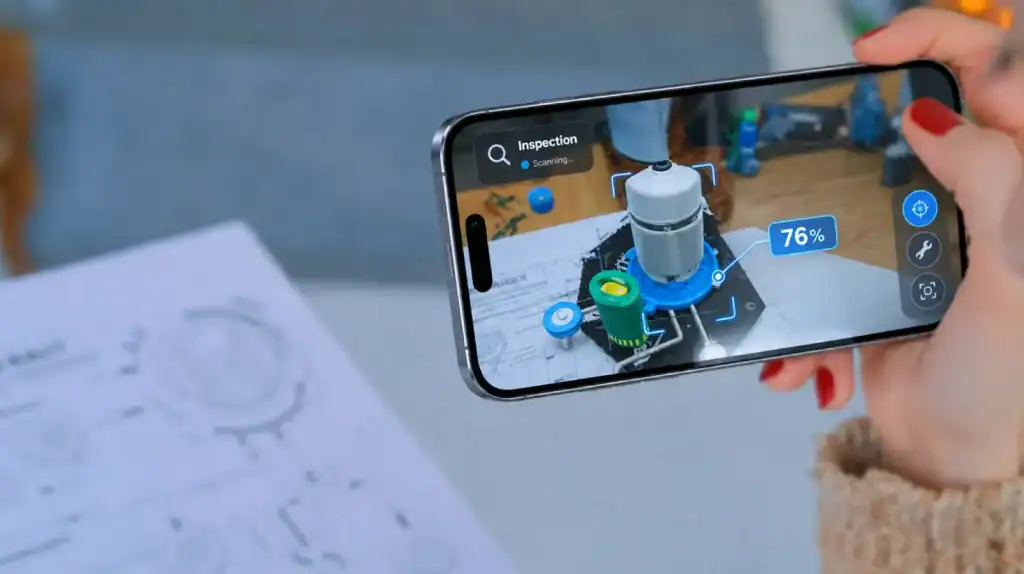
AR app development cost typically ranges between $5,000 to $300,000 or more, depending on the experience, tracking technology, 3D assets, target platforms, and integrations. A basic marker-based prototype may fit a budget of 20,000, while a production-ready shopping app or enterprise AR solution can require 300,000+.
The business case matters as much as the technology. The U.S. Census Bureau’s retail e-commerce report estimated that online sales accounted for 16.6% of total U.S. retail sales in the fourth quarter of 2025. That figure doesn’t measure augmented reality adoption, but it illustrates the size of the online retail channel where AR product visualization and virtual try-on experiences may be useful.
The cost of an AR app depends on what users need to see and do. Placing a basic 3D object in a room is a different engineering task from letting shoppers customize furniture, preview it at scale, save configurations, and purchase products through an integrated catalog.
How Much Does an AR App Cost by Type?
The cost to develop an AR app varies by experience type, with simple prototypes at the lower end and advanced applications with custom 3D content, backend systems, and complex tracking at the higher end.
| AR App Type | Estimated Development Cost | Typical Scope |
|---|---|---|
| Basic AR prototype or marker-based experience | $20,000 | Image recognition, limited interactions, and a small asset set |
| Standard mobile AR app | 60,000 | Plane detection, interactive 3D content, and core UI |
| AR product visualization or configurator | 100,000+ | Detailed product models, variants, and catalog integration |
| Virtual try-on or AR shopping app | $150,000+ | Product tracking, asset libraries, and commerce integration |
| Enterprise AR application | 300,000+ | Custom workflows, enterprise integrations, and content management |
These figures are preliminary budgeting ranges, not fixed market prices. They can overlap because an application’s features, asset requirements, and integration needs matter more than its category alone. A technically demanding prototype can cost more than a simple production application.
1. Basic AR Prototypes and Marker-Based Apps
Estimated cost: $20,000.
A basic AR prototype tests whether a particular experience works before a business invests in a complete product. It might recognize a printed image, display a 3D object, or show a short animation when a user points a camera at a marker.
Costs generally stay lower when the project has:
- A small number of predefined interactions.
- Existing or relatively simple 3D assets.
- Limited backend requirements.
- A narrow set of supported devices.
- No complex user accounts, payments, or content management.
A prototype should still test the conditions that matter to the intended use case. If the experience depends on recognizing objects in different lighting conditions, for example, testing only in a controlled office may produce misleading results.
2. Markerless AR and 3D Product Visualization
Estimated cost: $$100,000+, depending on scope.
Markerless AR lets users place or interact with digital objects without scanning a predefined image. Common examples include placing a virtual sofa in a living room, previewing equipment in a workspace, or viewing a 3D product from different angles.
Development may involve:
- Plane detection and surface tracking.
- Real-world scale and object placement.
- Touch gestures for moving, rotating, and resizing models.
- Lighting estimation and realistic rendering.
- Optimized 3D models and product variants.
More demanding experiences may require depth sensing and occlusion handling, which help virtual objects interact convincingly with real surroundings. The ARCore Depth API documentation explains how depth information supports effects such as placing digital objects behind real-world objects.
The main cost driver is not simply displaying a model. It’s making the model look convincing, remain stable as the user moves, and perform well on the devices the business intends to support.
3. Virtual Try-On and AR E-Commerce Apps
Estimated cost: $150,000+, depending on product complexity.
Virtual try-on applications let users preview products such as glasses, cosmetics, accessories, or clothing-related items. AR shopping apps can also place furniture and home decor in a user’s environment.
Costs increase when the experience needs:
- Face, body, or object tracking.
- Accurate product positioning and realistic materials.
- A large library of 3D assets.
- Product variants, colors, sizes, and customization.
- Inventory, product catalog, cart, and checkout integrations.
- Analytics to measure engagement and purchase behavior.
The type of product matters. A simple glasses preview and a realistic apparel try-on system have different tracking and asset requirements. The latter may need more advanced body estimation, garment simulation, or specialized content production.
4. WebAR Experiences
Estimated cost: $60,000+ for many scoped experiences.
WebAR delivers an augmented reality experience through a compatible browser or web-based platform. Users may open a link or scan a QR code instead of installing a dedicated application.
It can suit product previews, marketing campaigns, packaging experiences, and interactive product demonstrations. However, the absence of a conventional app installation doesn’t eliminate AR app development costs.
Budget for browser and device testing, 3D asset delivery, hosting, and any commercial WebAR platform fees. Features also depend on the selected technology and browser support. Validate the required capabilities on the actual target devices before committing to a browser-based approach.
5. Enterprise AR Applications
Estimated cost: $300,000+, with larger projects potentially exceeding this range.
Enterprise AR applications often combine spatial tracking with business systems, custom workflows, and security requirements. Examples include guided maintenance, equipment inspection, warehouse assistance, and employee training.
Typical requirements include:
- Integration with enterprise resource planning (ERP), product lifecycle management (PLM), or other business systems.
- Role-based access and identity management.
- Remote content updates and an AR content management system.
- Detailed operational workflows and reporting.
- Device management, security testing, and ongoing support.
An enterprise project may also require field testing in environments with poor lighting, reflective surfaces, moving equipment, or unreliable connectivity. These conditions can create more engineering and QA work than a controlled consumer-facing demo.
What Factors Affect AR App Development Cost?
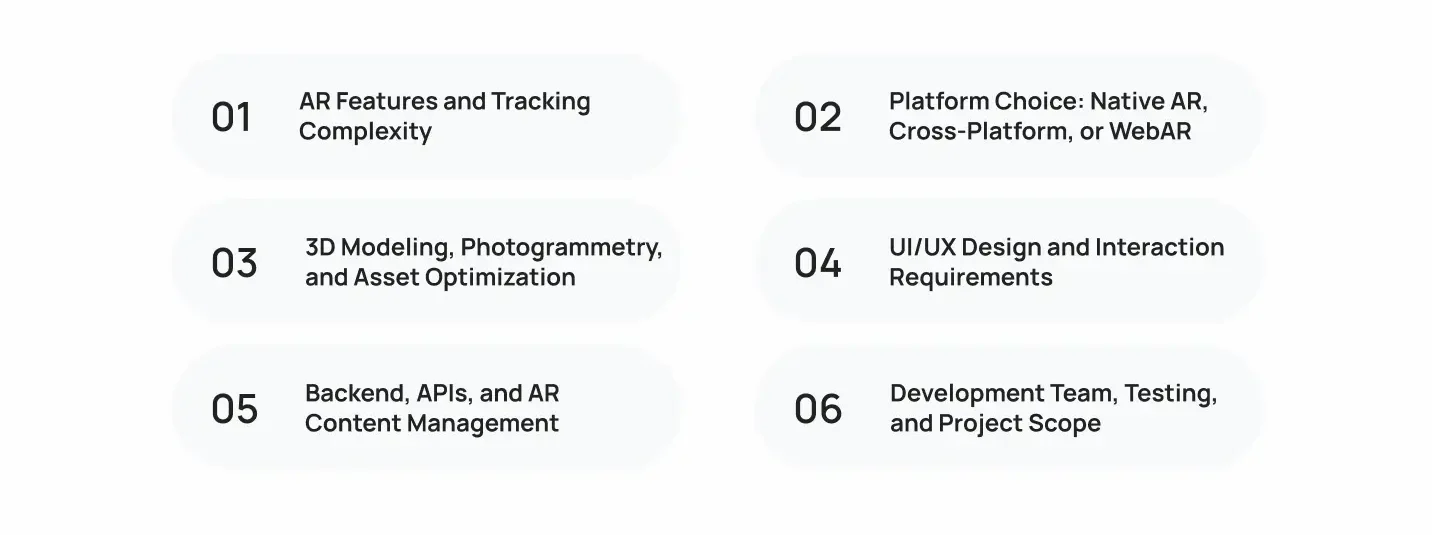
The biggest AR app development cost drivers are tracking complexity, platform choice, 3D content, integrations, and testing. Each adds work to the project in a different way, so a useful estimate should break down the requirements instead of pricing the app by its category alone.
1. AR Features and Tracking Complexity
AR features determine how the application understands the physical environment and places digital content within it.
| Feature or Technology | What it Does | Cost Implication |
|---|---|---|
| Marker-based tracking | Recognizes predefined images or markers | Often simpler when recognition conditions are controlled |
| Image recognition | Identifies known images or visual targets | Requires target preparation and recognition testing |
| Object recognition | Identifies or tracks physical objects | Complexity depends on object variation and recognition requirements |
| Plane detection | Detects surfaces for placing virtual content | Requires tracking, placement logic, and testing |
| Depth sensing | Estimates distances between the camera and real objects | Depends on device support and the intended effect |
| Occlusion handling | Makes virtual objects appear correctly in front of or behind real objects | Adds depth processing and rendering considerations |
| SLAM | Estimates device position while mapping environmental features | Often part of more sophisticated spatial tracking |
| Spatial or cloud anchors | Helps position content relative to a location or shared environment | Persistent or shared experiences can require additional services and testing |
| Geospatial AR | Places digital content using geographic location and spatial data | May require location services, geographic data, and outdoor testing |
These features are not always separate line items. A markerless product viewer may already use plane detection, while a shared AR experience may combine tracking with cloud anchors.
For example, a furniture retailer that only needs customers to place a sofa in a room has a different scope from one that needs multiple users to see shared virtual objects in the same physical space. Shared experiences can require anchor hosting, synchronization, backend logic, and additional testing.
2. Platform Choice: Native AR, Cross-Platform, or WebAR
Platform selection affects the tools, codebase, device coverage, and testing effort.
- iOS: ARKit and related Apple frameworks support experiences such as world tracking, plane detection, and placing virtual content in physical environments.
- Android: ARCore supports mobile AR capabilities across compatible Android devices, although support varies by device and feature.
- Cross-platform: A shared codebase can reduce duplicated application work, but specialized AR features may still require platform-specific implementation.
- WebAR: Browser-based experiences can simplify access and distribution, but supported capabilities depend on the browser, device, and selected WebAR technology.
A business should define its supported devices before development begins. Supporting two platforms doesn’t necessarily mean twice the cost, but it can increase engineering and QA effort, particularly when the AR features behave differently across devices.
For a closer look at the available frameworks and their trade-offs, see Cubix’s guide to mobile app development technologies and tools.
3. 3D Modeling, Photogrammetry, and Asset Optimization
3D content can become a substantial part of an AR budget when the experience needs realistic models, detailed textures, animations, or many product variations.
The main cost drivers include:
- Model complexity: A simple geometric object takes less work than a detailed product with intricate components.
- Asset quantity: A catalog containing hundreds of products requires more production or conversion work than a handful of models.
- Visual fidelity: Realistic materials, textures, lighting, and surface detail require more attention.
- Photogrammetry: Creating models from photographs may require capture, reconstruction, cleanup, and optimization.
- Animations and variants: Moving parts, color options, and configurable components add production and integration work.
- Optimization: Models need suitable polygon counts, textures, file sizes, and rendering performance for the target devices.
Using an existing CAD model can save time, but it may not be ready for real-time rendering. Engineering models often contain unnecessary geometry or lack the materials and optimized textures needed for an AR experience.
The practical approach is to audit existing assets before commissioning new ones. That establishes which models can be reused, which need conversion, and which must be created from scratch.
4. UI/UX Design and Interaction Requirements
AR interfaces must guide users through a camera-based experience, not just display conventional screens.
Budget for camera permissions, onboarding, scanning instructions, object placement, gestures, customization controls, and recovery states when tracking fails.
A product visualization app, for instance, should explain how users can find a suitable surface and reposition an object if it appears at the wrong scale. Without these interactions, users may assume the AR feature is inaccurate even when the underlying tracking works as intended.
Accessibility, readable controls, and clear error messages also matter. They should be planned during design rather than added after testing reveals usability problems.
5. Backend, APIs, and AR Content Management
An AR app with a few built-in models may need little backend infrastructure. A shopping or enterprise app that updates content remotely can require a much larger system.
Common requirements include:
- Product catalogs and inventory APIs.
- User accounts and saved configurations.
- E-commerce and payment integrations.
- Analytics and event tracking.
- Cloud storage and content delivery.
- An AR content management system for updating models without rebuilding the application.
- Enterprise authentication and business-system integrations.
The important question is whether content changes require a new app release. If product teams need to add models, change descriptions, or update variants regularly, a managed content pipeline may justify its initial cost by simplifying future updates.
6. Development Team, Testing, and Project Scope
AR projects can involve mobile developers, AR engineers, 3D artists, UI/UX designers, backend developers, and QA specialists. Not every project needs every role full-time, but the required skills should be reflected in the estimate.
Testing also needs to go beyond checking whether the app launches. Teams should assess tracking stability, camera behavior, lighting conditions, asset loading, thermal performance, device compatibility, and recovery from interruptions.
The official ARCore supported-device list illustrates why device coverage must be planned carefully: support for AR capabilities can vary by model. A project that depends on a specific depth feature should confirm compatibility before development and define what happens on unsupported devices.
In-House vs. Outsourced AR App Development Cost
In-house development typically requires ongoing spending on employees, recruitment, equipment, and management. Outsourcing replaces much of that internal staffing overhead with contracted project fees or billing rates, but the better option depends on how much AR work the business expects to do over time.
| Cost Consideration | In-House Team | Outsourced Team |
|---|---|---|
| Recruitment | Internal hiring and onboarding | Usually handled by the provider |
| Compensation | Salaries, benefits, payroll costs, and equipment | Contracted project fees or hourly billing |
| Specialized skills | May require new hires or training | Can be sourced for the project |
| Project management | Internal management overhead | Shared or provider-led, depending on the agreement |
| Long-term capacity | Ongoing team costs between projects | Team size may be adjusted by agreement |
| Direct control | Greater day-to-day control | Depends on the engagement model and collaboration process |
1. When Does an In-House AR Team Make Sense?
An internal team may suit a business with a continuous AR product roadmap, frequent releases, and a need for direct control over priorities and technical decisions.
It can also make sense when AR is a core capability and the company expects to maintain specialized knowledge over several years. The financial comparison should include the cost of keeping the team productive between major releases, not just salaries during active development.
2. When Is Outsourcing a Practical Option?
Outsourcing can be useful when a business needs a prototype, MVP, or defined application but doesn’t have the necessary AR engineering or 3D production skills internally.
It may also help companies test a new use case before committing to permanent hires. The agreement should define deliverables, code ownership, documentation, handover, support, and any third-party license obligations.
3. How Do AR Development Pricing Models Compare?
- Fixed-price: Works best when the scope, deliverables, and acceptance criteria are well defined.
- Time-and-materials: Suits projects where requirements may change as the team validates technical feasibility.
- Dedicated team: Can work for long-term development requiring ongoing collaboration and flexible priorities.
Compare the total scope behind each proposal. A low hourly rate may not produce a lower final cost if the estimate excludes QA, 3D assets, project management, or integration work. For additional context on budgeting and engagement options, see this guide to mobile app pricing strategy.
How Much Does AR App Development Cost by Region?
Regional labor rates can change the cost of an AR project, but location alone doesn’t determine the final price. The estimate also depends on developer seniority, specialist AR skills, team composition, delivery quality, and the number of hours required.
A basic way to estimate labor cost is:
Estimated labor cost = Total development hours × Hourly rate
For example, a project requiring 800 hours at a contracted rate of $75 per hour would have an estimated labor cost of $60,000. This is an illustrative calculation, not a market-rate benchmark, and excludes any additional expenses not covered by the rate.
How Do Regional Rates Compare?
| Development Region | Estimated Hourly Rate (USD) | General Pricing Consideration |
|---|---|---|
| United States and Canada | $180+ | Higher labor costs, especially for experienced AR specialists |
| Western Europe | $$150 | Rates vary by country, seniority, and agency structure |
| Eastern Europe | $$90 | Can offer lower rates while providing experienced development teams |
| South Asia | $$65 | Often lower quoted rates, with variation in expertise and delivery models |
| Latin America | $100 | Rates vary by country, experience, and collaboration requirements |
These are broad market tendencies, not a verified rate card. AR-specific rates can differ from general software development rates, so use current, comparable quotes when building a budget.
What Affects Hourly Rates Across Regions?
- AR specialization: Experience with ARKit, ARCore, SLAM, computer vision, and real-time 3D rendering can affect rates.
- Seniority: A senior engineer handling architecture and complex tracking may cost more per hour but reduce implementation risk.
- Team structure: Some proposals include project management, QA, and design; others price these separately.
- Communication: Time-zone overlap, documentation, and review cycles affect collaboration effort.
- Scope and quality: Device testing, asset optimization, and support commitments can change the total cost.
How Should You Compare Regional Quotes?
Ask every provider to estimate the same feature set and deliverables. Confirm whether the quote includes discovery, 3D assets, integrations, testing, deployment, and post-launch support.
Also assess the provider’s relevant AR portfolio, intellectual property terms, security practices, and handover process. A lower initial quote is not a saving if the project needs substantial rework or leaves your team unable to maintain the application.
For a more detailed look at specialist hiring costs, consult Cubix’s guide on how much it costs to hire an AR app developer.
AR App Development Cost Breakdown By Phases
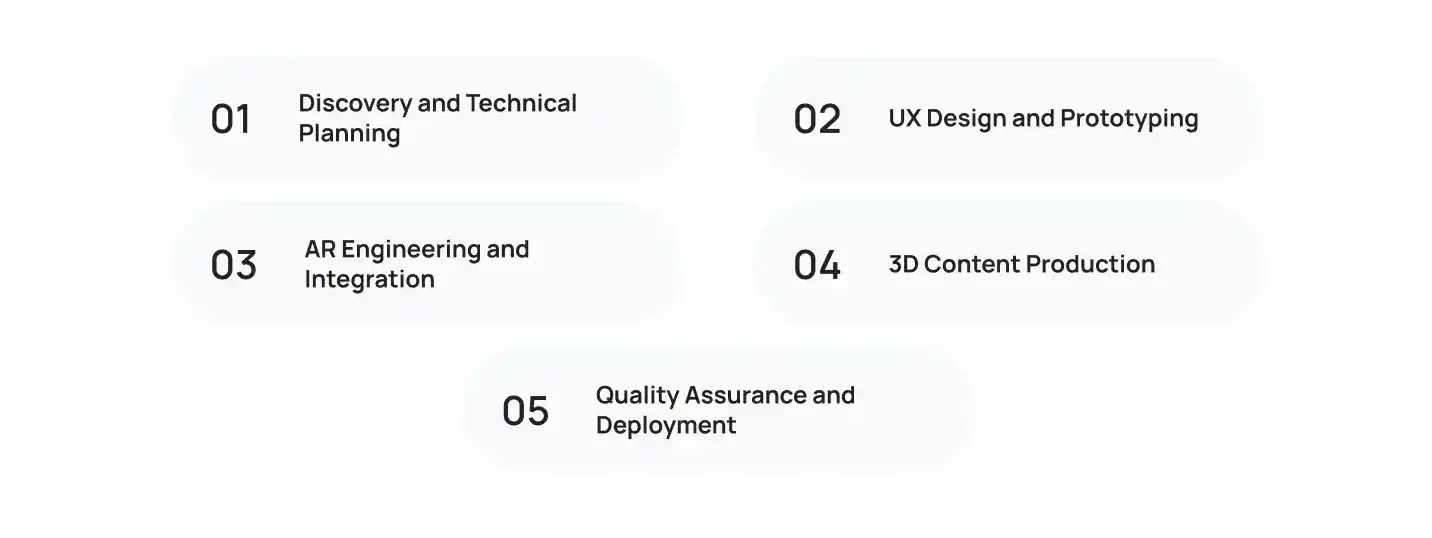
A useful AR app development estimate separates discovery, design, engineering, 3D content, testing, and delivery. The following figures are indicative estimates in USD for a typical project, not fixed quotes. Actual costs depend on app complexity, platform requirements, and the amount of custom AR functionality.
| Development Phase | Estimated Cost (USD) | Main Cost Drivers | Expected Deliverables |
|---|---|---|---|
| Discovery and technical planning | $8,000 | Requirements, feasibility, platform selection | Scope, technical plan, and initial estimate |
| UX design and prototyping | $$12,000 | User flows, interaction design, proof of concept | Wireframes, prototype, and validated workflows |
| AR engineering and integration | $70,000 | Tracking, rendering, application logic, APIs | Working AR functionality and integrations |
| 3D content production | 30,000+ | Modeling, texturing, animation, optimization | Production-ready 3D assets |
| QA and deployment | 15,000 | Device testing, bug fixes, performance checks | Tested release and deployment preparation |
| Project management | 15,000 | Coordination, reviews, documentation | Delivery oversight and project reporting |
1. Discovery and Technical Planning
Define the use case, features, target devices, and AR requirements, including marker-based tracking, markerless placement, depth effects, or geospatial features. Identify technical risks, unsupported devices, and missing 3D assets before development begins.
2. UX Design and Prototyping
Map user flows for scanning environments, placing objects, changing settings, and handling errors. Prototype complex interactions to validate usability and technical feasibility before full development.
3. AR Engineering and Integration
Build AR tracking, object placement, rendering, interactions, and backend integrations. Costs increase with complex features, such as configurable 3D products connected to a live product catalog.
4. 3D Content Production
Create or optimize 3D models, textures, materials, and animations for target devices. Confirm whether the deliverables include reusable source files or only optimized assets for the app.
5. Quality Assurance and Deployment
Test device compatibility, tracking accuracy, rendering, performance, and network interruptions. Deployment may include app-store submissions, release configuration, documentation, and handover. For broader scheduling considerations, see the guide to app development timelines.
What are the Hidden AR App Development Costs?
Hidden costs usually arise from expenses excluded from the initial quote, changes to the approved scope, or services that continue after launch. Ask providers to identify these items separately so the initial development estimate doesn’t become the entire budget by default.
1. AR SDK and Software Licensing
Some development tools and platforms have commercial licensing terms, usage limits, or subscription charges. Others may be available without a separate license fee for the intended use.
Check the terms of the specific SDK, plugin, or WebAR service, including commercial use, deployment limits, and recurring charges. Don’t assume that every AR framework requires a paid license or that a free SDK makes the overall project free to operate.
2. 3D Asset Revisions and Additional Content
The first set of product models may not cover every variant or visual requirement. Businesses may later request new colors, materials, animations, or additional products.
Budget separately for initial asset production and future content creation. If models need to be accurate to physical dimensions, establish the source of product measurements and the process for validating the finished assets.
3. Cloud Infrastructure and Content Delivery
Apps that retrieve models or product data remotely may incur hosting, storage, bandwidth, and content delivery costs. These expenses depend on asset sizes, traffic, caching, and how frequently content changes.
A catalog with many high-resolution models may need an asset delivery strategy that prevents long loading times and unnecessary data usage. Cost estimates should include both the infrastructure setup and expected usage.
4. Third-Party Services and Integrations
External APIs, analytics platforms, authentication services, product catalogs, and e-commerce systems may introduce subscription fees or usage-based charges.
Integration costs can also rise when the existing systems have limited documentation, inconsistent data, or restricted API access. Confirm these dependencies during discovery rather than assuming every system can be connected through a simple API call.
5. Device Testing and Compatibility
A limited test-device set may be sufficient for an initial prototype but inadequate for a public release with broad device coverage. Testing may reveal differences in tracking, camera quality, processing performance, and feature support.
If the app relies on specific hardware capabilities, define supported devices and fallback behavior early. Expanding compatibility after launch can require additional engineering and regression testing.
6. Scope Changes and Release Requirements
New features, additional integrations, design revisions, or changes to acceptance criteria can increase the cost beyond the original estimate. Platform account fees and release-related expenses may also apply, depending on the distribution method.
To control these costs, define what’s included in the contract, how changes are approved, and how extra work is priced.
For planning purposes, classify the budget into three groups:
- One-time costs: Discovery, initial development, and first-round asset production.
- Recurring costs: Hosting plans, commercial subscriptions, maintenance, and ongoing support.
- Usage-based costs: Bandwidth, API consumption, storage, or other charges that change with activity.
This gives decision-makers a clearer view of total cost of ownership (TCO).
WebAR vs. Native AR: Which Is More Cost-Effective?
WebAR can reduce upfront costs for simple, browser-based experiences, while native AR is better suited to applications that need advanced tracking or deeper device integration. The following estimates provide a starting point for comparing the options.
| Consideration | WebAR | Native AR |
|---|---|---|
| Estimated development cost | 40,000 | $120,000 |
| Typical timeline | 4–12 weeks | 3–5 months |
| Access | Browser link or QR code; no app installation | Users install an app on supported devices |
| Best fit | Marketing campaigns, product previews, simple AR experiences | Interactive product apps, advanced tracking, recurring use |
| Ongoing costs | Hosting, platform fees if applicable, browser testing | Maintenance, backend services, device testing, app updates |
| Main trade-off | Browser and platform limitations | Higher development and maintenance costs |
When Is WebAR a Cost-Effective Choice?
WebAR is worth considering when users need quick access without installing an app. For example, a retailer could offer a browser-based product preview through a QR code on packaging or a campaign page.
- Budget: Around 40,000 for a typical custom experience.
- Timeline: Approximately 4–12 weeks.
- Best fit: Short-term campaigns, simple product visualization, and experiences with limited interactions.
Check browser compatibility, tracking requirements, and any platform or hosting fees before committing to this approach.
When Is Native AR Worth the Additional Investment?
Native AR can justify its higher upfront cost when users need advanced tracking, deeper device integration, or a feature-rich experience they will return to regularly.
- Budget: Around 120,000 for a mid-complexity app.
- Timeline: Approximately 3–5 months.
- Best fit: Product configurators, advanced markerless placement, and applications requiring more control over native AR capabilities.
Supporting both iOS and Android can increase costs because each platform needs compatibility testing and potentially platform-specific engineering. Cross-platform frameworks can reduce code duplication, but they do not eliminate all additional work.
For a related cost comparison, see the guide to VR app development cost. VR shares some 3D development requirements with AR, but hardware and interaction requirements differ.
What Does It Cost to Maintain an AR App?

AR app maintenance typically requires a recurring budget for bug fixes, device compatibility, software licenses, cloud services, and 3D content updates. As a starting point, budget around 15%–25% of the initial augmented reality development cost annually for routine maintenance, with additional funding for major feature upgrades or extensive content changes.
For an AR app that costs $50,000 to build, this translates to approximately $12,500 per year, excluding substantial new features and unusually high infrastructure costs.
Recurring AR App Maintenance Expenses
| Expense | Estimated Cost (USD) | Typical Frequency |
|---|---|---|
| Bug fixes and performance monitoring | $$1,500/month | Ongoing |
| OS and device compatibility updates | $$5,000 per update cycle | As needed |
| SDK and software licensing | $1,000+/month | Monthly or annually |
| Cloud hosting, storage, and bandwidth | $1,000+/month | Monthly |
| Security updates | 3,000 per review or remediation cycle | Periodic |
| 3D content updates | 1,000+ per asset | As needed |
| Feature improvements | $15,000+ per enhancement | Based on roadmap |
These are indicative planning ranges, not published AR industry averages. Actual costs depend on support contracts, user traffic, asset complexity, licensing terms, and engineering rates. Some expenses overlap with a maintenance contract, so avoid counting the same work twice.
How Should You Estimate Total Cost of Ownership?
Estimate the total cost of ownership (TCO) by combining the initial build cost with expected maintenance, infrastructure, licensing, and content updates over your chosen period.
For example, a $50,000 AR app with annual maintenance budgeted at $$12,500 would have an estimated three-year cost of $87,500, before separate infrastructure fees, major upgrades, or other excluded expenses.
Before approving a budget, confirm:
- Monthly support and hosting charges.
- Annual SDK and software licensing fees.
- The number and frequency of 3D asset updates.
- Device compatibility and security update responsibilities.
- Whether new features are covered or billed separately.
A maintenance agreement should define response times, supported devices, included fixes, update responsibilities, and the pricing of additional work.
How Can You Reduce AR App Development Costs?

Focus your budget on the features that prove value, and test expensive technical requirements before committing to a full build.
1. Start With an AR MVP
Limit the first release to one use case and 3–5 core features. For example, launch a furniture preview with 10–20 products before building a full catalog, checkout, and product configurator. Define a success metric before development. Use this guide to validate an app idea before building it.
2. Reuse Existing 3D Assets
Audit CAD files, product models, and licensed assets before commissioning new models. Budget for conversion and optimization if needed, and verify usage rights.
3. Limit Initial Platform Coverage
Start with one platform or a clearly defined set of supported devices if that fits your audience. Expand coverage after validating demand, but test compatibility with the devices your target customers actually use.
4. Test the Riskiest AR Feature First
Build a small proof of concept for challenging requirements such as occlusion, object tracking, or large 3D models. This helps expose technical limitations before they affect the full project budget.
5. Compare Total Vendor Costs
Request itemized quotes covering engineering, 3D assets, QA, licenses, deployment, and post-launch support. Compare proposals against the same scope and deliverables, not just hourly rates.
6. Freeze the Initial Scope
Move nonessential features to a later release, define acceptance criteria, and require approval for paid change requests. Keep testing and asset optimization in the budget rather than cutting them to meet the initial estimate.
The goal is to reduce unnecessary work while retaining the features and quality needed to validate the AR experience.
How Do You Estimate Your AR App Budget?
Once the project requirements are defined, calculate the budget by combining development costs, third-party expenses, contingency, and post-launch operations.
Step 1: Calculate the Development Subtotal
Use the following estimates to calculate the initial augmented reality development cost. These are indicative planning ranges, and not every project will require the same level of investment in each phase.
| Development Phase | Estimated Cost (USD) |
|---|---|
| Discovery and technical planning | $8,000 |
| UX design and prototyping | $12,000 |
| AR engineering and integration | $70,000 |
| 3D content production | $$30,000+ |
| QA and deployment | $$15,000 |
| Project management | 15,000 |
Treat these figures as reference ranges, not a fixed package. Your final estimate should reflect the actual work required and avoid counting the same tasks across multiple phases.
Step 2: Add External and Operating Expenses
Account for costs that may sit outside the core development quote, including AR SDK licenses, cloud hosting, paid APIs, app-store accounts, and ongoing content services. Ask providers to identify which charges are included and which will be billed separately.
Step 3: Include a Contingency Reserve
For preliminary planning, set aside an additional 10%–20% of the estimated development subtotal for unforeseen expenses. Adjust this reserve based on how much technical uncertainty remains and how firmly the requirements are defined.
Example: If the development subtotal is $50,000 and you reserve 15% for contingency, your initial budget becomes $57,500, before external expenses and ongoing maintenance.
Step 4: Calculate the Total Cost of Ownership
Estimate the full cost over your intended planning period, such as three years:
Total budget = Initial development + External expenses + Contingency + Maintenance and future updates
Include recurring licenses, infrastructure, support, and planned content updates. Keep one-time development costs separate from recurring expenses so you can see both the upfront investment and the long-term financial commitment.
The result is a more useful budget than a single development quote because it accounts for the costs of launching, operating, and maintaining the AR application.
Conclusion
AR app development costs range from a few thousand dollars for a focused prototype to hundreds of thousands for a feature-rich or enterprise application. The main variables are the tracking technology, 3D content, platform coverage, integrations, team structure, and long-term maintenance requirements.
Before committing to a budget, define the core use case, confirm which devices must be supported, and test the most technically demanding feature. Then compare itemized quotes that cover development, assets, QA, licensing, and post-launch support. This gives you a more realistic view of both the initial investment and the cost of operating the application over time.
If you’re planning an AR product and need help defining the right scope, Cubix’s AR VR app development services can help you assess the technical requirements, prioritize features, and plan a development budget around your business needs.
Have an AR App Idea? Let's Put a Realistic Price on It
Contact UsFrequently Asked Questions
1. How much does AR app development cost?
AR app development can cost around 20,000 for a basic prototype and 150,000+ for more involved shopping or virtual try-on experiences. Enterprise applications can exceed $300,000. The final price depends on features, platforms, 3D assets, integrations, and testing.
2. What are the cheapest ways to build an AR app?
Start with an MVP, limit the initial feature set, reuse suitable 3D assets, and support only the devices needed for the first release. Validate technically complex features early rather than cutting essential testing.
3. What drives the cost of an AR app?
The main factors are tracking technology, platform choice, 3D model production, UI/UX design, backend integrations, device coverage, and QA. Shared experiences and advanced depth or occlusion requirements can add further complexity.
4. How long does AR app development take?
A limited prototype may take a few weeks, while a production application can take several months or longer. The timeline depends on scope, asset readiness, integrations, device testing, and how quickly requirements are approved.
5. Is an AR app worth the investment for my business?
It can be worthwhile when AR solves a measurable problem, such as helping customers visualize products, supporting complex training, or improving field workflows. Define success metrics and test the use case before committing to a larger build.
6. Do AR apps need ongoing maintenance costs?
Yes. Depending on the application, recurring expenses may include bug fixes, compatibility updates, cloud infrastructure, SDK licenses, security work, and new 3D content. The amount depends on the app’s technical scope and support requirements.
7. Should I build a native or cross-platform AR app to save money?
Cross-platform development may reduce duplicated application work, but advanced AR features can still require platform-specific engineering. Native development may be a better fit when the app depends on deeper platform capabilities. Choose based on the required experience, not code reuse alone.
8. How much do 3D models add to the budget?
The cost depends on the number of models, detail, textures, animations, variants, and optimization work. Existing CAD or 3D files may reduce production effort, but they often need conversion and cleanup before they are suitable for real-time AR.
9. Can I start with an AR MVP?
Yes. An MVP can test one core use case with limited features and a focused set of assets. It helps validate technical feasibility and user demand before the business invests in advanced tracking, extensive catalogs, or enterprise integrations.
10. How do I get an accurate AR app quote?
Prepare the use case, target platforms, tracking requirements, 3D asset specifications, integrations, supported devices, and post-launch expectations. Ask providers to itemize deliverables, assumptions, exclusions, testing, and ongoing costs.