
Key Takeaways
- A mobile app product roadmap is a strategic plan that outlines the key stages of an app’s journey, from the initial idea and design through MVP development, launch, and ongoing improvements.
- Overbuilding wastes money, slows launches, and confuses users.
- Frameworks like RICE, MoSCoW, Kano, and Value vs. Effort help you decide what to build first.
- Your MVP should solve one problem well, not ten problems poorly.
- User feedback and product analytics should drive roadmap changes, not guesswork.
- Technical debt and dependencies deserve a spot on your roadmap too.
- A partner like Cubix can help you scope smart and build lean.
Up to 80% of app features go rarely used or completely ignored. Teams build them. Users skip them. That’s a lot of wasted time and money.
As mobile apps become increasingly central to everyday life, the global mobile application market is valued at approximately $330 billion in 2026.
Prioritization is the real skill in product management. Anyone can list features. Very few people can say no to the wrong ones. A good roadmap forces those hard choices early, before you burn the budget on things nobody asked for.
This guide breaks down how to build a mobile app product roadmap that actually works. We’ll cover proven frameworks, real data, and simple steps you can use today. If you’re planning your build with a mobile app development company, this roadmap thinking applies from day one.
Want to discuss your project? Our experts are just a click away.
Contact UsWhat Is a Mobile App Product Roadmap?
A mobile app product roadmap is a working document that maps prioritized features and initiatives against your product goals, laid out over a set time horizon. It’s built to guide decisions, not to promise exact delivery dates.
Most functional roadmaps contain the same five pieces:
- A product goal: The outcome you’re driving toward, like improving activation or growing paid conversions.
- Themes: Grouped areas of work, such as onboarding, monetization, or retention, instead of a flat list of features.
- Prioritized initiatives: What’s being worked on now, what’s next, and what’s parked for later.
- A time horizon: Usually mapped in quarters rather than fixed calendar dates, since mobile scope shifts often.
- Success metrics: The number that tells you whether a theme actually worked once it ships.
Roadmaps also come in different formats, and picking the wrong one is a common mistake:
| Roadmap Format | How It’s Structured | Best Fit |
| Now / Next / Later | Three buckets, no fixed dates | Early-stage apps with fast-changing priorities |
| Quarterly Timeline | Features mapped to specific quarters | Apps with stakeholders who need date commitments |
| Theme-Based | Grouped by outcome, like retention or growth | Teams running the roadmap against OKRs |
| Release-Based | Organized by version number, like v1.2, v1.3 | Apps with a fixed, recurring release cycle |
One thing mobile roadmaps have to account for that web roadmaps don’t: platform review time. Apple’s App Store review typically takes around 24 to 48 hours for most submissions, though major updates or first-time apps can take longer. Google Play review is usually faster, often just a few hours. Build that buffer into your timeline, or your “next Tuesday” release quietly becomes next Thursday.
Why Feature Prioritization Matters More Than Ever
App stores are crowded. Users have zero patience for clutter. If your app feels bloated, they’ll delete it and move on. Roughly 35% of startups fail because they build something the market never wanted. That’s not a coding problem. That’s a prioritization problem.
Poor prioritization also drives up cost. Every feature you build costs money to design, test, and maintain later. Skipping the ones nobody needs protects your budget. This ties directly into overall mobile app development cost, which climbs fast when scope creeps.
It also affects how smoothly your build goes. Teams that fail to prioritize well often run into the same mobile app development challenges again and again: missed deadlines, confused developers, and features nobody tests properly.
The Real Cost of Overbuilding Your App
Overbuilding feels productive. It isn’t. You’re adding weight to an app that should stay light and fast.
Studies on feature usage suggest that up to 45% of built features never get touched by users, and another chunk gets used only rarely. That’s nearly half your development effort going nowhere.
Maintaining unused features isn’t free either. Every screen, every button, every backend service needs upkeep. That upkeep adds to your long-term mobile app maintenance costs, even if users never open that part of the app.
Signs You’re Overbuilding vs. Building Right
| Overbuilding Signs | Building Right Signs |
| Feature list grows every sprint | Feature list shrinks as priorities get clearer |
| Users ignore new features after launch | Users actively request more of what’s there |
| Team can’t explain why a feature exists | Every feature ties to a clear goal |
| Release dates keep slipping | Releases stay predictable |
| App feels cluttered and slow | App feels focused and fast |
How to Prioritize Features for a Mobile App Roadmap
Prioritization isn’t a one-time task. It’s a habit. Build it into every planning session. Start small. Your first version doesn’t need everything. This is exactly why mobile app development MVP thinking works so well. You launch with the core value, then expand based on real usage.
Some teams even manage to develop an MVP in less than a month when they cut scope ruthlessly and focus on one core problem.
Start With Product Outcomes and OKRs, Not a Feature Wishlist
Before you list features, list outcomes. What should change for your users? What should change for your business?
Teams that tie their roadmap to OKRs are roughly twice as likely to hit their product goals compared to teams working off loose feature ideas. Outcomes keep everyone honest about what actually matters.
Map Features to User Stories and Acceptance Criteria
Every feature should trace back to a user story. Something like: “As a new user, I want to reset my password so I can get back into my account.”
Then write acceptance criteria. These are the specific conditions that make the feature “done.” This keeps scope tight and prevents feature creep during development.
Top Feature Prioritization Frameworks (With Examples)
RICE Framework (Reach, Impact, Confidence, Effort)
RICE scores each feature on four factors, then combines them into one number. Higher score, higher priority.
Teams using structured scoring models like RICE often cut planning debates by close to 40%, simply because the math replaces the arguing.
| Feature | Reach | Impact | Confidence | Effort | RICE Score |
| Push Notifications | 8000 | 3 | 90% | 2 | 10,800 |
| Dark Mode | 5000 | 1 | 80% | 1 | 4,000 |
| AR Try-On | 2000 | 3 | 60% | 5 | 720 |
MoSCoW Prioritization (Must, Should, Could, Won’t)
MoSCoW sorts features into four simple buckets. Must-have. Should-have. Could-have. Won’t-have this time.
Projects using MoSCoW report noticeably fewer mid-development scope changes, since everyone agrees upfront on what “must” ship.
Kano Model (Delighters vs. Basics)
Kano groups features by how they affect satisfaction. Basic features stop complaints. Performance features increase satisfaction steadily. Delighters create surprise and loyalty.
Apps that include a few well-placed delighter features can see user satisfaction scores climb by over 25%. Small surprises go a long way.
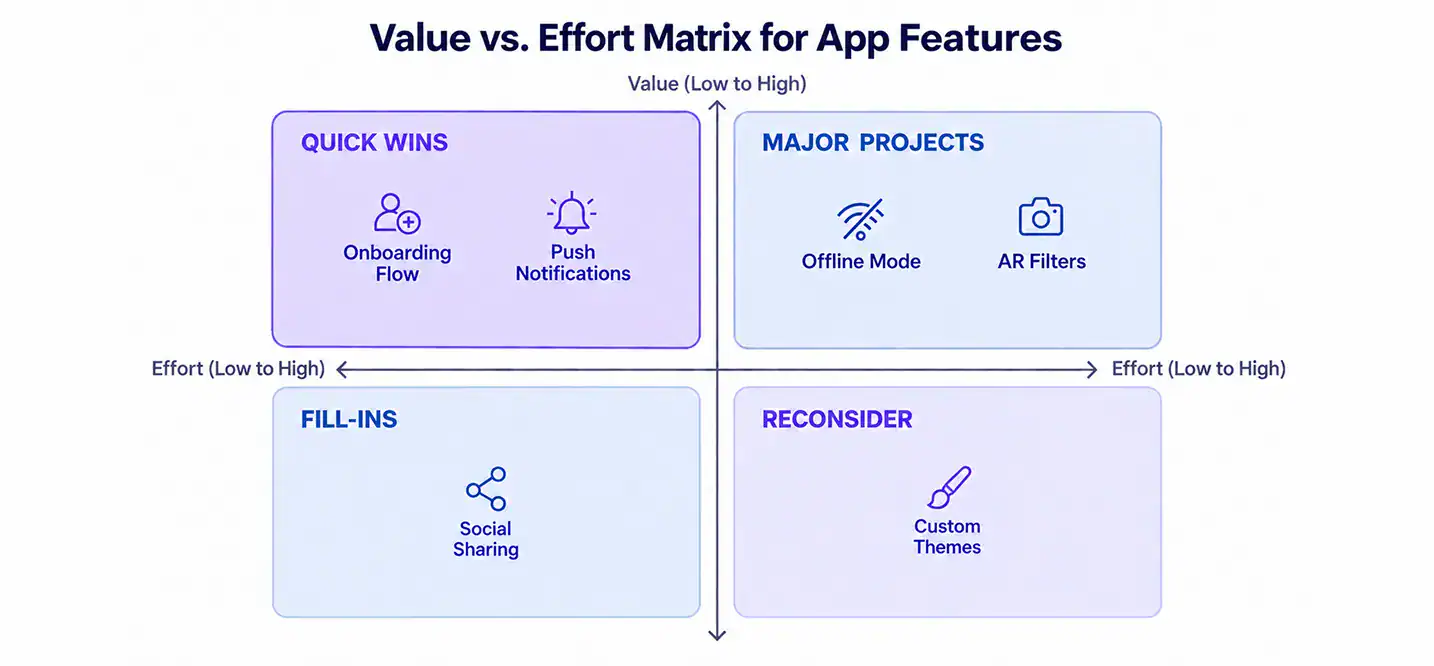
Value vs. Effort Matrix
This one is visual and fast. Plot every feature on two axes: value to the user and effort to build. Quick wins sit in the top left. Big bets sit in the top right. Everything else waits.
Cost of Delay and Opportunity Scoring
The cost of delay asks a different question. What does it cost you to wait on this feature? Delaying a high-value feature by even one quarter can mean losing 10 to 15% of its potential revenue impact. Speed matters, but so does sequencing.
Which Prioritization Framework Fits Your App Stage
| Framework | Best For | Pros | Cons |
| RICE | Data-rich teams | Objective, numbers-based | Needs good data inputs |
| MoSCoW | Fast-moving teams | Simple, fast agreement | Can feel subjective |
| Kano | Mature apps adding delight | Focuses on satisfaction | Needs user surveys |
| Value vs. Effort | Early-stage teams | Visual, quick to run | Less precise |
| Cost of Delay | Revenue-focused teams | Ties priority to money | Requires revenue estimates |
Managing the Backlog: A Kanban Approach to Feature Prioritization
A fixed, static backlog breaks down fast in mobile app development. Priorities shift. Users surprise you. Your process needs room to move with that.
A Kanban-style board handles this better than one long frozen list. Features move through stages, and only a limited number can sit in each stage at once. That single rule changes how a team behaves:
- Nothing sits forever. Once a column fills up, nothing new enters until something moves out.
- It forces real tradeoffs. You can’t just keep adding features without removing something first.
- Bottlenecks become visible. Everyone can see exactly where things are stuck, and why.
That structure also fixes a common mistake: calling a feature “done” the moment it ships.
A feature isn’t really finished until it’s validated. That means it has to prove it solves an actual user problem, not just exist in the app. Validation comes from a few places:
- Changed sentiment in app store reviews
- Direct user interviews
- Real behavior once the feature goes live
If a shipped feature doesn’t move any of these, it goes back for another look. It doesn’t get to sit on the roadmap collecting dust as a false win.
Dependencies and technical debt belong on this board too, not off to the side as an afterthought:
- Some features can’t move until others are finished. Payment tools need working account systems in place first, for example.
- Ignoring technical debt has a real cost. It can slow future releases by as much as 50%, since every new build has to fight through old, messy code.
- Debt needs its own column and its own priority. Otherwise it never gets touched, and it quietly slows down everything else.
A clear app development process makes this kind of dependency mapping far easier from the start. The same discipline also supports scalable mobile app development later on, once the codebase and the team both get bigger. If you’re still shaping your build approach, these tips for building a custom mobile app pair well with this kind of backlog discipline.
KPIs That Should Actually Drive Your Roadmap
Not every number deserves a seat at the planning table. A handful of KPIs tell you almost everything you need to know about what to build next.
| KPI | What It Measures | How It Shapes the Roadmap |
| User Reach | Total users active in a given period, segmented by plan type | Shows which segment to prioritize features for |
| DAU / MAU | Daily or monthly active users performing a real action | Tells you if a feature is pulling people back in |
| MRR | Total monthly recurring revenue from subscriptions or purchases | Flags whether a feature is worth its build cost |
| ARPU | Average revenue per active user | Highlights which user segment to build for next |
| Churn Rate | Percentage of users who stop using or uninstall the app | Warns you when a recent release did more harm than good |
| Retention Rate | Percentage of users who keep coming back over time | Confirms whether a feature actually created stickiness |
| Customer Lifetime Value | Total revenue from a user across their time in the app | Shows how much room you have to invest in bigger features |
How Cubix Helps You Build a Roadmap That Actually Works
Planning a roadmap on paper is one thing. Executing it without scope creep is another challenge entirely. Cubix has spent years helping companies scope apps the right way, starting lean and expanding based on real user data instead of assumptions.
That approach follows the same custom mobile app development guide principles covered throughout this article: outcomes first, features second.
Instead of handing clients a long feature list to sign off on, Cubix works through prioritization frameworks like the ones above, matching each feature to actual business goals before a single line of code gets written.
Start lean, grow with data, and avoid the trap of building for the sake of building. If you want help getting the scope right from the start, Cubix can walk through it with you.
Want to discuss your project? Our experts are just a click away.
Contact UsFrequently Asked Questions
It should include your product goals, prioritized features, rough timelines, and dependencies. Keep it high-level. Save detailed tasks for the backlog.
Score features using a framework like RICE or MoSCoW, tie each one to a clear user or business outcome, and cut anything that doesn’t move the needle.
There isn’t one best option. RICE works well for data-heavy teams. MoSCoW works well for fast decisions. Pick based on your team’s stage and data availability.
Start with a lean MVP, track real usage data after launch, and only add features once demand is proven. Say no more often than you say yes.
Include only what’s needed to solve the core user problem. If the app still works without a feature, it probably belongs in a later release.
Collect it constantly, tag it by theme, and compare it against your existing goals before adding anything new to the plan.
Not every request fits your direction. Weigh each one against your roadmap priorities and only accept requests that support your bigger goals.
Yes. Skipping technical debt slows everything down later. Give it dedicated time each release cycle, not just leftover time.
Review it monthly in early stages and quarterly once your app stabilizes. Update it whenever new data changes your priorities significantly.
Look at feature usage, retention, churn, and user feedback volume. Let real behavior guide what ships next, not internal opinions alone.