Key Takeaways
- Enterprise cloud computing replaces owned data centers with on-demand, virtualized infrastructure, cutting capital costs and speeding up delivery.
- Public, private, hybrid, and multi-cloud are the four core deployment models. Each fits a different mix of cost, control, and compliance needs.
- A full enterprise cloud migration typically costs between $250,000 and over $1,000,000, depending on scope, data volume, and compliance requirements.
- Security is the top adoption concern. Gartner projects that through 2025, 99% of cloud security failures will trace back to customer-side misconfiguration, not the provider.
- A clear migration strategy, covering infrastructure assessment, model selection, data planning, and ongoing monitoring, keeps downtime and cost overruns in check.
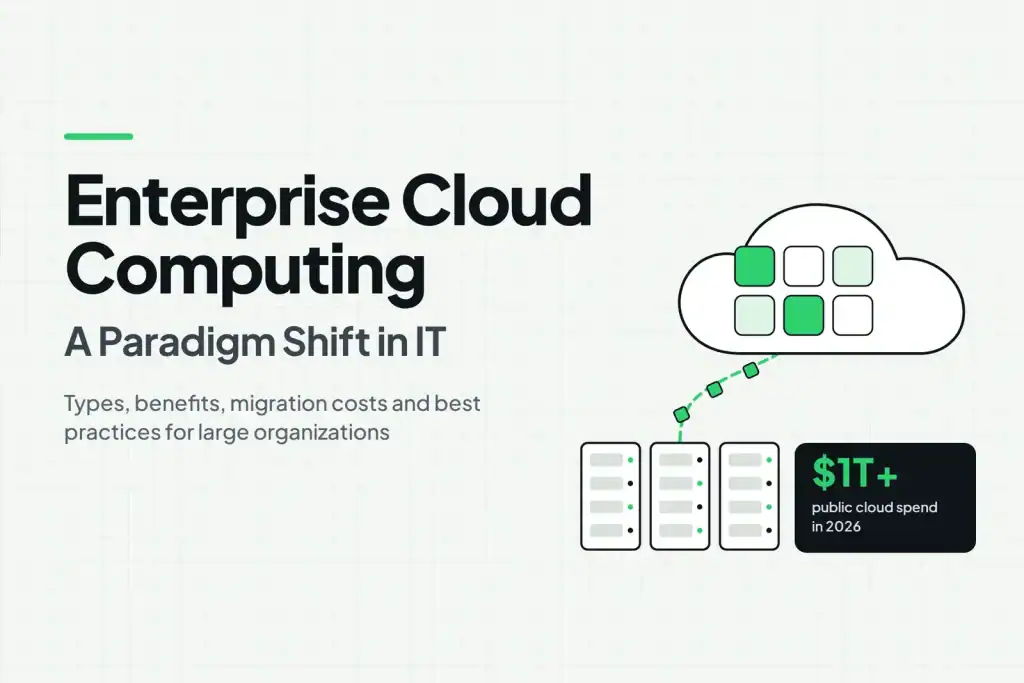
Global public cloud spending is on track to cross $1 trillion in 2026, driven by PaaS and AI platform adoption, growing more than 21% year over year and expected to double again by 2029. That growth is not accidental. Enterprises are rethinking how they build, run, and secure their IT systems, and enterprise cloud computing sits at the center of that shift. In fact, this move reflects a broader cloud computing paradigm shift in IT that is reshaping how large organizations plan technology budgets and staff their teams.
This guide breaks down what enterprise cloud computing means, how it compares to traditional IT infrastructure, what it costs, and how to plan a migration that works for a large organization. You will also find the main service models, common concerns, and best practices you need before making the move. For a wider view of where the technology is headed, see our breakdown of cloud computing trends reshaping the digital landscape.
What Is Enterprise Cloud Computing?
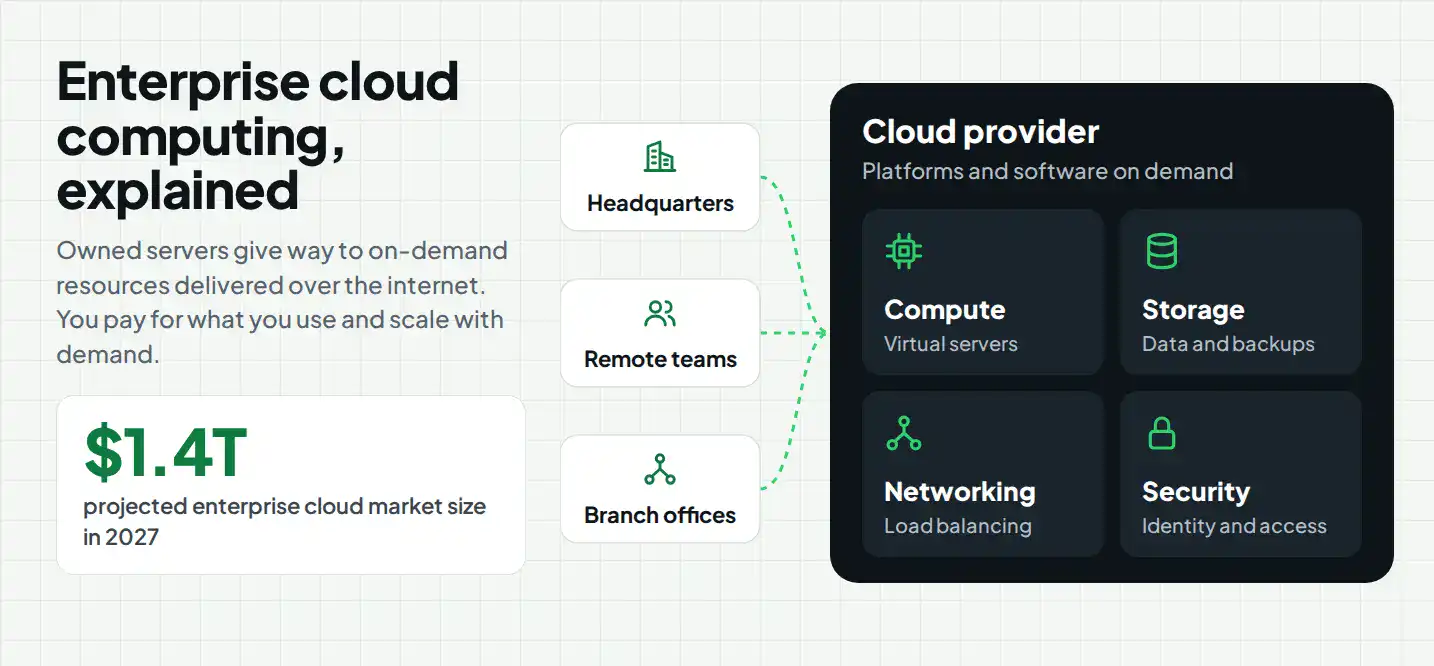
Enterprise cloud computing refers to cloud infrastructure, platforms, and software built for large organizations with complex workloads, compliance obligations, and distributed teams. The global enterprise cloud computing market is projected to reach $1.4 trillion in 2027, reflecting the growing adoption of cloud technologies across large organizations.
At its core, this model swaps owned servers for virtualized, on-demand computing resources delivered over the internet. You pay for what you use, scale capacity up or down as demand shifts, and hand off most hardware maintenance to your cloud provider. Because the shift touches storage, security, and application development at once, most enterprises treat it as a company-wide initiative rather than a single department’s project.
Enterprise Cloud vs. Traditional IT Infrastructure
The differences show up fastest when you compare cost, speed, and recovery.
| Factor | Traditional IT Infrastructure | Enterprise Cloud Computing |
|---|---|---|
| Upfront cost | High (servers, data centers, licensing) | Low (pay-as-you-go) |
| Scaling | Manual, limited by hardware | On-demand and elastic |
| Maintenance | Handled by an in-house team | Managed largely by the provider |
| Deployment speed | Weeks to months | Minutes to hours |
| Disaster recovery | Requires a separate backup site | Built into most cloud platforms |
Traditional infrastructure still works for a handful of use cases, mainly workloads with strict data residency rules or legacy systems that resist migration. For most other workloads, the cloud model wins on speed and cost.
Types of Enterprise Cloud Computing
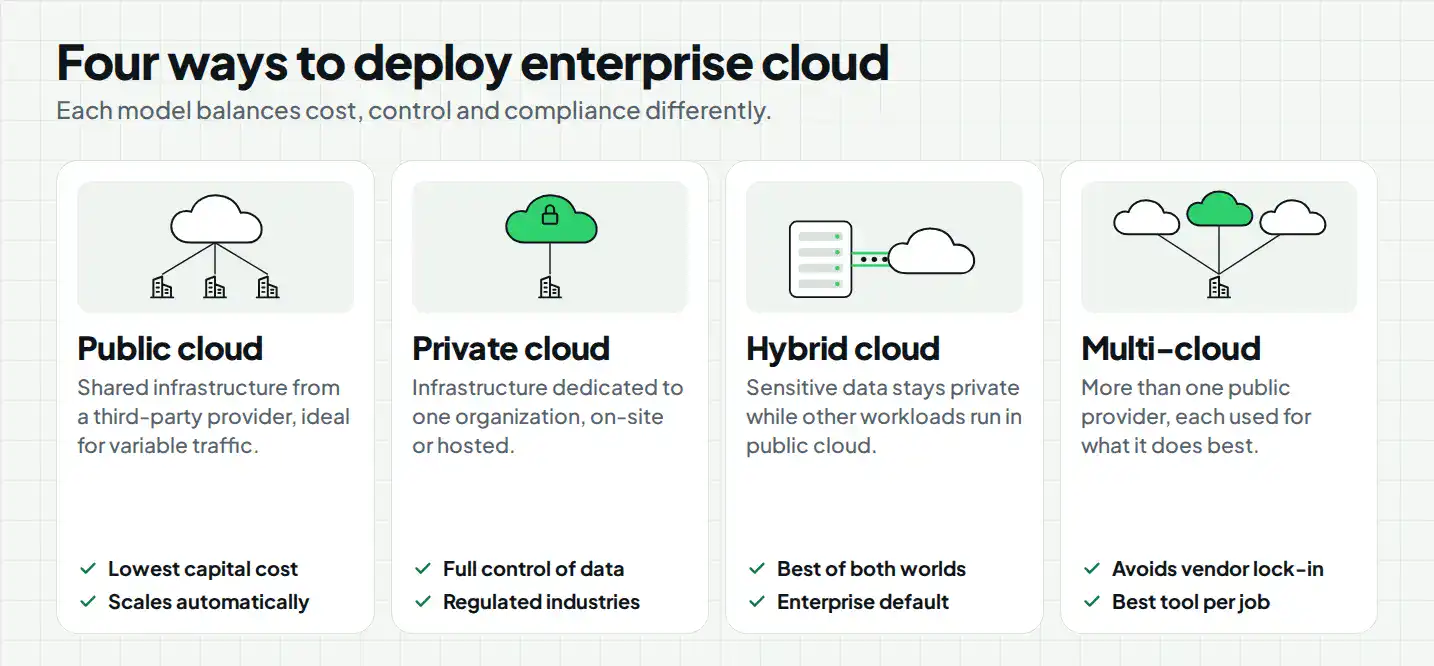
The main enterprise cloud computing deployment models include public cloud, private cloud, hybrid cloud, and multicloud. Each model offers a different approach to managing infrastructure, applications, data, and workloads based on an organization’s specific needs.
1. Public Cloud
Public cloud infrastructure runs on shared servers owned by a third-party provider, such as AWS, Microsoft Azure, or Google Cloud. Enterprises get low upfront costs and near-unlimited scale but share physical infrastructure with other tenants.
- Best for web applications, dev and test environments, and workloads with variable traffic
- Lowest capital cost among the four models
- Scales automatically as demand grows
2. Private Cloud
A private cloud dedicates infrastructure to a single organization, either hosted on-site or by a provider. It suits enterprises with strict compliance rules, such as healthcare or finance.
- Full control over security configurations and data location
- Higher cost than public cloud, but better for sensitive workloads
- Common in regulated industries with strict audit requirements
3. Hybrid Cloud
Hybrid cloud combines public and private environments, letting enterprises keep sensitive data on private infrastructure while running less sensitive workloads on public cloud. This hybrid cloud enterprise architecture has become the default setup for large organizations. Globally, 94% of enterprises now run workloads in the cloud, and hybrid or multi-cloud architectures have become standard for resilience and AI workloads.
- Balances cost, control, and compliance in one setup
- Supports workload placement based on sensitivity and performance needs
- Requires strong integration between environments to avoid data silos
4. Multi-Cloud
Multi-cloud means using more than one public cloud provider at once, often to avoid vendor lock-in or to use each provider’s strongest services. A retail enterprise might run its e-commerce front end on one provider and its data analytics on another.
- Reduces dependency on a single vendor
- Lets teams choose the best tool for each workload
- Adds complexity to security and cost management, so it needs careful governance
Benefits of Enterprise Cloud Computing
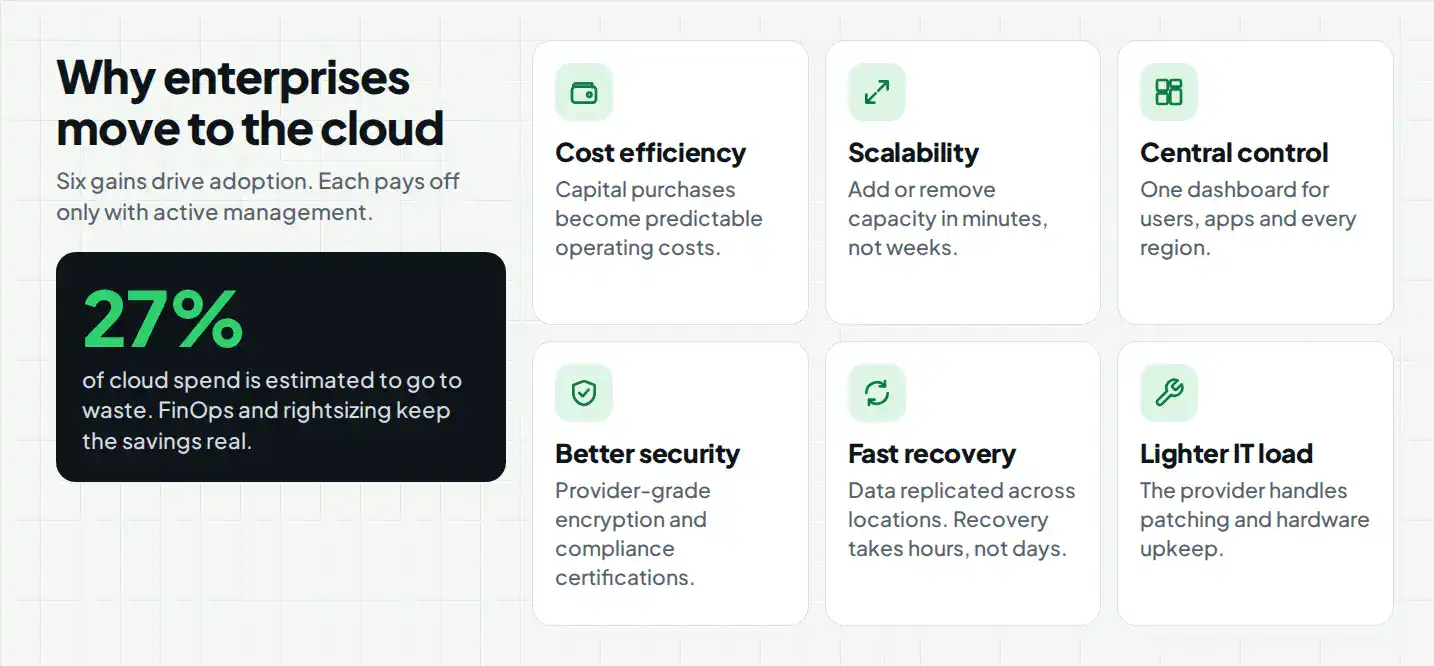
The enterprise cloud computing benefits below explain why adoption keeps climbing despite the added complexity of managing distributed systems.
1. Cost Efficiency and Utility Pricing
Cloud computing shifts IT spending from large capital purchases to predictable operating costs. However, that shift only pays off with active management. Organizations estimate that 27% of their cloud spend goes to waste, which is why FinOps practices and regular rightsizing matter as much as the migration itself.
2. Scalability and Agility
Enterprises can add or remove computing capacity in minutes instead of ordering new hardware. This matters most during seasonal spikes, product launches, or sudden traffic surges, when traditional infrastructure would require weeks of lead time.
3. Centralized Management and Control
Cloud platforms give IT teams a single dashboard to manage users, applications, and resources across regions. As a result, enterprises spend less time reconciling systems and more time on strategic work.
4. Enhanced Security and Compliance
Leading cloud providers invest heavily in physical security, encryption, and compliance certifications that most enterprises could not replicate on their own. That said, strong enterprise cloud governance and security still depend on how well the customer configures access controls and monitors activity, since the provider only secures part of the stack.
5. Business Continuity and Disaster Recovery
Cloud platforms replicate data across multiple locations by default, so a single hardware failure or regional outage does not take down the entire system. Recovery that once took days can now happen in hours.
6. Reduced IT Burden
Because the provider handles patching, hardware replacement, and much of the underlying maintenance, internal IT teams can focus on applications and business priorities instead of keeping servers running.
How Much Does Enterprise Cloud Migration Cost?
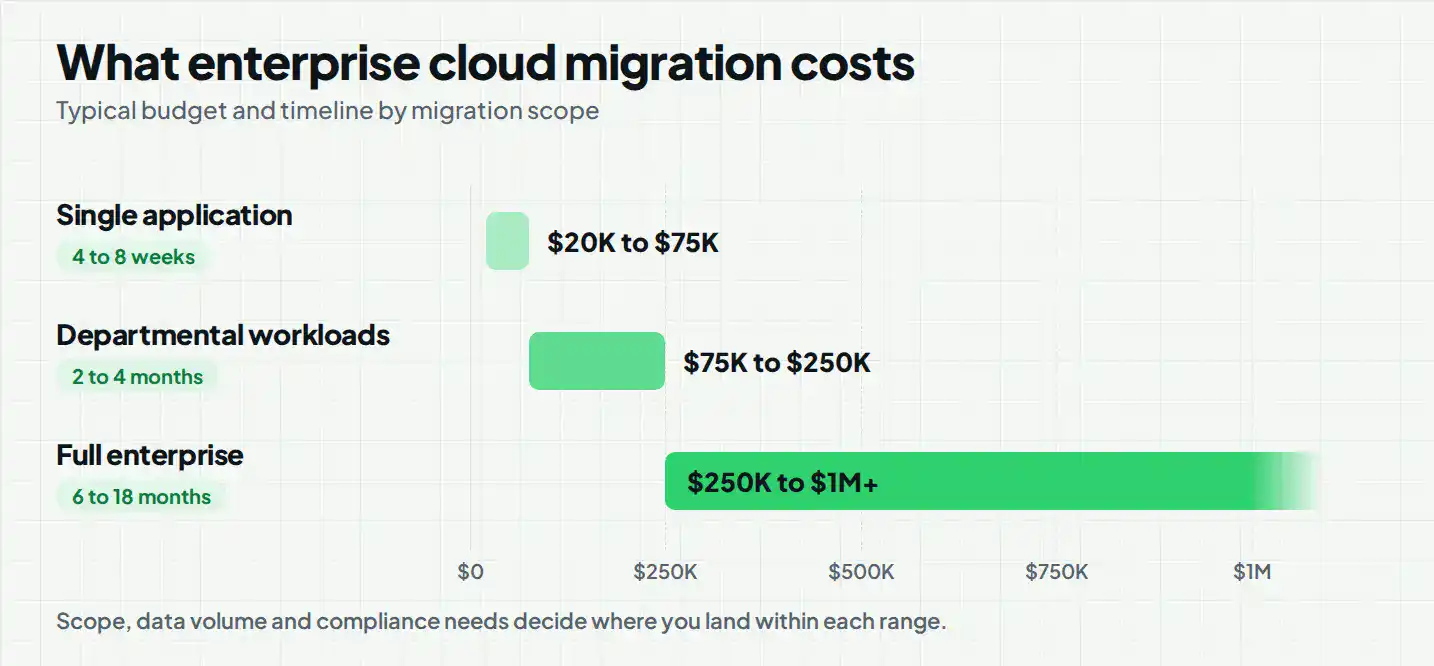
Enterprise cloud migration cost depends heavily on scope. A single application move costs far less than a full infrastructure overhaul, and the table below shows typical ranges for each.
| Migration Scope | Cost Range | Timeline | What’s Included |
|---|---|---|---|
| Single application migration | $20,000 to $75,000 | 4 to 8 weeks |
App refactoring, testing, cutover |
| Departmental workload migration | $75,000 to $250,000 | 2 to 4 months | Multiple app migration, data transfer, integration |
| Full enterprise migration | $250,000 to $1,000,000+ | 6 to 18 months | Infrastructure overhaul, security hardening, staff training |
Core Components of Enterprise Cloud Computing
Enterprise cloud computing relies on several core components, including compute resources, cloud storage, networking, databases, identity management, and security tools. T
Cloud Infrastructure
The virtualized servers, storage, and compute resources that replace physical data centers. This is the foundation everything else runs on.
Data Storage and Databases
Cloud-based storage and managed databases handle structured and unstructured data at scale, with automatic backups and replication built in.
Networking
Virtual networks, load balancers, and content delivery systems connect users to applications reliably, regardless of where those users or the underlying servers sit.
Security and Identity Management
Identity and access management tools control who can reach which resources. This layer is where most cloud breaches actually start, so it deserves the most attention during setup.
Monitoring and Management Tools
Dashboards and alerting systems track performance, cost, and security events in real time, giving IT teams the visibility to catch problems before they affect users.
What Are Enterprise Cloud Computing Service Models?
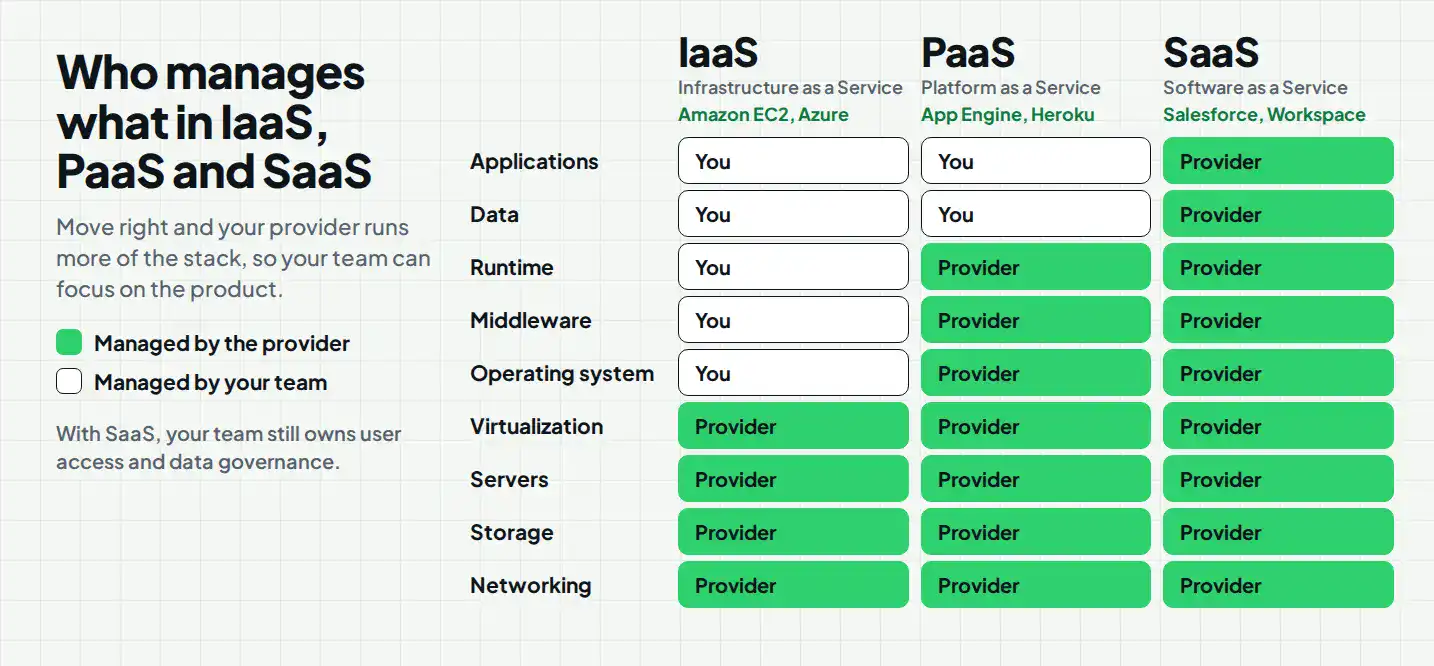
Enterprises typically choose from four service models based on how much control they want versus how much they want the provider to manage.
| Service Model | What You Manage | What the Provider Manages | Best Used For | Common Examples |
|---|---|---|---|---|
| IaaS (Infrastructure as a Service) | Operating systems, applications, and data | Physical servers, storage, networking, and virtualization | Maximum control and flexible scaling of raw IT resources | Amazon EC2, Microsoft Azure |
| PaaS (Platform as a Service) | Application code and custom logic | Operating systems, middleware, databases, and underlying infrastructure | Streamlining app development and testing without managing servers | Google App Engine, Heroku |
| SaaS (Software as a Service) | User access, data governance, and usage | The entire application stack, infrastructure, maintenance, and security | Ready-to-use, end-user business applications accessible via web | Salesforce, Google Workspace |
Enterprise Cloud Computing Use Cases
Data Analytics and AI
Cloud platforms give enterprises the compute power to train models and process large datasets without buying dedicated hardware. Our look at AI trends shaping enterprise IT covers how this is changing the way large organizations approach data strategy.
Application Development
Development teams use cloud platforms to spin up test environments instantly, ship updates faster, and roll back changes without risking production systems.
Disaster Recovery
Cloud-based backup and failover systems let enterprises recover from outages in hours instead of days, without maintaining a costly secondary data center.
Remote Work and Collaboration
Cloud-hosted applications and file systems let distributed teams access the same data and tools from anywhere, which has become a baseline expectation rather than a bonus.
Business Process Automation
Enterprises connect cloud services to automate repetitive workflows, from invoice processing to customer onboarding, reducing manual work and errors.
Enterprise Cloud Migration Strategy
Cloud transformation in enterprise IT rarely happens overnight. A solid enterprise cloud migration strategy moves through five stages, and skipping any of them tends to show up later as downtime or cost overruns.
1. Assessing Existing Infrastructure
Start by cataloging current applications, dependencies, and data flows. You cannot plan a migration around systems you have not fully mapped.
2. Choosing the Right Cloud Model
Match each workload to public, private, hybrid, or multi-cloud based on compliance needs, cost targets, and performance requirements.
3. Planning Data and Application Migration
Sequence the migration so critical systems move with minimal disruption. Most enterprises migrate in phases rather than all at once.
4. Testing and Deployment
Run workloads in parallel before full cutover, so you catch integration issues while the old system still runs as a fallback.
5. Monitoring and Optimization
Once live, track performance and cost continuously. Cloud environments drift over time, and regular tuning keeps spend and performance in line with actual usage.
Common Concerns in Adopting Enterprise Cloud Computing
Security vulnerabilities, complex compliance, and unpredictable costs are the concerns that come up most often when enterprises weigh a move to the cloud. More than half of organizations, 55%, say the cloud is harder to secure than on-premises infrastructure because of its complexity and shared responsibility model.
Key concerns enterprises raise most often:
- Security and Shared Responsibility: Traditional security models do not map cleanly onto the cloud. Enterprises often misunderstand the shared responsibility model, leaving data exposed to misconfiguration. This gap matters because Gartner projects that 99% of cloud security failures through 2025 will be the customer’s fault, not the provider’s.
- Compliance and Governance: Meeting data privacy laws like GDPR gets harder when a provider moves data across international data centers. Strong enterprise cloud governance and security practices need to account for where data physically lives, not just how it is encrypted.
- Cost Management: Cloud expenses can spiral without active oversight. Dynamic scaling makes long-term budgeting difficult, and in some cases, public cloud ends up costing more than the on-premises hardware it replaced.
- Vendor Lock-In: Relying on one provider’s proprietary tools makes it costly and slow to migrate or refactor applications later.
- Skills Shortage: A shortage of trained cloud security specialists and internal IT talent slows down proper governance and deployment. 82% of enterprises are already adjusting their cloud approach in response to regulatory and geopolitical pressure, which only adds to the skills gap.
Enterprise Cloud Computing Best Practices
Security-First Architecture
Build access controls and encryption into the design from day one instead of layering them on after deployment.
Cost Monitoring
Set budget alerts and review spend weekly, not quarterly, so waste gets caught before it compounds.
Backup and Disaster Recovery
Test your recovery plan on a schedule. A backup you have never restored from is not a plan you can rely on.
Access Controls
Apply least-privilege access by default, and review permissions regularly as teams and projects change.
Regular Performance Monitoring
Track latency, uptime, and resource usage continuously, so small issues get caught before they turn into outages.
Enterprise Cloud Computing with Cubix
Cubix works as a custom enterprise cloud development company for organizations that need more than a generic migration checklist. Our team designs cloud development services around your specific compliance needs, existing systems, and growth plans, rather than forcing your infrastructure into a one-size-fits-all template.
For enterprises building data-heavy applications, Cubix also delivers custom machine learning development through our dedicated machine learning development services, covering everything from predictive analytics to automated decision systems that run natively on your cloud environment.
Whether you are planning your first migration or optimizing an existing setup, our enterprise cloud consulting services cover assessment, architecture, security hardening, and ongoing support. If your organization is weighing the shift to enterprise cloud computing, talk to our team before you commit to a provider or a timeline.
Ready to migrate? Partner with Cubix for seamless cloud transformation
Contact UsFrequently Asked Questions
1. What are the four types of cloud computing?
The four main types are public cloud, private cloud, hybrid cloud, and multi-cloud. Each balances cost, control, and compliance differently, and most enterprises use a combination rather than relying on just one.
2. What does “enterprise cloud” mean?
Enterprise cloud refers to cloud infrastructure and services built specifically for large organizations, with a focus on security, compliance, centralized governance, and support for complex, distributed workloads.
3. What is an example of enterprise computing?
A large retailer running its inventory management, customer data, and e-commerce platform on a combination of private cloud servers and public cloud services is a common example of enterprise computing in action.
4. What are the top three cloud computing platforms?
Amazon Web Services (AWS), Microsoft Azure, and Google Cloud Platform are the three largest cloud providers by market share, and most enterprises build their cloud strategy around one or a mix of these.
5. What are enterprise cloud computing solutions?
Enterprise cloud computing solutions include infrastructure, platform, and software services tailored to large-scale business needs, along with the security, compliance, and management tools required to run them reliably across an organization.
6. How much does enterprise cloud migration cost?
Enterprise cloud migration typically costs $20,000 to $1 million+, depending on the number of applications, data volume, infrastructure complexity, and migration requirements.